History
 Simple Mail Transfer Protocol (SMTP) is
an Internet standard for electronic mail (email)
transmission.
 First defined by RFC 821in 1982
 SMTP became widely used in the early 1980s. At
the time, it was a complement to Unix to Unix
Copy Program (UUCP) mail, which was better
suited for handling email transfers between
machines that were intermittently connected.
Introduction
 SMTP (Simple Mail Transfer Protocol) is
a TCP/IP protocol used in sending and
receiving e-mail.
 Users typically use a program that uses
SMTP for sending e-mail and either POP3 or
IMAP for receiving e-mail.
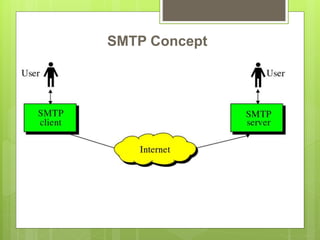
SMTP Concept
Working
 SMTP is a simple ASCII protocol that is based on client-
server model. After establishing the TCP connection, the
sending machine, operating as the client, waits for the
receiving machine, operating as the server, to talk first.
The server starts by sending a line of text giving its
identity and telling whether or not it is prepared to receive
mail. If it is not, the client releases the connection and
tries again later.
 If the server is willing to accept e-mail, the client
announces whom the e-mail is coming from and
destination, the server gives the client the go ahead to
send the message. Then the client sends the message
and the server acknowledges it.
Smtp commands
 The HELO command is used to initiate an
SMTP session. When one host needs to
establish an SMTP session with another host
 MAIL FROM: command is used primarily to
send email addresses
 The RCPT TO: command tells the receiving
host the email address of the message
recipient
Smtp commands contd.
 DATA has the body of the mail
 The QUIT command is used to terminate an
SMTP session
 The RSET command performs an SMTP
reset, and then aborts the message that is
currently being sent.
 EXPN includes the mailing list to be expanded
SMTP response codes
 Responses are 3 digit codes sent from server to client
 220: The SMTP service is ready
 221: SMTP is closing the transmission channel
 250: The command has been completed
 354: OK to transmit message
 450: Command can not be completed because the
mailbox is busy
 451: Command has been aborted because of an error
 452: Command has been aborted because the receiving
host
is out of disk space
 500: Syntax error
 550: Specified mailbox is unavailable or does not exist
 552: Command was aborted because the recipient has
exceeded
their storage quota
 554: The transaction has failed
Mail Transfer Phases
 Connection Establishment
 Mail transfer
 Connection termination
Connection Establishment
 An SMTP sender will attempt to set up a TCP connection with a
target host when it has one or more mail message to deliver to
that host. The following sequence occurs during connection
setup:

 1. The sender opens a TCP connection with the receiver.
 2. Once the connection is established, the receiver identifies
itself with '220 Service Ready".
 3. The sender identifies itself with the HELO command.
 4. The receiver accepts the sender's identification with "250 'OK".
 5. If the mail service on the destination is not available, the
destination host returns a "421 Service Not Available" reply in
step 2 and the process is terminated.
Mail Transfer
• Once the connection has been established, the
SMTP sender may send one or more messages to
the SMTP receiver.
• There are three logical phases to the transfer of a
message :
 1. A MAIL command identifies the originator of the
message.
 2. One or more RCPT commands identify the
recipients of this message.
 3. A DATA command transfers the message text.
Connection termination
The SMTP sender closes the connection in the
following manner:
 1. The sender sends a QUIT command and
waits for a reply.
 2. Sender initiates TCP close operation for the
TCP connection.
 3. The receiver initiates its TCP close after
sending is reply to the QUIT command.
LATEST DEVELOPMENTS
 Today’s email content needs to be lively,
dynamic and time-dependent.
 A drop in click rates and falling conversion
rates, just like everyone else who still sends
the same email to everyone in their database
 The latest development is real-time content in
emails. Previously the content of an email
was fixed at the time it was sent. Now the
content of your mails can be updated in real-
time, every single time the email is opened.
Examples
 Offer of the day
 Live data
 Limited time content
 Social content
 Agile emails
The most recent development stage is agile
emails where the content is updated each
time the email is opened. Combined with
dynamic content and automisation, this
creates fantastic and unlimited opportunities.
IDN
 International email (IDN email or Intl email) is
email that contains international characters
(characters which do not exist in
the ASCII character set), encoded as UTF-8, in
the email header and in supporting mail transfer
protocols. The most significant aspect of this is the
allowance of email addresses (also known as
email identities) in most of the world's writing
systems, at both interface and transport levels.
IDN Contd.
 A Russian might wish to
use дерек@екзампил.ком as their identifier
but be forced to use a transcription such
as derek@example.com
 International email, by contrast,
uses Unicode characters encoded as UTF-8 -
allowing for the encoding the text of
addresses in most of the world's writing
systems
Usage
 All email servers use SMTP
 godaddy- 250 msgs per day
 gmail- 150 msgs a day
 But we can pay and create if we want to
create full fledged email servers
Evolution
 Earlier using SMTP only text needed to be
transferred. However nowadays, additional
features such multimedia also
 Security and encryption features added
 Both provide a way to encrypt a
communication channel between two
computers (e.g. your computer and our
server).
 TLS is the successor to SSL and the terms
SSL and TLS are used interchangeably
unless you're referring to a specific version of
the protocol.
Versions
 STARTTLS is a way to take an existing insecure
connection and upgrade it to a secure connection
using SSL/TLS.
 Note that despite having TLS in the name,
STARTTLS doesn't mean you have to use TLS,
you can use SSL
 So the ordering of protocols in terms of oldest to
newest is: SSL v2, SSL v3, TLS v1.0, TLS v1.1,
TLS v1.2, TLS v1.3 (currently proposed).
 Recently Google enabled smtp/tls - for security
purposes. both parties need to support this.
 When you connect to an SSL/TLS encrypted port, or
use STARTTLS to upgrade an existing connection,
both sides will negotiate which protocol and which
version to use based on what has been configured in
the software and what each side supports.
 SSL/TLS is virtually universal these days
 SSL v2 was deprecated and phased out many
years ago due to security issues. SSL v3 is
currently deprecated due to security issues, and
 support has or is being phased out by most
services these days. Almost all software supports
TLS v1.0. As at October 2016, support for TLS
v1.1
 and TLS v1.2 is also very good, though there are
some exceptions, mostly with Internet Explorer.
 To add security to some existing protocols (e.g. IMAP,
POP, etc.), it was decided to just add SSL/TLS
encryption as a layer underneath the existing protocol.
 To distinguish that software should talk the SSL/TLS
encrypted version of the protocol rather than the
plaintext one, a different port number was used for
each protocol. So you have:
 IMAP uses port 143, but SSL/TLS encrypted IMAP
uses port 993.
 POP uses port 110, but SSL/TLS encrypted POP uses
port 995.
 SMTP uses port 25, but SSL/TLS encrypted SMTP
uses port 465.
 This has now basically become the de facto
standard that everyone uses.
 IMAP SSL/TLS encrypted over port 993 or
POP SSL/TLS encrypted over port 995.
 Many sites (including FastMail) now disable
plain IMAP (port 143) and plain POP (port
110) altogether so people must use an
SSL/TLS encrypted connection.
Thank You 

Simple Mail Transfer Protocol

  • 3.
    History  Simple MailTransfer Protocol (SMTP) is an Internet standard for electronic mail (email) transmission.  First defined by RFC 821in 1982  SMTP became widely used in the early 1980s. At the time, it was a complement to Unix to Unix Copy Program (UUCP) mail, which was better suited for handling email transfers between machines that were intermittently connected.
  • 4.
    Introduction  SMTP (SimpleMail Transfer Protocol) is a TCP/IP protocol used in sending and receiving e-mail.  Users typically use a program that uses SMTP for sending e-mail and either POP3 or IMAP for receiving e-mail.
  • 5.
  • 6.
    Working  SMTP isa simple ASCII protocol that is based on client- server model. After establishing the TCP connection, the sending machine, operating as the client, waits for the receiving machine, operating as the server, to talk first. The server starts by sending a line of text giving its identity and telling whether or not it is prepared to receive mail. If it is not, the client releases the connection and tries again later.  If the server is willing to accept e-mail, the client announces whom the e-mail is coming from and destination, the server gives the client the go ahead to send the message. Then the client sends the message and the server acknowledges it.
  • 7.
    Smtp commands  TheHELO command is used to initiate an SMTP session. When one host needs to establish an SMTP session with another host  MAIL FROM: command is used primarily to send email addresses  The RCPT TO: command tells the receiving host the email address of the message recipient
  • 8.
    Smtp commands contd. DATA has the body of the mail  The QUIT command is used to terminate an SMTP session  The RSET command performs an SMTP reset, and then aborts the message that is currently being sent.  EXPN includes the mailing list to be expanded
  • 9.
    SMTP response codes Responses are 3 digit codes sent from server to client  220: The SMTP service is ready  221: SMTP is closing the transmission channel  250: The command has been completed  354: OK to transmit message  450: Command can not be completed because the mailbox is busy
  • 10.
     451: Commandhas been aborted because of an error  452: Command has been aborted because the receiving host is out of disk space  500: Syntax error  550: Specified mailbox is unavailable or does not exist  552: Command was aborted because the recipient has exceeded their storage quota  554: The transaction has failed
  • 11.
    Mail Transfer Phases Connection Establishment  Mail transfer  Connection termination
  • 12.
    Connection Establishment  AnSMTP sender will attempt to set up a TCP connection with a target host when it has one or more mail message to deliver to that host. The following sequence occurs during connection setup:   1. The sender opens a TCP connection with the receiver.  2. Once the connection is established, the receiver identifies itself with '220 Service Ready".  3. The sender identifies itself with the HELO command.  4. The receiver accepts the sender's identification with "250 'OK".  5. If the mail service on the destination is not available, the destination host returns a "421 Service Not Available" reply in step 2 and the process is terminated.
  • 13.
    Mail Transfer • Oncethe connection has been established, the SMTP sender may send one or more messages to the SMTP receiver. • There are three logical phases to the transfer of a message :  1. A MAIL command identifies the originator of the message.  2. One or more RCPT commands identify the recipients of this message.  3. A DATA command transfers the message text.
  • 14.
    Connection termination The SMTPsender closes the connection in the following manner:  1. The sender sends a QUIT command and waits for a reply.  2. Sender initiates TCP close operation for the TCP connection.  3. The receiver initiates its TCP close after sending is reply to the QUIT command.
  • 15.
  • 16.
     Today’s emailcontent needs to be lively, dynamic and time-dependent.  A drop in click rates and falling conversion rates, just like everyone else who still sends the same email to everyone in their database
  • 17.
     The latestdevelopment is real-time content in emails. Previously the content of an email was fixed at the time it was sent. Now the content of your mails can be updated in real- time, every single time the email is opened.
  • 18.
    Examples  Offer ofthe day  Live data  Limited time content  Social content
  • 19.
     Agile emails Themost recent development stage is agile emails where the content is updated each time the email is opened. Combined with dynamic content and automisation, this creates fantastic and unlimited opportunities.
  • 20.
    IDN  International email(IDN email or Intl email) is email that contains international characters (characters which do not exist in the ASCII character set), encoded as UTF-8, in the email header and in supporting mail transfer protocols. The most significant aspect of this is the allowance of email addresses (also known as email identities) in most of the world's writing systems, at both interface and transport levels.
  • 21.
    IDN Contd.  ARussian might wish to use дерек@екзампил.ком as their identifier but be forced to use a transcription such as derek@example.com  International email, by contrast, uses Unicode characters encoded as UTF-8 - allowing for the encoding the text of addresses in most of the world's writing systems
  • 22.
    Usage  All emailservers use SMTP  godaddy- 250 msgs per day  gmail- 150 msgs a day  But we can pay and create if we want to create full fledged email servers
  • 23.
    Evolution  Earlier usingSMTP only text needed to be transferred. However nowadays, additional features such multimedia also  Security and encryption features added
  • 24.
     Both providea way to encrypt a communication channel between two computers (e.g. your computer and our server).  TLS is the successor to SSL and the terms SSL and TLS are used interchangeably unless you're referring to a specific version of the protocol.
  • 25.
    Versions  STARTTLS isa way to take an existing insecure connection and upgrade it to a secure connection using SSL/TLS.  Note that despite having TLS in the name, STARTTLS doesn't mean you have to use TLS, you can use SSL  So the ordering of protocols in terms of oldest to newest is: SSL v2, SSL v3, TLS v1.0, TLS v1.1, TLS v1.2, TLS v1.3 (currently proposed).
  • 26.
     Recently Googleenabled smtp/tls - for security purposes. both parties need to support this.  When you connect to an SSL/TLS encrypted port, or use STARTTLS to upgrade an existing connection, both sides will negotiate which protocol and which version to use based on what has been configured in the software and what each side supports.  SSL/TLS is virtually universal these days
  • 27.
     SSL v2was deprecated and phased out many years ago due to security issues. SSL v3 is currently deprecated due to security issues, and  support has or is being phased out by most services these days. Almost all software supports TLS v1.0. As at October 2016, support for TLS v1.1  and TLS v1.2 is also very good, though there are some exceptions, mostly with Internet Explorer.
  • 28.
     To addsecurity to some existing protocols (e.g. IMAP, POP, etc.), it was decided to just add SSL/TLS encryption as a layer underneath the existing protocol.  To distinguish that software should talk the SSL/TLS encrypted version of the protocol rather than the plaintext one, a different port number was used for each protocol. So you have:  IMAP uses port 143, but SSL/TLS encrypted IMAP uses port 993.  POP uses port 110, but SSL/TLS encrypted POP uses port 995.  SMTP uses port 25, but SSL/TLS encrypted SMTP uses port 465.
  • 29.
     This hasnow basically become the de facto standard that everyone uses.  IMAP SSL/TLS encrypted over port 993 or POP SSL/TLS encrypted over port 995.  Many sites (including FastMail) now disable plain IMAP (port 143) and plain POP (port 110) altogether so people must use an SSL/TLS encrypted connection.
  • 30.