Herat University
                   Computer Science Faculty
                       Scientific Writing
                   Scientific Research Article


  TCP And UDP
  What is difference between them?
  Where are they used?
  Why?


By: Ahmad Khalid
Lecturers:
Mrs. Nabizada
Mr. Fahim Ahmady
                                                 Nov 2011
Contents
 Introduction
 Advantages of TCP
 Disadvantages of TCP
 Advantages of UDP
 Disadvantages of UDP
 Where are they used? Why?
 Conclusion
Introduction
 TCP and UDP works in Transport Layer of OSI
  Model as well as TCP/IP Model
 TCP (Transmission Control Protocol) enables two
  hosts to establish a connection and exchange
  streams of data. TCP guarantees delivery of data
  and also guarantees that packets will be delivered
  in the same order in which they were sent.
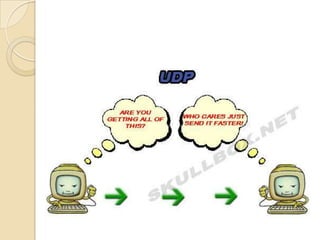
 UDP (User Datagram Protocol) a connectionless
  protocol that, like TCP, runs on top of IP networks.
  Provides very few error recovery services, offering
  instead a direct way to send and receive
  datagrams over an IP network.
Advantages of TCP
   TCP guarantees three things: that your data gets there,
    that it gets there in order, and that it gets there without
    duplication. (the truth, the whole truth, and nothing but
    the truth...)
   TCP does Flow Control and Congestion Control
   For a programmer: The operating system does all the
    work. you just sit back and watch the show. no need to
    have the same bugs in your code that everyone else did
    on their first try; it's all been figured out for you.
   Since it's in the OS, handling incoming packets has
    fewer context switches from kernel to user space and
    back; all the reassembly, acking, flow control, etc is
    done by the kernel.
   Routers may notice TCP packets and treat them
    specially. they can buffer and retransmit them
   TCP has good relative throughput on a modem or a
    LAN.
Disadvantages of TCP
 TCP cannot conclude a transmission without all data in
  motion being explicitly acked.
 TCP cannot be used for broadcast or multicast
  transmission.
 TCP has no block boundaries; you must create your
  own.
 For a programmer:
    ◦ OS might be buggy –as well TCP
    ◦ TCP may have lots of features you don't need. it may waste
      bandwidth, time, or effort on ensuring things that are irrelevant to
      the task at hand.
   Routers on the internet today are out of memory. they
    can't pay much attention to TCP flying by, and try to
    help it. design assumptions of TCP break down in this
    environment.
Advantages of UDP
 Broadcast and multicast transmission are
  available with UDP
 It doesn't restrict you to a connection based
  communication model, so startup latency in
  distributed applications is much lower, as is
  operating system overhead FAST.
 All flow control, acking, transaction logging,
  etc is up to user programs; a broken OS
  implementation is not going to get in your way.
  additionally, you only need to implement and
  use the features you need.
 The recipient of UDP packets gets them
  unmangled, including block boundaries.
Disadvantages of UDP
 There are no guarantees with UDP. a packet
  may not be delivered, or delivered twice, or
  delivered out of order; you get no indication
  of this unless the listening program at the
  other end decides to say something.
 UDP has no flow control, Congestion Control.
  implementation is the duty of user programs.
 Routers are quite careless with UDP. they
  never retransmit it if it collides, and it seems
  to be the first thing dropped when a router is
  short on memory.
 UDP suffers from worse packet loss than
  TCP
Where are they used? Why?
 TCP is used in HTTP, HTTPs, FTP,
  SMTP Telnet etc...
 UDP is used in DNS, DHCP, TFTP,
  SNMP, RIP, VOIP, Multi media, Online
  games etc…
 Consider Multi media, if we use TCP
  instead of UDP when ever pocket loss
  occurred we get long delay to continue
  watching/listening because TCP is
  retransmitting lost packets and it takes
TCP vs. UDP Conclusion
 TCP and UDP each have their place. In fact, some
  applications use a combination of the two. For example,
  a lot of online multiplayer games use TCP for data
  transfer and UDP for things like a client heartbeat or to
  send opponent position updates.
 TCP is generally a good choice, though, even with its
  associated overhead. Most of the overhead is in the
  connection. Therefore, if your application stays
  connected for any length of time, then the cost is
  mitigated. In addition, if you’re sending any quantity of
  data, then it’s cheaper to use TCP’s built-in reliability,
  ordering, and flow control instead of building your own.
 UDP is a good choice for multi Media like VoIP to
  provide small jitter
Thank You

Tcp and udp

  • 1.
    Herat University Computer Science Faculty Scientific Writing Scientific Research Article TCP And UDP What is difference between them? Where are they used? Why? By: Ahmad Khalid Lecturers: Mrs. Nabizada Mr. Fahim Ahmady Nov 2011
  • 2.
    Contents  Introduction  Advantagesof TCP  Disadvantages of TCP  Advantages of UDP  Disadvantages of UDP  Where are they used? Why?  Conclusion
  • 3.
    Introduction  TCP andUDP works in Transport Layer of OSI Model as well as TCP/IP Model  TCP (Transmission Control Protocol) enables two hosts to establish a connection and exchange streams of data. TCP guarantees delivery of data and also guarantees that packets will be delivered in the same order in which they were sent.  UDP (User Datagram Protocol) a connectionless protocol that, like TCP, runs on top of IP networks. Provides very few error recovery services, offering instead a direct way to send and receive datagrams over an IP network.
  • 4.
    Advantages of TCP  TCP guarantees three things: that your data gets there, that it gets there in order, and that it gets there without duplication. (the truth, the whole truth, and nothing but the truth...)  TCP does Flow Control and Congestion Control  For a programmer: The operating system does all the work. you just sit back and watch the show. no need to have the same bugs in your code that everyone else did on their first try; it's all been figured out for you.  Since it's in the OS, handling incoming packets has fewer context switches from kernel to user space and back; all the reassembly, acking, flow control, etc is done by the kernel.  Routers may notice TCP packets and treat them specially. they can buffer and retransmit them  TCP has good relative throughput on a modem or a LAN.
  • 5.
    Disadvantages of TCP TCP cannot conclude a transmission without all data in motion being explicitly acked.  TCP cannot be used for broadcast or multicast transmission.  TCP has no block boundaries; you must create your own.  For a programmer: ◦ OS might be buggy –as well TCP ◦ TCP may have lots of features you don't need. it may waste bandwidth, time, or effort on ensuring things that are irrelevant to the task at hand.  Routers on the internet today are out of memory. they can't pay much attention to TCP flying by, and try to help it. design assumptions of TCP break down in this environment.
  • 6.
    Advantages of UDP Broadcast and multicast transmission are available with UDP  It doesn't restrict you to a connection based communication model, so startup latency in distributed applications is much lower, as is operating system overhead FAST.  All flow control, acking, transaction logging, etc is up to user programs; a broken OS implementation is not going to get in your way. additionally, you only need to implement and use the features you need.  The recipient of UDP packets gets them unmangled, including block boundaries.
  • 7.
    Disadvantages of UDP There are no guarantees with UDP. a packet may not be delivered, or delivered twice, or delivered out of order; you get no indication of this unless the listening program at the other end decides to say something.  UDP has no flow control, Congestion Control. implementation is the duty of user programs.  Routers are quite careless with UDP. they never retransmit it if it collides, and it seems to be the first thing dropped when a router is short on memory.  UDP suffers from worse packet loss than TCP
  • 10.
    Where are theyused? Why?  TCP is used in HTTP, HTTPs, FTP, SMTP Telnet etc...  UDP is used in DNS, DHCP, TFTP, SNMP, RIP, VOIP, Multi media, Online games etc…  Consider Multi media, if we use TCP instead of UDP when ever pocket loss occurred we get long delay to continue watching/listening because TCP is retransmitting lost packets and it takes
  • 11.
    TCP vs. UDPConclusion  TCP and UDP each have their place. In fact, some applications use a combination of the two. For example, a lot of online multiplayer games use TCP for data transfer and UDP for things like a client heartbeat or to send opponent position updates.  TCP is generally a good choice, though, even with its associated overhead. Most of the overhead is in the connection. Therefore, if your application stays connected for any length of time, then the cost is mitigated. In addition, if you’re sending any quantity of data, then it’s cheaper to use TCP’s built-in reliability, ordering, and flow control instead of building your own.  UDP is a good choice for multi Media like VoIP to provide small jitter
  • 12.