26.1
ELECTRONIC MAILELECTRONIC MAIL
One of the most popular Internet services is electronicOne of the most popular Internet services is electronic
mail (e-mail). The designers of the Internet probablymail (e-mail). The designers of the Internet probably
never imagined the popularity of this applicationnever imagined the popularity of this application
program. Its architecture consists of severalprogram. Its architecture consists of several
components that we discuss in this chapter.components that we discuss in this chapter.
Architecture
User Agent
Message Transfer Agent: SMTP
Message Access Agent: POP and IMAP
Web-Based Mail
Topics discussed in this section:Topics discussed in this section:
26.2
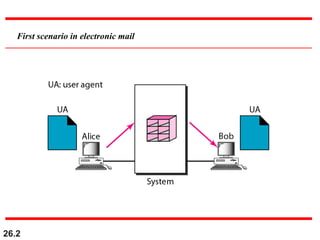
First scenario in electronic mail
26.3
When the sender and the receiver of an
e-mail are on the same system,
we need only two user agents.
Note
26.4
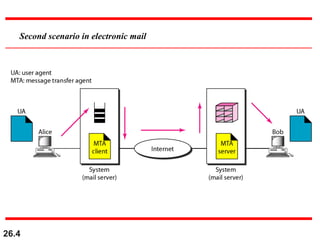
Second scenario in electronic mail
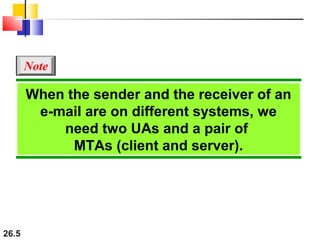
26.5
When the sender and the receiver of an
e-mail are on different systems, we
need two UAs and a pair of
MTAs (client and server).
Note
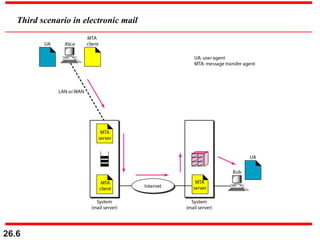
26.6
Third scenario in electronic mail
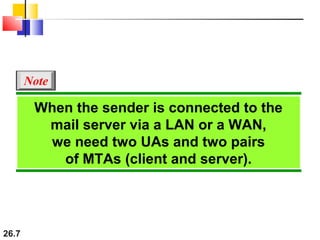
26.7
When the sender is connected to the
mail server via a LAN or a WAN,
we need two UAs and two pairs
of MTAs (client and server).
Note
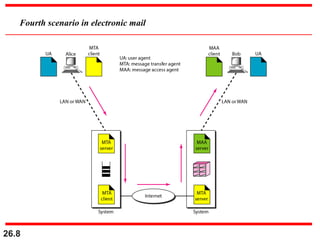
26.8
Fourth scenario in electronic mail
26.9
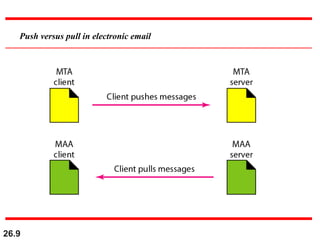
Push versus pull in electronic email
26.10
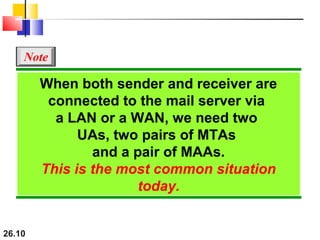
When both sender and receiver are
connected to the mail server via
a LAN or a WAN, we need two
UAs, two pairs of MTAs
and a pair of MAAs.
This is the most common situation
today.
Note
26.11
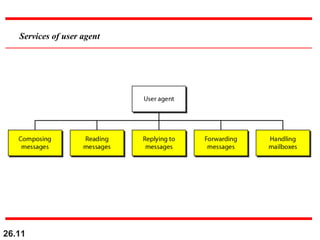
Services of user agent
26.12
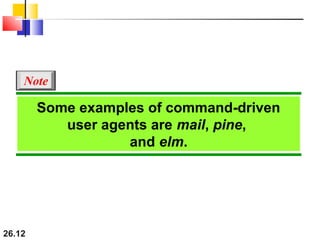
Some examples of command-driven
user agents are mail, pine,
and elm.
Note
26.13
Some examples of GUI-based user
agents are Eudora, Outlook, and
Netscape.
Note
26.14
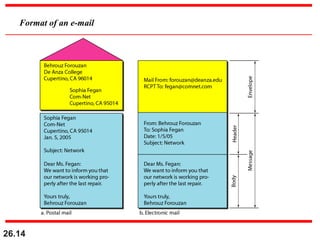
Format of an e-mail
26.15
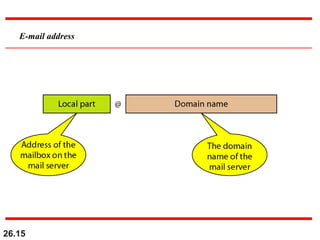
E-mail address
26.16
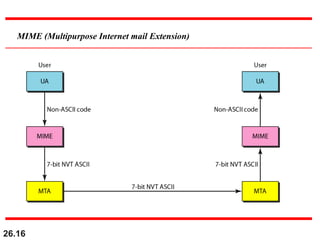
MIME (Multipurpose Internet mail Extension)
26.17
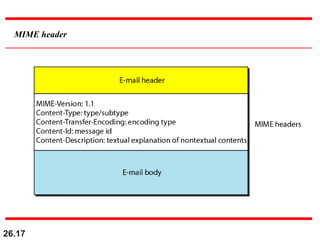
MIME header
26.18
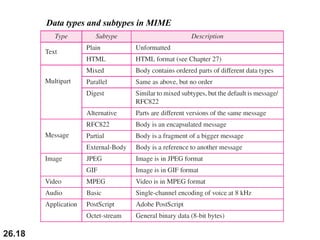
Data types and subtypes in MIME
26.19
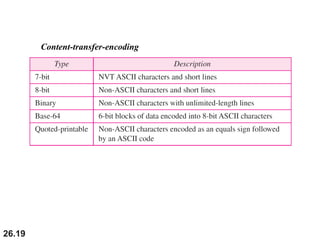
Content-transfer-encoding
26.20
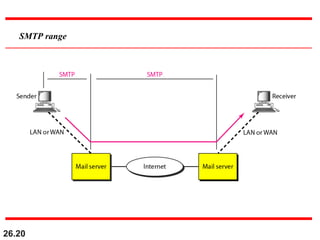
SMTP range
26.21
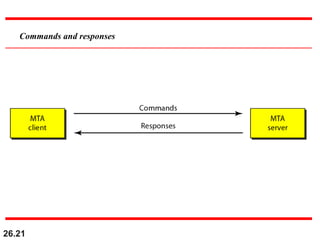
Commands and responses
26.22
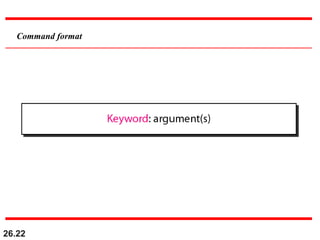
Command format
26.23
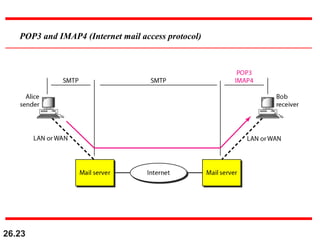
POP3 and IMAP4 (Internet mail access protocol)
26.24
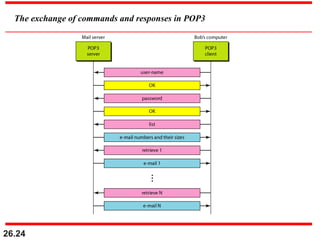
The exchange of commands and responses in POP3
26.25
FILE TRANSFERFILE TRANSFER
Transferring files from one computer to another is oneTransferring files from one computer to another is one
of the most common tasks expected from a networkingof the most common tasks expected from a networking
or internetworking environment. As a matter of fact,or internetworking environment. As a matter of fact,
the greatest volume of data exchange in the Internetthe greatest volume of data exchange in the Internet
today is due to file transfer.today is due to file transfer.
File Transfer Protocol (FTP)
Anonymous FTP
Topics discussed in this section:Topics discussed in this section:
26.26
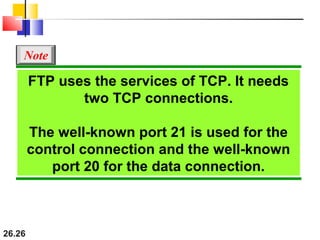
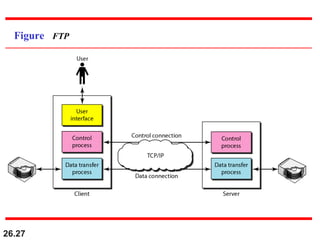
FTP uses the services of TCP. It needs
two TCP connections.
The well-known port 21 is used for the
control connection and the well-known
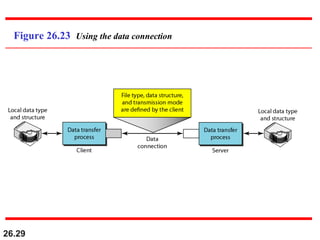
port 20 for the data connection.
Note
26.27
Figure FTP
26.28
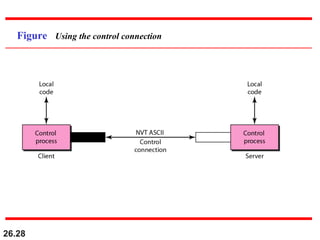
Figure Using the control connection
26.29
Figure 26.23 Using the data connection
27.30
27-3 HTTP27-3 HTTP
The Hypertext Transfer Protocol (HTTP) is a protocolThe Hypertext Transfer Protocol (HTTP) is a protocol
used mainly to access data on the World Wide Web.used mainly to access data on the World Wide Web.
HTTP functions as a combination of FTP and SMTP.HTTP functions as a combination of FTP and SMTP.
HTTP Transaction
Persistent Versus Nonpersistent Connection
Topics discussed in this section:Topics discussed in this section:
27.31
HTTP uses the services of TCP on well-
known port 80.
Note
27.32
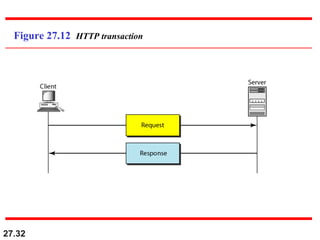
Figure 27.12 HTTP transaction
27.33
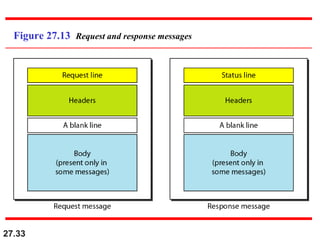
Figure 27.13 Request and response messages
27.34
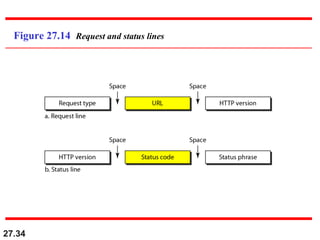
Figure 27.14 Request and status lines
27.35
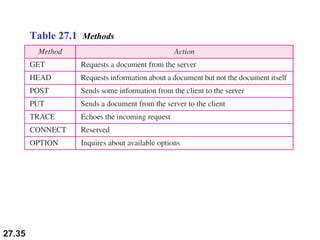
Table 27.1 Methods
27.36
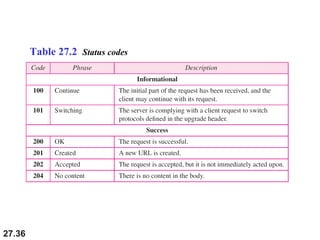
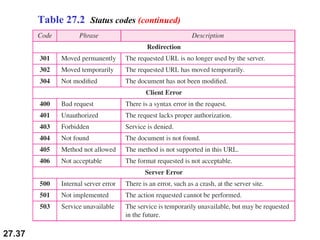
Table 27.2 Status codes
27.37
Table 27.2 Status codes (continued)
27.38
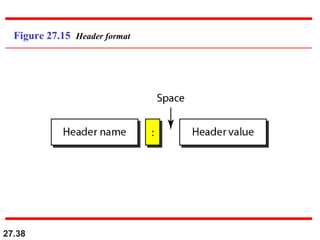
Figure 27.15 Header format
27.39
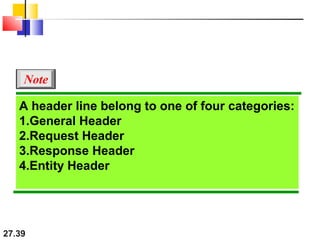
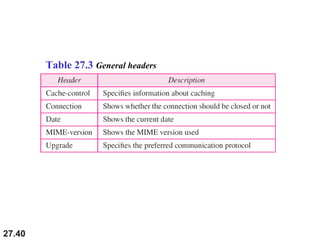
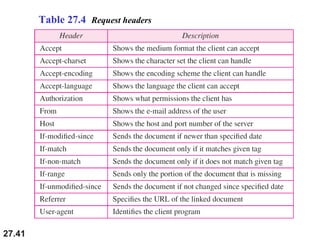
A header line belong to one of four categories:
1.General Header
2.Request Header
3.Response Header
4.Entity Header
Note
27.40
Table 27.3 General headers
27.41
Table 27.4 Request headers
27.42
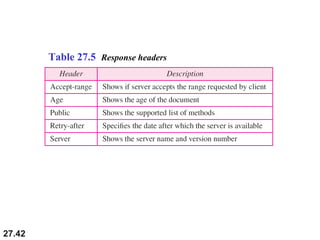
Table 27.5 Response headers
27.43
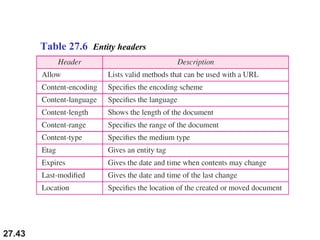
Table 27.6 Entity headers
27.44
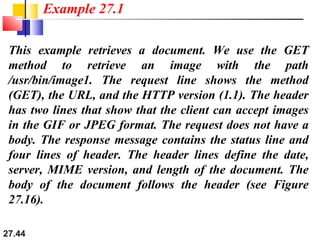
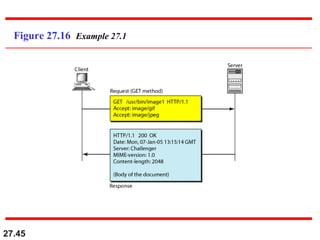
This example retrieves a document. We use the GET
method to retrieve an image with the path
/usr/bin/image1. The request line shows the method
(GET), the URL, and the HTTP version (1.1). The header
has two lines that show that the client can accept images
in the GIF or JPEG format. The request does not have a
body. The response message contains the status line and
four lines of header. The header lines define the date,
server, MIME version, and length of the document. The
body of the document follows the header (see Figure
27.16).
Example 27.1
27.45
Figure 27.16 Example 27.1
27.46
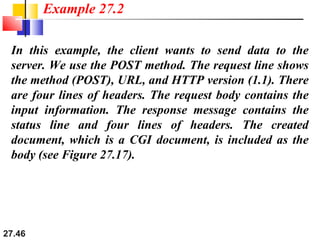
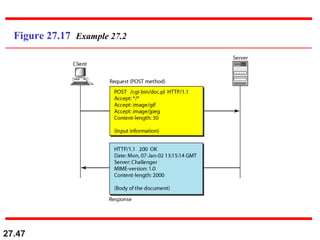
In this example, the client wants to send data to the
server. We use the POST method. The request line shows
the method (POST), URL, and HTTP version (1.1). There
are four lines of headers. The request body contains the
input information. The response message contains the
status line and four lines of headers. The created
document, which is a CGI document, is included as the
body (see Figure 27.17).
Example 27.2
27.47
Figure 27.17 Example 27.2
27.48
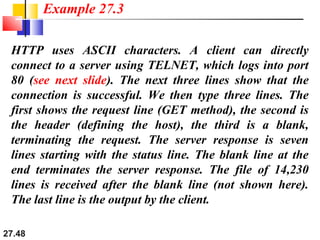
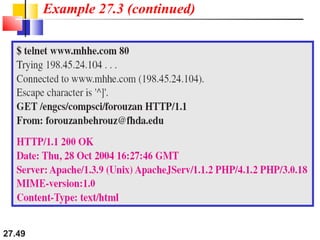
HTTP uses ASCII characters. A client can directly
connect to a server using TELNET, which logs into port
80 (see next slide). The next three lines show that the
connection is successful. We then type three lines. The
first shows the request line (GET method), the second is
the header (defining the host), the third is a blank,
terminating the request. The server response is seven
lines starting with the status line. The blank line at the
end terminates the server response. The file of 14,230
lines is received after the blank line (not shown here).
The last line is the output by the client.
Example 27.3
27.49
Example 27.3 (continued)
27.50
HTTP version 1.1 specifies a persistent
connection by default.
Note
26.51
Computer Science & Engineering
Assignment
Semester- VI (I & II) Branch: CSE
Subject with Code: Computer Networks (IT-305-F)
Q:1 Explain the Following.
1. SMTP,
2. POP,
3. IMAP;
4. FTP,
5. HTTP

transfer protocols,ftp,smtp,pop,imap

  • 1.
    26.1 ELECTRONIC MAILELECTRONIC MAIL Oneof the most popular Internet services is electronicOne of the most popular Internet services is electronic mail (e-mail). The designers of the Internet probablymail (e-mail). The designers of the Internet probably never imagined the popularity of this applicationnever imagined the popularity of this application program. Its architecture consists of severalprogram. Its architecture consists of several components that we discuss in this chapter.components that we discuss in this chapter. Architecture User Agent Message Transfer Agent: SMTP Message Access Agent: POP and IMAP Web-Based Mail Topics discussed in this section:Topics discussed in this section:
  • 2.
    26.2 First scenario inelectronic mail
  • 3.
    26.3 When the senderand the receiver of an e-mail are on the same system, we need only two user agents. Note
  • 4.
    26.4 Second scenario inelectronic mail
  • 5.
    26.5 When the senderand the receiver of an e-mail are on different systems, we need two UAs and a pair of MTAs (client and server). Note
  • 6.
    26.6 Third scenario inelectronic mail
  • 7.
    26.7 When the senderis connected to the mail server via a LAN or a WAN, we need two UAs and two pairs of MTAs (client and server). Note
  • 8.
    26.8 Fourth scenario inelectronic mail
  • 9.
    26.9 Push versus pullin electronic email
  • 10.
    26.10 When both senderand receiver are connected to the mail server via a LAN or a WAN, we need two UAs, two pairs of MTAs and a pair of MAAs. This is the most common situation today. Note
  • 11.
  • 12.
    26.12 Some examples ofcommand-driven user agents are mail, pine, and elm. Note
  • 13.
    26.13 Some examples ofGUI-based user agents are Eudora, Outlook, and Netscape. Note
  • 14.
  • 15.
  • 16.
  • 17.
  • 18.
    26.18 Data types andsubtypes in MIME
  • 19.
  • 20.
  • 21.
  • 22.
  • 23.
    26.23 POP3 and IMAP4(Internet mail access protocol)
  • 24.
    26.24 The exchange ofcommands and responses in POP3
  • 25.
    26.25 FILE TRANSFERFILE TRANSFER Transferringfiles from one computer to another is oneTransferring files from one computer to another is one of the most common tasks expected from a networkingof the most common tasks expected from a networking or internetworking environment. As a matter of fact,or internetworking environment. As a matter of fact, the greatest volume of data exchange in the Internetthe greatest volume of data exchange in the Internet today is due to file transfer.today is due to file transfer. File Transfer Protocol (FTP) Anonymous FTP Topics discussed in this section:Topics discussed in this section:
  • 26.
    26.26 FTP uses theservices of TCP. It needs two TCP connections. The well-known port 21 is used for the control connection and the well-known port 20 for the data connection. Note
  • 27.
  • 28.
    26.28 Figure Using thecontrol connection
  • 29.
    26.29 Figure 26.23 Usingthe data connection
  • 30.
    27.30 27-3 HTTP27-3 HTTP TheHypertext Transfer Protocol (HTTP) is a protocolThe Hypertext Transfer Protocol (HTTP) is a protocol used mainly to access data on the World Wide Web.used mainly to access data on the World Wide Web. HTTP functions as a combination of FTP and SMTP.HTTP functions as a combination of FTP and SMTP. HTTP Transaction Persistent Versus Nonpersistent Connection Topics discussed in this section:Topics discussed in this section:
  • 31.
    27.31 HTTP uses theservices of TCP on well- known port 80. Note
  • 32.
  • 33.
    27.33 Figure 27.13 Requestand response messages
  • 34.
  • 35.
  • 36.
  • 37.
    27.37 Table 27.2 Statuscodes (continued)
  • 38.
  • 39.
    27.39 A header linebelong to one of four categories: 1.General Header 2.Request Header 3.Response Header 4.Entity Header Note
  • 40.
  • 41.
  • 42.
  • 43.
  • 44.
    27.44 This example retrievesa document. We use the GET method to retrieve an image with the path /usr/bin/image1. The request line shows the method (GET), the URL, and the HTTP version (1.1). The header has two lines that show that the client can accept images in the GIF or JPEG format. The request does not have a body. The response message contains the status line and four lines of header. The header lines define the date, server, MIME version, and length of the document. The body of the document follows the header (see Figure 27.16). Example 27.1
  • 45.
  • 46.
    27.46 In this example,the client wants to send data to the server. We use the POST method. The request line shows the method (POST), URL, and HTTP version (1.1). There are four lines of headers. The request body contains the input information. The response message contains the status line and four lines of headers. The created document, which is a CGI document, is included as the body (see Figure 27.17). Example 27.2
  • 47.
  • 48.
    27.48 HTTP uses ASCIIcharacters. A client can directly connect to a server using TELNET, which logs into port 80 (see next slide). The next three lines show that the connection is successful. We then type three lines. The first shows the request line (GET method), the second is the header (defining the host), the third is a blank, terminating the request. The server response is seven lines starting with the status line. The blank line at the end terminates the server response. The file of 14,230 lines is received after the blank line (not shown here). The last line is the output by the client. Example 27.3
  • 49.
  • 50.
    27.50 HTTP version 1.1specifies a persistent connection by default. Note
  • 51.
    26.51 Computer Science &Engineering Assignment Semester- VI (I & II) Branch: CSE Subject with Code: Computer Networks (IT-305-F) Q:1 Explain the Following. 1. SMTP, 2. POP, 3. IMAP; 4. FTP, 5. HTTP