
GRAPHICS & IMAGE PROCESSING
ICT2403
Digital Image Fundamentals - II
K.A.S.H.Kulathilake
B.Sc. (Hons) IT (SLIIT), MCS (UCSC)
Rajarata University of Sri Lanka
Faculty of Applied Sciences
Department of Physical Sciences
Learning Outcomes
ICT2403 - Graphics & Image Processing
• At the end of this lecture, you should be
able to;
– describe spatial resolution
– describe intensity resolution
– identify the effect of aliasing
– describe image interpolation
– describe relationships among the pixels
Spatial Resolution
• Spatial resolution is the smallest discernible
detail in an image.
• Or, we can describe the smallest number of
discernible line pairs per unit distance
– Example, 100 line pairs per millimeter.
• Dots per unit distance is a measure of image
resolution used commonly in the printing and
publishing industry.
– 300 dpi
ICT2403 - Graphics & Image Processing
Spatial Resolution (cont…)
• Measuring Spatial Resolution:
– Since the spatial resolution refers to clarity , so for
different devices , different measure has been
made to measure it.
• FOR EXAMPLE:
– DOTS PER INCH: Dots per inch or DPI is usually used in
monitors.
– LINES PER INCH: Lines per inch or LPI is usually used in laser
printers.
– PIXEL PER INCH: Pixel per inch or PPI is measure for different
devices such as tablets , Mobile phones e.t.c.
ICT2403 - Graphics & Image Processing
Spatial Resolution (cont…)
ICT2403 - Graphics & Image Processing
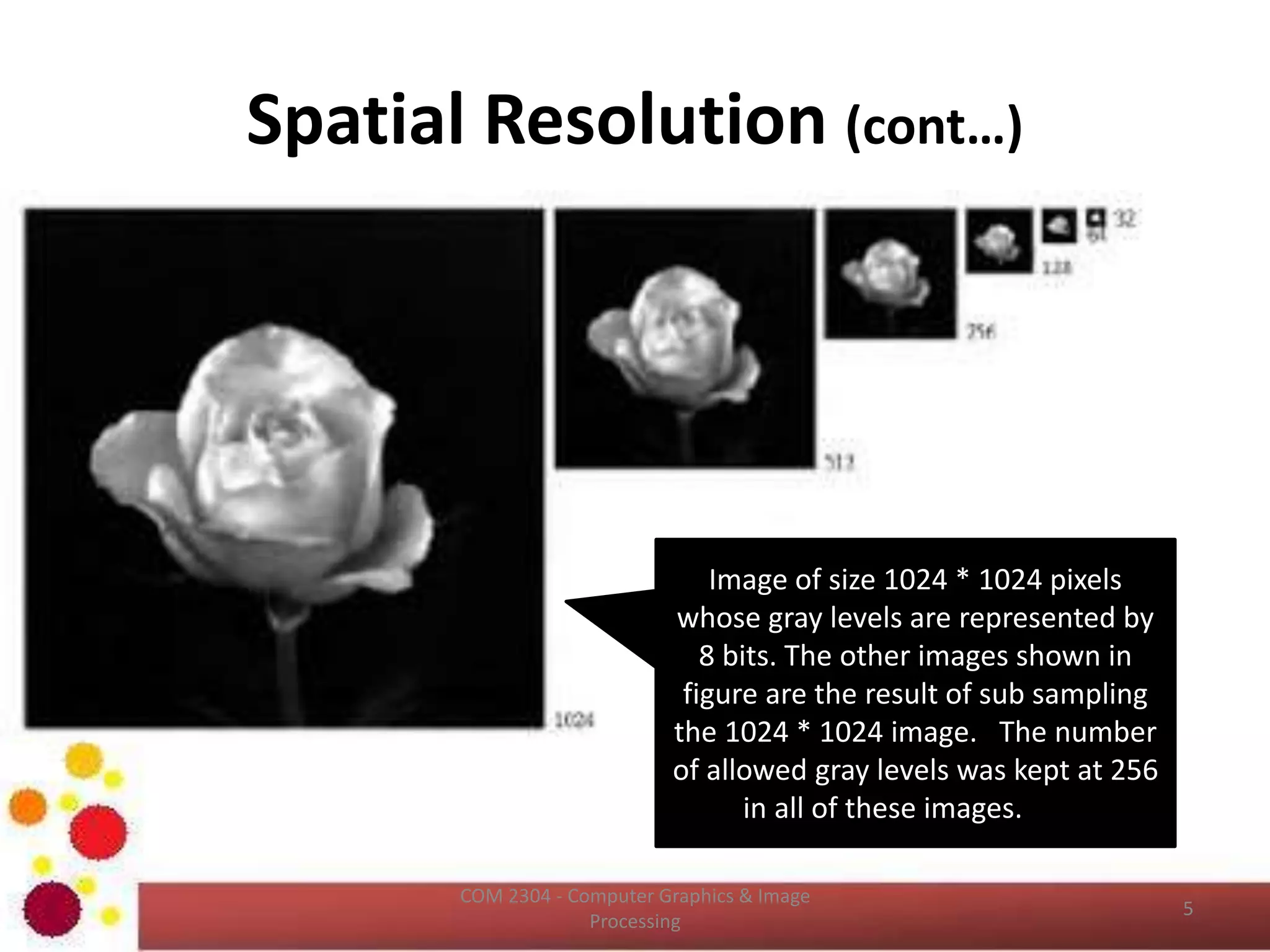
Image of size 1024 * 1024 pixels
whose gray levels are represented by
8 bits. The other images shown in
figure are the result of sub sampling
the 1024 * 1024 image. The number
of allowed gray levels was kept at 256
in all of these images.
Spatial Resolution (cont…)
ICT2403 - Graphics & Image Processing
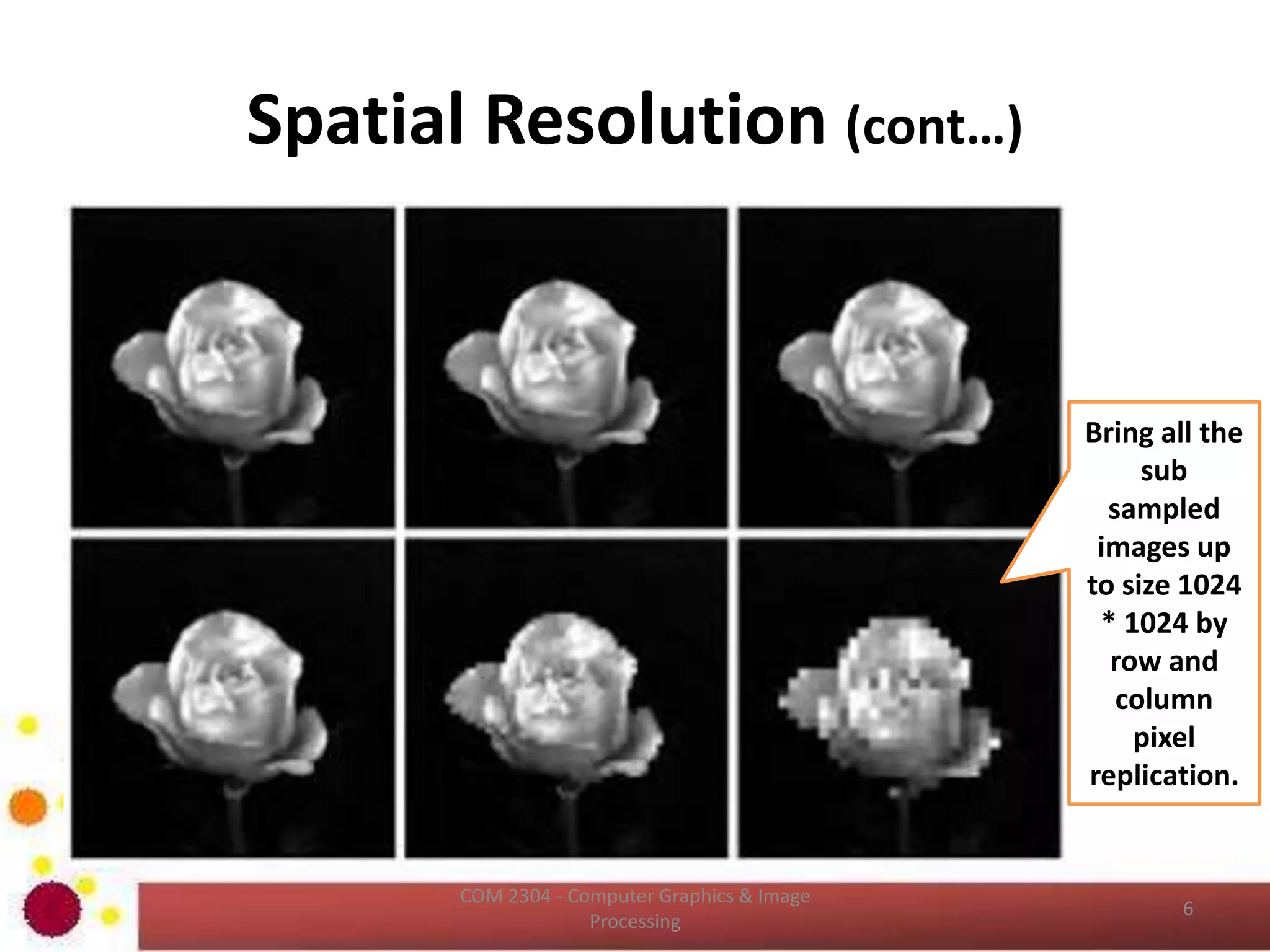
Bring all the
sub
sampled
images up
to size 1024
* 1024 by
row and
column
pixel
replication.
Intensity Resolution
• It is a smallest discernible change in intensity
level.
• It is an integer power of two (8 bits, 16 bits)
• An 8‐bit system quantizes intensity in fixed
increments of 1/256 units of intensity
amplitude.
ICT2403 - Graphics & Image Processing
Intensity Resolution (cont…)
ICT2403 - Graphics & Image Processing
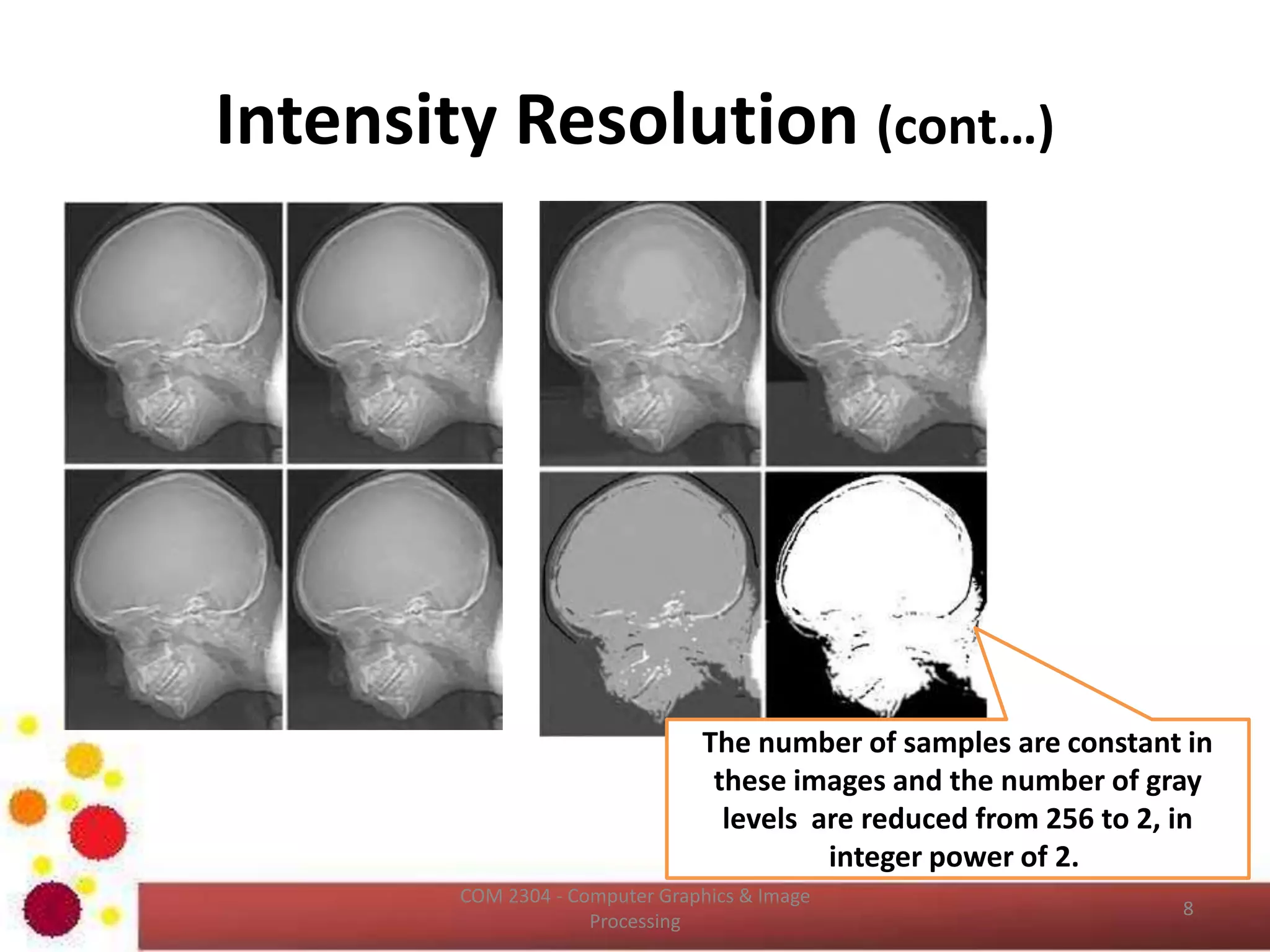
• 256 gray levels (8bits/pixel) 32 gray levels (5 bits/pixel) 16 gray levels (4 bits/pixel)
• 8 gray levels (3 bits/pixel) 4 gray levels (2 bits/pixel) 2 gray levels (1 bit/pixel)
Intensity Resolution (cont…)
ICT2403 - Graphics & Image Processing
The number of samples are constant in
these images and the number of gray
levels are reduced from 256 to 2, in
integer power of 2.
Intensity Resolution (cont…)
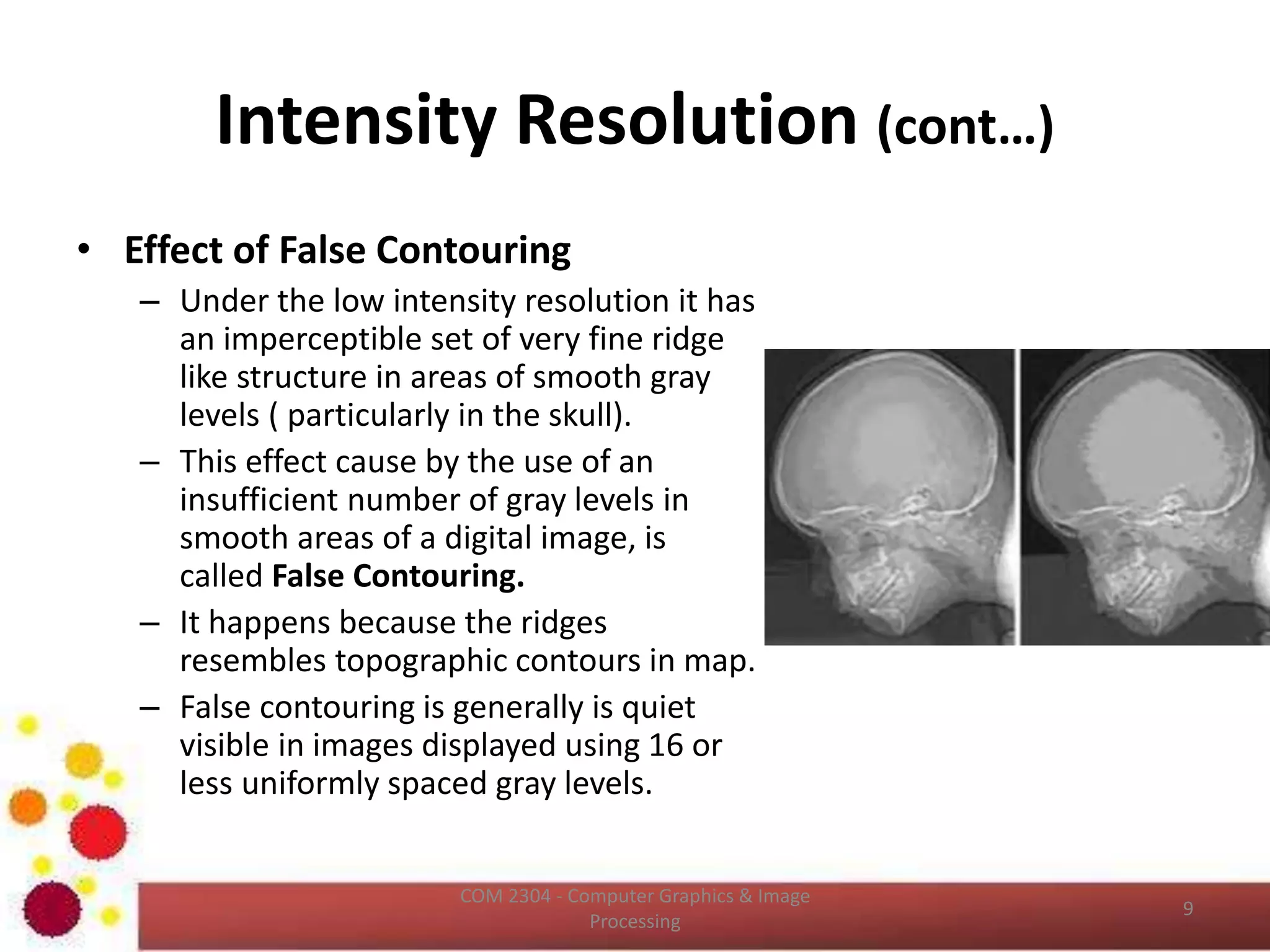
• Effect of False Contouring
– Under the low intensity resolution it has
an imperceptible set of very fine ridge
like structure in areas of smooth gray
levels ( particularly in the skull).
– This effect cause by the use of an
insufficient number of gray levels in
smooth areas of a digital image, is
called False Contouring.
– It happens because the ridges
resembles topographic contours in map.
– False contouring is generally is quiet
visible in images displayed using 16 or
less uniformly spaced gray levels.
ICT2403 - Graphics & Image Processing
Image File Formats
• Many image formats adhere to the simple model shown
below (line by line, no breaks between lines).
• The header contains at least the width and height of the
image.
• Most headers begin with a signature or “magic number” - a
short sequence of bytes for identifying the file format.
ICT2403 - Graphics & Image Processing
Image File Formats (Cont…)
• Common File Formats
– GIF (Graphic Interchange Format)
– PNG (Portable Network Graphics)
– JPEG (Joint Photographic Experts Group)
– TIFF (Tagged Image File Format)
– PGM (Portable Gray Map)
– FITS (Flexible Image Transport System)
ICT2403 - Graphics & Image Processing
Aliasing
• Shannon’s sampling theorem
– If the function is sampled at a rate equal to or greater than
twice its highest frequency, it is possible to recover
completely the original function from its samples.
• If the function is under sampled, then the
phenomenon called aliasing corrupts the sampled
image.
• The corruption is in the form of additional frequency
components being introduced into the sampled
function.
• These are called aliased frequencies.
ICT2403 - Graphics & Image Processing
Aliasing (Cont…)
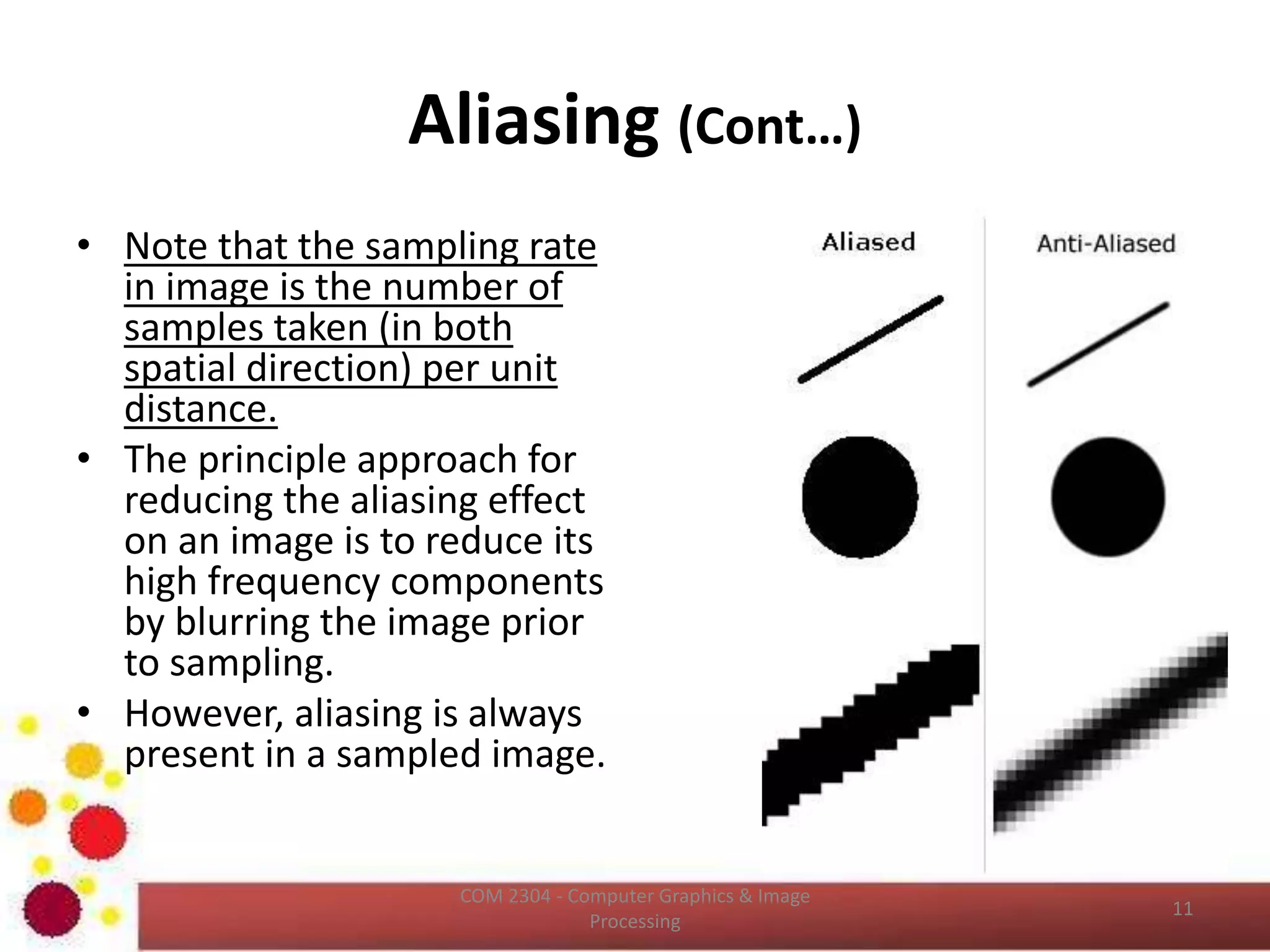
• Note that the sampling rate
in image is the number of
samples taken (in both
spatial direction) per unit
distance.
• The principle approach for
reducing the aliasing effect
on an image is to reduce its
high frequency components
by blurring the image prior
to sampling.
• However, aliasing is always
present in a sampled image.
ICT2403 - Graphics & Image Processing
Aliasing (Cont…)
ICT2403 - Graphics & Image Processing
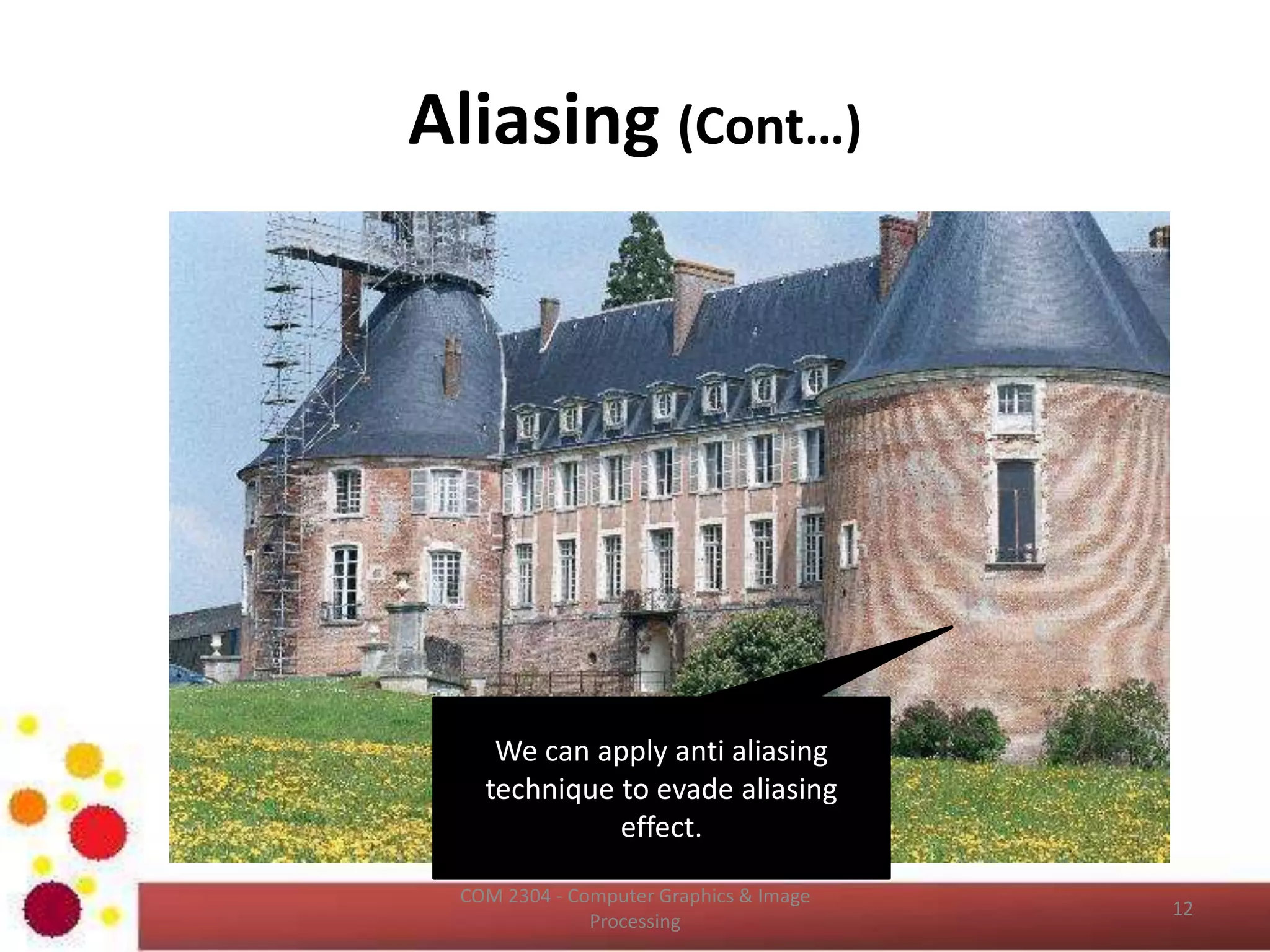
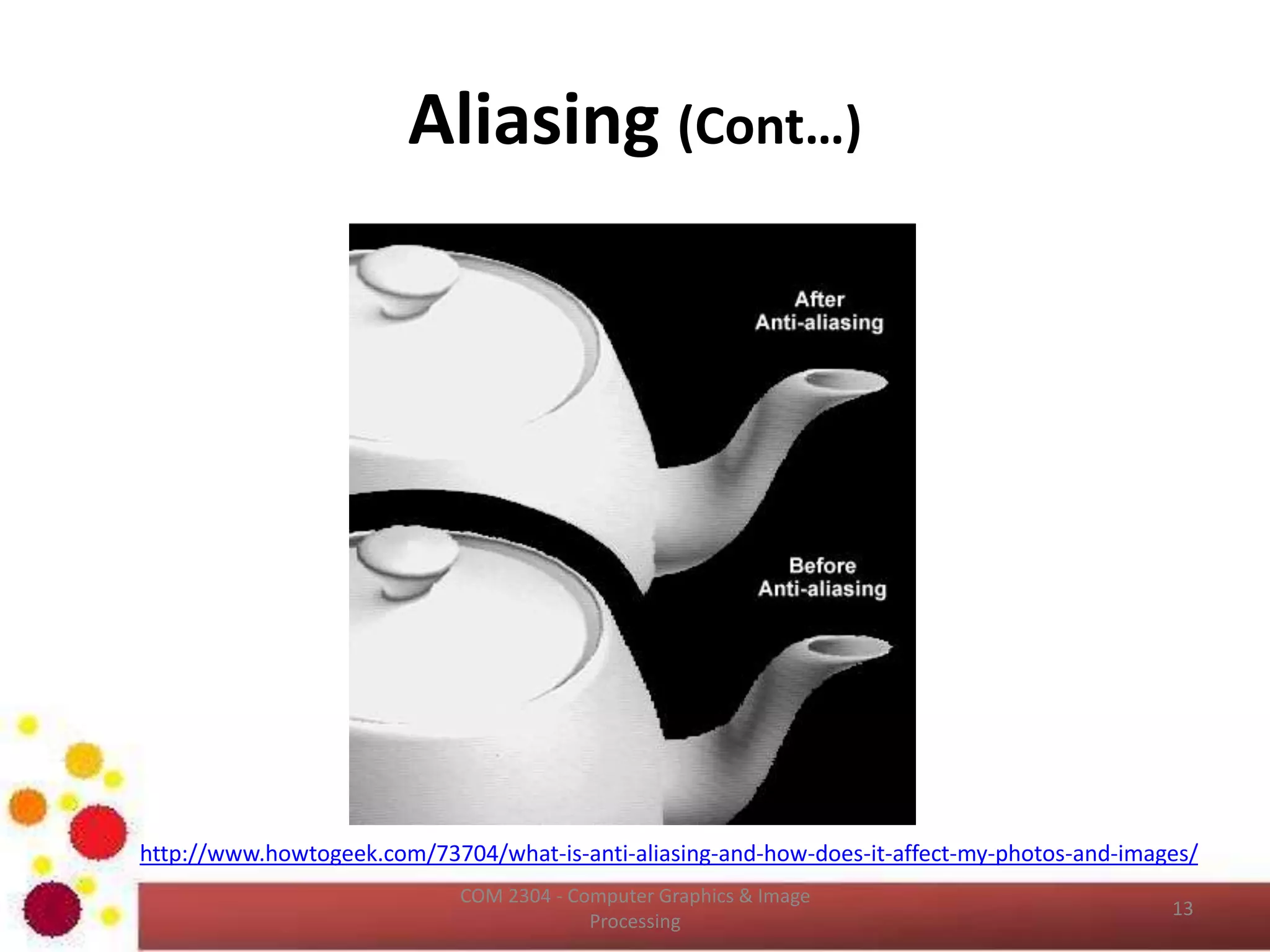
We can apply anti aliasing
technique to evade aliasing
effect.
Aliasing (Cont…)
http://www.howtogeek.com/73704/what-is-anti-aliasing-and-how-does-it-affect-my-photos-and-images/
ICT2403 - Graphics & Image Processing
Image Representation from
Frequency Domain
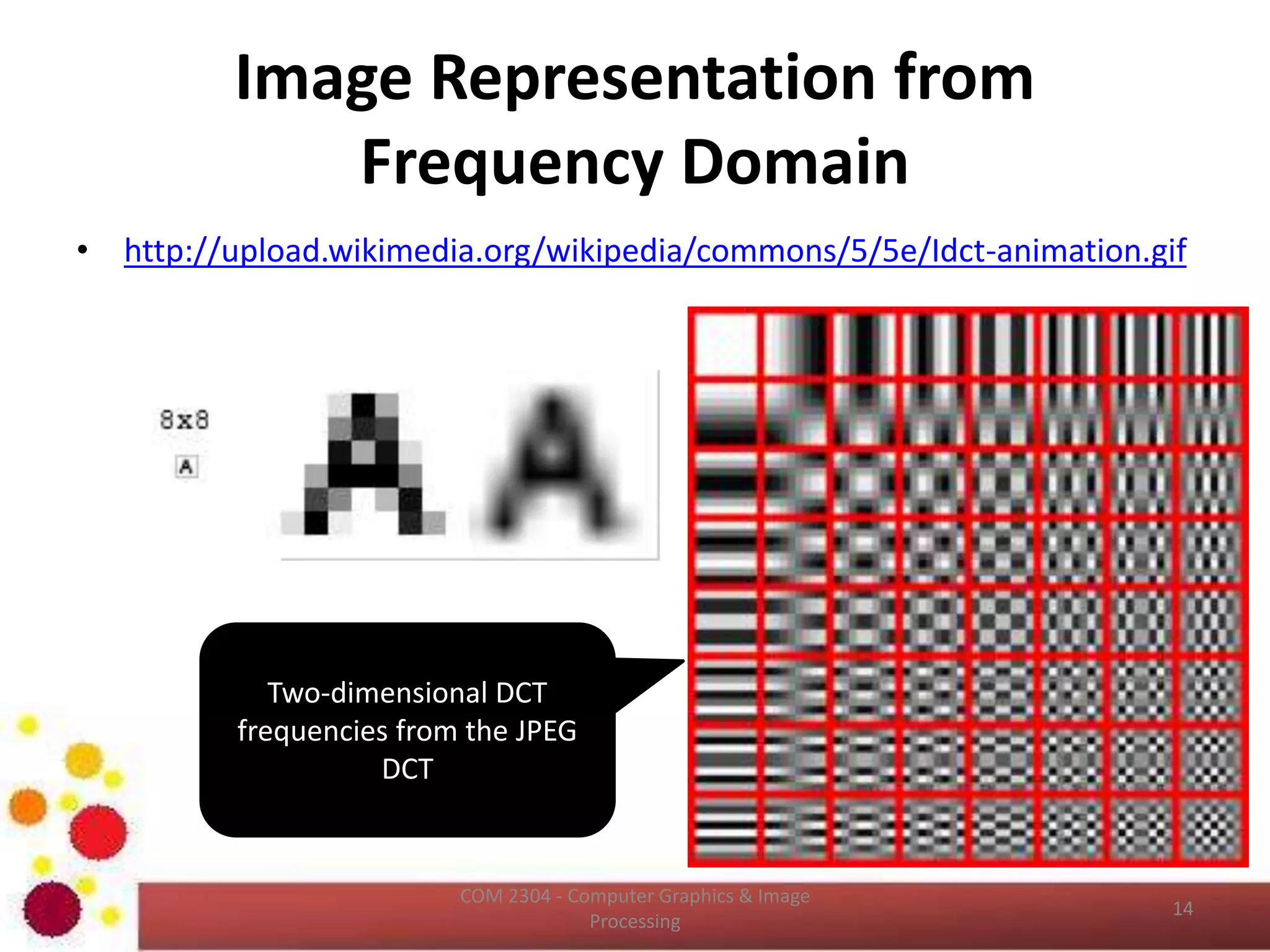
• http://upload.wikimedia.org/wikipedia/commons/5/5e/Idct-animation.gif
• https://en.wikipedia.org/wiki/Discrete_cosine_transform
ICT2403 - Graphics & Image Processing
Two-dimensional DCT
frequencies from the JPEG
DCT
Image Representation from
Frequency Domain (Cont…)
ICT2403 - Graphics & Image Processing
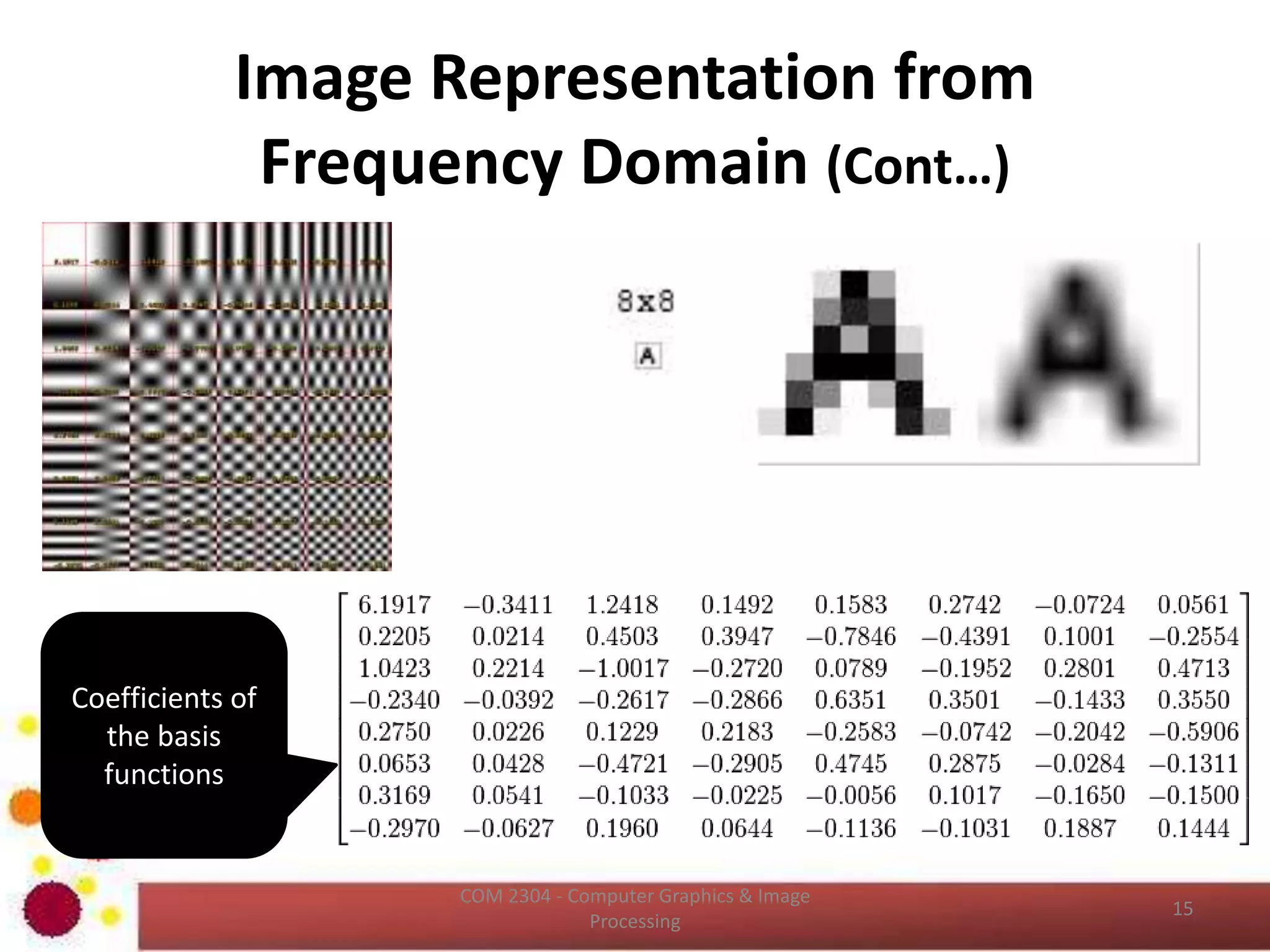
Coefficients of
the basis
functions
Image Interpolation
• Interpolation is the process of using known data
to estimate values at unknown locations.
• It happens anytime you resize or remap (distort)
your image from one pixel grid to another.
• Image resizing is necessary when you need to
increase or decrease the total number of pixels,
whereas remapping can occur under a wider
variety of scenarios: correcting for lens distortion,
changing perspective, and rotating an image.
ICT2403 - Graphics & Image Processing
Image Interpolation (Cont…)
• Read about Distortion -
https://photographylife.com/what-is-
distortion
ICT2403 - Graphics & Image Processing
Image Interpolation (Cont…)
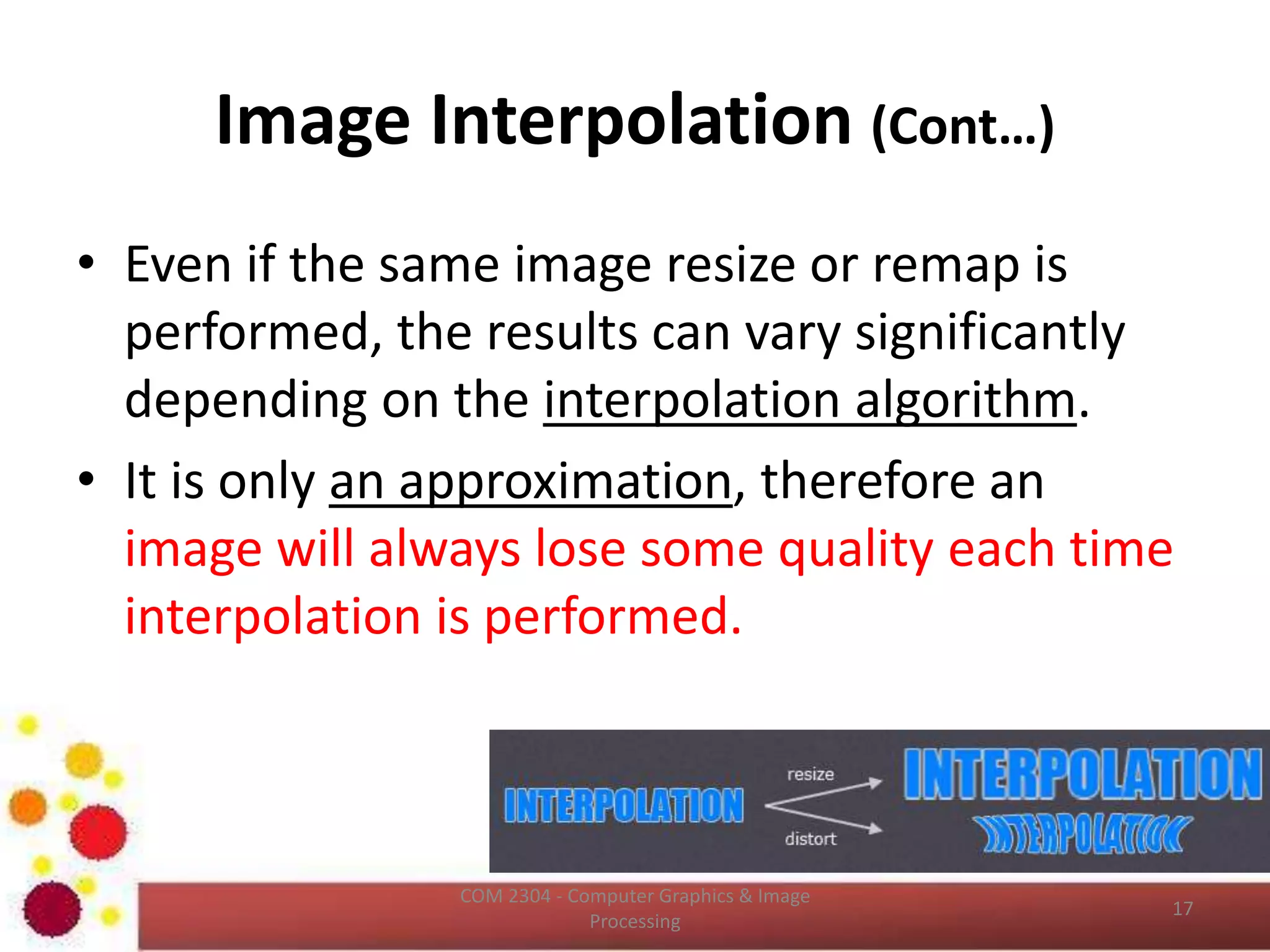
• Even if the same image resize or remap is
performed, the results can vary significantly
depending on the interpolation algorithm.
• It is only an approximation, therefore an
image will always lose some quality each time
interpolation is performed.
ICT2403 - Graphics & Image Processing
Image Interpolation (Cont…)
ICT2403 - Graphics & Image Processing
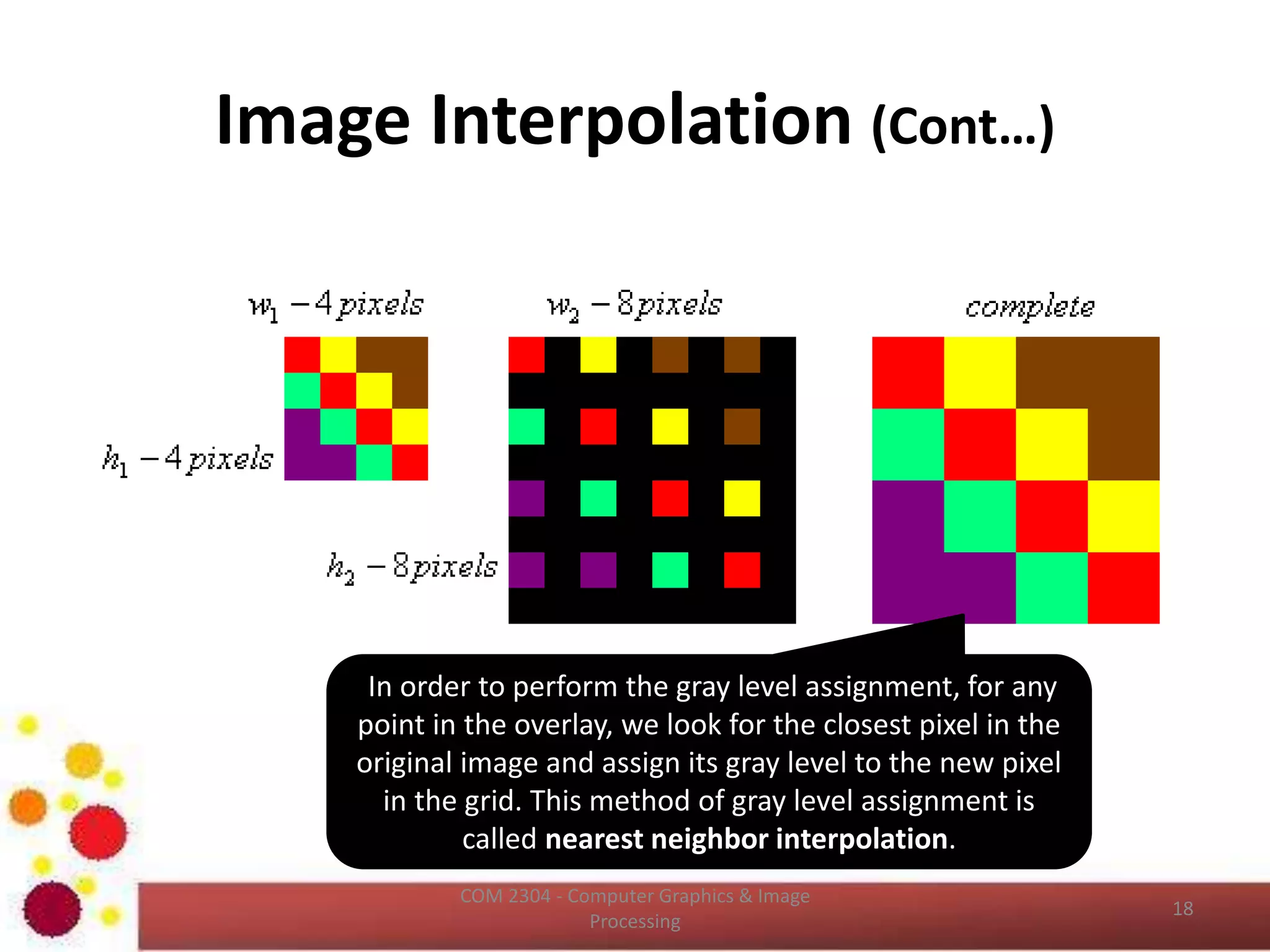
In order to perform the gray level assignment, for any
point in the overlay, we look for the closest pixel in the
original image and assign its gray level to the new pixel
in the grid. This method of gray level assignment is
called nearest neighbor interpolation.
Image Interpolation (Cont…)
• Pixel replication is a special case of nearest neighbor
interpolation.
• Pixel replication is applicable when we want to increase
the size of an image an integer number of times.
• For instance, to double the size of an image we can
duplicate each column (horizontal direction
enlargement) or row (vertical direction enlargement).
• Image shrinking is done in similar manner as zooming
and the equivalent process of pixel replication is row
column deletion.
– For example, to shrink an image by one half, we delete
every other row and column.
ICT2403 - Graphics & Image Processing
Image Interpolation (Cont…)
• It is possible to use more neighbors for
interpolation.
• Using more neighbors implies fitting the points
with a more complex surface, which generally
gives a more smoother results.
• This is important in 3D graphics and medical
image processing.
• Reading 
http://www.cambridgeincolour.com/tutorials/im
age-interpolation.htm
ICT2403 - Graphics & Image Processing
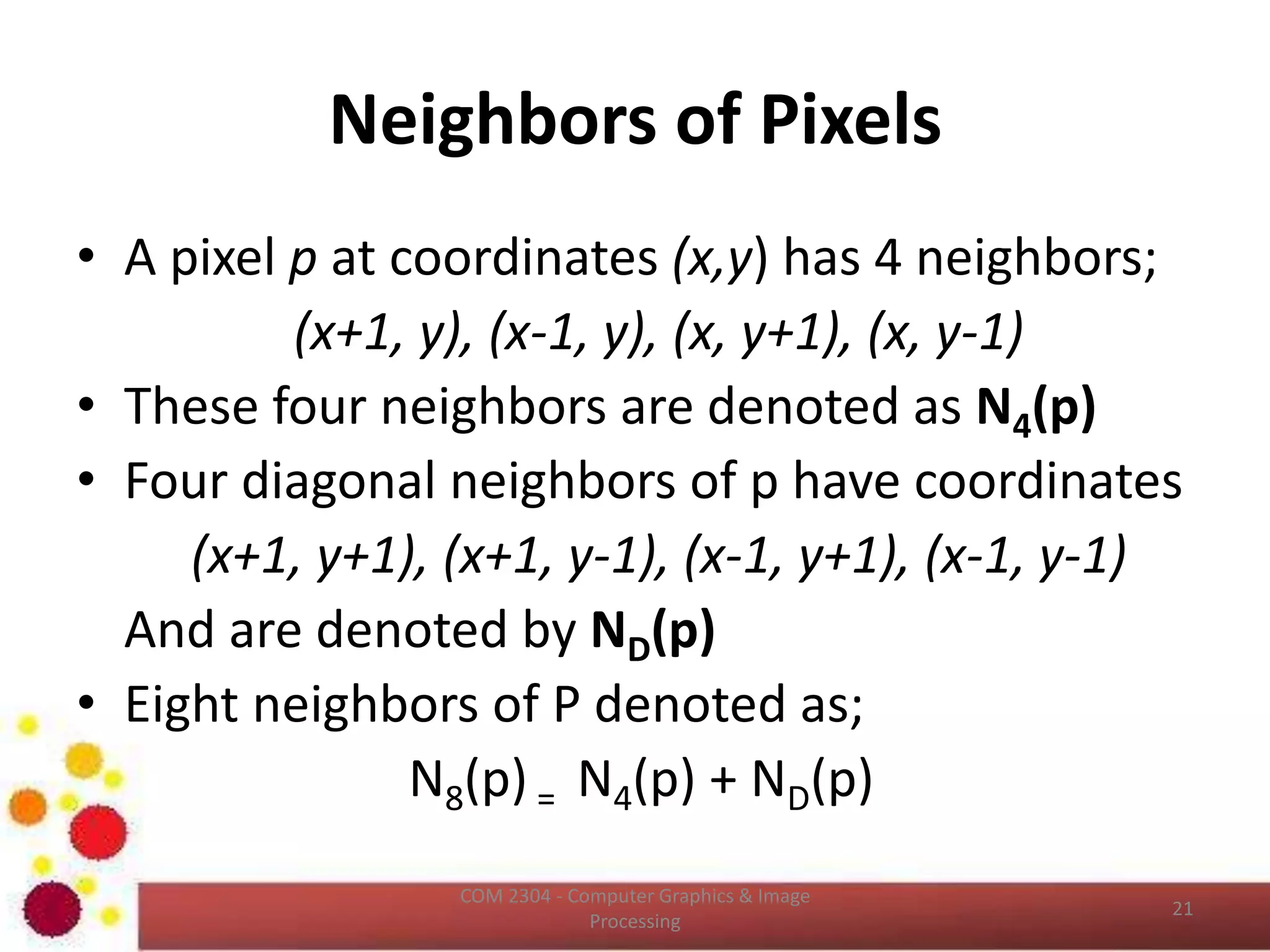
Neighbors of Pixels
• A pixel p at coordinates (x,y) has 4 neighbors ( (x+1, y), (x-1, y),
(x, y+1), (x, y-1) ). These four neighbors are denoted as N4(p)
• Four diagonal neighbors of p have coordinates ((x+1, y+1),
(x+1, y-1), (x-1, y+1), (x-1, y-1)). And are denoted by ND(p)
• Eight neighbors of P denoted as;
N8(p) = N4(p) + ND(p)
ICT2403 - Graphics & Image Processing
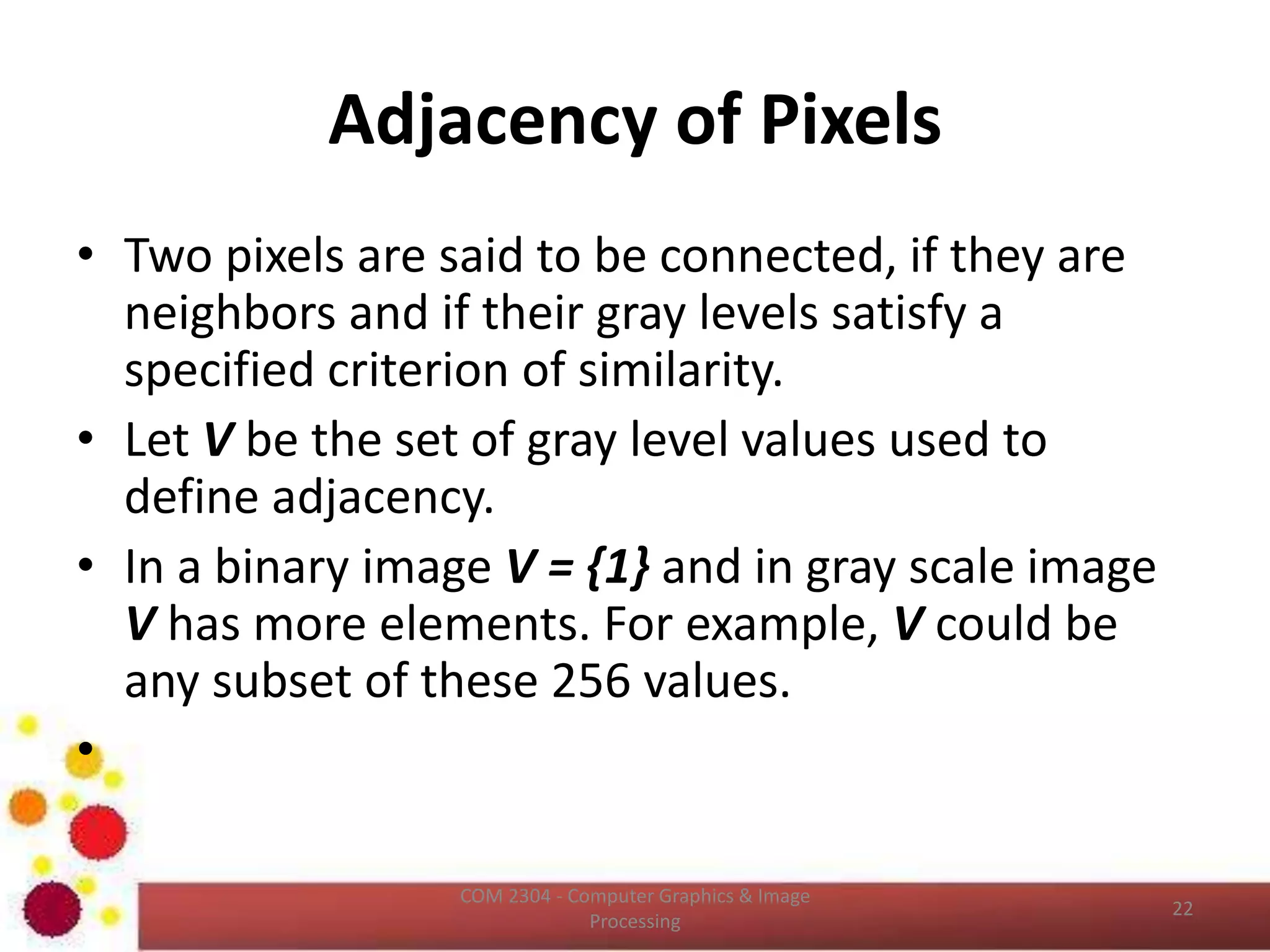
Adjacency of Pixels
• Two pixels are said to be connected, if they
are neighbors and if their gray levels satisfy a
specified criterion of similarity.
ICT2403 - Graphics & Image Processing
Adjacency of Pixels (Cont…)
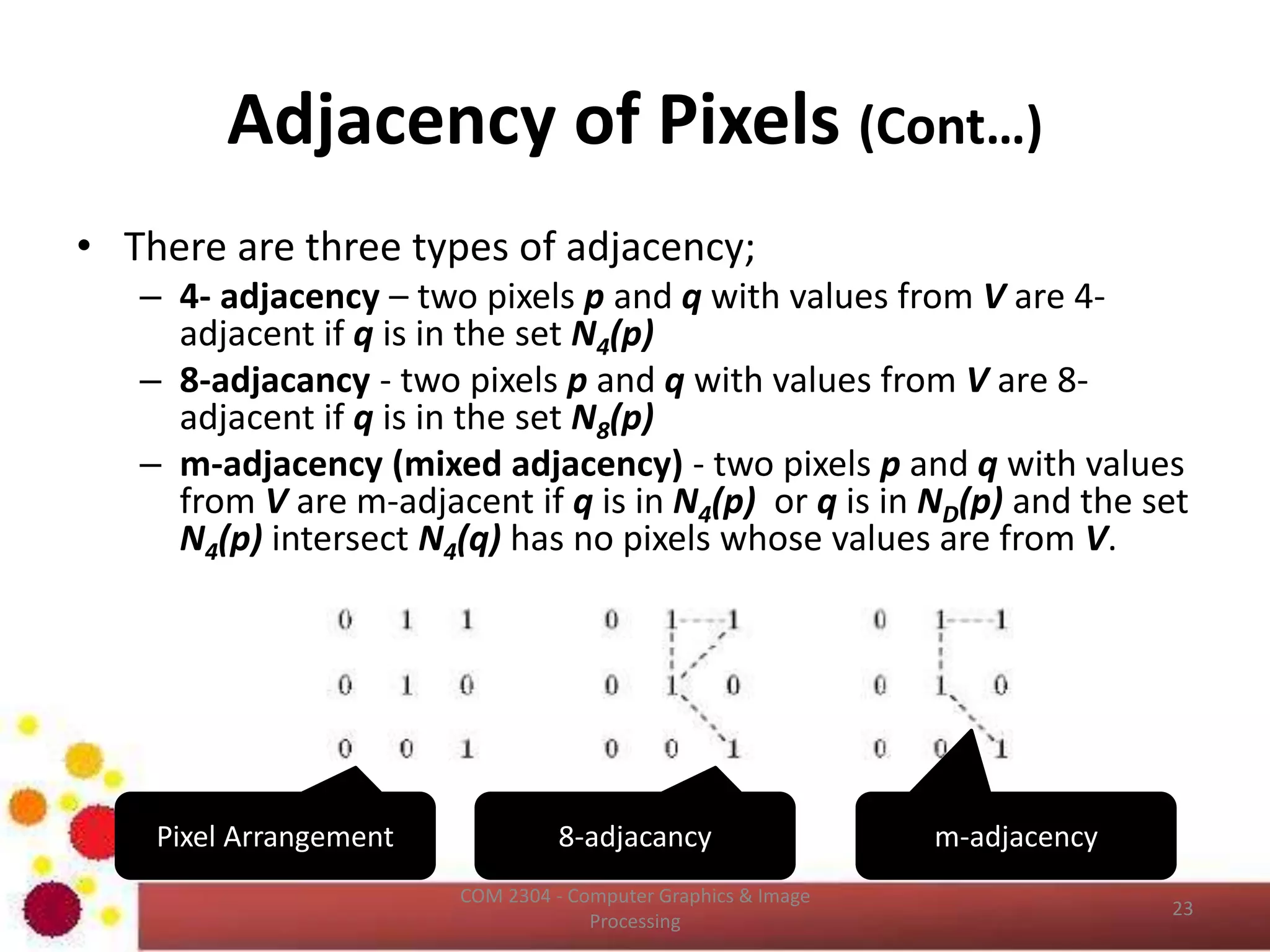
• There are three types of adjacency;
– 4- adjacency – two pixels p and q with values from V are 4-
adjacent if q is in the set N4(p)
– 8-adjacancy - two pixels p and q with values from V are 8-
adjacent if q is in the set N8(p)
– m-adjacency (mixed adjacency) - two pixels p and q with values
from V are m-adjacent if q is in N4(p) or q is in ND(p) and the set
N4(p) intersect N4(q) has no pixels whose values are from V.
ICT2403 - Graphics & Image Processing
8-adjacancy m-adjacencyPixel Arrangement
Connectivity
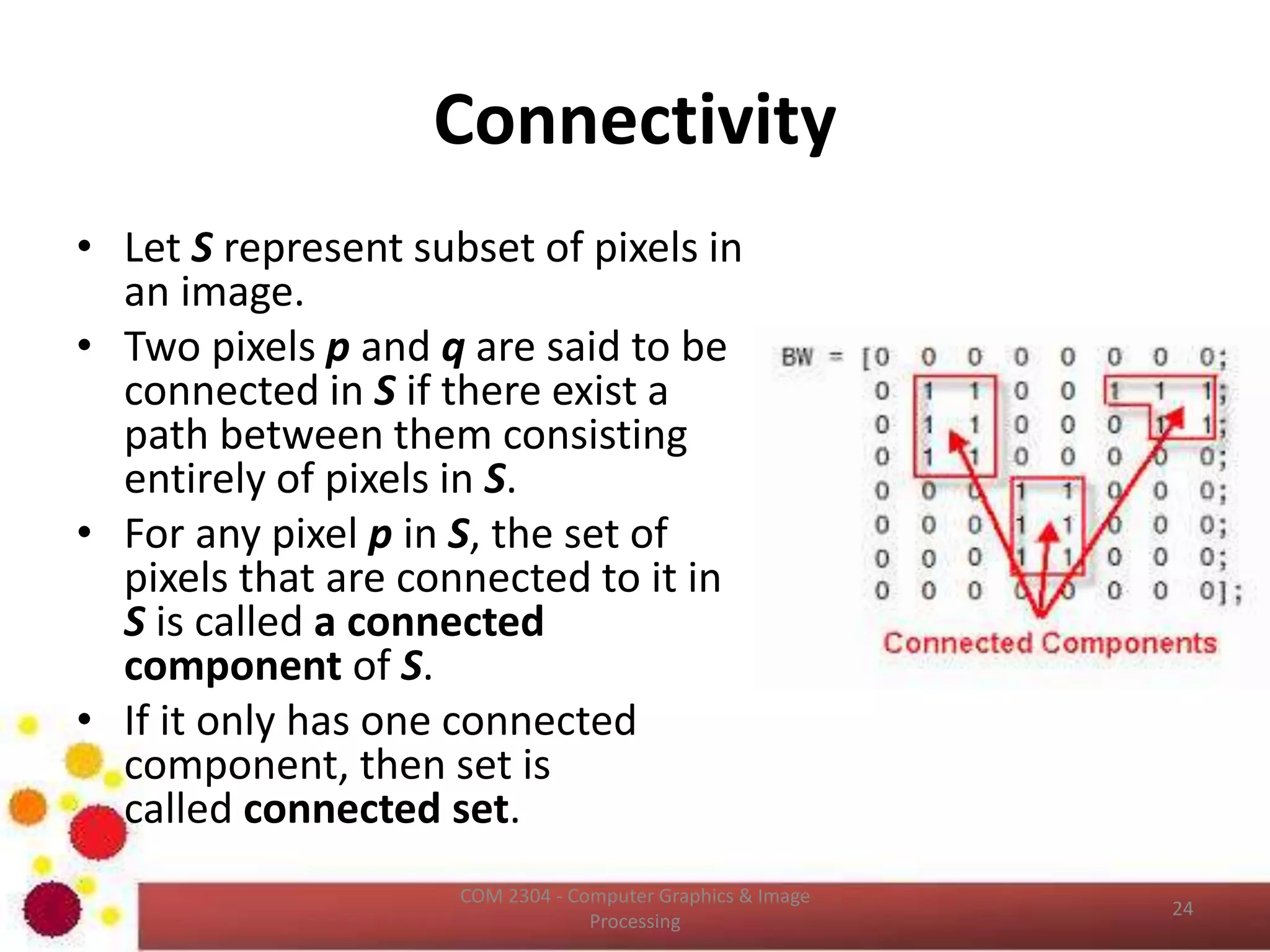
• Let S represent subset of pixels in
an image.
• Two pixels p and q are said to be
connected in S if there exist a
path between them consisting
entirely of pixels in S.
• For any pixel p in S, the set of
pixels that are connected to it in
S is called a connected
component of S.
• If it only has one connected
component, then set is
called connected set.
ICT2403 - Graphics & Image Processing
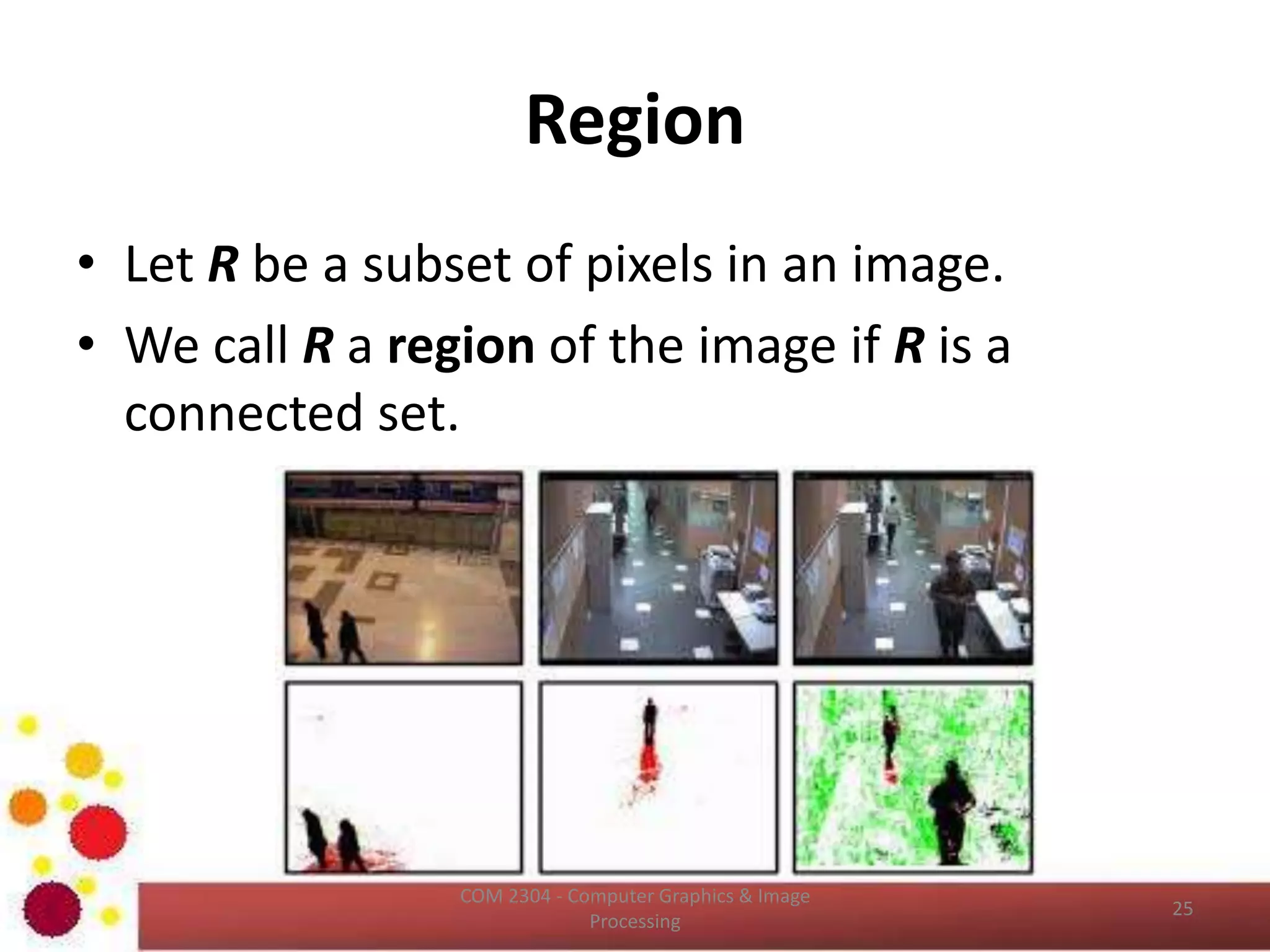
Region
• Let R be a subset of pixels in an image.
• We call R a region of the image if R is a
connected set.
ICT2403 - Graphics & Image Processing
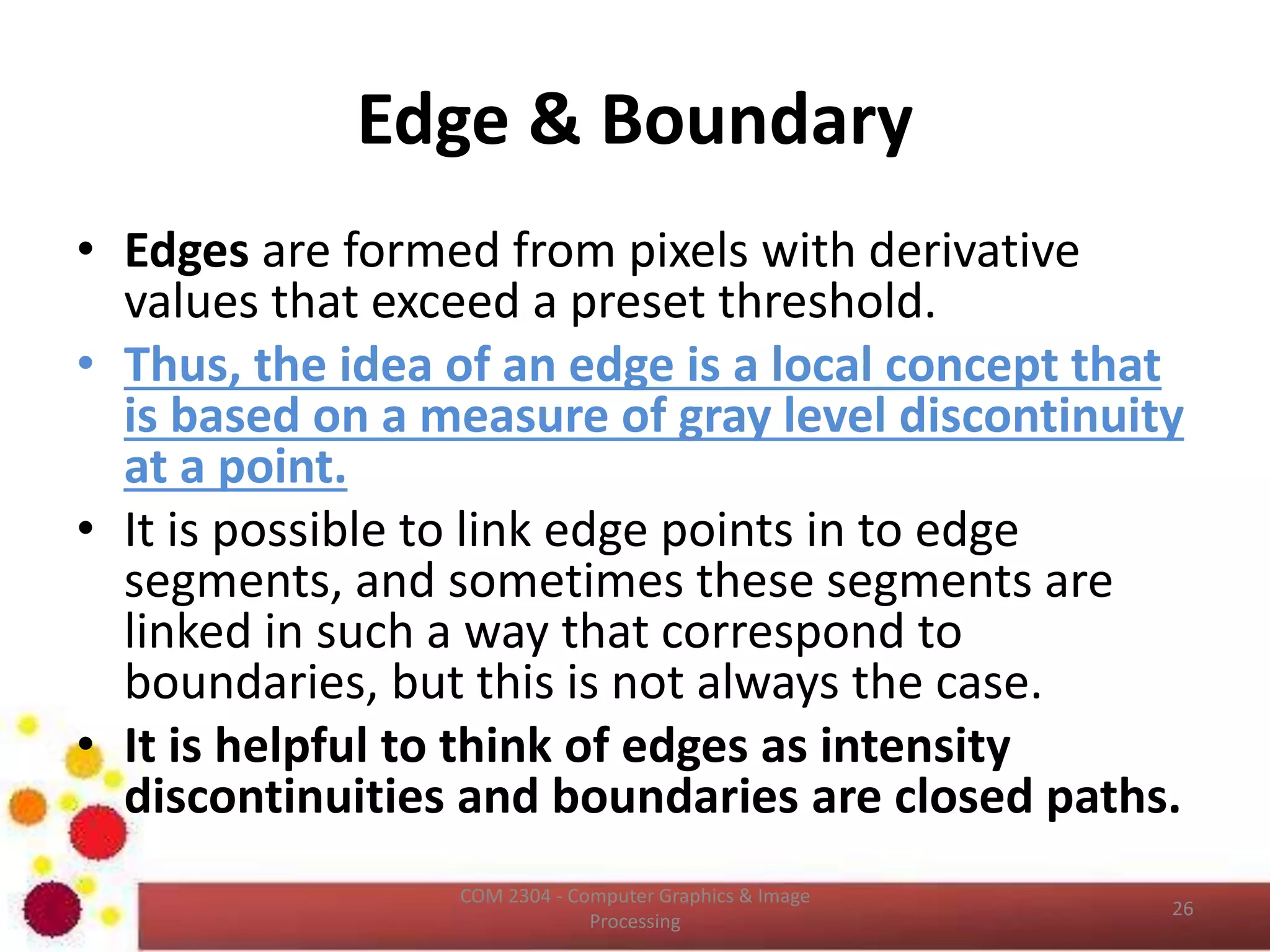
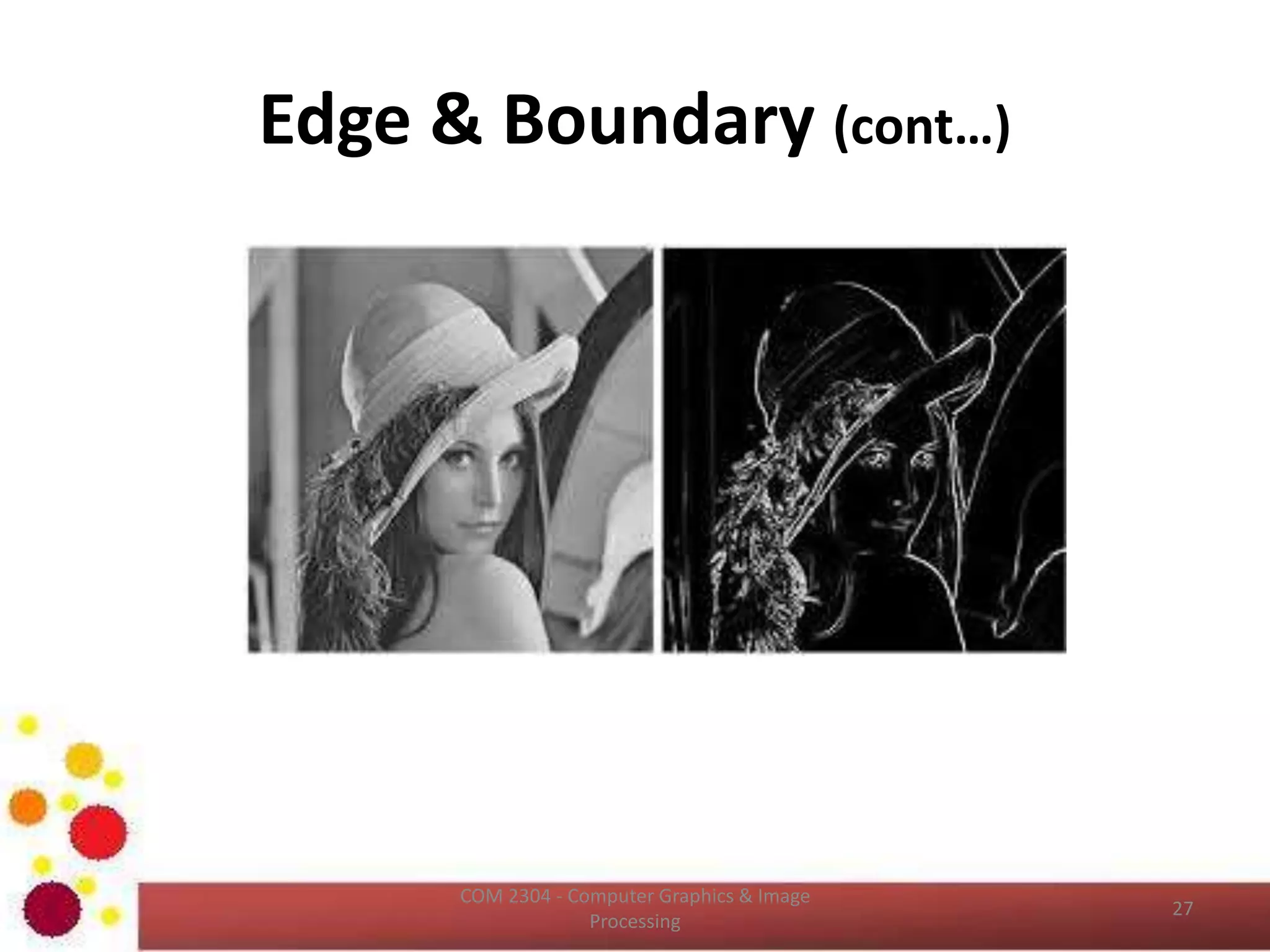
Edge & Boundary
• Edges are formed from pixels with derivative
values that exceed a preset threshold.
• Thus, the idea of an edge is a local concept that
is based on a measure of gray level discontinuity
at a point.
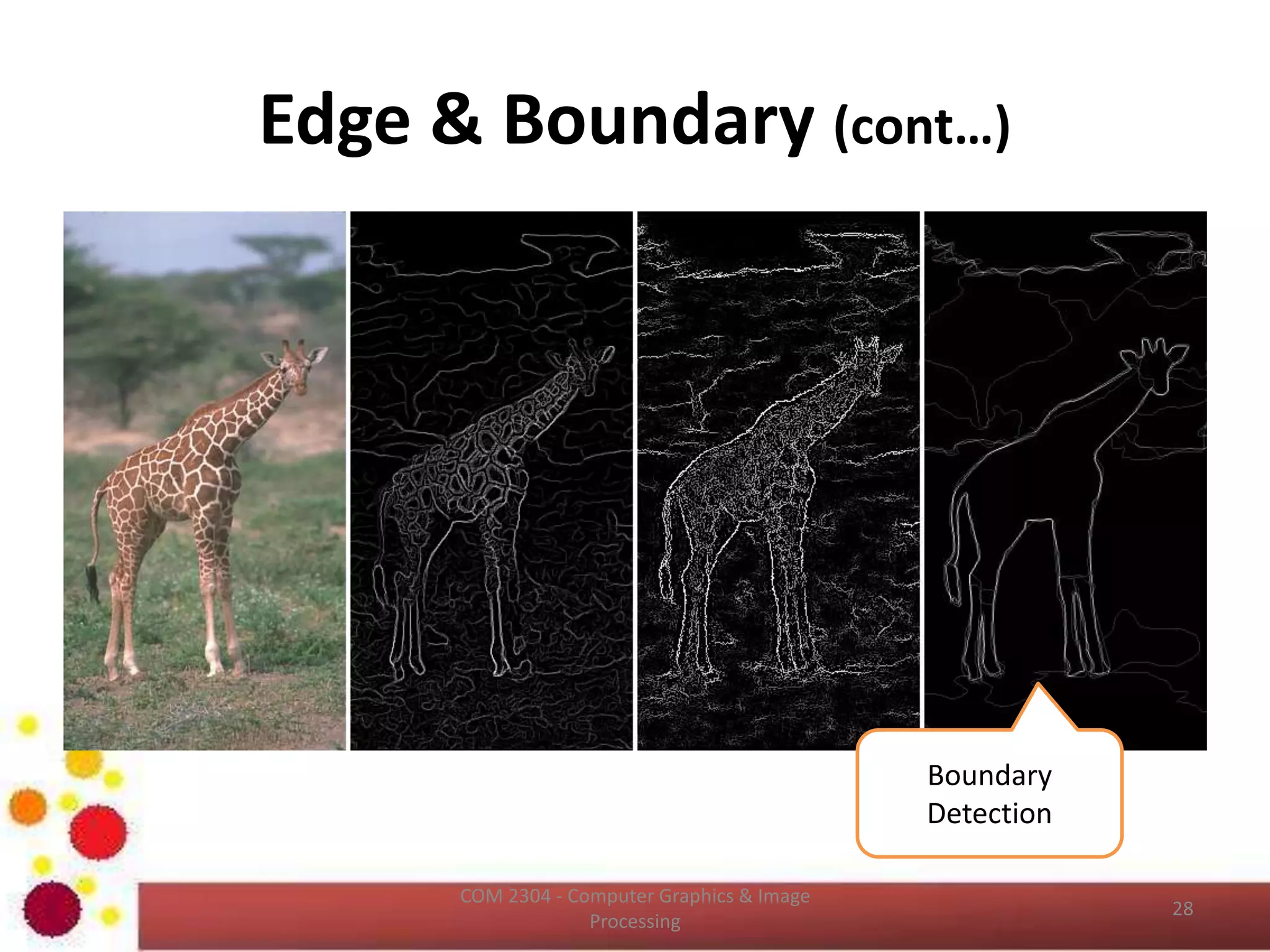
• It is possible to link edge points in to edge
segments, and sometimes these segments are
linked in such a way that correspond to
boundaries, but this is not always the case.
• It is helpful to think of edges as intensity
discontinuities and boundaries are closed paths.
ICT2403 - Graphics & Image Processing
Edge & Boundary (cont…)
ICT2403 - Graphics & Image Processing
Edge & Boundary (cont…)
ICT2403 - Graphics & Image Processing
Boundary
Detection
Reference
• Chapter 02 of Gonzalez, R.C., Woods, R.E.,
Digital Image Processing, 3rd ed. Addison-
Wesley Pub.
ICT2403 - Graphics & Image Processing
Learning Outcomes Revisit
• Now, you should be able to;
– describe spatial resolution
– describe intensity resolution
– identify the effect of aliasing
– describe image interpolation
– describe relationships among the pixels
ICT2403 - Graphics & Image Processing
QUESTIONS ?
Next Lecture – Color and Color Models
ICT2403 - Graphics & Image Processing

Digital Image Fundamentals - II

  • 1.
    GRAPHICS & IMAGEPROCESSING ICT2403 Digital Image Fundamentals - II K.A.S.H.Kulathilake B.Sc. (Hons) IT (SLIIT), MCS (UCSC) Rajarata University of Sri Lanka Faculty of Applied Sciences Department of Physical Sciences
  • 2.
    Learning Outcomes ICT2403 -Graphics & Image Processing • At the end of this lecture, you should be able to; – describe spatial resolution – describe intensity resolution – identify the effect of aliasing – describe image interpolation – describe relationships among the pixels
  • 3.
    Spatial Resolution • Spatialresolution is the smallest discernible detail in an image. • Or, we can describe the smallest number of discernible line pairs per unit distance – Example, 100 line pairs per millimeter. • Dots per unit distance is a measure of image resolution used commonly in the printing and publishing industry. – 300 dpi ICT2403 - Graphics & Image Processing
  • 4.
    Spatial Resolution (cont…) •Measuring Spatial Resolution: – Since the spatial resolution refers to clarity , so for different devices , different measure has been made to measure it. • FOR EXAMPLE: – DOTS PER INCH: Dots per inch or DPI is usually used in monitors. – LINES PER INCH: Lines per inch or LPI is usually used in laser printers. – PIXEL PER INCH: Pixel per inch or PPI is measure for different devices such as tablets , Mobile phones e.t.c. ICT2403 - Graphics & Image Processing
  • 5.
    Spatial Resolution (cont…) ICT2403- Graphics & Image Processing Image of size 1024 * 1024 pixels whose gray levels are represented by 8 bits. The other images shown in figure are the result of sub sampling the 1024 * 1024 image. The number of allowed gray levels was kept at 256 in all of these images.
  • 6.
    Spatial Resolution (cont…) ICT2403- Graphics & Image Processing Bring all the sub sampled images up to size 1024 * 1024 by row and column pixel replication.
  • 7.
    Intensity Resolution • Itis a smallest discernible change in intensity level. • It is an integer power of two (8 bits, 16 bits) • An 8‐bit system quantizes intensity in fixed increments of 1/256 units of intensity amplitude. ICT2403 - Graphics & Image Processing
  • 8.
    Intensity Resolution (cont…) ICT2403- Graphics & Image Processing • 256 gray levels (8bits/pixel) 32 gray levels (5 bits/pixel) 16 gray levels (4 bits/pixel) • 8 gray levels (3 bits/pixel) 4 gray levels (2 bits/pixel) 2 gray levels (1 bit/pixel)
  • 9.
    Intensity Resolution (cont…) ICT2403- Graphics & Image Processing The number of samples are constant in these images and the number of gray levels are reduced from 256 to 2, in integer power of 2.
  • 10.
    Intensity Resolution (cont…) •Effect of False Contouring – Under the low intensity resolution it has an imperceptible set of very fine ridge like structure in areas of smooth gray levels ( particularly in the skull). – This effect cause by the use of an insufficient number of gray levels in smooth areas of a digital image, is called False Contouring. – It happens because the ridges resembles topographic contours in map. – False contouring is generally is quiet visible in images displayed using 16 or less uniformly spaced gray levels. ICT2403 - Graphics & Image Processing
  • 11.
    Image File Formats •Many image formats adhere to the simple model shown below (line by line, no breaks between lines). • The header contains at least the width and height of the image. • Most headers begin with a signature or “magic number” - a short sequence of bytes for identifying the file format. ICT2403 - Graphics & Image Processing
  • 12.
    Image File Formats(Cont…) • Common File Formats – GIF (Graphic Interchange Format) – PNG (Portable Network Graphics) – JPEG (Joint Photographic Experts Group) – TIFF (Tagged Image File Format) – PGM (Portable Gray Map) – FITS (Flexible Image Transport System) ICT2403 - Graphics & Image Processing
  • 13.
    Aliasing • Shannon’s samplingtheorem – If the function is sampled at a rate equal to or greater than twice its highest frequency, it is possible to recover completely the original function from its samples. • If the function is under sampled, then the phenomenon called aliasing corrupts the sampled image. • The corruption is in the form of additional frequency components being introduced into the sampled function. • These are called aliased frequencies. ICT2403 - Graphics & Image Processing
  • 14.
    Aliasing (Cont…) • Notethat the sampling rate in image is the number of samples taken (in both spatial direction) per unit distance. • The principle approach for reducing the aliasing effect on an image is to reduce its high frequency components by blurring the image prior to sampling. • However, aliasing is always present in a sampled image. ICT2403 - Graphics & Image Processing
  • 15.
    Aliasing (Cont…) ICT2403 -Graphics & Image Processing We can apply anti aliasing technique to evade aliasing effect.
  • 16.
  • 17.
    Image Representation from FrequencyDomain • http://upload.wikimedia.org/wikipedia/commons/5/5e/Idct-animation.gif • https://en.wikipedia.org/wiki/Discrete_cosine_transform ICT2403 - Graphics & Image Processing Two-dimensional DCT frequencies from the JPEG DCT
  • 18.
    Image Representation from FrequencyDomain (Cont…) ICT2403 - Graphics & Image Processing Coefficients of the basis functions
  • 19.
    Image Interpolation • Interpolationis the process of using known data to estimate values at unknown locations. • It happens anytime you resize or remap (distort) your image from one pixel grid to another. • Image resizing is necessary when you need to increase or decrease the total number of pixels, whereas remapping can occur under a wider variety of scenarios: correcting for lens distortion, changing perspective, and rotating an image. ICT2403 - Graphics & Image Processing
  • 20.
    Image Interpolation (Cont…) •Read about Distortion - https://photographylife.com/what-is- distortion ICT2403 - Graphics & Image Processing
  • 21.
    Image Interpolation (Cont…) •Even if the same image resize or remap is performed, the results can vary significantly depending on the interpolation algorithm. • It is only an approximation, therefore an image will always lose some quality each time interpolation is performed. ICT2403 - Graphics & Image Processing
  • 22.
    Image Interpolation (Cont…) ICT2403- Graphics & Image Processing In order to perform the gray level assignment, for any point in the overlay, we look for the closest pixel in the original image and assign its gray level to the new pixel in the grid. This method of gray level assignment is called nearest neighbor interpolation.
  • 23.
    Image Interpolation (Cont…) •Pixel replication is a special case of nearest neighbor interpolation. • Pixel replication is applicable when we want to increase the size of an image an integer number of times. • For instance, to double the size of an image we can duplicate each column (horizontal direction enlargement) or row (vertical direction enlargement). • Image shrinking is done in similar manner as zooming and the equivalent process of pixel replication is row column deletion. – For example, to shrink an image by one half, we delete every other row and column. ICT2403 - Graphics & Image Processing
  • 24.
    Image Interpolation (Cont…) •It is possible to use more neighbors for interpolation. • Using more neighbors implies fitting the points with a more complex surface, which generally gives a more smoother results. • This is important in 3D graphics and medical image processing. • Reading  http://www.cambridgeincolour.com/tutorials/im age-interpolation.htm ICT2403 - Graphics & Image Processing
  • 25.
    Neighbors of Pixels •A pixel p at coordinates (x,y) has 4 neighbors ( (x+1, y), (x-1, y), (x, y+1), (x, y-1) ). These four neighbors are denoted as N4(p) • Four diagonal neighbors of p have coordinates ((x+1, y+1), (x+1, y-1), (x-1, y+1), (x-1, y-1)). And are denoted by ND(p) • Eight neighbors of P denoted as; N8(p) = N4(p) + ND(p) ICT2403 - Graphics & Image Processing
  • 26.
    Adjacency of Pixels •Two pixels are said to be connected, if they are neighbors and if their gray levels satisfy a specified criterion of similarity. ICT2403 - Graphics & Image Processing
  • 27.
    Adjacency of Pixels(Cont…) • There are three types of adjacency; – 4- adjacency – two pixels p and q with values from V are 4- adjacent if q is in the set N4(p) – 8-adjacancy - two pixels p and q with values from V are 8- adjacent if q is in the set N8(p) – m-adjacency (mixed adjacency) - two pixels p and q with values from V are m-adjacent if q is in N4(p) or q is in ND(p) and the set N4(p) intersect N4(q) has no pixels whose values are from V. ICT2403 - Graphics & Image Processing 8-adjacancy m-adjacencyPixel Arrangement
  • 28.
    Connectivity • Let Srepresent subset of pixels in an image. • Two pixels p and q are said to be connected in S if there exist a path between them consisting entirely of pixels in S. • For any pixel p in S, the set of pixels that are connected to it in S is called a connected component of S. • If it only has one connected component, then set is called connected set. ICT2403 - Graphics & Image Processing
  • 29.
    Region • Let Rbe a subset of pixels in an image. • We call R a region of the image if R is a connected set. ICT2403 - Graphics & Image Processing
  • 30.
    Edge & Boundary •Edges are formed from pixels with derivative values that exceed a preset threshold. • Thus, the idea of an edge is a local concept that is based on a measure of gray level discontinuity at a point. • It is possible to link edge points in to edge segments, and sometimes these segments are linked in such a way that correspond to boundaries, but this is not always the case. • It is helpful to think of edges as intensity discontinuities and boundaries are closed paths. ICT2403 - Graphics & Image Processing
  • 31.
    Edge & Boundary(cont…) ICT2403 - Graphics & Image Processing
  • 32.
    Edge & Boundary(cont…) ICT2403 - Graphics & Image Processing Boundary Detection
  • 33.
    Reference • Chapter 02of Gonzalez, R.C., Woods, R.E., Digital Image Processing, 3rd ed. Addison- Wesley Pub. ICT2403 - Graphics & Image Processing
  • 34.
    Learning Outcomes Revisit •Now, you should be able to; – describe spatial resolution – describe intensity resolution – identify the effect of aliasing – describe image interpolation – describe relationships among the pixels ICT2403 - Graphics & Image Processing
  • 35.
    QUESTIONS ? Next Lecture– Color and Color Models ICT2403 - Graphics & Image Processing