DIGITAL
REPRESENTATION
The term bit is an abbreviation of binary
digit and represents the smallest piece of
data. Humans interpret words and pictures;
computers interpret only patterns of bit.
1. A bit can have only
two possible values,
a one digit (1) or a
zero digit (0).
2. A bit can be used to
represent the state
of something that
has two states.
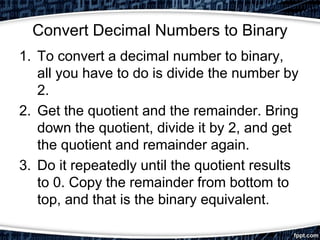
Convert Decimal Numbers to Binary
1. To convert a decimal number to binary,
all you have to do is divide the number by
2.
2. Get the quotient and the remainder. Bring
down the quotient, divide it by 2, and get
the quotient and remainder again.
3. Do it repeatedly until the quotient results
to 0. Copy the remainder from bottom to
top, and that is the binary equivalent.
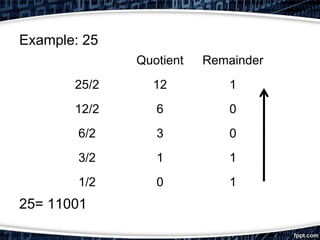
Example: 25
25= 11001
Quotient Remainder
25/2 12 1
12/2 6 0
6/2 3 0
3/2 1 1
1/2 0 1
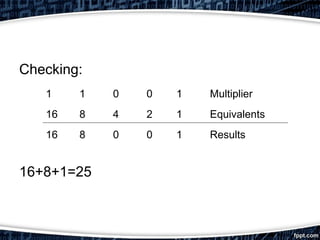
Checking:
16+8+1=25
1 1 0 0 1 Multiplier
16 8 4 2 1 Equivalents
16 8 0 0 1 Results
Calculating Data Storage
• While a bit is the smallest representation
of data, the most basic unit of digital
storage is the byte.
A byte is 8 bits and the smallest unit of
measure (UOM) used to represent data
storage capacity.
• When referring to storage space, we use
the terms byte (B), kilobytes (KB),
megabytes (MB), gigabytes (GB), and
terabytes (TB).
1 Kilobyte is a little more than one thousand
bytes, specifically 1,024. A Megabyte
represents more than a million bytes or
1,048,576. A Gigabyte is 1,073,741,824
bytes. A terabyte is 1,099,511,627,776.
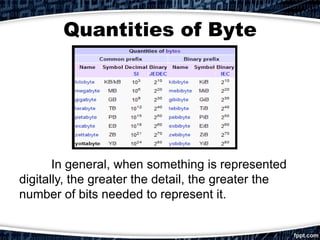
Quantities of Byte
In general, when something is represented
digitally, the greater the detail, the greater the
number of bits needed to represent it.
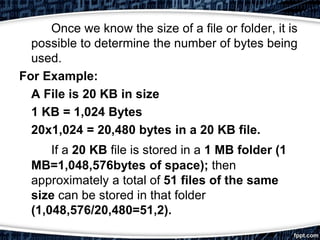
Once we know the size of a file or folder, it is
possible to determine the number of bytes being
used.
For Example:
A File is 20 KB in size
1 KB = 1,024 Bytes
20x1,024 = 20,480 bytes in a 20 KB file.
If a 20 KB file is stored in a 1 MB folder (1
MB=1,048,576bytes of space); then
approximately a total of 51 files of the same
size can be stored in that folder
(1,048,576/20,480=51,2).
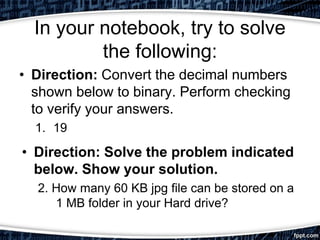
In your notebook, try to solve
the following:
• Direction: Convert the decimal numbers
shown below to binary. Perform checking
to verify your answers.
1. 19
• Direction: Solve the problem indicated
below. Show your solution.
2. How many 60 KB jpg file can be stored on a
1 MB folder in your Hard drive?
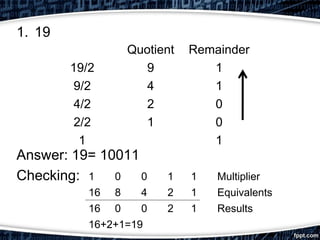
1. 19
Answer: 19= 10011
Checking:
Quotient Remainder
19/2 9 1
9/2 4 1
4/2 2 0
2/2 1 0
1 1
1 0 0 1 1 Multiplier
16 8 4 2 1 Equivalents
16 0 0 2 1 Results
16+2+1=19

Digital representation

  • 1.
  • 2.
    The term bitis an abbreviation of binary digit and represents the smallest piece of data. Humans interpret words and pictures; computers interpret only patterns of bit. 1. A bit can have only two possible values, a one digit (1) or a zero digit (0). 2. A bit can be used to represent the state of something that has two states.
  • 3.
    Convert Decimal Numbersto Binary 1. To convert a decimal number to binary, all you have to do is divide the number by 2. 2. Get the quotient and the remainder. Bring down the quotient, divide it by 2, and get the quotient and remainder again. 3. Do it repeatedly until the quotient results to 0. Copy the remainder from bottom to top, and that is the binary equivalent.
  • 4.
    Example: 25 25= 11001 QuotientRemainder 25/2 12 1 12/2 6 0 6/2 3 0 3/2 1 1 1/2 0 1
  • 5.
    Checking: 16+8+1=25 1 1 00 1 Multiplier 16 8 4 2 1 Equivalents 16 8 0 0 1 Results
  • 6.
    Calculating Data Storage •While a bit is the smallest representation of data, the most basic unit of digital storage is the byte. A byte is 8 bits and the smallest unit of measure (UOM) used to represent data storage capacity.
  • 7.
    • When referringto storage space, we use the terms byte (B), kilobytes (KB), megabytes (MB), gigabytes (GB), and terabytes (TB). 1 Kilobyte is a little more than one thousand bytes, specifically 1,024. A Megabyte represents more than a million bytes or 1,048,576. A Gigabyte is 1,073,741,824 bytes. A terabyte is 1,099,511,627,776.
  • 8.
    Quantities of Byte Ingeneral, when something is represented digitally, the greater the detail, the greater the number of bits needed to represent it.
  • 9.
    Once we knowthe size of a file or folder, it is possible to determine the number of bytes being used. For Example: A File is 20 KB in size 1 KB = 1,024 Bytes 20x1,024 = 20,480 bytes in a 20 KB file. If a 20 KB file is stored in a 1 MB folder (1 MB=1,048,576bytes of space); then approximately a total of 51 files of the same size can be stored in that folder (1,048,576/20,480=51,2).
  • 10.
    In your notebook,try to solve the following: • Direction: Convert the decimal numbers shown below to binary. Perform checking to verify your answers. 1. 19 • Direction: Solve the problem indicated below. Show your solution. 2. How many 60 KB jpg file can be stored on a 1 MB folder in your Hard drive?
  • 11.
    1. 19 Answer: 19=10011 Checking: Quotient Remainder 19/2 9 1 9/2 4 1 4/2 2 0 2/2 1 0 1 1 1 0 0 1 1 Multiplier 16 8 4 2 1 Equivalents 16 0 0 2 1 Results 16+2+1=19