Google Analytics
Expectations
• At the end of this course - you will NOT be a GA
Ninja!
• You will be aware of the essentials about GA/GTM
• You will not become an expert in all possible uses
• You will have a decent enough background to
explore more
Agenda
• Introduction to GA
• GA terms and concepts
• Setting up GA
• Dashboard and reporting overview (standard+custom reports)
• Campaign tracking
• Case study - gharofy.com
• GTM - codeless set-up (base tags and event tracking)
History of web “analytics”
Event LogsCounters
HITS!
Daily unique visitors!
Non actionable!!
Why GA ?
In God we trust. All others must bring data.
s. It is a shocking habit — destructive to the logical faculty.” - She
GA helps to Collect, process, report and analyse data.GA helps to Collect, process, report and analyse data.
“War is ninety percent information” - Napoleon
a drunken man uses lamp posts – for support rather than for illum
How GA works?
• 4 components - data collection, processing, configuration,
reporting
• collection - website uses JS to send “hits”/ mobile app
needs code for each “activity” to be tracked.
• processing - transformation of “hits” from Google servers to
something useful
• configuration - applying settings, filters to raw data (for
processing)
• reporting - querying processed information.
How GA works-2
courtesy: developers.google.com
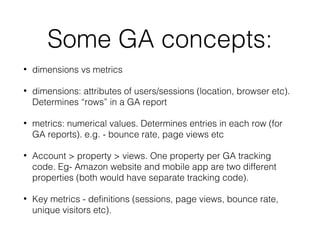
Some GA concepts:
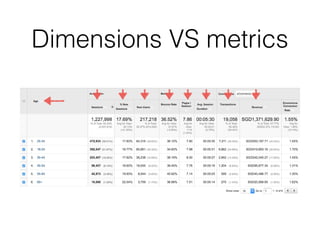
• dimensions vs metrics
• dimensions: attributes of users/sessions (location, browser etc).
Determines “rows” in a GA report
• metrics: numerical values. Determines entries in each row (for
GA reports). e.g. - bounce rate, page views etc
• Account > property > views. One property per GA tracking
code. Eg- Amazon website and mobile app are two different
properties (both would have separate tracking code).
• Key metrics - definitions (sessions, page views, bounce rate,
unique visitors etc).
Dimensions VS metrics
Account > property > view
Set-up preprocessing
• create a shopify account
• install WASP (chrome based). WASP inspector
helps you check the tags fired to Google servers.
Setting up GA (analytics.js)
GA web UI overview
• Standard reports + report dimensions + advanced
filters
• Custom reports
• Playing with graphs
• Segmentation
• Goal setting
• Spreadsheet analysis
Campaign tracking
• www.bonkyshop.com/index.html?utm_campaign=hariraya
• Emails, Social campaigns, banner Ads etc.
• Adding UTM parameters in a URL after “?” helps
you capture campaign details in GA.
Gharofy - case study
www.gharofy.com
www.gharofy.com
Some questions:
• Who is/are a typical user of gharofy?
• What has been their strategy for growing business?
• Suppose you are made the CMO for Gharofy and allocated 100k in marketing
budget. What decisions will you take and why (try to back it up with some data)
• Any suggestions on the content of the pages?
• Highest exit pages?
• How many people went to contact us form?
• What suggestions will you give to the developers for website performance?
• What % of traffic from mobile is direct?
GTM - codeless setup
GTM concepts
• Container and tags: Container lets users fire numerous tags without
changing a single line of code. Container code needs to be added
just after <body> tag on your HTML. Once a container is added to
your website, you can start adding tags from GTM account.
• variables: Variables are entities like - button ID, dropdown ID. These
variables help us set rules which would trigger certain tags. Eg - if the
ID of a button is “search”, fire a “Search” tag. This would let site
owners track the number of times “search” button was clicked.
• triggers: Triggers are rules that determine when a tag should be fired.
Triggers use variables to set rules.
• debugger: GTM provides a debugger which can be used to check in
real time if a particular event got fired.
In case of doubts and
questions, reach out to me:
email: soniprateek@gmail.com

Crash Course on Google Analytics

  • 1.
  • 2.
    Expectations • At theend of this course - you will NOT be a GA Ninja! • You will be aware of the essentials about GA/GTM • You will not become an expert in all possible uses • You will have a decent enough background to explore more
  • 3.
    Agenda • Introduction toGA • GA terms and concepts • Setting up GA • Dashboard and reporting overview (standard+custom reports) • Campaign tracking • Case study - gharofy.com • GTM - codeless set-up (base tags and event tracking)
  • 4.
    History of web“analytics” Event LogsCounters HITS! Daily unique visitors! Non actionable!!
  • 5.
    Why GA ? InGod we trust. All others must bring data. s. It is a shocking habit — destructive to the logical faculty.” - She GA helps to Collect, process, report and analyse data.GA helps to Collect, process, report and analyse data. “War is ninety percent information” - Napoleon a drunken man uses lamp posts – for support rather than for illum
  • 6.
    How GA works? •4 components - data collection, processing, configuration, reporting • collection - website uses JS to send “hits”/ mobile app needs code for each “activity” to be tracked. • processing - transformation of “hits” from Google servers to something useful • configuration - applying settings, filters to raw data (for processing) • reporting - querying processed information.
  • 7.
    How GA works-2 courtesy:developers.google.com
  • 8.
    Some GA concepts: •dimensions vs metrics • dimensions: attributes of users/sessions (location, browser etc). Determines “rows” in a GA report • metrics: numerical values. Determines entries in each row (for GA reports). e.g. - bounce rate, page views etc • Account > property > views. One property per GA tracking code. Eg- Amazon website and mobile app are two different properties (both would have separate tracking code). • Key metrics - definitions (sessions, page views, bounce rate, unique visitors etc).
  • 9.
  • 10.
  • 11.
    Set-up preprocessing • createa shopify account • install WASP (chrome based). WASP inspector helps you check the tags fired to Google servers.
  • 12.
    Setting up GA(analytics.js)
  • 13.
    GA web UIoverview • Standard reports + report dimensions + advanced filters • Custom reports • Playing with graphs • Segmentation • Goal setting • Spreadsheet analysis
  • 14.
    Campaign tracking • www.bonkyshop.com/index.html?utm_campaign=hariraya •Emails, Social campaigns, banner Ads etc. • Adding UTM parameters in a URL after “?” helps you capture campaign details in GA.
  • 15.
    Gharofy - casestudy www.gharofy.com www.gharofy.com
  • 16.
    Some questions: • Whois/are a typical user of gharofy? • What has been their strategy for growing business? • Suppose you are made the CMO for Gharofy and allocated 100k in marketing budget. What decisions will you take and why (try to back it up with some data) • Any suggestions on the content of the pages? • Highest exit pages? • How many people went to contact us form? • What suggestions will you give to the developers for website performance? • What % of traffic from mobile is direct?
  • 17.
  • 18.
    GTM concepts • Containerand tags: Container lets users fire numerous tags without changing a single line of code. Container code needs to be added just after <body> tag on your HTML. Once a container is added to your website, you can start adding tags from GTM account. • variables: Variables are entities like - button ID, dropdown ID. These variables help us set rules which would trigger certain tags. Eg - if the ID of a button is “search”, fire a “Search” tag. This would let site owners track the number of times “search” button was clicked. • triggers: Triggers are rules that determine when a tag should be fired. Triggers use variables to set rules. • debugger: GTM provides a debugger which can be used to check in real time if a particular event got fired.
  • 19.
    In case ofdoubts and questions, reach out to me: email: soniprateek@gmail.com