Google Analytics 101
Jenika Pouliot | @jenika29 | p1ws.com | #smbme
juh-NEEK-ah
• Google Analytics Certified Individual
• Google Analytics User Since January 2008
• Marketing Director at Page One Web Solutions
• Learn More http://p1ws.me/Jenika
What is Google Analytics?
• Free!
• Javascript Snippet
• Easy
• SO MUCH DATA!
Why Do You Need GA?
• Align business goals with website goals
• Data collection
• Understand site usage
• Understand your audience
• Make strategic decisions
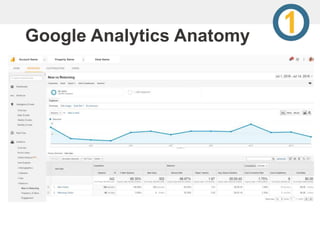
Google Analytics Anatomy
Account Name Property Name View Name
What can you learn:
• Audience Reporting
• Acquisition Reporting
• Behavior Reporting
• Conversion Reporting
• BONUS – Real Time Reporting
• And SO MUCH MORE!
Inside Audience Reports
• Demographics – Age/Gender
• Interests
• Geography – Language/Location
• Behavior
• Technology
• Mobile - Devices
• Custom
• Benchmarking
• Users Flow
Inside Acquisition Reports
• All Traffic – Channel Breakdown
• Adwords / Campaigns
• Search Console – NEW!
• Social
Inside Behavior Reports
• Behavior Flow
• Site Content
• Site Speed
• Events – ties in with event tracking
• Publisher – ties in with Adsense
• Experiments
• In-Page Analytics
Inside Conversion Reports
• Goals
• Ecommerce
• Multi-Channel Funnels
• Attribution
How to install GA:
• Sign up for a free account
• Analytics.Google.com
• Copy JS tracking code
• Paste code before the closing </head> tag on each
page of the website
• Sometimes plugins available to make this even easier
Creating a Dashboard
• The data you care about most
• Blank Canvas
• Starter Dashboard
• Import from Gallery
Creating a Dashboard
• New Users / Users
• Sessions by Geo
• Sessions by Browser
• Avg. Session Duration & Pages/Session
• Bounce Rate
• Revenue
• Goal Completions
Creating a Dashboard
• Add Widget
• Email/Export
• Add to Dashboard (Inside Reports)
Pro Tips
• Filter out your IP
• Set up goals
• Use annotations
• Don’t focus on any one metric
• Allow data to tell stories
Thanks!
• Twitter: @jenika29
• Email: jenika@p1ws.com
• We’re hiring!

Google Analytics 101

  • 1.
    Google Analytics 101 JenikaPouliot | @jenika29 | p1ws.com | #smbme
  • 2.
    juh-NEEK-ah • Google AnalyticsCertified Individual • Google Analytics User Since January 2008 • Marketing Director at Page One Web Solutions • Learn More http://p1ws.me/Jenika
  • 3.
    What is GoogleAnalytics? • Free! • Javascript Snippet • Easy • SO MUCH DATA!
  • 4.
    Why Do YouNeed GA? • Align business goals with website goals • Data collection • Understand site usage • Understand your audience • Make strategic decisions
  • 5.
    Google Analytics Anatomy AccountName Property Name View Name
  • 6.
    What can youlearn: • Audience Reporting • Acquisition Reporting • Behavior Reporting • Conversion Reporting • BONUS – Real Time Reporting • And SO MUCH MORE!
  • 7.
    Inside Audience Reports •Demographics – Age/Gender • Interests • Geography – Language/Location • Behavior • Technology • Mobile - Devices • Custom • Benchmarking • Users Flow
  • 8.
    Inside Acquisition Reports •All Traffic – Channel Breakdown • Adwords / Campaigns • Search Console – NEW! • Social
  • 9.
    Inside Behavior Reports •Behavior Flow • Site Content • Site Speed • Events – ties in with event tracking • Publisher – ties in with Adsense • Experiments • In-Page Analytics
  • 10.
    Inside Conversion Reports •Goals • Ecommerce • Multi-Channel Funnels • Attribution
  • 11.
    How to installGA: • Sign up for a free account • Analytics.Google.com • Copy JS tracking code • Paste code before the closing </head> tag on each page of the website • Sometimes plugins available to make this even easier
  • 12.
    Creating a Dashboard •The data you care about most • Blank Canvas • Starter Dashboard • Import from Gallery
  • 13.
    Creating a Dashboard •New Users / Users • Sessions by Geo • Sessions by Browser • Avg. Session Duration & Pages/Session • Bounce Rate • Revenue • Goal Completions
  • 14.
    Creating a Dashboard •Add Widget • Email/Export • Add to Dashboard (Inside Reports)
  • 15.
    Pro Tips • Filterout your IP • Set up goals • Use annotations • Don’t focus on any one metric • Allow data to tell stories
  • 16.
    Thanks! • Twitter: @jenika29 •Email: jenika@p1ws.com • We’re hiring!