Google  Analytics The Basics
The Rundown
➤  What is Google Analytics
➤  Why we measure?
➤  What to measure?
➤  Getting use to the Interface
➤  Understanding the Metrics
➤  Interpreting Reports
➤  How to track your campaigns
Google Analytics
Google Analytics is a service offered
by Google that generates detailed
statistics about a website's traffic and
traffic sources and measures
conversions and sales. The product is
aimed at marketers as opposed to
webmasters and technologists from
which the industry of web analytics
originally grew.
Universal Analytics
Universal Analytics introduces a set of features
that change the way data is collected and
organized in your Google Analytics account, so
you can get a better understanding of how users
interact with your online content.
•  Connect multiple devices, sessions, and
engagement data with the User ID.
•  Get a new and more flexible tracking code that
lets you collect data from any digital device.
•  Use simplified and more accessible
configuration options.
•  Create custom dimensions & custom metrics to
collect data that's unique to your business.
•  Collect deeper demographic data of your
users.
What To Measure
Define Your Business Goals
➤ Why does your business have a website?
➤ What is its purpose or what problem does it solve
for the business?
Goals By Business Model
Sell	
  Products	
  Ecommerce	
  
Contact	
  Info	
  for	
  Sales	
  Prospects	
  Lead	
  Genera7on	
  
Show	
  Adver7sing	
  to	
  Visitors	
  Content	
  Publisher	
  
Help	
  Customers	
  Solve	
  Problems	
  Support	
  
Drive	
  Awareness	
  &	
  Engagement	
  Branding	
  
Business	
  Objec7ve	
   Goal	
  
Defining Goals in Terms of Website Actions
View	
  a	
  ‘Thank	
  
you’	
  page	
  
Sign	
  up	
  for	
  an	
  
email	
  list	
  
Download	
  a	
  
whitepaper	
  
Make	
  a	
  
purchase	
  
Listen	
  to	
  3	
  
audio	
  tracks	
  
All	
  of	
  these	
  ac7ons	
  are	
  “conversions”	
  
For	
  example,	
  do	
  you	
  want	
  your	
  visitors	
  to…	
  
$ü
Think About Micro Conversions
Goals	
  
There	
  is	
  value	
  here!	
  
These	
  ac7ons	
  lead	
  to	
  your	
  future	
  conversions.	
  
Think About Micro Conversions
Common Micro Conversions
•  Share content via social media,
•  Subscribe to newsletters,
•  Watch video,
•  Play games,
•  Use calculators,
•  Use payment estimators,
•  Live chat,
•  Customize product,
•  View special content,
•  Store locator,
•  Property search.
New	
  visitors	
  
Micro	
  Conversions	
  
Goal	
  Achieved	
  
Keep	
  your	
  customers	
  returning	
  
Getting use
to the Interface
Audience
Acquisition
Behaviour
Conversions
Getting use to the Interface
Audience
The visitors overview is the default screen you’ll see
when you view the report for any of your sites. This
screen gives you the number of visitors, unique
visitors, and pageviews (along with the average
pages/visit).
It also shows you the average time spent on your
site, the bounce rate, and the percentage of new
visits (a pie chart comparing new to returning visitors
is also shown).
Audience Metrics
•  Demographics,
•  Interests,
•  Geo,
•  Behaviour,
•  Technology,
•  Mobile
Acquisition
The Acquisition tab shows you where your traffic is
coming from tells you a lot about the strength of
your SEO, your incoming links, and your AdWords
and other advertising campaigns.
It also shows you where your weaknesses are. Ideally,
you want traffic coming from a variety of sources, so
that your traffic isn’t tied to closely to a single source
that’s beyond your control.
Acquisition Metrics
•  Organic,
•  Direct,
•  Referral,
•  Social,
•  Email
Behavior
On the content overview page, the graph represents
page views rather than visits, so you’ll notice the
numbers used should be a lot larger than on the
visits graph. One thing you’ll notice here is that both
pageviews and unique pageviews are both shown.
Behaviour Metrics
•  Site Content,
•  Site Speed,
•  Site Search,
•  Events,
•  AdSense,
Conversions
Conversions are broken down into two categories:
goals and ecommerce. Goals are fairly easy to set
up. You can have up to four sets of goals, each with
five individual goals.
This can be valuable for tracking different kinds of
actions on your site (like length of time spent,
reaching a specific page, or visiting a certain number
of pages).
Conversion Metrics
•  Goals,
•  Ecommerce,
•  Multi-Channel Funnels,
•  Attribution
Understanding
Metrics
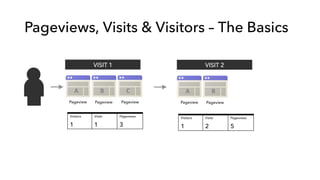
Pageviews, Visits & Visitors
•  A pageview is counted every time a
page on your site loads,
•  A visit (or session) is a period of
inteaction between a browser and a
website. Closing the browser or
staying inactive for 30 minutes ends
the visit.
•  A visitor is uniquely identified by a
Google Analytics visitor Cookie.
Pageviews, Visits & Visitors – The Basics
Visitors Visits Pageviews
1 1 3
Pageview Pageview Pageview
Visitors Visits Pageviews
1 2 5
VISIT 1 VISIT 2
A	
   B	
   C	
  
Pageview Pageview
A	
   B	
  
Pageviews vs Unique Pageviews
Pageviews
6
Unique Pageviews
3
Page A 3 1
Page C 2 1
Page B 1 1
Pageview Pageview
VISIT
A	
   C	
  
Pageview Pageview
B	
   C	
  
Pageview Pageview
C	
   A	
  
Time Metrics – Time on Page
Time on Page is calculated by the timestamps of the page visit.
3:32:25 3:33:40
Time on Page =
1 minute and 15 seconds
Time on Page =
0 seconds
Equation: Page B Time – Page A Time = Time on Page A
Exit	
  
A	
   B	
  
Time Metrics – Time on Site
Time on Site is calculated by the time on each page.
3:32:25 3:33:40
Time on Page =
1 minute and 15 seconds
Time on Page =
1 minute and 10 seconds
This visit had a time of 2 Minutes and 25 Seconds.
Page A (01:15) + Page B (01:10) = Time of Visit (02:25)
3:34:50
Time on Page =
0 seconds
Exit	
  
A	
   B	
   C	
  
Traffic Sources
Direct Traffic
Visitor arrives directly
There are a few misconceptions
around what is treated as a direct
visit. A direct visit can be
attributed from a visitor:
-  Typing the URL into the
address bar,
-  Visiting the site via a
bookmark,
-  Ctrl-clicking a link (manually
opening a new window)
-  Visiting from a HTTPS
webpage,
-  Visit from an email without a
tracked link,
-  Visits from shortened URLs
-  Visits from a document
Referral Traffic
Visitor arrives via
another site.
Search Traffic
Visitor arrives via a
search engine
How To Track
Your Campaigns
Link Tagging
Link	
  tagging	
  is	
  the	
  process	
  of	
  adding	
  marke7ng	
  informa7on	
  to	
  
the	
  URLs	
  in	
  your	
  marke7ng	
  material.	
  
Tags	
   Meaning	
  
Campaign	
   Name	
  of	
  your	
  campaign	
  
Medium	
   The	
  channel	
  
Source	
   More	
  informa7on	
  about	
  the	
  channel	
  
Keyword	
   Keyword	
  from	
  search	
  
Content	
   Ad	
  variant	
  
How The Tag Is Displayed In Your URL
Example of tagged URL, within an Email
Campaign Tag Query Parameter
Campaign Utm_campaign
Medium Utm_medium
Source Utm_source
Keyword Utm_term
Content Utm_content
http://www.cheproximity.com.au/?
utm_source=newsletter&utm_medium=email&utm_content=text&ut
m_campaign=april2014
Event Tracking
Events are user interactions with content that can be tracked independently from a web
page or a screen load.
_gaq.push([‘_trackEvent’, ’Category’, ’Action’, ’Opt Label’, Opt Value’])‘_trackEvent’
’Category’ – the category that you want to show up, use something broad like external links, social
links, images, videos, or form.
‘Action’ – This is the action that occurred; something the user did that you are tracking. For the
‘Action’ property use clicked, submissions, copy or whatever you are tracking from the user.
‘Optional Label’ – This is an optional field you don’t need anything, but when you start tracking a lot
of stuff you want to be able to segment it out. For this property think of it like a specific category for
example, facebook, box 2, or headline picture.
Optional Value – This is a number value for the thing you are tracking. There is no need to put
quotes around the numerical value because its a number.
Google Tag Manager
Google Tag Manager lets you add or update your website tags and mobile applications,
easily and for free, whenever you want, without bugging the IT folks.
End.

Google Analytics for Dummies

  • 1.
  • 2.
    The Rundown ➤  Whatis Google Analytics ➤  Why we measure? ➤  What to measure? ➤  Getting use to the Interface ➤  Understanding the Metrics ➤  Interpreting Reports ➤  How to track your campaigns
  • 3.
    Google Analytics Google Analyticsis a service offered by Google that generates detailed statistics about a website's traffic and traffic sources and measures conversions and sales. The product is aimed at marketers as opposed to webmasters and technologists from which the industry of web analytics originally grew.
  • 4.
    Universal Analytics Universal Analyticsintroduces a set of features that change the way data is collected and organized in your Google Analytics account, so you can get a better understanding of how users interact with your online content. •  Connect multiple devices, sessions, and engagement data with the User ID. •  Get a new and more flexible tracking code that lets you collect data from any digital device. •  Use simplified and more accessible configuration options. •  Create custom dimensions & custom metrics to collect data that's unique to your business. •  Collect deeper demographic data of your users.
  • 5.
  • 6.
    Define Your BusinessGoals ➤ Why does your business have a website? ➤ What is its purpose or what problem does it solve for the business?
  • 7.
    Goals By BusinessModel Sell  Products  Ecommerce   Contact  Info  for  Sales  Prospects  Lead  Genera7on   Show  Adver7sing  to  Visitors  Content  Publisher   Help  Customers  Solve  Problems  Support   Drive  Awareness  &  Engagement  Branding   Business  Objec7ve   Goal  
  • 8.
    Defining Goals inTerms of Website Actions View  a  ‘Thank   you’  page   Sign  up  for  an   email  list   Download  a   whitepaper   Make  a   purchase   Listen  to  3   audio  tracks   All  of  these  ac7ons  are  “conversions”   For  example,  do  you  want  your  visitors  to…   $ü
  • 9.
    Think About MicroConversions Goals   There  is  value  here!   These  ac7ons  lead  to  your  future  conversions.  
  • 10.
    Think About MicroConversions Common Micro Conversions •  Share content via social media, •  Subscribe to newsletters, •  Watch video, •  Play games, •  Use calculators, •  Use payment estimators, •  Live chat, •  Customize product, •  View special content, •  Store locator, •  Property search. New  visitors   Micro  Conversions   Goal  Achieved   Keep  your  customers  returning  
  • 11.
  • 12.
  • 13.
    Audience The visitors overviewis the default screen you’ll see when you view the report for any of your sites. This screen gives you the number of visitors, unique visitors, and pageviews (along with the average pages/visit). It also shows you the average time spent on your site, the bounce rate, and the percentage of new visits (a pie chart comparing new to returning visitors is also shown). Audience Metrics •  Demographics, •  Interests, •  Geo, •  Behaviour, •  Technology, •  Mobile
  • 14.
    Acquisition The Acquisition tabshows you where your traffic is coming from tells you a lot about the strength of your SEO, your incoming links, and your AdWords and other advertising campaigns. It also shows you where your weaknesses are. Ideally, you want traffic coming from a variety of sources, so that your traffic isn’t tied to closely to a single source that’s beyond your control. Acquisition Metrics •  Organic, •  Direct, •  Referral, •  Social, •  Email
  • 15.
    Behavior On the contentoverview page, the graph represents page views rather than visits, so you’ll notice the numbers used should be a lot larger than on the visits graph. One thing you’ll notice here is that both pageviews and unique pageviews are both shown. Behaviour Metrics •  Site Content, •  Site Speed, •  Site Search, •  Events, •  AdSense,
  • 16.
    Conversions Conversions are brokendown into two categories: goals and ecommerce. Goals are fairly easy to set up. You can have up to four sets of goals, each with five individual goals. This can be valuable for tracking different kinds of actions on your site (like length of time spent, reaching a specific page, or visiting a certain number of pages). Conversion Metrics •  Goals, •  Ecommerce, •  Multi-Channel Funnels, •  Attribution
  • 17.
  • 18.
    Pageviews, Visits &Visitors •  A pageview is counted every time a page on your site loads, •  A visit (or session) is a period of inteaction between a browser and a website. Closing the browser or staying inactive for 30 minutes ends the visit. •  A visitor is uniquely identified by a Google Analytics visitor Cookie.
  • 19.
    Pageviews, Visits &Visitors – The Basics Visitors Visits Pageviews 1 1 3 Pageview Pageview Pageview Visitors Visits Pageviews 1 2 5 VISIT 1 VISIT 2 A   B   C   Pageview Pageview A   B  
  • 20.
    Pageviews vs UniquePageviews Pageviews 6 Unique Pageviews 3 Page A 3 1 Page C 2 1 Page B 1 1 Pageview Pageview VISIT A   C   Pageview Pageview B   C   Pageview Pageview C   A  
  • 21.
    Time Metrics –Time on Page Time on Page is calculated by the timestamps of the page visit. 3:32:25 3:33:40 Time on Page = 1 minute and 15 seconds Time on Page = 0 seconds Equation: Page B Time – Page A Time = Time on Page A Exit   A   B  
  • 22.
    Time Metrics –Time on Site Time on Site is calculated by the time on each page. 3:32:25 3:33:40 Time on Page = 1 minute and 15 seconds Time on Page = 1 minute and 10 seconds This visit had a time of 2 Minutes and 25 Seconds. Page A (01:15) + Page B (01:10) = Time of Visit (02:25) 3:34:50 Time on Page = 0 seconds Exit   A   B   C  
  • 23.
    Traffic Sources Direct Traffic Visitorarrives directly There are a few misconceptions around what is treated as a direct visit. A direct visit can be attributed from a visitor: -  Typing the URL into the address bar, -  Visiting the site via a bookmark, -  Ctrl-clicking a link (manually opening a new window) -  Visiting from a HTTPS webpage, -  Visit from an email without a tracked link, -  Visits from shortened URLs -  Visits from a document Referral Traffic Visitor arrives via another site. Search Traffic Visitor arrives via a search engine
  • 24.
  • 25.
    Link Tagging Link  tagging  is  the  process  of  adding  marke7ng  informa7on  to   the  URLs  in  your  marke7ng  material.   Tags   Meaning   Campaign   Name  of  your  campaign   Medium   The  channel   Source   More  informa7on  about  the  channel   Keyword   Keyword  from  search   Content   Ad  variant  
  • 26.
    How The TagIs Displayed In Your URL Example of tagged URL, within an Email Campaign Tag Query Parameter Campaign Utm_campaign Medium Utm_medium Source Utm_source Keyword Utm_term Content Utm_content http://www.cheproximity.com.au/? utm_source=newsletter&utm_medium=email&utm_content=text&ut m_campaign=april2014
  • 27.
    Event Tracking Events areuser interactions with content that can be tracked independently from a web page or a screen load. _gaq.push([‘_trackEvent’, ’Category’, ’Action’, ’Opt Label’, Opt Value’])‘_trackEvent’ ’Category’ – the category that you want to show up, use something broad like external links, social links, images, videos, or form. ‘Action’ – This is the action that occurred; something the user did that you are tracking. For the ‘Action’ property use clicked, submissions, copy or whatever you are tracking from the user. ‘Optional Label’ – This is an optional field you don’t need anything, but when you start tracking a lot of stuff you want to be able to segment it out. For this property think of it like a specific category for example, facebook, box 2, or headline picture. Optional Value – This is a number value for the thing you are tracking. There is no need to put quotes around the numerical value because its a number.
  • 28.
    Google Tag Manager GoogleTag Manager lets you add or update your website tags and mobile applications, easily and for free, whenever you want, without bugging the IT folks.
  • 29.

Editor's Notes

  • #14  This gives you a good, high-level overview of how your site is doing. High pages/visit, high average time on your site, and a low bounce rate give you an idea of how useful visitors are finding your site once they arrive.
  • #15  For example, if 80% of your traffic comes from organic Google results, and suddenly Google changes their algorithm and your site ends up on page 10 instead of the top of page 1, you’ll see a huge drop in traffic. But if only 40% of your traffic is coming from the same source, it’s easier to compensate (in this case you might increase your AdWords spending to compensate for a lack of presence in organic results).
  • #17 There are four different kinds of goals. Some are simply pages on your site you want visitors to reach. This could be a thank you page after someone has placed an order or signed up. It could be a particular product page. Or it could be something like your contact page or a request for information. You can also set a goal for a length of time spent on your site, the number of pages/visit, or an event.