Google analytics
By D Balaji
Agenda
• What is GA
• Why do we need GA
• How it works
• Applications
• Advanced level ones
What is Google analytics
• It’s a free application from Google to measure webpage traffic
• Analytics generate metrics
• Metrics help businesses to measure things
• Good measurements can help you get better results
• Analytics collects data from client side through javascript.
• It also makes the data collected into something easily understandable like
reports
Other ways to collect data from client side
• Cookies
• Page counters
• On the server side
• Log analysers
• Stack reporting
Types of data in analytics
• Real time
• Helps you be reactive
• Like heavy traffic etc
• Historical
• Helps you be proactive
• Better planning etc
History of Google analytics
• Till 2005, Google priced its analytics at 200$
• It buys a company called Urchin
• Later the product was released for free
• It had 0.25 million new registrations in 2 days
Pre-requisites
• Basic HTML, JS
• Google account
• Sign up for analytics by giving your website details
• Got time or serious business user, read terms of data use
How Google identifies your site
• You need to copy and paste the Javascript code on every page of
your application
• The JS code has a unique key that is tied to your website
• Once the script is set, Google starts tracking each visitor
anonymously
• Its advisable to put Google analytics in head section of the page.
• If you put GA code at the bottom of the page, some visitors may
not wait for the page to load. They may exit even before analytics
loads
Topics to discuss
• I have 2 websites, should I have one google analytics account or
two?
• Other than page load, can I capture events like mouse clicks?
• I have a team, how can I give google analytics access to them?
• Is the tracking information on GA up to date?
Understanding terms/Jargon
• Visitor – any human/crawler visiting the website from a standard
IP address.
• Visits – interaction by a user on a website
• Unique visitor – An unique individual visiting our site
• New visitor – first ever visit to the website
• Repeat visitor – activity containing 2 or more visits in the duration
mentioned
• Return visitor – Any one who has visited to site earlier in any time
frame
Contd
• Visit duration – how long visitors spend time on the site
• Bounce – an ultra short visit is a bounce. User has not interacted
with the site
• Keywords – terms used by the visitors to find your website. Types
of keywords
• Paid e.g. google ads
• Organic e.g SEO
• Funnel – path taken by user to reach the goal
Traffic sources
• Direct traffic – people who type URL in the browser
• In this case, the referrer shall be ‘no referrer’
• If user clicks on a link from a website ‘medium.com’, then the
referrer shall be set as ‘medium.com’
• Organic or search engine
Metrics on ecommerce site
• Site usage
• Ecommerce overview
• Goal conversion rate
• Average order value
• Products
• Transactions
Metrics on static site
• Site usage
• Top content
• New vs Returning
• Bounce rate
• Depth of visit
• Map overlay
Custom reports
• Custom reports is a convergence of 2 different types of data
• Dimensions
• Metrics
• Dimensions
• They are usually attributes of a visitor
• Text based measurements
• For example, if interested in tracking users by city. Then city is a dimension
• Metrics
• Measurement of attributes, i.e. numbers
Filters
• Filters help us in selectively removing a section of the user data.
E.g. Visitors from the development team can be filtered by their
IP address
• Types of filters
• Standard filters
• Custom via regex or pattern matching
• Some filters can also help you include information
• Filters can be applied on multiple domains at the same time via
filter manager
• Filters are applied in an order in which they were applied
Goals
• Nobody tracks website metrics without a reason. That reason is
based on their goal.
• Management speak/Lingo
• Objectives – big picture, how the product should perform or fit into. They
are the long term goals
• Goals – short term aims, e.g. increase sales by 20% every year
• Specifics – what you want to accomplish. That’s the result of the funnel.
More people on the order confirmation page
Goal information
• Goal status – on/off
• Match type
• URL
• Header match
• Regex
• Goal URL
• Goal Name
• Is URL case sensitive
• Goal value
• Funnel
Funnel
• Mapping user behaviour or flow
• Define landing page
• Second or more steps. Think about newsletter example. Filling form and
activating email are the steps
• Final step – confirmation page
• Funnels should cover as many steps possible so we get accurate
data
• Non standard funnels is one where all the steps are not a part of
the same website
Other analytics vendors
• Omniture site catalyst
• Coremetrics
• Webtrends
• ClickTracks
• Unica netinsight
Dimensions of campaign tracking
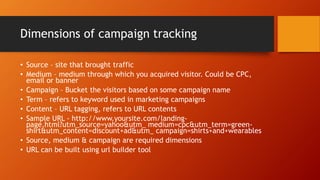
• Source – site that brought traffic
• Medium – medium through which you acquired visitor. Could be CPC,
email or banner
• Campaign – Bucket the visitors based on some campaign name
• Term – refers to keyword used in marketing campaigns
• Content – URL tagging, refers to URL contents
• Sample URL - http://www.yoursite.com/landing-
page.html?utm_source=yahoo&utm_ medium=cpc&utm_term=green-
shirt&utm_content=discount+ad&utm_ campaign=shirts+and+wearables
• Source, medium & campaign are required dimensions
• URL can be built using url builder tool
AdWords related jargon
• RPC – Revenue per click
• CPC – Cost per click
• ROI – Return of investment
• Margin –Usually a %. Its difference between expenditure on ads and
income divided by revenue.
• Visits and clicks – if user visits a page from ad, it’s a click. If user had
bookmarked a link and visits later, then it’s a visit.
• GCLid – Google click identifier used to pass adwords information to
analytics
• CTR click through rate
Tracking subdomains and multiple domain
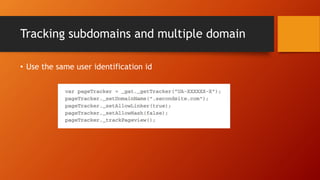
• Use the same user identification id
Reports
• We have setup google analytics to collect data. We will present
the collected data in the form of reports
• Reports show us what is working correctly and what is not
• Popular reports
• Visitor
• Traffic sources etc
• Overview review gives us a quick version of the important data
• GA uses cookies to track visitors on a site. When user clears his
cookies, then he is counted as a new user
Benchmarking
• As people we compare things, we say his car is not a Ferrari. We
were able to do this because we know his car and Ferrari
• Same with websites, if we share our data with google. Then google
gives the industry benchmark to compare with
• To enable this feature we need to turn on a feature to share data
with google
• Once enabled it takes upto 2 weeks to get enough data.
• Recency – how frequently a visitor returns to a site
Event tracking
• Helps to track user activity
• Sample pageTracker._trackEvent(“Videos”, “Play Button”,
“Transformers Trailer”, “37”);
• Tracking affects bounce rate calculation
• Google can track 500 events per session
Data hierarchy
• Account – highest level access
• Property – source of data could be an app or site
• View – specific set of data from property
Types of access
• Read & Analyse
• Collaborate
• Edit
• Manage users
Jargon & rules
• Hit – data about a specific type of interaction sent to GA
• Session – collection of hits called session
• Dimension – some attribute that describes data
• Report – data presented to user
• Personal identification like names, emails etc should not be
collected as part of GA
• Property id – the number which identifies your GA account
Placement of GA code
• Put it in the head section or beginning of the body
• Its async so it would not cause any blocking
• Google analytics generally uses a cookie to track users
• Cookie name would be _ga
• If you don’t want cookie based solution then provide client id
everytime
Goals in GA
• Goals are a type of user interaction which we want to consider as
a conversion
• Types of goals
• Destination
• Session duration
• Pages per session
• Event goals
Next part to be contd.

Google analytics concepts introduction

  • 1.
  • 2.
    Agenda • What isGA • Why do we need GA • How it works • Applications • Advanced level ones
  • 3.
    What is Googleanalytics • It’s a free application from Google to measure webpage traffic • Analytics generate metrics • Metrics help businesses to measure things • Good measurements can help you get better results • Analytics collects data from client side through javascript. • It also makes the data collected into something easily understandable like reports
  • 4.
    Other ways tocollect data from client side • Cookies • Page counters • On the server side • Log analysers • Stack reporting
  • 5.
    Types of datain analytics • Real time • Helps you be reactive • Like heavy traffic etc • Historical • Helps you be proactive • Better planning etc
  • 6.
    History of Googleanalytics • Till 2005, Google priced its analytics at 200$ • It buys a company called Urchin • Later the product was released for free • It had 0.25 million new registrations in 2 days
  • 7.
    Pre-requisites • Basic HTML,JS • Google account • Sign up for analytics by giving your website details • Got time or serious business user, read terms of data use
  • 8.
    How Google identifiesyour site • You need to copy and paste the Javascript code on every page of your application • The JS code has a unique key that is tied to your website • Once the script is set, Google starts tracking each visitor anonymously • Its advisable to put Google analytics in head section of the page. • If you put GA code at the bottom of the page, some visitors may not wait for the page to load. They may exit even before analytics loads
  • 9.
    Topics to discuss •I have 2 websites, should I have one google analytics account or two? • Other than page load, can I capture events like mouse clicks? • I have a team, how can I give google analytics access to them? • Is the tracking information on GA up to date?
  • 10.
    Understanding terms/Jargon • Visitor– any human/crawler visiting the website from a standard IP address. • Visits – interaction by a user on a website • Unique visitor – An unique individual visiting our site • New visitor – first ever visit to the website • Repeat visitor – activity containing 2 or more visits in the duration mentioned • Return visitor – Any one who has visited to site earlier in any time frame
  • 11.
    Contd • Visit duration– how long visitors spend time on the site • Bounce – an ultra short visit is a bounce. User has not interacted with the site • Keywords – terms used by the visitors to find your website. Types of keywords • Paid e.g. google ads • Organic e.g SEO • Funnel – path taken by user to reach the goal
  • 12.
    Traffic sources • Directtraffic – people who type URL in the browser • In this case, the referrer shall be ‘no referrer’ • If user clicks on a link from a website ‘medium.com’, then the referrer shall be set as ‘medium.com’ • Organic or search engine
  • 13.
    Metrics on ecommercesite • Site usage • Ecommerce overview • Goal conversion rate • Average order value • Products • Transactions
  • 14.
    Metrics on staticsite • Site usage • Top content • New vs Returning • Bounce rate • Depth of visit • Map overlay
  • 15.
    Custom reports • Customreports is a convergence of 2 different types of data • Dimensions • Metrics • Dimensions • They are usually attributes of a visitor • Text based measurements • For example, if interested in tracking users by city. Then city is a dimension • Metrics • Measurement of attributes, i.e. numbers
  • 16.
    Filters • Filters helpus in selectively removing a section of the user data. E.g. Visitors from the development team can be filtered by their IP address • Types of filters • Standard filters • Custom via regex or pattern matching • Some filters can also help you include information • Filters can be applied on multiple domains at the same time via filter manager • Filters are applied in an order in which they were applied
  • 17.
    Goals • Nobody trackswebsite metrics without a reason. That reason is based on their goal. • Management speak/Lingo • Objectives – big picture, how the product should perform or fit into. They are the long term goals • Goals – short term aims, e.g. increase sales by 20% every year • Specifics – what you want to accomplish. That’s the result of the funnel. More people on the order confirmation page
  • 18.
    Goal information • Goalstatus – on/off • Match type • URL • Header match • Regex • Goal URL • Goal Name • Is URL case sensitive • Goal value • Funnel
  • 19.
    Funnel • Mapping userbehaviour or flow • Define landing page • Second or more steps. Think about newsletter example. Filling form and activating email are the steps • Final step – confirmation page • Funnels should cover as many steps possible so we get accurate data • Non standard funnels is one where all the steps are not a part of the same website
  • 20.
    Other analytics vendors •Omniture site catalyst • Coremetrics • Webtrends • ClickTracks • Unica netinsight
  • 21.
    Dimensions of campaigntracking • Source – site that brought traffic • Medium – medium through which you acquired visitor. Could be CPC, email or banner • Campaign – Bucket the visitors based on some campaign name • Term – refers to keyword used in marketing campaigns • Content – URL tagging, refers to URL contents • Sample URL - http://www.yoursite.com/landing- page.html?utm_source=yahoo&utm_ medium=cpc&utm_term=green- shirt&utm_content=discount+ad&utm_ campaign=shirts+and+wearables • Source, medium & campaign are required dimensions • URL can be built using url builder tool
  • 22.
    AdWords related jargon •RPC – Revenue per click • CPC – Cost per click • ROI – Return of investment • Margin –Usually a %. Its difference between expenditure on ads and income divided by revenue. • Visits and clicks – if user visits a page from ad, it’s a click. If user had bookmarked a link and visits later, then it’s a visit. • GCLid – Google click identifier used to pass adwords information to analytics • CTR click through rate
  • 23.
    Tracking subdomains andmultiple domain • Use the same user identification id
  • 24.
    Reports • We havesetup google analytics to collect data. We will present the collected data in the form of reports • Reports show us what is working correctly and what is not • Popular reports • Visitor • Traffic sources etc • Overview review gives us a quick version of the important data • GA uses cookies to track visitors on a site. When user clears his cookies, then he is counted as a new user
  • 25.
    Benchmarking • As peoplewe compare things, we say his car is not a Ferrari. We were able to do this because we know his car and Ferrari • Same with websites, if we share our data with google. Then google gives the industry benchmark to compare with • To enable this feature we need to turn on a feature to share data with google • Once enabled it takes upto 2 weeks to get enough data. • Recency – how frequently a visitor returns to a site
  • 26.
    Event tracking • Helpsto track user activity • Sample pageTracker._trackEvent(“Videos”, “Play Button”, “Transformers Trailer”, “37”); • Tracking affects bounce rate calculation • Google can track 500 events per session
  • 27.
    Data hierarchy • Account– highest level access • Property – source of data could be an app or site • View – specific set of data from property
  • 28.
    Types of access •Read & Analyse • Collaborate • Edit • Manage users
  • 29.
    Jargon & rules •Hit – data about a specific type of interaction sent to GA • Session – collection of hits called session • Dimension – some attribute that describes data • Report – data presented to user • Personal identification like names, emails etc should not be collected as part of GA • Property id – the number which identifies your GA account
  • 30.
    Placement of GAcode • Put it in the head section or beginning of the body • Its async so it would not cause any blocking • Google analytics generally uses a cookie to track users • Cookie name would be _ga • If you don’t want cookie based solution then provide client id everytime
  • 31.
    Goals in GA •Goals are a type of user interaction which we want to consider as a conversion • Types of goals • Destination • Session duration • Pages per session • Event goals
  • 32.
    Next part tobe contd.