An introduction to Google Analytics.
Tracking and understanding user behaviour on your
website. Julian Erbsloeh – Head of Insight at Fresh Egg
• Web analytics is the measurement, collection, analysis and
reporting of web data for purposes of improving website
performance and understanding and optimising the user
journey.
• Google Analytics (GA) is just one of many analytics and
tracking platforms on the web. It is a good platform and for
most users it’s free to use.
• Google Tag Manager is a free tag management container
which can streamline the implementation of various tracking
tags including Google Analytics
Web analytics and analytics platforms.
• Visits to your website (aka Sessions or traffic)
• User demographics (age, gender and general interests)
• Traffic sources – where visitors come from
• User journeys and where they fail
• Performance of marketing campaigns
• Form completions and check-out funnels
• Sales performance
• Cross-channel performance
• Device usage
• Website performance (load times etc)
• …
Google Analytics – what can we track?
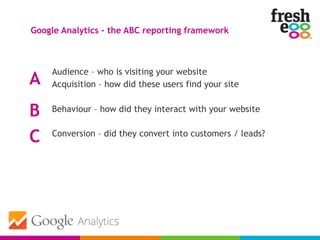
Audience – who is visiting your website
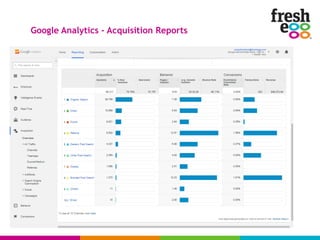
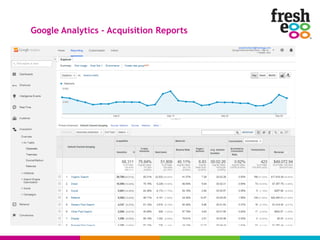
Acquisition – how did these users find your site
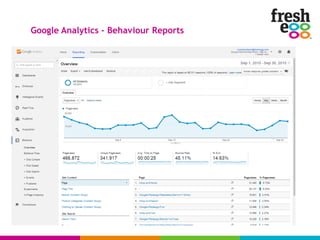
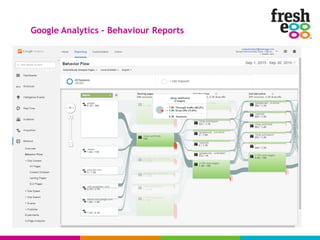
Behaviour – how did they interact with your website
Conversion – did they convert into customers / leads?
Google Analytics – the ABC reporting framework
A
B
C
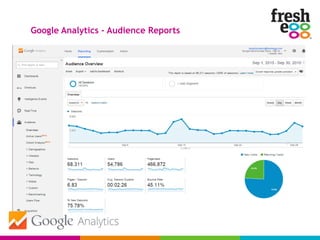
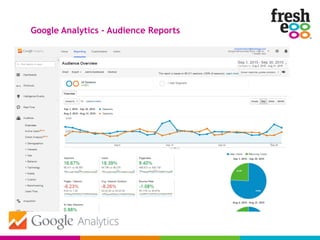
Google Analytics – Audience Reports
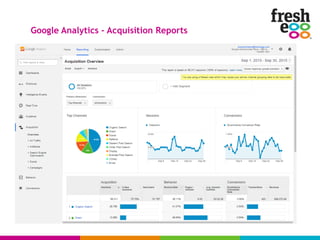
Google Analytics – Acquisition Reports
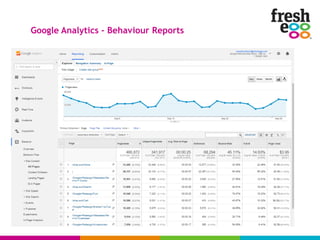
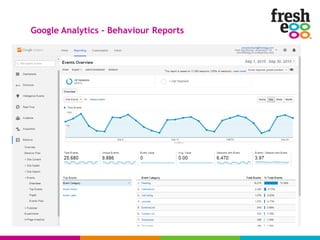
Google Analytics – Behaviour Reports
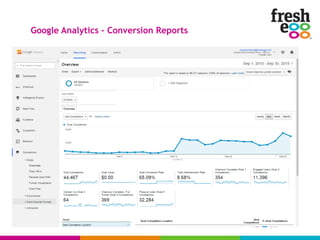
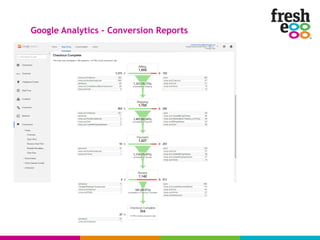
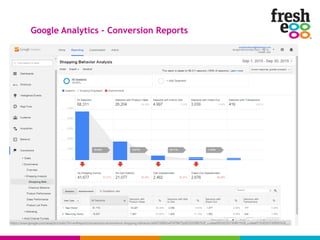
Google Analytics – Conversion Reports
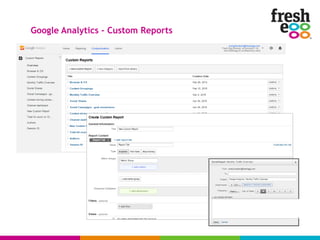
Google Analytics – Custom Reports
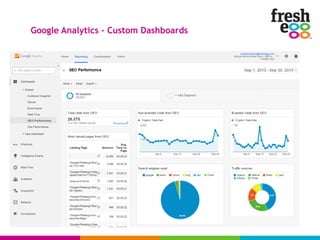
Google Analytics – Custom Dashboards
Ok I am sold, how do I get started
with Google Analytics?
The asynchronous GA tracking code:
<script>
(function(i,s,o,g,r,a,m){i['GoogleAnalyticsObject']=r;i[r]=i[r]||function(){
(i[r].q=i[r].q||[]).push(arguments)},i[r].l=1*new Date();a=s.createElement(o),
m=s.getElementsByTagName(o)
[0];a.async=1;a.src=g;m.parentNode.insertBefore(a,m)
})(window,document,'script','//www.google-analytics.com/analytics.js','ga');
ga('create', 'UA-5451XXXX-1', 'auto');
ga('send', 'pageview');
</script>
This code needs to be placed on every page of your website, just
before the closing </head> tag.
Getting started – implementing Google Analytics on your site
developer support needed
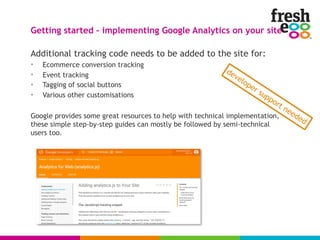
Additional tracking code needs to be added to the site for:
• Ecommerce conversion tracking
• Event tracking
• Tagging of social buttons
• Various other customisations
Google provides some great resources to help with technical implementation,
these simple step-by-step guides can mostly be followed by semi-technical
users too.
Getting started – implementing Google Analytics on your site
developer support needed
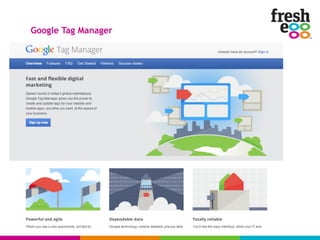
Google Tag Manager
Google Tag Manager
One code snippet on every page through which all tracking and
even third party marketing tags can be set up.
<!-- Google Tag Manager -->
<noscript><iframe src="//www.googletagmanager.com/ns.html?id=GTM-
TT6KB5"
height="0" width="0" style="display:none;visibility:hidden"></iframe></
noscript>
<script>(function(w,d,s,l,i){w[l]=w[l]||[];w[l].push({'gtm.start':
new Date().getTime(),event:'gtm.js'});var f=d.getElementsByTagName(s)[0],
j=d.createElement(s),dl=l!='dataLayer'?'&l='+l:'';j.async=true;j.src=
'//www.googletagmanager.com/gtm.js?id='+i
+dl;f.parentNode.insertBefore(j,f);
})(window,document,'script','dataLayer','GTM-TT6KB5');</script>
<!-- End Google Tag Manager -->
The only other code you will ever need to implement directly in your site is e-
commerce conversion code.
developer support needed
• Self-referrals – referrals from your own website highlight an issue with the
tracking code implementation, often related to subdomains or missing
tracking code. Check the referrals report for entries of your own site.
• Traffic from bots and spam referrers – check your referrers reports for
sites that should not be there, names frequently include terms like SEO,
poker, buttons and others. Also check service providers report for entries
with 100% new traffic and poor engagement metrics.
• Traffic from unwanted websites, test servers and bots can also be found
in the hostname report. A filter can be set up to exclude this kind of spam.
• Dated tracking code placed in footer of each page instead of the head,
this impacts how reliably the tracking code fires each time the page loads.
• No goal or event tracking – how can you judge the performance of your
website when you don’t know if users do what you want them to do?
5 common issues with Google Analytics set-ups
Google Analytics workshops at Fresh Egg offices in Worthing:
Coming soon!
Content:
• Introduction to Google Analytics
• Creation of a measurement framework for your business
• Building custom reports and dashboards
• Extracting actionable insight from data
• Advanced features and tracking
• Business reporting
If you are interested please speak to Tina Tilly
Want to learn more about Google Analytics?
Introduction to web analytics and the Google analytics platform pdf

Introduction to web analytics and the Google analytics platform pdf

  • 1.
    An introduction toGoogle Analytics. Tracking and understanding user behaviour on your website. Julian Erbsloeh – Head of Insight at Fresh Egg
  • 2.
    • Web analytics isthe measurement, collection, analysis and reporting of web data for purposes of improving website performance and understanding and optimising the user journey. • Google Analytics (GA) is just one of many analytics and tracking platforms on the web. It is a good platform and for most users it’s free to use. • Google Tag Manager is a free tag management container which can streamline the implementation of various tracking tags including Google Analytics Web analytics and analytics platforms.
  • 3.
    • Visits toyour website (aka Sessions or traffic) • User demographics (age, gender and general interests) • Traffic sources – where visitors come from • User journeys and where they fail • Performance of marketing campaigns • Form completions and check-out funnels • Sales performance • Cross-channel performance • Device usage • Website performance (load times etc) • … Google Analytics – what can we track?
  • 4.
    Audience – whois visiting your website Acquisition – how did these users find your site Behaviour – how did they interact with your website Conversion – did they convert into customers / leads? Google Analytics – the ABC reporting framework A B C
  • 5.
    Google Analytics –Audience Reports
  • 6.
    Google Analytics –Audience Reports
  • 7.
    Google Analytics –Acquisition Reports
  • 8.
    Google Analytics –Acquisition Reports
  • 9.
    Google Analytics –Acquisition Reports
  • 10.
    Google Analytics –Behaviour Reports
  • 11.
    Google Analytics –Behaviour Reports
  • 12.
    Google Analytics –Behaviour Reports
  • 13.
    Google Analytics –Behaviour Reports
  • 14.
    Google Analytics –Conversion Reports
  • 15.
    Google Analytics –Conversion Reports
  • 16.
    Google Analytics –Conversion Reports
  • 17.
    Google Analytics –Custom Reports
  • 18.
    Google Analytics –Custom Dashboards
  • 19.
    Ok I amsold, how do I get started with Google Analytics?
  • 20.
    The asynchronous GAtracking code: <script> (function(i,s,o,g,r,a,m){i['GoogleAnalyticsObject']=r;i[r]=i[r]||function(){ (i[r].q=i[r].q||[]).push(arguments)},i[r].l=1*new Date();a=s.createElement(o), m=s.getElementsByTagName(o) [0];a.async=1;a.src=g;m.parentNode.insertBefore(a,m) })(window,document,'script','//www.google-analytics.com/analytics.js','ga'); ga('create', 'UA-5451XXXX-1', 'auto'); ga('send', 'pageview'); </script> This code needs to be placed on every page of your website, just before the closing </head> tag. Getting started – implementing Google Analytics on your site developer support needed
  • 21.
    Additional tracking codeneeds to be added to the site for: • Ecommerce conversion tracking • Event tracking • Tagging of social buttons • Various other customisations Google provides some great resources to help with technical implementation, these simple step-by-step guides can mostly be followed by semi-technical users too. Getting started – implementing Google Analytics on your site developer support needed
  • 22.
  • 23.
    Google Tag Manager Onecode snippet on every page through which all tracking and even third party marketing tags can be set up. <!-- Google Tag Manager --> <noscript><iframe src="//www.googletagmanager.com/ns.html?id=GTM- TT6KB5" height="0" width="0" style="display:none;visibility:hidden"></iframe></ noscript> <script>(function(w,d,s,l,i){w[l]=w[l]||[];w[l].push({'gtm.start': new Date().getTime(),event:'gtm.js'});var f=d.getElementsByTagName(s)[0], j=d.createElement(s),dl=l!='dataLayer'?'&l='+l:'';j.async=true;j.src= '//www.googletagmanager.com/gtm.js?id='+i +dl;f.parentNode.insertBefore(j,f); })(window,document,'script','dataLayer','GTM-TT6KB5');</script> <!-- End Google Tag Manager --> The only other code you will ever need to implement directly in your site is e- commerce conversion code. developer support needed
  • 24.
    • Self-referrals –referrals from your own website highlight an issue with the tracking code implementation, often related to subdomains or missing tracking code. Check the referrals report for entries of your own site. • Traffic from bots and spam referrers – check your referrers reports for sites that should not be there, names frequently include terms like SEO, poker, buttons and others. Also check service providers report for entries with 100% new traffic and poor engagement metrics. • Traffic from unwanted websites, test servers and bots can also be found in the hostname report. A filter can be set up to exclude this kind of spam. • Dated tracking code placed in footer of each page instead of the head, this impacts how reliably the tracking code fires each time the page loads. • No goal or event tracking – how can you judge the performance of your website when you don’t know if users do what you want them to do? 5 common issues with Google Analytics set-ups
  • 25.
    Google Analytics workshopsat Fresh Egg offices in Worthing: Coming soon! Content: • Introduction to Google Analytics • Creation of a measurement framework for your business • Building custom reports and dashboards • Extracting actionable insight from data • Advanced features and tracking • Business reporting If you are interested please speak to Tina Tilly Want to learn more about Google Analytics?