Digital Marketing Presentation
Google Analytics
What is Google Analytics
Google Analytics is a web analytics service that provides
statistics and basic analytical tools for search engine
optimization (SEO) and marketing purposes.
It is used to track website performance and collect visitor
insights.
It can help organizations determine top sources of user traffic,
gauge the success of their marketing activities and campaigns,
track goal completions (such as purchases, adding products to
carts), discover patterns and trends in user engagement and
obtain other visitor information such as demographics.
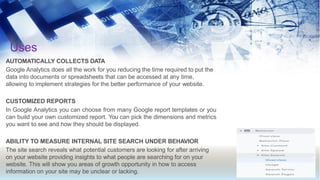
Uses
AUTOMATICALLY COLLECTS DATA
Google Analytics does all the work for you reducing the time required to put the
data into documents or spreadsheets that can be accessed at any time,
allowing to implement strategies for the better performance of your website.
CUSTOMIZED REPORTS
In Google Analytics you can choose from many Google report templates or you
can build your own customized report. You can pick the dimensions and metrics
you want to see and how they should be displayed.
ABILITY TO MEASURE INTERNAL SITE SEARCH UNDER BEHAVIOR
The site search reveals what potential customers are looking for after arriving
on your website providing insights to what people are searching for on your
website. This will show you areas of growth opportunity in how to access
information on your site may be unclear or lacking.
TO UNDERSTAND WHY VISITORS ARE BOUNCING OFF YOUR WEBSITE
Bounce Rate is the percentage of visitors who leave your website after visiting only one
page. This is one of the most important metrics because this is telling you that visitors are
coming to your website but are not finding what they are looking for. With the detailed report
on bounce rate, you can find ways and means to reduce the bounce rate of your website.
TO KNOW THE AGE, GENDER, INTEREST, DEVICE AND LOCATION OF YOUR
AUDIENCE
With Google Analytics, you can uncover valuable data about your audience to determine
which channels drive most of the traffic to your website.
TheAudience section provides a lot of information about the people who visit your website
like their age, gender, interests, devices, and location.
TO UNDERSTAND WHICH SOCIAL PLATFORMS TO TARGET
Social platforms are a great way to drive a lot of traffic and engage potential customers.
With Google Analytics, you have the access to view which platforms are driving visitors to
your site. This will help you choose the best platform to advertise to your customers.
TO UNDERSTAND WHAT KIND OF CONTENT YOU SHOULD WRITE
Content is the king and if created correctly it can help you to get a lot more traffic
and potential visitors and help your ranking in the search engines.
Google Analytics helps you to keep a track of all the content that receives views
and shares. With this data, you can enhance the top viewed blogs so that they
appeal to the customers in a more productive manner.
TO CHECK IF YOU ARE ACHIEVING GOALS
The goals in Google Analytics helps you to track how much your business is
moving ahead and progressing.
You can also assign a number of goals that will help you to track the customer’s
journey based on their actions.
Role of Google Analytics in increasing
traffic of a website
It helps in in increasing website traffic in several ways, that are listed
below:
Overview of All Channels
Being able to monitor all the platforms allows you to review what is
working well in terms of advertising, and what isn’t. Having all the
data in one place makes it easy to compare the different channels. If
you are currently putting money into your SEO, PPC, or Social
Media Marketing, you can monitor your ROI.
Conversion Tracking
It’s all good knowing how many people have visited your site, and
where they came from, but how do you know if those users are
actually converting? Google Analytics allows you to set up goals to
track when a user completes a certain action on your site.
Regardless of how many users each channel is driving to your site,
you need to know that this traffic is converting.
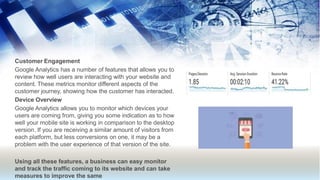
Customer Engagement
Google Analytics has a number of features that allows you to
review how well users are interacting with your website and
content. These metrics monitor different aspects of the
customer journey, showing how the customer has interacted.
Device Overview
Google Analytics allows you to monitor which devices your
users are coming from, giving you some indication as to how
well your mobile site is working in comparison to the desktop
version. If you are receiving a similar amount of visitors from
each platform, but less conversions on one, it may be a
problem with the user experience of that version of the site.
Using all these features, a business can easy monitor
and track the traffic coming to its website and can take
measures to improve the same
How does the software work?
• Google Analytics works by relying on a small bit of Java-script Code that is placed on your
website This code is activated when visitors arrive on your site. It allows Google to record
important information about your site so that you can better understand your site visitors and
build your business.
The code that you place in your website will look at three main sources of data and information. It
will use:
•
•
•
First party cookies
The HTTP request that the browser sends
The browser and system information of the user
Through these data sources, the code will track certain information about the person visiting your
website. It will help you understand everything from the geographic location of the user, the
language in which they view your site, and the pages they visit on the website. The information that
the Google tracking code collects will then be sent over to the Google Analytics to be displayed in
the reports that you can view.
•
•
You can also use Google Analytics to begin tracking attribution. Attribution attempts to calculate
the impact of various marketing channels and efforts on the final revenue collected from a
particular customer. Different attribution models weigh the different stages of the buyer’s
journey differently. You will want to select the attribution model that makes the most sense for
your business.
You can then use your attribution models to gain a better understanding of how customers
move through your content as they progress closer to conversion, what material has the biggest
impact on conversions, and your ROI. You can also calculate ROI for different marketing
methods, which can help you clearly demonstrate the value of these different channels, in turn
allowing you to advocate for more budget and investment.
Google wants to help businesses thrive online because when the websites provide a solid user
experience, it benefits the people who browse the site. This helps them feel satisfied with the
results that they received from the search engine. In turn, this makes them more likely to visit the
search engine again, which makes Google happy.
To help brands improve their websites and ability to engage customers, Google has created
Google Analytics. When you place the Analytics code in your website, you have access to a free
platform that provides in depth information regarding the behaviour of your site visitors and what
interests them.
TheseAnalytics can help you make business decisions. You will get to see what customers engage
with best on your website, what pages do not help customers, and where your site can improve.
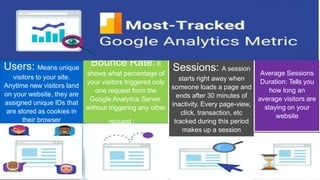
Users: Means unique
visitors to your site.
Anytime new visitors land
on your website, they are
assigned unique IDs that
are stored as cookies in
their browser
Bounce Rate: It
shows what percentage of
your visitors triggered only
one request from the
Google Analytics Server,
without triggering any other
request .
Sessions: A session
starts right away when
someone loads a page and
ends after 30 minutes of
inactivity. Every page-view,
click, transaction, etc
tracked during this period
makes up a session
Average Sessions
Duration: Tells you
how long an
average visitors are
staying on your
website
Sessions by
Channel: It is the
number of sessions
attributed to each channel
grouping such as organic,
paid, social, email, etc.
Goal
Completions: are
the number of times website
visitors complete a specific
goal on your website.
Page views: A page view is any
view of a page that is being tracked by
Google Analytics. If you land on a page,
that is page view. If you reload that
page, it counts as another view.
How to start Google Analytics
•
•
•
•
•
Step 1: Set up Google Tag Manager
Google Tag Manager is a free tag management system from
Google. The way it works is simple: Google Tag Manager takes
all the data on your website and sends it to other platforms such
as Facebook Analytics and Google Analytics.
First, you’ll have to create an account on the Google Tag
Manager dashboard.
You’ll then set up a container, which is essentially a bucket
containing all of the “macros, rules, and tags” for your website,
according to Google.
Give your container a descriptive name and select the type of
content it’ll be associated with (Web, iOS, Android, or AMP).
•
•
Once that’s done, click create, review the Terms of Service, and
agree to those terms. You’ll then be given the container’s
installation code snippet.
This is the piece of code you’ll be pasting into your website’s
back end in order to manage your tags. To do that, copy and
paste the two snippets of code onto every page of your website.
As the instructions say, you’ll need to the first one in the header
and the second after the opening of the body
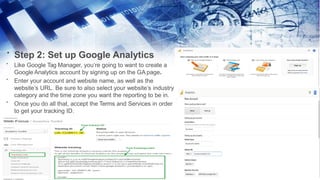
Step 2: Set up Google Analytics
•
•
•
•
Like Google Tag Manager, you’re going to want to create a
Google Analytics account by signing up on the GA page.
Enter your account and website name, as well as the
website’s URL. Be sure to also select your website’s industry
category and the time zone you want the reporting to be in.
Once you do all that, accept the Terms and Services in order
to get your tracking ID.
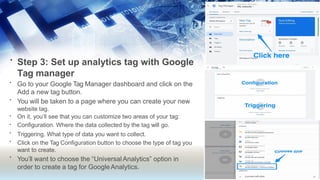
• Step 3: Set up analytics tag with Google
Tag manager
•
•
•
•
•
•
•
Go to your Google Tag Manager dashboard and click on the
Add a new tag button.
You will be taken to a page where you can create your new
website tag.
On it, you’ll see that you can customize two areas of your tag:
Configuration. Where the data collected by the tag will go.
Triggering. What type of data you want to collect.
Click on the Tag Configuration button to choose the type of tag you
want to create.
You’ll want to choose the “UniversalAnalytics” option in
order to create a tag for GoogleAnalytics.
•
•
•
•
•
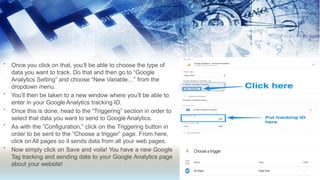
Once you click on that, you’ll be able to choose the type of
data you want to track. Do that and then go to “Google
Analytics Setting” and choose “New Variable…” from the
dropdown menu.
You’ll then be taken to a new window where you’ll be able to
enter in your Google Analytics tracking ID.
Once this is done, head to the “Triggering” section in order to
select that data you want to send to Google Analytics.
As with the “Configuration,” click on the Triggering button in
order to be sent to the “Choose a trigger” page. From here,
click on All pages so it sends data from all your web pages.
Now simply click on Save and voila! You have a new Google
Tag tracking and sending data to your Google Analytics page
about your website!
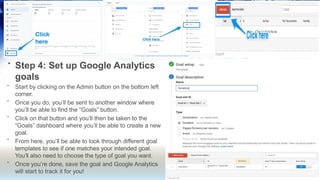
• Step 4: Set up Google Analytics
goals
•
•
•
•
•
Start by clicking on the Admin button on the bottom left
corner.
Once you do, you’ll be sent to another window where
you’ll be able to find the “Goals” button.
Click on that button and you’ll then be taken to the
“Goals” dashboard where you’ll be able to create a new
goal.
From here, you’ll be able to look through different goal
templates to see if one matches your intended goal.
You’ll also need to choose the type of goal you want.
Once you’re done, save the goal and Google Analytics
will start to track it for you!
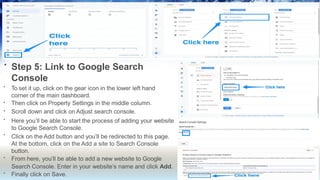
• Step 5: Link to Google Search
Console
•
•
•
•
•
•
•
To set it up, click on the gear icon in the lower left hand
corner of the main dashboard.
Then click on Property Settings in the middle column.
Scroll down and click on Adjust search console.
Here you’ll be able to start the process of adding your website
to Google Search Console.
Click on the Add button and you’ll be redirected to this page.
At the bottom, click on the Add a site to Search Console
button.
From here, you’ll be able to add a new website to Google
Search Console. Enter in your website’s name and click Add.
Finally click on Save.

Digital-marketing-presentationabcccd.pdf

  • 1.
  • 2.
    What is GoogleAnalytics Google Analytics is a web analytics service that provides statistics and basic analytical tools for search engine optimization (SEO) and marketing purposes. It is used to track website performance and collect visitor insights. It can help organizations determine top sources of user traffic, gauge the success of their marketing activities and campaigns, track goal completions (such as purchases, adding products to carts), discover patterns and trends in user engagement and obtain other visitor information such as demographics.
  • 3.
    Uses AUTOMATICALLY COLLECTS DATA GoogleAnalytics does all the work for you reducing the time required to put the data into documents or spreadsheets that can be accessed at any time, allowing to implement strategies for the better performance of your website. CUSTOMIZED REPORTS In Google Analytics you can choose from many Google report templates or you can build your own customized report. You can pick the dimensions and metrics you want to see and how they should be displayed. ABILITY TO MEASURE INTERNAL SITE SEARCH UNDER BEHAVIOR The site search reveals what potential customers are looking for after arriving on your website providing insights to what people are searching for on your website. This will show you areas of growth opportunity in how to access information on your site may be unclear or lacking.
  • 4.
    TO UNDERSTAND WHYVISITORS ARE BOUNCING OFF YOUR WEBSITE Bounce Rate is the percentage of visitors who leave your website after visiting only one page. This is one of the most important metrics because this is telling you that visitors are coming to your website but are not finding what they are looking for. With the detailed report on bounce rate, you can find ways and means to reduce the bounce rate of your website. TO KNOW THE AGE, GENDER, INTEREST, DEVICE AND LOCATION OF YOUR AUDIENCE With Google Analytics, you can uncover valuable data about your audience to determine which channels drive most of the traffic to your website. TheAudience section provides a lot of information about the people who visit your website like their age, gender, interests, devices, and location. TO UNDERSTAND WHICH SOCIAL PLATFORMS TO TARGET Social platforms are a great way to drive a lot of traffic and engage potential customers. With Google Analytics, you have the access to view which platforms are driving visitors to your site. This will help you choose the best platform to advertise to your customers.
  • 5.
    TO UNDERSTAND WHATKIND OF CONTENT YOU SHOULD WRITE Content is the king and if created correctly it can help you to get a lot more traffic and potential visitors and help your ranking in the search engines. Google Analytics helps you to keep a track of all the content that receives views and shares. With this data, you can enhance the top viewed blogs so that they appeal to the customers in a more productive manner. TO CHECK IF YOU ARE ACHIEVING GOALS The goals in Google Analytics helps you to track how much your business is moving ahead and progressing. You can also assign a number of goals that will help you to track the customer’s journey based on their actions.
  • 6.
    Role of GoogleAnalytics in increasing traffic of a website It helps in in increasing website traffic in several ways, that are listed below: Overview of All Channels Being able to monitor all the platforms allows you to review what is working well in terms of advertising, and what isn’t. Having all the data in one place makes it easy to compare the different channels. If you are currently putting money into your SEO, PPC, or Social Media Marketing, you can monitor your ROI. Conversion Tracking It’s all good knowing how many people have visited your site, and where they came from, but how do you know if those users are actually converting? Google Analytics allows you to set up goals to track when a user completes a certain action on your site. Regardless of how many users each channel is driving to your site, you need to know that this traffic is converting.
  • 7.
    Customer Engagement Google Analyticshas a number of features that allows you to review how well users are interacting with your website and content. These metrics monitor different aspects of the customer journey, showing how the customer has interacted. Device Overview Google Analytics allows you to monitor which devices your users are coming from, giving you some indication as to how well your mobile site is working in comparison to the desktop version. If you are receiving a similar amount of visitors from each platform, but less conversions on one, it may be a problem with the user experience of that version of the site. Using all these features, a business can easy monitor and track the traffic coming to its website and can take measures to improve the same
  • 8.
    How does thesoftware work? • Google Analytics works by relying on a small bit of Java-script Code that is placed on your website This code is activated when visitors arrive on your site. It allows Google to record important information about your site so that you can better understand your site visitors and build your business. The code that you place in your website will look at three main sources of data and information. It will use: • • • First party cookies The HTTP request that the browser sends The browser and system information of the user Through these data sources, the code will track certain information about the person visiting your website. It will help you understand everything from the geographic location of the user, the language in which they view your site, and the pages they visit on the website. The information that the Google tracking code collects will then be sent over to the Google Analytics to be displayed in the reports that you can view.
  • 9.
    • • You can alsouse Google Analytics to begin tracking attribution. Attribution attempts to calculate the impact of various marketing channels and efforts on the final revenue collected from a particular customer. Different attribution models weigh the different stages of the buyer’s journey differently. You will want to select the attribution model that makes the most sense for your business. You can then use your attribution models to gain a better understanding of how customers move through your content as they progress closer to conversion, what material has the biggest impact on conversions, and your ROI. You can also calculate ROI for different marketing methods, which can help you clearly demonstrate the value of these different channels, in turn allowing you to advocate for more budget and investment.
  • 10.
    Google wants tohelp businesses thrive online because when the websites provide a solid user experience, it benefits the people who browse the site. This helps them feel satisfied with the results that they received from the search engine. In turn, this makes them more likely to visit the search engine again, which makes Google happy. To help brands improve their websites and ability to engage customers, Google has created Google Analytics. When you place the Analytics code in your website, you have access to a free platform that provides in depth information regarding the behaviour of your site visitors and what interests them. TheseAnalytics can help you make business decisions. You will get to see what customers engage with best on your website, what pages do not help customers, and where your site can improve.
  • 11.
    Users: Means unique visitorsto your site. Anytime new visitors land on your website, they are assigned unique IDs that are stored as cookies in their browser Bounce Rate: It shows what percentage of your visitors triggered only one request from the Google Analytics Server, without triggering any other request . Sessions: A session starts right away when someone loads a page and ends after 30 minutes of inactivity. Every page-view, click, transaction, etc tracked during this period makes up a session Average Sessions Duration: Tells you how long an average visitors are staying on your website
  • 12.
    Sessions by Channel: Itis the number of sessions attributed to each channel grouping such as organic, paid, social, email, etc. Goal Completions: are the number of times website visitors complete a specific goal on your website. Page views: A page view is any view of a page that is being tracked by Google Analytics. If you land on a page, that is page view. If you reload that page, it counts as another view.
  • 13.
    How to startGoogle Analytics • • • • • Step 1: Set up Google Tag Manager Google Tag Manager is a free tag management system from Google. The way it works is simple: Google Tag Manager takes all the data on your website and sends it to other platforms such as Facebook Analytics and Google Analytics. First, you’ll have to create an account on the Google Tag Manager dashboard. You’ll then set up a container, which is essentially a bucket containing all of the “macros, rules, and tags” for your website, according to Google. Give your container a descriptive name and select the type of content it’ll be associated with (Web, iOS, Android, or AMP).
  • 14.
    • • Once that’s done,click create, review the Terms of Service, and agree to those terms. You’ll then be given the container’s installation code snippet. This is the piece of code you’ll be pasting into your website’s back end in order to manage your tags. To do that, copy and paste the two snippets of code onto every page of your website. As the instructions say, you’ll need to the first one in the header and the second after the opening of the body
  • 15.
    Step 2: Setup Google Analytics • • • • Like Google Tag Manager, you’re going to want to create a Google Analytics account by signing up on the GA page. Enter your account and website name, as well as the website’s URL. Be sure to also select your website’s industry category and the time zone you want the reporting to be in. Once you do all that, accept the Terms and Services in order to get your tracking ID.
  • 16.
    • Step 3:Set up analytics tag with Google Tag manager • • • • • • • Go to your Google Tag Manager dashboard and click on the Add a new tag button. You will be taken to a page where you can create your new website tag. On it, you’ll see that you can customize two areas of your tag: Configuration. Where the data collected by the tag will go. Triggering. What type of data you want to collect. Click on the Tag Configuration button to choose the type of tag you want to create. You’ll want to choose the “UniversalAnalytics” option in order to create a tag for GoogleAnalytics.
  • 17.
    • • • • • Once you clickon that, you’ll be able to choose the type of data you want to track. Do that and then go to “Google Analytics Setting” and choose “New Variable…” from the dropdown menu. You’ll then be taken to a new window where you’ll be able to enter in your Google Analytics tracking ID. Once this is done, head to the “Triggering” section in order to select that data you want to send to Google Analytics. As with the “Configuration,” click on the Triggering button in order to be sent to the “Choose a trigger” page. From here, click on All pages so it sends data from all your web pages. Now simply click on Save and voila! You have a new Google Tag tracking and sending data to your Google Analytics page about your website!
  • 18.
    • Step 4:Set up Google Analytics goals • • • • • Start by clicking on the Admin button on the bottom left corner. Once you do, you’ll be sent to another window where you’ll be able to find the “Goals” button. Click on that button and you’ll then be taken to the “Goals” dashboard where you’ll be able to create a new goal. From here, you’ll be able to look through different goal templates to see if one matches your intended goal. You’ll also need to choose the type of goal you want. Once you’re done, save the goal and Google Analytics will start to track it for you!
  • 19.
    • Step 5:Link to Google Search Console • • • • • • • To set it up, click on the gear icon in the lower left hand corner of the main dashboard. Then click on Property Settings in the middle column. Scroll down and click on Adjust search console. Here you’ll be able to start the process of adding your website to Google Search Console. Click on the Add button and you’ll be redirected to this page. At the bottom, click on the Add a site to Search Console button. From here, you’ll be able to add a new website to Google Search Console. Enter in your website’s name and click Add. Finally click on Save.