Chapter          16

            Host Configuration:
            BOOTP and DHCP
 Objectives
 Upon completion you will be able to:

 • Know the types of information required by a system on boot-up
 • Know how BOOTP operates
 • Know how DHCP operates
 • Understand the differences between BOOTP and DHCP
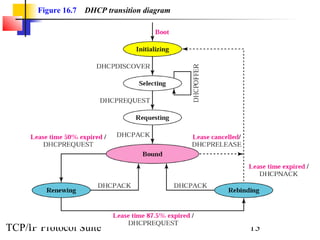
 • Understand the DHCP transition state diagram

TCP/IP Protocol Suite                                 1
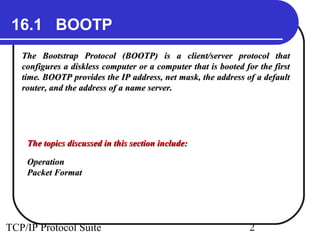
16.1 BOOTP
   The Bootstrap Protocol (BOOTP) is a client/server protocol that
   configures a diskless computer or a computer that is booted for the first
   time. BOOTP provides the IP address, net mask, the address of a default
   router, and the address of a name server.


    The topics discussed in this section include:

    Operation
    Packet Format


TCP/IP Protocol Suite                                           2
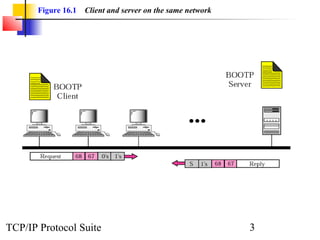
Figure 16.1   Client and server on the same network


TCP/IP Protocol Suite                                        3
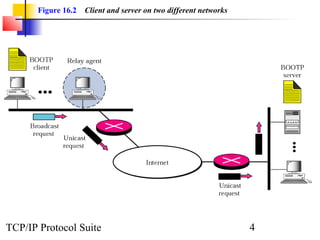
Figure 16.2   Client and server on two different networks


TCP/IP Protocol Suite                                              4
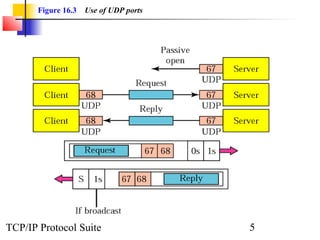
Figure 16.3   Use of UDP ports


TCP/IP Protocol Suite                   5
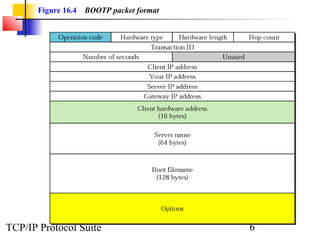
Figure 16.4   BOOTP packet format


TCP/IP Protocol Suite                      6
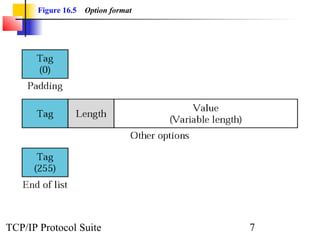
Figure 16.5   Option format


TCP/IP Protocol Suite                7
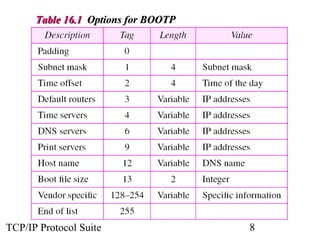
Table 16.1 Options for BOOTP


TCP/IP Protocol Suite                8
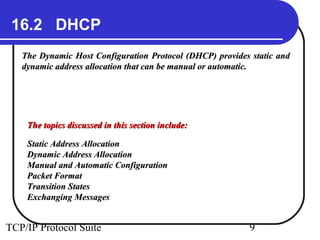
16.2 DHCP
   The Dynamic Host Configuration Protocol (DHCP) provides static and
   dynamic address allocation that can be manual or automatic.


    The topics discussed in this section include:

    Static Address Allocation
    Dynamic Address Allocation
    Manual and Automatic Configuration
    Packet Format
    Transition States
    Exchanging Messages


TCP/IP Protocol Suite                                      9
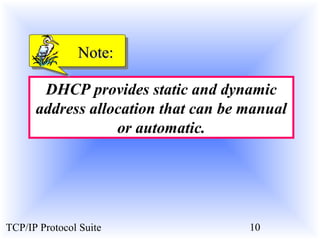
Note:

       DHCP provides static and dynamic
      address allocation that can be manual
                  or automatic.


TCP/IP Protocol Suite                10
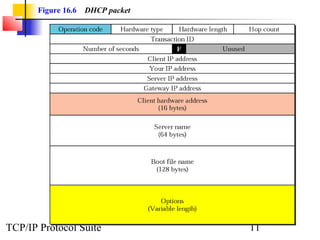
Figure 16.6   DHCP packet


TCP/IP Protocol Suite              11
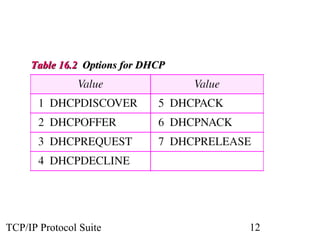
Table 16.2 Options for DHCP


TCP/IP Protocol Suite              12
Figure 16.7   DHCP transition diagram


TCP/IP Protocol Suite                          13
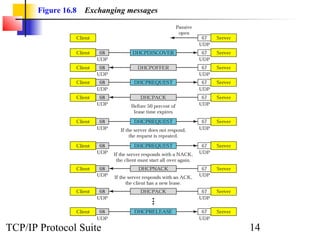
Figure 16.8   Exchanging messages


TCP/IP Protocol Suite                      14

Bootp and dhcp

  • 1.
    Chapter 16 Host Configuration: BOOTP and DHCP Objectives Upon completion you will be able to: • Know the types of information required by a system on boot-up • Know how BOOTP operates • Know how DHCP operates • Understand the differences between BOOTP and DHCP • Understand the DHCP transition state diagram TCP/IP Protocol Suite 1
  • 2.
    16.1 BOOTP The Bootstrap Protocol (BOOTP) is a client/server protocol that configures a diskless computer or a computer that is booted for the first time. BOOTP provides the IP address, net mask, the address of a default router, and the address of a name server. The topics discussed in this section include: Operation Packet Format TCP/IP Protocol Suite 2
  • 3.
    Figure 16.1 Client and server on the same network TCP/IP Protocol Suite 3
  • 4.
    Figure 16.2 Client and server on two different networks TCP/IP Protocol Suite 4
  • 5.
    Figure 16.3 Use of UDP ports TCP/IP Protocol Suite 5
  • 6.
    Figure 16.4 BOOTP packet format TCP/IP Protocol Suite 6
  • 7.
    Figure 16.5 Option format TCP/IP Protocol Suite 7
  • 8.
    Table 16.1 Optionsfor BOOTP TCP/IP Protocol Suite 8
  • 9.
    16.2 DHCP The Dynamic Host Configuration Protocol (DHCP) provides static and dynamic address allocation that can be manual or automatic. The topics discussed in this section include: Static Address Allocation Dynamic Address Allocation Manual and Automatic Configuration Packet Format Transition States Exchanging Messages TCP/IP Protocol Suite 9
  • 10.
    Note: DHCP provides static and dynamic address allocation that can be manual or automatic. TCP/IP Protocol Suite 10
  • 11.
    Figure 16.6 DHCP packet TCP/IP Protocol Suite 11
  • 12.
    Table 16.2 Optionsfor DHCP TCP/IP Protocol Suite 12
  • 13.
    Figure 16.7 DHCP transition diagram TCP/IP Protocol Suite 13
  • 14.
    Figure 16.8 Exchanging messages TCP/IP Protocol Suite 14