Chapter        11

                   User Datagram
                      Protocol
 Objectives
 Upon completion you will be able to:

 • Be able to explain process-to-process communication
 • Know the format of a UDP user datagram
 • Be able to calculate a UDP checksum
 • Understand the operation of UDP
 • Know when it is appropriate to use UDP
 • Understand the modules in a UDP package
TCP/IP Protocol Suite                                1
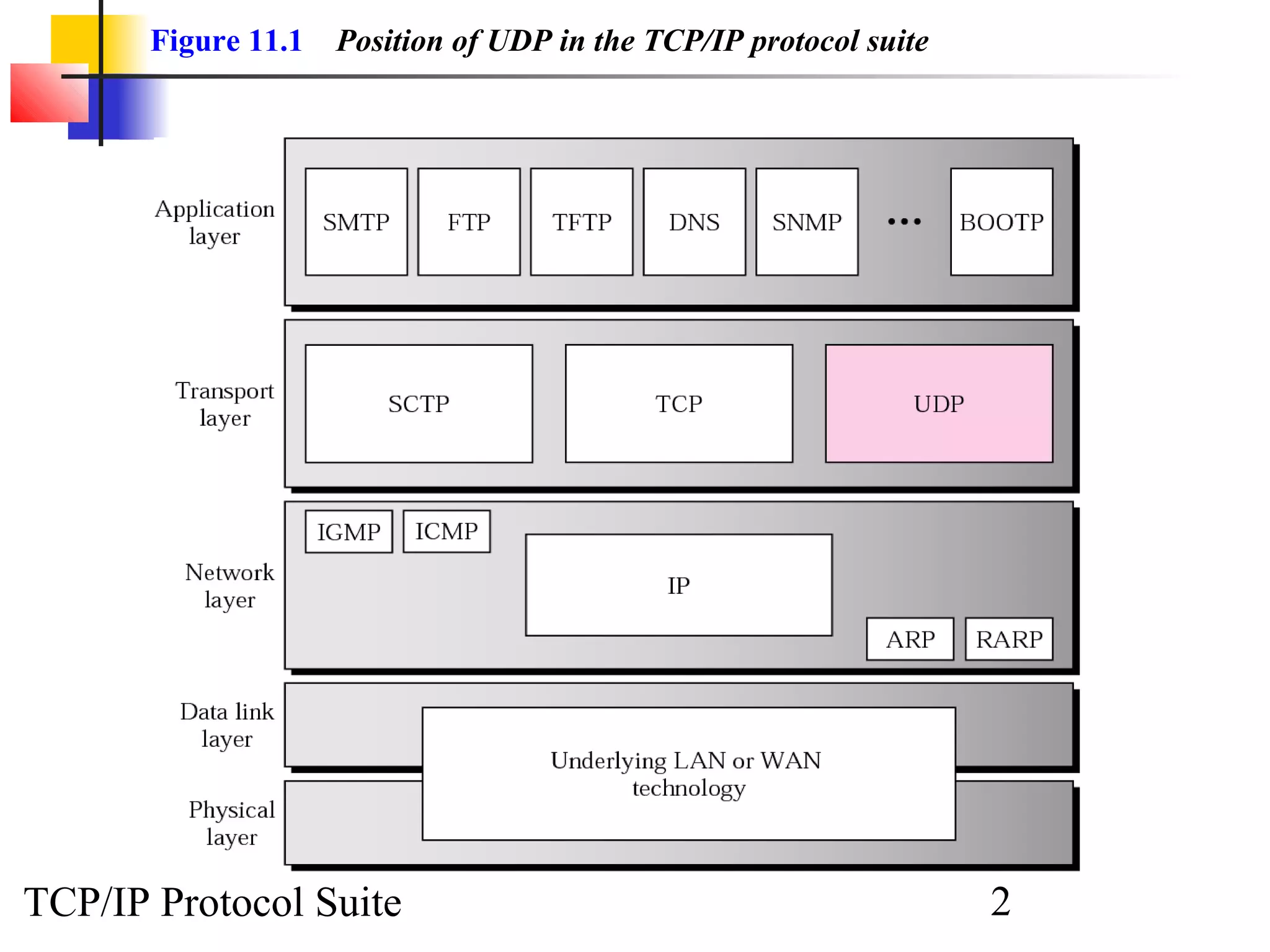
Figure 11.1   Position of UDP in the TCP/IP protocol suite


TCP/IP Protocol Suite                                               2
11.1 PROCESS-TO-PROCESS
     COMMUNICATION
   Before we examine UDP, we must first understand host-to-host
   communication and process-to-process communication and the
   difference between them.


    The topics discussed in this section include:

    Port Numbers
    Socket Addresses


TCP/IP Protocol Suite                                3
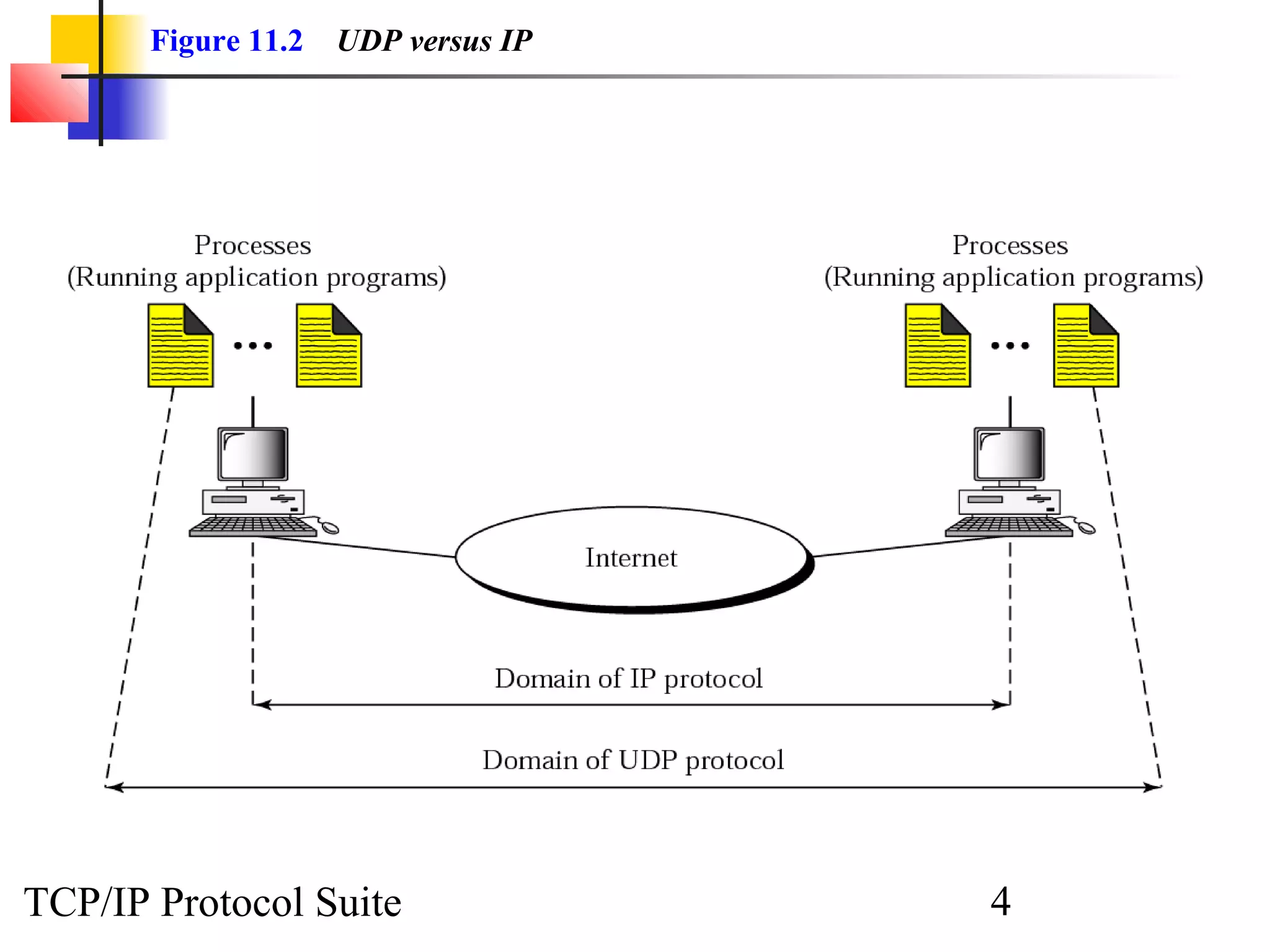
Figure 11.2   UDP versus IP


TCP/IP Protocol Suite                4
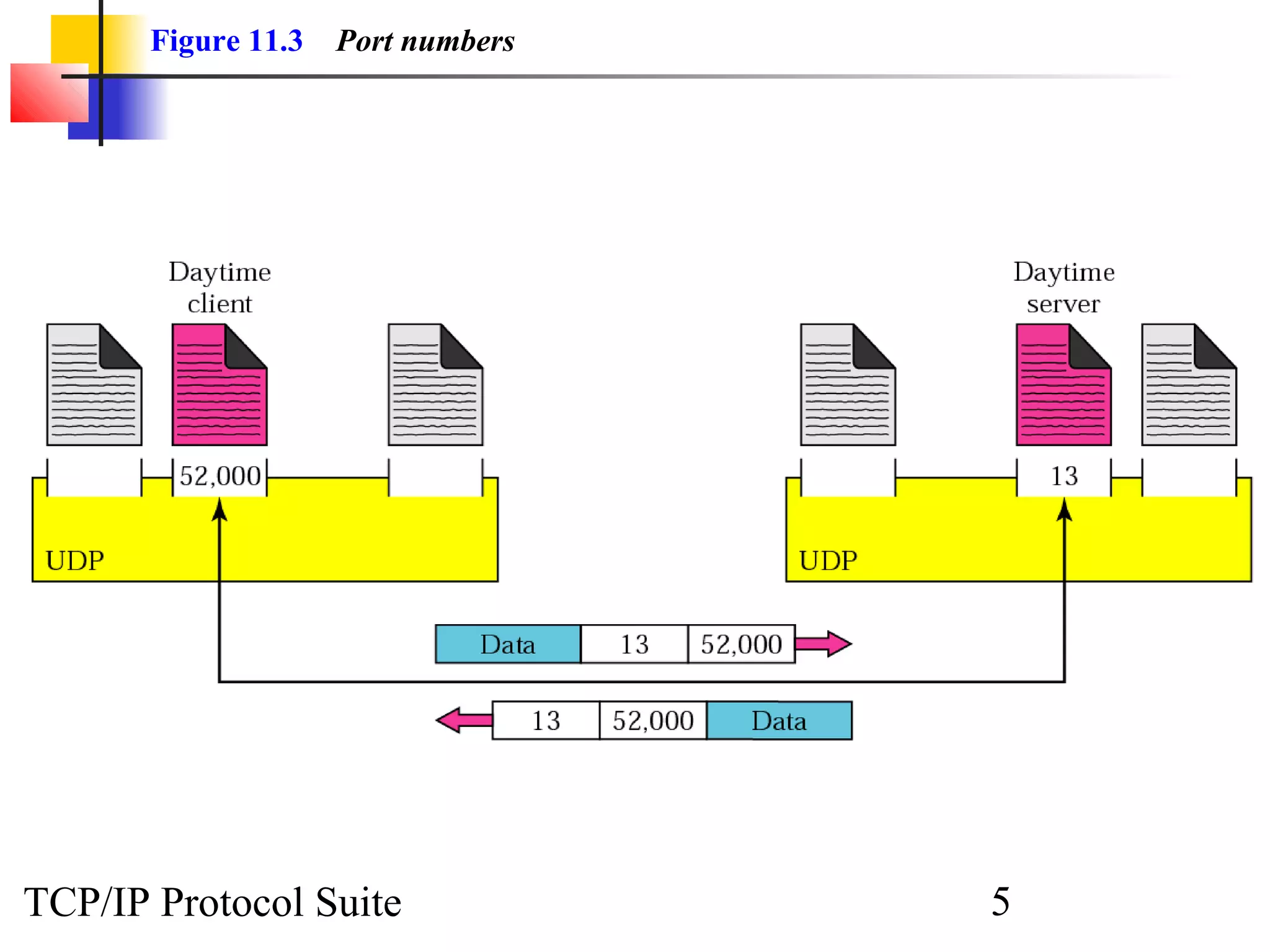
Figure 11.3   Port numbers


TCP/IP Protocol Suite               5
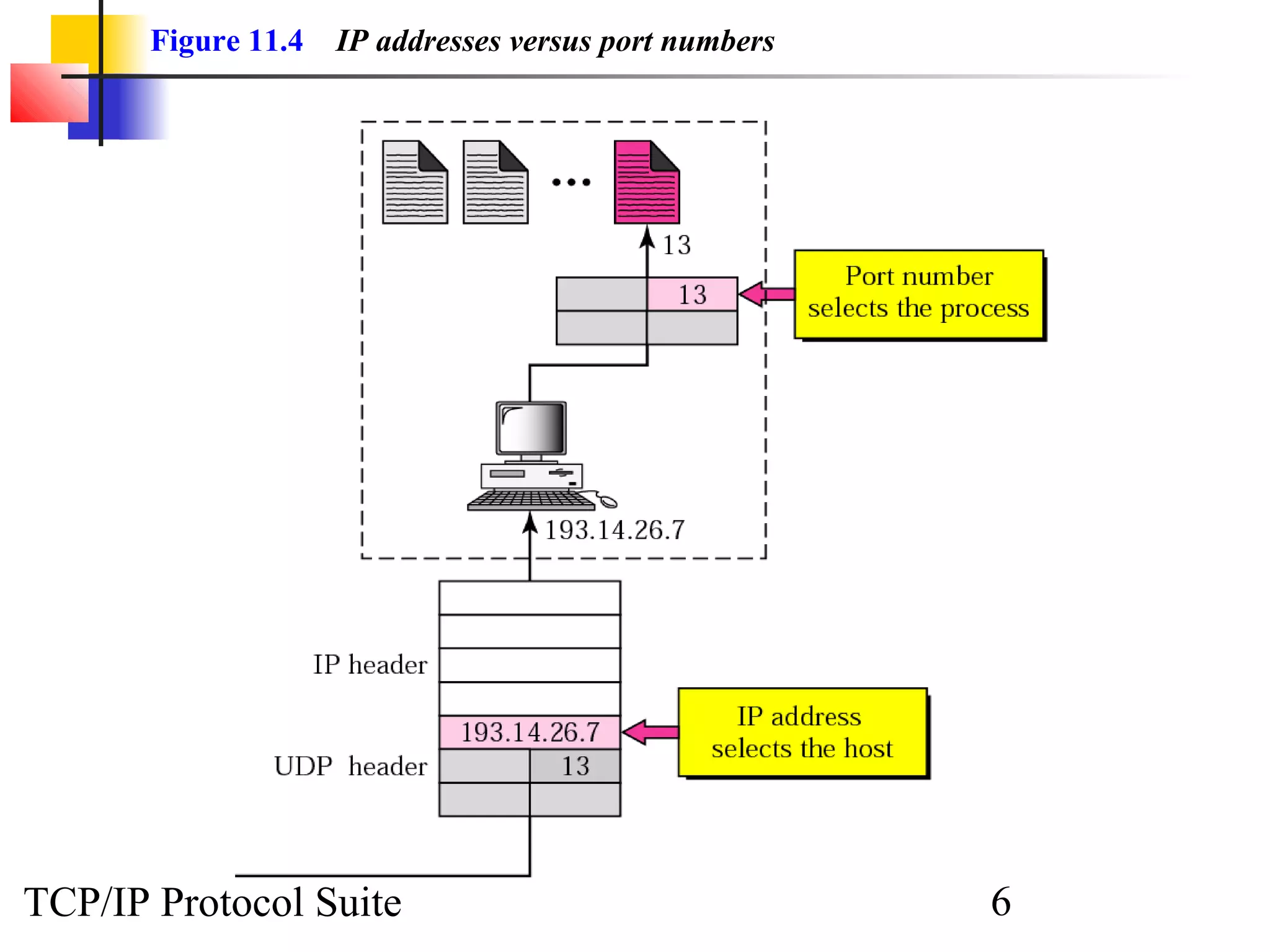
Figure 11.4   IP addresses versus port numbers


TCP/IP Protocol Suite                                   6
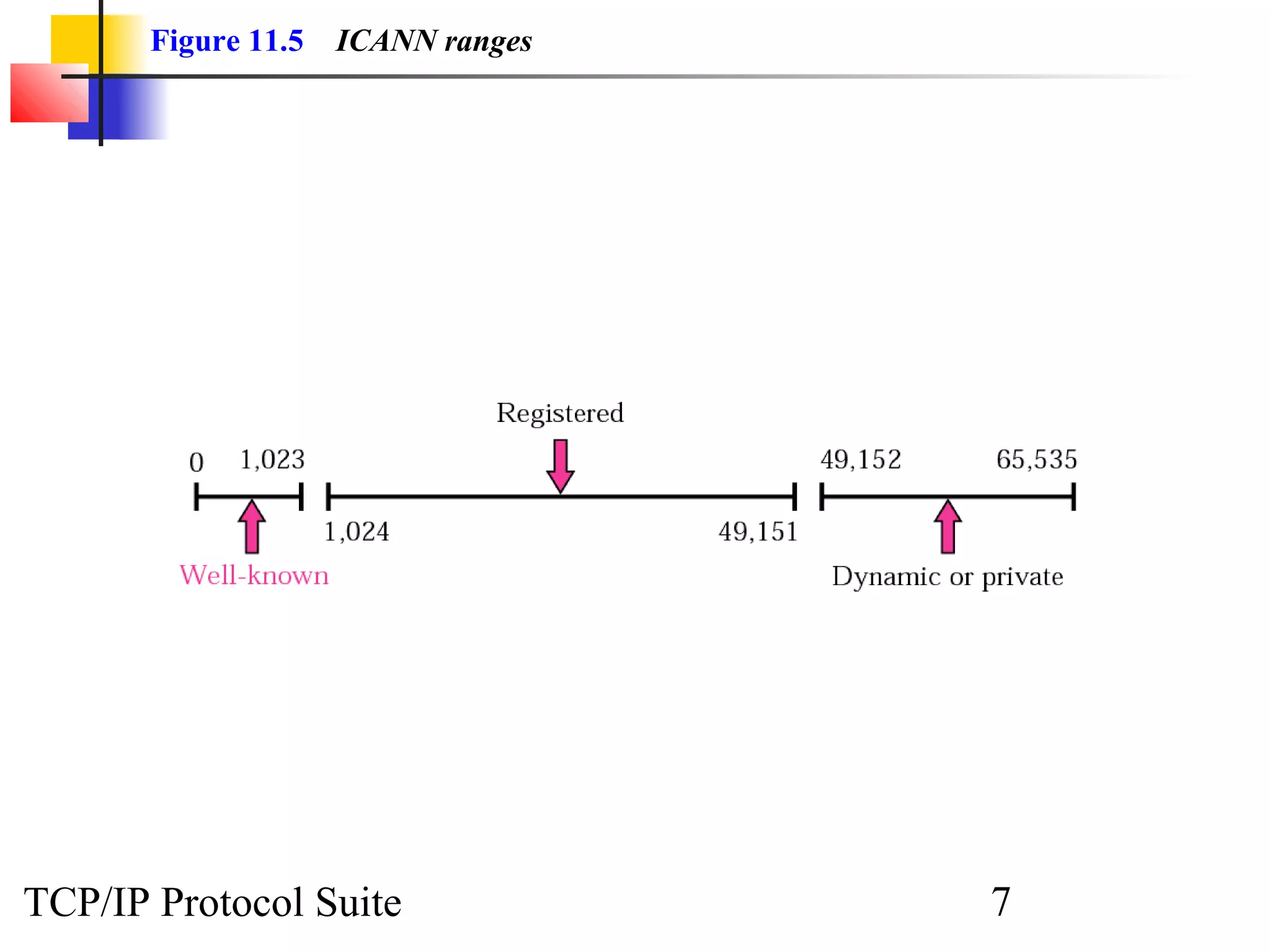
Figure 11.5   ICANN ranges


TCP/IP Protocol Suite               7
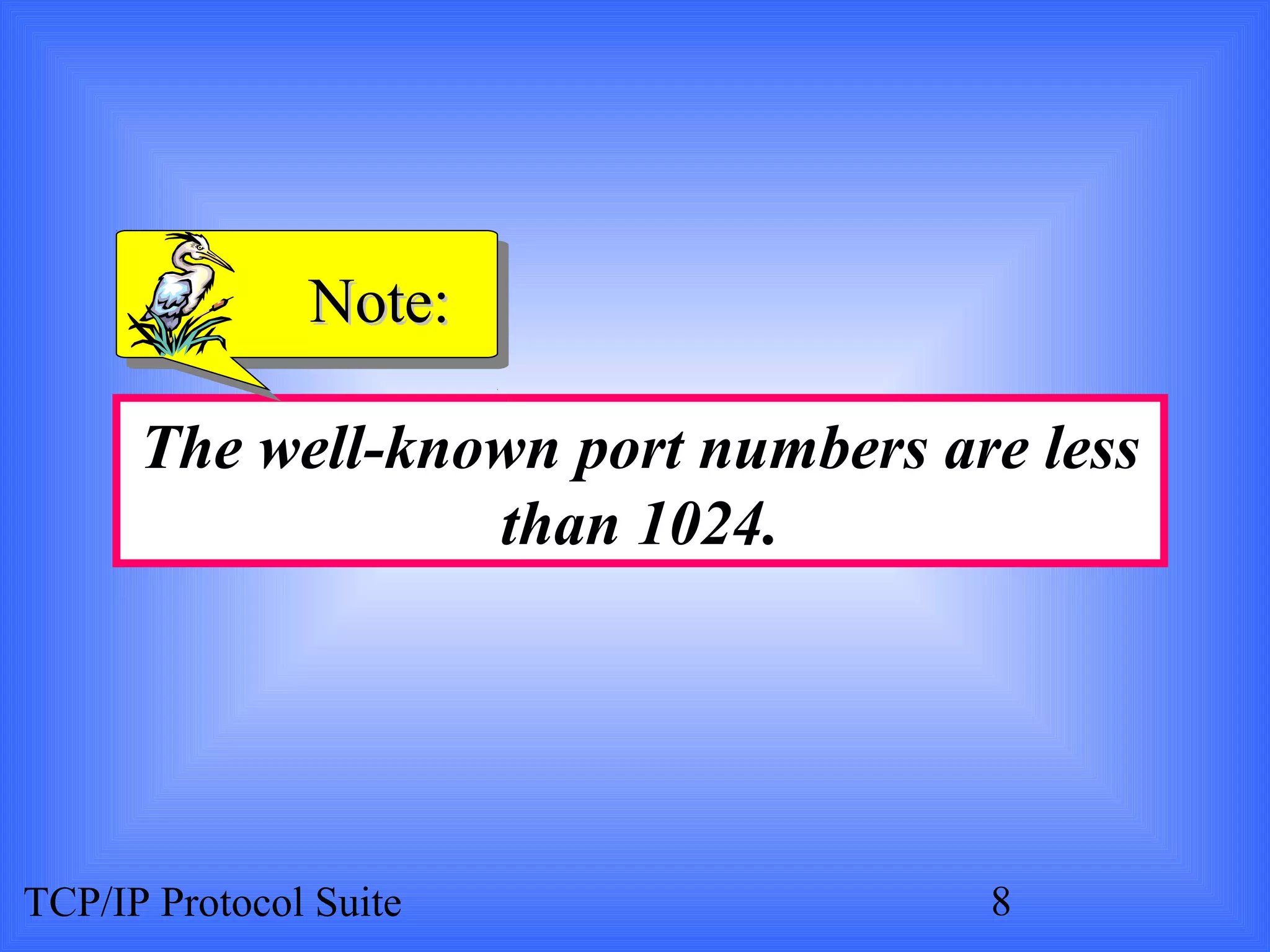
Note:

      The well-known port numbers are less
                  than 1024.


TCP/IP Protocol Suite               8
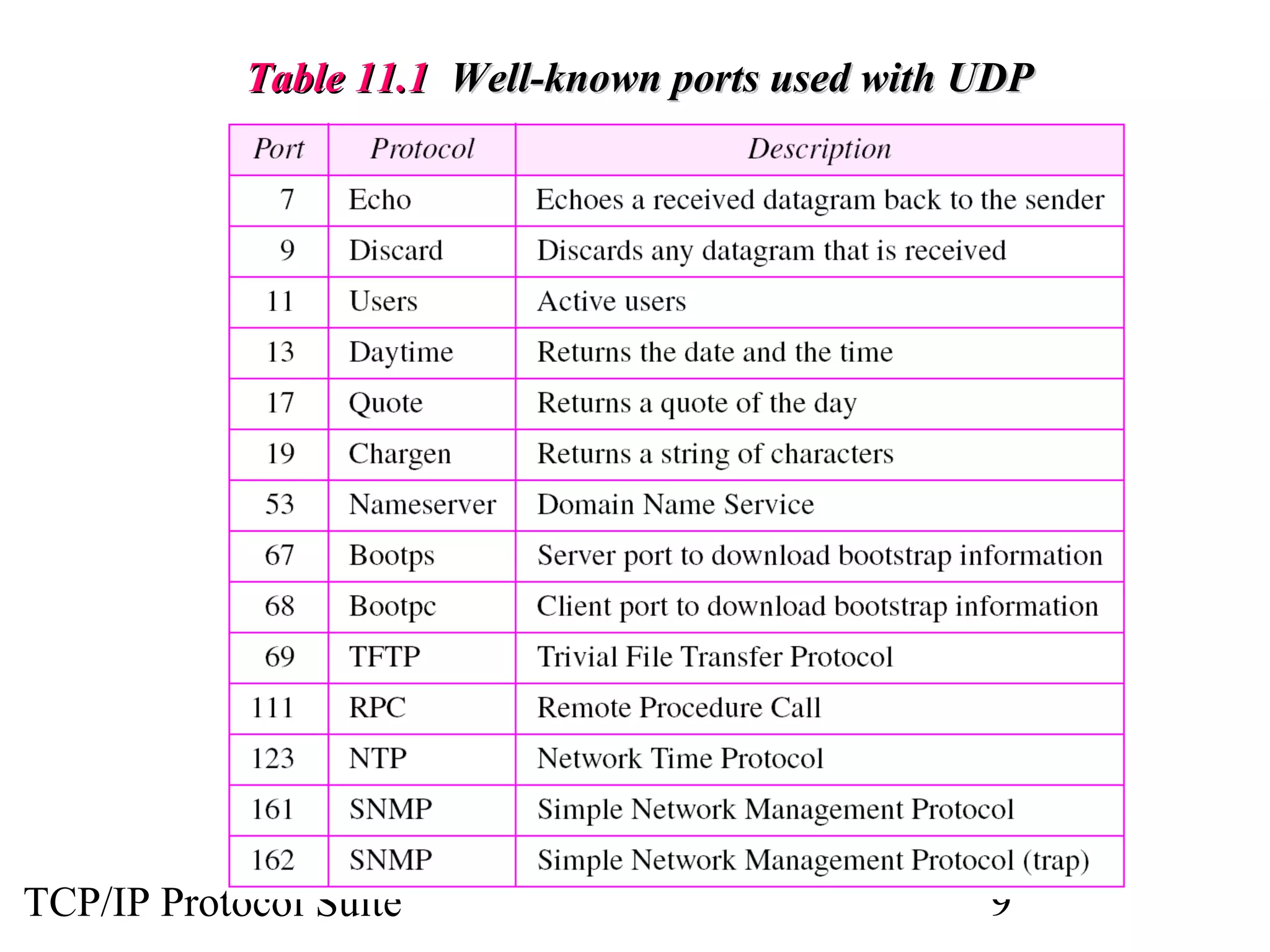
Table 11.1 Well-known ports used with UDP


TCP/IP Protocol Suite                             9
ExamplE 1

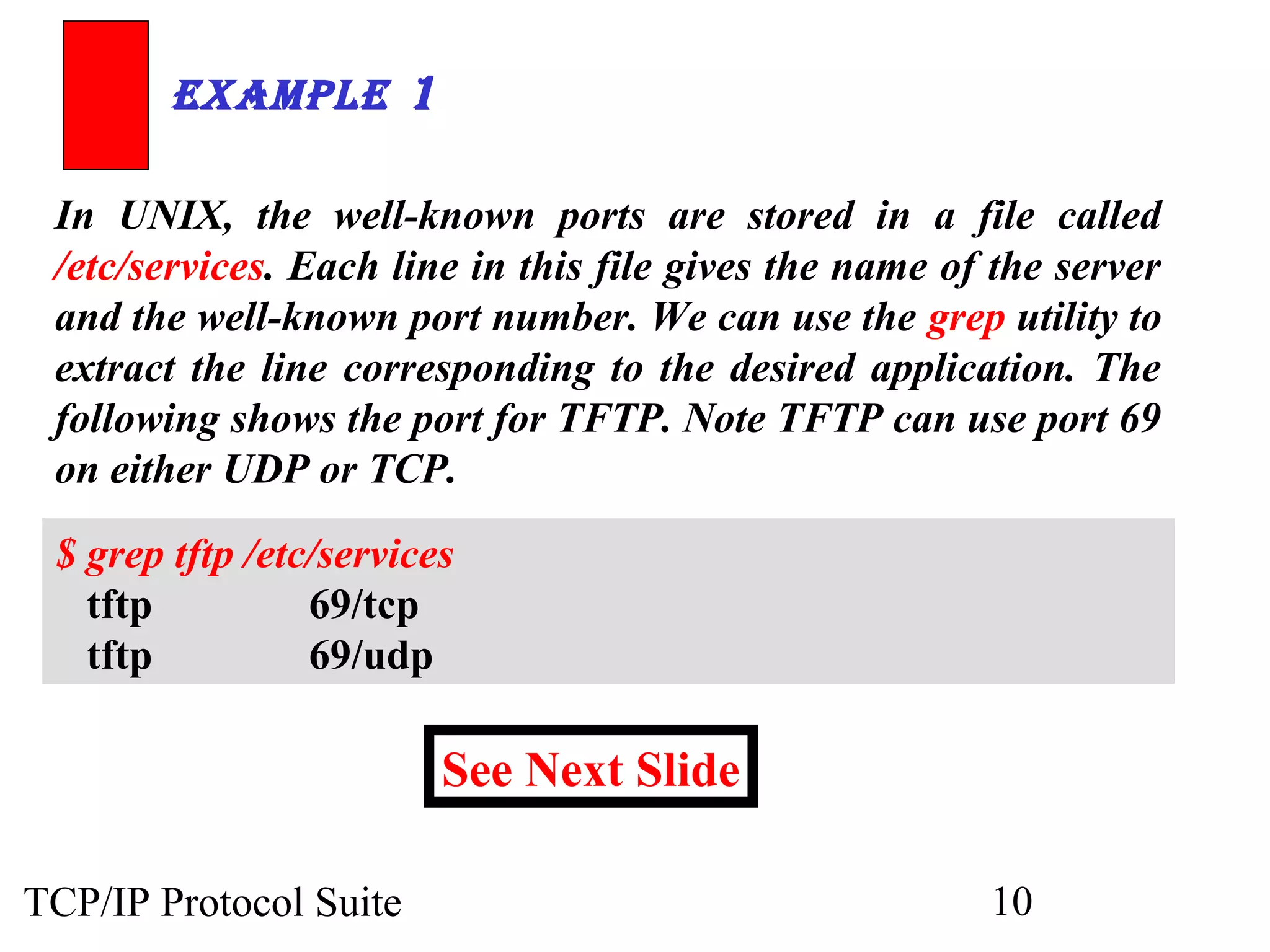
 In UNIX, the well-known ports are stored in a file called
 /etc/services. Each line in this file gives the name of the server
 and the well-known port number. We can use the grep utility to
 extract the line corresponding to the desired application. The
 following shows the port for TFTP. Note TFTP can use port 69
 on either UDP or TCP.

 $ grep tftp /etc/services
   tftp          69/tcp
   tftp          69/udp

                         See Next Slide

TCP/IP Protocol Suite                                   10
ExamplE 1       (ContinuEd)


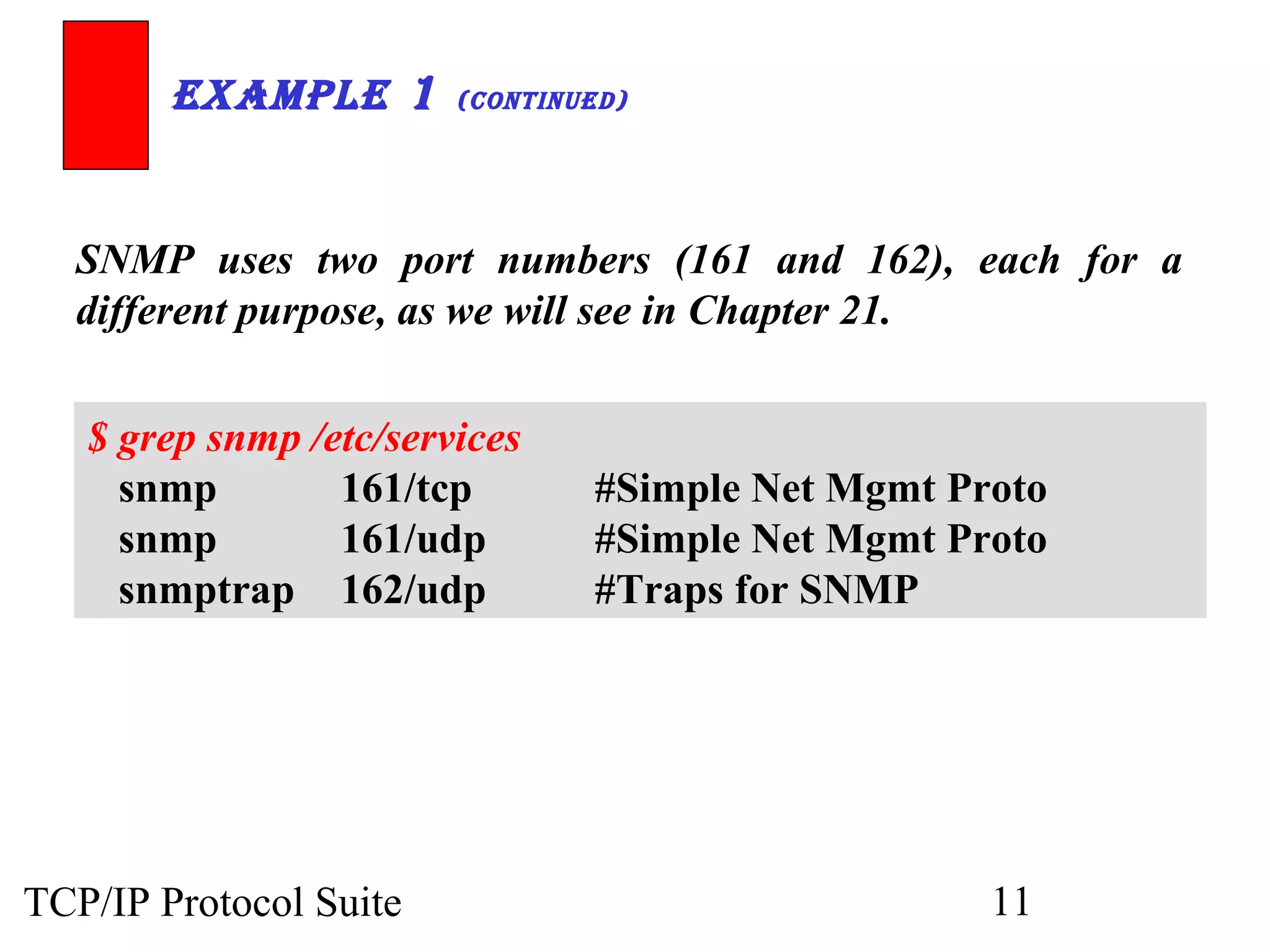
  SNMP uses two port numbers (161 and 162), each for a
  different purpose, as we will see in Chapter 21.


   $ grep snmp /etc/services
     snmp        161/tcp        #Simple Net Mgmt Proto
     snmp        161/udp        #Simple Net Mgmt Proto
     snmptrap 162/udp           #Traps for SNMP


TCP/IP Protocol Suite                              11
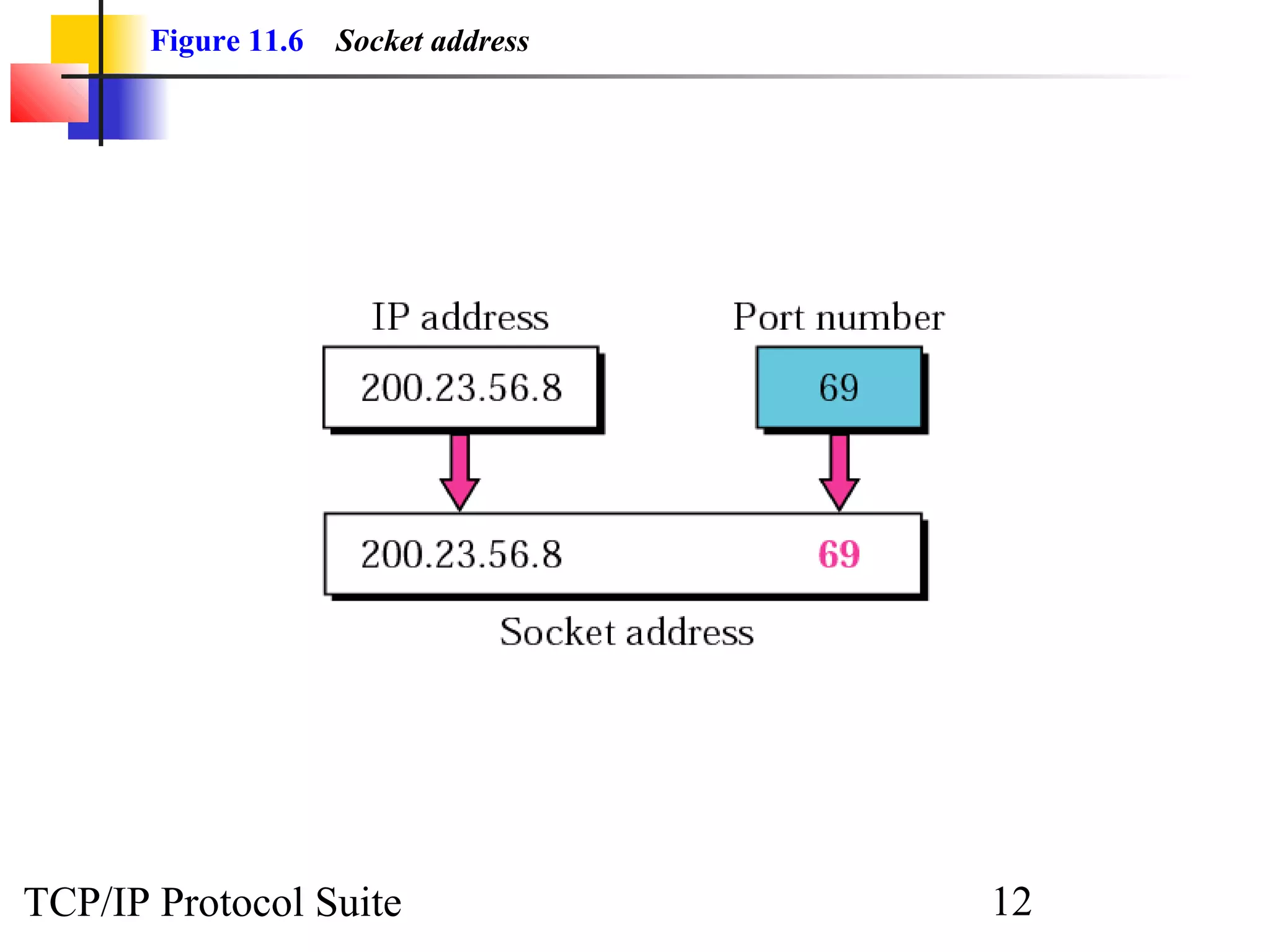
Figure 11.6   Socket address


TCP/IP Protocol Suite                 12
11.2 USER DATAGRAM
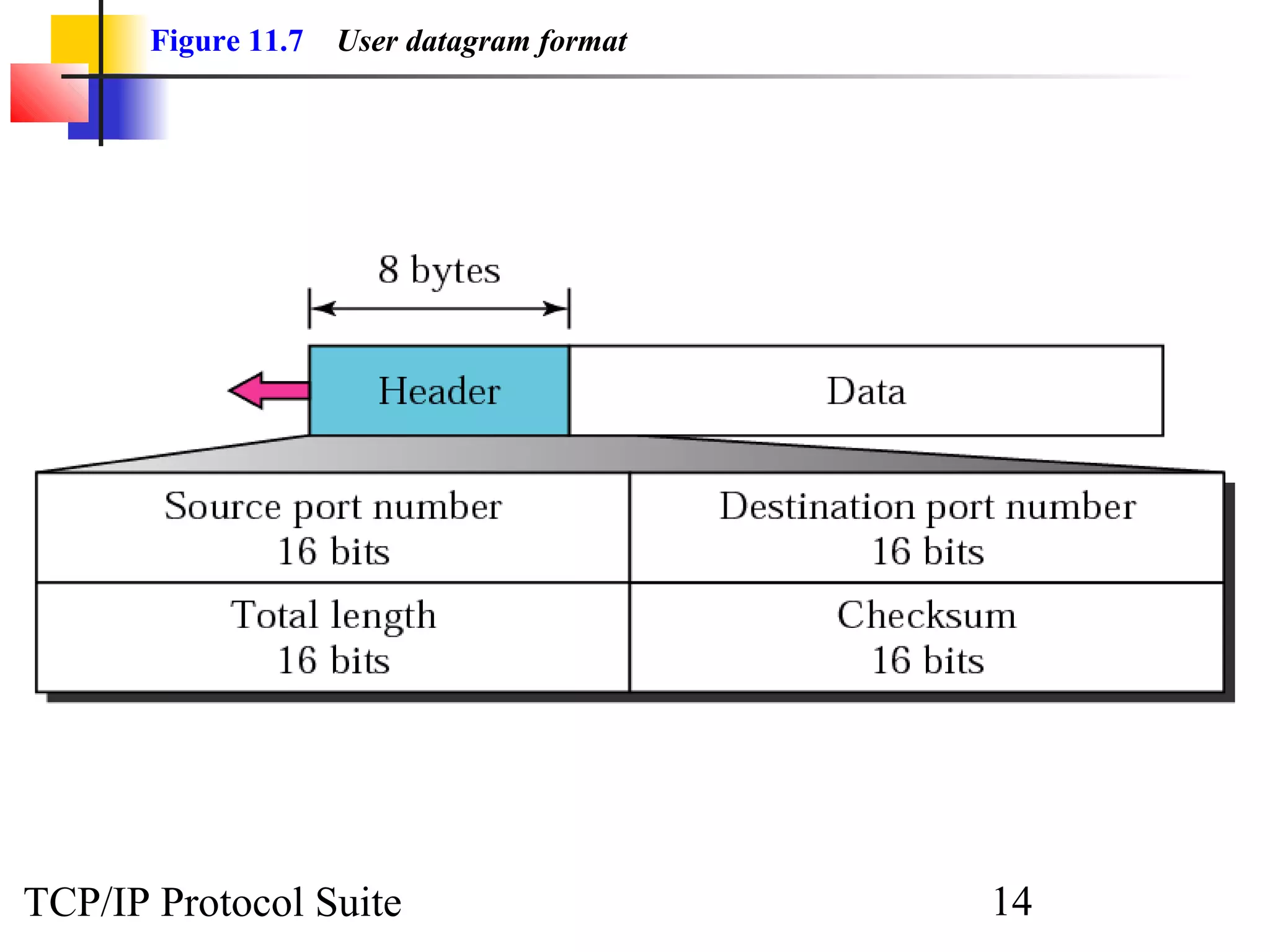
   UDP packets are called user datagrams and have a fixed-size header of
   8 bytes.


TCP/IP Protocol Suite                                        13
Figure 11.7   User datagram format


TCP/IP Protocol Suite                       14
Note:

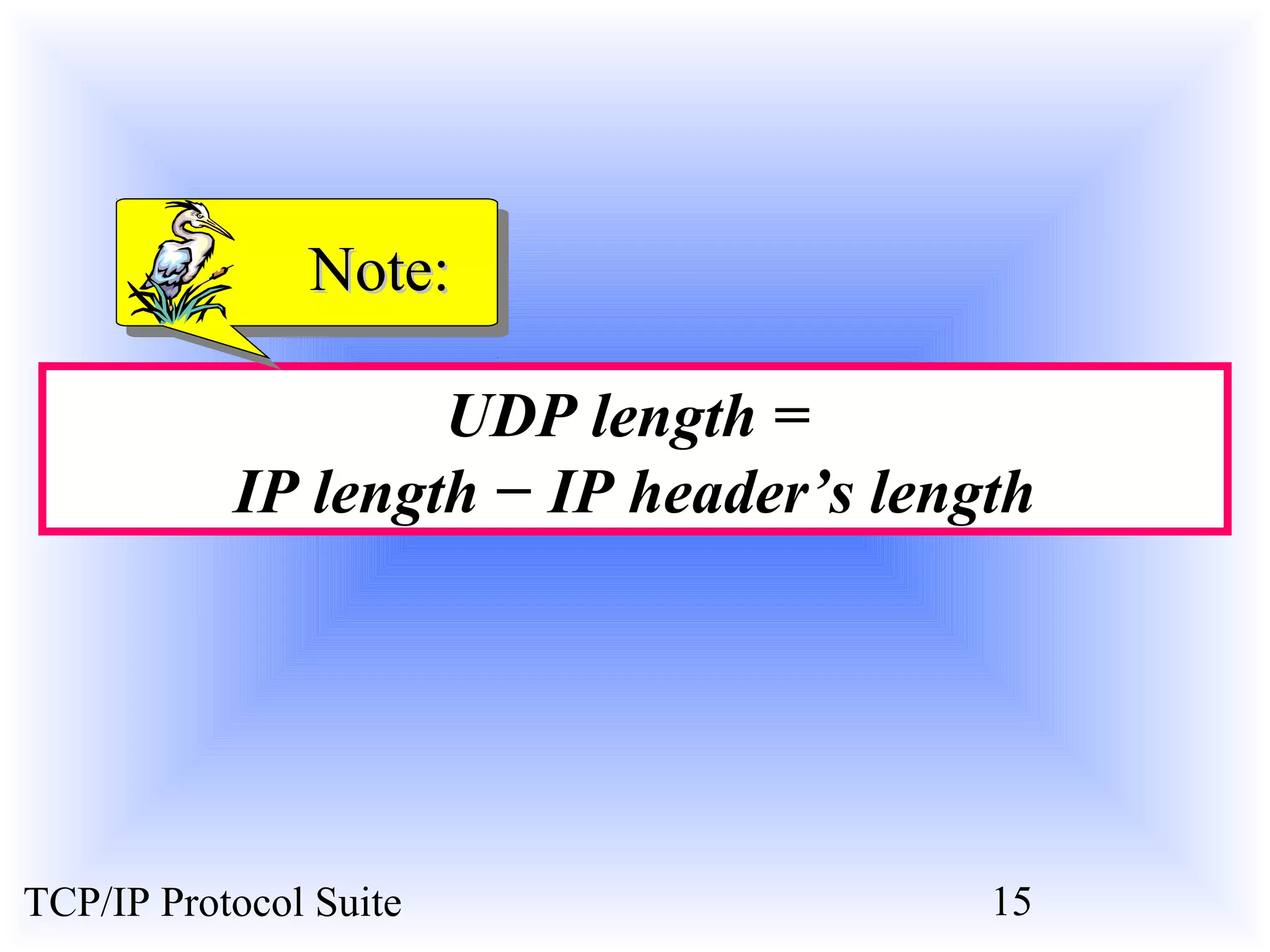
                   UDP length =
           IP length − IP header’s length


TCP/IP Protocol Suite                  15
11.3 CHECKSUM
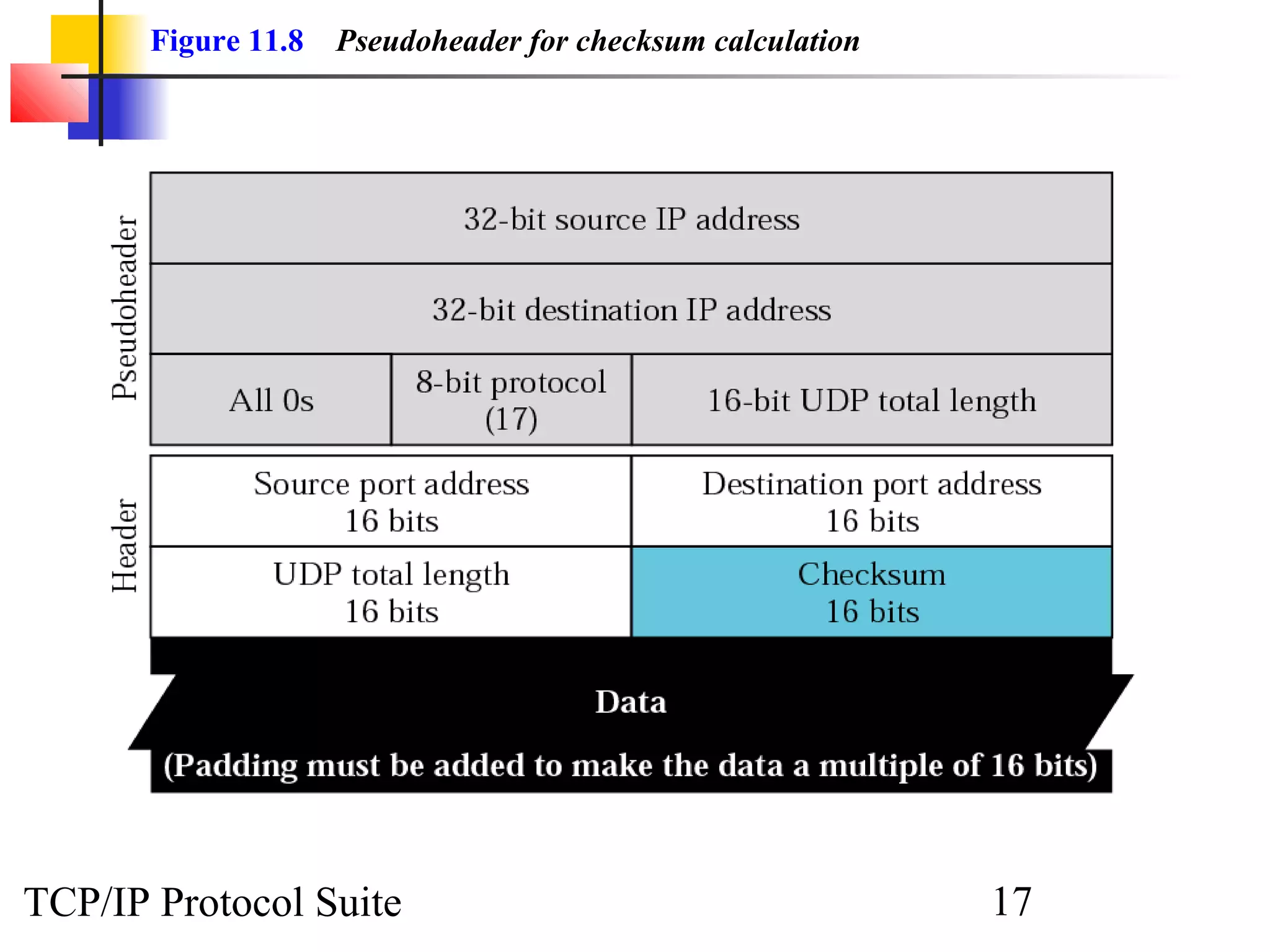
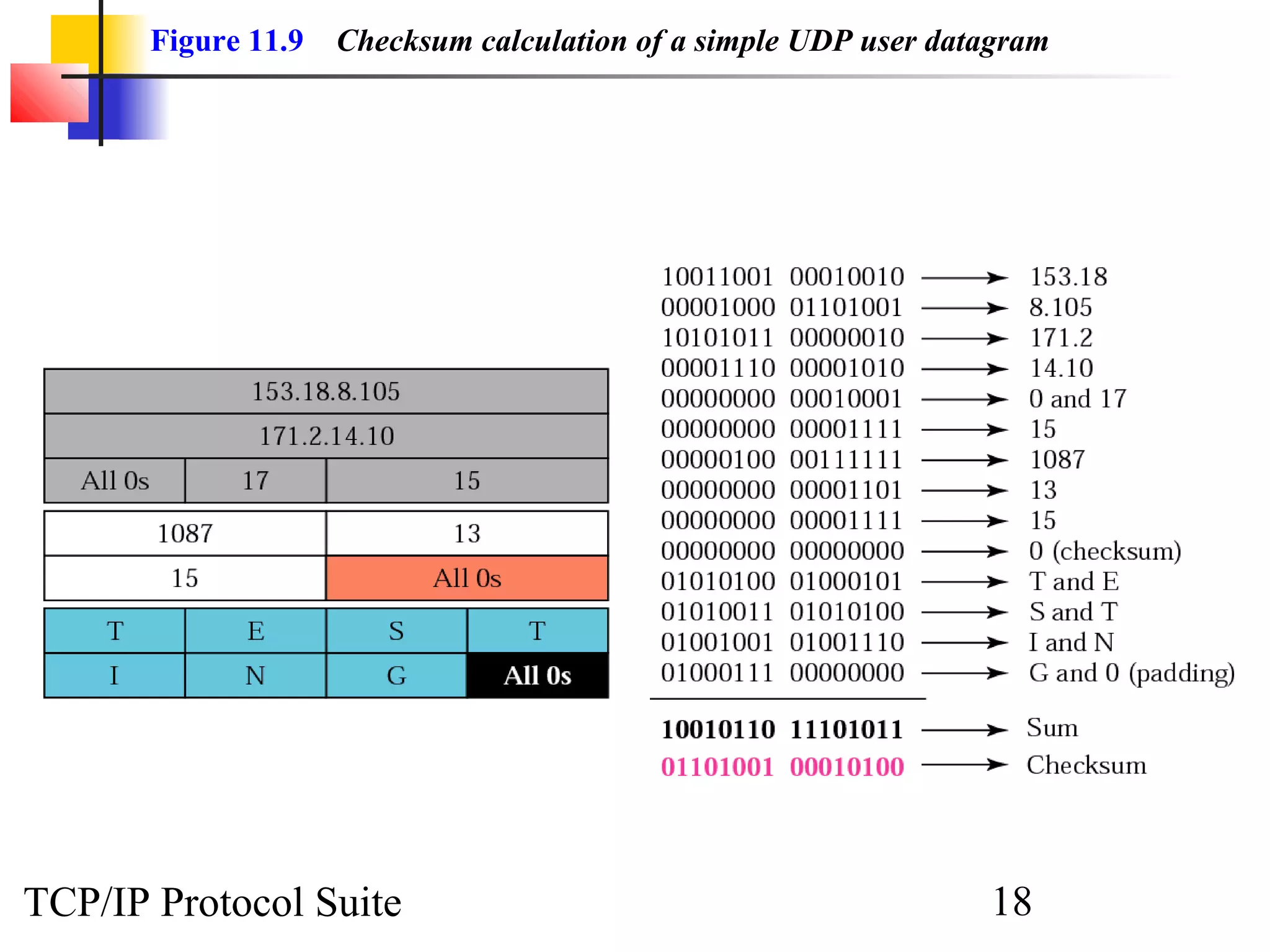
   UDP checksum calculation is different from the one for IP and ICMP.
   Here the checksum includes three sections: a pseudoheader, the UDP
   header, and the data coming from the application layer.


    The topics discussed in this section include:

    Checksum Calculation at Sender
    Checksum Calculation at Receiver
    Optional Use of the Checksum


TCP/IP Protocol Suite                                      16
Figure 11.8   Pseudoheader for checksum calculation


TCP/IP Protocol Suite                                        17
Figure 11.9   Checksum calculation of a simple UDP user datagram


TCP/IP Protocol Suite                                             18
11.4 UDP OPERATION
   UDP uses concepts common to the transport layer. These concepts will
   be discussed here briefly, and then expanded in the next chapter on the
   TCP protocol.


    The topics discussed in this section include:

    Connectionless Services
    Flow and Error Control
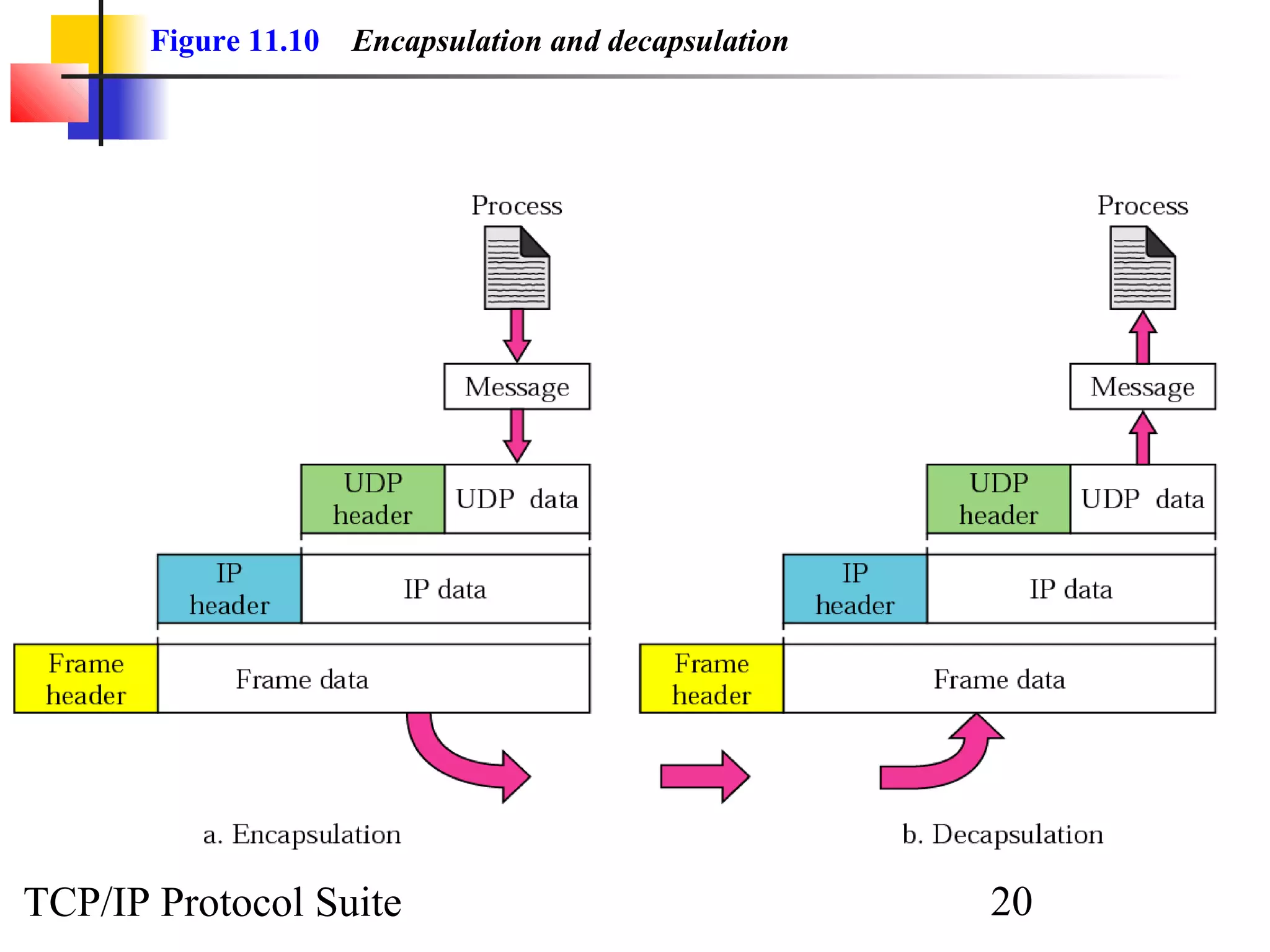
    Encapsulation and Decapsulation
    Queuing
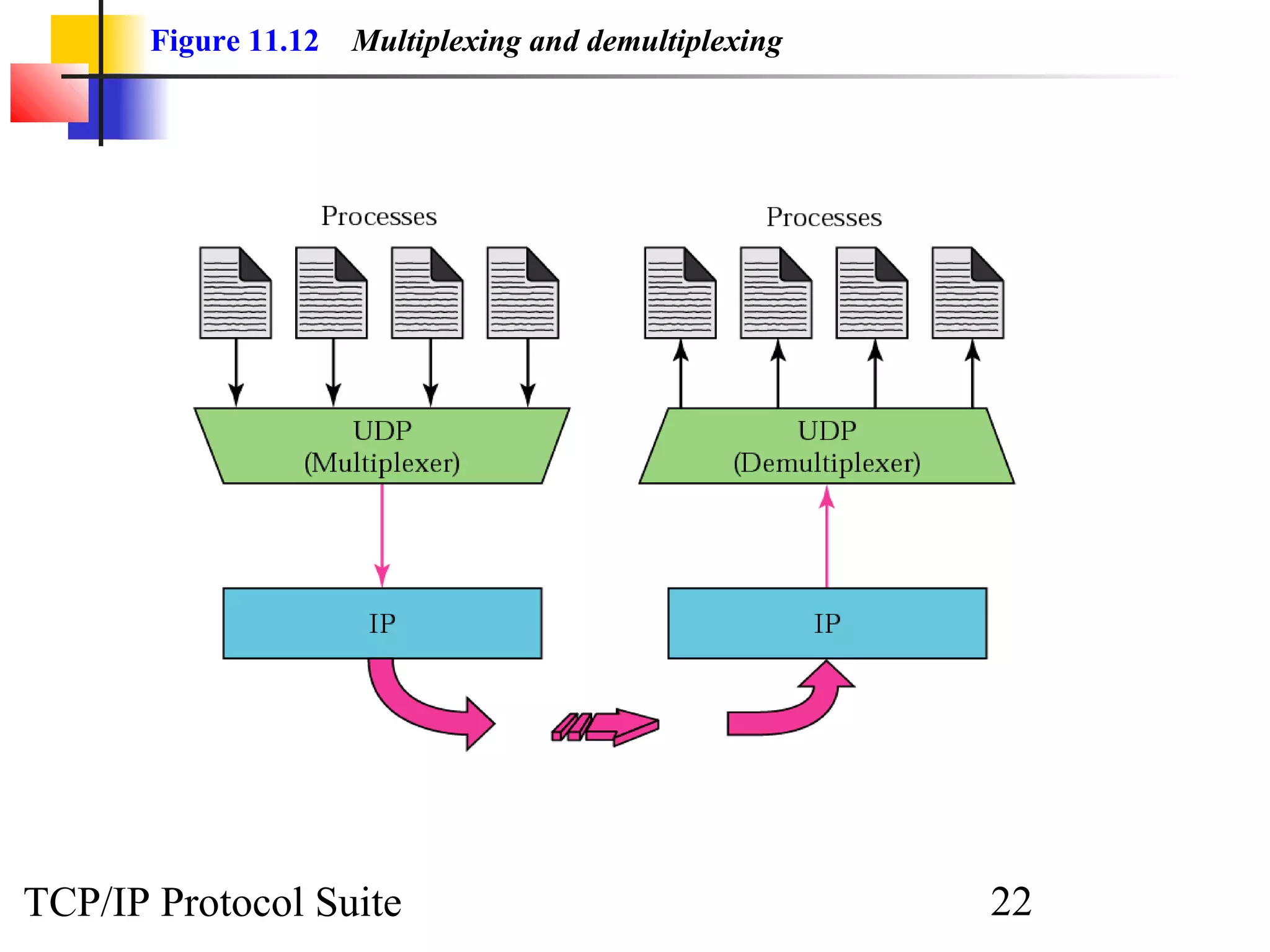
    Multiplexing and Demultiplexing

TCP/IP Protocol Suite                                          19
Figure 11.10   Encapsulation and decapsulation


TCP/IP Protocol Suite                                   20
Figure 11.11   Queues in UDP


TCP/IP Protocol Suite                 21
Figure 11.12   Multiplexing and demultiplexing


TCP/IP Protocol Suite                                   22
11.5 USE OF UDP
   We discuss some uses of the UDP protocol in this section.


TCP/IP Protocol Suite                                          23
11.6 UDP PACKAGE
   To show how UDP handles the sending and receiving of UDP packets,
   we present a simple version of the UDP package. The UDP package
   involves five components: a control-block table,      input queues, a
   control-block module, an input module, and an output module.


    The topics discussed in this section include:
    Control-Block Table
    Input Queues
    Control-Block Module
    Input Module
    Output Module

TCP/IP Protocol Suite                                        24
Figure 11.13   UDP design


TCP/IP Protocol Suite              25
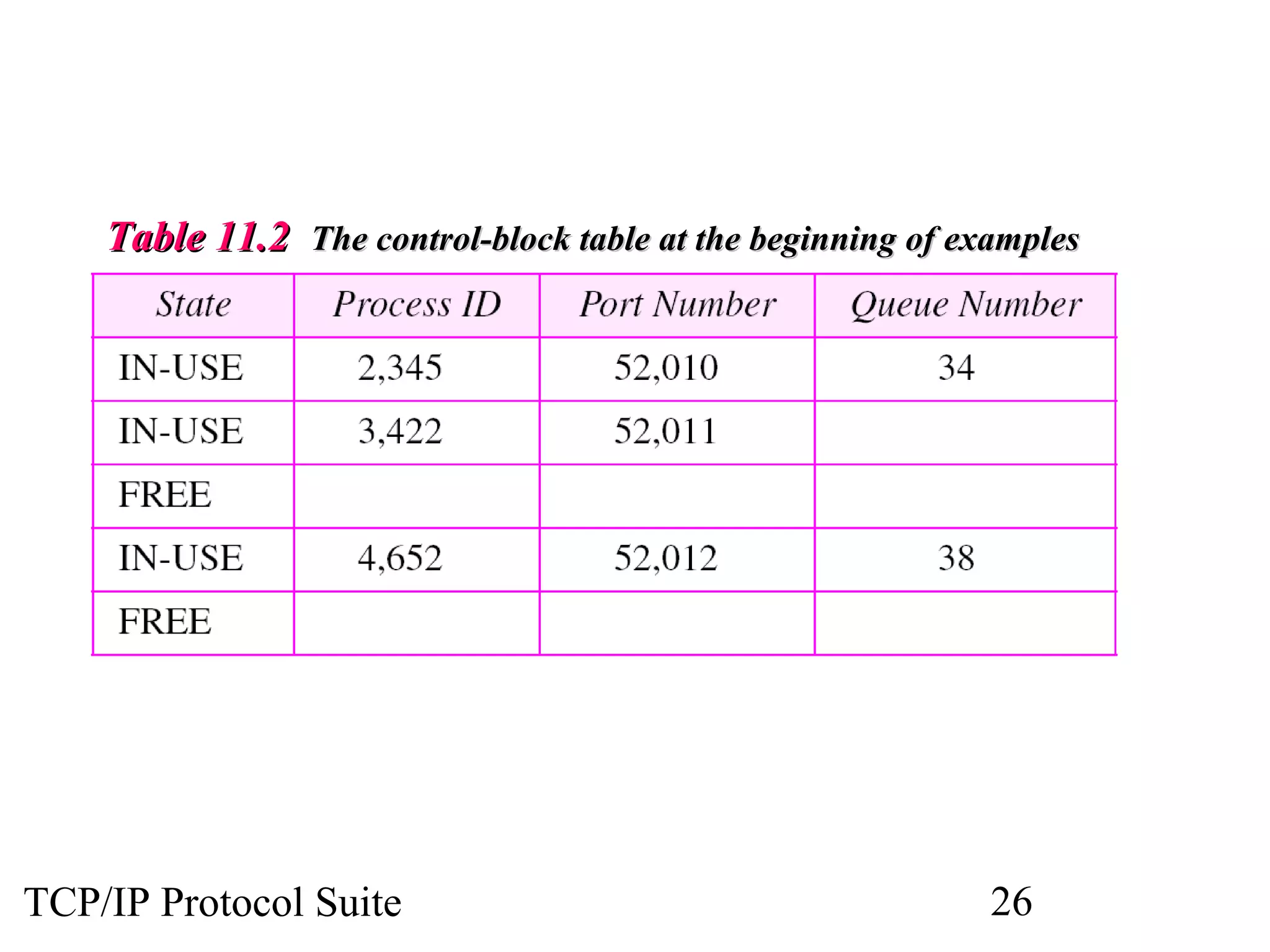
Table 11.2 The control-block table at the beginning of examples


TCP/IP Protocol Suite                                        26
ExamplE 2


 The first activity is the arrival of a user datagram with
 destination port number 52,012. The input module searches for
 this port number and finds it. Queue number 38 has been
 assigned to this port, which means that the port has been
 previously used. The input module sends the data to queue 38.
 The control-block table does not change.


TCP/IP Protocol Suite                               27
ExamplE 3

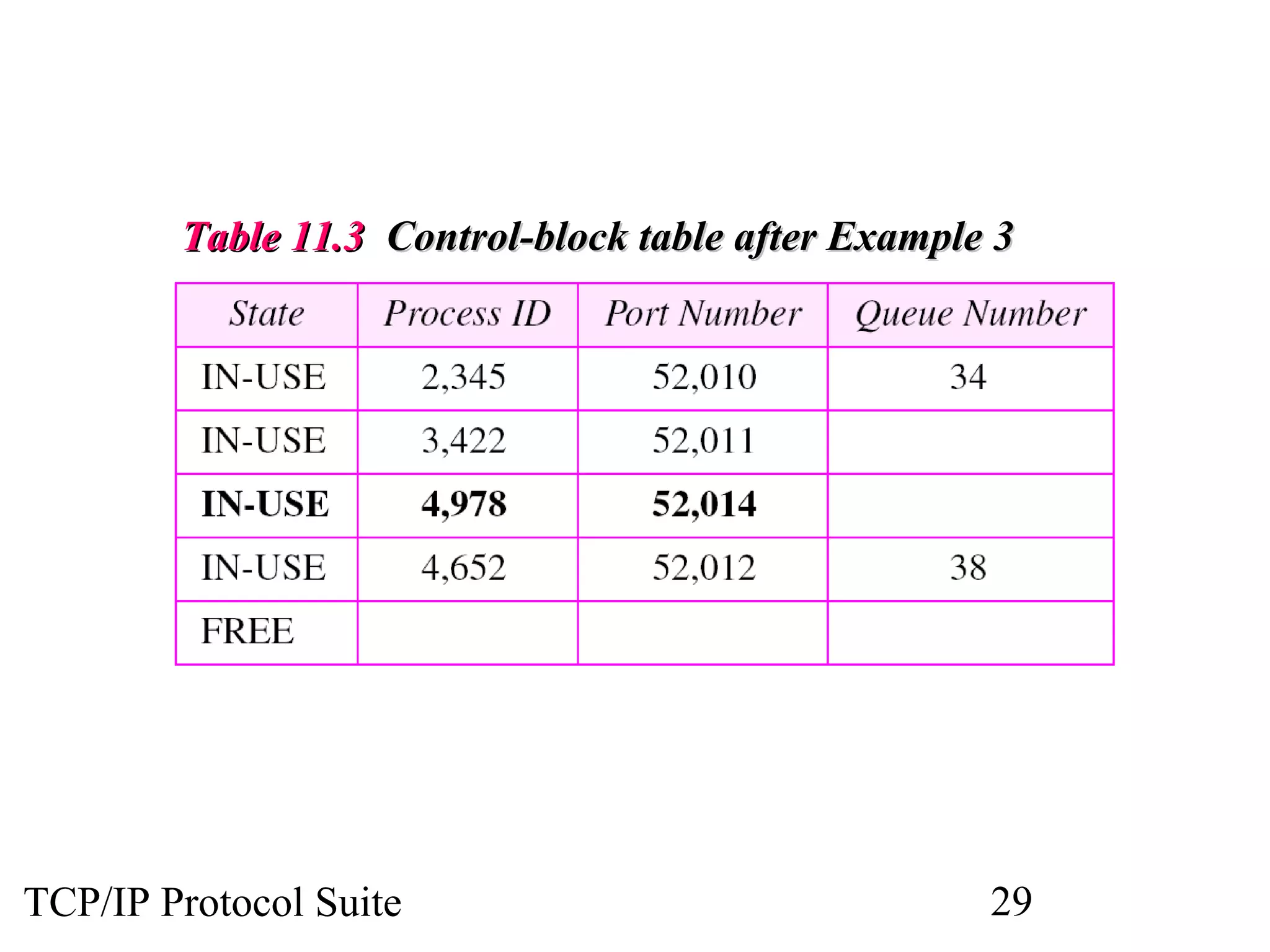
 After a few seconds, a process starts. It asks the operating
 system for a port number and is granted port number 52,014.
 Now the process sends its ID (4,978) and the port number to
 the control-block module to create an entry in the table. The
 module takes the first FREE entry and inserts the information
 received. The module does not allocate a queue at this moment
 because no user datagrams have arrived for this destination
 (see Table 11.3).

                        See Next Slide


TCP/IP Protocol Suite                               28
Table 11.3 Control-block table after Example 3


TCP/IP Protocol Suite                               29
ExamplE 4

 A user datagram now arrives for port 52,011. The input
 module checks the table and finds that no queue has been
 allocated for this destination since this is the first time a user
 datagram has arrived for this destination. The module creates
 a queue and gives it a number (43). See Table 11.4.


                        See Next Slide


TCP/IP Protocol Suite                                   30
Table 11.4 Control-block after Example 4


TCP/IP Protocol Suite                               31
ExamplE 5


 After a few seconds, a user datagram arrives for port 52,222.
 The input module checks the table and cannot find an entry for
 this destination. The user datagram is dropped and a request is
 made to ICMP to send an “unreachable port” message to the
 source.


TCP/IP Protocol Suite                                 32

Chap 11

  • 1.
    Chapter 11 User Datagram Protocol Objectives Upon completion you will be able to: • Be able to explain process-to-process communication • Know the format of a UDP user datagram • Be able to calculate a UDP checksum • Understand the operation of UDP • Know when it is appropriate to use UDP • Understand the modules in a UDP package TCP/IP Protocol Suite 1
  • 2.
    Figure 11.1 Position of UDP in the TCP/IP protocol suite TCP/IP Protocol Suite 2
  • 3.
    11.1 PROCESS-TO-PROCESS COMMUNICATION Before we examine UDP, we must first understand host-to-host communication and process-to-process communication and the difference between them. The topics discussed in this section include: Port Numbers Socket Addresses TCP/IP Protocol Suite 3
  • 4.
    Figure 11.2 UDP versus IP TCP/IP Protocol Suite 4
  • 5.
    Figure 11.3 Port numbers TCP/IP Protocol Suite 5
  • 6.
    Figure 11.4 IP addresses versus port numbers TCP/IP Protocol Suite 6
  • 7.
    Figure 11.5 ICANN ranges TCP/IP Protocol Suite 7
  • 8.
    Note: The well-known port numbers are less than 1024. TCP/IP Protocol Suite 8
  • 9.
    Table 11.1 Well-knownports used with UDP TCP/IP Protocol Suite 9
  • 10.
    ExamplE 1 InUNIX, the well-known ports are stored in a file called /etc/services. Each line in this file gives the name of the server and the well-known port number. We can use the grep utility to extract the line corresponding to the desired application. The following shows the port for TFTP. Note TFTP can use port 69 on either UDP or TCP. $ grep tftp /etc/services tftp 69/tcp tftp 69/udp See Next Slide TCP/IP Protocol Suite 10
  • 11.
    ExamplE 1 (ContinuEd) SNMP uses two port numbers (161 and 162), each for a different purpose, as we will see in Chapter 21. $ grep snmp /etc/services snmp 161/tcp #Simple Net Mgmt Proto snmp 161/udp #Simple Net Mgmt Proto snmptrap 162/udp #Traps for SNMP TCP/IP Protocol Suite 11
  • 12.
    Figure 11.6 Socket address TCP/IP Protocol Suite 12
  • 13.
    11.2 USER DATAGRAM UDP packets are called user datagrams and have a fixed-size header of 8 bytes. TCP/IP Protocol Suite 13
  • 14.
    Figure 11.7 User datagram format TCP/IP Protocol Suite 14
  • 15.
    Note: UDP length = IP length − IP header’s length TCP/IP Protocol Suite 15
  • 16.
    11.3 CHECKSUM UDP checksum calculation is different from the one for IP and ICMP. Here the checksum includes three sections: a pseudoheader, the UDP header, and the data coming from the application layer. The topics discussed in this section include: Checksum Calculation at Sender Checksum Calculation at Receiver Optional Use of the Checksum TCP/IP Protocol Suite 16
  • 17.
    Figure 11.8 Pseudoheader for checksum calculation TCP/IP Protocol Suite 17
  • 18.
    Figure 11.9 Checksum calculation of a simple UDP user datagram TCP/IP Protocol Suite 18
  • 19.
    11.4 UDP OPERATION UDP uses concepts common to the transport layer. These concepts will be discussed here briefly, and then expanded in the next chapter on the TCP protocol. The topics discussed in this section include: Connectionless Services Flow and Error Control Encapsulation and Decapsulation Queuing Multiplexing and Demultiplexing TCP/IP Protocol Suite 19
  • 20.
    Figure 11.10 Encapsulation and decapsulation TCP/IP Protocol Suite 20
  • 21.
    Figure 11.11 Queues in UDP TCP/IP Protocol Suite 21
  • 22.
    Figure 11.12 Multiplexing and demultiplexing TCP/IP Protocol Suite 22
  • 23.
    11.5 USE OFUDP We discuss some uses of the UDP protocol in this section. TCP/IP Protocol Suite 23
  • 24.
    11.6 UDP PACKAGE To show how UDP handles the sending and receiving of UDP packets, we present a simple version of the UDP package. The UDP package involves five components: a control-block table, input queues, a control-block module, an input module, and an output module. The topics discussed in this section include: Control-Block Table Input Queues Control-Block Module Input Module Output Module TCP/IP Protocol Suite 24
  • 25.
    Figure 11.13 UDP design TCP/IP Protocol Suite 25
  • 26.
    Table 11.2 Thecontrol-block table at the beginning of examples TCP/IP Protocol Suite 26
  • 27.
    ExamplE 2 Thefirst activity is the arrival of a user datagram with destination port number 52,012. The input module searches for this port number and finds it. Queue number 38 has been assigned to this port, which means that the port has been previously used. The input module sends the data to queue 38. The control-block table does not change. TCP/IP Protocol Suite 27
  • 28.
    ExamplE 3 Aftera few seconds, a process starts. It asks the operating system for a port number and is granted port number 52,014. Now the process sends its ID (4,978) and the port number to the control-block module to create an entry in the table. The module takes the first FREE entry and inserts the information received. The module does not allocate a queue at this moment because no user datagrams have arrived for this destination (see Table 11.3). See Next Slide TCP/IP Protocol Suite 28
  • 29.
    Table 11.3 Control-blocktable after Example 3 TCP/IP Protocol Suite 29
  • 30.
    ExamplE 4 Auser datagram now arrives for port 52,011. The input module checks the table and finds that no queue has been allocated for this destination since this is the first time a user datagram has arrived for this destination. The module creates a queue and gives it a number (43). See Table 11.4. See Next Slide TCP/IP Protocol Suite 30
  • 31.
    Table 11.4 Control-blockafter Example 4 TCP/IP Protocol Suite 31
  • 32.
    ExamplE 5 Aftera few seconds, a user datagram arrives for port 52,222. The input module checks the table and cannot find an entry for this destination. The user datagram is dropped and a request is made to ICMP to send an “unreachable port” message to the source. TCP/IP Protocol Suite 32