
CCNA 1 v3.0 Module 9
TCP/IP Protocol Suite and IP
Addressing
Purpose of This PowerPoint
  This PowerPoint primarily consists of the Target
  Indicators (TIs) of this module in CCNA version 3.0.
  It was created to give instructors a PowerPoint to
  take and modify as their own.
  This PowerPoint is:
     NOT a study guide for the module final

      assessment.
     NOT a study guide for the CCNA certification

      exam.
  Please report any mistakes you find in this
  PowerPoint by using the Academy Connection Help
  link.
To Locate Instructional Resource
Materials on Academy Connection:

  Go to the Community FTP Center to locate
  materials created by the instructor community
  Go to the Tools section
  Go to the Alpha Preview section
  Go to the Community link under Resources
  See the resources available on the Class
  home page for classes you are offering
  Search http://www.cisco.com
  Contact your parent academy!
Objectives
  Introduction to TCP/IP
  Internet addresses
  Obtaining an IP address
Introduction to TCP/IP
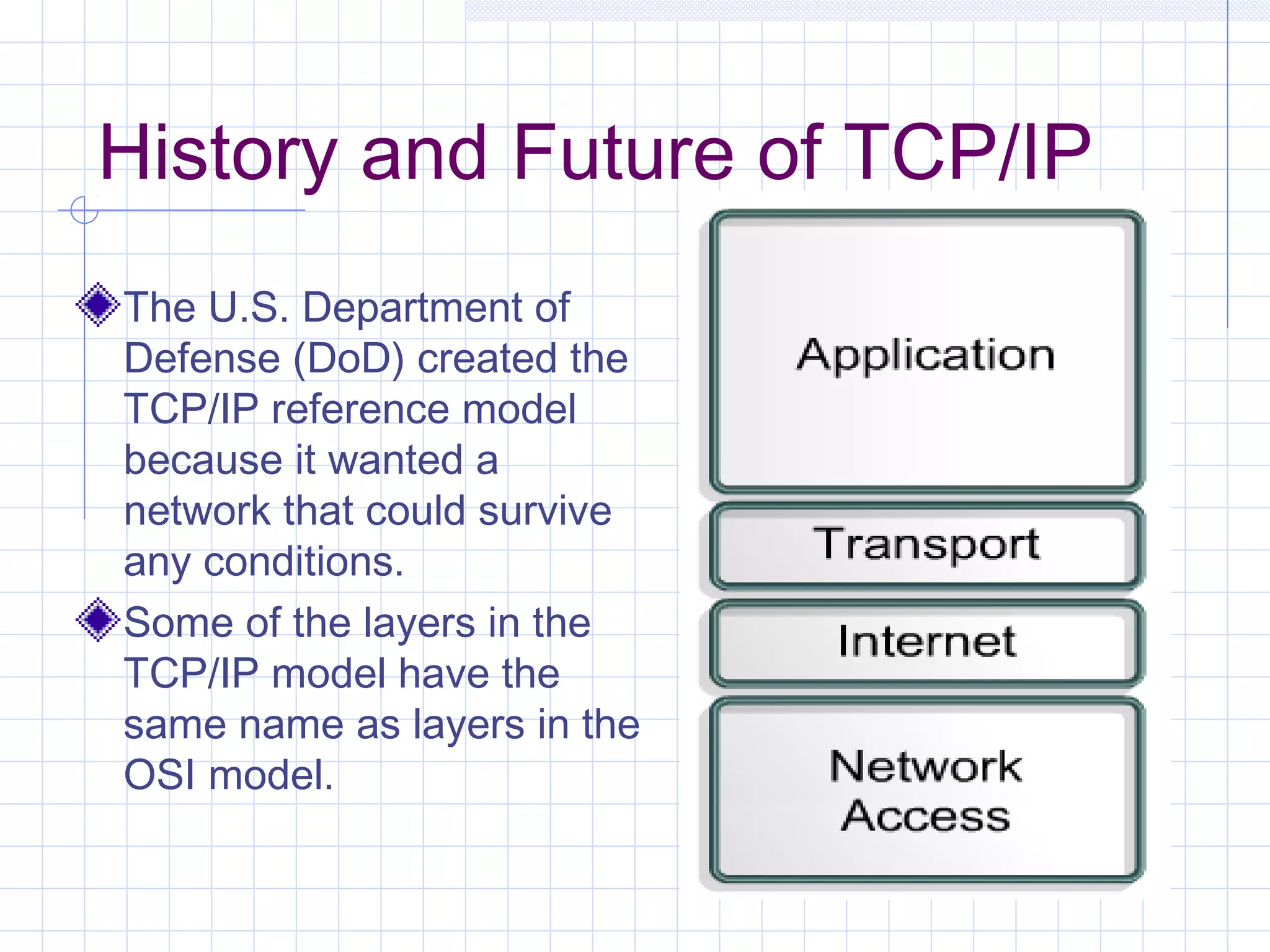
History and Future of TCP/IP
The U.S. Department of
Defense (DoD) created the
TCP/IP reference model
because it wanted a
network that could survive
any conditions.
Some of the layers in the
TCP/IP model have the
same name as layers in the
OSI model.
Application Layer
  Handles high-level protocols, issues of
  representation, encoding, and dialog
  control.
  The TCP/IP protocol suite combines all
  application related issues into one layer
  and ensures this data is properly
  packaged before passing it on to the
  next layer.
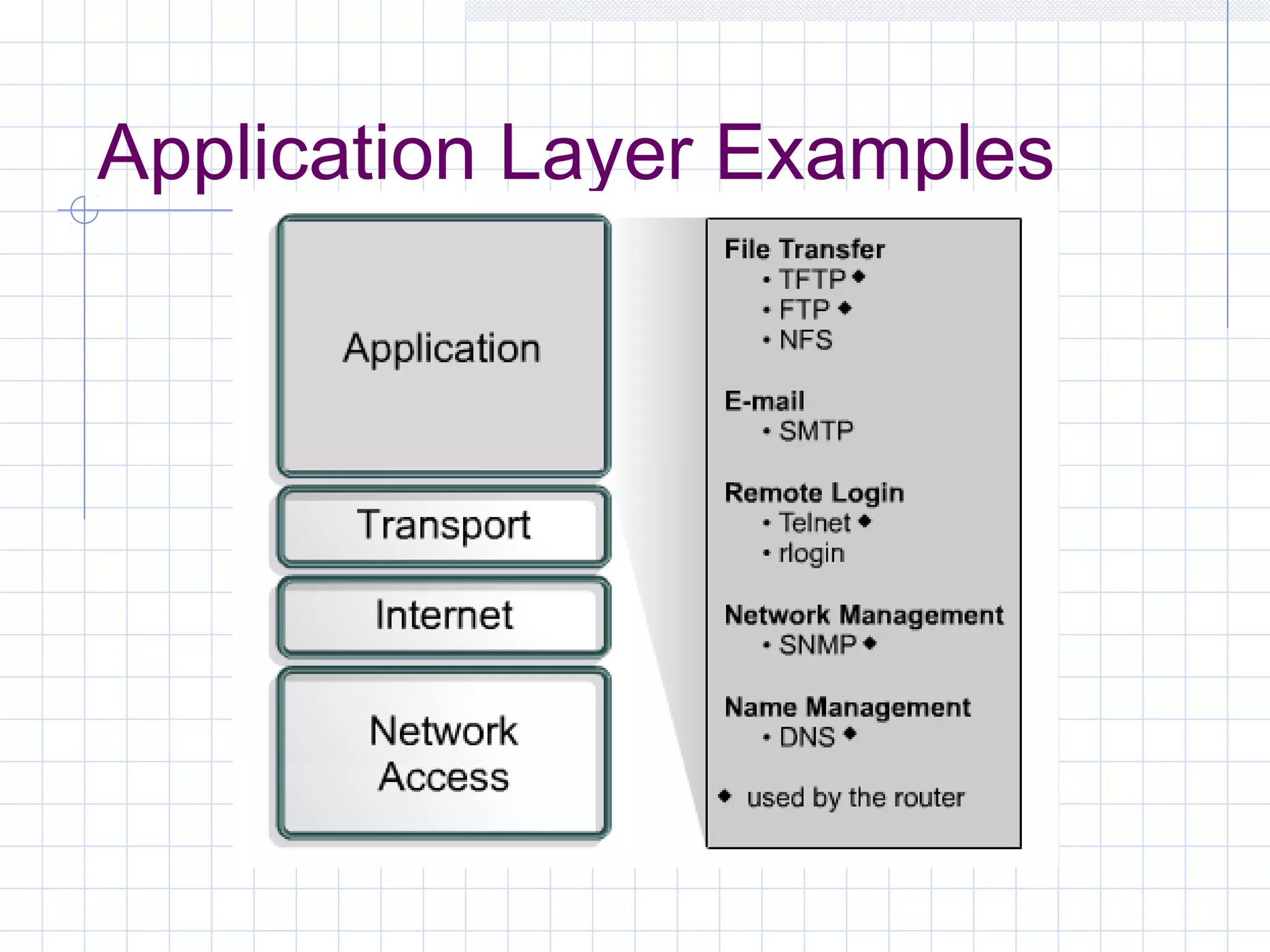
Application Layer Examples
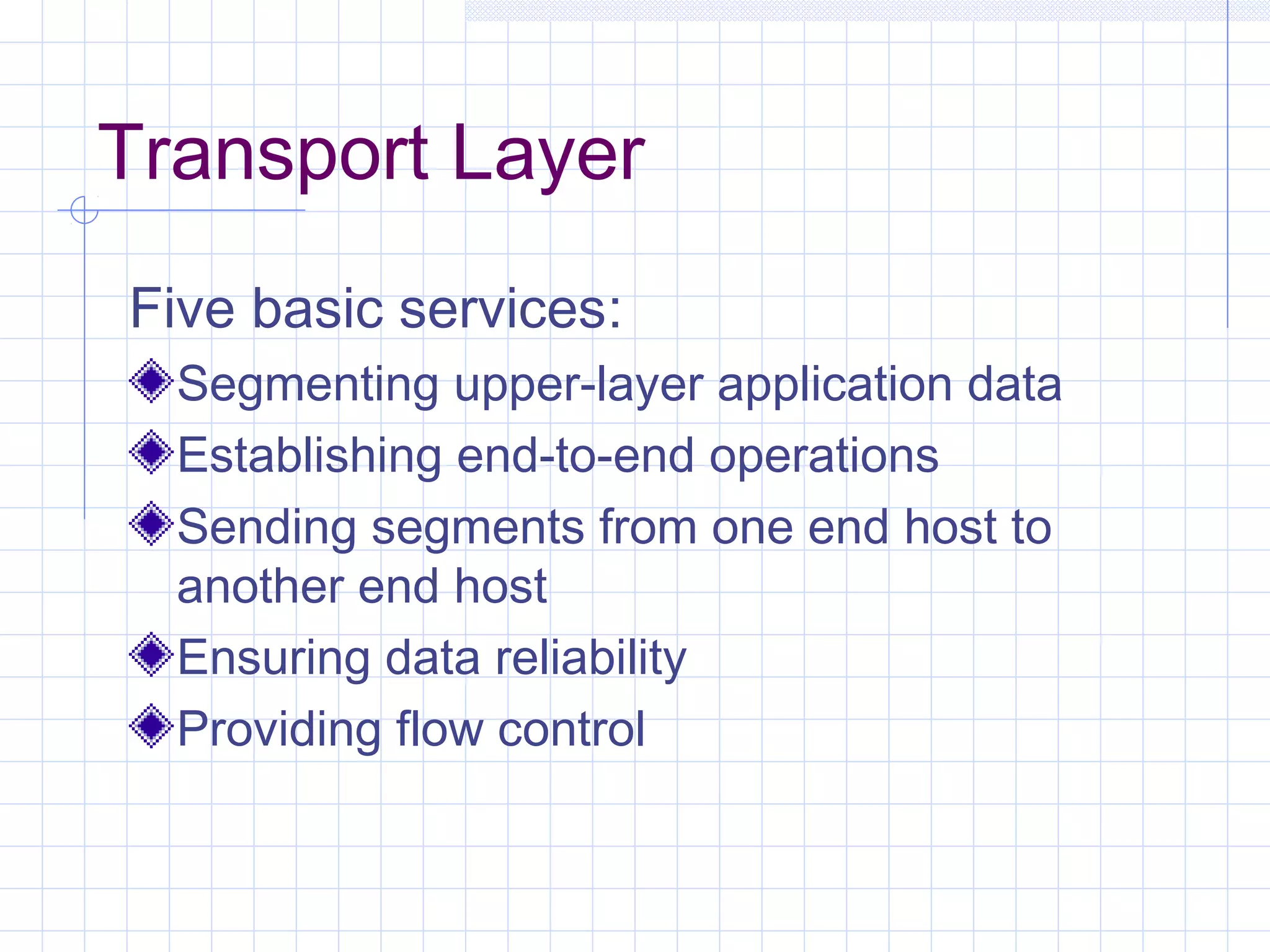
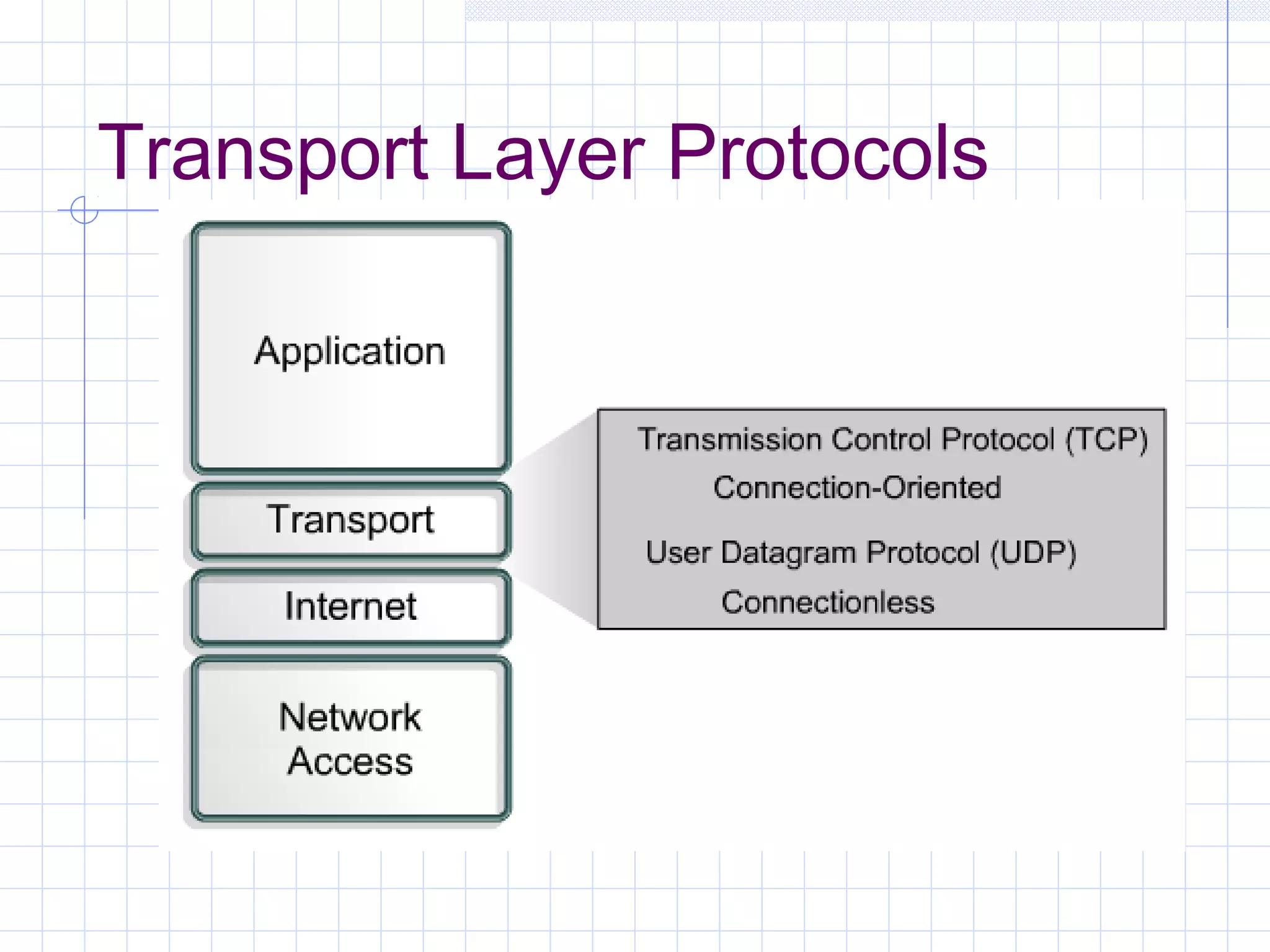
Transport Layer
Five basic services:
  Segmenting upper-layer application data
  Establishing end-to-end operations
  Sending segments from one end host to
  another end host
  Ensuring data reliability
  Providing flow control
Transport Layer Protocols
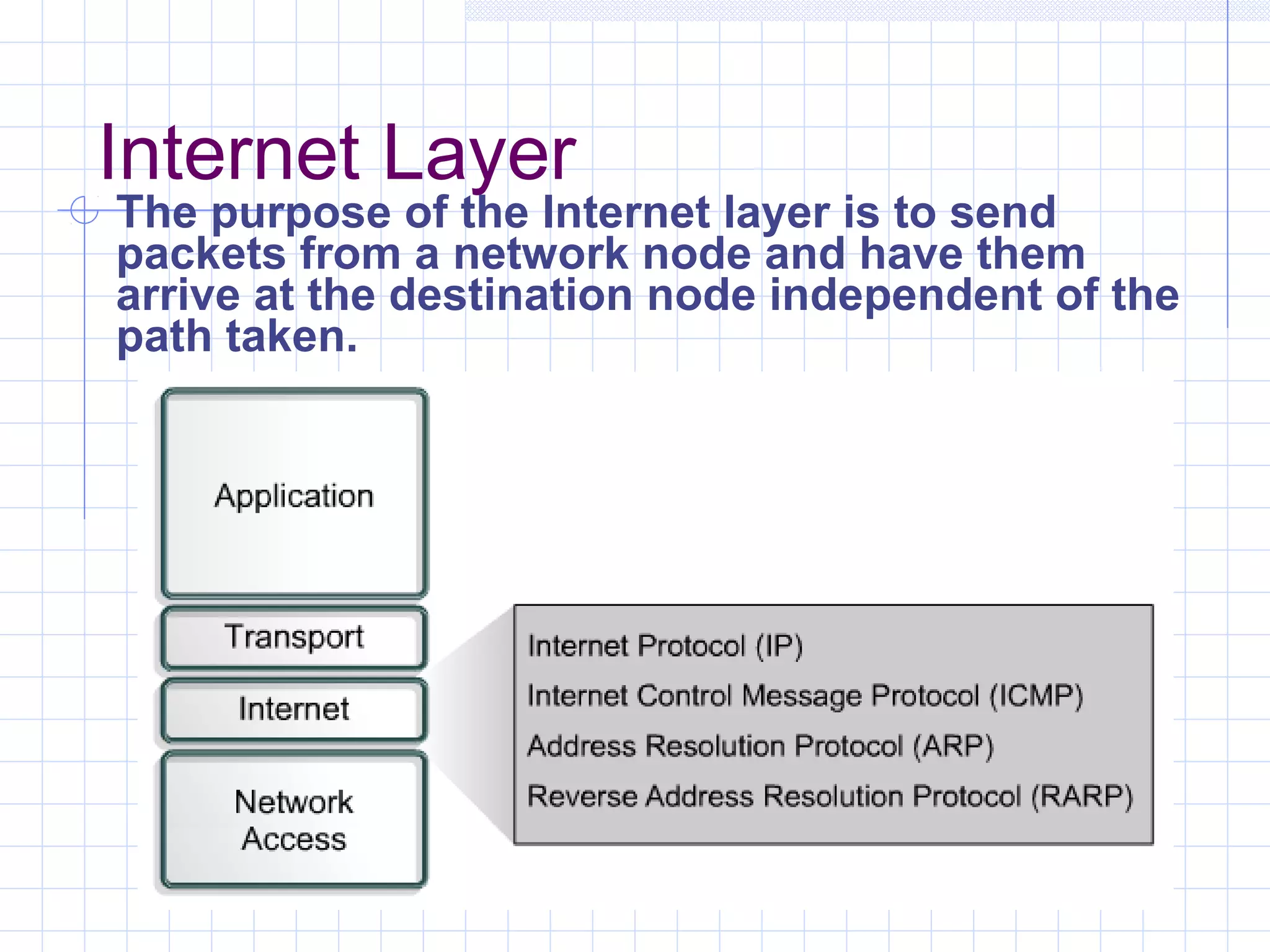
Internet Layer
The purpose of the Internet layer is to send
packets from a network node and have them
arrive at the destination node independent of the
path taken.
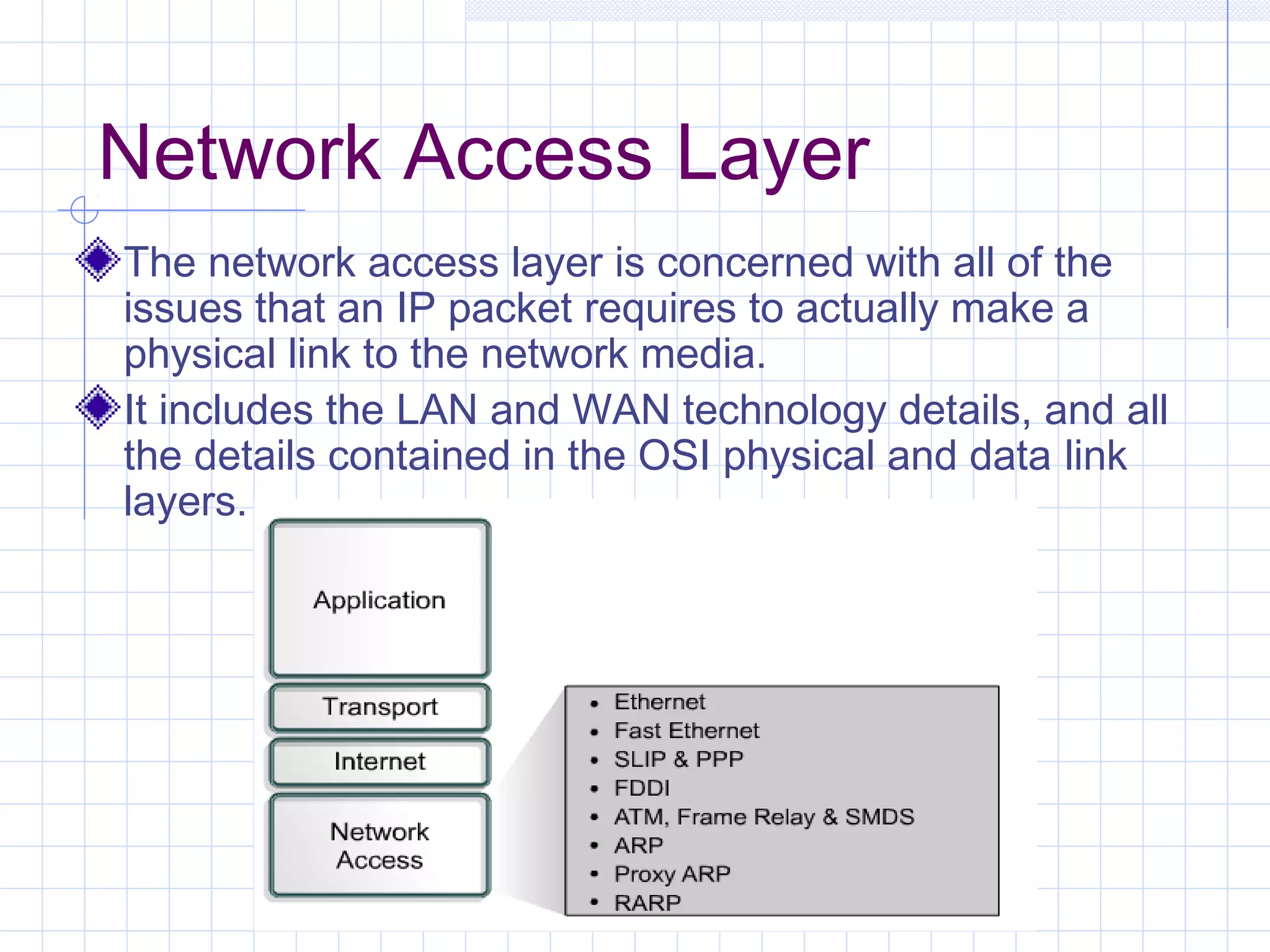
Network Access Layer
The network access layer is concerned with all of the
issues that an IP packet requires to actually make a
physical link to the network media.
It includes the LAN and WAN technology details, and all
the details contained in the OSI physical and data link
layers.
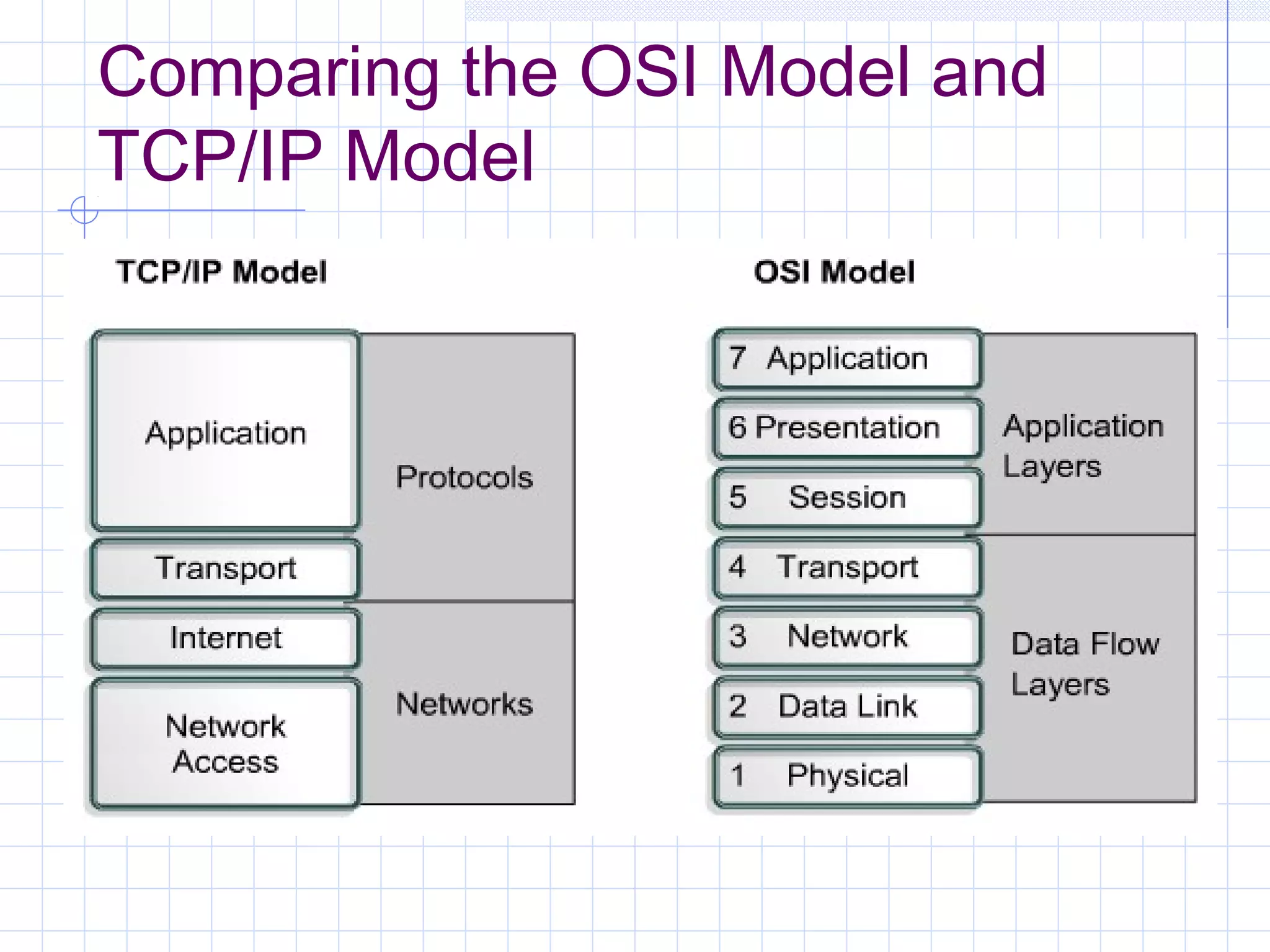
Comparing the OSI Model and
TCP/IP Model
Similarities of the OSI and
TCP/IP Models
Both have layers.
Both have application layers, though they
include very different services.
Both have comparable transport and
network layers.
Packet-switched, not circuit-switched,
technology is assumed.
Networking professionals need to know
both models.
Differences of the OSI and
TCP/IP Models
TCP/IP combines the presentation and session
layer into its application layer.
TCP/IP combines the OSI data link and physical
layers into one layer.
TCP/IP appears simpler because it has fewer
layers.
TCP/IP transport layer using UDP does not
always guarantee reliable delivery of packets as
the transport layer in the OSI model does.
Internet Architecture
  Two computers, anywhere in the world,
  following certain hardware, software,
  protocol specifications, can
  communicate, reliably even when not
  directly connected.
  LANs are no longer scalable beyond a
  certain number of stations or
  geographic separation.
Internet Addresses
IP Addressing
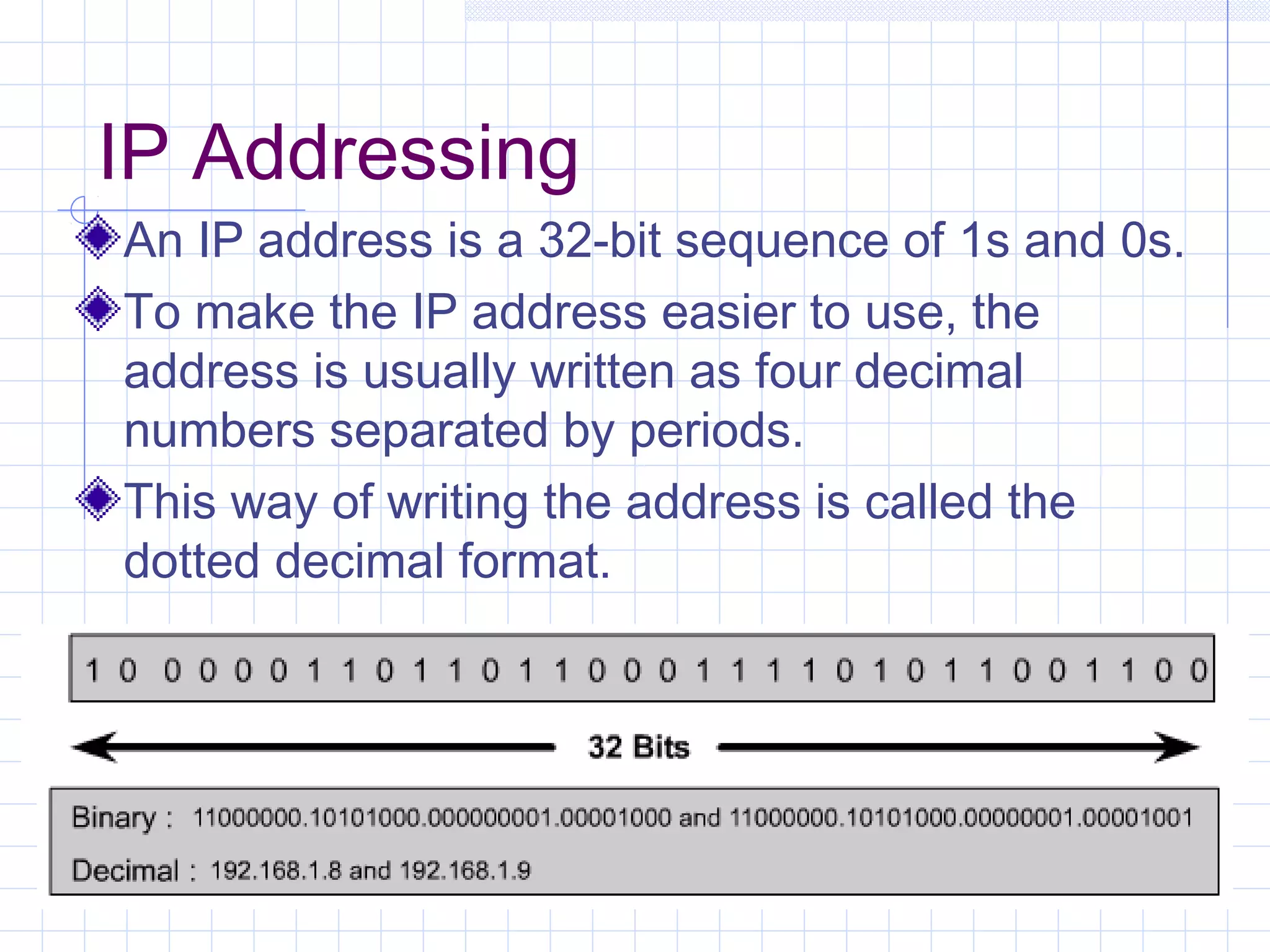
An IP address is a 32-bit sequence of 1s and 0s.
To make the IP address easier to use, the
address is usually written as four decimal
numbers separated by periods.
This way of writing the address is called the
dotted decimal format.
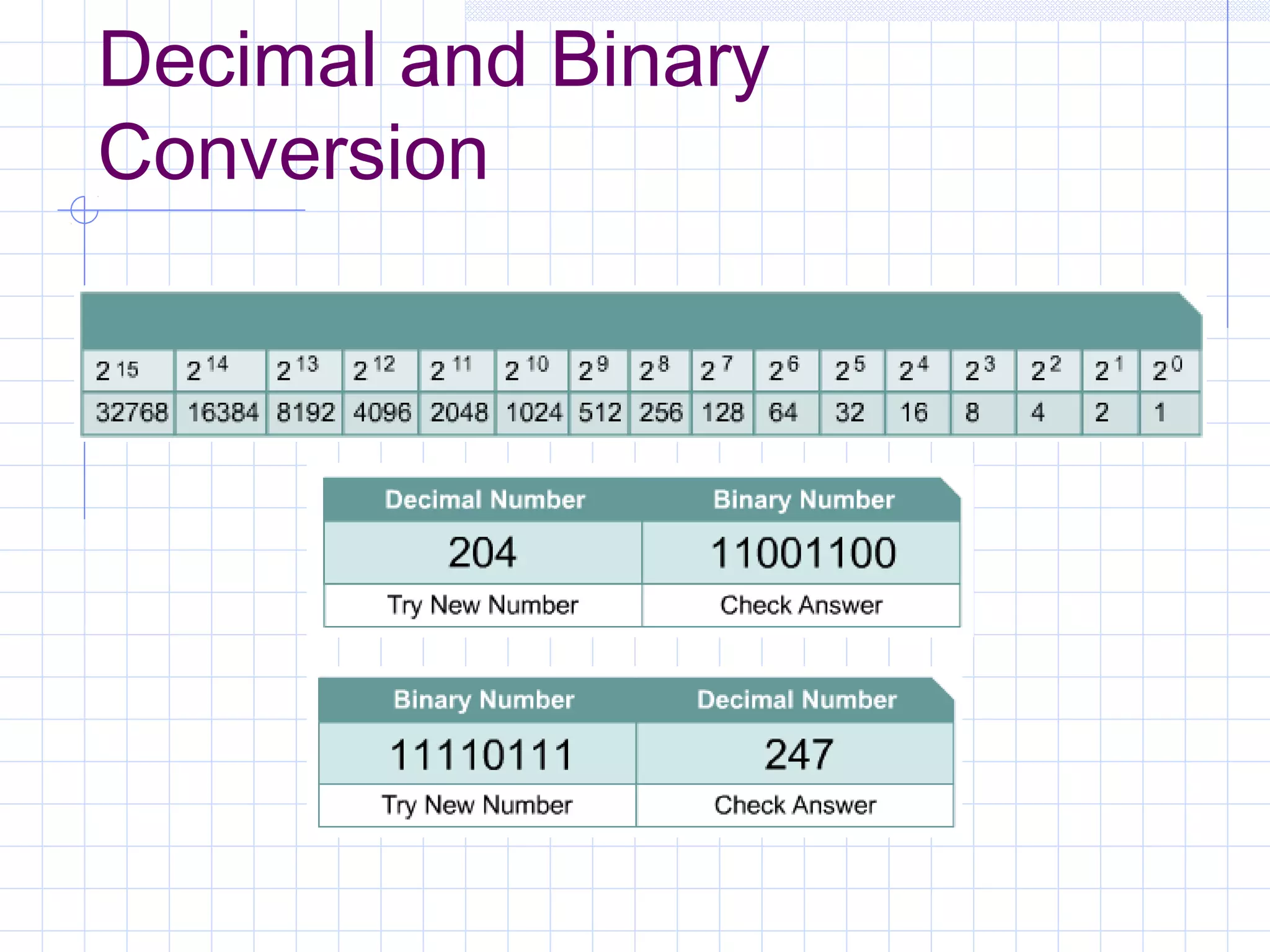
Decimal and Binary
Conversion
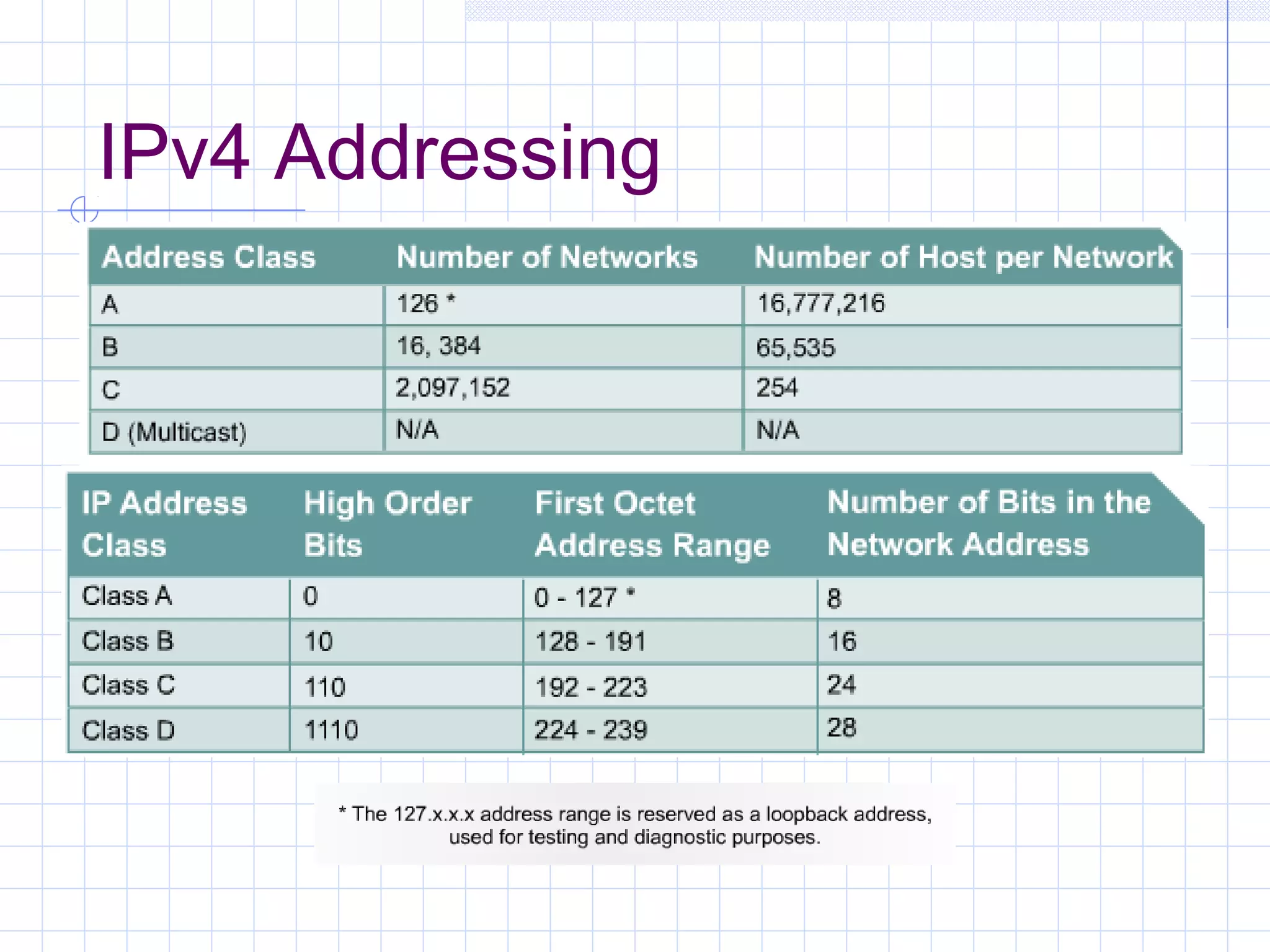
IPv4 Addressing
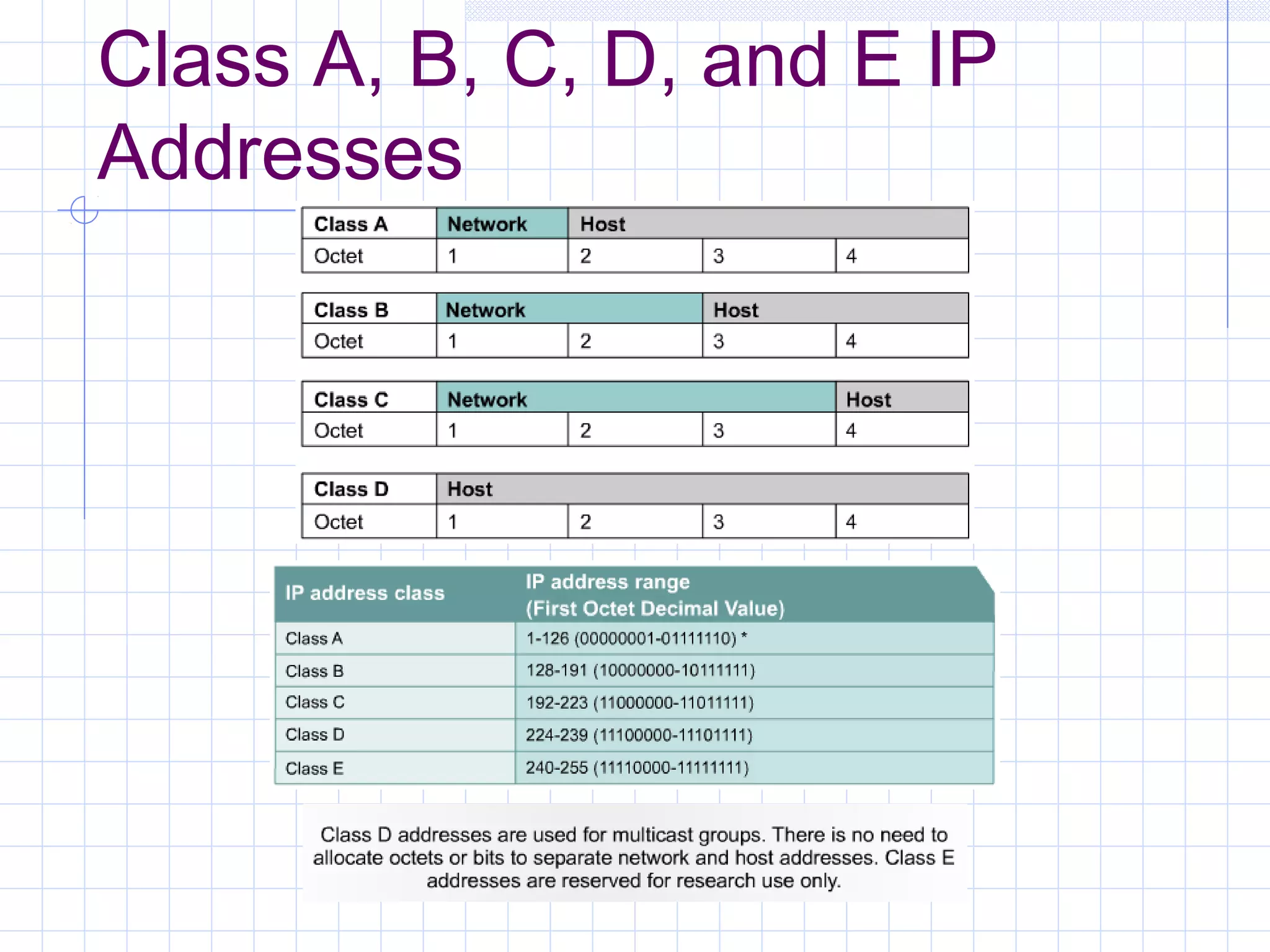
Class A, B, C, D, and E IP
Addresses
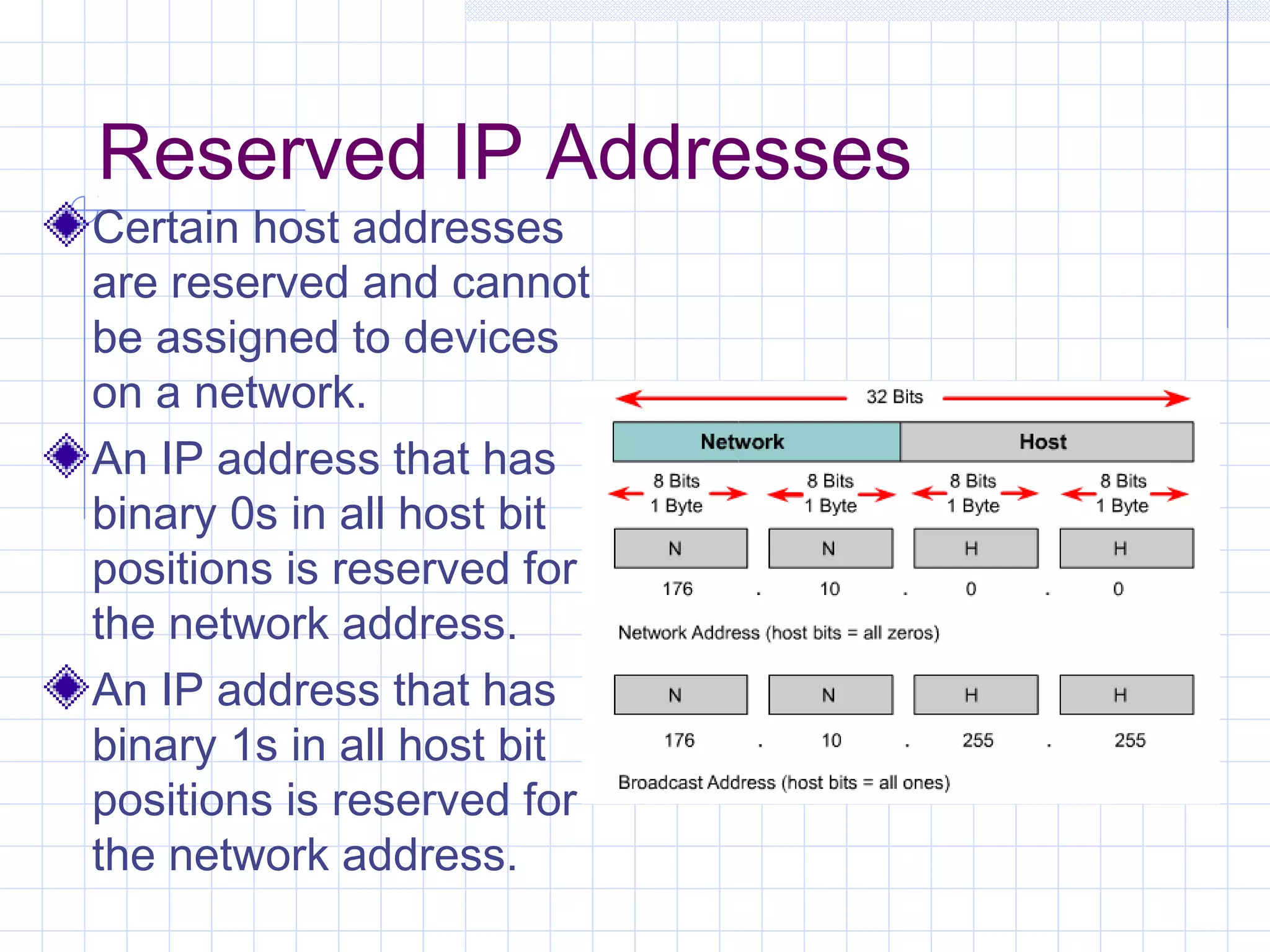
Reserved IP Addresses
Certain host addresses
are reserved and cannot
be assigned to devices
on a network.
An IP address that has
binary 0s in all host bit
positions is reserved for
the network address.
An IP address that has
binary 1s in all host bit
positions is reserved for
the network address.
Public and Private IP
Addresses
No two machines that connect to a public network can
have the same IP address because public IP addresses
are global and standardized.
However, private networks that are not connected to the
Internet may use any host addresses, as long as each
host within the private network is unique.
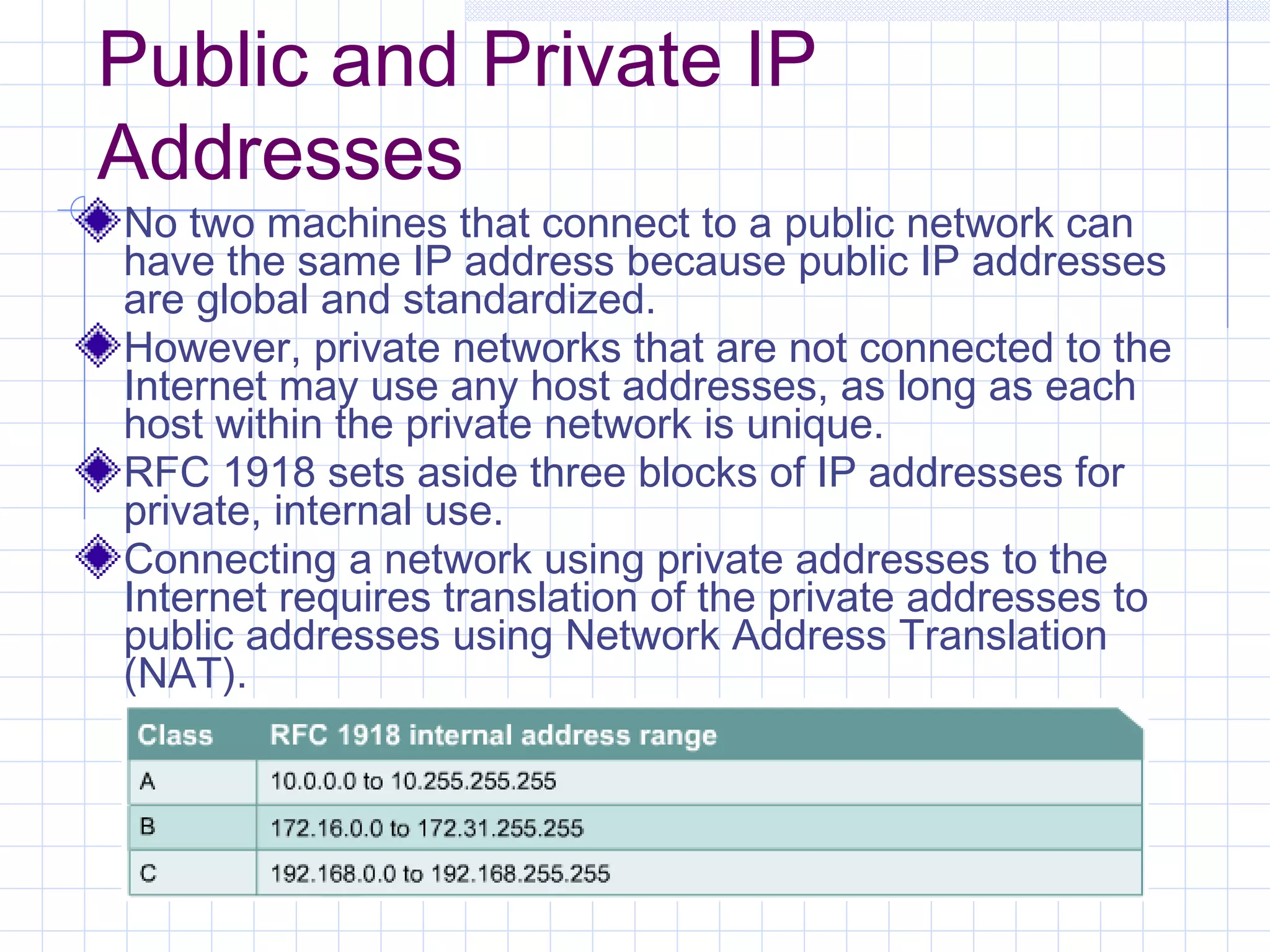
RFC 1918 sets aside three blocks of IP addresses for
private, internal use.
Connecting a network using private addresses to the
Internet requires translation of the private addresses to
public addresses using Network Address Translation
(NAT).
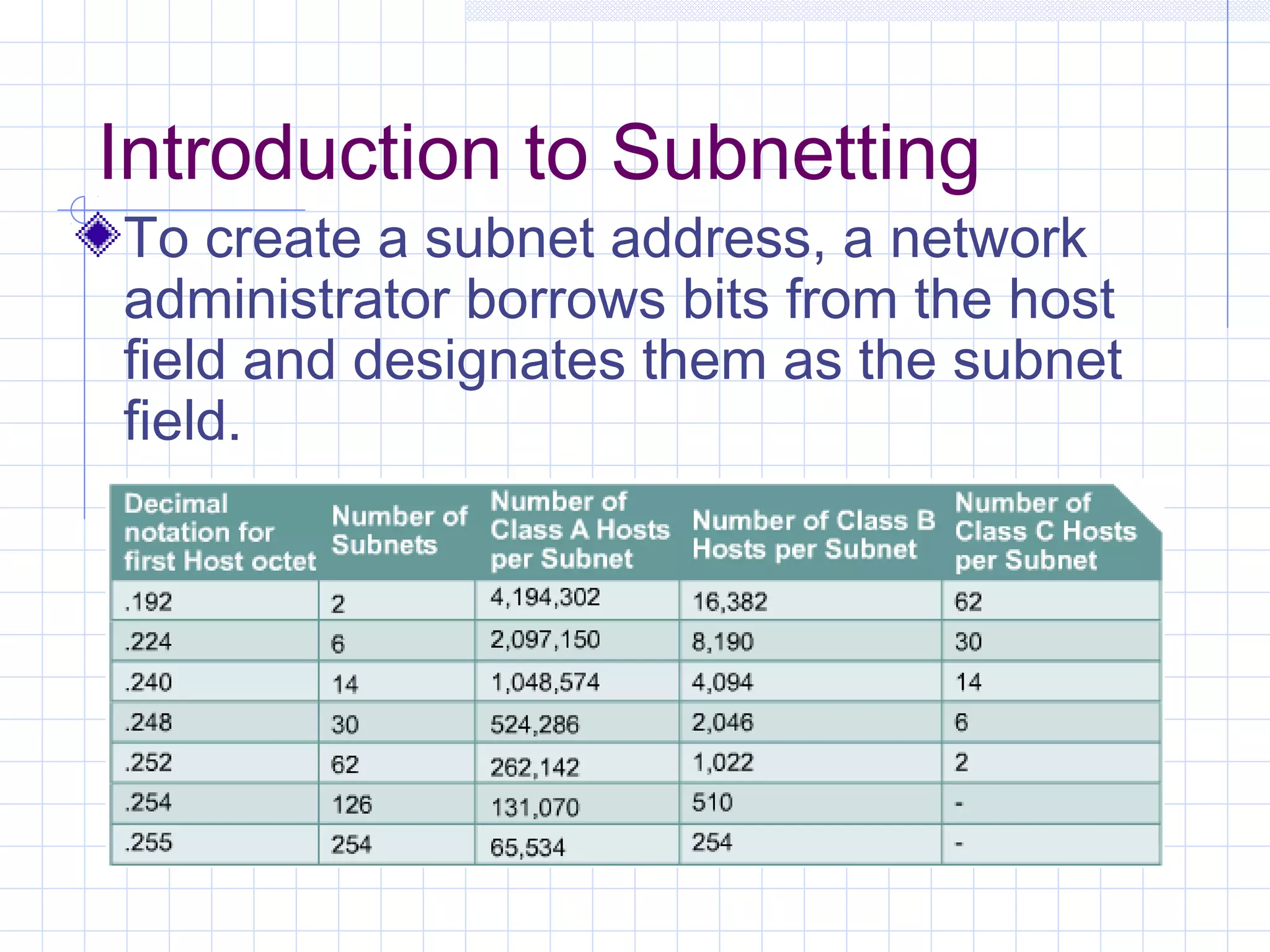
Introduction to Subnetting
To create a subnet address, a network
administrator borrows bits from the host
field and designates them as the subnet
field.
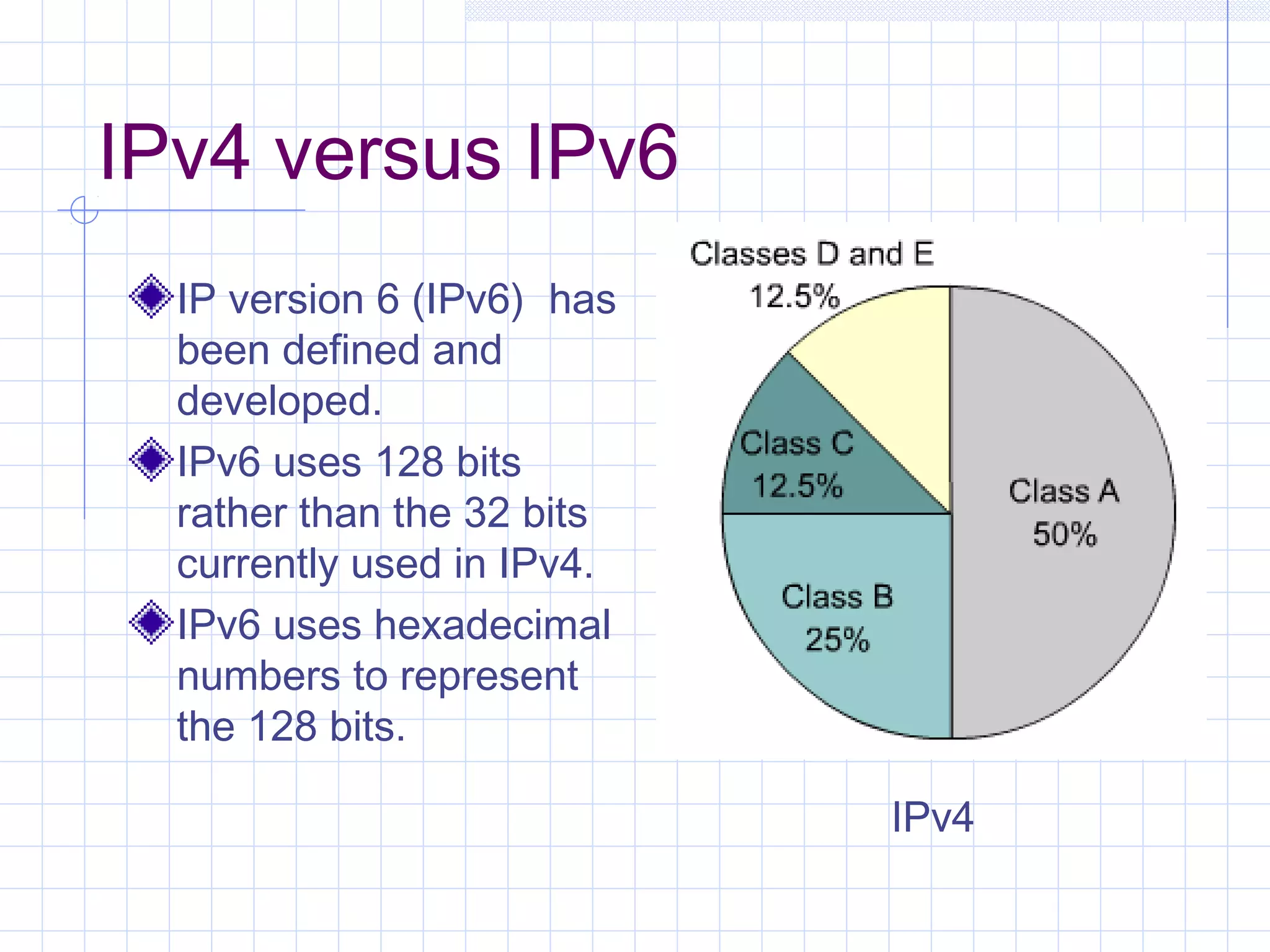
IPv4 versus IPv6
  IP version 6 (IPv6) has
  been defined and
  developed.
  IPv6 uses 128 bits
  rather than the 32 bits
  currently used in IPv4.
  IPv6 uses hexadecimal
  numbers to represent
  the 128 bits.

                            IPv4
Obtaining an IP Address
Obtaining an Internet Address
Static addressing
    Each individual device must be configured with
     an IP address.
Dynamic addressing
    Reverse Address Resolution Protocol (RARP)
    Bootstrap Protocol (BOOTP)
    Dynamic Host Configuration Protocol (DHCP)
    DHCP initialization sequence
    Function of the Address Resolution Protocol
    ARP operation within a subnet
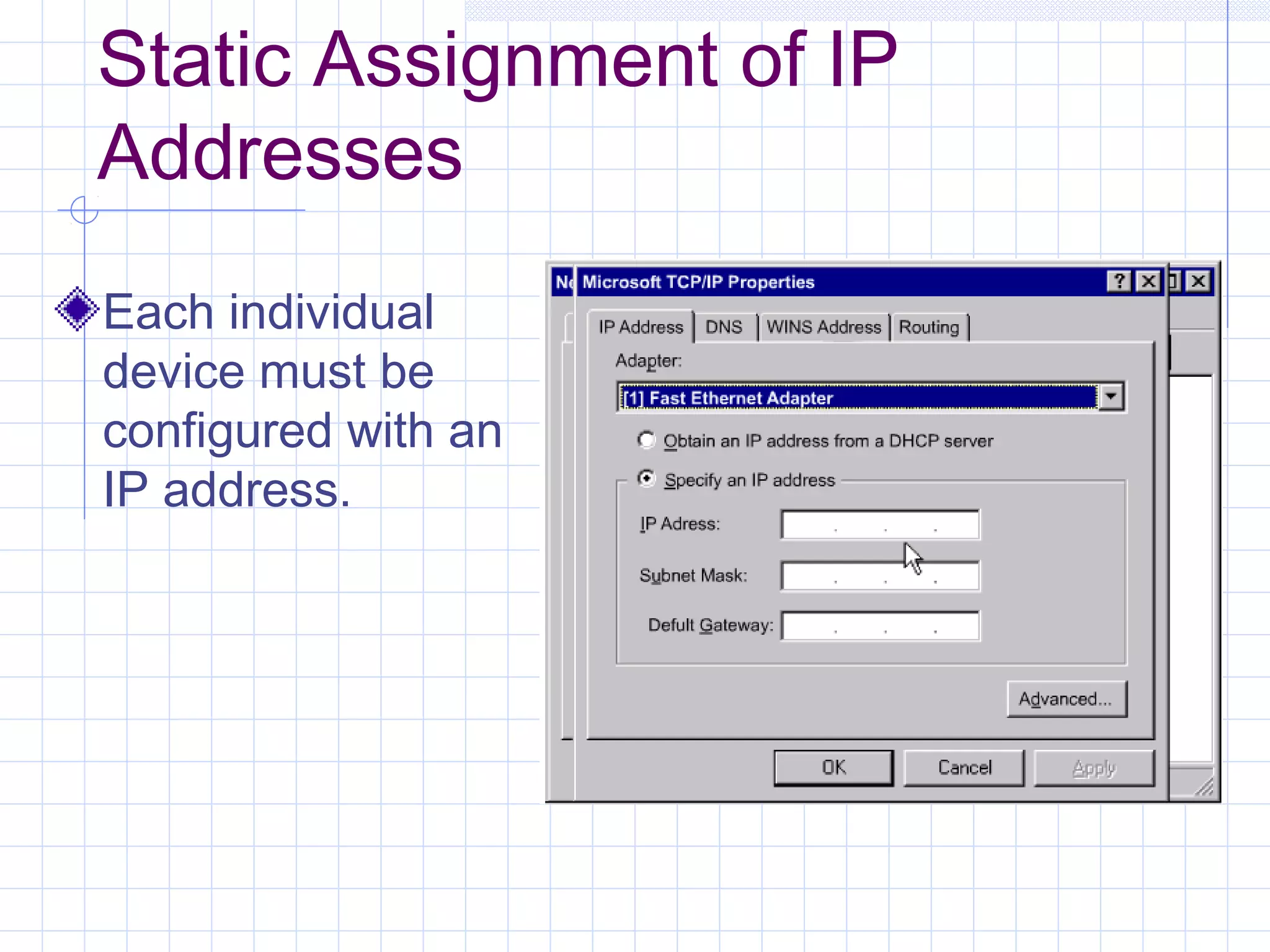
Static Assignment of IP
Addresses
Each individual
device must be
configured with an
IP address.
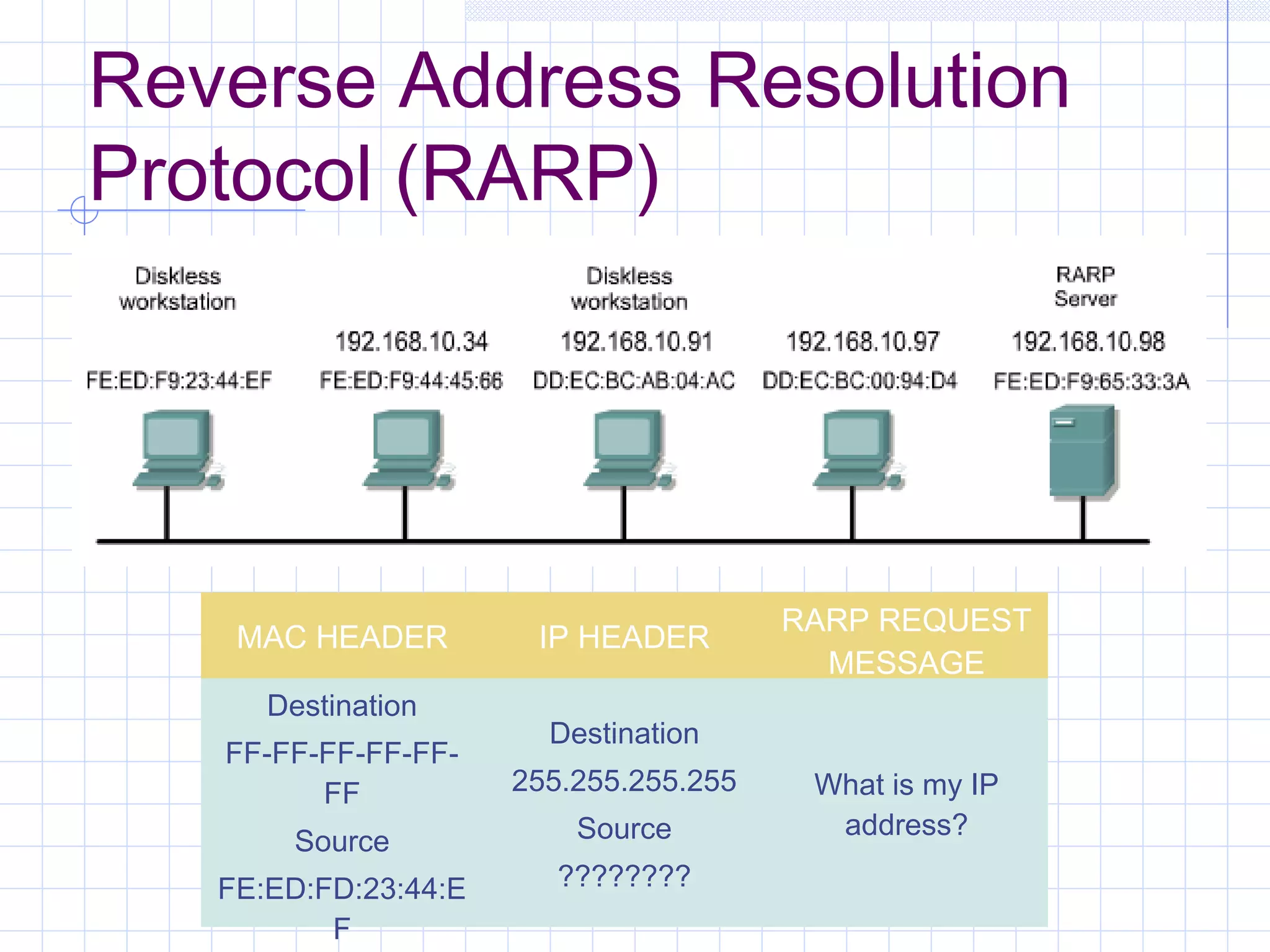
Reverse Address Resolution
Protocol (RARP)


                                        RARP REQUEST
    MAC HEADER         IP HEADER
                                          MESSAGE
      Destination
                        Destination
   FF-FF-FF-FF-FF-
         FF           255.255.255.255    What is my IP
                          Source          address?
        Source
   FE:ED:FD:23:44:E      ????????
          F
BOOTP IP
 The Bootstrap Protocol (BOOTP)
 operates in a client/server environment
 and only requires a single packet
 exchange to obtain IP information.
 BOOTP packets can include the IP
 address, as well as the address of a
 router, the address of a server, and
 vendor-specific information.
Dynamic Host Configuration
Protocol
 Allows a host to obtain an IP address
 using a defined range of IP addresses
 on a DHCP server.
 As hosts come online, contact the
 DHCP server, and request an address.
Problems in Address
Resolution
In TCP/IP communications, a datagram on a local-
area network must contain both a destination MAC
address and a destination IP address.
There needs to be a way to automatically map IP
to MAC addresses.
The TCP/IP suite has a protocol, called Address
Resolution Protocol (ARP), which can
automatically obtain MAC addresses for local
transmission.
TCP/IP has a variation on ARP called Proxy ARP
that will provide the MAC address of an
intermediate device for transmission outside the
LAN to another network segment.
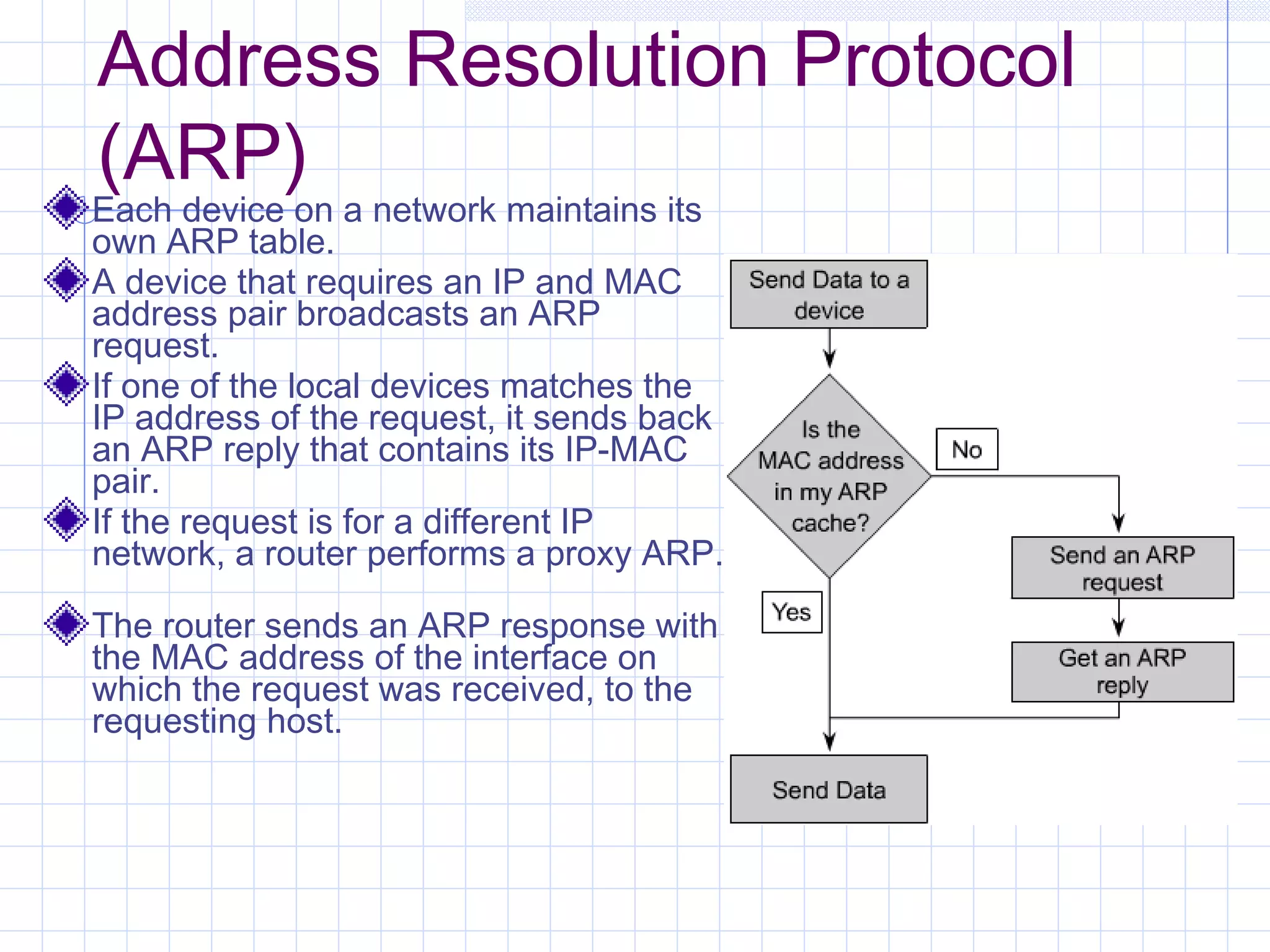
Address Resolution Protocol
(ARP)
Each device on a network maintains its
own ARP table.
A device that requires an IP and MAC
address pair broadcasts an ARP
request.
If one of the local devices matches the
IP address of the request, it sends back
an ARP reply that contains its IP-MAC
pair.
If the request is for a different IP
network, a router performs a proxy ARP.

The router sends an ARP response with
the MAC address of the interface on
which the request was received, to the
requesting host.

Ccna1v3 mod09

  • 1.
    CCNA 1 v3.0Module 9 TCP/IP Protocol Suite and IP Addressing
  • 2.
    Purpose of ThisPowerPoint This PowerPoint primarily consists of the Target Indicators (TIs) of this module in CCNA version 3.0. It was created to give instructors a PowerPoint to take and modify as their own. This PowerPoint is:  NOT a study guide for the module final assessment.  NOT a study guide for the CCNA certification exam. Please report any mistakes you find in this PowerPoint by using the Academy Connection Help link.
  • 3.
    To Locate InstructionalResource Materials on Academy Connection: Go to the Community FTP Center to locate materials created by the instructor community Go to the Tools section Go to the Alpha Preview section Go to the Community link under Resources See the resources available on the Class home page for classes you are offering Search http://www.cisco.com Contact your parent academy!
  • 4.
    Objectives Introductionto TCP/IP Internet addresses Obtaining an IP address
  • 5.
  • 6.
    History and Futureof TCP/IP The U.S. Department of Defense (DoD) created the TCP/IP reference model because it wanted a network that could survive any conditions. Some of the layers in the TCP/IP model have the same name as layers in the OSI model.
  • 7.
    Application Layer Handles high-level protocols, issues of representation, encoding, and dialog control. The TCP/IP protocol suite combines all application related issues into one layer and ensures this data is properly packaged before passing it on to the next layer.
  • 8.
  • 9.
    Transport Layer Five basicservices: Segmenting upper-layer application data Establishing end-to-end operations Sending segments from one end host to another end host Ensuring data reliability Providing flow control
  • 10.
  • 11.
    Internet Layer The purposeof the Internet layer is to send packets from a network node and have them arrive at the destination node independent of the path taken.
  • 12.
    Network Access Layer Thenetwork access layer is concerned with all of the issues that an IP packet requires to actually make a physical link to the network media. It includes the LAN and WAN technology details, and all the details contained in the OSI physical and data link layers.
  • 13.
    Comparing the OSIModel and TCP/IP Model
  • 14.
    Similarities of theOSI and TCP/IP Models Both have layers. Both have application layers, though they include very different services. Both have comparable transport and network layers. Packet-switched, not circuit-switched, technology is assumed. Networking professionals need to know both models.
  • 15.
    Differences of theOSI and TCP/IP Models TCP/IP combines the presentation and session layer into its application layer. TCP/IP combines the OSI data link and physical layers into one layer. TCP/IP appears simpler because it has fewer layers. TCP/IP transport layer using UDP does not always guarantee reliable delivery of packets as the transport layer in the OSI model does.
  • 16.
    Internet Architecture Two computers, anywhere in the world, following certain hardware, software, protocol specifications, can communicate, reliably even when not directly connected. LANs are no longer scalable beyond a certain number of stations or geographic separation.
  • 17.
  • 18.
    IP Addressing An IPaddress is a 32-bit sequence of 1s and 0s. To make the IP address easier to use, the address is usually written as four decimal numbers separated by periods. This way of writing the address is called the dotted decimal format.
  • 19.
  • 20.
  • 21.
    Class A, B,C, D, and E IP Addresses
  • 22.
    Reserved IP Addresses Certainhost addresses are reserved and cannot be assigned to devices on a network. An IP address that has binary 0s in all host bit positions is reserved for the network address. An IP address that has binary 1s in all host bit positions is reserved for the network address.
  • 23.
    Public and PrivateIP Addresses No two machines that connect to a public network can have the same IP address because public IP addresses are global and standardized. However, private networks that are not connected to the Internet may use any host addresses, as long as each host within the private network is unique. RFC 1918 sets aside three blocks of IP addresses for private, internal use. Connecting a network using private addresses to the Internet requires translation of the private addresses to public addresses using Network Address Translation (NAT).
  • 24.
    Introduction to Subnetting Tocreate a subnet address, a network administrator borrows bits from the host field and designates them as the subnet field.
  • 25.
    IPv4 versus IPv6 IP version 6 (IPv6) has been defined and developed. IPv6 uses 128 bits rather than the 32 bits currently used in IPv4. IPv6 uses hexadecimal numbers to represent the 128 bits. IPv4
  • 26.
  • 27.
    Obtaining an InternetAddress Static addressing  Each individual device must be configured with an IP address. Dynamic addressing  Reverse Address Resolution Protocol (RARP)  Bootstrap Protocol (BOOTP)  Dynamic Host Configuration Protocol (DHCP)  DHCP initialization sequence  Function of the Address Resolution Protocol  ARP operation within a subnet
  • 28.
    Static Assignment ofIP Addresses Each individual device must be configured with an IP address.
  • 29.
    Reverse Address Resolution Protocol(RARP) RARP REQUEST MAC HEADER IP HEADER MESSAGE Destination Destination FF-FF-FF-FF-FF- FF 255.255.255.255 What is my IP Source address? Source FE:ED:FD:23:44:E ???????? F
  • 30.
    BOOTP IP TheBootstrap Protocol (BOOTP) operates in a client/server environment and only requires a single packet exchange to obtain IP information. BOOTP packets can include the IP address, as well as the address of a router, the address of a server, and vendor-specific information.
  • 31.
    Dynamic Host Configuration Protocol Allows a host to obtain an IP address using a defined range of IP addresses on a DHCP server. As hosts come online, contact the DHCP server, and request an address.
  • 32.
    Problems in Address Resolution InTCP/IP communications, a datagram on a local- area network must contain both a destination MAC address and a destination IP address. There needs to be a way to automatically map IP to MAC addresses. The TCP/IP suite has a protocol, called Address Resolution Protocol (ARP), which can automatically obtain MAC addresses for local transmission. TCP/IP has a variation on ARP called Proxy ARP that will provide the MAC address of an intermediate device for transmission outside the LAN to another network segment.
  • 33.
    Address Resolution Protocol (ARP) Eachdevice on a network maintains its own ARP table. A device that requires an IP and MAC address pair broadcasts an ARP request. If one of the local devices matches the IP address of the request, it sends back an ARP reply that contains its IP-MAC pair. If the request is for a different IP network, a router performs a proxy ARP. The router sends an ARP response with the MAC address of the interface on which the request was received, to the requesting host.