Networking Devices
Networking Devices are units that mediate data in a computer network and are also called network
equipment. Units which are the last receiver or generate data are called hosts or data terminal
equipment. Devices are:
1. Gateway: this device is placed at a network node and interfaces with another network that
uses different protocols. It works on OSI layers 4 to 7.
2. Router: a specialized network device that determines the
next network point to which it can forward a data packet
towards the ultimate destination of the packet. Unlike a
gateway, it cannot interface different protocols. It works on
OSI layer 3.
3. Switch: a device that allocates traffic from one network
segment to certain lines (intended destination(s)) which
connect the segment to another network segment. Unlike a
hub, a switch splits the network traffic and sends it to
different destinations rather than to all systems on the
network. It works on OSI layer 2.
Figure 1 Gateway
Figure 2 Router
Figure 3 Switch
Networking Devices
4. Bridge: a device that connects multiple network segments along the data link layer. It works on
OSI layer 2.
5. Hub: a device that connects multiple Ethernet segments, making them acts as a single segment.
When using a hub, every attached device shares the same broadcast domain and the same
collision domain. Therefore, only one computer connected to the hub is able to transmit at a
time. Depending on the network topology, the hub provides a basic level 1 OSI model connection
among the network objects (workstations, servers, etc.). It provides bandwidth which is shared
among all the objects, in contrast to switches, which provide a connection between individual
nodes. It works on OSI layer 1.
6. Repeater: a device which amplifies or regenerates digital
signals received while sending them from one part of a network
into another. It works on OSI layer 1.
Some Hybrid Network Devices:
1. Protocol Converter: a hardware device that converts between two different types of
transmission, such as asynchronous and synchronous transmissions.
2. Bridge Router (BRouter): a device that combines router and bridge functionality and
therefore works on OSI layers 2 and 3.
Figure 4 Bridge
Figure 5 Repeater
Networking Devices
Hardware or software components that typically sit on the connection point
of different networks, e.g. between an internal network and an external
network:
1. Proxy Server: A proxy server is a server that makes Internet connections on behalf of the client
PCs. All the requests for Internet access that are made by a client on a network are executed by
the proxy server. In other words, a proxy server acts as a point of contact between a private
network and a public network such as the Internet.
2. Firewall: a piece of hardware or software put on the network to prevent some communications
forbidden by the network policy.
3. Network Address Translator (NAT): network service provided as hardware or software
that converts internal to external network addresses and vice versa.
Other hardware for establishing networks or dial-up connections:
1. Multiplexer: a device that combines several electrical signals into a single signal.
2. Network Interface Controller: a device connecting the attached computer to a wire-based
computer network.
3. Wireless Network Interface Controller: a device connecting the attached computer to a
radio-based computer network.
4. Modem: device that modulates an analog "carrier" signal (such as sound) to encode digital
information, and that also demodulates such a carrier signal to decode the transmitted
information, such as a computer communicating with another computer over a telephone
network.
5. ISDN Terminal Adapter (TA): a specialized gateway for ISDN.
6. Line Driver: A device to increase transmission distance by amplifying the signal; used in base-
band networks only.
Networking Devices
Specialized Network Devices:
1. Multilayer Switch: A multilayer switch (MLS) is a computer networking device that switches
on OSI layer 2 like an ordinary network switch and provides extra functions on higher OSI layers.
2. Layer 4-7 Switch, Web-Switch, Content-Switch: Some switches can use up to OSI layer 7
packet information; these may be called layer 4-7 switches, content-switches, content services
switches, web-switches or application-switches.
Content switches are typically used for load balancing among groups of servers. Load balancing
can be performed on HTTP, HTTPS, VPN, or any TCP/IP traffic using a specific port. Load
balancing often involves destination network address translation so that the client of the load
balanced service is not fully aware of which server is handling its requests.
3. IDS/IPS (Intrusion Detection System/Intrusion Prevention System): An Intrusion
Detection System (IDS) is software and/or hardware designed to detect unwanted attempts at
accessing, manipulating, and/or disabling of computer systems, mainly through a network, such
as the Internet. An intrusion detection system is used to detect several types of malicious
behaviors that can compromise the security and trust of a computer system. This includes
network attacks against vulnerable services, data driven attacks on applications, host based
attacks such as privilege escalation, unauthorized logins and access to sensitive files, and
malware (viruses, Trojan horses, and worms). An Intrusion Prevention System is a network
security device that monitors network and/or system activities for malicious or unwanted
behavior and can react, in real-time, to block or prevent those activities.
4. Load Balancer: In computing, load balancing distributes workloads across multiple computing
resources, such as computers, a computer cluster, network links, central processing units or disk
drives. Load balancing aims to optimize resource use, maximize throughput, minimize response
time, and avoid overload of any single resource. Using multiple components with load balancing
instead of a single component may increase reliability through redundancy. Load balancing
usually involves dedicated software or hardware, such as a multilayer switch or a Domain Name
System server process.
5. DNS (Domain Name System) Server: A name server is a computer hardware or software
server that implements a network service for providing responses to queries against a directory
service. It translates an often humanly-meaningful, text-based identifier to a system-internal,
often numeric identification or addressing component. This service is performed by the server in
response to a service protocol request.
Networking Devices
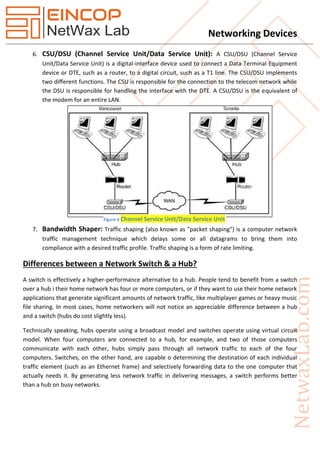
6. CSU/DSU (Channel Service Unit/Data Service Unit): A CSU/DSU (Channel Service
Unit/Data Service Unit) is a digital-interface device used to connect a Data Terminal Equipment
device or DTE, such as a router, to a digital circuit, such as a T1 line. The CSU/DSU implements
two different functions. The CSU is responsible for the connection to the telecom network while
the DSU is responsible for handling the interface with the DTE. A CSU/DSU is the equivalent of
the modem for an entire LAN.
7. Bandwidth Shaper: Traffic shaping (also known as "packet shaping") is a computer network
traffic management technique which delays some or all datagrams to bring them into
compliance with a desired traffic profile. Traffic shaping is a form of rate limiting.
Differences between a Network Switch & a Hub?
A switch is effectively a higher-performance alternative to a hub. People tend to benefit from a switch
over a hub i their home network has four or more computers, or if they want to use their home network
applications that generate significant amounts of network traffic, like multiplayer games or heavy music
file sharing. In most cases, home networkers will not notice an appreciable difference between a hub
and a switch (hubs do cost slightly less).
Technically speaking, hubs operate using a broadcast model and switches operate using virtual circuit
model. When four computers are connected to a hub, for example, and two of those computers
communicate with each other, hubs simply pass through all network traffic to each of the four
computers. Switches, on the other hand, are capable o determining the destination of each individual
traffic element (such as an Ethernet frame) and selectively forwarding data to the one computer that
actually needs it. By generating less network traffic in delivering messages, a switch performs better
than a hub on busy networks.
Figure 6 Channel Service Unit/Data Service Unit

Networking Devices

  • 1.
    Networking Devices Networking Devicesare units that mediate data in a computer network and are also called network equipment. Units which are the last receiver or generate data are called hosts or data terminal equipment. Devices are: 1. Gateway: this device is placed at a network node and interfaces with another network that uses different protocols. It works on OSI layers 4 to 7. 2. Router: a specialized network device that determines the next network point to which it can forward a data packet towards the ultimate destination of the packet. Unlike a gateway, it cannot interface different protocols. It works on OSI layer 3. 3. Switch: a device that allocates traffic from one network segment to certain lines (intended destination(s)) which connect the segment to another network segment. Unlike a hub, a switch splits the network traffic and sends it to different destinations rather than to all systems on the network. It works on OSI layer 2. Figure 1 Gateway Figure 2 Router Figure 3 Switch
  • 2.
    Networking Devices 4. Bridge:a device that connects multiple network segments along the data link layer. It works on OSI layer 2. 5. Hub: a device that connects multiple Ethernet segments, making them acts as a single segment. When using a hub, every attached device shares the same broadcast domain and the same collision domain. Therefore, only one computer connected to the hub is able to transmit at a time. Depending on the network topology, the hub provides a basic level 1 OSI model connection among the network objects (workstations, servers, etc.). It provides bandwidth which is shared among all the objects, in contrast to switches, which provide a connection between individual nodes. It works on OSI layer 1. 6. Repeater: a device which amplifies or regenerates digital signals received while sending them from one part of a network into another. It works on OSI layer 1. Some Hybrid Network Devices: 1. Protocol Converter: a hardware device that converts between two different types of transmission, such as asynchronous and synchronous transmissions. 2. Bridge Router (BRouter): a device that combines router and bridge functionality and therefore works on OSI layers 2 and 3. Figure 4 Bridge Figure 5 Repeater
  • 3.
    Networking Devices Hardware orsoftware components that typically sit on the connection point of different networks, e.g. between an internal network and an external network: 1. Proxy Server: A proxy server is a server that makes Internet connections on behalf of the client PCs. All the requests for Internet access that are made by a client on a network are executed by the proxy server. In other words, a proxy server acts as a point of contact between a private network and a public network such as the Internet. 2. Firewall: a piece of hardware or software put on the network to prevent some communications forbidden by the network policy. 3. Network Address Translator (NAT): network service provided as hardware or software that converts internal to external network addresses and vice versa. Other hardware for establishing networks or dial-up connections: 1. Multiplexer: a device that combines several electrical signals into a single signal. 2. Network Interface Controller: a device connecting the attached computer to a wire-based computer network. 3. Wireless Network Interface Controller: a device connecting the attached computer to a radio-based computer network. 4. Modem: device that modulates an analog "carrier" signal (such as sound) to encode digital information, and that also demodulates such a carrier signal to decode the transmitted information, such as a computer communicating with another computer over a telephone network. 5. ISDN Terminal Adapter (TA): a specialized gateway for ISDN. 6. Line Driver: A device to increase transmission distance by amplifying the signal; used in base- band networks only.
  • 4.
    Networking Devices Specialized NetworkDevices: 1. Multilayer Switch: A multilayer switch (MLS) is a computer networking device that switches on OSI layer 2 like an ordinary network switch and provides extra functions on higher OSI layers. 2. Layer 4-7 Switch, Web-Switch, Content-Switch: Some switches can use up to OSI layer 7 packet information; these may be called layer 4-7 switches, content-switches, content services switches, web-switches or application-switches. Content switches are typically used for load balancing among groups of servers. Load balancing can be performed on HTTP, HTTPS, VPN, or any TCP/IP traffic using a specific port. Load balancing often involves destination network address translation so that the client of the load balanced service is not fully aware of which server is handling its requests. 3. IDS/IPS (Intrusion Detection System/Intrusion Prevention System): An Intrusion Detection System (IDS) is software and/or hardware designed to detect unwanted attempts at accessing, manipulating, and/or disabling of computer systems, mainly through a network, such as the Internet. An intrusion detection system is used to detect several types of malicious behaviors that can compromise the security and trust of a computer system. This includes network attacks against vulnerable services, data driven attacks on applications, host based attacks such as privilege escalation, unauthorized logins and access to sensitive files, and malware (viruses, Trojan horses, and worms). An Intrusion Prevention System is a network security device that monitors network and/or system activities for malicious or unwanted behavior and can react, in real-time, to block or prevent those activities. 4. Load Balancer: In computing, load balancing distributes workloads across multiple computing resources, such as computers, a computer cluster, network links, central processing units or disk drives. Load balancing aims to optimize resource use, maximize throughput, minimize response time, and avoid overload of any single resource. Using multiple components with load balancing instead of a single component may increase reliability through redundancy. Load balancing usually involves dedicated software or hardware, such as a multilayer switch or a Domain Name System server process. 5. DNS (Domain Name System) Server: A name server is a computer hardware or software server that implements a network service for providing responses to queries against a directory service. It translates an often humanly-meaningful, text-based identifier to a system-internal, often numeric identification or addressing component. This service is performed by the server in response to a service protocol request.
  • 5.
    Networking Devices 6. CSU/DSU(Channel Service Unit/Data Service Unit): A CSU/DSU (Channel Service Unit/Data Service Unit) is a digital-interface device used to connect a Data Terminal Equipment device or DTE, such as a router, to a digital circuit, such as a T1 line. The CSU/DSU implements two different functions. The CSU is responsible for the connection to the telecom network while the DSU is responsible for handling the interface with the DTE. A CSU/DSU is the equivalent of the modem for an entire LAN. 7. Bandwidth Shaper: Traffic shaping (also known as "packet shaping") is a computer network traffic management technique which delays some or all datagrams to bring them into compliance with a desired traffic profile. Traffic shaping is a form of rate limiting. Differences between a Network Switch & a Hub? A switch is effectively a higher-performance alternative to a hub. People tend to benefit from a switch over a hub i their home network has four or more computers, or if they want to use their home network applications that generate significant amounts of network traffic, like multiplayer games or heavy music file sharing. In most cases, home networkers will not notice an appreciable difference between a hub and a switch (hubs do cost slightly less). Technically speaking, hubs operate using a broadcast model and switches operate using virtual circuit model. When four computers are connected to a hub, for example, and two of those computers communicate with each other, hubs simply pass through all network traffic to each of the four computers. Switches, on the other hand, are capable o determining the destination of each individual traffic element (such as an Ethernet frame) and selectively forwarding data to the one computer that actually needs it. By generating less network traffic in delivering messages, a switch performs better than a hub on busy networks. Figure 6 Channel Service Unit/Data Service Unit