NETWORK DEVICES
TAGORE GOVERNMENT COLLEGE OF EDUCATION
PRESENTED BY :
AYUSHI ALOK REDDY
B.Sc.B.Ed (COMPUTER SCIENCE)
3RD
YEAR / 5TH
SEMESTER
SUBJECT : PEDAGOGY OF COMPUTER SCIENCE
DEFINITION OF NETWORK DEVICES
 Network devices, also known as networking hardware, are physical devices that
allow hardware on a computer network to communicate and interact with one
another. For example Repeater, Hub, Bridge, Switch, Routers, Gateway, Brouter,
and NIC, etc.
 In simple terms, a network device is a physical device that is used to connect
other physical devices on a network.
 In some cases, their role is to simply forward packets of information to a
destination. In other cases, it might be to serve as a translator or to block
suspicious network traffic .
TYPES OF NETWORK DEVICES
The eight common network devices are :
 Repeater
 Hub
 Bridge
 Switch
 Router
 Gateway
 Brouter
 NIC
1. REPEATER
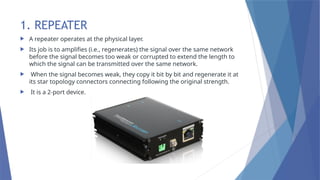
 A repeater operates at the physical layer.
 Its job is to amplifies (i.e., regenerates) the signal over the same network
before the signal becomes too weak or corrupted to extend the length to
which the signal can be transmitted over the same network.
 When the signal becomes weak, they copy it bit by bit and regenerate it at
its star topology connectors connecting following the original strength.
 It is a 2-port device.
2. HUB
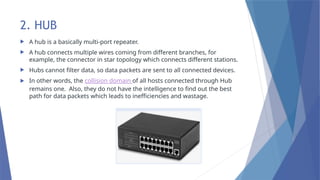
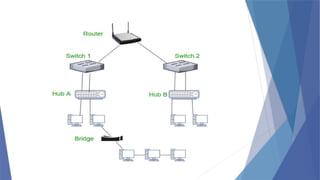
 A hub is a basically multi-port repeater.
 A hub connects multiple wires coming from different branches, for
example, the connector in star topology which connects different stations.
 Hubs cannot filter data, so data packets are sent to all connected devices.
 In other words, the collision domain of all hosts connected through Hub
remains one. Also, they do not have the intelligence to find out the best
path for data packets which leads to inefficiencies and wastage.
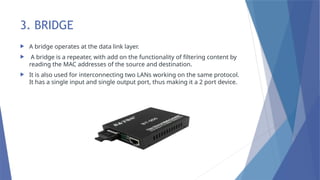
3. BRIDGE
 A bridge operates at the data link layer.
 A bridge is a repeater, with add on the functionality of filtering content by
reading the MAC addresses of the source and destination.
 It is also used for interconnecting two LANs working on the same protocol.
It has a single input and single output port, thus making it a 2 port device.
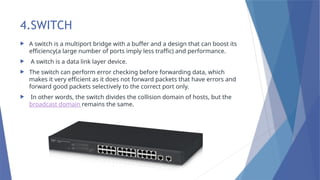
4.SWITCH
 A switch is a multiport bridge with a buffer and a design that can boost its
efficiency(a large number of ports imply less traffic) and performance.
 A switch is a data link layer device.
 The switch can perform error checking before forwarding data, which
makes it very efficient as it does not forward packets that have errors and
forward good packets selectively to the correct port only.
 In other words, the switch divides the collision domain of hosts, but the
broadcast domain remains the same.
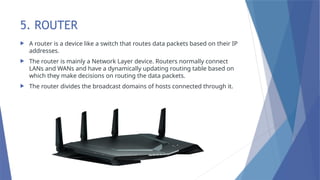
5. ROUTER
 A router is a device like a switch that routes data packets based on their IP
addresses.
 The router is mainly a Network Layer device. Routers normally connect
LANs and WANs and have a dynamically updating routing table based on
which they make decisions on routing the data packets.
 The router divides the broadcast domains of hosts connected through it.
6. GATEWAY
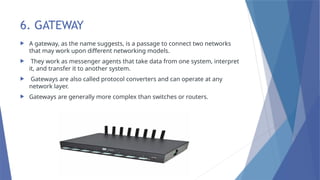
 A gateway, as the name suggests, is a passage to connect two networks
that may work upon different networking models.
 They work as messenger agents that take data from one system, interpret
it, and transfer it to another system.
 Gateways are also called protocol converters and can operate at any
network layer.
 Gateways are generally more complex than switches or routers.
7. BROUTER
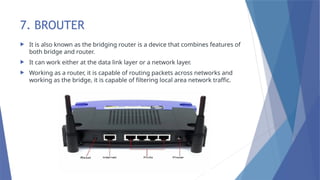
 It is also known as the bridging router is a device that combines features of
both bridge and router.
 It can work either at the data link layer or a network layer.
 Working as a router, it is capable of routing packets across networks and
working as the bridge, it is capable of filtering local area network traffic.
8. NIC
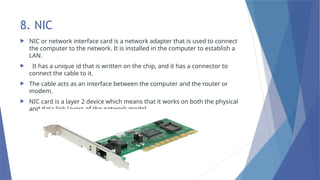
 NIC or network interface card is a network adapter that is used to connect
the computer to the network. It is installed in the computer to establish a
LAN.
 It has a unique id that is written on the chip, and it has a connector to
connect the cable to it.
 The cable acts as an interface between the computer and the router or
modem.
 NIC card is a layer 2 device which means that it works on both the physical
and data link layers of the network model.
THANK YOU

NETWORK DEVICES

  • 1.
    NETWORK DEVICES TAGORE GOVERNMENTCOLLEGE OF EDUCATION PRESENTED BY : AYUSHI ALOK REDDY B.Sc.B.Ed (COMPUTER SCIENCE) 3RD YEAR / 5TH SEMESTER SUBJECT : PEDAGOGY OF COMPUTER SCIENCE
  • 2.
    DEFINITION OF NETWORKDEVICES  Network devices, also known as networking hardware, are physical devices that allow hardware on a computer network to communicate and interact with one another. For example Repeater, Hub, Bridge, Switch, Routers, Gateway, Brouter, and NIC, etc.  In simple terms, a network device is a physical device that is used to connect other physical devices on a network.  In some cases, their role is to simply forward packets of information to a destination. In other cases, it might be to serve as a translator or to block suspicious network traffic .
  • 3.
    TYPES OF NETWORKDEVICES The eight common network devices are :  Repeater  Hub  Bridge  Switch  Router  Gateway  Brouter  NIC
  • 4.
    1. REPEATER  Arepeater operates at the physical layer.  Its job is to amplifies (i.e., regenerates) the signal over the same network before the signal becomes too weak or corrupted to extend the length to which the signal can be transmitted over the same network.  When the signal becomes weak, they copy it bit by bit and regenerate it at its star topology connectors connecting following the original strength.  It is a 2-port device.
  • 5.
    2. HUB  Ahub is a basically multi-port repeater.  A hub connects multiple wires coming from different branches, for example, the connector in star topology which connects different stations.  Hubs cannot filter data, so data packets are sent to all connected devices.  In other words, the collision domain of all hosts connected through Hub remains one. Also, they do not have the intelligence to find out the best path for data packets which leads to inefficiencies and wastage.
  • 6.
    3. BRIDGE  Abridge operates at the data link layer.  A bridge is a repeater, with add on the functionality of filtering content by reading the MAC addresses of the source and destination.  It is also used for interconnecting two LANs working on the same protocol. It has a single input and single output port, thus making it a 2 port device.
  • 7.
    4.SWITCH  A switchis a multiport bridge with a buffer and a design that can boost its efficiency(a large number of ports imply less traffic) and performance.  A switch is a data link layer device.  The switch can perform error checking before forwarding data, which makes it very efficient as it does not forward packets that have errors and forward good packets selectively to the correct port only.  In other words, the switch divides the collision domain of hosts, but the broadcast domain remains the same.
  • 8.
    5. ROUTER  Arouter is a device like a switch that routes data packets based on their IP addresses.  The router is mainly a Network Layer device. Routers normally connect LANs and WANs and have a dynamically updating routing table based on which they make decisions on routing the data packets.  The router divides the broadcast domains of hosts connected through it.
  • 10.
    6. GATEWAY  Agateway, as the name suggests, is a passage to connect two networks that may work upon different networking models.  They work as messenger agents that take data from one system, interpret it, and transfer it to another system.  Gateways are also called protocol converters and can operate at any network layer.  Gateways are generally more complex than switches or routers.
  • 11.
    7. BROUTER  Itis also known as the bridging router is a device that combines features of both bridge and router.  It can work either at the data link layer or a network layer.  Working as a router, it is capable of routing packets across networks and working as the bridge, it is capable of filtering local area network traffic.
  • 12.
    8. NIC  NICor network interface card is a network adapter that is used to connect the computer to the network. It is installed in the computer to establish a LAN.  It has a unique id that is written on the chip, and it has a connector to connect the cable to it.  The cable acts as an interface between the computer and the router or modem.  NIC card is a layer 2 device which means that it works on both the physical and data link layers of the network model.
  • 13.