BY ADEEBA KHAN
COMPUTER TECHNOLOGY
All but the most basic of networks require
devices to provide connectivity and
functionality
Some networking devices
✓ Hubs
✓ Switches
✓ Bridges
✓ Routers
✓ Gateways
✓ CSU/DSU (Channel Service Unit/Data Service Unit)
✓ NICs (Network Interface Card)
✓ ISDN (Integrated Services Digital Network) adapters
✓ Modems
✓ Firewalls
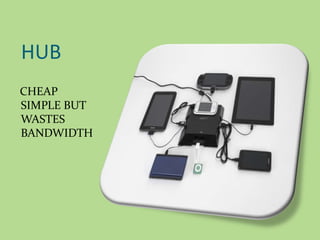
HUB
CHEAP
SIMPLE BUT
WASTES
BANDWIDTH
H
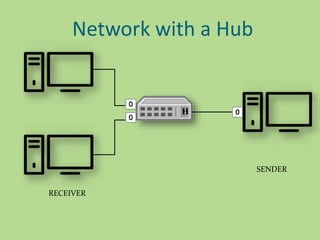
Network with a Hub
SENDER
RECEIVER
H
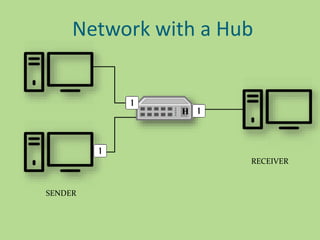
Network with a Hub
SENDER
RECEIVER
H
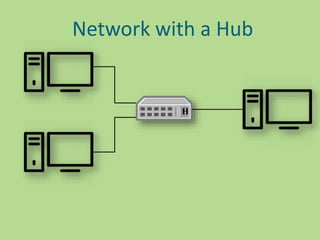
Network with a Hub
How a hub behaves
 Each incoming bit is replicated on all other interfaces
 Simplest and cheapest way to create a network
 Lots of unnecessary traffic
 Security problem
A hub may be passive or active :-
 Those which operate below the physical layer is a
passive hub.
 Those which operate at the physical layer is an active
hub
Uses of hub
 Hubs are used to create small Home Networks.
 Hubs are used for monitoring the networks.
 Hubs are used in Organizations and Computer Labs
for connectivity.
 It Makes one device or peripheral available throughout
the whole network.
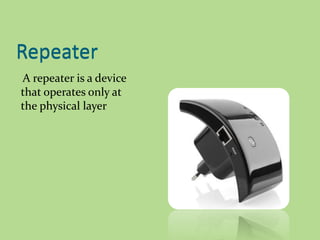
Repeater
A repeater is a device
that operates only at
the physical layer
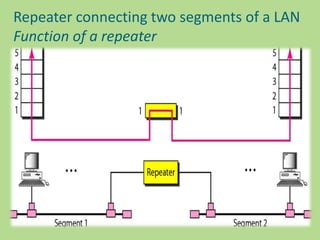
Repeater
Repeater connecting two segments of a LAN
Function of a repeater
Bridge
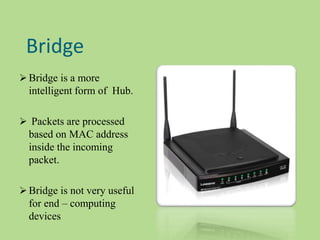
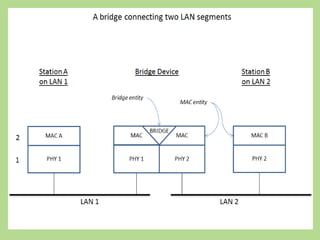
 Bridge is a more
intelligent form of Hub.
 Packets are processed
based on MAC address
inside the incoming
packet.
 Bridge is not very useful
for end – computing
devices
Switch
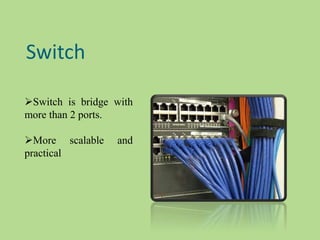
Switch is bridge with
more than 2 ports.
More scalable and
practical
If a hub capture a list where every host can be reached than it
would be able to send every packet straight to it destination
without expanding the entire network.
 Two layer switch operate at physical and data link layer.
 Three layer switch operates at network, data link and physical
layer.
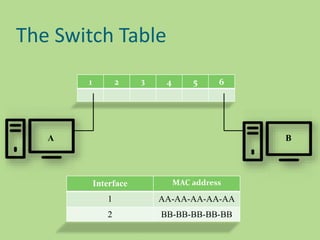
The Switch Table
1 2 3 4 5 6
A B
Interface MAC address
1 AA-AA-AA-AA-AA
2 BB-BB-BB-BB-BB
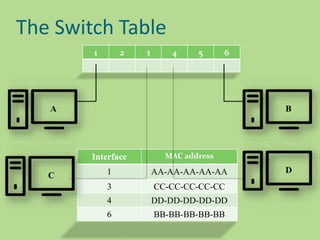
The Switch Table
1 2 3 4 5 6
Interface MAC address
1 AA-AA-AA-AA-AA
3 CC-CC-CC-CC-CC
4 DD-DD-DD-DD-DD
6 BB-BB-BB-BB-BB
B
D
A
C
Ways in which Switch work..
Flooding
Forwarding
Filtering
Broadcasting
Flooding :-
Flooding is performed when the switch has no entry for the
frame's destination MAC address. When a frame is flooded, it is
sent out every single port on the switch except the one it came in
one.
Forwarding :-
Forwarding is performed when the switch does have an entry for
the frame's destination MAC address. Forwarding a frame means
the frame is being sent out only one port on the switch.
Filtering :-
Filtering is performed when the switch has an entry for both
the source and destination MAC address, and the MAC table
indicates that both addresses are found off the same port.
Broadcasting :- There is one other frame type that is sent out
every port on the switch except the one that received it, and
that's a broadcast frame, Broadcast frames are intended for all
hosts, and the MAC broadcast address is ff-ff-ff-ff-ff-ff .
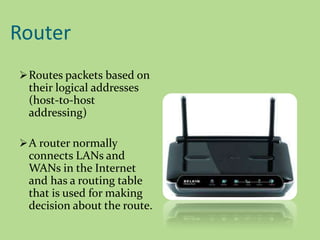
Router
Routes packets based on
their logical addresses
(host-to-host
addressing)
A router normally
connects LANs and
WANs in the Internet
and has a routing table
that is used for making
decision about the route.
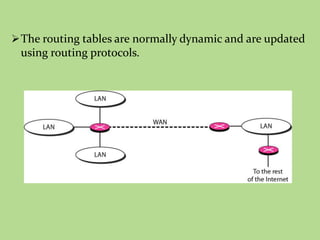
The routing tables are normally dynamic and are updated
using routing protocols.
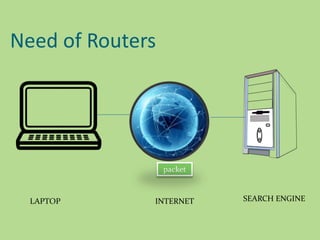
Need of Routers
packet
LAPTOP INTERNET SEARCH ENGINE
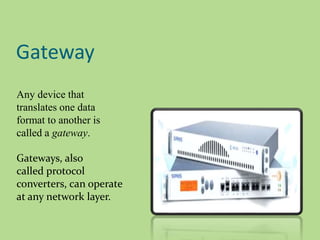
Gateway
Any device that
translates one data
format to another is
called a gateway.
Gateways, also
called protocol
converters, can operate
at any network layer.
A gateway takes an application message ,reads it and
interpret it .
Gateway can provide security.
It filter unwanted application layer messages.
 The activities of a gateway are more complex than that
of the router or switch as it communicates using more
than one protocol.
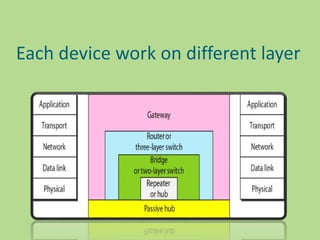
Each device work on different layer
OTHER NETWORK DEVICES
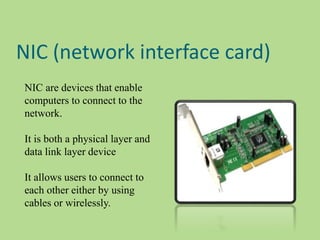
NIC (network interface card)
NIC are devices that enable
computers to connect to the
network.
It is both a physical layer and
data link layer device
It allows users to connect to
each other either by using
cables or wirelessly.
How NIC works ?
 A computer or device on a network can be reached by its
MAC(media access control) address through the NIC
card.
 Every Ethernet network card has a unique 48-bit serial
number called a MAC address which is stored in ROM
carried on the card.
 The MACs on the network are used to direct traffic
between the computers
The Ethernet address is 6 bytes (48bits),normally written in
Hexadecimal notation with a colon between the bytes.
Example
06:01:02:01:2C:4B
Source address is unicast address –the frame comes from only
one station .
Destination address ,however can be unicast , multicast, or
broadcast.
LSB of first byte defines the type of address. If the bit is 0 ,the
address is unicast otherwise multicast .
Broadcast is a special case of multicast where all bits are 1.
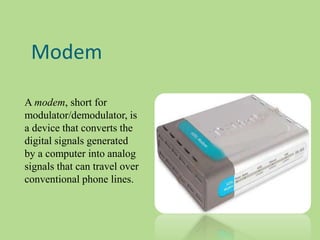
Modem
A modem, short for
modulator/demodulator, is
a device that converts the
digital signals generated
by a computer into analog
signals that can travel over
conventional phone lines.
The modem at the receiving end converts the signal
back into a format the computer can understand.
Modems can be used as a means to connect to an ISP
or as a mechanism for dialing up to a LAN.
FEATURES OF MODEM
Modulated Signals
Data Compression
Error Correction
Flow Control
Modulated signal
The essential function of a modem is to create an easily
transmitted and decoded signal that allows digital data to be
sent from place to place without the loss of information.
Data Compression
To reduce the amount of time it takes to send data and to cut
down on the amount of error in the signal, modems need to
employ data compression. Data compression techniques
reduce the size of the signal needed to send the required data.
Error Correction
When information is transmitted between modems, it can
sometimes be damaged -- meaning that parts of the data are
altered or lost. To get around this, modems use error correction.
Flow Control
Individual modems send information at different speeds. It's
necessary for faster modems to slow down so that slower
modems can catch up, otherwise the slower modem will
receive more data than it can process.
ISDN
Integrated Services Digital Network (ISDN) is a remote
access and WAN technology .
ISDN offers greater speeds than a modem .
Integrated services refers to ISDN's ability to deliver at
minimum two simultaneous connections, in any combination
of data, voice, video, and fax, over a single line. Multiple
devices can be attached to the line, and used as needed.
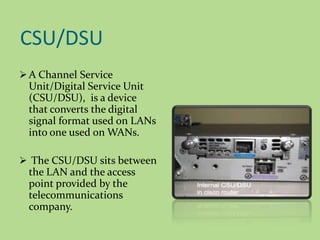
CSU/DSU
 A Channel Service
Unit/Digital Service Unit
(CSU/DSU), is a device
that converts the digital
signal format used on LANs
into one used on WANs.
 The CSU/DSU sits between
the LAN and the access
point provided by the
telecommunications
company.
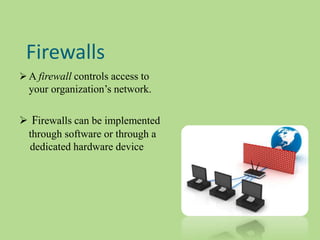
Firewalls
 A firewall controls access to
your organization’s network.
 Firewalls can be implemented
through software or through a
dedicated hardware device
Sources
 http://www.pearsonhighered.com/samplechapter/078
9732548.pdf
 Data Communications and networking
by Behrouz A Forouzan (Tata McGrawHill)
 http://www.wikiforu.com/2013/04/hub-types-
applications-in-network.html
 https://www.youtube.com/watch?v=Xmwmezk75Tk
THANKYOU

Networking devices

  • 1.
  • 2.
    All but themost basic of networks require devices to provide connectivity and functionality
  • 3.
    Some networking devices ✓Hubs ✓ Switches ✓ Bridges ✓ Routers ✓ Gateways ✓ CSU/DSU (Channel Service Unit/Data Service Unit) ✓ NICs (Network Interface Card) ✓ ISDN (Integrated Services Digital Network) adapters ✓ Modems ✓ Firewalls
  • 4.
  • 5.
    H Network with aHub SENDER RECEIVER
  • 6.
    H Network with aHub SENDER RECEIVER
  • 7.
  • 8.
    How a hubbehaves  Each incoming bit is replicated on all other interfaces  Simplest and cheapest way to create a network  Lots of unnecessary traffic  Security problem
  • 9.
    A hub maybe passive or active :-  Those which operate below the physical layer is a passive hub.  Those which operate at the physical layer is an active hub
  • 10.
    Uses of hub Hubs are used to create small Home Networks.  Hubs are used for monitoring the networks.  Hubs are used in Organizations and Computer Labs for connectivity.  It Makes one device or peripheral available throughout the whole network.
  • 11.
    Repeater A repeater isa device that operates only at the physical layer Repeater
  • 12.
    Repeater connecting twosegments of a LAN Function of a repeater
  • 13.
    Bridge  Bridge isa more intelligent form of Hub.  Packets are processed based on MAC address inside the incoming packet.  Bridge is not very useful for end – computing devices
  • 15.
    Switch Switch is bridgewith more than 2 ports. More scalable and practical
  • 16.
    If a hubcapture a list where every host can be reached than it would be able to send every packet straight to it destination without expanding the entire network.  Two layer switch operate at physical and data link layer.  Three layer switch operates at network, data link and physical layer.
  • 17.
    The Switch Table 12 3 4 5 6 A B Interface MAC address 1 AA-AA-AA-AA-AA 2 BB-BB-BB-BB-BB
  • 18.
    The Switch Table 12 3 4 5 6 Interface MAC address 1 AA-AA-AA-AA-AA 3 CC-CC-CC-CC-CC 4 DD-DD-DD-DD-DD 6 BB-BB-BB-BB-BB B D A C
  • 19.
    Ways in whichSwitch work.. Flooding Forwarding Filtering Broadcasting
  • 20.
    Flooding :- Flooding isperformed when the switch has no entry for the frame's destination MAC address. When a frame is flooded, it is sent out every single port on the switch except the one it came in one. Forwarding :- Forwarding is performed when the switch does have an entry for the frame's destination MAC address. Forwarding a frame means the frame is being sent out only one port on the switch.
  • 21.
    Filtering :- Filtering isperformed when the switch has an entry for both the source and destination MAC address, and the MAC table indicates that both addresses are found off the same port. Broadcasting :- There is one other frame type that is sent out every port on the switch except the one that received it, and that's a broadcast frame, Broadcast frames are intended for all hosts, and the MAC broadcast address is ff-ff-ff-ff-ff-ff .
  • 22.
    Router Routes packets basedon their logical addresses (host-to-host addressing) A router normally connects LANs and WANs in the Internet and has a routing table that is used for making decision about the route.
  • 23.
    The routing tablesare normally dynamic and are updated using routing protocols.
  • 24.
    Need of Routers packet LAPTOPINTERNET SEARCH ENGINE
  • 25.
    Gateway Any device that translatesone data format to another is called a gateway. Gateways, also called protocol converters, can operate at any network layer.
  • 26.
    A gateway takesan application message ,reads it and interpret it . Gateway can provide security. It filter unwanted application layer messages.  The activities of a gateway are more complex than that of the router or switch as it communicates using more than one protocol.
  • 27.
    Each device workon different layer
  • 28.
  • 29.
    NIC (network interfacecard) NIC are devices that enable computers to connect to the network. It is both a physical layer and data link layer device It allows users to connect to each other either by using cables or wirelessly.
  • 30.
    How NIC works?  A computer or device on a network can be reached by its MAC(media access control) address through the NIC card.  Every Ethernet network card has a unique 48-bit serial number called a MAC address which is stored in ROM carried on the card.  The MACs on the network are used to direct traffic between the computers
  • 31.
    The Ethernet addressis 6 bytes (48bits),normally written in Hexadecimal notation with a colon between the bytes. Example 06:01:02:01:2C:4B Source address is unicast address –the frame comes from only one station . Destination address ,however can be unicast , multicast, or broadcast. LSB of first byte defines the type of address. If the bit is 0 ,the address is unicast otherwise multicast . Broadcast is a special case of multicast where all bits are 1.
  • 32.
    Modem A modem, shortfor modulator/demodulator, is a device that converts the digital signals generated by a computer into analog signals that can travel over conventional phone lines.
  • 33.
    The modem atthe receiving end converts the signal back into a format the computer can understand. Modems can be used as a means to connect to an ISP or as a mechanism for dialing up to a LAN.
  • 34.
    FEATURES OF MODEM ModulatedSignals Data Compression Error Correction Flow Control
  • 35.
    Modulated signal The essentialfunction of a modem is to create an easily transmitted and decoded signal that allows digital data to be sent from place to place without the loss of information. Data Compression To reduce the amount of time it takes to send data and to cut down on the amount of error in the signal, modems need to employ data compression. Data compression techniques reduce the size of the signal needed to send the required data.
  • 36.
    Error Correction When informationis transmitted between modems, it can sometimes be damaged -- meaning that parts of the data are altered or lost. To get around this, modems use error correction. Flow Control Individual modems send information at different speeds. It's necessary for faster modems to slow down so that slower modems can catch up, otherwise the slower modem will receive more data than it can process.
  • 37.
    ISDN Integrated Services DigitalNetwork (ISDN) is a remote access and WAN technology . ISDN offers greater speeds than a modem . Integrated services refers to ISDN's ability to deliver at minimum two simultaneous connections, in any combination of data, voice, video, and fax, over a single line. Multiple devices can be attached to the line, and used as needed.
  • 38.
    CSU/DSU  A ChannelService Unit/Digital Service Unit (CSU/DSU), is a device that converts the digital signal format used on LANs into one used on WANs.  The CSU/DSU sits between the LAN and the access point provided by the telecommunications company.
  • 39.
    Firewalls  A firewallcontrols access to your organization’s network.  Firewalls can be implemented through software or through a dedicated hardware device
  • 40.
    Sources  http://www.pearsonhighered.com/samplechapter/078 9732548.pdf  DataCommunications and networking by Behrouz A Forouzan (Tata McGrawHill)  http://www.wikiforu.com/2013/04/hub-types- applications-in-network.html  https://www.youtube.com/watch?v=Xmwmezk75Tk
  • 41.

Editor's Notes

  • #2 182 218 146
  • #5 HUBS ARE CHEAP and simple that connect bunch of computer to each other but are little wasteful with bandwidth
  • #6 When a computer sense information to a hub It replicates data on all other interfaces Bits come in clones comes out A hub doesn’t know anything about packet and it doesn’t bother figuring out who is suppose to receive the data it just bounce everyone The receiver will get the msg and the other host will ignore pckt if the receiver feel doesn’t match their own address. A hub does not know anything about packets
  • #9 You have 5 host then hub unnecessarily send packets to 3 host that aren’t intrested. There is huge waste of bandwidth also keep in mind that other people in the nw can see ur traffic if they use free software like wireshock . May be the hub wont be best choice for sharing private videos
  • #16 If a hub capture a list of where every host can b e reached than it would be able to send every packing straight to it destination without expanding the entire network.
  • #18 In this ex we plug comp A to port 1 and comp 6. each nw has a unique that switches use to identify a comp there calle mac address Use ethernet cinnection wifi uses it to
  • #19 In this ex we plug comp A to port 1 and comp 6. each nw has a unique that switches use to identify a comp there calle mac address Use ethernet cinnection wifi uses it to
  • #21 Unknown unicast frames are always flooded. 
  • #22 ( or FF-FF-FF-FF-FF-FF, as a MAC address's case does not matter. )
  • #27 A gateway takes an application message ,reads it and interpret it which means it can be used as a connecting device between two internetworks that uses different models.
  • #30 The network controller implements the electronic circuitry required to communicate using a specific physical layer and data link layerstandard such as Ethernet, Wi-Fi or Token Ring. This provides a base for a full network protocol stack, allowing communication among small groups of computers on the same local area network and large-scale network communications through routable protocols, such as Internet Protocol. The NIC allows computers to communicate over a computer network. It is both a physical layer and data link layer device, as it provides physical access to a networking medium and, for IEEE 802 and similar networks, provides a low-level addressing system through the use of MAC addresses. It allows users to connect to each other either by using cables or wirelessly.
  • #36 The essential function of a modem is to create an easily transmitted and decoded signal that allows digital data to be sent from place to place without the loss of information. The most familiar use of modems is to send information over a telephone channel, but modems can be used to relay data over any system that provides a means of transmitting analog signals, including radio and optical networks. Individual modems send information at different speeds. It's necessary for faster modems to slow down so that slower modems can catch up, otherwise the slower modem will receive more data than it can process. If this starts to happen, the slower modem transmits a character to the faster one. This character is a signal for the fast modem to pause in sending information until the slow modem gets caught up. When the slow modem is ready for more data, it sends a different character that signals to the fast modem that it can start transmitting again. In this way, the two modems can match their speeds.
  • #37 Information is grouped into batches, called frames. Each frame is tagged with a checksum, a small piece of data derived from the information in the frame. A checksum can be thought of as a kind of fingerprint, unique to the data in a particular frame. The modem that receives the information derives its own checksum from the frame it has been sent, then compares its checksum data with the checksum sent by the transmitting modem. If the checksums match, the information is undamaged. If they don't match, the data has been corrupted in transmission; the receiving modem sends it back and waits for the transmitting modem to re-send that frame.
  • #38 ntegrated Services Digital Network (ISDN) is a remote access and WAN technology that can be used in place of a Plain Old Telephone Service (POTS) dial-up link if it is available. ISDN offers greater speeds than a modem and can also pick up and drop the line considerably faster.
  • #39 A Channel Service Unit/Digital Service Unit (CSU/DSU), is a device that converts the digital signal format used on LANs into one used on WANs. Such translation is necessary because the networking technologies used on WANs are different from those used on LANs. The CSU/DSU sits between the LAN and the access point provided by the telecommunications company. Many router manufacturers are now incorporating CSU/DSU functionality into their products. Many router manufacturers are now incorporating CSU/DSU functionality into their products.
  • #40 A firewall is a networking device, either hardware or software based, that controls access to your organization’s network. This controlled access is designed to protect data and resources from an outside threat. To do this, firewalls are typically placed at entry/exit points of a network—for example, placing a firewall between an internal network and the Internet. Once there, it can control access in and out of that point. Although firewalls typically protect internal networks from public networks, they are also used to control access between specific network segments within a network—for example, placing a firewall between the Accounts and the