STP Protection
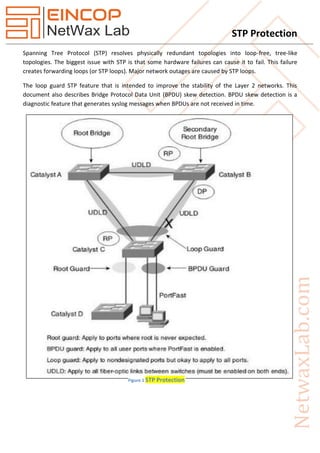
Spanning Tree Protocol (STP) resolves physically redundant topologies into loop-free, tree-like
topologies. The biggest issue with STP is that some hardware failures can cause it to fail. This failure
creates forwarding loops (or STP loops). Major network outages are caused by STP loops.
The loop guard STP feature that is intended to improve the stability of the Layer 2 networks. This
document also describes Bridge Protocol Data Unit (BPDU) skew detection. BPDU skew detection is a
diagnostic feature that generates syslog messages when BPDUs are not received in time.
Figure 1 STP Protection
STP Protection
Feature Availability
CatOS
1. The STP loop guard feature was introduced in CatOS version 6.2.1 of the Catalyst software for
Catalyst 4000 and Catalyst 5000 platforms and in version 6.2.2 for the Catalyst 6000 platform.
2. The BPDU skew detection feature was introduced in CatOS version 6.2.1 of the Catalyst software
for Catalyst 4000 and Catalyst 5000 platforms and in version 6.2.2 for the Catalyst 6000 platform.
Cisco IOS
1. The STP loop guard feature was introduced in Cisco IOS Software Release 12.1(12c)EW for
Catalyst 4500 switches and Cisco IOS Software Release 12.1(11b)EX for Catalyst 6500.
2. The BPDU skew detection feature is not supported in Catalyst switches running Cisco IOS system
software.
Brief Summary of STP Port Roles
Internally, STP assigns to each bridge (or switch) port a role that is based on configuration, topology,
relative position of the port in the topology, and other considerations. The port role defines the
behavior of the port from the STP point of view. Based on the port role, the port either sends or receives
STP BPDUs and forwards or blocks the data traffic. This list provides a brief summary of each STP port
role:
1. Designated- One designated port is elected per link (segment). The designated port is the port
closest to the root bridge. This port sends BPDUs on the link (segment) and forwards traffic
towards the root bridge. In an STP converged network, each designated port is in the STP
forwarding state.
2. Root- The bridge can have only one root port. The root port is the port that leads to the root
bridge. In an STP converged network, the root port is in the STP forwarding state.
3. Alternate- Alternate ports lead to the root bridge, but are not root ports. The alternate ports
maintain the STP blocking state.
4. Backup- This is a special case when two or more ports of the same bridge (switch) are connected
together, directly or through shared media. In this case, one port is designated, and the
remaining ports block. The role for this port is backup.
STP Protection
Root Guard
It is a security feature of STP. It protects our network from root bridge changes. After enabling root
guard, if any switch receives BPDU then it will put that port in root inconsistent state. It should apply on
all designated trunk ports. We should not configure this feature between those switches which are
performing STP load balancing.
A feature when it receives BPDU then it put that port in error disable or root inconsistent state.
Loop Guard
It is a feature of STP. It should be enabling on all the Non-DP ports (root & blocking).
After enabling loop guard if switch is receiving BPDUs on a switchport constantly then it will remain in
working mode, but if it stops to receive BPDUs on switchport then it will put that switch port in loop
inconsistent mode.
It is a feature when it receives a BPDU, it remain silent, if it will not receive BPDU then it will put that
port in loop inconsistent state or error disable state.
(Note: always applied on Non-DP ports.)
Consider this example in order to illustrate this behavior:
Switch A is the root switch. Switch C does not receive BPDUs from switch B due to unidirectional link
failure on the link between switch B and switch C.
Without loop guard, the STP blocking port on switch C transitions to the STP listening state when the
max_age timer expires, and then it transitions to the forwarding state in two times the forward_delay
time. This situation creates a loop.
Figure 2
STP Protection
With loop guard enabled, the blocking port on switch C transitions into STP loop-inconsistent state when
the max_age timer expires. A port in STP loop-inconsistent state does not pass user traffic, so a loop is
not created. (The loop-inconsistent state is effectively equal to blocking state.)
BPDU Guard
A feature when it receives BPDU it put that port in error disable mode.
(Note: Always applied on access port.)
For enable – shut & no shut
BPDU Filter
When we enable port fast then we save only 32 sec convergence time but STP is still working on the
port, if we want to block STP completely on a port then we have to use BPDU filter.
(Note: Always applied on access port.)
Figure 3
Figure 4
STP Protection
BPDU Skew Detection
STP operation relies heavily on the timely reception of BPDUs. At every hello_time message (2 seconds
by default), the root bridge sends BPDUs. Non-root bridges do not regenerate BPDUs for each
hello_time message, but they receive relayed BPDUs from the root bridge. Therefore, every non-root
bridge should receive BPDUs on every VLAN for each hello_time message. In some cases, BPDUs are
lost, or the bridge CPU is too busy to relay BPDU in a timely manner. These issues, as well as other
issues, can cause BPDUs to arrive late (if they arrive at all). This issue potentially compromises the
stability of the spanning tree topology.
BPDU skew detection allows the switch to keep track of BPDUs that arrive late and to notify the
administrator with syslog messages. For every port on which a BPDU has ever arrived late (or has
skewed), skew detection reports the most recent skew and the duration of the skew (latency). It also
reports the longest BPDU delay on this particular port.
In order to protect the bridge CPU from overload, a syslog message is not generated every time BPDU
skewing occurs. Messages are rate-limited to one message every 60 seconds. However, should the delay
of BPDU exceed max_age divided by 2 (which equals 10 seconds by default), the message is immediately
printed.
(Note: BPDU skew detection is a diagnostic feature. Upon detection of BPDU skewing, it sends a syslog
message. BPDU skew detection takes no further corrective action.)
This is an example of a syslog message generated by BPDU skew detection:
%SPANTREE-2-BPDU_SKEWING: BPDU skewed with a delay of 10 secs (max_age/2)
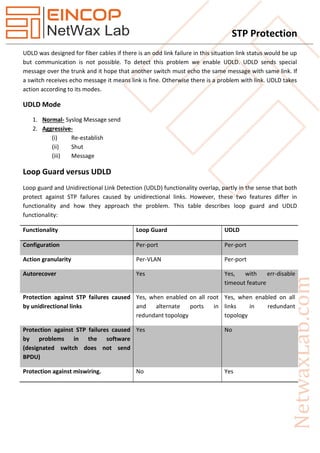
UDLD (Unidirectional Link Detection)
Figure 5 UDLD
STP Protection
UDLD was designed for fiber cables if there is an odd link failure in this situation link status would be up
but communication is not possible. To detect this problem we enable UDLD. UDLD sends special
message over the trunk and it hope that another switch must echo the same message with same link. If
a switch receives echo message it means link is fine. Otherwise there is a problem with link. UDLD takes
action according to its modes.
UDLD Mode
1. Normal- Syslog Message send
2. Aggressive-
(i) Re-establish
(ii) Shut
(iii) Message
Loop Guard versus UDLD
Loop guard and Unidirectional Link Detection (UDLD) functionality overlap, partly in the sense that both
protect against STP failures caused by unidirectional links. However, these two features differ in
functionality and how they approach the problem. This table describes loop guard and UDLD
functionality:
Functionality Loop Guard UDLD
Configuration Per-port Per-port
Action granularity Per-VLAN Per-port
Autorecover Yes Yes, with err-disable
timeout feature
Protection against STP failures caused
by unidirectional links
Yes, when enabled on all root
and alternate ports in
redundant topology
Yes, when enabled on all
links in redundant
topology
Protection against STP failures caused
by problems in the software
(designated switch does not send
BPDU)
Yes No
Protection against miswiring. No Yes
STP Protection
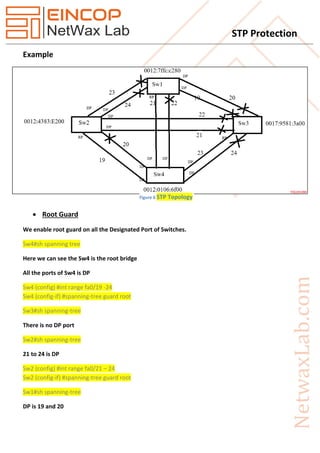
Example
 Root Guard
We enable root guard on all the Designated Port of Switches.
Sw4#sh spanning tree
Here we can see the Sw4 is the root bridge
All the ports of Sw4 is DP
Sw4 (config) #int range fa0/19 -24
Sw4 (config-if) #spanning-tree guard root
Sw3#sh spanning-tree
There is no DP port
Sw2#sh spanning-tree
21 to 24 is DP
Sw2 (config) #int range fa0/21 – 24
Sw2 (config-if) #spanning-tree guard root
Sw1#sh spanning-tree
DP is 19 and 20
Figure 6 STP Topology
STP Protection
Sw1 (config) #int range fa0/19 – 20
Sw1 (config-if) #spanning-tree guard root
Finally we enabled root guard on all the switches DP ports.
Now we will make Sw3 as Root Bridge for vlan 1
Sw3 (config) #spanning-tree vlan 1 priority 0
Sw3#sh spanning-tree
Sw4#sh spanning-tree
Now we can see root guard send the port in root inconsistent mode.
Sw3 (config) #no spanning-tree vlan 1 priority 0
Sw1#sh spanning-tree
 Loop Guard
It will apply on all non-DP and blocking port
Sw1#sh spanning-tree
Fa0/21 is the root port
Sw1 (config) #int fa0/21
Sw1 (config-if) #spanning-tree guard loop
Sw4 (config) #int fa0/21
Sw4 (config-if) #spanning-tree bpdufilter enable
Sw1#sh spanning-tree
Sw4 (config) #int fa0/21
Sw4 (config-if) #spanning-tree bpdufilter disable
Sw1#sh spanning-tree
 BPDU Guard
Only applied on Access ports
Sw1 (config) #int range fa0/1 – 18
Sw1 (config-if-range) #spanning-tree bpduguard enable
Sw1 (config-if-range) #spanning-tree bpdufilter enable
STP Protection
For globally enabling
Sw1 (config) #spanning-tree portfast bpduguard default
Sw1 (config) #spanning-tree portfast default
Sw1 (config) #spanning-tree portfast bpdufilter default
 UDLD
Sw1 (config) #udld enable
Sw1 (config) #udld aggressive
Sw2 (config) #udld enable
Sw2 (config) #udld aggressive
Sw3 (config) #udld enable
Sw3 (config) #udld aggressive
Sw4 (config) #udld enable
Sw4 (config) #udld aggressive

STP Protection

  • 1.
    STP Protection Spanning TreeProtocol (STP) resolves physically redundant topologies into loop-free, tree-like topologies. The biggest issue with STP is that some hardware failures can cause it to fail. This failure creates forwarding loops (or STP loops). Major network outages are caused by STP loops. The loop guard STP feature that is intended to improve the stability of the Layer 2 networks. This document also describes Bridge Protocol Data Unit (BPDU) skew detection. BPDU skew detection is a diagnostic feature that generates syslog messages when BPDUs are not received in time. Figure 1 STP Protection
  • 2.
    STP Protection Feature Availability CatOS 1.The STP loop guard feature was introduced in CatOS version 6.2.1 of the Catalyst software for Catalyst 4000 and Catalyst 5000 platforms and in version 6.2.2 for the Catalyst 6000 platform. 2. The BPDU skew detection feature was introduced in CatOS version 6.2.1 of the Catalyst software for Catalyst 4000 and Catalyst 5000 platforms and in version 6.2.2 for the Catalyst 6000 platform. Cisco IOS 1. The STP loop guard feature was introduced in Cisco IOS Software Release 12.1(12c)EW for Catalyst 4500 switches and Cisco IOS Software Release 12.1(11b)EX for Catalyst 6500. 2. The BPDU skew detection feature is not supported in Catalyst switches running Cisco IOS system software. Brief Summary of STP Port Roles Internally, STP assigns to each bridge (or switch) port a role that is based on configuration, topology, relative position of the port in the topology, and other considerations. The port role defines the behavior of the port from the STP point of view. Based on the port role, the port either sends or receives STP BPDUs and forwards or blocks the data traffic. This list provides a brief summary of each STP port role: 1. Designated- One designated port is elected per link (segment). The designated port is the port closest to the root bridge. This port sends BPDUs on the link (segment) and forwards traffic towards the root bridge. In an STP converged network, each designated port is in the STP forwarding state. 2. Root- The bridge can have only one root port. The root port is the port that leads to the root bridge. In an STP converged network, the root port is in the STP forwarding state. 3. Alternate- Alternate ports lead to the root bridge, but are not root ports. The alternate ports maintain the STP blocking state. 4. Backup- This is a special case when two or more ports of the same bridge (switch) are connected together, directly or through shared media. In this case, one port is designated, and the remaining ports block. The role for this port is backup.
  • 3.
    STP Protection Root Guard Itis a security feature of STP. It protects our network from root bridge changes. After enabling root guard, if any switch receives BPDU then it will put that port in root inconsistent state. It should apply on all designated trunk ports. We should not configure this feature between those switches which are performing STP load balancing. A feature when it receives BPDU then it put that port in error disable or root inconsistent state. Loop Guard It is a feature of STP. It should be enabling on all the Non-DP ports (root & blocking). After enabling loop guard if switch is receiving BPDUs on a switchport constantly then it will remain in working mode, but if it stops to receive BPDUs on switchport then it will put that switch port in loop inconsistent mode. It is a feature when it receives a BPDU, it remain silent, if it will not receive BPDU then it will put that port in loop inconsistent state or error disable state. (Note: always applied on Non-DP ports.) Consider this example in order to illustrate this behavior: Switch A is the root switch. Switch C does not receive BPDUs from switch B due to unidirectional link failure on the link between switch B and switch C. Without loop guard, the STP blocking port on switch C transitions to the STP listening state when the max_age timer expires, and then it transitions to the forwarding state in two times the forward_delay time. This situation creates a loop. Figure 2
  • 4.
    STP Protection With loopguard enabled, the blocking port on switch C transitions into STP loop-inconsistent state when the max_age timer expires. A port in STP loop-inconsistent state does not pass user traffic, so a loop is not created. (The loop-inconsistent state is effectively equal to blocking state.) BPDU Guard A feature when it receives BPDU it put that port in error disable mode. (Note: Always applied on access port.) For enable – shut & no shut BPDU Filter When we enable port fast then we save only 32 sec convergence time but STP is still working on the port, if we want to block STP completely on a port then we have to use BPDU filter. (Note: Always applied on access port.) Figure 3 Figure 4
  • 5.
    STP Protection BPDU SkewDetection STP operation relies heavily on the timely reception of BPDUs. At every hello_time message (2 seconds by default), the root bridge sends BPDUs. Non-root bridges do not regenerate BPDUs for each hello_time message, but they receive relayed BPDUs from the root bridge. Therefore, every non-root bridge should receive BPDUs on every VLAN for each hello_time message. In some cases, BPDUs are lost, or the bridge CPU is too busy to relay BPDU in a timely manner. These issues, as well as other issues, can cause BPDUs to arrive late (if they arrive at all). This issue potentially compromises the stability of the spanning tree topology. BPDU skew detection allows the switch to keep track of BPDUs that arrive late and to notify the administrator with syslog messages. For every port on which a BPDU has ever arrived late (or has skewed), skew detection reports the most recent skew and the duration of the skew (latency). It also reports the longest BPDU delay on this particular port. In order to protect the bridge CPU from overload, a syslog message is not generated every time BPDU skewing occurs. Messages are rate-limited to one message every 60 seconds. However, should the delay of BPDU exceed max_age divided by 2 (which equals 10 seconds by default), the message is immediately printed. (Note: BPDU skew detection is a diagnostic feature. Upon detection of BPDU skewing, it sends a syslog message. BPDU skew detection takes no further corrective action.) This is an example of a syslog message generated by BPDU skew detection: %SPANTREE-2-BPDU_SKEWING: BPDU skewed with a delay of 10 secs (max_age/2) UDLD (Unidirectional Link Detection) Figure 5 UDLD
  • 6.
    STP Protection UDLD wasdesigned for fiber cables if there is an odd link failure in this situation link status would be up but communication is not possible. To detect this problem we enable UDLD. UDLD sends special message over the trunk and it hope that another switch must echo the same message with same link. If a switch receives echo message it means link is fine. Otherwise there is a problem with link. UDLD takes action according to its modes. UDLD Mode 1. Normal- Syslog Message send 2. Aggressive- (i) Re-establish (ii) Shut (iii) Message Loop Guard versus UDLD Loop guard and Unidirectional Link Detection (UDLD) functionality overlap, partly in the sense that both protect against STP failures caused by unidirectional links. However, these two features differ in functionality and how they approach the problem. This table describes loop guard and UDLD functionality: Functionality Loop Guard UDLD Configuration Per-port Per-port Action granularity Per-VLAN Per-port Autorecover Yes Yes, with err-disable timeout feature Protection against STP failures caused by unidirectional links Yes, when enabled on all root and alternate ports in redundant topology Yes, when enabled on all links in redundant topology Protection against STP failures caused by problems in the software (designated switch does not send BPDU) Yes No Protection against miswiring. No Yes
  • 7.
    STP Protection Example  RootGuard We enable root guard on all the Designated Port of Switches. Sw4#sh spanning tree Here we can see the Sw4 is the root bridge All the ports of Sw4 is DP Sw4 (config) #int range fa0/19 -24 Sw4 (config-if) #spanning-tree guard root Sw3#sh spanning-tree There is no DP port Sw2#sh spanning-tree 21 to 24 is DP Sw2 (config) #int range fa0/21 – 24 Sw2 (config-if) #spanning-tree guard root Sw1#sh spanning-tree DP is 19 and 20 Figure 6 STP Topology
  • 8.
    STP Protection Sw1 (config)#int range fa0/19 – 20 Sw1 (config-if) #spanning-tree guard root Finally we enabled root guard on all the switches DP ports. Now we will make Sw3 as Root Bridge for vlan 1 Sw3 (config) #spanning-tree vlan 1 priority 0 Sw3#sh spanning-tree Sw4#sh spanning-tree Now we can see root guard send the port in root inconsistent mode. Sw3 (config) #no spanning-tree vlan 1 priority 0 Sw1#sh spanning-tree  Loop Guard It will apply on all non-DP and blocking port Sw1#sh spanning-tree Fa0/21 is the root port Sw1 (config) #int fa0/21 Sw1 (config-if) #spanning-tree guard loop Sw4 (config) #int fa0/21 Sw4 (config-if) #spanning-tree bpdufilter enable Sw1#sh spanning-tree Sw4 (config) #int fa0/21 Sw4 (config-if) #spanning-tree bpdufilter disable Sw1#sh spanning-tree  BPDU Guard Only applied on Access ports Sw1 (config) #int range fa0/1 – 18 Sw1 (config-if-range) #spanning-tree bpduguard enable Sw1 (config-if-range) #spanning-tree bpdufilter enable
  • 9.
    STP Protection For globallyenabling Sw1 (config) #spanning-tree portfast bpduguard default Sw1 (config) #spanning-tree portfast default Sw1 (config) #spanning-tree portfast bpdufilter default  UDLD Sw1 (config) #udld enable Sw1 (config) #udld aggressive Sw2 (config) #udld enable Sw2 (config) #udld aggressive Sw3 (config) #udld enable Sw3 (config) #udld aggressive Sw4 (config) #udld enable Sw4 (config) #udld aggressive