Unit-1: Introductory Concepts
 Goals and applications of networks,
 Categories of networks,
 Organization of the Internet
 ISP(Internet Service Providers)
 Network structure and architecture (layering principles, services, protocols and
standards),
 The OSI reference model,
 TCP/IP protocol suite,
 Network devices and components.
DATA COMMUNICATIONS
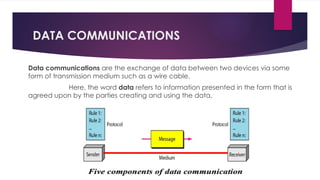
Data communications are the exchange of data between two devices via some
form of transmission medium such as a wire cable.
Here, the word data refers to information presented in the form that is
agreed upon by the parties creating and using the data.
NETWORKS
A network is a set of autonomous nodes interconnected by communication
links(wired/wireless media)and are able to interact with each other.
Here, node can be a computer, printer, or any other device capable of sending
and/or receiving data generated by other nodes on the network.
Goals of Computer Networks:
 Resource Sharing
 High Reliability
 Inter-process Communication – if network users located geographically apart
 Flexible access – Files can be accessed from any computer in the network.
Network Criteria
A network must be able to meet a certain number of criteria. The most important of
these are:-
1. Performance
It can be measured in many ways
 transit time
 response time.
 the number of users
 the type of transmission medium
 the capabilities of the connected hardware, and the efficiency of the software.
Performance is often evaluated by two networking metrics: throughput and delay
Network Criteria
2. Accuracy. The system must deliver the data accurately to the correct destination. Data
that have been altered in transmission and left uncorrected are unusable.
3. Robustness ability of a network to maintain its structural integrity and continue to
operate its original functions normally even after being attacked,
4. Reliability It is measured by the frequency of failure, the time it takes a link to recover
from a failure.
5. Security Network security issues include protecting data from unauthorized access,
protecting data from damage and development, and implementing policies and
procedures for recovery from breaches and data losses.
THE INTERNET
An internet, is a collaboration of more than hundreds of thousands of
interconnected networks that can communicate with each other.
 The Internet today is not a simple hierarchical structure. It is made up of many wide-
and local-area networks joined by connecting devices and switching stations.
 It is difficult to give an accurate representation of the Internet because it is continually
changing-new networks are being added, existing networks are adding addresses, and
networks of defunct companies are being removed.
 End users, who want Internet connection contact Internet service providers (lSPs) and
use their services on payment basis.
 The Internet today is run by private companies, not the government.
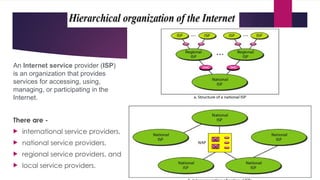
An Internet service provider (ISP)
is an organization that provides
services for accessing, using,
managing, or participating in the
Internet.
There are -
 international service providers,
 national service providers,
 regional service providers, and
 local service providers.
Network Devices and Components
 Network devices, or networking
hardware, are physical devices that
are required for communication
and interaction between hardware
on a computer network.
 You can quickly, safely, and
accurately transfer data over one
or more networks with the help of
network devices.
Types of network devices
 Repeater
 Bridge
 Hub
 Switch
 Router
 Gateway
 Modem
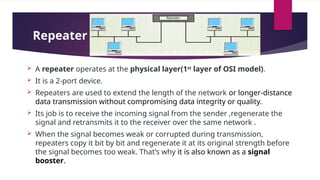
Repeater –
 A repeater operates at the physical layer(1st
layer of OSI model).
 It is a 2-port device.
 Repeaters are used to extend the length of the network or longer-distance
data transmission without compromising data integrity or quality.
 Its job is to receive the incoming signal from the sender ,regenerate the
signal and retransmits it to the receiver over the same network .
 When the signal becomes weak or corrupted during transmission,
repeaters copy it bit by bit and regenerate it at its original strength before
the signal becomes too weak. That’s why it is also known as a signal
booster.
 Advantages of Repeaters
• Repeaters are simple to install and can easily extend the length or the coverage area of
networks.
• They are cost effective.
• Repeaters don’t require any processing overhead. The only time they need to be investigated is
in case of degradation of performance.
 Disadvantages of Repeaters
• Repeaters cannot connect dissimilar networks.
• Sometimes, they cannot differentiate between actual signal and noise.
• They cannot reduce network traffic or congestion.
• Most networks have limitations upon the number of repeaters that can be deployed.
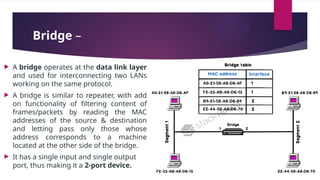
Bridge –
 A bridge operates at the data link layer
and used for interconnecting two LANs
working on the same protocol.
 A bridge is similar to repeater, with add
on functionality of filtering content of
frames/packets by reading the MAC
addresses of the source & destination
and letting pass only those whose
address corresponds to a machine
located at the other side of the bridge.
 It has a single input and single output
port, thus making it a 2-port device.
Advantages
• Bridge connects similar network types with different
cabling
• Some bridges connect networks having different
architectures and media types
• It extends the physical network
• Bridges also can reduce network traffic on a segment by
subdividing network communications
• It creates separate collision domains. Hence it can
increase available bandwidth to individual nodes as
fewer nodes share a collision domain.
Disadvantages
• It is slower compare to repeaters due to the
filtering process
• It is more expensive compared to repeaters
• Does not scale to extremely large network
• Buffering and processing introduces delays
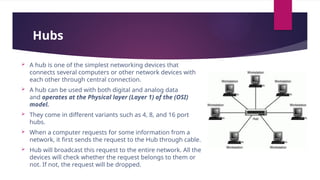
Hubs
 A hub is one of the simplest networking devices that
connects several computers or other network devices with
each other through central connection.
 A hub can be used with both digital and analog data
and operates at the Physical layer (Layer 1) of the (OSI)
model.
 They come in different variants such as 4, 8, and 16 port
hubs.
 When a computer requests for some information from a
network, it first sends the request to the Hub through cable.
 Hub will broadcast this request to the entire network. All the
devices will check whether the request belongs to them or
not. If not, the request will be dropped.
Advantages of the hub network device are:
• Easy to install
• Inexpensive
• It does not affect the performance of the network seriously
• Easy removal of damaged device
Disadvantages of the hub network device are:
• Can not filter information
• It can not reduce the network traffic
• Broadcast of the data happens to all the port. Thus, No security
• use the half-duplex method for transmission.
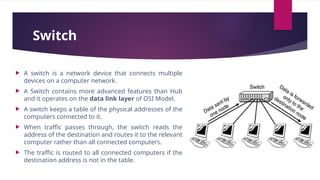
Switch
 A switch is a network device that connects multiple
devices on a computer network.
 A Switch contains more advanced features than Hub
and it operates on the data link layer of OSI Model.
 A switch keeps a table of the physical addresses of the
computers connected to it.
 When traffic passes through, the switch reads the
address of the destination and routes it to the relevant
computer rather than all connected computers.
 The traffic is routed to all connected computers if the
destination address is not in the table.
Advantages:
 The hub shares the bandwidth between the ports. A switch, on the other hand,
provides dedicated bandwidth to the ports.
 The switch can perform error checking before forwarding data, which makes it
very efficient as it does not forward packets that have errors and forward good
packets selectively to the correct port only.
Limitations
 Switches can be subject to distributed denial of service (DDoS) attacks;
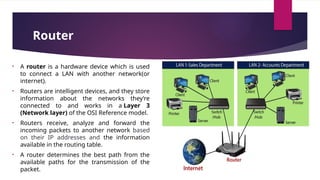
Router
• A router is a hardware device which is used
to connect a LAN with another network(or
internet).
• Routers are intelligent devices, and they store
information about the networks they’re
connected to and works in a Layer 3
(Network layer) of the OSI Reference model.
• Routers receive, analyze and forward the
incoming packets to another network based
on their IP addresses and the information
available in the routing table.
• A router determines the best path from the
available paths for the transmission of the
packet.
Advantages Of Router:
• Security: The information which is transmitted to the network will traverse the
entire cable, but the only specified device which has been addressed can read the
data.
• Reliability: If the server has stopped functioning, the network goes down, but no
other networks are affected that are served by the router.
• Performance: Router enhances the overall performance of the network. Suppose
there are 24 workstations in a network generates a same amount of traffic. This
increases the traffic load on the network. Router splits the single network into two
networks of 12 workstations each, reduces the traffic load by half.
• Can connect different network architecture, such as Ethernet and token ring
 Disadvantages of the router :
• A router is more expensive than bridge or repeaters
• Router only work with routable network protocol, not all protocol are routable
• The router is slower than bridge or repeaters because they must analyze data transmission
from the physical to the network layer
• Dynamic router communication causes additional network traffic
• Are relatively complex device
• Can require a considerable amount of initial configuration
• They are protocol dependent devices which must understand protocol they are using.
Gateways –
 A gateway, as the name suggests, is a passage to connect two networks
that may work upon different networking models.
 They work as messenger agents that take data from one system, interpret
it, and transfer it to another system.
 Gateways are generally more complex than switches or routers.
 Gateways perform all of the functions of routers and more.
 In fact, a router with added translation functionality is a gateway. The
function that does the translation between different network technologies is
called a protocol converter.
 Gateways operates at network layer.
Modem
 Modems (modulators-demodulators) are used to transmit digital signals over analog
telephone lines.
 Thus, digital signals are converted by the modem into analog signals of different
frequencies and transmitted to a modem at the receiving location.
 The receiving modem performs the reverse transformation and provides a digital output
to a device connected to a modem, usually a computer.
 The digital data is usually transferred to or from the modem over a serial line through an
industry standard interface, RS-232.
 Many telephone companies offer DSL services, and many cable operators use modems as
end terminals for identification and recognition of home and personal users.
 Modems work on both the Physical and Data Link layers.
Computer Network Architecture
A communication subsystem/network is a combination of hardware and software that sends
data from one location to another.
 The hardware consists of the physical equipments that carries signals from one point of
the network to another.
 The software consists of instruction sets that make possible the services that we expect
from a network.
Early, the implementation of software for such subsystems were based on single, complex,
unstructured program with many interacting components. The resultant software was very
difficult to test and modify.
To overcome such problems, the ISO has developed a layered approach. In a layered
approach, networking concept is divided into several layers, and each layer is assigned a
particular task. Therefore, we can say that networking tasks depend upon the layers.
Layered Network Architecture
The main aim of the layered architecture is to divide the design into small pieces/layers.
 Each lower layer adds its services to the higher layer to provide a full set of services to
manage communications and run the applications.
 It provides modularity and clear interfaces, i.e., provides interaction between
subsystems.
 It ensures the independence between layers by providing the services from lower to
higher layer without defining how the services are implemented. Therefore, any
modification in a layer will not affect the other layers.
The number of layers, functions, contents of each layer will vary from network to network.
However, the purpose of each layer is same i.e. to provide the service to a higher layer and
hiding the details from the layers of how the services are implemented.
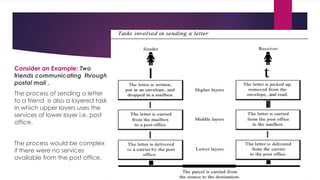
Consider an Example: Two
friends communicating through
postal mail .
The process of sending a letter
to a friend is also a layered task
in which upper layers uses the
services of lower layer i.e. post
office.
The process would be complex
if there were no services
available from the post office.
Layered Architecture Elements
The basic elements of layered architecture are : services, protocols, and interfaces.
1. Service: It is a set of actions that a layer provides to the higher layer.
2. Protocol: It defines a set of rules that a layer uses to exchange the information with peer
entity. These rules mainly concern about both the contents and order of the messages used.
3. Interface: It is a way through which the message is transferred from one layer to another
layer.
In a n-layer architecture, layer n on one machine will have a communication with
the layer n on another machine through lower layers and the rules used in a conversation
are known as a (layer-n protocol).
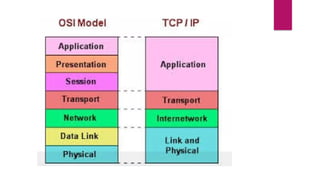
Network Models
 OSI (Open System Interconnection) model
 TCP/IP Protocol Suite model
OSI Reference Model
OSI Reference Model
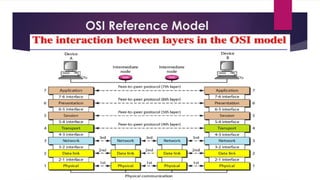
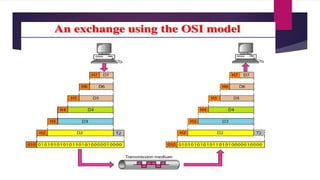
 OSI stands for Open System Interconnection is a reference model that describes how
information from a software application in one computer moves through a physical
medium to the software application in another computer.
 developed by ISO in 1984, and allows any two different systems to communicate
regardless of their underlying architecture(h/w and s/w).
 It is a model for understanding and designing a network architecture that is flexible,
robust, and interoperable
 OSI consists of seven layers, and each layer performs a particular network function.
 OSI model divides the whole task into seven smaller and manageable tasks. Each layer is
assigned a particular task.
 Each layer is self-contained, so that task assigned to each layer can be performed
independently.
Functions of each layer in the OSI model
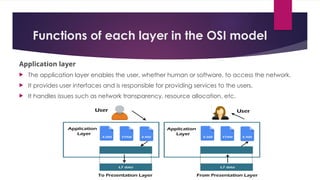
Application layer
 The application layer enables the user, whether human or software, to access the network.
 It provides user interfaces and is responsible for providing services to the users.
 It handles issues such as network transparency, resource allocation, etc.
Specific services provided by the application layer :
 Network virtual terminal. A network virtual terminal is a software version of a physical
terminal, and it allows a user to log on to a remote host. To do so, the application creates
a software emulation of a terminal at the remote host.
 File transfer, access, and management. This application allows a user to access files in a
remote host (to make changes or read data), to retrieve files from a remote computer for
use in the local computer, and to manage or control files in a remote computer locally.
 Mail services. This application provides the basis for e-mail forwarding and storage.
 Directory services. This application provides distributed database sources and access for
global information about various objects and services.
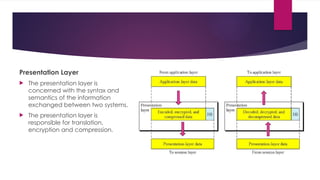
Presentation Layer
 The presentation layer is
concerned with the syntax and
semantics of the information
exchanged between two systems.
 The presentation layer is
responsible for translation,
encryption and compression.
Specific responsibilities of the presentation layer:
 Translation. As different computers use different encoding systems, the presentation layer is
responsible for interoperability between these different encoding methods. The presentation layer
at the sender changes the information from its sender-dependent format into a common format
and The presentation layer at the receiving machine changes the common format into its receiver-
dependent format.
 Encryption. To carry sensitive information, a system must be able to ensure privacy. Encryption
means that the sender transforms the original information to another form and sends the resulting
message out over the network.
 Decryption reverses the original encryption process to transform the message back to its original
form.
 Compression. Data compression reduces the number of bits contained in the information. Data
compression becomes particularly important in the transmission of multimedia such as text, audio,
and video.
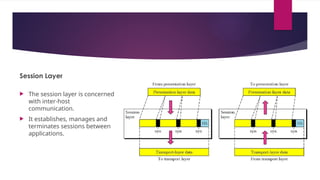
Session Layer
 The session layer is concerned
with inter-host
communication.
 It establishes, manages and
terminates sessions between
applications.
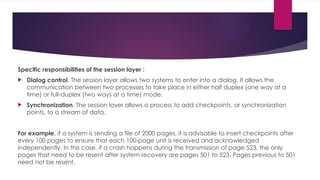
Specific responsibilities of the session layer :
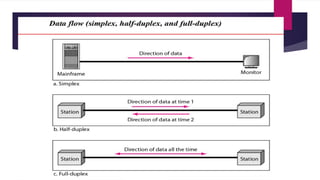
 Dialog control. The session layer allows two systems to enter into a dialog. It allows the
communication between two processes to take place in either half duplex (one way at a
time) or full-duplex (two ways at a time) mode.
 Synchronization. The session layer allows a process to add checkpoints, or synchronization
points, to a stream of data.
For example, if a system is sending a file of 2000 pages, it is advisable to insert checkpoints after
every 100 pages to ensure that each 100-page unit is received and acknowledged
independently. In this case, if a crash happens during the transmission of page 523, the only
pages that need to be resent after system recovery are pages 501 to 523. Pages previous to 501
need not be resent.
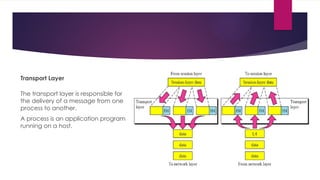
Transport Layer
The transport layer is responsible for
the delivery of a message from one
process to another.
A process is an application program
running on a host.
Responsibilities of Transport layer:
 Service-point addressing. Computers often run several programs/process at the same time. Transport layer
is responsible for delivery of message from a specific process (running program) on one computer to a
specific process (running program) on the other. The transport layer header must therefore include a type
of address called a service-point address (or port address).
 Segmentation and reassembly. A message is divided into transmittable segments, with each segment
containing a sequence number. These numbers enable the transport layer to reassemble the message
correctly upon arriving at the destination and to identify and replace packets that were lost in transmission.
 Connection control. The transport layer can be either connectionless or connection oriented.
 Flow control: the transport layer is responsible for flow control. However, flow control at this layer is
performed end to end rather than across a single link.
 Error control. the transport layer is responsible for error control. However, error control at this layer is
performed process-to process rather than across a single link. The sending transport layer makes sure that
the entire message arrives at the receiving transport layer without error (damage, loss, or duplication). Error
correction is usually achieved through retransmission.
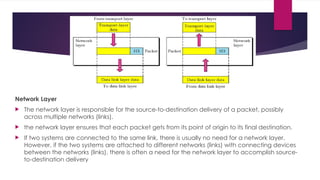
Network Layer
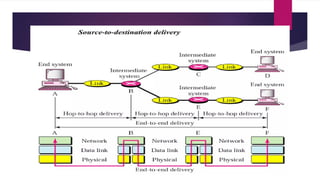
 The network layer is responsible for the source-to-destination delivery of a packet, possibly
across multiple networks (links).
 the network layer ensures that each packet gets from its point of origin to its final destination.
 If two systems are connected to the same link, there is usually no need for a network layer.
However, if the two systems are attached to different networks (links) with connecting devices
between the networks (links), there is often a need for the network layer to accomplish source-
to-destination delivery
Responsibilities of the network layer:
 Logical addressing. The physical addressing implemented by the data link layer handles
the addressing problem locally. If a packet passes the network boundary, we need
another addressing system to help distinguish the source and destination systems. The
network layer adds a header to the packet coming from the upper layer that, among
other things, includes the logical addresses of the sender and receiver.
 Routing. When independent networks or links are connected to create internetworks
(network of networks) or a large network, the connecting devices (called routers or
switches) route or switch the packets to their final destination. One of the functions of the
network layer is to provide this mechanism
Data Link Layer
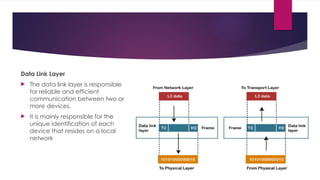
 The data link layer is responsible
for reliable and efficient
communication between two or
more devices.
 It is mainly responsible for the
unique identification of each
device that resides on a local
network
Responsibilities of the data link layer:
 Framing. The data link layer divides the stream of bits received from the network layer into
manageable data units called frames.
 Physical addressing. If frames are to be distributed to different systems on the network, the data link
layer adds a header to the frame to define the sender and/or receiver of the frame. If the frame is
intended for a system outside the sender's network, the receiver address is the address of the device
that connects the network to the next one.
 Flow control. If the rate at which the data are absorbed by the receiver is less than the rate at which
data are produced in the sender, the data link layer imposes a flow control mechanism to avoid
overwhelming the receiver.
 Error control. The data link layer adds reliability to the physical layer by adding mechanisms to detect
and retransmit damaged or lost frames. It also uses a mechanism to recognize duplicate frames. Error
control is normally achieved through a trailer added to the end of the frame.
 Access control. When two or more devices are connected to the same link, data link layer protocols
are necessary to determine which device has control over the link at any given time
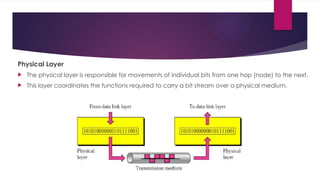
Physical Layer
 The physical layer is responsible for movements of individual bits from one hop (node) to the next.
 This layer coordinates the functions required to carry a bit stream over a physical medium.
The physical layer responsibilities:
 Physical characteristics of interfaces and medium. The physical layer defines the characteristics of the
interface between the devices and the transmission medium. It also defines the type of transmission medium.
 Representation of bits. The physical layer data consists of a stream of bits (sequence of 0s or 1s) with no
interpretation. To be transmitted, bits must be encoded into signals--electrical or optical. The physical layer
defines the type of encoding (how 0s and Is are changed to signals).
 Data rate. The transmission rate-the number of bits sent each second-is also defined by the physical layer.
 Synchronization of bits. The sender and receiver not only must use the same bit rate but also must be
synchronized at the bit level. In other words, the sender and the receiver clocks must be synchronized.
 Line configuration. The physical layer is concerned with the type of connection of devices to the
media(point-to-point configuration, or multipoint configuration)
 Physical topology. The physical topology defines how devices are connected to make a network.
 Transmission mode. The physical layer also defines the direction of transmission between two devices:
simplex, half-duplex, or full-duplex.
Unit-1 (Part-a) (1).pptxxxxxxxxxxxxxxxxx

Unit-1 (Part-a) (1).pptxxxxxxxxxxxxxxxxx

  • 2.
    Unit-1: Introductory Concepts Goals and applications of networks,  Categories of networks,  Organization of the Internet  ISP(Internet Service Providers)  Network structure and architecture (layering principles, services, protocols and standards),  The OSI reference model,  TCP/IP protocol suite,  Network devices and components.
  • 3.
    DATA COMMUNICATIONS Data communicationsare the exchange of data between two devices via some form of transmission medium such as a wire cable. Here, the word data refers to information presented in the form that is agreed upon by the parties creating and using the data.
  • 5.
    NETWORKS A network isa set of autonomous nodes interconnected by communication links(wired/wireless media)and are able to interact with each other. Here, node can be a computer, printer, or any other device capable of sending and/or receiving data generated by other nodes on the network. Goals of Computer Networks:  Resource Sharing  High Reliability  Inter-process Communication – if network users located geographically apart  Flexible access – Files can be accessed from any computer in the network.
  • 6.
    Network Criteria A networkmust be able to meet a certain number of criteria. The most important of these are:- 1. Performance It can be measured in many ways  transit time  response time.  the number of users  the type of transmission medium  the capabilities of the connected hardware, and the efficiency of the software. Performance is often evaluated by two networking metrics: throughput and delay
  • 7.
    Network Criteria 2. Accuracy.The system must deliver the data accurately to the correct destination. Data that have been altered in transmission and left uncorrected are unusable. 3. Robustness ability of a network to maintain its structural integrity and continue to operate its original functions normally even after being attacked, 4. Reliability It is measured by the frequency of failure, the time it takes a link to recover from a failure. 5. Security Network security issues include protecting data from unauthorized access, protecting data from damage and development, and implementing policies and procedures for recovery from breaches and data losses.
  • 8.
    THE INTERNET An internet,is a collaboration of more than hundreds of thousands of interconnected networks that can communicate with each other.  The Internet today is not a simple hierarchical structure. It is made up of many wide- and local-area networks joined by connecting devices and switching stations.  It is difficult to give an accurate representation of the Internet because it is continually changing-new networks are being added, existing networks are adding addresses, and networks of defunct companies are being removed.  End users, who want Internet connection contact Internet service providers (lSPs) and use their services on payment basis.  The Internet today is run by private companies, not the government.
  • 9.
    An Internet serviceprovider (ISP) is an organization that provides services for accessing, using, managing, or participating in the Internet. There are -  international service providers,  national service providers,  regional service providers, and  local service providers.
  • 10.
    Network Devices andComponents  Network devices, or networking hardware, are physical devices that are required for communication and interaction between hardware on a computer network.  You can quickly, safely, and accurately transfer data over one or more networks with the help of network devices. Types of network devices  Repeater  Bridge  Hub  Switch  Router  Gateway  Modem
  • 11.
    Repeater –  Arepeater operates at the physical layer(1st layer of OSI model).  It is a 2-port device.  Repeaters are used to extend the length of the network or longer-distance data transmission without compromising data integrity or quality.  Its job is to receive the incoming signal from the sender ,regenerate the signal and retransmits it to the receiver over the same network .  When the signal becomes weak or corrupted during transmission, repeaters copy it bit by bit and regenerate it at its original strength before the signal becomes too weak. That’s why it is also known as a signal booster.
  • 12.
     Advantages ofRepeaters • Repeaters are simple to install and can easily extend the length or the coverage area of networks. • They are cost effective. • Repeaters don’t require any processing overhead. The only time they need to be investigated is in case of degradation of performance.  Disadvantages of Repeaters • Repeaters cannot connect dissimilar networks. • Sometimes, they cannot differentiate between actual signal and noise. • They cannot reduce network traffic or congestion. • Most networks have limitations upon the number of repeaters that can be deployed.
  • 13.
    Bridge –  Abridge operates at the data link layer and used for interconnecting two LANs working on the same protocol.  A bridge is similar to repeater, with add on functionality of filtering content of frames/packets by reading the MAC addresses of the source & destination and letting pass only those whose address corresponds to a machine located at the other side of the bridge.  It has a single input and single output port, thus making it a 2-port device.
  • 14.
    Advantages • Bridge connectssimilar network types with different cabling • Some bridges connect networks having different architectures and media types • It extends the physical network • Bridges also can reduce network traffic on a segment by subdividing network communications • It creates separate collision domains. Hence it can increase available bandwidth to individual nodes as fewer nodes share a collision domain. Disadvantages • It is slower compare to repeaters due to the filtering process • It is more expensive compared to repeaters • Does not scale to extremely large network • Buffering and processing introduces delays
  • 15.
    Hubs  A hubis one of the simplest networking devices that connects several computers or other network devices with each other through central connection.  A hub can be used with both digital and analog data and operates at the Physical layer (Layer 1) of the (OSI) model.  They come in different variants such as 4, 8, and 16 port hubs.  When a computer requests for some information from a network, it first sends the request to the Hub through cable.  Hub will broadcast this request to the entire network. All the devices will check whether the request belongs to them or not. If not, the request will be dropped.
  • 16.
    Advantages of thehub network device are: • Easy to install • Inexpensive • It does not affect the performance of the network seriously • Easy removal of damaged device Disadvantages of the hub network device are: • Can not filter information • It can not reduce the network traffic • Broadcast of the data happens to all the port. Thus, No security • use the half-duplex method for transmission.
  • 17.
    Switch  A switchis a network device that connects multiple devices on a computer network.  A Switch contains more advanced features than Hub and it operates on the data link layer of OSI Model.  A switch keeps a table of the physical addresses of the computers connected to it.  When traffic passes through, the switch reads the address of the destination and routes it to the relevant computer rather than all connected computers.  The traffic is routed to all connected computers if the destination address is not in the table.
  • 18.
    Advantages:  The hubshares the bandwidth between the ports. A switch, on the other hand, provides dedicated bandwidth to the ports.  The switch can perform error checking before forwarding data, which makes it very efficient as it does not forward packets that have errors and forward good packets selectively to the correct port only. Limitations  Switches can be subject to distributed denial of service (DDoS) attacks;
  • 19.
    Router • A routeris a hardware device which is used to connect a LAN with another network(or internet). • Routers are intelligent devices, and they store information about the networks they’re connected to and works in a Layer 3 (Network layer) of the OSI Reference model. • Routers receive, analyze and forward the incoming packets to another network based on their IP addresses and the information available in the routing table. • A router determines the best path from the available paths for the transmission of the packet.
  • 20.
    Advantages Of Router: •Security: The information which is transmitted to the network will traverse the entire cable, but the only specified device which has been addressed can read the data. • Reliability: If the server has stopped functioning, the network goes down, but no other networks are affected that are served by the router. • Performance: Router enhances the overall performance of the network. Suppose there are 24 workstations in a network generates a same amount of traffic. This increases the traffic load on the network. Router splits the single network into two networks of 12 workstations each, reduces the traffic load by half. • Can connect different network architecture, such as Ethernet and token ring
  • 21.
     Disadvantages ofthe router : • A router is more expensive than bridge or repeaters • Router only work with routable network protocol, not all protocol are routable • The router is slower than bridge or repeaters because they must analyze data transmission from the physical to the network layer • Dynamic router communication causes additional network traffic • Are relatively complex device • Can require a considerable amount of initial configuration • They are protocol dependent devices which must understand protocol they are using.
  • 22.
    Gateways –  Agateway, as the name suggests, is a passage to connect two networks that may work upon different networking models.  They work as messenger agents that take data from one system, interpret it, and transfer it to another system.  Gateways are generally more complex than switches or routers.  Gateways perform all of the functions of routers and more.  In fact, a router with added translation functionality is a gateway. The function that does the translation between different network technologies is called a protocol converter.  Gateways operates at network layer.
  • 23.
    Modem  Modems (modulators-demodulators)are used to transmit digital signals over analog telephone lines.  Thus, digital signals are converted by the modem into analog signals of different frequencies and transmitted to a modem at the receiving location.  The receiving modem performs the reverse transformation and provides a digital output to a device connected to a modem, usually a computer.  The digital data is usually transferred to or from the modem over a serial line through an industry standard interface, RS-232.  Many telephone companies offer DSL services, and many cable operators use modems as end terminals for identification and recognition of home and personal users.  Modems work on both the Physical and Data Link layers.
  • 24.
    Computer Network Architecture Acommunication subsystem/network is a combination of hardware and software that sends data from one location to another.  The hardware consists of the physical equipments that carries signals from one point of the network to another.  The software consists of instruction sets that make possible the services that we expect from a network. Early, the implementation of software for such subsystems were based on single, complex, unstructured program with many interacting components. The resultant software was very difficult to test and modify. To overcome such problems, the ISO has developed a layered approach. In a layered approach, networking concept is divided into several layers, and each layer is assigned a particular task. Therefore, we can say that networking tasks depend upon the layers.
  • 25.
    Layered Network Architecture Themain aim of the layered architecture is to divide the design into small pieces/layers.  Each lower layer adds its services to the higher layer to provide a full set of services to manage communications and run the applications.  It provides modularity and clear interfaces, i.e., provides interaction between subsystems.  It ensures the independence between layers by providing the services from lower to higher layer without defining how the services are implemented. Therefore, any modification in a layer will not affect the other layers. The number of layers, functions, contents of each layer will vary from network to network. However, the purpose of each layer is same i.e. to provide the service to a higher layer and hiding the details from the layers of how the services are implemented.
  • 26.
    Consider an Example:Two friends communicating through postal mail . The process of sending a letter to a friend is also a layered task in which upper layers uses the services of lower layer i.e. post office. The process would be complex if there were no services available from the post office.
  • 27.
    Layered Architecture Elements Thebasic elements of layered architecture are : services, protocols, and interfaces. 1. Service: It is a set of actions that a layer provides to the higher layer. 2. Protocol: It defines a set of rules that a layer uses to exchange the information with peer entity. These rules mainly concern about both the contents and order of the messages used. 3. Interface: It is a way through which the message is transferred from one layer to another layer. In a n-layer architecture, layer n on one machine will have a communication with the layer n on another machine through lower layers and the rules used in a conversation are known as a (layer-n protocol).
  • 28.
    Network Models  OSI(Open System Interconnection) model  TCP/IP Protocol Suite model
  • 29.
  • 30.
    OSI Reference Model OSI stands for Open System Interconnection is a reference model that describes how information from a software application in one computer moves through a physical medium to the software application in another computer.  developed by ISO in 1984, and allows any two different systems to communicate regardless of their underlying architecture(h/w and s/w).  It is a model for understanding and designing a network architecture that is flexible, robust, and interoperable  OSI consists of seven layers, and each layer performs a particular network function.  OSI model divides the whole task into seven smaller and manageable tasks. Each layer is assigned a particular task.  Each layer is self-contained, so that task assigned to each layer can be performed independently.
  • 32.
    Functions of eachlayer in the OSI model Application layer  The application layer enables the user, whether human or software, to access the network.  It provides user interfaces and is responsible for providing services to the users.  It handles issues such as network transparency, resource allocation, etc.
  • 33.
    Specific services providedby the application layer :  Network virtual terminal. A network virtual terminal is a software version of a physical terminal, and it allows a user to log on to a remote host. To do so, the application creates a software emulation of a terminal at the remote host.  File transfer, access, and management. This application allows a user to access files in a remote host (to make changes or read data), to retrieve files from a remote computer for use in the local computer, and to manage or control files in a remote computer locally.  Mail services. This application provides the basis for e-mail forwarding and storage.  Directory services. This application provides distributed database sources and access for global information about various objects and services.
  • 34.
    Presentation Layer  Thepresentation layer is concerned with the syntax and semantics of the information exchanged between two systems.  The presentation layer is responsible for translation, encryption and compression.
  • 35.
    Specific responsibilities ofthe presentation layer:  Translation. As different computers use different encoding systems, the presentation layer is responsible for interoperability between these different encoding methods. The presentation layer at the sender changes the information from its sender-dependent format into a common format and The presentation layer at the receiving machine changes the common format into its receiver- dependent format.  Encryption. To carry sensitive information, a system must be able to ensure privacy. Encryption means that the sender transforms the original information to another form and sends the resulting message out over the network.  Decryption reverses the original encryption process to transform the message back to its original form.  Compression. Data compression reduces the number of bits contained in the information. Data compression becomes particularly important in the transmission of multimedia such as text, audio, and video.
  • 36.
    Session Layer  Thesession layer is concerned with inter-host communication.  It establishes, manages and terminates sessions between applications.
  • 37.
    Specific responsibilities ofthe session layer :  Dialog control. The session layer allows two systems to enter into a dialog. It allows the communication between two processes to take place in either half duplex (one way at a time) or full-duplex (two ways at a time) mode.  Synchronization. The session layer allows a process to add checkpoints, or synchronization points, to a stream of data. For example, if a system is sending a file of 2000 pages, it is advisable to insert checkpoints after every 100 pages to ensure that each 100-page unit is received and acknowledged independently. In this case, if a crash happens during the transmission of page 523, the only pages that need to be resent after system recovery are pages 501 to 523. Pages previous to 501 need not be resent.
  • 38.
    Transport Layer The transportlayer is responsible for the delivery of a message from one process to another. A process is an application program running on a host.
  • 39.
    Responsibilities of Transportlayer:  Service-point addressing. Computers often run several programs/process at the same time. Transport layer is responsible for delivery of message from a specific process (running program) on one computer to a specific process (running program) on the other. The transport layer header must therefore include a type of address called a service-point address (or port address).  Segmentation and reassembly. A message is divided into transmittable segments, with each segment containing a sequence number. These numbers enable the transport layer to reassemble the message correctly upon arriving at the destination and to identify and replace packets that were lost in transmission.  Connection control. The transport layer can be either connectionless or connection oriented.  Flow control: the transport layer is responsible for flow control. However, flow control at this layer is performed end to end rather than across a single link.  Error control. the transport layer is responsible for error control. However, error control at this layer is performed process-to process rather than across a single link. The sending transport layer makes sure that the entire message arrives at the receiving transport layer without error (damage, loss, or duplication). Error correction is usually achieved through retransmission.
  • 40.
    Network Layer  Thenetwork layer is responsible for the source-to-destination delivery of a packet, possibly across multiple networks (links).  the network layer ensures that each packet gets from its point of origin to its final destination.  If two systems are connected to the same link, there is usually no need for a network layer. However, if the two systems are attached to different networks (links) with connecting devices between the networks (links), there is often a need for the network layer to accomplish source- to-destination delivery
  • 41.
    Responsibilities of thenetwork layer:  Logical addressing. The physical addressing implemented by the data link layer handles the addressing problem locally. If a packet passes the network boundary, we need another addressing system to help distinguish the source and destination systems. The network layer adds a header to the packet coming from the upper layer that, among other things, includes the logical addresses of the sender and receiver.  Routing. When independent networks or links are connected to create internetworks (network of networks) or a large network, the connecting devices (called routers or switches) route or switch the packets to their final destination. One of the functions of the network layer is to provide this mechanism
  • 43.
    Data Link Layer The data link layer is responsible for reliable and efficient communication between two or more devices.  It is mainly responsible for the unique identification of each device that resides on a local network
  • 44.
    Responsibilities of thedata link layer:  Framing. The data link layer divides the stream of bits received from the network layer into manageable data units called frames.  Physical addressing. If frames are to be distributed to different systems on the network, the data link layer adds a header to the frame to define the sender and/or receiver of the frame. If the frame is intended for a system outside the sender's network, the receiver address is the address of the device that connects the network to the next one.  Flow control. If the rate at which the data are absorbed by the receiver is less than the rate at which data are produced in the sender, the data link layer imposes a flow control mechanism to avoid overwhelming the receiver.  Error control. The data link layer adds reliability to the physical layer by adding mechanisms to detect and retransmit damaged or lost frames. It also uses a mechanism to recognize duplicate frames. Error control is normally achieved through a trailer added to the end of the frame.  Access control. When two or more devices are connected to the same link, data link layer protocols are necessary to determine which device has control over the link at any given time
  • 45.
    Physical Layer  Thephysical layer is responsible for movements of individual bits from one hop (node) to the next.  This layer coordinates the functions required to carry a bit stream over a physical medium.
  • 46.
    The physical layerresponsibilities:  Physical characteristics of interfaces and medium. The physical layer defines the characteristics of the interface between the devices and the transmission medium. It also defines the type of transmission medium.  Representation of bits. The physical layer data consists of a stream of bits (sequence of 0s or 1s) with no interpretation. To be transmitted, bits must be encoded into signals--electrical or optical. The physical layer defines the type of encoding (how 0s and Is are changed to signals).  Data rate. The transmission rate-the number of bits sent each second-is also defined by the physical layer.  Synchronization of bits. The sender and receiver not only must use the same bit rate but also must be synchronized at the bit level. In other words, the sender and the receiver clocks must be synchronized.  Line configuration. The physical layer is concerned with the type of connection of devices to the media(point-to-point configuration, or multipoint configuration)  Physical topology. The physical topology defines how devices are connected to make a network.  Transmission mode. The physical layer also defines the direction of transmission between two devices: simplex, half-duplex, or full-duplex.