CSE 402:  Introduction to  Computer Graphics Prof.G.SasiKumar,  SCSE
Instructor G. Sasi Kumar ,  [email_address] Textbook 1 .   Computer Graphics and Multimedia: Applications, Problems and Solutions by John DiMarco.   2. Handbook of Internet and Multimedia Systems and Applications edited by Borivoje Furht. Requirements Homework x2 20% (do not copy) CAT 15% Quiz & Oral presentation 15% Final exam 50% Provisional web page : Intranet.vit.ac.in –  Lecture slides (PDF), assignments, other information
People •  Faculty - CG –  Prof.  SasiKumar G Room :   SMV 235 / Office:SJT-310-A08 E-mail:  [email_address]   Mobile: 8870919338
Literature Peter Shirley et al., "Fundamentals of Computer Graphics", AK Peters, 2005. James Foley, Andries Van Dam, et al., "Computer Graphics:Principles and Practice", 2. Edition, Addison-Wesley, 1995. Peter Shirley et al., "Fundamentals of Computer Graphics", AK Peters, 2005. James Foley, Andries Van Dam, et al., "Computer Graphics: Principles and Practice", 2. Edition, Addison-Wesley, 1995,
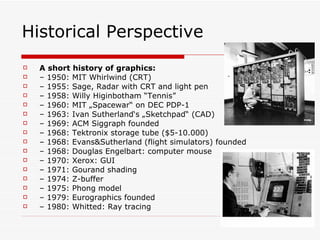
Historical Perspective A short history of graphics: –  1950: MIT Whirlwind (CRT) –  1955: Sage, Radar with CRT and light pen –  1958: Willy Higinbotham “Tennis” –  1960: MIT „Spacewar“ on DEC PDP-1 –  1963: Ivan Sutherland‘s „Sketchpad“ (CAD) –  1969: ACM Siggraph founded –  1968: Tektronix storage tube ($5-10.000) –  1968: Evans&Sutherland (flight simulators) founded –  1968: Douglas Engelbart: computer mouse –  1970: Xerox: GUI –  1971: Gourand shading –  1974: Z-buffer –  1975: Phong model –  1979: Eurographics founded –  1980: Whitted: Ray tracing
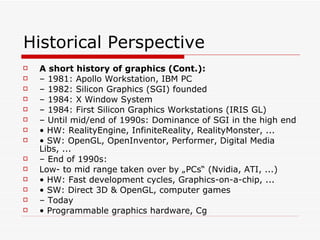
Historical Perspective A short history of graphics (Cont.): –  1981: Apollo Workstation, IBM PC –  1982: Silicon Graphics (SGI) founded –  1984: X Window System –  1984: First Silicon Graphics Workstations (IRIS GL) –  Until mid/end of 1990s: Dominance of SGI in the high end •  HW: RealityEngine, InfiniteReality, RealityMonster, ... •  SW: OpenGL, OpenInventor, Performer, Digital Media Libs, ... –  End of 1990s: Low- to mid range taken over by „PCs“ (Nvidia, ATI, ...) •  HW: Fast development cycles, Graphics-on-a-chip, ... •  SW: Direct 3D & OpenGL, computer games –  Today •  Programmable graphics hardware, Cg
Computer Graphics Industry Graphics hardware –  NVidia (USA) –  ATI (Canada) •  Software research –  Microsoft (USA, UK, China) •  Animation software –  Alias (Canada) –  Avid/SoftImage (USA/Canada) –  Autodesk (USA) •  Interactive entertainment –  Electronic Arts (USA) •  HEADQUARTERS:  Redwood City, California •  REVENUES:  $3.1 billion for fiscal 2005 •  EMPLOYEES:  6,100 worldwide –  Sony, Nintendo, Sega (Japan) –  Ubi Soft (France) •  F/X –  Industrial Light & Magic (USA) –  Digital Domain (USA) –  Pixar (USA)
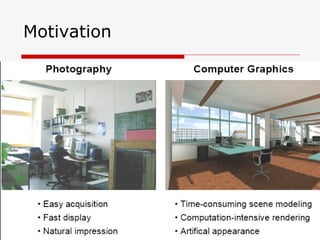
Motivation
Unit-I Introduction (CG) Introductions to computer graphics  Programming in the simple raster graphics package (SRGP)  Basic raster graphics algorithms for drawing 2D primitives  Graphics hardware
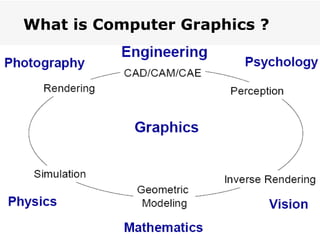
What is Computer Graphics ? Computer Graphics   involves display, manipulation and storage of pictures and experimental data for proper visualization using a computer. Typical graphics system comprises of a host  computer with support of fast processor, large memory, frame buffer and •  Display devices (color monitors), •  Input devices (mouse, keyboard, joystick, touch screen, trackball) •  Output devices (LCD panels, laser printers, color printers. Plotters etc.) •  Interfacing devices such as, video I/O, TV interface etc.
What is Computer Graphics ?
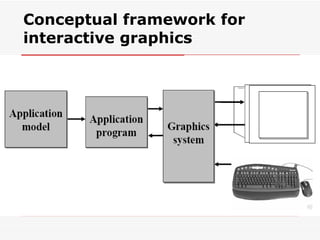
Conceptual framework for interactive graphics
Typical applications areas are •  GUI  •  Plotting in business •  Office automation  •  Desktop publishing •  Plotting in science and technology •  Web/business/commercial publishing and advertisements •  CAD/CAM design (VLSI, Construction, Circuits) •  Scientific Visualization
Typical applications areas are… •  Entertainment (movie, TV Advt., Games etc.) •  Simulation studies  •  Simulators •  Cartography  •  Multimedia •  Virtual reality •  Process Monitoring •  Digital Image Processing •  Education and Training
GUI – Graphical User Interface Typical Components Used: •  Menus •  Icons •  Cursors •  Dialog Boxes •  Scroll Bars •  Buttons •  Valuators •  Grids •  Sketching •  3-D Interface
Typical Components Used: GKS – Graphics Kernel System by ISO (International Standards  Organization) & ANSI (American National Standards Institute) SRGP – Simple Raster Graphics Package PHIGS – Programmers Hierarchical Interactive Graphics System
Various application packages and standards are available: •  Core graphics •  GKS •  SRGP •  PHIGS, SPHIGS and PEX 3D •  OpenGL (with ActiveX and Direct3D) •  X11-based systems.
On various platforms, such as DOS, Windows, Linux, OS/2, SGI, SunOS, Solaris, HP-UX, Mac, DEC-OSF.
Various utilities Various utilities and tools available for web-based design include:  Java, XML, VRML and GIF animators. Certain compilers, such as,  Visual C/C++, Visual Basic, Borland C/C++, Borland Pascal, Turbo C, Turbo Pascal, Gnu C/C++, Java  provide their own graphical libraries, API, support and help for programming 2- D/3-D graphics. Some these systems are •  device-independent  (X11, OpenGL ) •  device-dependent  (Solaris, HP-AGP ).
Four basic output primitives (or elements) for drawing pictures: •  POLYLINE •  Filled POLYGONS (regions) •  ELLIPSE (ARC) •  TEXT •  Raster IMAGE Four major areas of Computer Graphics are: •  Display of information, •  Design/Modeling, •  Simulation and •  User Interface.
Computer Graphics Computer Graphics systems could be  active  or passive . In both cases, the input to the system is the scene description and output is a static or animated scene to be displayed. In case of  active  systems, the user controls the display with the help of a GUI, using an input device. Computer Graphics is now-a-days, a significant component of almost all systems and applications of computers in every field of life.
Various fundamental  concepts and principles  in Computer Graphics are Display Systems Storage displays, Random scan, Raster refresh displays, CRT basics, video basics, Flat panel displays. Transformations Affine ( 2-D and 3-D ) : Rotation, Translation, Scale, Reflection and Shear. Viewing : The Camera Transformations - perspective, orthographic, isometric and stereographic views, Quaternion.
Fundamental  concepts…. Scan Conversion and Clipping Drawing of Points, Lines, Markers, Curves, Circles, Ellipse, Polyline, Polygon. Area filling,  fill-style, fill pattern, clipping algorithms, anti-aliasing etc. Hidden Surface Removal Back face culling, Painter's algorithm, scan-line algorithm, BSP-trees, Z-buffer/sorting, Ray tracing etc. Shading & Illumination Phong's shading model, texture mapping, bump mapping, Gouraud shading, Shadows and background, Color models etc.
Fundamental  concepts….. Solid Modeling Wire-frame, Octrees, Sweep, Boundary representations. Regularized Boolean set operations, Constructive Solid Geometry. Curves and Surfaces Bezier (Bernstein Polynomials) Curves, BSplines, Cubic-Splines, Quadratic surfaces, parametric and non-parametric forms, Hermite Curves etc.
Fundamental  concepts….. Miscellaneous Animation, Fractals, Projection and Viewing, Geometry, Modeling, Image File formats, Image Morphing, Interaction (sample and event-driven) etc. Advanced Raster Graphics Architecture Display Processors, Pipeline and parallel architectures, multi-processor systems, hybrid architectures.
References 1. Computer Graphics; Principles and practice; 2nd edn. in C;J. Foley, A. Van Dam, Feiner and Hughes; Addison Wesley, 1997. 2. Mathematical elements for Computer Graphics; 2nd edn.; D.F. Rogers and J. A. Adams; McGraw-Hill International. Edn.,1990. 3. Computer Graphics - C version; D. Hearn and M. P. Baker;Pearson Education, 2004. 4. Computer Graphics using OpenGL; 2nd edn.; F. S. Hill Jr.;Pearson Education, 2003. 5. Procedural Elements for Computer Graphics; 2nd Edn., D. F.Rogers, Tata McGraw-Hill, 2002.

unit-1-intro

  • 1.
    CSE 402: Introduction to Computer Graphics Prof.G.SasiKumar, SCSE
  • 2.
    Instructor G. SasiKumar , [email_address] Textbook 1 . Computer Graphics and Multimedia: Applications, Problems and Solutions by John DiMarco. 2. Handbook of Internet and Multimedia Systems and Applications edited by Borivoje Furht. Requirements Homework x2 20% (do not copy) CAT 15% Quiz & Oral presentation 15% Final exam 50% Provisional web page : Intranet.vit.ac.in – Lecture slides (PDF), assignments, other information
  • 3.
    People • Faculty - CG – Prof. SasiKumar G Room : SMV 235 / Office:SJT-310-A08 E-mail: [email_address] Mobile: 8870919338
  • 4.
    Literature Peter Shirleyet al., "Fundamentals of Computer Graphics", AK Peters, 2005. James Foley, Andries Van Dam, et al., "Computer Graphics:Principles and Practice", 2. Edition, Addison-Wesley, 1995. Peter Shirley et al., "Fundamentals of Computer Graphics", AK Peters, 2005. James Foley, Andries Van Dam, et al., "Computer Graphics: Principles and Practice", 2. Edition, Addison-Wesley, 1995,
  • 5.
    Historical Perspective Ashort history of graphics: – 1950: MIT Whirlwind (CRT) – 1955: Sage, Radar with CRT and light pen – 1958: Willy Higinbotham “Tennis” – 1960: MIT „Spacewar“ on DEC PDP-1 – 1963: Ivan Sutherland‘s „Sketchpad“ (CAD) – 1969: ACM Siggraph founded – 1968: Tektronix storage tube ($5-10.000) – 1968: Evans&Sutherland (flight simulators) founded – 1968: Douglas Engelbart: computer mouse – 1970: Xerox: GUI – 1971: Gourand shading – 1974: Z-buffer – 1975: Phong model – 1979: Eurographics founded – 1980: Whitted: Ray tracing
  • 6.
    Historical Perspective Ashort history of graphics (Cont.): – 1981: Apollo Workstation, IBM PC – 1982: Silicon Graphics (SGI) founded – 1984: X Window System – 1984: First Silicon Graphics Workstations (IRIS GL) – Until mid/end of 1990s: Dominance of SGI in the high end • HW: RealityEngine, InfiniteReality, RealityMonster, ... • SW: OpenGL, OpenInventor, Performer, Digital Media Libs, ... – End of 1990s: Low- to mid range taken over by „PCs“ (Nvidia, ATI, ...) • HW: Fast development cycles, Graphics-on-a-chip, ... • SW: Direct 3D & OpenGL, computer games – Today • Programmable graphics hardware, Cg
  • 7.
    Computer Graphics IndustryGraphics hardware – NVidia (USA) – ATI (Canada) • Software research – Microsoft (USA, UK, China) • Animation software – Alias (Canada) – Avid/SoftImage (USA/Canada) – Autodesk (USA) • Interactive entertainment – Electronic Arts (USA) • HEADQUARTERS: Redwood City, California • REVENUES: $3.1 billion for fiscal 2005 • EMPLOYEES: 6,100 worldwide – Sony, Nintendo, Sega (Japan) – Ubi Soft (France) • F/X – Industrial Light & Magic (USA) – Digital Domain (USA) – Pixar (USA)
  • 8.
  • 9.
    Unit-I Introduction (CG)Introductions to computer graphics Programming in the simple raster graphics package (SRGP) Basic raster graphics algorithms for drawing 2D primitives Graphics hardware
  • 10.
    What is ComputerGraphics ? Computer Graphics involves display, manipulation and storage of pictures and experimental data for proper visualization using a computer. Typical graphics system comprises of a host computer with support of fast processor, large memory, frame buffer and • Display devices (color monitors), • Input devices (mouse, keyboard, joystick, touch screen, trackball) • Output devices (LCD panels, laser printers, color printers. Plotters etc.) • Interfacing devices such as, video I/O, TV interface etc.
  • 11.
    What is ComputerGraphics ?
  • 12.
    Conceptual framework forinteractive graphics
  • 13.
    Typical applications areasare • GUI • Plotting in business • Office automation • Desktop publishing • Plotting in science and technology • Web/business/commercial publishing and advertisements • CAD/CAM design (VLSI, Construction, Circuits) • Scientific Visualization
  • 14.
    Typical applications areasare… • Entertainment (movie, TV Advt., Games etc.) • Simulation studies • Simulators • Cartography • Multimedia • Virtual reality • Process Monitoring • Digital Image Processing • Education and Training
  • 15.
    GUI – GraphicalUser Interface Typical Components Used: • Menus • Icons • Cursors • Dialog Boxes • Scroll Bars • Buttons • Valuators • Grids • Sketching • 3-D Interface
  • 16.
    Typical Components Used:GKS – Graphics Kernel System by ISO (International Standards Organization) & ANSI (American National Standards Institute) SRGP – Simple Raster Graphics Package PHIGS – Programmers Hierarchical Interactive Graphics System
  • 17.
    Various application packagesand standards are available: • Core graphics • GKS • SRGP • PHIGS, SPHIGS and PEX 3D • OpenGL (with ActiveX and Direct3D) • X11-based systems.
  • 18.
    On various platforms,such as DOS, Windows, Linux, OS/2, SGI, SunOS, Solaris, HP-UX, Mac, DEC-OSF.
  • 19.
    Various utilities Variousutilities and tools available for web-based design include: Java, XML, VRML and GIF animators. Certain compilers, such as, Visual C/C++, Visual Basic, Borland C/C++, Borland Pascal, Turbo C, Turbo Pascal, Gnu C/C++, Java provide their own graphical libraries, API, support and help for programming 2- D/3-D graphics. Some these systems are • device-independent (X11, OpenGL ) • device-dependent (Solaris, HP-AGP ).
  • 20.
    Four basic outputprimitives (or elements) for drawing pictures: • POLYLINE • Filled POLYGONS (regions) • ELLIPSE (ARC) • TEXT • Raster IMAGE Four major areas of Computer Graphics are: • Display of information, • Design/Modeling, • Simulation and • User Interface.
  • 21.
    Computer Graphics ComputerGraphics systems could be active or passive . In both cases, the input to the system is the scene description and output is a static or animated scene to be displayed. In case of active systems, the user controls the display with the help of a GUI, using an input device. Computer Graphics is now-a-days, a significant component of almost all systems and applications of computers in every field of life.
  • 22.
    Various fundamental concepts and principles in Computer Graphics are Display Systems Storage displays, Random scan, Raster refresh displays, CRT basics, video basics, Flat panel displays. Transformations Affine ( 2-D and 3-D ) : Rotation, Translation, Scale, Reflection and Shear. Viewing : The Camera Transformations - perspective, orthographic, isometric and stereographic views, Quaternion.
  • 23.
    Fundamental concepts….Scan Conversion and Clipping Drawing of Points, Lines, Markers, Curves, Circles, Ellipse, Polyline, Polygon. Area filling, fill-style, fill pattern, clipping algorithms, anti-aliasing etc. Hidden Surface Removal Back face culling, Painter's algorithm, scan-line algorithm, BSP-trees, Z-buffer/sorting, Ray tracing etc. Shading & Illumination Phong's shading model, texture mapping, bump mapping, Gouraud shading, Shadows and background, Color models etc.
  • 24.
    Fundamental concepts…..Solid Modeling Wire-frame, Octrees, Sweep, Boundary representations. Regularized Boolean set operations, Constructive Solid Geometry. Curves and Surfaces Bezier (Bernstein Polynomials) Curves, BSplines, Cubic-Splines, Quadratic surfaces, parametric and non-parametric forms, Hermite Curves etc.
  • 25.
    Fundamental concepts…..Miscellaneous Animation, Fractals, Projection and Viewing, Geometry, Modeling, Image File formats, Image Morphing, Interaction (sample and event-driven) etc. Advanced Raster Graphics Architecture Display Processors, Pipeline and parallel architectures, multi-processor systems, hybrid architectures.
  • 26.
    References 1. ComputerGraphics; Principles and practice; 2nd edn. in C;J. Foley, A. Van Dam, Feiner and Hughes; Addison Wesley, 1997. 2. Mathematical elements for Computer Graphics; 2nd edn.; D.F. Rogers and J. A. Adams; McGraw-Hill International. Edn.,1990. 3. Computer Graphics - C version; D. Hearn and M. P. Baker;Pearson Education, 2004. 4. Computer Graphics using OpenGL; 2nd edn.; F. S. Hill Jr.;Pearson Education, 2003. 5. Procedural Elements for Computer Graphics; 2nd Edn., D. F.Rogers, Tata McGraw-Hill, 2002.