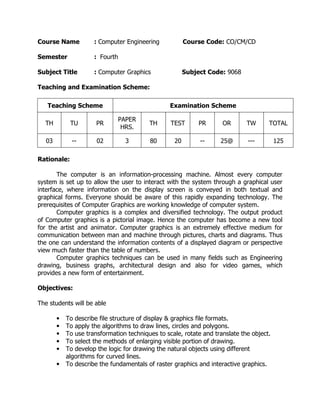
Course Name

: Computer Engineering

Semester

: Fourth

Subject Title

Course Code: CO/CM/CD

: Computer Graphics

Subject Code: 9068

Teaching and Examination Scheme:
Teaching Scheme

Examination Scheme

TH

TU

PR

PAPER
HRS.

TH

TEST

PR

OR

TW

TOTAL

03

--

02

3

80

20

--

25@

---

125

Rationale:
The computer is an information-processing machine. Almost every computer
system is set up to allow the user to interact with the system through a graphical user
interface, where information on the display screen is conveyed in both textual and
graphical forms. Everyone should be aware of this rapidly expanding technology. The
prerequisites of Computer Graphics are working knowledge of computer system.
Computer graphics is a complex and diversified technology. The output product
of Computer graphics is a pictorial image. Hence the computer has become a new tool
for the artist and animator. Computer graphics is an extremely effective medium for
communication between man and machine through pictures, charts and diagrams. Thus
the one can understand the information contents of a displayed diagram or perspective
view much faster than the table of numbers.
Computer graphics techniques can be used in many fields such as Engineering
drawing, business graphs, architectural design and also for video games, which
provides a new form of entertainment.
Objectives:
The students will be able
•
•
•
•
•
•

To describe file structure of display & graphics file formats.
To apply the algorithms to draw lines, circles and polygons.
To use transformation techniques to scale, rotate and translate the object.
To select the methods of enlarging visible portion of drawing.
To develop the logic for drawing the natural objects using different
algorithms for curved lines.
To describe the fundamentals of raster graphics and interactive graphics.
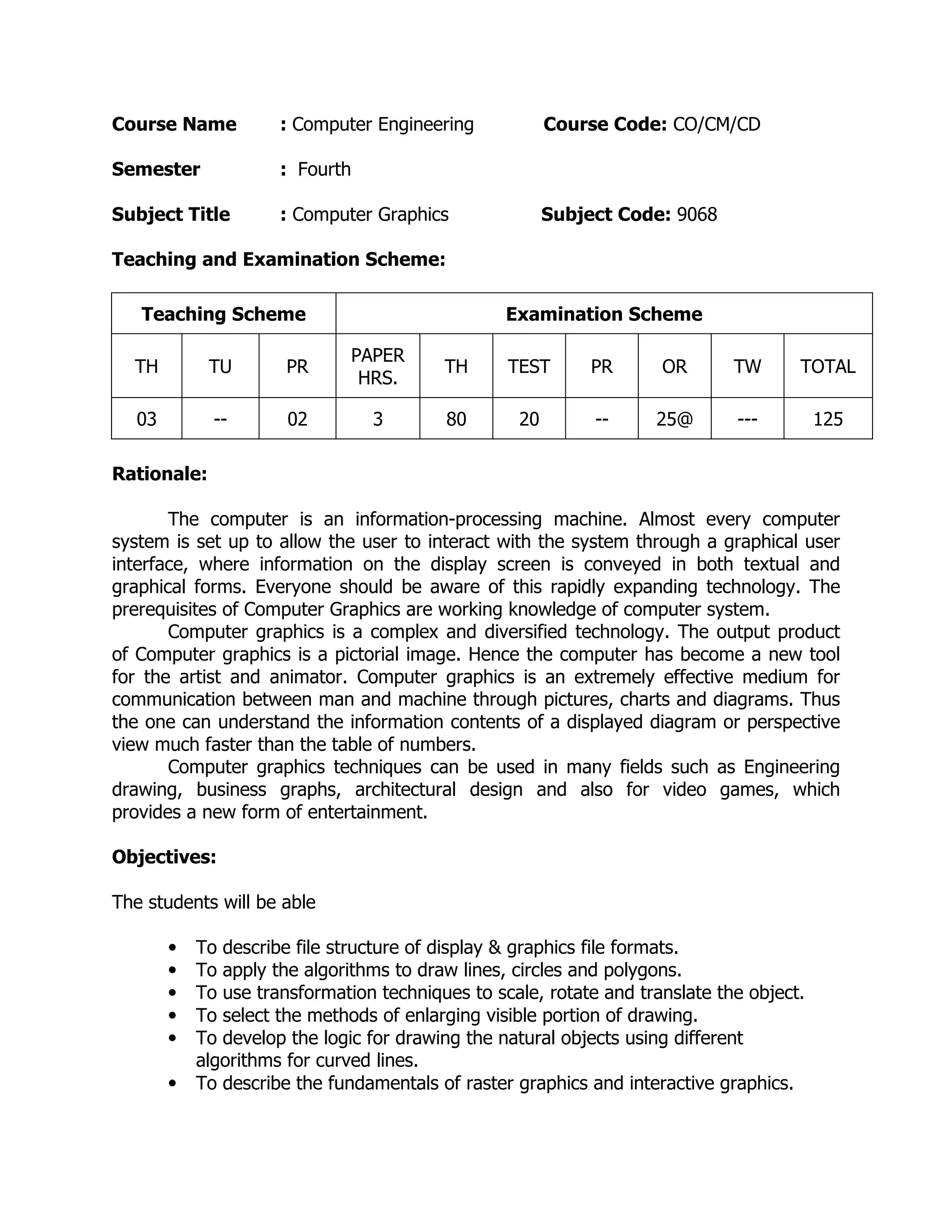
Learning Structure:

Application

New tool for the Artist & Animator using graphics Hardware &
software

Coding and debugging

Execution of program

Procedure

Principles

Concepts

Facts

Principles of Computer Graphics to convey the information in the
graphics form on the display screen

Concepts of
windowing &
clipping

Concepts of
drawing natural
objects

Concepts of Line, circle &
polygon generation

Graphical functions of C++

Concepts of
implementing
Transfer Techniques
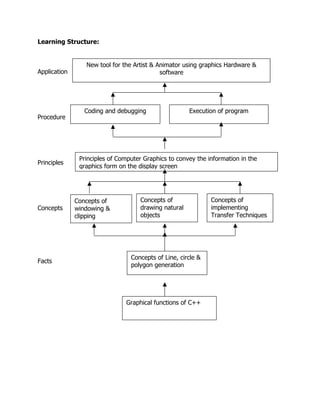
Contents: Theory
Name of the Topic
Hours Marks
Chapter
Basics of Computer Graphics
08
12
01
Display devices, Primitive operations, The Display-file
interpreter, Display file structure, and Graphics file
formats.
Text mode graphics function, Graphic mode graphics
functions Shapes, colors, Co-ordinate systems, Applications
of computer graphics
Line, circle, and polygon.
10
16
02
Basic concepts in line drawing, Line drawing algorithms:
DDAalgorithms, Bresenham’s algorithm Circle generating
algorithms: DDA circle drawing algorithm, Bresenham’s
circle drawing algorithm, midpoint circle algorithm
Polygons – Types of polygons, Polygon representation,
Entering polygons, inside –outside test, polygon filling:
Flood fill, scan-line algorithm
Transformations
06
10
03
2D transformation: scaling, Reflection, shearing, Rotation,
Translation, Rotation about an arbitrary point.
3D Transformation: scaling, rotation, translation, rotation
about arbitrary axis.
Windowing & clipping
08
12
04
Viewing transformation, Normalization transformation
Line clipping: Cohen-Sutherland, Line clipping algorithm,
midpoint subdivision algorithm Polygon clipping: Sutherland
– Hodgeman Polygon clipping algorithm.
Curves and fractals
08
14
05
Curve generation: arc generation using DDA algorithm.
Interpolation, B-Spline, Bezier curves.
Fractals: Hilbert’s Curve, Koch curve, Fractal lines, Fractal
Surfaces.
Raster graphics and interactive graphics
08
16
06
Raster scan display, Random scan display Need for graphics
standards, Graphics standards, Advantages of Graphics
standards, Hazards of Graphics standards.
Graphical user interface
Open GL: What is Open GL, How
OpenGL works, Open
GL and animation.
48
80
Total
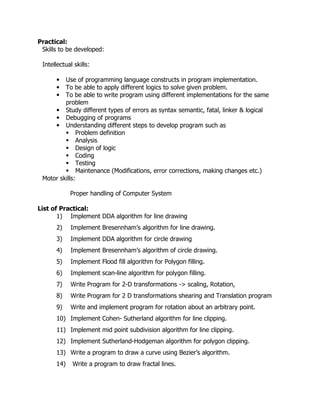
Practical:
Skills to be developed:
Intellectual skills:
Use of programming language constructs in program implementation.
To be able to apply different logics to solve given problem.
To be able to write program using different implementations for the same
problem
• Study different types of errors as syntax semantic, fatal, linker & logical
• Debugging of programs
• Understanding different steps to develop program such as
Problem definition
Analysis
Design of logic
Coding
Testing
Maintenance (Modifications, error corrections, making changes etc.)
Motor skills:
•
•
•

Proper handling of Computer System
List of Practical:
1) Implement DDA algorithm for line drawing
2)

Implement Bresennham’s algorithm for line drawing.

3)

Implement DDA algorithm for circle drawing

4)

Implement Bresennham’s algorithm of circle drawing.

5)

Implement Flood fill algorithm for Polygon filling.

6)

Implement scan-line algorithm for polygon filling.

7)

Write Program for 2-D transformations -> scaling, Rotation,

8)

Write Program for 2 D transformations shearing and Translation program

9)

Write and implement program for rotation about an arbitrary point.

10) Implement Cohen- Sutherland algorithm for line clipping.
11) Implement mid point subdivision algorithm for line clipping.
12) Implement Sutherland-Hodgeman algorithm for polygon clipping.
13) Write a program to draw a curve using Bezier’s algorithm.
14)

Write a program to draw fractal lines.
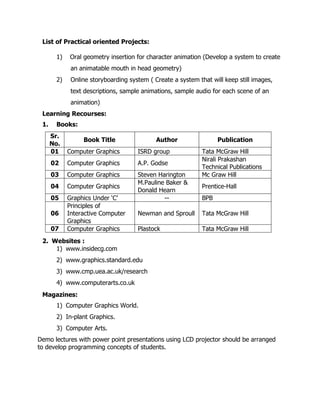
List of Practical oriented Projects:
1)

Oral geometry insertion for character animation (Develop a system to create
an animatable mouth in head geometry)

2)

Online storyboarding system ( Create a system that will keep still images,
text descriptions, sample animations, sample audio for each scene of an
animation)

Learning Recourses:
1.

Books:
Sr.
No.
01

Computer Graphics

ISRD group

02

Computer Graphics

A.P. Godse

03

Computer Graphics

04

Computer Graphics

05

Graphics Under ‘C’
Principles of
Interactive Computer
Graphics
Computer Graphics

Steven Harington
M.Pauline Baker &
Donald Hearn
--

06
07

Book Title

Author

Publication
Tata McGraw Hill
Nirali Prakashan
Technical Publications
Mc Graw Hill
Prentice-Hall
BPB

Newman and Sproull

Tata McGraw Hill

Plastock

Tata McGraw Hill

2. Websites :
1) www.insidecg.com
2) www.graphics.standard.edu
3) www.cmp.uea.ac.uk/research
4) www.computerarts.co.uk
Magazines:
1) Computer Graphics World.
2) In-plant Graphics.
3) Computer Arts.
Demo lectures with power point presentations using LCD projector should be arranged
to develop programming concepts of students.

Computer graphics 9068

  • 1.
    Course Name : ComputerEngineering Semester : Fourth Subject Title Course Code: CO/CM/CD : Computer Graphics Subject Code: 9068 Teaching and Examination Scheme: Teaching Scheme Examination Scheme TH TU PR PAPER HRS. TH TEST PR OR TW TOTAL 03 -- 02 3 80 20 -- 25@ --- 125 Rationale: The computer is an information-processing machine. Almost every computer system is set up to allow the user to interact with the system through a graphical user interface, where information on the display screen is conveyed in both textual and graphical forms. Everyone should be aware of this rapidly expanding technology. The prerequisites of Computer Graphics are working knowledge of computer system. Computer graphics is a complex and diversified technology. The output product of Computer graphics is a pictorial image. Hence the computer has become a new tool for the artist and animator. Computer graphics is an extremely effective medium for communication between man and machine through pictures, charts and diagrams. Thus the one can understand the information contents of a displayed diagram or perspective view much faster than the table of numbers. Computer graphics techniques can be used in many fields such as Engineering drawing, business graphs, architectural design and also for video games, which provides a new form of entertainment. Objectives: The students will be able • • • • • • To describe file structure of display & graphics file formats. To apply the algorithms to draw lines, circles and polygons. To use transformation techniques to scale, rotate and translate the object. To select the methods of enlarging visible portion of drawing. To develop the logic for drawing the natural objects using different algorithms for curved lines. To describe the fundamentals of raster graphics and interactive graphics.
  • 2.
    Learning Structure: Application New toolfor the Artist & Animator using graphics Hardware & software Coding and debugging Execution of program Procedure Principles Concepts Facts Principles of Computer Graphics to convey the information in the graphics form on the display screen Concepts of windowing & clipping Concepts of drawing natural objects Concepts of Line, circle & polygon generation Graphical functions of C++ Concepts of implementing Transfer Techniques
  • 3.
    Contents: Theory Name ofthe Topic Hours Marks Chapter Basics of Computer Graphics 08 12 01 Display devices, Primitive operations, The Display-file interpreter, Display file structure, and Graphics file formats. Text mode graphics function, Graphic mode graphics functions Shapes, colors, Co-ordinate systems, Applications of computer graphics Line, circle, and polygon. 10 16 02 Basic concepts in line drawing, Line drawing algorithms: DDAalgorithms, Bresenham’s algorithm Circle generating algorithms: DDA circle drawing algorithm, Bresenham’s circle drawing algorithm, midpoint circle algorithm Polygons – Types of polygons, Polygon representation, Entering polygons, inside –outside test, polygon filling: Flood fill, scan-line algorithm Transformations 06 10 03 2D transformation: scaling, Reflection, shearing, Rotation, Translation, Rotation about an arbitrary point. 3D Transformation: scaling, rotation, translation, rotation about arbitrary axis. Windowing & clipping 08 12 04 Viewing transformation, Normalization transformation Line clipping: Cohen-Sutherland, Line clipping algorithm, midpoint subdivision algorithm Polygon clipping: Sutherland – Hodgeman Polygon clipping algorithm. Curves and fractals 08 14 05 Curve generation: arc generation using DDA algorithm. Interpolation, B-Spline, Bezier curves. Fractals: Hilbert’s Curve, Koch curve, Fractal lines, Fractal Surfaces. Raster graphics and interactive graphics 08 16 06 Raster scan display, Random scan display Need for graphics standards, Graphics standards, Advantages of Graphics standards, Hazards of Graphics standards. Graphical user interface Open GL: What is Open GL, How OpenGL works, Open GL and animation. 48 80 Total
  • 4.
    Practical: Skills to bedeveloped: Intellectual skills: Use of programming language constructs in program implementation. To be able to apply different logics to solve given problem. To be able to write program using different implementations for the same problem • Study different types of errors as syntax semantic, fatal, linker & logical • Debugging of programs • Understanding different steps to develop program such as Problem definition Analysis Design of logic Coding Testing Maintenance (Modifications, error corrections, making changes etc.) Motor skills: • • • Proper handling of Computer System List of Practical: 1) Implement DDA algorithm for line drawing 2) Implement Bresennham’s algorithm for line drawing. 3) Implement DDA algorithm for circle drawing 4) Implement Bresennham’s algorithm of circle drawing. 5) Implement Flood fill algorithm for Polygon filling. 6) Implement scan-line algorithm for polygon filling. 7) Write Program for 2-D transformations -> scaling, Rotation, 8) Write Program for 2 D transformations shearing and Translation program 9) Write and implement program for rotation about an arbitrary point. 10) Implement Cohen- Sutherland algorithm for line clipping. 11) Implement mid point subdivision algorithm for line clipping. 12) Implement Sutherland-Hodgeman algorithm for polygon clipping. 13) Write a program to draw a curve using Bezier’s algorithm. 14) Write a program to draw fractal lines.
  • 5.
    List of Practicaloriented Projects: 1) Oral geometry insertion for character animation (Develop a system to create an animatable mouth in head geometry) 2) Online storyboarding system ( Create a system that will keep still images, text descriptions, sample animations, sample audio for each scene of an animation) Learning Recourses: 1. Books: Sr. No. 01 Computer Graphics ISRD group 02 Computer Graphics A.P. Godse 03 Computer Graphics 04 Computer Graphics 05 Graphics Under ‘C’ Principles of Interactive Computer Graphics Computer Graphics Steven Harington M.Pauline Baker & Donald Hearn -- 06 07 Book Title Author Publication Tata McGraw Hill Nirali Prakashan Technical Publications Mc Graw Hill Prentice-Hall BPB Newman and Sproull Tata McGraw Hill Plastock Tata McGraw Hill 2. Websites : 1) www.insidecg.com 2) www.graphics.standard.edu 3) www.cmp.uea.ac.uk/research 4) www.computerarts.co.uk Magazines: 1) Computer Graphics World. 2) In-plant Graphics. 3) Computer Arts. Demo lectures with power point presentations using LCD projector should be arranged to develop programming concepts of students.