Presentation
On
Computer Graphics
 Introduction
 History
 What is Computer Graphics
 Types
 Application
 Users
 Advantages
 Conclusion
 Computer graphics can be used in many disciplines.
 Charting, Presentations, Drawing, Painting and Design, Image
Processing and Scientific Visualization are some among them
 The phrase “Computer Graphics” was coined in 1960 by
William Fetter, a graphic designer for Boeing.
 The field of computer graphics developed with the emergence
of computer graphics hardware.
 Creation, Manipulation, and Storage of geometric objects
(modelling) and their images (rendering)
 Display those images on screens or hardcopy devices
 Image processing
 Others: GUI, Haptics,
Displays (VR)...
 Non Interactive Computer Graphics
 Interactive Computer Graphics
 It’s known as passive computer graphics, the observer has no
control over the image.
 Familiar examples of this type of computer graphics include
the titles shown on TV and other forms of computer art.
 Interactive Computer Graphics involves a two way
communication between computer and user.
 This helps him to signal his request to the computer.
 The computer on receiving signals from the input device can
modify the displayed picture appropriately.
 Paint programs
 Illustration/design programs
 Animation software
 CAD software
 Desktop publishing
 The images are stored as bit maps and can easily be edited.
 It is a graphics program that enables you to draw pictures on
the display screen which is represented as bit maps (bit-
mapped graphics).
 In contrast, draw programs use vector graphics (object-
oriented images), which scale better.
 Supports more advanced features than paint programs,
particularly for drawing curved lines.
 The images are usually stored in vector-based formats.
Illustration/design programs are often called draw programs.
 It can be defined as a simulation of movement created by
displaying a series of pictures, or frames.
 A cartoon on television is one example of animation.
 Provides a full set of word-processing features as well as fine
control over placement of text and graphics, so that you can
create newsletters, advertisements, books, and other types of
documents.
 It means by using a personal computer or workstation high-
quality printed documents can be produced.
 It is the acronym for computer-aided design.
 A CAD system is a combination of hardware and software
that enables engineers and architects to design everything from
furniture to airplanes.
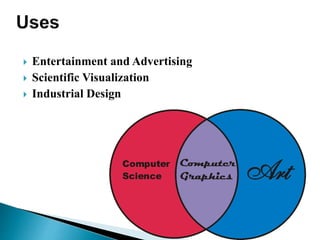
 Entertainment and Advertising
 Scientific Visualization
 Industrial Design
 It’s have ability to show moving pictures and thus it is possible
to produce animations with computer graphics.
 The computer graphics also provides facility called update
dynamics.
 When it is not properly built, it can be very difficult to work
with.
 It generally requires more memory resources than a non-
graphical one.
 It might require the installation of additional software, e.g., the
"runtime environment" in the case of java.
 However as computer graphics went out of fashion when
audiences became used to them, we see graphic designers
using computers as they should be intended as another tool to
get the required creative effect.
Computer graphics ppt

Computer graphics ppt

  • 1.
  • 2.
     Introduction  History What is Computer Graphics  Types  Application  Users  Advantages  Conclusion
  • 3.
     Computer graphicscan be used in many disciplines.  Charting, Presentations, Drawing, Painting and Design, Image Processing and Scientific Visualization are some among them
  • 4.
     The phrase“Computer Graphics” was coined in 1960 by William Fetter, a graphic designer for Boeing.  The field of computer graphics developed with the emergence of computer graphics hardware.
  • 5.
     Creation, Manipulation,and Storage of geometric objects (modelling) and their images (rendering)  Display those images on screens or hardcopy devices  Image processing  Others: GUI, Haptics, Displays (VR)...
  • 6.
     Non InteractiveComputer Graphics  Interactive Computer Graphics
  • 7.
     It’s knownas passive computer graphics, the observer has no control over the image.  Familiar examples of this type of computer graphics include the titles shown on TV and other forms of computer art.
  • 8.
     Interactive ComputerGraphics involves a two way communication between computer and user.  This helps him to signal his request to the computer.  The computer on receiving signals from the input device can modify the displayed picture appropriately.
  • 9.
     Paint programs Illustration/design programs  Animation software  CAD software  Desktop publishing
  • 10.
     The imagesare stored as bit maps and can easily be edited.  It is a graphics program that enables you to draw pictures on the display screen which is represented as bit maps (bit- mapped graphics).  In contrast, draw programs use vector graphics (object- oriented images), which scale better.
  • 11.
     Supports moreadvanced features than paint programs, particularly for drawing curved lines.  The images are usually stored in vector-based formats. Illustration/design programs are often called draw programs.
  • 12.
     It canbe defined as a simulation of movement created by displaying a series of pictures, or frames.  A cartoon on television is one example of animation.
  • 13.
     Provides afull set of word-processing features as well as fine control over placement of text and graphics, so that you can create newsletters, advertisements, books, and other types of documents.  It means by using a personal computer or workstation high- quality printed documents can be produced.
  • 14.
     It isthe acronym for computer-aided design.  A CAD system is a combination of hardware and software that enables engineers and architects to design everything from furniture to airplanes.
  • 15.
     Entertainment andAdvertising  Scientific Visualization  Industrial Design
  • 16.
     It’s haveability to show moving pictures and thus it is possible to produce animations with computer graphics.  The computer graphics also provides facility called update dynamics.
  • 17.
     When itis not properly built, it can be very difficult to work with.  It generally requires more memory resources than a non- graphical one.  It might require the installation of additional software, e.g., the "runtime environment" in the case of java.
  • 18.
     However ascomputer graphics went out of fashion when audiences became used to them, we see graphic designers using computers as they should be intended as another tool to get the required creative effect.

Editor's Notes