2D Viewing
Arambam Neelima
Dept of CSE, NIT Nagaland
Clipping
• The technique for not showing the part of the
picture in which one is not interested is called
as clipping.
• A graphics package allows a user to specify
which part of a defined picture is to be
displayed and where that part is to be placed
on the display device
• A view for a 2D picture is selected by specifying a
region of the xy plane that contains the total
picture or any part of it
• select parts of Picture areas are then mapped
onto specified areas of the device coordinates
• 2D viewing transformations from world to device
coordinates involve translation, rotation, and
scaling operations, as well as procedures for
deleting those parts of the picture that are
outside the limits of a selected scene area
Co-ordinate system
• World Co-ordinate System: Right handed
cartesian co-ordinate system in which we
describe the co-ordinates of the picture to be
displayed.
• Device Co-ordinate System: Co-ordinate
system corresponding to the device in which
we want to display.
Viewing transformation system
• The process of mapping a part of the world
co-ordinate scene to device co-ordinate
system is known as viewing transformation.
• A world co-ordinate area selected for display
is called as a window and an area on display
device to which a window is mapped is called
as a view point.
• Window defines ‘What’ to be viewed and the
viewport defines ‘Where’ it is to be displayed
Window
Object in World Co-
ordinate system
Object in Device co-
ordinate system
• Case I: If we change the position of the window
keeping the viewport location constant then the
different part of the object is displayed at the
same position on the display device
• Case II: If we change the location of the viewport
but keep the window constant then the same
part of the object is drawn at different place.
• Changing the size of viewports, we can change
the size and proportions of displayed objects;
zoom in and zoom out effects
Normalization
Normalization: Specify coordinate values between 0 and1
• normalization and window to viewport
transformations can be combined into one operation.
• In this case, the viewport coordinates in the range from
0 to 1 so that the viewport is positioned within a unit
square
• Unit square containing the viewport is mapped to the
outputdisplay device
• normalization and clipping routines are applied before
the viewport transformation
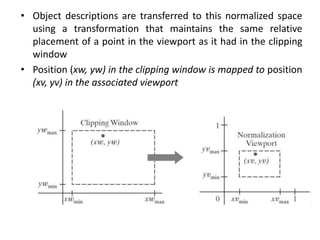
• Object descriptions are transferred to this normalized space
using a transformation that maintains the same relative
placement of a point in the viewport as it had in the clipping
window
• Position (xw, yw) in the clipping window is mapped to position
(xv, yv) in the associated viewport
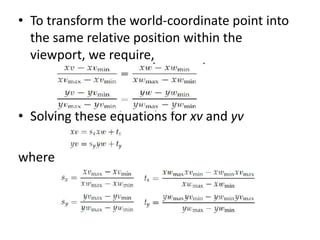
• To transform the world-coordinate point into
the same relative position within the
viewport, we require,
• Solving these equations for xv and yv
where
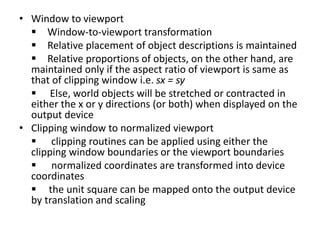
• Window to viewport
 Window-to-viewport transformation
 Relative placement of object descriptions is maintained
 Relative proportions of objects, on the other hand, are
maintained only if the aspect ratio of viewport is same as
that of clipping window i.e. sx = sy
 Else, world objects will be stretched or contracted in
either the x or y directions (or both) when displayed on the
output device
• Clipping window to normalized viewport
 clipping routines can be applied using either the
clipping window boundaries or the viewport boundaries
 normalized coordinates are transformed into device
coordinates
 the unit square can be mapped onto the output device
by translation and scaling
Point Clipping
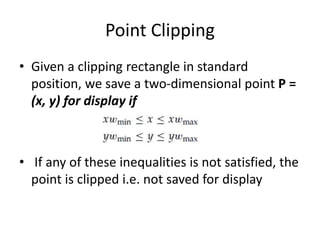
• Given a clipping rectangle in standard
position, we save a two-dimensional point P =
(x, y) for display if
• If any of these inequalities is not satisfied, the
point is clipped i.e. not saved for display
Line Clipping
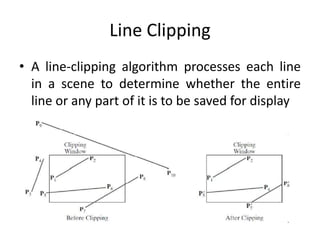
• A line-clipping algorithm processes each line
in a scene to determine whether the entire
line or any part of it is to be saved for display
• Line Clipping
• Need to compute intersection points of lines
with clipping window
• minimize intersection calculation for better
algorithm
• Test whether a line segment is completely inside
the clipping window or completely outside
• Completely inside – easy; both points are inside
– P1P2
• Completely outside – difficult; both points
outside?? – P3P4
• If not possible –Test whether any part of a line
crosses the window interior
COHEN SUTHERLAND LINE CLIPPING
One of the earliest algorithms for fast line clipping
• Processing time is reduced by performing more tests
before proceeding to the intersection calculations
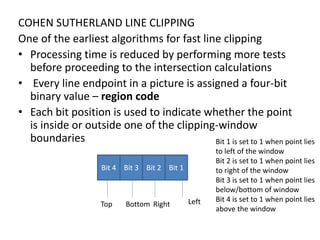
• Every line endpoint in a picture is assigned a four-bit
binary value – region code
• Each bit position is used to indicate whether the point
is inside or outside one of the clipping-window
boundaries
Bit 4 Bit 3 Bit 2 Bit 1
Bottom Right LeftTop
Bit 1 is set to 1 when point lies
to left of the window
Bit 2 is set to 1 when point lies
to right of the window
Bit 3 is set to 1 when point lies
below/bottom of window
Bit 4 is set to 1 when point lies
above the window
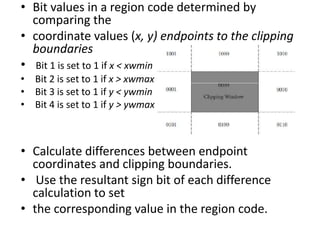
• Bit values in a region code determined by
comparing the
• coordinate values (x, y) endpoints to the clipping
boundaries
• Bit 1 is set to 1 if x < xwmin
• Bit 2 is set to 1 if x > xwmax
• Bit 3 is set to 1 if y < ywmin
• Bit 4 is set to 1 if y > ywmax
• Calculate differences between endpoint
coordinates and clipping boundaries.
• Use the resultant sign bit of each difference
calculation to set
• the corresponding value in the region code.
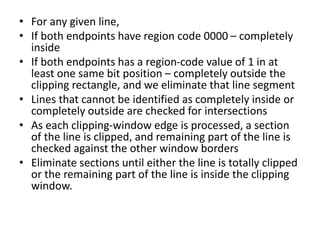
• For any given line,
• If both endpoints have region code 0000 – completely
inside
• If both endpoints has a region-code value of 1 in at
least one same bit position – completely outside the
clipping rectangle, and we eliminate that line segment
• Lines that cannot be identified as completely inside or
completely outside are checked for intersections
• As each clipping-window edge is processed, a section
of the line is clipped, and remaining part of the line is
checked against the other window borders
• Eliminate sections until either the line is totally clipped
or the remaining part of the line is inside the clipping
window.
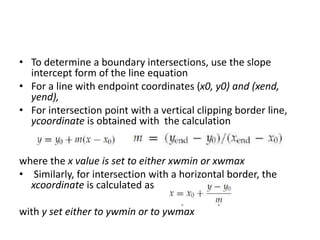
• To determine a boundary intersections, use the slope
intercept form of the line equation
• For a line with endpoint coordinates (x0, y0) and (xend,
yend),
• For intersection point with a vertical clipping border line,
ycoordinate is obtained with the calculation
where the x value is set to either xwmin or xwmax
• Similarly, for intersection with a horizontal border, the
xcoordinate is calculated as
with y set either to ywmin or to ywmax
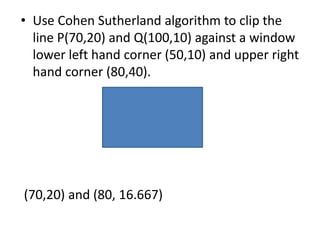
• Use Cohen Sutherland algorithm to clip the
line P(70,20) and Q(100,10) against a window
lower left hand corner (50,10) and upper right
hand corner (80,40).
(70,20) and (80, 16.667)

2 d viewing computer graphics

  • 1.
    2D Viewing Arambam Neelima Deptof CSE, NIT Nagaland
  • 3.
    Clipping • The techniquefor not showing the part of the picture in which one is not interested is called as clipping. • A graphics package allows a user to specify which part of a defined picture is to be displayed and where that part is to be placed on the display device
  • 4.
    • A viewfor a 2D picture is selected by specifying a region of the xy plane that contains the total picture or any part of it • select parts of Picture areas are then mapped onto specified areas of the device coordinates • 2D viewing transformations from world to device coordinates involve translation, rotation, and scaling operations, as well as procedures for deleting those parts of the picture that are outside the limits of a selected scene area
  • 5.
    Co-ordinate system • WorldCo-ordinate System: Right handed cartesian co-ordinate system in which we describe the co-ordinates of the picture to be displayed. • Device Co-ordinate System: Co-ordinate system corresponding to the device in which we want to display.
  • 6.
    Viewing transformation system •The process of mapping a part of the world co-ordinate scene to device co-ordinate system is known as viewing transformation. • A world co-ordinate area selected for display is called as a window and an area on display device to which a window is mapped is called as a view point. • Window defines ‘What’ to be viewed and the viewport defines ‘Where’ it is to be displayed
  • 7.
    Window Object in WorldCo- ordinate system Object in Device co- ordinate system
  • 8.
    • Case I:If we change the position of the window keeping the viewport location constant then the different part of the object is displayed at the same position on the display device • Case II: If we change the location of the viewport but keep the window constant then the same part of the object is drawn at different place. • Changing the size of viewports, we can change the size and proportions of displayed objects; zoom in and zoom out effects
  • 9.
    Normalization Normalization: Specify coordinatevalues between 0 and1 • normalization and window to viewport transformations can be combined into one operation. • In this case, the viewport coordinates in the range from 0 to 1 so that the viewport is positioned within a unit square • Unit square containing the viewport is mapped to the outputdisplay device • normalization and clipping routines are applied before the viewport transformation
  • 10.
    • Object descriptionsare transferred to this normalized space using a transformation that maintains the same relative placement of a point in the viewport as it had in the clipping window • Position (xw, yw) in the clipping window is mapped to position (xv, yv) in the associated viewport
  • 11.
    • To transformthe world-coordinate point into the same relative position within the viewport, we require, • Solving these equations for xv and yv where
  • 12.
    • Window toviewport  Window-to-viewport transformation  Relative placement of object descriptions is maintained  Relative proportions of objects, on the other hand, are maintained only if the aspect ratio of viewport is same as that of clipping window i.e. sx = sy  Else, world objects will be stretched or contracted in either the x or y directions (or both) when displayed on the output device • Clipping window to normalized viewport  clipping routines can be applied using either the clipping window boundaries or the viewport boundaries  normalized coordinates are transformed into device coordinates  the unit square can be mapped onto the output device by translation and scaling
  • 13.
    Point Clipping • Givena clipping rectangle in standard position, we save a two-dimensional point P = (x, y) for display if • If any of these inequalities is not satisfied, the point is clipped i.e. not saved for display
  • 14.
    Line Clipping • Aline-clipping algorithm processes each line in a scene to determine whether the entire line or any part of it is to be saved for display
  • 15.
    • Line Clipping •Need to compute intersection points of lines with clipping window • minimize intersection calculation for better algorithm • Test whether a line segment is completely inside the clipping window or completely outside • Completely inside – easy; both points are inside – P1P2 • Completely outside – difficult; both points outside?? – P3P4 • If not possible –Test whether any part of a line crosses the window interior
  • 16.
    COHEN SUTHERLAND LINECLIPPING One of the earliest algorithms for fast line clipping • Processing time is reduced by performing more tests before proceeding to the intersection calculations • Every line endpoint in a picture is assigned a four-bit binary value – region code • Each bit position is used to indicate whether the point is inside or outside one of the clipping-window boundaries Bit 4 Bit 3 Bit 2 Bit 1 Bottom Right LeftTop Bit 1 is set to 1 when point lies to left of the window Bit 2 is set to 1 when point lies to right of the window Bit 3 is set to 1 when point lies below/bottom of window Bit 4 is set to 1 when point lies above the window
  • 17.
    • Bit valuesin a region code determined by comparing the • coordinate values (x, y) endpoints to the clipping boundaries • Bit 1 is set to 1 if x < xwmin • Bit 2 is set to 1 if x > xwmax • Bit 3 is set to 1 if y < ywmin • Bit 4 is set to 1 if y > ywmax • Calculate differences between endpoint coordinates and clipping boundaries. • Use the resultant sign bit of each difference calculation to set • the corresponding value in the region code.
  • 18.
    • For anygiven line, • If both endpoints have region code 0000 – completely inside • If both endpoints has a region-code value of 1 in at least one same bit position – completely outside the clipping rectangle, and we eliminate that line segment • Lines that cannot be identified as completely inside or completely outside are checked for intersections • As each clipping-window edge is processed, a section of the line is clipped, and remaining part of the line is checked against the other window borders • Eliminate sections until either the line is totally clipped or the remaining part of the line is inside the clipping window.
  • 19.
    • To determinea boundary intersections, use the slope intercept form of the line equation • For a line with endpoint coordinates (x0, y0) and (xend, yend), • For intersection point with a vertical clipping border line, ycoordinate is obtained with the calculation where the x value is set to either xwmin or xwmax • Similarly, for intersection with a horizontal border, the xcoordinate is calculated as with y set either to ywmin or to ywmax
  • 20.
    • Use CohenSutherland algorithm to clip the line P(70,20) and Q(100,10) against a window lower left hand corner (50,10) and upper right hand corner (80,40). (70,20) and (80, 16.667)