Listen. Share. Connect.
What is Twitter? Free micro-blogging platform. Updates of 140 characters or less The sharing of content, ideas and data .
Why should you use Twitter? Build business  connections .  Increase your  brand awareness . Further relationships  with existing and potential customers. Voice  opinions, thoughts, recommendations . Find and answer questions in r eal time . Breaking news happens on Twitter!
Twitter Beginnings Create your profile at  http://www.twitter.com Username should align with your business or other social networks. Create a memorable, informative bio that contains relevant key words. Upload a photo of yourself, or your business logo. Create a branded, customized Twitter landing page.  Next…find people to follow!
Follow others There are many ways to find others  to follow on Twitter. Tools: twitter.search.com is easy to use. So are twellow & tweepz. Search by interest, name, location, key words. Follow competitors to see what they’re doing & saying! If you find someone interesting, see who THEY are following. This is a great way to build a network of people.
What is a Tweet?! Tweets are updates of 140 characters or less that answer the question:  “ What’s happening?”
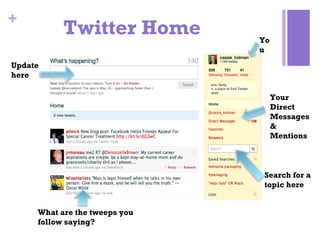
Twitter Home What are the tweeps you follow saying? Update here Search for a topic here You Your Direct Messages & Mentions
Talk on Twitter @:   Use the @ symbol to direct a tweet at another user.  (also called “reply”) @butterfly_pro Check out our new blog post! RT (ReTweet ):  If you like another tweet, you can repost it to your own Twitter stream using the RT feature. You can add your own thoughts before the “RT” symbol. @rachela_adler: Some are surprising! RT @SPARKAdvtsg: Marketing-The 15 Biggest Baby Boomer Brands http://adage.com/u/w5Ibya
If you mouse over a tweet in your home Twitter stream, you will see options to  “ReTweet ” and “ Reply”  [@]. Other platforms, such as Hootsuite or Tweetdeck, have a similar option.  “ I like this tweet! I  want to ReTweet it!”
Talk on Twitter  (cont.) DM (direct message ):  Private messages you can send to other Twitter users. Type “D”, followed by their Twitter name.  # :  Use hashtags to identify a trending topic or “mark” your tweet. This is great for searchability. Ex: Follow @butterfly_pro for the latest #mom blog news.
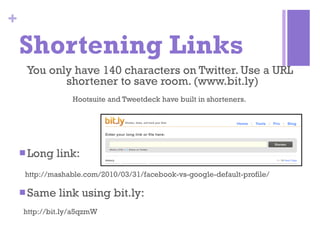
Shortening Links You only have 140 characters on Twitter. Use a URL shortener to save room. (www.bit.ly)  Hootsuite and Tweetdeck have built in shorteners.  Long link:  http://mashable.com/2010/03/31/facebook-vs-google-default-profile/ Same link using bit.ly: http://bit.ly/a5qzmW
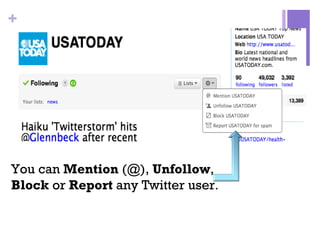
You can  Mention  (@),  Unfollow ,  Block  or  Report  any Twitter user .
Twitter Apps FIND PEOPLE Twellow : the “yellow pages” of Twitter. Tweepz : search for other users by location, bio or name. UPDATE Tweetdeck :  create lists/columns, update Facebook and Twitter simultaneously. Hootsuite : column functionality, statistics tracking, synch all social networks. Ping.fm :  Update all your social networks at once. MONITOR Tweetbeep : Get Twitter alerts by email.
Remember… Use a memorable username and bio. Maintain an  active  account. Share links.  Use a url shortener. Give credit when it is due.  Use the @ symbol to recognize other Twitter users’ content, blog posts, ideas, etc. Keep your updates shorter than 140 characters  if you want people to RT (re-tweet) them.  Engage.  Respond to people’s questions, send @replies and comment on other people’s thoughts. Listen, respond.
Follow the me! Rachel Adler: @RachelA_Adler What I Should Have Learned: @Wishlearned www.whatishouldhavelarned.tumblr.com

Twitter basic

  • 1.
  • 2.
    What is Twitter?Free micro-blogging platform. Updates of 140 characters or less The sharing of content, ideas and data .
  • 3.
    Why should youuse Twitter? Build business connections . Increase your brand awareness . Further relationships with existing and potential customers. Voice opinions, thoughts, recommendations . Find and answer questions in r eal time . Breaking news happens on Twitter!
  • 4.
    Twitter Beginnings Createyour profile at http://www.twitter.com Username should align with your business or other social networks. Create a memorable, informative bio that contains relevant key words. Upload a photo of yourself, or your business logo. Create a branded, customized Twitter landing page. Next…find people to follow!
  • 5.
    Follow others Thereare many ways to find others to follow on Twitter. Tools: twitter.search.com is easy to use. So are twellow & tweepz. Search by interest, name, location, key words. Follow competitors to see what they’re doing & saying! If you find someone interesting, see who THEY are following. This is a great way to build a network of people.
  • 6.
    What is aTweet?! Tweets are updates of 140 characters or less that answer the question: “ What’s happening?”
  • 7.
    Twitter Home Whatare the tweeps you follow saying? Update here Search for a topic here You Your Direct Messages & Mentions
  • 8.
    Talk on Twitter@: Use the @ symbol to direct a tweet at another user. (also called “reply”) @butterfly_pro Check out our new blog post! RT (ReTweet ): If you like another tweet, you can repost it to your own Twitter stream using the RT feature. You can add your own thoughts before the “RT” symbol. @rachela_adler: Some are surprising! RT @SPARKAdvtsg: Marketing-The 15 Biggest Baby Boomer Brands http://adage.com/u/w5Ibya
  • 9.
    If you mouseover a tweet in your home Twitter stream, you will see options to “ReTweet ” and “ Reply” [@]. Other platforms, such as Hootsuite or Tweetdeck, have a similar option. “ I like this tweet! I want to ReTweet it!”
  • 10.
    Talk on Twitter (cont.) DM (direct message ): Private messages you can send to other Twitter users. Type “D”, followed by their Twitter name. # : Use hashtags to identify a trending topic or “mark” your tweet. This is great for searchability. Ex: Follow @butterfly_pro for the latest #mom blog news.
  • 11.
    Shortening Links Youonly have 140 characters on Twitter. Use a URL shortener to save room. (www.bit.ly) Hootsuite and Tweetdeck have built in shorteners. Long link: http://mashable.com/2010/03/31/facebook-vs-google-default-profile/ Same link using bit.ly: http://bit.ly/a5qzmW
  • 12.
    You can Mention (@), Unfollow , Block or Report any Twitter user .
  • 13.
    Twitter Apps FINDPEOPLE Twellow : the “yellow pages” of Twitter. Tweepz : search for other users by location, bio or name. UPDATE Tweetdeck : create lists/columns, update Facebook and Twitter simultaneously. Hootsuite : column functionality, statistics tracking, synch all social networks. Ping.fm : Update all your social networks at once. MONITOR Tweetbeep : Get Twitter alerts by email.
  • 14.
    Remember… Use amemorable username and bio. Maintain an active account. Share links. Use a url shortener. Give credit when it is due. Use the @ symbol to recognize other Twitter users’ content, blog posts, ideas, etc. Keep your updates shorter than 140 characters if you want people to RT (re-tweet) them. Engage. Respond to people’s questions, send @replies and comment on other people’s thoughts. Listen, respond.
  • 15.
    Follow the me!Rachel Adler: @RachelA_Adler What I Should Have Learned: @Wishlearned www.whatishouldhavelarned.tumblr.com