GETTING STARTED ON Brought to you by:
What is Twitter? Definition:  a social networking and micro-blogging service that allows you answer the question, "What are you doing?" by sending short text messages 140 characters in length, called "tweets", to your friends, or "followers.” “ Twitter is blogging without the hassle!” - Anonymous
What’s all the fuss about? Twitter can help with the following: Getting real-time updates and news immediately Connect with people who you may have been connected with Broadcast real-time updates immediately to your network
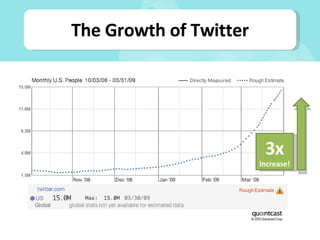
The Growth of Twitter 3x  Increase!
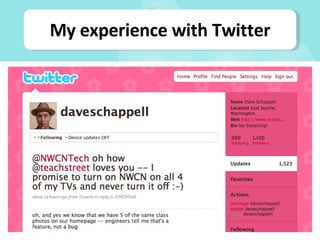
My experience with Twitter
What you’ll be learning today Get your Twitter account started Understand what people say on Twitter Understand how others have used Twitter Integrate Twitter with current activities Utilize tools to enhance your Twitter experience
BASICS
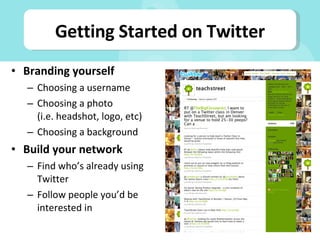
Branding yourself Choosing a username Choosing a photo (i.e. headshot, logo, etc) Choosing a background Build your network Find who’s already using Twitter Follow people you’d be interested in Getting Started on Twitter
What are you doing? Interesting facts about your industry Specials or promotions Information about events Handling customer service via Twitter What to Tweet About
TERMINOLOGY
Twitter Terminology Jargon: Tweets = 140-character updates on Twitter Follower =  A user interested in your updates Symbols: @ = public conversations # = adding a tag to a tweet RT = retweeting is sharing tweets with others d = direct messages are similar to e-mails
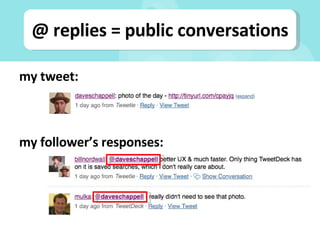
@ replies = public conversations my tweet: my follower’s responses:
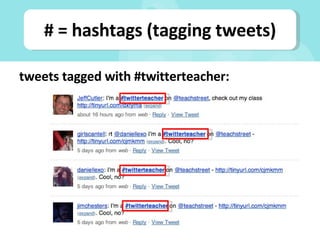
# = hashtags (tagging tweets) tweets tagged with #twitterteacher:
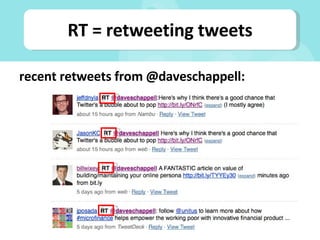
RT = retweeting tweets recent retweets from @daveschappell:
EXAMPLES
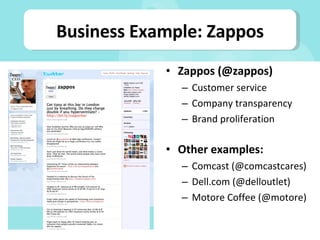
Zappos (@zappos) Customer service Company transparency Brand proliferation Other examples: Comcast (@comcastcares) Dell.com (@delloutlet) Motore Coffee (@motore) Business Example: Zappos
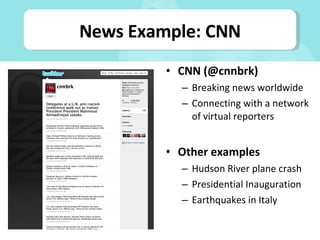
CNN (@cnnbrk) Breaking news worldwide Connecting with a network of virtual reporters Other examples Hudson River plane crash Presidential Inauguration Earthquakes in Italy News Example: CNN
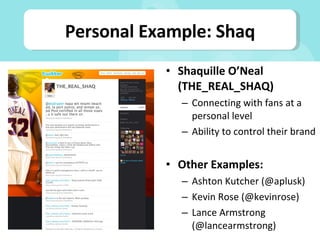
Shaquille O’Neal (THE_REAL_SHAQ) Connecting with fans at a personal level Ability to control their brand Other Examples: Ashton Kutcher (@aplusk) Kevin Rose (@kevinrose) Lance Armstrong (@lancearmstrong) Personal Example: Shaq
INTEGRATION
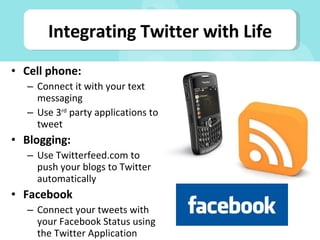
Cell phone: Connect it with your text messaging Use 3 rd  party applications to tweet Blogging: Use Twitterfeed.com to push your blogs to Twitter automatically Facebook Connect your tweets with your Facebook Status using the Twitter Application Integrating Twitter with Life
TOOLS
Twhirl:  http://www.twhirl.org Twitterific: http://iconfactory.com/software/twitterrific Tweetie: http://www.atebits.com/tweetie-mac/ Tweetdeck: http://www.tweetdeck.com/beta/ Twitter Clients
TinyURL: http://www.tinyurl.com Bit.ly: http://www.bit.ly Tr.im: http://www.tr.im Digg.com: http://www.digg.com URL Shorteners
Question? E-mail: help@teachstreet.com Twitter: @teachstreet

Getting Started On Twitter

  • 1.
    GETTING STARTED ONBrought to you by:
  • 2.
    What is Twitter?Definition: a social networking and micro-blogging service that allows you answer the question, "What are you doing?" by sending short text messages 140 characters in length, called "tweets", to your friends, or "followers.” “ Twitter is blogging without the hassle!” - Anonymous
  • 3.
    What’s all thefuss about? Twitter can help with the following: Getting real-time updates and news immediately Connect with people who you may have been connected with Broadcast real-time updates immediately to your network
  • 4.
    The Growth ofTwitter 3x Increase!
  • 5.
  • 6.
    What you’ll belearning today Get your Twitter account started Understand what people say on Twitter Understand how others have used Twitter Integrate Twitter with current activities Utilize tools to enhance your Twitter experience
  • 7.
  • 8.
    Branding yourself Choosinga username Choosing a photo (i.e. headshot, logo, etc) Choosing a background Build your network Find who’s already using Twitter Follow people you’d be interested in Getting Started on Twitter
  • 9.
    What are youdoing? Interesting facts about your industry Specials or promotions Information about events Handling customer service via Twitter What to Tweet About
  • 10.
  • 11.
    Twitter Terminology Jargon:Tweets = 140-character updates on Twitter Follower = A user interested in your updates Symbols: @ = public conversations # = adding a tag to a tweet RT = retweeting is sharing tweets with others d = direct messages are similar to e-mails
  • 12.
    @ replies =public conversations my tweet: my follower’s responses:
  • 13.
    # = hashtags(tagging tweets) tweets tagged with #twitterteacher:
  • 14.
    RT = retweetingtweets recent retweets from @daveschappell:
  • 15.
  • 16.
    Zappos (@zappos) Customerservice Company transparency Brand proliferation Other examples: Comcast (@comcastcares) Dell.com (@delloutlet) Motore Coffee (@motore) Business Example: Zappos
  • 17.
    CNN (@cnnbrk) Breakingnews worldwide Connecting with a network of virtual reporters Other examples Hudson River plane crash Presidential Inauguration Earthquakes in Italy News Example: CNN
  • 18.
    Shaquille O’Neal (THE_REAL_SHAQ)Connecting with fans at a personal level Ability to control their brand Other Examples: Ashton Kutcher (@aplusk) Kevin Rose (@kevinrose) Lance Armstrong (@lancearmstrong) Personal Example: Shaq
  • 19.
  • 20.
    Cell phone: Connectit with your text messaging Use 3 rd party applications to tweet Blogging: Use Twitterfeed.com to push your blogs to Twitter automatically Facebook Connect your tweets with your Facebook Status using the Twitter Application Integrating Twitter with Life
  • 21.
  • 22.
    Twhirl: http://www.twhirl.orgTwitterific: http://iconfactory.com/software/twitterrific Tweetie: http://www.atebits.com/tweetie-mac/ Tweetdeck: http://www.tweetdeck.com/beta/ Twitter Clients
  • 23.
    TinyURL: http://www.tinyurl.com Bit.ly:http://www.bit.ly Tr.im: http://www.tr.im Digg.com: http://www.digg.com URL Shorteners
  • 24.