Twitter Everything you ever  wanted to know but didn’t know what to ask Andy Stitt, SME (Social Media Enthusiast)
How is Twitter used? Primarily used to build community Rapid (and viral) sharing of information Real-time communication Invent words that sound like slang for eight-year-olds (i.e. tweeting, tweeple, twollow, twellow, twibe)
Key Concepts Tweet Following vs. followers @ replies Direct messages Retweeting Twitter search Hashtags Trending topics
Quick Quiz A “tweet” is a. The sound a bird makes b. How a four-year-old says the word “treat” c. A short 140-character or less message on Twitter d. All of the above
Answer d. All of the above
Your Home Screen Serves as your dashboard, or “master control” Tweets from those people that you follow are shown From this screen, you can: Send out a tweet Check your replies and direct messages Perform a Twitter search and check trending topics
 
Your Personal Page  and Twitter Stream Displays your name, location, website, and bio Twitter stream shows all of your tweets How many people you follow and how many are following you IMPORTANT: Your page is how you are viewed by others in the Twitter world; brand it with a good picture and background!
 
Following vs. Followers The difference between the two columns on your home screen and personal page: Following: list of those that you have chosen to “follow” on Twitter Followers: list of those that have chosen to “follow” you
Privacy Controls You can choose to block a follower You can choose to protect your updates, or “tweets,” so that only those who you grant permission can see them
The use of the @ character “ @” is used to signify a Twitter username when used in a tweet, i.e. “I read a great book written by @andystitt829” Whenever you use @username in a tweet, that person will see it in their “Replies” stream If you reply to someone using this method, it will show up in your public Twitter stream
 
Direct Messages Private two-way communication; like a 160-character e-mail Does not show up in public Twitter stream Users must be following each other in order to use DM feature Twitter command to direct message is: d username message
 
Retweeting If you want to quote another Twitter user or simply share something from someone else with your followers, then you can “retweet” andystitt829: Check out this cool website dianefromm: RT @andystitt829: Check out this cool website
Two types of retweeting Directly quoting dianefromm: RT @andystitt829 Check out  http://www.pmief.org  for brand new scholarships for college students Paraphrasing dianefromm:  http:// www.pmief.org  has lots of scholarships you might be interested in. Thanks, @andystitt829 for the info REMEMBER: RT indicates a direct quote
URL shorteners Due to the 140-character limitation, Twitter users use URL shorteners to share URLs Examples are: tinyurl.com, twurl.nl, bit.ly Desktop Twitter clients usually have a URL shortening feature
Link before URL shortening
Link after URL shortening
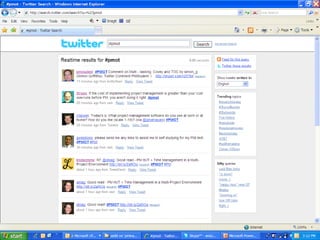
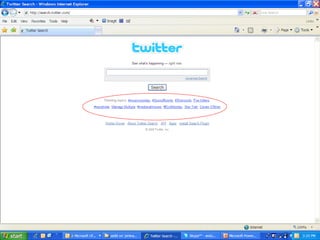
Twitter Search http://search.twitter.com  is the “Google” of Twitter Allows you to search for tweets with specified keywords Search results come up in real time; the screen refreshes if more tweets are posted after you finished the search This can also be done from your Twitter home screen
Initial Twitter Search Page
Search Results Page
Hashtags Hashtagging is similar to search engine and blog post indexing using keywords Hashtags can be used to communicate to a group: “Hey project managers, I have something for you #pmot” Hashtags can also indicate a particular event: “I am about to go to a session at the IFC Online Fundraising conference #ifconline” You can search for hashtags at Twitter Search or your home screen
 
Trending Topics Topics that are heavily tweeted about at any given part of the day are tracked and shown on Twitter Search and your home screen Each trending topic is shown as a clickable search term Examples: #swineflu was a trending topic in April, and the new Star Trek movie was one during its opening weekend
 
How can you use Twitter? Twitter website:  http://www.twitter.com Desktop clients http://www.tweetdeck.com http:// www.twhirl.com Smartphone apps http://www.twitterfon.com  for iPhone http://www.ubertwitter.com  for Blackberry
How will your activity on Twitter help your organization? Spread the word of programs, activities, etc. to your followers Find people who might be interested in supporting the cause Use the search function to find mentions of key terms that are relevant to your organization Use the search function to listen to what others are saying about your organization
Thank you for your time Now go out there and tweet to your heart’s content!

Twitter Presentation

  • 1.
    Twitter Everything youever wanted to know but didn’t know what to ask Andy Stitt, SME (Social Media Enthusiast)
  • 2.
    How is Twitterused? Primarily used to build community Rapid (and viral) sharing of information Real-time communication Invent words that sound like slang for eight-year-olds (i.e. tweeting, tweeple, twollow, twellow, twibe)
  • 3.
    Key Concepts TweetFollowing vs. followers @ replies Direct messages Retweeting Twitter search Hashtags Trending topics
  • 4.
    Quick Quiz A“tweet” is a. The sound a bird makes b. How a four-year-old says the word “treat” c. A short 140-character or less message on Twitter d. All of the above
  • 5.
    Answer d. Allof the above
  • 6.
    Your Home ScreenServes as your dashboard, or “master control” Tweets from those people that you follow are shown From this screen, you can: Send out a tweet Check your replies and direct messages Perform a Twitter search and check trending topics
  • 7.
  • 8.
    Your Personal Page and Twitter Stream Displays your name, location, website, and bio Twitter stream shows all of your tweets How many people you follow and how many are following you IMPORTANT: Your page is how you are viewed by others in the Twitter world; brand it with a good picture and background!
  • 9.
  • 10.
    Following vs. FollowersThe difference between the two columns on your home screen and personal page: Following: list of those that you have chosen to “follow” on Twitter Followers: list of those that have chosen to “follow” you
  • 11.
    Privacy Controls Youcan choose to block a follower You can choose to protect your updates, or “tweets,” so that only those who you grant permission can see them
  • 12.
    The use ofthe @ character “ @” is used to signify a Twitter username when used in a tweet, i.e. “I read a great book written by @andystitt829” Whenever you use @username in a tweet, that person will see it in their “Replies” stream If you reply to someone using this method, it will show up in your public Twitter stream
  • 13.
  • 14.
    Direct Messages Privatetwo-way communication; like a 160-character e-mail Does not show up in public Twitter stream Users must be following each other in order to use DM feature Twitter command to direct message is: d username message
  • 15.
  • 16.
    Retweeting If youwant to quote another Twitter user or simply share something from someone else with your followers, then you can “retweet” andystitt829: Check out this cool website dianefromm: RT @andystitt829: Check out this cool website
  • 17.
    Two types ofretweeting Directly quoting dianefromm: RT @andystitt829 Check out http://www.pmief.org for brand new scholarships for college students Paraphrasing dianefromm: http:// www.pmief.org has lots of scholarships you might be interested in. Thanks, @andystitt829 for the info REMEMBER: RT indicates a direct quote
  • 18.
    URL shorteners Dueto the 140-character limitation, Twitter users use URL shorteners to share URLs Examples are: tinyurl.com, twurl.nl, bit.ly Desktop Twitter clients usually have a URL shortening feature
  • 19.
    Link before URLshortening
  • 20.
    Link after URLshortening
  • 21.
    Twitter Search http://search.twitter.com is the “Google” of Twitter Allows you to search for tweets with specified keywords Search results come up in real time; the screen refreshes if more tweets are posted after you finished the search This can also be done from your Twitter home screen
  • 22.
  • 23.
  • 24.
    Hashtags Hashtagging issimilar to search engine and blog post indexing using keywords Hashtags can be used to communicate to a group: “Hey project managers, I have something for you #pmot” Hashtags can also indicate a particular event: “I am about to go to a session at the IFC Online Fundraising conference #ifconline” You can search for hashtags at Twitter Search or your home screen
  • 25.
  • 26.
    Trending Topics Topicsthat are heavily tweeted about at any given part of the day are tracked and shown on Twitter Search and your home screen Each trending topic is shown as a clickable search term Examples: #swineflu was a trending topic in April, and the new Star Trek movie was one during its opening weekend
  • 27.
  • 28.
    How can youuse Twitter? Twitter website: http://www.twitter.com Desktop clients http://www.tweetdeck.com http:// www.twhirl.com Smartphone apps http://www.twitterfon.com for iPhone http://www.ubertwitter.com for Blackberry
  • 29.
    How will youractivity on Twitter help your organization? Spread the word of programs, activities, etc. to your followers Find people who might be interested in supporting the cause Use the search function to find mentions of key terms that are relevant to your organization Use the search function to listen to what others are saying about your organization
  • 30.
    Thank you foryour time Now go out there and tweet to your heart’s content!