twitter guide
contents What Is Twitter? Effect Of Twitter Why Use Twitter? Setting Up An Account Sending A Tweet Searching Twitter URL Shortening Replying (@)  Direct Messages (D)  Retweeting (RT or retweet) Hashtags (#) Trending Topics Follow Friday Promote Your Page  Twitter Etiquette Minimise Risks Tools Useful Links
what is twitter? It’s an instant messaging or micro blogging service 140 characters to tell friends or followers what you are doing 3 ways to send a tweet Web browser Mobile phone Twitter application Your tweet is shown  On your profile page On the homepage of your followers On the Twitter public timeline
effect of twitter Twitter has amplified the amount of conversations about brands More connections More conversation Unlike Facebook, Twitter has also made those conversations publicly accessible Twitter provides powerful insight for brands
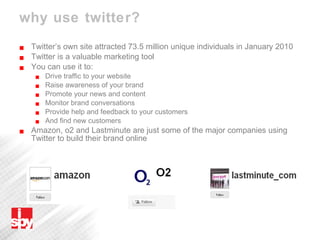
why use twitter? Twitter’s own site attracted 73.5 million unique individuals in January 2010 Twitter is a valuable marketing tool You can use it to: Drive traffic to your website  Raise awareness of your brand  Promote your news and content Monitor brand conversations  Provide help and feedback to your customers And find new customers Amazon, o2 and Lastminute are just some of the major companies using Twitter to build their brand online
setting up an account It’s free to sign up Go to http://twitter.com Follow instructions on how to set up your profile Use your brand name Add a brief bio Add a recognisable logo Include a link to your website Create a customised wallpaper with your website addresses
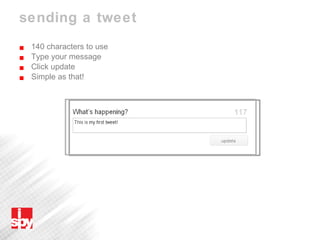
sending a tweet 140 characters to use Type your message Click update Simple as that!
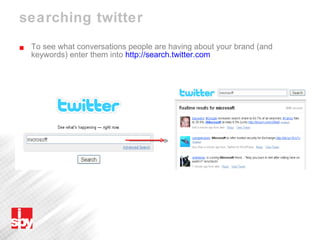
searching twitter To see what conversations people are having about your brand (and keywords) enter them into  http://search.twitter.com
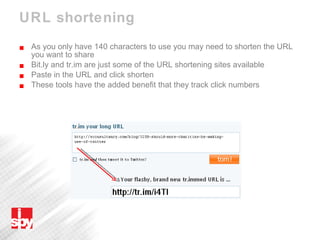
URL shortening As you only have 140 characters to use you may need to shorten the URL you want to share Bit.ly and tr.im are just some of the URL shortening sites available Paste in the URL and click shorten These tools have the added benefit that they track click numbers
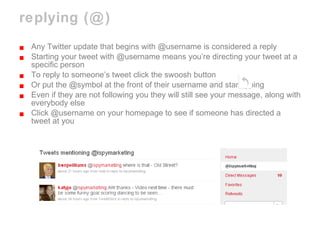
replying (@) Any Twitter update that begins with @username is considered a reply Starting your tweet with @username means you’re directing your tweet at a specific person To reply to someone’s tweet click the swoosh button Or put the @symbol at the front of their username and start typing Even if they are not following you they will still see your message, along with everybody else  Click @username on your homepage to see if someone has directed a tweet at you
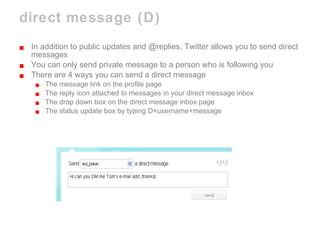
direct message (D) In addition to public updates and @replies, Twitter allows you to send direct messages You can only send private message to a person who is following you There are 4 ways you can send a direct message The message link on the profile page The reply icon attached to messages in your direct message inbox The drop down box on the direct message inbox page The status update box by typing D+username+message
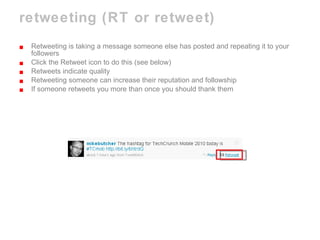
retweeting (RT or retweet) Retweeting is taking a message someone else has posted and repeating it to your followers Click the Retweet icon to do this (see below) Retweets indicate quality Retweeting someone can increase their reputation and followship If someone retweets you more than once you should thank them
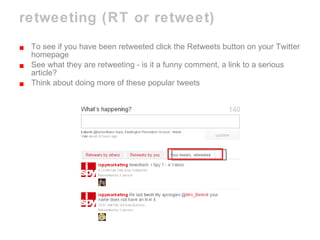
retweeting (RT or retweet) To see if you have been retweeted click the Retweets button on your Twitter homepage See what they are retweeting - is it a funny comment, a link to a serious article? Think about doing more of these popular tweets
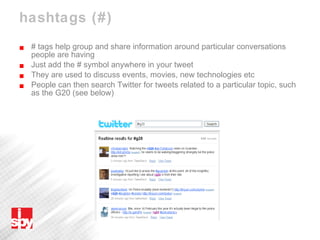
hashtags (#) # tags help group and share information around particular conversations people are having Just add the # symbol anywhere in your tweet They are used to discuss events, movies, new technologies etc People can then search Twitter for tweets related to a particular topic, such as the G20 (see below)
stay on topic If you abuse hashtags your account could get suspended Don’t add lots of hashtags in an attempt to gain attention in search Don’t repeatedly tweet the same topic / hashtag without adding value to the conversation in an attempt to get the topic trending/trending higher
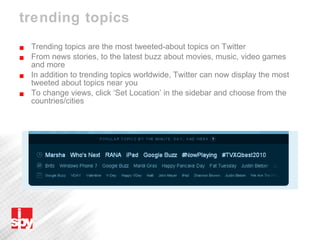
trending topics Trending topics are the most tweeted-about topics on Twitter From news stories, to the latest buzz about movies, music, video games and more In addition to trending topics worldwide, Twitter can now display the most tweeted about topics near you To change views, click ‘Set Location’ in the sidebar and choose from the countries/cities
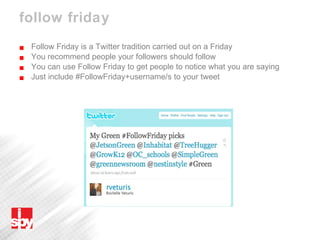
follow friday Follow Friday is a Twitter tradition carried out on a Friday  You recommend people your followers should follow You can use Follow Friday to get people to notice what you are saying Just include #FollowFriday+username/s to your tweet
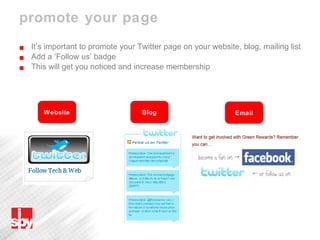
promote your page It’s important to promote your Twitter page on your website, blog, mailing list Add a ‘Follow us’ badge This will get you noticed and increase membership Website Blog Email
promote your page Add your page to Twitter directories (e.g. Wefollow.com) for everyone to see Use a Twitter directory to find new people to follow Search by relevant category, e.g. Travel agent, property, environmental Search the web for people to follow e.g. ‘Property people on Twitter’ Follow someone and they are likely to follow you back Interact with people to gain new followers
twitter etiquette Post a variety of tweets Post links to your site and blog If someone is following you follow them back Interact with other people  Tweet when you have something valuable to contribute Don’t use Twitter only for self promotion - it’s a conversation! If you’re going to criticise make it constructive Remember tweets cannot be deleted from the timeline and could come back to haunt you
minimise risks  Keep tweets clean and professional Be careful about making negative comments about anything Restrict the amount of people who tweet to a few Avoid tweeting from multiple Twitter clients Check which Twitter account you’re in (work / personal) Double or triple check your updates  Be professional with personal Twitter account at all times
tools Desktop Application Twhirl  http://www.twhirl.org   Firefox Plugins Twitbin  http://www.twitbin.com   Twitterfox  http://twitterfox.net   Mobile Tiny Twitter  http://tinytwitter.com   TwitterBerry (Blackberry)  http://www.orangatame.com/products/twitterberry   Twitterific (iPhone and iPod Touch)  http://iconfactory.com/software/twitterrific   Powerful Twitter Organisation Application Tweet Deck  http://www.tweetdeck.com/beta
tools Monitor Twitter Keywords And What’s Hot Twitter Search  http://search.twitter.com   Monitter  http://monitter.com   Tweetscan  http://www.tweetscan.com   Twitscoop (What’s hot)  http://www.twitscoop.com Monitor Trends Twist  http://twist.flaptor.com   Share Pictures & Video Twitpic  http://twitpic.com Twitvid  http://www.twitvid.com   yfrog  http://www.yfrog.com
useful links http://help.twitter.com http://mashable.com/2009/01/21/best-twitter-brands   http://www.webanalyticsworld.net/2009/02/ultimate-guide-to-twitter-marketing.html   http://caffeinatedmarketing.com/2008/12/01/be-true-to-your-twitter-the-auto-dm-question   http://shankman.com/be-careful-what-you-post   http://econsultancy.com/blog/3417-list-of-uk-retailers-on-twitter   http://mashable.com/2009/12/08/dell-twitter-sales   http://mashable.com/2009/03/30/twitter-badges   http://mashable.com/2009/03/09/twitter-brand-voice   http://mashable.com/2009/10/06/retweetable-tweets
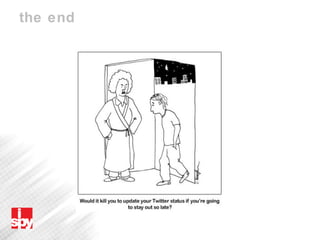
the end

Twitter Guide 2010 - I Spy Marketing

  • 1.
  • 2.
    contents What IsTwitter? Effect Of Twitter Why Use Twitter? Setting Up An Account Sending A Tweet Searching Twitter URL Shortening Replying (@) Direct Messages (D) Retweeting (RT or retweet) Hashtags (#) Trending Topics Follow Friday Promote Your Page Twitter Etiquette Minimise Risks Tools Useful Links
  • 3.
    what is twitter?It’s an instant messaging or micro blogging service 140 characters to tell friends or followers what you are doing 3 ways to send a tweet Web browser Mobile phone Twitter application Your tweet is shown On your profile page On the homepage of your followers On the Twitter public timeline
  • 4.
    effect of twitterTwitter has amplified the amount of conversations about brands More connections More conversation Unlike Facebook, Twitter has also made those conversations publicly accessible Twitter provides powerful insight for brands
  • 5.
    why use twitter?Twitter’s own site attracted 73.5 million unique individuals in January 2010 Twitter is a valuable marketing tool You can use it to: Drive traffic to your website Raise awareness of your brand Promote your news and content Monitor brand conversations Provide help and feedback to your customers And find new customers Amazon, o2 and Lastminute are just some of the major companies using Twitter to build their brand online
  • 6.
    setting up anaccount It’s free to sign up Go to http://twitter.com Follow instructions on how to set up your profile Use your brand name Add a brief bio Add a recognisable logo Include a link to your website Create a customised wallpaper with your website addresses
  • 7.
    sending a tweet140 characters to use Type your message Click update Simple as that!
  • 8.
    searching twitter Tosee what conversations people are having about your brand (and keywords) enter them into http://search.twitter.com
  • 9.
    URL shortening Asyou only have 140 characters to use you may need to shorten the URL you want to share Bit.ly and tr.im are just some of the URL shortening sites available Paste in the URL and click shorten These tools have the added benefit that they track click numbers
  • 10.
    replying (@) AnyTwitter update that begins with @username is considered a reply Starting your tweet with @username means you’re directing your tweet at a specific person To reply to someone’s tweet click the swoosh button Or put the @symbol at the front of their username and start typing Even if they are not following you they will still see your message, along with everybody else Click @username on your homepage to see if someone has directed a tweet at you
  • 11.
    direct message (D)In addition to public updates and @replies, Twitter allows you to send direct messages You can only send private message to a person who is following you There are 4 ways you can send a direct message The message link on the profile page The reply icon attached to messages in your direct message inbox The drop down box on the direct message inbox page The status update box by typing D+username+message
  • 12.
    retweeting (RT orretweet) Retweeting is taking a message someone else has posted and repeating it to your followers Click the Retweet icon to do this (see below) Retweets indicate quality Retweeting someone can increase their reputation and followship If someone retweets you more than once you should thank them
  • 13.
    retweeting (RT orretweet) To see if you have been retweeted click the Retweets button on your Twitter homepage See what they are retweeting - is it a funny comment, a link to a serious article? Think about doing more of these popular tweets
  • 14.
    hashtags (#) #tags help group and share information around particular conversations people are having Just add the # symbol anywhere in your tweet They are used to discuss events, movies, new technologies etc People can then search Twitter for tweets related to a particular topic, such as the G20 (see below)
  • 15.
    stay on topicIf you abuse hashtags your account could get suspended Don’t add lots of hashtags in an attempt to gain attention in search Don’t repeatedly tweet the same topic / hashtag without adding value to the conversation in an attempt to get the topic trending/trending higher
  • 16.
    trending topics Trendingtopics are the most tweeted-about topics on Twitter From news stories, to the latest buzz about movies, music, video games and more In addition to trending topics worldwide, Twitter can now display the most tweeted about topics near you To change views, click ‘Set Location’ in the sidebar and choose from the countries/cities
  • 17.
    follow friday FollowFriday is a Twitter tradition carried out on a Friday You recommend people your followers should follow You can use Follow Friday to get people to notice what you are saying Just include #FollowFriday+username/s to your tweet
  • 18.
    promote your pageIt’s important to promote your Twitter page on your website, blog, mailing list Add a ‘Follow us’ badge This will get you noticed and increase membership Website Blog Email
  • 19.
    promote your pageAdd your page to Twitter directories (e.g. Wefollow.com) for everyone to see Use a Twitter directory to find new people to follow Search by relevant category, e.g. Travel agent, property, environmental Search the web for people to follow e.g. ‘Property people on Twitter’ Follow someone and they are likely to follow you back Interact with people to gain new followers
  • 20.
    twitter etiquette Posta variety of tweets Post links to your site and blog If someone is following you follow them back Interact with other people Tweet when you have something valuable to contribute Don’t use Twitter only for self promotion - it’s a conversation! If you’re going to criticise make it constructive Remember tweets cannot be deleted from the timeline and could come back to haunt you
  • 21.
    minimise risks Keep tweets clean and professional Be careful about making negative comments about anything Restrict the amount of people who tweet to a few Avoid tweeting from multiple Twitter clients Check which Twitter account you’re in (work / personal) Double or triple check your updates Be professional with personal Twitter account at all times
  • 22.
    tools Desktop ApplicationTwhirl http://www.twhirl.org Firefox Plugins Twitbin http://www.twitbin.com Twitterfox http://twitterfox.net Mobile Tiny Twitter http://tinytwitter.com TwitterBerry (Blackberry) http://www.orangatame.com/products/twitterberry Twitterific (iPhone and iPod Touch) http://iconfactory.com/software/twitterrific Powerful Twitter Organisation Application Tweet Deck http://www.tweetdeck.com/beta
  • 23.
    tools Monitor TwitterKeywords And What’s Hot Twitter Search http://search.twitter.com Monitter http://monitter.com Tweetscan http://www.tweetscan.com Twitscoop (What’s hot) http://www.twitscoop.com Monitor Trends Twist http://twist.flaptor.com Share Pictures & Video Twitpic http://twitpic.com Twitvid http://www.twitvid.com yfrog http://www.yfrog.com
  • 24.
    useful links http://help.twitter.comhttp://mashable.com/2009/01/21/best-twitter-brands http://www.webanalyticsworld.net/2009/02/ultimate-guide-to-twitter-marketing.html http://caffeinatedmarketing.com/2008/12/01/be-true-to-your-twitter-the-auto-dm-question http://shankman.com/be-careful-what-you-post http://econsultancy.com/blog/3417-list-of-uk-retailers-on-twitter http://mashable.com/2009/12/08/dell-twitter-sales http://mashable.com/2009/03/30/twitter-badges http://mashable.com/2009/03/09/twitter-brand-voice http://mashable.com/2009/10/06/retweetable-tweets
  • 25.