Twitter
What is it?
What is Twitter?

A Micro-blogging service…of course!


             HUH?
Seriously…what is Twitter?
► Twitter is a tool that allows you to share
  short updates, 140 characters or less, with
  people in your network.
► You can also read others’ updates in your
  network as well
► Twitter is based in the social networking
  side of applications and has some great
  business potential
How do I use Twitter?
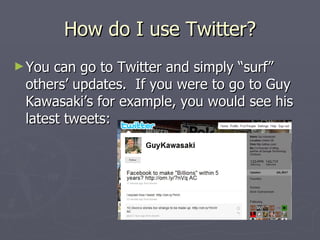
► You can go to Twitter and simply “surf”
 others’ updates. If you were to go to Guy
 Kawasaki’s for example, you would see his
 latest tweets:
How do I use Twitter?
► The   best way to use Twitter is to sign up for
  an account.
► It is free
► You do not have to tie it into your cell
  phone and get text messages
► It is free
► Did I mention…it is FREE?
Signing up for an Account
► Prettybasic stuff
► Go to http://twitter.com/
► Click
► Put in some basic info, then create your
  account
► Note: Choose wisely of your screen name!
► You will have to verify your creation via
  email but it is quick
“And They’re OFF”
► You can now Tweet (that is the art of
  posting on Twitter) away
► Go on….start Tweeting
What can I do on Twitter?
► Simply and basically, you can Tweet
► Tweet about what you want
► Bring value to those that you want as your
  audience
   If your audience is your old college buddies, tell
    them what you are doing
   If your audience is your customer base, bring
    value to them with info about your products,
    plans, ideas, specials, etc
Twitter Anecdote
► Kogi   Korean BBQ truck in LA Tweets its next
  stop
► Lines of 300 to 800 people are waiting for
  the truck at its stops!
► This has all been done with Twitter
► Here is a link to the LA Times article:
   http://www.latimes.com/theguide/restaurants/la
    -fo-kogi11-2009feb11,0,4560062.story
I Tweeted, What’s Next?
► Congrats, welcome to Twitter
► Now, you may want to follow someone
► You can choose who ever you want to
  follow
► The choices are endless; family members,
  workmates, friends, celebrities, etc
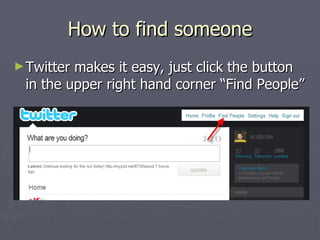
How to find someone
► Twittermakes it easy, just click the button
 in the upper right hand corner “Find People”
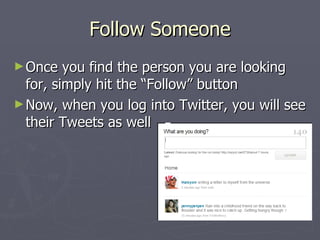
Follow Someone
► Once   you find the person you are looking
  for, simply hit the “Follow” button
► Now, when you log into Twitter, you will see
  their Tweets as well
Someone is Following me!
► Yes, people can follow you too.
► This is your audience!
► Bring them value!
► The more followers you have, the cooler
  you are in Twitter world!
   Just kidding. Some do believe this (note the
    Ashton Kutcher vs CNN incident). But, what
    matters is the value you bring your audience.
Twitter Etiquette
► Yes, proper etiquette has even found its
  way to Twitter
► Proper Twit-iquette says that if someone
  follows you, you should follow them
► You should also send them a Direct
  Message thanking them for the follow
► I do not practice this exactly…
I don’t want to follow you
► Twitter  is free. Therefore, there are people
  that use Twitter to promote things you may
  not want to see or deal with.
► If you get a follow from someone you don’t
  know, don’t follow them.
► In fact, Twitter has this great feature of
  being able to “Block” other users.
► I have started using the “Block” feature with
  some of the more unsavory Twitter-ers
What does ‘#’ Mean?
► The   ‘#’, or hashtag, is a tagging system that
  was created on Twitter
► It allows Tweets to be grouped into specific
  groups
► For example, Tweets concerning Product
  Management tend to contain ‘#prodmgmt’
  in them.
► You can then search for all the Tweets with
  a specific hashtag (more on searching later)
What does ‘@’ mean?
► Twitter   has spawned a nomenclature all its
  own
► When you see the ‘@’ symbol, someone is
  mentioning or replying to another user on
  Twitter
► It gives you the chance to look that person
  up and see if you want to follow them
Replies
► When   you see an ‘@name’ at the beginning
  of a message, the Tweet is most likely a
  reply to something before
► Some people have conversations back and
  forth in such a manner
Retweets
► Retweets   are the Holy Grail of Twitter! You can
  retweet what others have said that you find
  interesting.
► These are signified with an ‘RT’ at the beginning of
  a Tweet
► They are generally followed with ‘@’ and the name
  of the original Tweeter
► Being Retweeted is the BOMB! You have said
  something that someone else in the world found
  interesting…who would have thought?!?
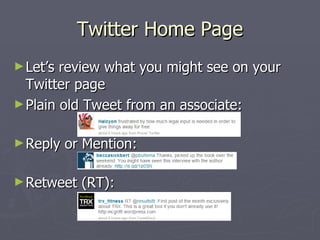
Twitter Home Page
► Let’s review what you might see on your
  Twitter page
► Plain old Tweet from an associate:


► Reply   or Mention:

► Retweet   (RT):
Direct Messages
► When   two people follow each other (sounds
  like the beginning of “The Talk” with my
  kids!) they can Direct Message (DM) each
  other
► DMs are only seen by the sender and the
  recipient
► Its just like an email, only in 140 characters
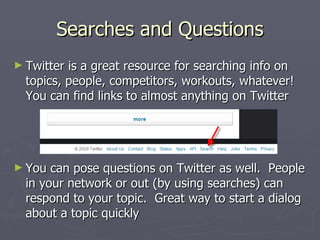
Searches and Questions
► Twitter is a great resource for searching info on
  topics, people, competitors, workouts, whatever!
  You can find links to almost anything on Twitter


► You  can pose questions on Twitter as well. People
  in your network or out (by using searches) can
  respond to your topic. Great way to start a dialog
  about a topic quickly
Celebrities and Twitter
► OK.   Ashton, Oprah, Britney. They all
  Tweet. But, what are they tweeting about
  and do I really care?
► You have to answer that one for yourself!
► I follow two celebrities, Lance Armstrong
  (@lancearmstong) because I dig his tweets,
  cycling, Tour de France, Livestrong, etc.
  The other is Natalie Coughlin
  (@nataliecoughlin)…just ‘cause 
Basics
►I  think we have covered the basics
► Twitter is about getting your name out. It
  is another medium to do so.
► Twitter can help build a brand for your
  company or product or charity or whatever
► Twitter’s potential in business use is just
  being tapped
Why do this in PowerPoint?
►Idon’t know. It just felt right. I guess I
 could Tweet the whole thing, but then how
 much use would it be for those that are not
 on Twitter?!?
Why did I do this?
►I get asked about Twitter in my daily life
► This helped me explain it to others and
  provide a place for them to learn about
  Twitter as well
Advanced Twitter Topics
► Yes, there are advanced Twitter topics!
► The next few slides will talk about a few
  topics such as:
     Pictures and Twitter
     URL Shortners….huh?
     Twitter Clients (other ways of using Twitter
      without have to go to the website)
► Thereare more but these should help wet
 your appetite!
Pictures and Twitter
► You  can post pictures via other sites that tie
  into Twitter!
► YFrog and Twitpic are just 2 of many
  popular sites
   http://www.twitpic.com/
   http://www.yfrog.com/
► You  can post a picture, add a tweet and
  voila…your tweet includes text and a URL to
  the picture you uploaded!
URL Shorteners
► OK.  You only have 140 characters to say it. You
  don’t want to waste that with a HUGE URL.
► URL shorteners (I like http://tinyurl.com/) provide
  a way to take a link and make it very short.
► For example, this
   http://crankypm.com/2009/07/guest-post-death-funnel-haw
► Becomes
   http://tinyurl.com/l23wbs
Twitter Clients
►A   Twitter Client is another system that puts
  some more pretty on the front of Twitter
  (you know, lipstick on a pig)
► Many clients offer integrated features such
  as saved searches, URL shorteners built
  right in, integration with picture sites, etc.
► Some even allow integration with Facebook
  or other Social Networking sites
Twitter Clients
► There   are many clients out there
► I like TweetDeck, it runs in the Adobe AIR
  Framework which some people do not like
► Choose one that is best for you, there is no
  right answer on this test question!
► Clients exist for Windows, Linux, Mac,
  iPhone, Crackberry…I mean BlackBerry (I
  use UberTwitter on my Crackberry)
Conclusion
► The End.
► “Go on. Go home. Why are you still sitting
  there?” (Bad Ferris Bueller reference)

► Thanks  for reading and I hope you found
 this interesting. You can follow me on
 Twitter at:
         http://twitter.com/scottcote

Twitter

  • 1.
  • 2.
    What is Twitter? AMicro-blogging service…of course! HUH?
  • 3.
    Seriously…what is Twitter? ►Twitter is a tool that allows you to share short updates, 140 characters or less, with people in your network. ► You can also read others’ updates in your network as well ► Twitter is based in the social networking side of applications and has some great business potential
  • 4.
    How do Iuse Twitter? ► You can go to Twitter and simply “surf” others’ updates. If you were to go to Guy Kawasaki’s for example, you would see his latest tweets:
  • 5.
    How do Iuse Twitter? ► The best way to use Twitter is to sign up for an account. ► It is free ► You do not have to tie it into your cell phone and get text messages ► It is free ► Did I mention…it is FREE?
  • 6.
    Signing up foran Account ► Prettybasic stuff ► Go to http://twitter.com/ ► Click ► Put in some basic info, then create your account ► Note: Choose wisely of your screen name! ► You will have to verify your creation via email but it is quick
  • 7.
    “And They’re OFF” ►You can now Tweet (that is the art of posting on Twitter) away ► Go on….start Tweeting
  • 8.
    What can Ido on Twitter? ► Simply and basically, you can Tweet ► Tweet about what you want ► Bring value to those that you want as your audience  If your audience is your old college buddies, tell them what you are doing  If your audience is your customer base, bring value to them with info about your products, plans, ideas, specials, etc
  • 9.
    Twitter Anecdote ► Kogi Korean BBQ truck in LA Tweets its next stop ► Lines of 300 to 800 people are waiting for the truck at its stops! ► This has all been done with Twitter ► Here is a link to the LA Times article:  http://www.latimes.com/theguide/restaurants/la -fo-kogi11-2009feb11,0,4560062.story
  • 10.
    I Tweeted, What’sNext? ► Congrats, welcome to Twitter ► Now, you may want to follow someone ► You can choose who ever you want to follow ► The choices are endless; family members, workmates, friends, celebrities, etc
  • 11.
    How to findsomeone ► Twittermakes it easy, just click the button in the upper right hand corner “Find People”
  • 12.
    Follow Someone ► Once you find the person you are looking for, simply hit the “Follow” button ► Now, when you log into Twitter, you will see their Tweets as well
  • 13.
    Someone is Followingme! ► Yes, people can follow you too. ► This is your audience! ► Bring them value! ► The more followers you have, the cooler you are in Twitter world!  Just kidding. Some do believe this (note the Ashton Kutcher vs CNN incident). But, what matters is the value you bring your audience.
  • 14.
    Twitter Etiquette ► Yes,proper etiquette has even found its way to Twitter ► Proper Twit-iquette says that if someone follows you, you should follow them ► You should also send them a Direct Message thanking them for the follow ► I do not practice this exactly…
  • 15.
    I don’t wantto follow you ► Twitter is free. Therefore, there are people that use Twitter to promote things you may not want to see or deal with. ► If you get a follow from someone you don’t know, don’t follow them. ► In fact, Twitter has this great feature of being able to “Block” other users. ► I have started using the “Block” feature with some of the more unsavory Twitter-ers
  • 16.
    What does ‘#’Mean? ► The ‘#’, or hashtag, is a tagging system that was created on Twitter ► It allows Tweets to be grouped into specific groups ► For example, Tweets concerning Product Management tend to contain ‘#prodmgmt’ in them. ► You can then search for all the Tweets with a specific hashtag (more on searching later)
  • 17.
    What does ‘@’mean? ► Twitter has spawned a nomenclature all its own ► When you see the ‘@’ symbol, someone is mentioning or replying to another user on Twitter ► It gives you the chance to look that person up and see if you want to follow them
  • 18.
    Replies ► When you see an ‘@name’ at the beginning of a message, the Tweet is most likely a reply to something before ► Some people have conversations back and forth in such a manner
  • 19.
    Retweets ► Retweets are the Holy Grail of Twitter! You can retweet what others have said that you find interesting. ► These are signified with an ‘RT’ at the beginning of a Tweet ► They are generally followed with ‘@’ and the name of the original Tweeter ► Being Retweeted is the BOMB! You have said something that someone else in the world found interesting…who would have thought?!?
  • 20.
    Twitter Home Page ►Let’s review what you might see on your Twitter page ► Plain old Tweet from an associate: ► Reply or Mention: ► Retweet (RT):
  • 21.
    Direct Messages ► When two people follow each other (sounds like the beginning of “The Talk” with my kids!) they can Direct Message (DM) each other ► DMs are only seen by the sender and the recipient ► Its just like an email, only in 140 characters
  • 22.
    Searches and Questions ►Twitter is a great resource for searching info on topics, people, competitors, workouts, whatever! You can find links to almost anything on Twitter ► You can pose questions on Twitter as well. People in your network or out (by using searches) can respond to your topic. Great way to start a dialog about a topic quickly
  • 23.
    Celebrities and Twitter ►OK. Ashton, Oprah, Britney. They all Tweet. But, what are they tweeting about and do I really care? ► You have to answer that one for yourself! ► I follow two celebrities, Lance Armstrong (@lancearmstong) because I dig his tweets, cycling, Tour de France, Livestrong, etc. The other is Natalie Coughlin (@nataliecoughlin)…just ‘cause 
  • 24.
    Basics ►I thinkwe have covered the basics ► Twitter is about getting your name out. It is another medium to do so. ► Twitter can help build a brand for your company or product or charity or whatever ► Twitter’s potential in business use is just being tapped
  • 25.
    Why do thisin PowerPoint? ►Idon’t know. It just felt right. I guess I could Tweet the whole thing, but then how much use would it be for those that are not on Twitter?!?
  • 26.
    Why did Ido this? ►I get asked about Twitter in my daily life ► This helped me explain it to others and provide a place for them to learn about Twitter as well
  • 27.
    Advanced Twitter Topics ►Yes, there are advanced Twitter topics! ► The next few slides will talk about a few topics such as:  Pictures and Twitter  URL Shortners….huh?  Twitter Clients (other ways of using Twitter without have to go to the website) ► Thereare more but these should help wet your appetite!
  • 28.
    Pictures and Twitter ►You can post pictures via other sites that tie into Twitter! ► YFrog and Twitpic are just 2 of many popular sites  http://www.twitpic.com/  http://www.yfrog.com/ ► You can post a picture, add a tweet and voila…your tweet includes text and a URL to the picture you uploaded!
  • 29.
    URL Shorteners ► OK. You only have 140 characters to say it. You don’t want to waste that with a HUGE URL. ► URL shorteners (I like http://tinyurl.com/) provide a way to take a link and make it very short. ► For example, this  http://crankypm.com/2009/07/guest-post-death-funnel-haw ► Becomes  http://tinyurl.com/l23wbs
  • 30.
    Twitter Clients ►A Twitter Client is another system that puts some more pretty on the front of Twitter (you know, lipstick on a pig) ► Many clients offer integrated features such as saved searches, URL shorteners built right in, integration with picture sites, etc. ► Some even allow integration with Facebook or other Social Networking sites
  • 31.
    Twitter Clients ► There are many clients out there ► I like TweetDeck, it runs in the Adobe AIR Framework which some people do not like ► Choose one that is best for you, there is no right answer on this test question! ► Clients exist for Windows, Linux, Mac, iPhone, Crackberry…I mean BlackBerry (I use UberTwitter on my Crackberry)
  • 32.
    Conclusion ► The End. ►“Go on. Go home. Why are you still sitting there?” (Bad Ferris Bueller reference) ► Thanks for reading and I hope you found this interesting. You can follow me on Twitter at: http://twitter.com/scottcote