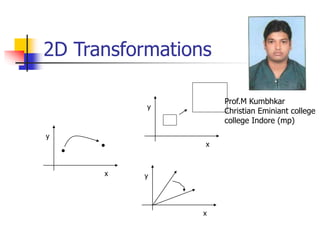
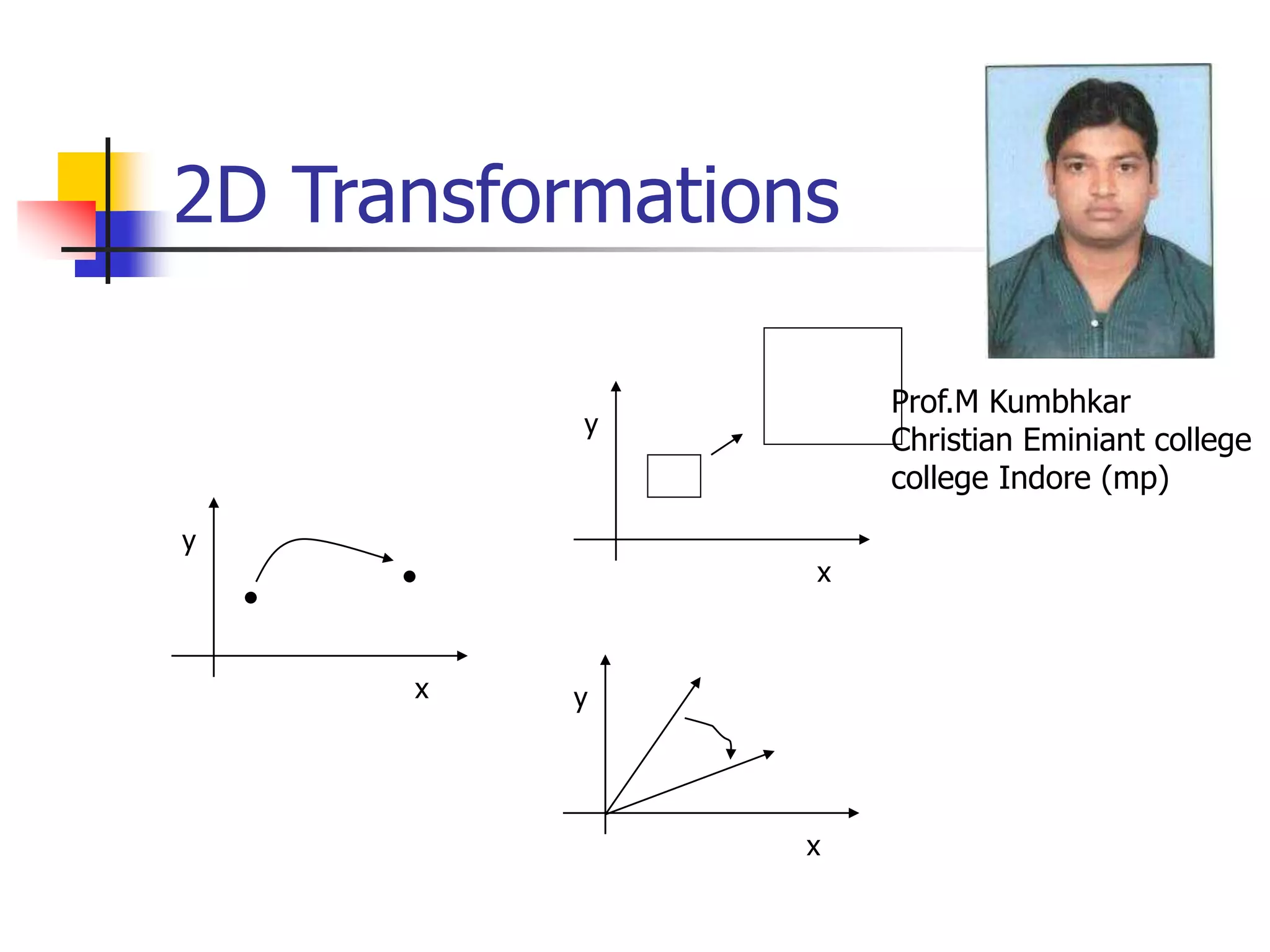
2D Transformations
x
y
x
y
x
y
Prof.M Kumbhkar
Christian Eminiant college
college Indore (mp)
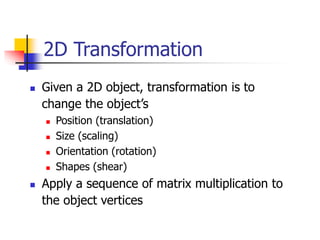
2D Transformation
 Given a 2D object, transformation is to
change the object’s
 Position (translation)
 Size (scaling)
 Orientation (rotation)
 Shapes (shear)
 Apply a sequence of matrix multiplication to
the object vertices
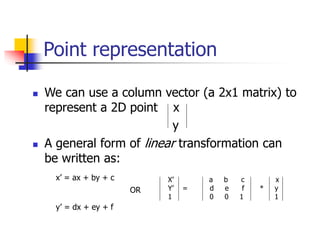
Point representation
 We can use a column vector (a 2x1 matrix) to
represent a 2D point x
y
 A general form of linear transformation can
be written as:
x’ = ax + by + c
OR
y’ = dx + ey + f
X’ a b c x
Y’ = d e f * y
1 0 0 1 1
Translation
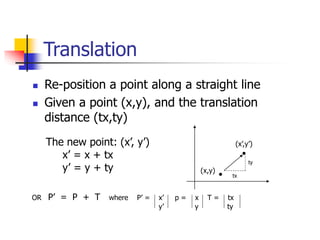
 Re-position a point along a straight line
 Given a point (x,y), and the translation
distance (tx,ty)
The new point: (x’, y’)
x’ = x + tx
y’ = y + ty (x,y)
(x’,y’)
OR P’ = P + T where P’ = x’ p = x T = tx
y’ y ty
tx
ty
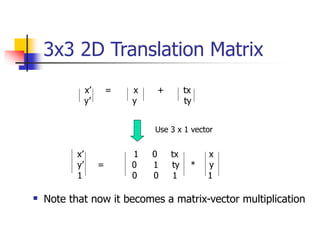
3x3 2D Translation Matrix
x’ = x + tx
y’ y ty
Use 3 x 1 vector
x’ 1 0 tx x
y’ = 0 1 ty * y
1 0 0 1 1
 Note that now it becomes a matrix-vector multiplication
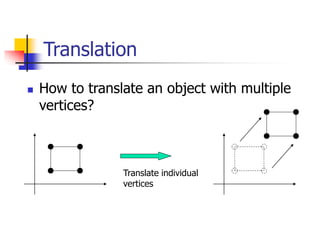
Translation
 How to translate an object with multiple
vertices?
Translate individual
vertices
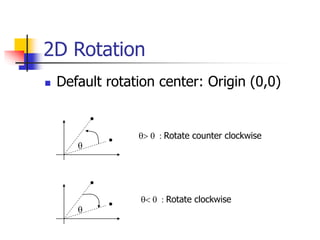
2D Rotation
 Default rotation center: Origin (0,0)
q
q> 0 : Rotate counter clockwise
q< 0 : Rotate clockwise
q
Rotation
(x,y)
(x’,y’)
q
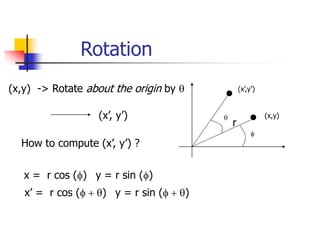
(x,y) -> Rotate about the origin by q
(x’, y’)
How to compute (x’, y’) ?
f
x = r cos (f) y = r sin (f)
r
x’ = r cos (f + q) y = r sin (f + q)
Rotation
(x,y)
(x’,y’)
q
f
r
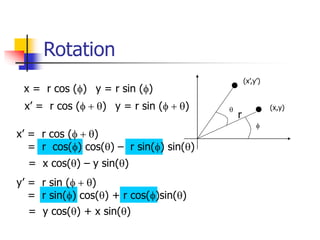
x = r cos (f) y = r sin (f)
x’ = r cos (f + q) y = r sin (f + q)
x’ = r cos (f + q)
= r cos(f) cos(q) – r sin(f) sin(q)
= x cos(q) – y sin(q)
y’ = r sin (f + q)
= r sin(f) cos(q) + r cos(f)sin(q)
= y cos(q) + x sin(q)
Rotation
(x,y)
(x’,y’)
q
f
r
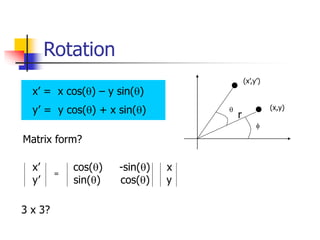
x’ = x cos(q) – y sin(q)
y’ = y cos(q) + x sin(q)
Matrix form?
x’ cos(q) -sin(q) x
y’ sin(q) cos(q) y
=
3 x 3?
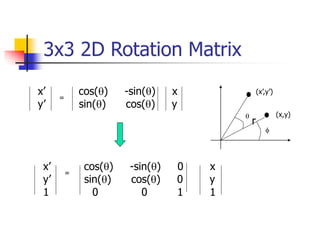
3x3 2D Rotation Matrix
x’ cos(q) -sin(q) x
y’ sin(q) cos(q) y
=
(x,y)
(x’,y’)
q
f
r
x’ cos(q) -sin(q) 0 x
y’ sin(q) cos(q) 0 y
1 0 0 1 1
=
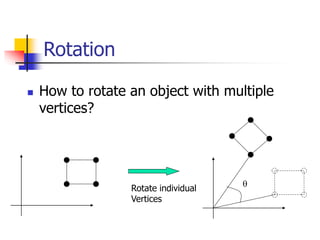
Rotation
 How to rotate an object with multiple
vertices?
Rotate individual
Vertices
q
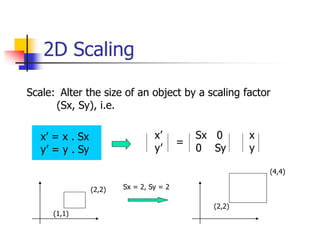
2D Scaling
Scale: Alter the size of an object by a scaling factor
(Sx, Sy), i.e.
x’ = x . Sx
y’ = y . Sy
x’ Sx 0 x
y’ 0 Sy y
=
(1,1)
(2,2) Sx = 2, Sy = 2
(2,2)
(4,4)
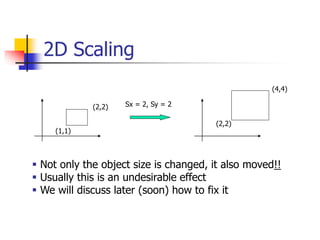
2D Scaling
(1,1)
(2,2) Sx = 2, Sy = 2
(2,2)
(4,4)
 Not only the object size is changed, it also moved!!
 Usually this is an undesirable effect
 We will discuss later (soon) how to fix it
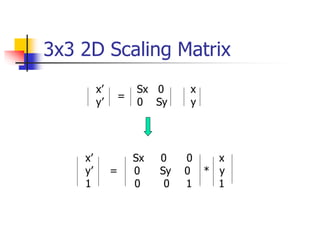
3x3 2D Scaling Matrix
x’ Sx 0 x
y’ 0 Sy y
=
x’ Sx 0 0 x
y’ = 0 Sy 0 * y
1 0 0 1 1
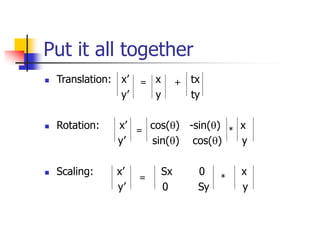
Put it all together
 Translation: x’ x tx
y’ y ty
 Rotation: x’ cos(q) -sin(q) x
y’ sin(q) cos(q) y
 Scaling: x’ Sx 0 x
y’ 0 Sy y
= +
= *
= *
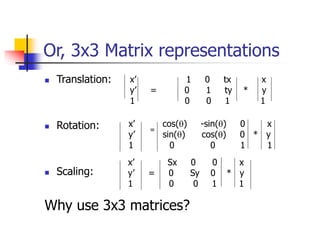
Or, 3x3 Matrix representations
 Translation:
 Rotation:
 Scaling:
Why use 3x3 matrices?
x’ 1 0 tx x
y’ = 0 1 ty * y
1 0 0 1 1
x’ cos(q) -sin(q) 0 x
y’ sin(q) cos(q) 0 * y
1 0 0 1 1
=
x’ Sx 0 0 x
y’ = 0 Sy 0 * y
1 0 0 1 1
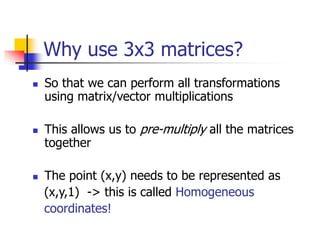
Why use 3x3 matrices?
 So that we can perform all transformations
using matrix/vector multiplications
 This allows us to pre-multiply all the matrices
together
 The point (x,y) needs to be represented as
(x,y,1) -> this is called Homogeneous
coordinates!
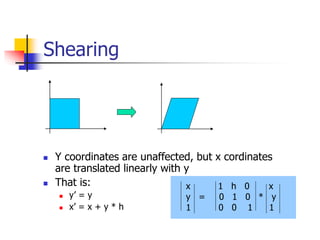
Shearing
 Y coordinates are unaffected, but x cordinates
are translated linearly with y
 That is:
 y’ = y
 x’ = x + y * h
x 1 h 0 x
y = 0 1 0 * y
1 0 0 1 1
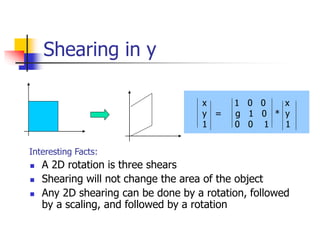
Shearing in y
x 1 0 0 x
y = g 1 0 * y
1 0 0 1 1
 A 2D rotation is three shears
 Shearing will not change the area of the object
 Any 2D shearing can be done by a rotation, followed
by a scaling, and followed by a rotation
Interesting Facts:
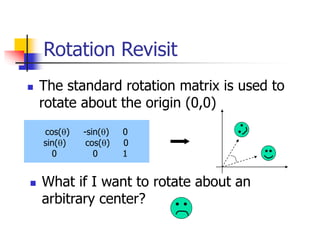
Rotation Revisit
 The standard rotation matrix is used to
rotate about the origin (0,0)
cos(q) -sin(q) 0
sin(q) cos(q) 0
0 0 1
 What if I want to rotate about an
arbitrary center?
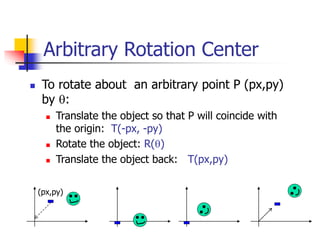
Arbitrary Rotation Center
 To rotate about an arbitrary point P (px,py)
by q:
 Translate the object so that P will coincide with
the origin: T(-px, -py)
 Rotate the object: R(q)
 Translate the object back: T(px,py)
(px,py)
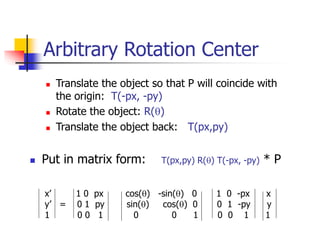
Arbitrary Rotation Center
 Translate the object so that P will coincide with
the origin: T(-px, -py)
 Rotate the object: R(q)
 Translate the object back: T(px,py)
 Put in matrix form: T(px,py) R(q) T(-px, -py) * P
x’ 1 0 px cos(q) -sin(q) 0 1 0 -px x
y’ = 0 1 py sin(q) cos(q) 0 0 1 -py y
1 0 0 1 0 0 1 0 0 1 1
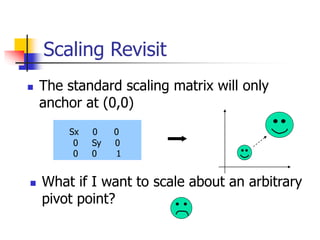
Scaling Revisit
 The standard scaling matrix will only
anchor at (0,0)
Sx 0 0
0 Sy 0
0 0 1
 What if I want to scale about an arbitrary
pivot point?
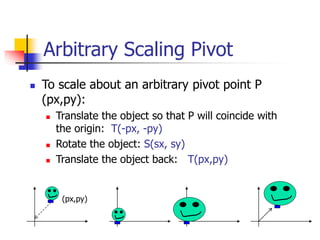
Arbitrary Scaling Pivot
 To scale about an arbitrary pivot point P
(px,py):
 Translate the object so that P will coincide with
the origin: T(-px, -py)
 Rotate the object: S(sx, sy)
 Translate the object back: T(px,py)
(px,py)
Affine Transformation
 Translation, Scaling, Rotation, Shearing are all affine
transformation
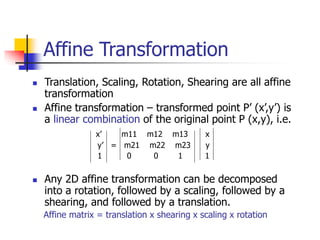
 Affine transformation – transformed point P’ (x’,y’) is
a linear combination of the original point P (x,y), i.e.
x’ m11 m12 m13 x
y’ = m21 m22 m23 y
1 0 0 1 1
 Any 2D affine transformation can be decomposed
into a rotation, followed by a scaling, followed by a
shearing, and followed by a translation.
Affine matrix = translation x shearing x scaling x rotation
Composing Transformation
 Composing Transformation – the process of applying
several transformation in succession to form one
overall transformation
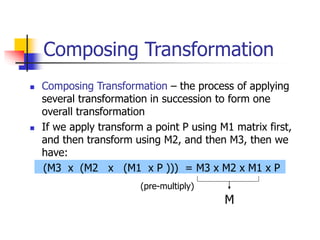
 If we apply transform a point P using M1 matrix first,
and then transform using M2, and then M3, then we
have:
(M3 x (M2 x (M1 x P ))) = M3 x M2 x M1 x P
M
(pre-multiply)
Composing Transformation
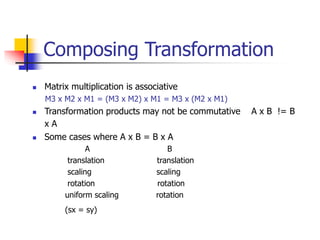
 Matrix multiplication is associative
M3 x M2 x M1 = (M3 x M2) x M1 = M3 x (M2 x M1)
 Transformation products may not be commutative A x B != B
x A
 Some cases where A x B = B x A
A B
translation translation
scaling scaling
rotation rotation
uniform scaling rotation
(sx = sy)
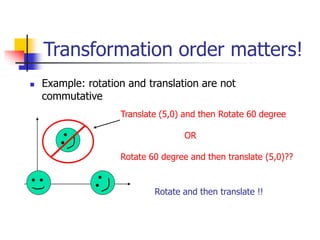
Transformation order matters!
 Example: rotation and translation are not
commutative
Translate (5,0) and then Rotate 60 degree
OR
Rotate 60 degree and then translate (5,0)??
Rotate and then translate !!
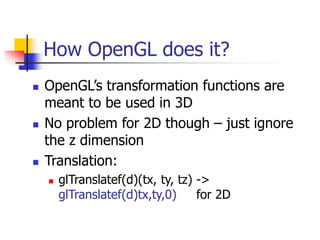
How OpenGL does it?
 OpenGL’s transformation functions are
meant to be used in 3D
 No problem for 2D though – just ignore
the z dimension
 Translation:
 glTranslatef(d)(tx, ty, tz) ->
glTranslatef(d)tx,ty,0) for 2D
How OpenGL does it?
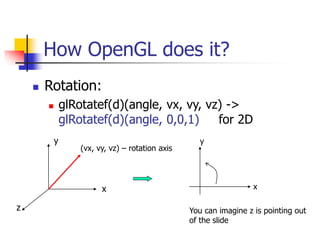
 Rotation:
 glRotatef(d)(angle, vx, vy, vz) ->
glRotatef(d)(angle, 0,0,1) for 2D
x
y
z
(vx, vy, vz) – rotation axis
x
y
You can imagine z is pointing out
of the slide
OpenGL Transformation Composition
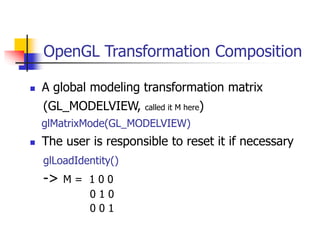
 A global modeling transformation matrix
(GL_MODELVIEW, called it M here)
glMatrixMode(GL_MODELVIEW)
 The user is responsible to reset it if necessary
glLoadIdentity()
-> M = 1 0 0
0 1 0
0 0 1
OpenGL Transformation Composition
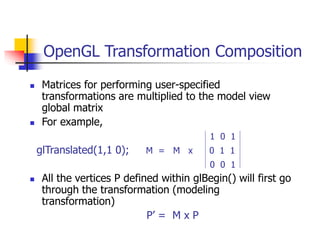
 Matrices for performing user-specified
transformations are multiplied to the model view
global matrix
 For example,
1 0 1
glTranslated(1,1 0); M = M x 0 1 1
0 0 1
 All the vertices P defined within glBegin() will first go
through the transformation (modeling
transformation)
P’ = M x P
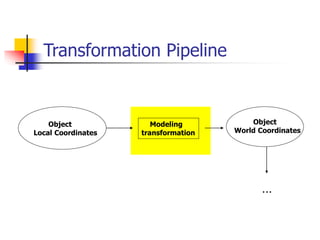
Transformation Pipeline
Object
Local Coordinates
Object
World Coordinates
Modeling
transformation
…

Transforms UNIt 2

  • 1.
  • 2.
    2D Transformation  Givena 2D object, transformation is to change the object’s  Position (translation)  Size (scaling)  Orientation (rotation)  Shapes (shear)  Apply a sequence of matrix multiplication to the object vertices
  • 3.
    Point representation  Wecan use a column vector (a 2x1 matrix) to represent a 2D point x y  A general form of linear transformation can be written as: x’ = ax + by + c OR y’ = dx + ey + f X’ a b c x Y’ = d e f * y 1 0 0 1 1
  • 4.
    Translation  Re-position apoint along a straight line  Given a point (x,y), and the translation distance (tx,ty) The new point: (x’, y’) x’ = x + tx y’ = y + ty (x,y) (x’,y’) OR P’ = P + T where P’ = x’ p = x T = tx y’ y ty tx ty
  • 5.
    3x3 2D TranslationMatrix x’ = x + tx y’ y ty Use 3 x 1 vector x’ 1 0 tx x y’ = 0 1 ty * y 1 0 0 1 1  Note that now it becomes a matrix-vector multiplication
  • 6.
    Translation  How totranslate an object with multiple vertices? Translate individual vertices
  • 7.
    2D Rotation  Defaultrotation center: Origin (0,0) q q> 0 : Rotate counter clockwise q< 0 : Rotate clockwise q
  • 8.
    Rotation (x,y) (x’,y’) q (x,y) -> Rotateabout the origin by q (x’, y’) How to compute (x’, y’) ? f x = r cos (f) y = r sin (f) r x’ = r cos (f + q) y = r sin (f + q)
  • 9.
    Rotation (x,y) (x’,y’) q f r x = rcos (f) y = r sin (f) x’ = r cos (f + q) y = r sin (f + q) x’ = r cos (f + q) = r cos(f) cos(q) – r sin(f) sin(q) = x cos(q) – y sin(q) y’ = r sin (f + q) = r sin(f) cos(q) + r cos(f)sin(q) = y cos(q) + x sin(q)
  • 10.
    Rotation (x,y) (x’,y’) q f r x’ = xcos(q) – y sin(q) y’ = y cos(q) + x sin(q) Matrix form? x’ cos(q) -sin(q) x y’ sin(q) cos(q) y = 3 x 3?
  • 11.
    3x3 2D RotationMatrix x’ cos(q) -sin(q) x y’ sin(q) cos(q) y = (x,y) (x’,y’) q f r x’ cos(q) -sin(q) 0 x y’ sin(q) cos(q) 0 y 1 0 0 1 1 =
  • 12.
    Rotation  How torotate an object with multiple vertices? Rotate individual Vertices q
  • 13.
    2D Scaling Scale: Alterthe size of an object by a scaling factor (Sx, Sy), i.e. x’ = x . Sx y’ = y . Sy x’ Sx 0 x y’ 0 Sy y = (1,1) (2,2) Sx = 2, Sy = 2 (2,2) (4,4)
  • 14.
    2D Scaling (1,1) (2,2) Sx= 2, Sy = 2 (2,2) (4,4)  Not only the object size is changed, it also moved!!  Usually this is an undesirable effect  We will discuss later (soon) how to fix it
  • 15.
    3x3 2D ScalingMatrix x’ Sx 0 x y’ 0 Sy y = x’ Sx 0 0 x y’ = 0 Sy 0 * y 1 0 0 1 1
  • 16.
    Put it alltogether  Translation: x’ x tx y’ y ty  Rotation: x’ cos(q) -sin(q) x y’ sin(q) cos(q) y  Scaling: x’ Sx 0 x y’ 0 Sy y = + = * = *
  • 17.
    Or, 3x3 Matrixrepresentations  Translation:  Rotation:  Scaling: Why use 3x3 matrices? x’ 1 0 tx x y’ = 0 1 ty * y 1 0 0 1 1 x’ cos(q) -sin(q) 0 x y’ sin(q) cos(q) 0 * y 1 0 0 1 1 = x’ Sx 0 0 x y’ = 0 Sy 0 * y 1 0 0 1 1
  • 18.
    Why use 3x3matrices?  So that we can perform all transformations using matrix/vector multiplications  This allows us to pre-multiply all the matrices together  The point (x,y) needs to be represented as (x,y,1) -> this is called Homogeneous coordinates!
  • 19.
    Shearing  Y coordinatesare unaffected, but x cordinates are translated linearly with y  That is:  y’ = y  x’ = x + y * h x 1 h 0 x y = 0 1 0 * y 1 0 0 1 1
  • 20.
    Shearing in y x1 0 0 x y = g 1 0 * y 1 0 0 1 1  A 2D rotation is three shears  Shearing will not change the area of the object  Any 2D shearing can be done by a rotation, followed by a scaling, and followed by a rotation Interesting Facts:
  • 21.
    Rotation Revisit  Thestandard rotation matrix is used to rotate about the origin (0,0) cos(q) -sin(q) 0 sin(q) cos(q) 0 0 0 1  What if I want to rotate about an arbitrary center?
  • 22.
    Arbitrary Rotation Center To rotate about an arbitrary point P (px,py) by q:  Translate the object so that P will coincide with the origin: T(-px, -py)  Rotate the object: R(q)  Translate the object back: T(px,py) (px,py)
  • 23.
    Arbitrary Rotation Center Translate the object so that P will coincide with the origin: T(-px, -py)  Rotate the object: R(q)  Translate the object back: T(px,py)  Put in matrix form: T(px,py) R(q) T(-px, -py) * P x’ 1 0 px cos(q) -sin(q) 0 1 0 -px x y’ = 0 1 py sin(q) cos(q) 0 0 1 -py y 1 0 0 1 0 0 1 0 0 1 1
  • 24.
    Scaling Revisit  Thestandard scaling matrix will only anchor at (0,0) Sx 0 0 0 Sy 0 0 0 1  What if I want to scale about an arbitrary pivot point?
  • 25.
    Arbitrary Scaling Pivot To scale about an arbitrary pivot point P (px,py):  Translate the object so that P will coincide with the origin: T(-px, -py)  Rotate the object: S(sx, sy)  Translate the object back: T(px,py) (px,py)
  • 26.
    Affine Transformation  Translation,Scaling, Rotation, Shearing are all affine transformation  Affine transformation – transformed point P’ (x’,y’) is a linear combination of the original point P (x,y), i.e. x’ m11 m12 m13 x y’ = m21 m22 m23 y 1 0 0 1 1  Any 2D affine transformation can be decomposed into a rotation, followed by a scaling, followed by a shearing, and followed by a translation. Affine matrix = translation x shearing x scaling x rotation
  • 27.
    Composing Transformation  ComposingTransformation – the process of applying several transformation in succession to form one overall transformation  If we apply transform a point P using M1 matrix first, and then transform using M2, and then M3, then we have: (M3 x (M2 x (M1 x P ))) = M3 x M2 x M1 x P M (pre-multiply)
  • 28.
    Composing Transformation  Matrixmultiplication is associative M3 x M2 x M1 = (M3 x M2) x M1 = M3 x (M2 x M1)  Transformation products may not be commutative A x B != B x A  Some cases where A x B = B x A A B translation translation scaling scaling rotation rotation uniform scaling rotation (sx = sy)
  • 29.
    Transformation order matters! Example: rotation and translation are not commutative Translate (5,0) and then Rotate 60 degree OR Rotate 60 degree and then translate (5,0)?? Rotate and then translate !!
  • 30.
    How OpenGL doesit?  OpenGL’s transformation functions are meant to be used in 3D  No problem for 2D though – just ignore the z dimension  Translation:  glTranslatef(d)(tx, ty, tz) -> glTranslatef(d)tx,ty,0) for 2D
  • 31.
    How OpenGL doesit?  Rotation:  glRotatef(d)(angle, vx, vy, vz) -> glRotatef(d)(angle, 0,0,1) for 2D x y z (vx, vy, vz) – rotation axis x y You can imagine z is pointing out of the slide
  • 32.
    OpenGL Transformation Composition A global modeling transformation matrix (GL_MODELVIEW, called it M here) glMatrixMode(GL_MODELVIEW)  The user is responsible to reset it if necessary glLoadIdentity() -> M = 1 0 0 0 1 0 0 0 1
  • 33.
    OpenGL Transformation Composition Matrices for performing user-specified transformations are multiplied to the model view global matrix  For example, 1 0 1 glTranslated(1,1 0); M = M x 0 1 1 0 0 1  All the vertices P defined within glBegin() will first go through the transformation (modeling transformation) P’ = M x P
  • 34.