Systems Analysis and Design: The Big Picture Computers:Tools for an Information Age
Objectives Define the terms “system,” “analysis,” and “design” Describe the principal functions of the systems analyst List and describe the phases of the systems development life cycle Describe the various data-gathering and analysis tools Describe a selection of systems design tools Explain the concept of prototyping Explain the role of the maintenance task in the systems development life cycle
Systems  Analysis  Design System  – an organized set of related components established to accomplish a certain task Computer system – a system that has a computer as one of its components Analysis  - Studying an existing system to determine how it works and how it meets users’ needs Typically happens as a result of some impetus for change, combined with the authority to make the change Design  - The process of developing a plan for an improved system, based on the result of the systems analysis
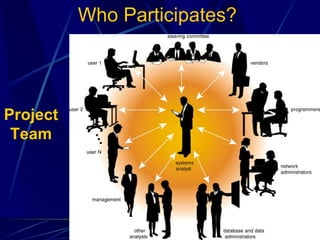
Who Participates? Project Team
Key Individuals Involved in Systems Analysis Systems analyst  – performs analysis and design May perform some programming as well Client  – the person or organization contracting to have the work done User  – the people who will have contact with the system
Systems Analyst: A Change Agent The catalyst or persuader who overcomes the reluctance to change within an organization Systems analyst can function as change agent, but it works best if it is someone inside the organization  What it takes: Coordination of many people, tasks, and schedules Communication skills, both oral and written Planning and design (an analytical mind) Self-discipline and self-direction Good organizational skills Creativity The ability to work without tangible results
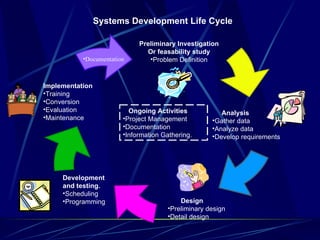
System Development Life Cycle (SDLC) Organized set of activities that guides those involved through the development of an information system. Phases Preliminary Investigation Analysis Design Development (Documentation) Implementation Ongoing activities Project management Overall Documentation Information gathering
Systems Development Life Cycle Documentation Preliminary Investigation Or feasability study Problem Definition Development and testing. Scheduling Programming Implementation Training Conversion Evaluation Maintenance Analysis Gather data Analyze data Develop requirements Design Preliminary design Detail design Ongoing Activities Project Management Documentation Information Gathering.
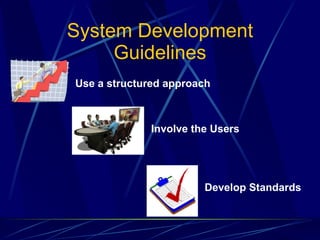
System Development Guidelines Use a structured approach Involve the Users Develop Standards
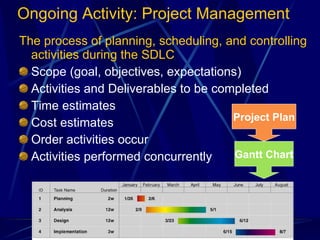
Ongoing Activity: Project Management The process of planning, scheduling, and controlling activities during the SDLC Scope (goal, objectives, expectations) Activities and Deliverables to be completed Time estimates Cost estimates Order activities occur Activities performed concurrently Gantt Chart Project Plan
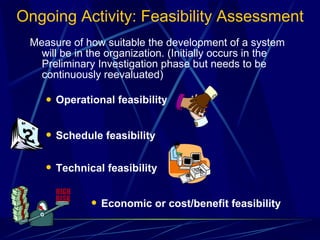
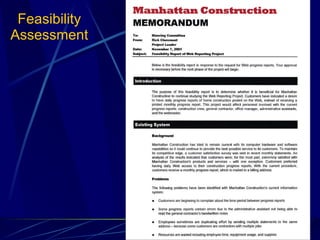
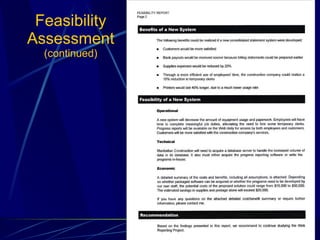
Ongoing Activity: Feasibility Assessment Measure of how suitable the development of a system will be in the organization. (Initially occurs in the Preliminary Investigation phase but needs to be continuously reevaluated) Operational feasibility Schedule feasibility Technical feasibility Economic or cost/benefit feasibility
Ongoing Activity: Documentation Compilation and summarization of data and information Reports Diagrams Programs Other deliverables generated during SDLC Project Notebook Project Dictionary/Repository
Ongoing Activity: Data & Info Gathering Review current system documentation Observe Send Questionnaires Interview Structured/Unstructured Conduct JAD (joint application design)  sessions Research Begins in Analysis Phase, but is continually updated
Phase 1: Preliminary Investigation A brief study of the problem to determine whether the project should be pursued Also called the feasibility study or system survey Involves working with the users Organization chart – a hierarchical drawing showing the organization’s management
Feasibility Study Technical feasibility  Economic feasibility  Operational feasibility  are the current work practices and procedures adequate to support the new system?  Legal feasibility Schedule feasibility  how long will the system take to develop, or can it be done in a desired time-frame?
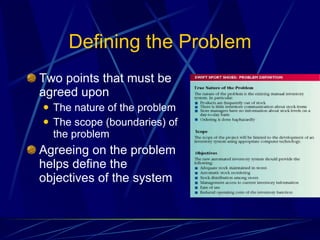
Defining the Problem Two points that must be agreed upon The nature of the problem The scope (boundaries) of the problem Agreeing on the problem helps define the objectives of the system
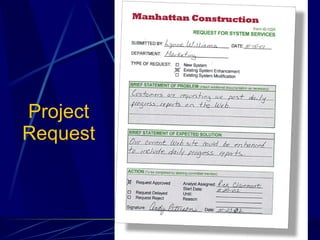
Project Request
Feasibility Assessment
Feasibility Assessment  (continued)
Phase 2: Analysis Understand the existing system Two tasks are involved Data gathering Data analysis
Data Gathering A number of techniques can be used Interviews with users and managers Structured interview – includes only questions that have been written out in advance Unstructured interview – interviewer has a general goal but few, if any questions prepared Examining current business and systems documents and output may include current order documents, computer systems procedures and reports used by operations and senior management Sending out questionnaires  Observation of current procedures by spending time in various departments; a time and motion study can show where procedures could be more efficient, or to detect bottlenecks
Data Analysis Typical tools for data analysis Entity Relationship diagram Data flow diagram Decision table/Decision Tree Written report Report to management/ customer/ client
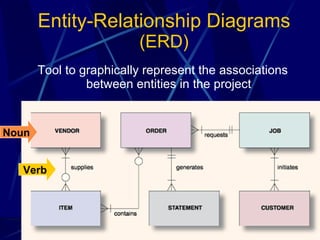
Entity-Relationship Diagrams  (ERD) Tool to graphically represent the associations between entities in the project Noun Verb
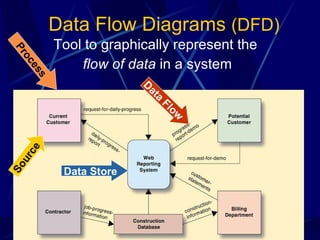
Data Flow Diagrams  (DFD) Tool to graphically represent the  flow of data  in a system Process Source Data Flow Data Store
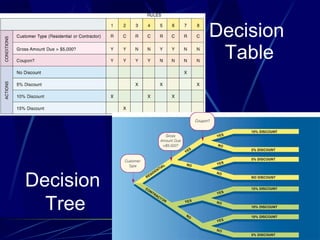
Decision  Table Decision  Tree
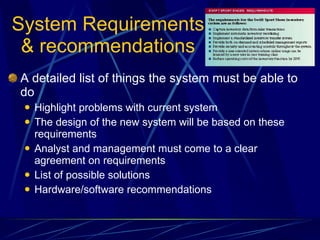
System Requirements & recommendations A detailed list of things the system must be able to do Highlight problems with current system The design of the new system will be based on these requirements Analyst and management must come to a clear agreement on requirements List of possible solutions Hardware/software recommendations
Report to Management Summarizes the problems found in the current system Describes the requirements for the new system, including a cost analysis Makes a recommendation on what course to take next
Pre-Design considerations The hardware platform  which type of computer, network capabilities, input, storage and output devices The software programming language, package or database The outputs report layouts and screen designs The inputs documents, screen layouts, validation procedures The user interface  how users will interact with the computer system The modular design of each program in the application The test plan and test data Conversion plan how the new system is to be implemented Documentation  User Technical
Phase 3: Design The new system is actually planned Divided into two subphases Preliminary design Several key decisions must be made Detail design specifications Output requirements Input requirements Files and databases System processing System controls and backups
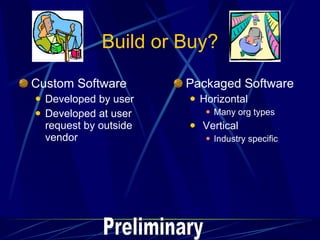
Build or Buy? Custom Software Developed by user Developed at user request by outside vendor Packaged Software Horizontal Many org types Vertical Industry specific Preliminary
Acquire Hardware/Software Technical specifications Solicit vendor proposals Test & evaluate   Benchmark Test Make a decision Detail
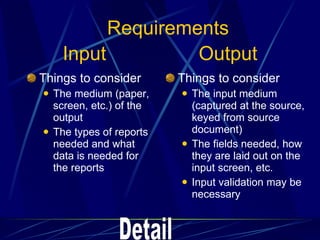
Input  Output Things to consider The medium (paper, screen, etc.) of the output The types of reports needed and what data is needed for the reports Things to consider The input medium (captured at the source, keyed from source document) The fields needed, how they are laid out on the input screen, etc. Input validation may be necessary Detail Requirements
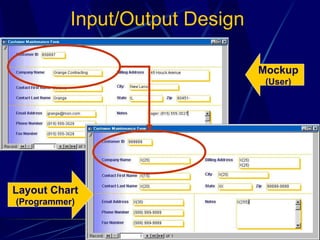
Input/Output Design Mockup (User) Layout Chart (Programmer)
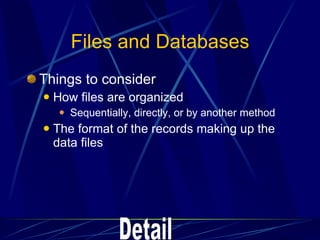
Files and Databases Things to consider How files are organized Sequentially, directly, or by another method The format of the records making up the data files Detail
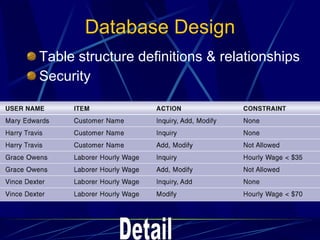
Database Design Table structure definitions & relationships Security Detail
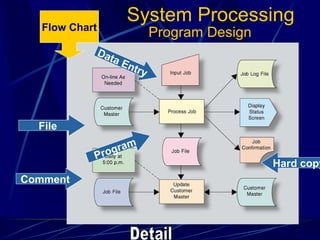
Program Design Data Entry Program File Hard copy Comment Flow Chart System Processing Detail
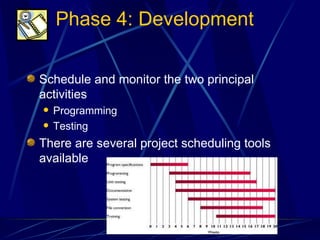
Phase 4: Development Schedule and monitor the two principal activities Programming  Testing  There are several project scheduling tools available
Programming Prepare program design specifications Use logic flowcharts and pseudocode to facilitate code development
Testing Unit testing – verifies that individual program units work Perform testing with test data System testing – determines whether all program units work together as planned Volume testing – uses real data in large amounts Determines whether the system can handle a large volume of data
Phase 5: Implementation Steps involved in starting the new system Training Equipment conversion File conversion System conversion Auditing Evaluation Maintenance
Training Teach users how to use the system The system will do no better than the people using it Develop user’s manual to aid users who are not familiar with the system Hands-on training is best
Equipment Conversion Items to consider Delivery schedules must be coordinated Terminals or personal computers must be networked Devices on the system must be compatible
File Conversion If existing files are manual, they must be keyed in or scanned into the system Manual files must be kept current while data is being input into the new system If existing files are computer-based, programs must be written to convert the files into the format needed for the new system
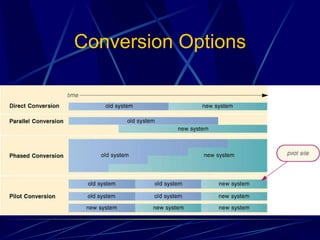
System Conversion Four approaches Direct conversion – the user simply stops using the old system and starts using the new one Phased conversion – the system is implemented one part at a time Pilot conversion – the entire system is used by a designated set of users Parallel conversion – the old and new systems are both used until users are satisfied the new system works
Conversion Options
Auditing Systems to trace data in the system back to a source document Very helpful in tracing security violations
Evaluation Determines how well the system is meeting the original requirements, benefits, and budgets Evaluation can be performed by the analyst and someone from the organization Evaluation can also be performed by an independent third party
Maintenance An ongoing activity that lasts the lifetime of the system Several types of maintenance activities Enhancements to the system Fix bugs in the system as they are identified
Terms to Know: Chapter 14 Analysis Benchmark test Build-or-buy decision CASE  Cost/benefit analysis Data dictionary Data flow diagram Decision tree/Decision table Deliverable Design Development Direct conversion Documentation Entity-relationship diagram (ERD) Feasibility Assessment/Study Gantt chart Joint application development (JAD) Layout chart Mockup Outsourcing Parallel conversion Phased conversion Pilot conversion Post-implementation system review Preliminary investigation Project dictionary Project plan Prototype RFP, RFQ, RFI Scope System System design System development life cycle-SDLC System testing Systems analyst Unit testing Volume testing
If asked, can you… Define the terms “system,” “analysis,” and “design” Describe the principal functions of the systems analyst List and describe the phases of the systems development life cycle Describe the various data-gathering and analysis tools Describe a selection of systems design tools Explain the concept of prototyping Explain the role of the maintenance task in the systems development life cycle
Sources Capron; Computers: Tools for An Information Age, 8 th  Ed. 2003 Pfaffenberger; Computers in Your Future 2003 Microsoft Clipart

Systems Analysis And Design 2

  • 1.
    Systems Analysis andDesign: The Big Picture Computers:Tools for an Information Age
  • 2.
    Objectives Define theterms “system,” “analysis,” and “design” Describe the principal functions of the systems analyst List and describe the phases of the systems development life cycle Describe the various data-gathering and analysis tools Describe a selection of systems design tools Explain the concept of prototyping Explain the role of the maintenance task in the systems development life cycle
  • 3.
    Systems Analysis Design System – an organized set of related components established to accomplish a certain task Computer system – a system that has a computer as one of its components Analysis - Studying an existing system to determine how it works and how it meets users’ needs Typically happens as a result of some impetus for change, combined with the authority to make the change Design - The process of developing a plan for an improved system, based on the result of the systems analysis
  • 4.
  • 5.
    Key Individuals Involvedin Systems Analysis Systems analyst – performs analysis and design May perform some programming as well Client – the person or organization contracting to have the work done User – the people who will have contact with the system
  • 6.
    Systems Analyst: AChange Agent The catalyst or persuader who overcomes the reluctance to change within an organization Systems analyst can function as change agent, but it works best if it is someone inside the organization What it takes: Coordination of many people, tasks, and schedules Communication skills, both oral and written Planning and design (an analytical mind) Self-discipline and self-direction Good organizational skills Creativity The ability to work without tangible results
  • 7.
    System Development LifeCycle (SDLC) Organized set of activities that guides those involved through the development of an information system. Phases Preliminary Investigation Analysis Design Development (Documentation) Implementation Ongoing activities Project management Overall Documentation Information gathering
  • 8.
    Systems Development LifeCycle Documentation Preliminary Investigation Or feasability study Problem Definition Development and testing. Scheduling Programming Implementation Training Conversion Evaluation Maintenance Analysis Gather data Analyze data Develop requirements Design Preliminary design Detail design Ongoing Activities Project Management Documentation Information Gathering.
  • 9.
    System Development GuidelinesUse a structured approach Involve the Users Develop Standards
  • 10.
    Ongoing Activity: ProjectManagement The process of planning, scheduling, and controlling activities during the SDLC Scope (goal, objectives, expectations) Activities and Deliverables to be completed Time estimates Cost estimates Order activities occur Activities performed concurrently Gantt Chart Project Plan
  • 11.
    Ongoing Activity: FeasibilityAssessment Measure of how suitable the development of a system will be in the organization. (Initially occurs in the Preliminary Investigation phase but needs to be continuously reevaluated) Operational feasibility Schedule feasibility Technical feasibility Economic or cost/benefit feasibility
  • 12.
    Ongoing Activity: DocumentationCompilation and summarization of data and information Reports Diagrams Programs Other deliverables generated during SDLC Project Notebook Project Dictionary/Repository
  • 13.
    Ongoing Activity: Data& Info Gathering Review current system documentation Observe Send Questionnaires Interview Structured/Unstructured Conduct JAD (joint application design) sessions Research Begins in Analysis Phase, but is continually updated
  • 14.
    Phase 1: PreliminaryInvestigation A brief study of the problem to determine whether the project should be pursued Also called the feasibility study or system survey Involves working with the users Organization chart – a hierarchical drawing showing the organization’s management
  • 15.
    Feasibility Study Technicalfeasibility Economic feasibility Operational feasibility are the current work practices and procedures adequate to support the new system? Legal feasibility Schedule feasibility how long will the system take to develop, or can it be done in a desired time-frame?
  • 16.
    Defining the ProblemTwo points that must be agreed upon The nature of the problem The scope (boundaries) of the problem Agreeing on the problem helps define the objectives of the system
  • 17.
  • 18.
  • 19.
  • 20.
    Phase 2: AnalysisUnderstand the existing system Two tasks are involved Data gathering Data analysis
  • 21.
    Data Gathering Anumber of techniques can be used Interviews with users and managers Structured interview – includes only questions that have been written out in advance Unstructured interview – interviewer has a general goal but few, if any questions prepared Examining current business and systems documents and output may include current order documents, computer systems procedures and reports used by operations and senior management Sending out questionnaires Observation of current procedures by spending time in various departments; a time and motion study can show where procedures could be more efficient, or to detect bottlenecks
  • 22.
    Data Analysis Typicaltools for data analysis Entity Relationship diagram Data flow diagram Decision table/Decision Tree Written report Report to management/ customer/ client
  • 23.
    Entity-Relationship Diagrams (ERD) Tool to graphically represent the associations between entities in the project Noun Verb
  • 24.
    Data Flow Diagrams (DFD) Tool to graphically represent the flow of data in a system Process Source Data Flow Data Store
  • 25.
    Decision TableDecision Tree
  • 26.
    System Requirements &recommendations A detailed list of things the system must be able to do Highlight problems with current system The design of the new system will be based on these requirements Analyst and management must come to a clear agreement on requirements List of possible solutions Hardware/software recommendations
  • 27.
    Report to ManagementSummarizes the problems found in the current system Describes the requirements for the new system, including a cost analysis Makes a recommendation on what course to take next
  • 28.
    Pre-Design considerations Thehardware platform which type of computer, network capabilities, input, storage and output devices The software programming language, package or database The outputs report layouts and screen designs The inputs documents, screen layouts, validation procedures The user interface how users will interact with the computer system The modular design of each program in the application The test plan and test data Conversion plan how the new system is to be implemented Documentation User Technical
  • 29.
    Phase 3: DesignThe new system is actually planned Divided into two subphases Preliminary design Several key decisions must be made Detail design specifications Output requirements Input requirements Files and databases System processing System controls and backups
  • 30.
    Build or Buy?Custom Software Developed by user Developed at user request by outside vendor Packaged Software Horizontal Many org types Vertical Industry specific Preliminary
  • 31.
    Acquire Hardware/Software Technicalspecifications Solicit vendor proposals Test & evaluate Benchmark Test Make a decision Detail
  • 32.
    Input OutputThings to consider The medium (paper, screen, etc.) of the output The types of reports needed and what data is needed for the reports Things to consider The input medium (captured at the source, keyed from source document) The fields needed, how they are laid out on the input screen, etc. Input validation may be necessary Detail Requirements
  • 33.
    Input/Output Design Mockup(User) Layout Chart (Programmer)
  • 34.
    Files and DatabasesThings to consider How files are organized Sequentially, directly, or by another method The format of the records making up the data files Detail
  • 35.
    Database Design Tablestructure definitions & relationships Security Detail
  • 36.
    Program Design DataEntry Program File Hard copy Comment Flow Chart System Processing Detail
  • 37.
    Phase 4: DevelopmentSchedule and monitor the two principal activities Programming Testing There are several project scheduling tools available
  • 38.
    Programming Prepare programdesign specifications Use logic flowcharts and pseudocode to facilitate code development
  • 39.
    Testing Unit testing– verifies that individual program units work Perform testing with test data System testing – determines whether all program units work together as planned Volume testing – uses real data in large amounts Determines whether the system can handle a large volume of data
  • 40.
    Phase 5: ImplementationSteps involved in starting the new system Training Equipment conversion File conversion System conversion Auditing Evaluation Maintenance
  • 41.
    Training Teach usershow to use the system The system will do no better than the people using it Develop user’s manual to aid users who are not familiar with the system Hands-on training is best
  • 42.
    Equipment Conversion Itemsto consider Delivery schedules must be coordinated Terminals or personal computers must be networked Devices on the system must be compatible
  • 43.
    File Conversion Ifexisting files are manual, they must be keyed in or scanned into the system Manual files must be kept current while data is being input into the new system If existing files are computer-based, programs must be written to convert the files into the format needed for the new system
  • 44.
    System Conversion Fourapproaches Direct conversion – the user simply stops using the old system and starts using the new one Phased conversion – the system is implemented one part at a time Pilot conversion – the entire system is used by a designated set of users Parallel conversion – the old and new systems are both used until users are satisfied the new system works
  • 45.
  • 46.
    Auditing Systems totrace data in the system back to a source document Very helpful in tracing security violations
  • 47.
    Evaluation Determines howwell the system is meeting the original requirements, benefits, and budgets Evaluation can be performed by the analyst and someone from the organization Evaluation can also be performed by an independent third party
  • 48.
    Maintenance An ongoingactivity that lasts the lifetime of the system Several types of maintenance activities Enhancements to the system Fix bugs in the system as they are identified
  • 49.
    Terms to Know:Chapter 14 Analysis Benchmark test Build-or-buy decision CASE Cost/benefit analysis Data dictionary Data flow diagram Decision tree/Decision table Deliverable Design Development Direct conversion Documentation Entity-relationship diagram (ERD) Feasibility Assessment/Study Gantt chart Joint application development (JAD) Layout chart Mockup Outsourcing Parallel conversion Phased conversion Pilot conversion Post-implementation system review Preliminary investigation Project dictionary Project plan Prototype RFP, RFQ, RFI Scope System System design System development life cycle-SDLC System testing Systems analyst Unit testing Volume testing
  • 50.
    If asked, canyou… Define the terms “system,” “analysis,” and “design” Describe the principal functions of the systems analyst List and describe the phases of the systems development life cycle Describe the various data-gathering and analysis tools Describe a selection of systems design tools Explain the concept of prototyping Explain the role of the maintenance task in the systems development life cycle
  • 51.
    Sources Capron; Computers:Tools for An Information Age, 8 th Ed. 2003 Pfaffenberger; Computers in Your Future 2003 Microsoft Clipart