Information Systems Analysis and Design Myriam Lewkowicz
Outline Information Systems: the big picture Information Systems for competitive advantage Organizational Information Systems Entreprise -Wide Information Systems Information Systems Development & Acquisition Managing the Information Systems Project Systems Planning  Determining System Requirements Structuring System Requirements:  Process Modeling Structuring System Requirements:  Conceptual Data Modeling Object Oriented Analysis and Design Designing the Human Interface Systems Implementation and Operation
Chapter 1 Information Systems: The Big Picture
Chapter 1 Objectives Understand the term information systems (IS) Understand IS components: Technology, people, organizations Understand IS career opportunities Understand types of information systems Understand IS and organizational success or failure Understand the future of IS management
Information Systems Defined Combinations of hardware, software, and telecommunications networks that people build and use to collect, create, and distribute useful data in organizations
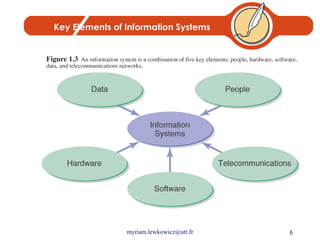
Key Elements of Information Systems
Data Data: raw material, unformatted information Information: processed data (meaningful) Knowledge: understanding relationships between pieces of information Wisdom: knowledge accumulated and applied
Knowledge as a Business Resource Knowledge Worker A well-educated professional who creates, modifies, or synthesizes knowledge in one’s profession Knowledge Society Also called digital society, new economy Working with brains instead of hands The importance of education Digital divide
Technology and Information Systems Computer-Based Information Systems One type of technology Technology – any mechanical and/or electrical means to supplement, extend, or replace human activity Information Technology (IT) – machine technology controlled by or using information The goal of IS is to provide useful data to users IS can be local or global, organizational or enterprise-wide
IS Managerial Personnel CIO IS director Account Executive Info Center Manager Development Manager Project Manager Maintenance Manager Systems Manager IS planning Manager Operations Manager Programming Manager Systems Programming Manager Manager of Emerging Technologies Telecommunications Manager Network Manager Database Administrator Auditing or Computer Security Manager Quality Assurance Manager Webmaster
Integrating Skills and Knowledge Technology hardware, software, networking Business business, management, social, communications Systems Integration, development methods, critical thinking, problem solving
Hot Skills in IS Workers Office / E-mail Languages Applications RDBS Administration Development Tools Internetworking Operating Systems LAN Administration Networking
IS Within the Firm Traditionally a love/hate relationship “Techies” vs. mere “users” (us vs. them) Poor service, lousy attitudes Now: progress toward better customer service Better relationships within the company Cooperation, not rivalry
The Spread of Technology in Organizations Technology infiltrates business units Dual role for IS workers: Work with IS technical group Work with business unit (marketing, finance, etc.)
The Spread of Technology in Organizations Benefits of centralized IS function Coordinated planning Consistent management Systems compatibility and connectivity
Questions Define and understand the term information systems (IS) Explain the technology, people, and organizational components of an information system.
Chapter 2 Information Systems for Competitive Advantage
Chapter 2 Objectives Understand the IS in automation, organizational learning, and strategic support Understand IS for strategic organizational success Understand the need for making an IS business case Understand technological innovations to improve competitive advantage
Why Use Information Systems? Automating: doing things faster Organizational learning: doing things better Supporting Strategy: doing things smarter
Automating:  Doing Things Faster Technology is used to automate a manual process Doing things faster, better, cheaper Greater accuracy and consistency Loan application example Manual processing Technology-supported process Completely automated
Organizational Learning:  Doing Things Better Going beyond automation Involves learning to improve the day-to-day activities within the process Looking at patterns and trends Organizational Learning Using acquired knowledge and insights to improve organizational behavior Total Quality Management (TQM) Monitoring an organization to improve quality of operations, products, and services
Supporting Strategy:  Doing Things Smarter Strategic Planning Create a vision: setting the direction Create a standard: performance targets Create a strategy: reaching the goal
Question Now, it should be fairly obvious why an IS professional should be able to make a business case for a given system. Why, however, is it just as important for non-IS professionals? How are they involved in this process? What is their role in information systems planning?
Chapter 3 Organizational Information Systems
Chapter Objectives Understand characteristics of operational, managerial, and executive information systems Understand characteristics of transaction processing systems, management information systems, and executive information systems Understand characteristics of information systems that span organizational boundaries
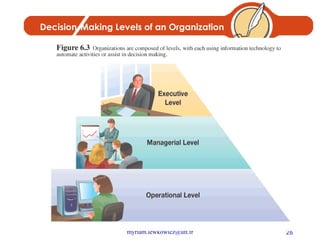
Decision-Making Levels of an Organization
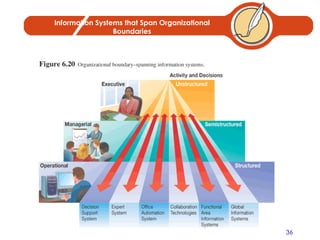
Decision-Making Levels of an Organization Executive level (top) Long-term decisions Unstructured decisions Managerial level (middle) Decisions covering weeks and months Semistructured decisions Operational level (bottom) Day-to-day decisions Structured decisions
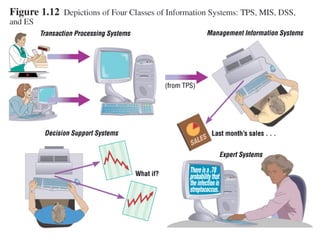
General Types of Information Systems Transaction Processing Systems (TPSs) Transactions Used at Operational level of the organization Goal: to automate repetitive information processing activities Increase speed Increase accuracy Greater efficiency
General Types of Information Systems Data input Manual data entry Semiautomated data entry Fully automated data entry Examples: Payroll Sales and ordering Inventory Purchasing, receiving, shipping Accounts payable and receivable
General Types of Information Systems Management Information Systems (MISs) Two Types: Management of IS in organizations Specific information systems for mid-level managers Used at managerial level of the organization
General Types of Information Systems Management Information Systems Types of reports: Scheduled report Key-indicator report Exception report Drill-down report Ad hoc report
General Types of Information Systems Management Information Systems (MISs) Examples: Sales forecasting Financial management and forecasting Manufacturing planning and scheduling Inventory management and planning Advertising and product pricing
General Types of Information Systems Executive Information Systems (EISs) Used at executive level of the organization Highly aggregated form Data types Soft data – news and nonanalytical data Hard data – facts and numbers
General Types of Information Systems Executive Information Systems (EISs) Examples: Executive-level decision making Long-range and strategic planning Monitoring internal and external events Crisis management Staffing and labor relations
1.
Information Systems that Span Organizational Boundaries
Information Systems that  Span Organizational Boundaries Decision Support Systems (DSSs) Designed to support organizational decision making “ What-if” analysis Example of a DSS tool: Microsoft Excel Text and graphs Models for each of the functional areas Accounting, finance, personnel, etc.
Information Systems that  Span Organizational Boundaries Expert Systems (ESs) Mimics human expertise by manipulating knowledge Rules (If-then) Inferencing
Information Systems that  Span Organizational Boundaries Office Automation Systems (OASs) Examples: Communicating and scheduling Document preparation Analyzing data Consolidating information
Information Systems that  Span Organizational Boundaries Collaboration Technologies Virtual teams Videoconferencing Groupware Electronic Meeting Systems (EMSs)
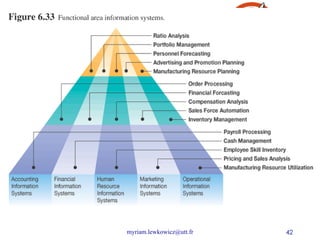
Information Systems that  Span Organizational Boundaries Functional Area Information Systems Geared toward specific areas in the company: Human Resources Benefits Marketing
 
Information Systems that  Span Organizational Boundaries Global Information Systems International IS Transnational IS Multinational IS Global IS
Chapter 4 Enterprise-Wide Information Systems
Chapter  Objectives Understand how information technology supports business activities Understand enterprise systems and how they evolved Understand software applications that are internally or externally focused Understand how to implement enterprise systems
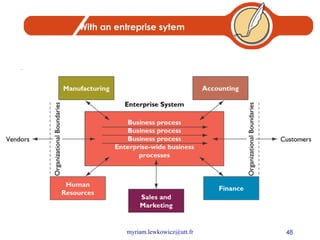
Enterprise Systems Enterprise systems Also known as enterprise-wide information systems Information systems that allow companies to integrate information across operations on a company-wide basis
Before an entreprise system
With an entreprise sytem
Types of Enterprise Systems Packaged applications Custom applications Stand-alone applications
Types of Enterprise Systems Enterprise Resource Planning Integrated applications ERP systems Baan Oracle PeopleSoft SAP
Types of Enterprise Systems ERP Implementation Modules Customizations Best practices Business process reengineering (BPR)
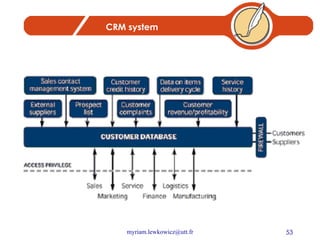
Types of Enterprise Systems Customer Relationship Management (CRM) Sales Force Automation (SFA) New opportunities for competitive advantage Examples: MGM American Airlines Marriott International
CRM system
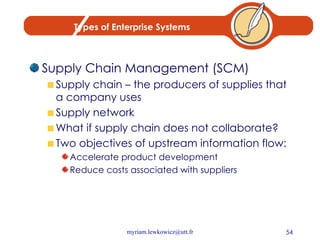
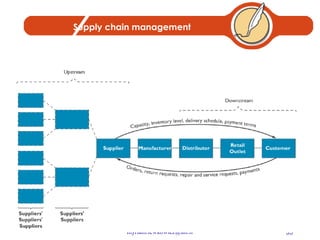
Types of Enterprise Systems Supply Chain Management (SCM) Supply chain – the producers of supplies that a company uses Supply network What if supply chain does not collaborate? Two objectives of upstream information flow: Accelerate product development Reduce costs associated with suppliers
Supply chain management
The Formula for Enterprise System Success Secure executive sponsorship Get help from outside experts Thoroughly train users Take a multidisciplinary approach to implementation
Questions List the different classes of information systems described in this chapter.  How do they differ from each other?  Of the information systems listed in the chapter, how many do you have experience with? What systems would you like to work with? What types of systems do you encounter at the university you are attending?  Consider an organization that you are familiar with, perhaps the one in which you work or one with which you have done business. Describe the type of information systems that organization uses and whether or not they are useful or up-to-date. List specific examples for updating or installing information systems that improve productivity or efficiency.
Chapter 5 Information Systems Development & Acquisition
Chapter Objectives Understand the process of IS management Understand the system development life cycle (SDLC) Understand alternative approaches to system development Understand  in-house system development Understand external acquisition, outsourcing, and end-user development
The Need for Structured Systems Development Systems analysis and design – the process of designing, building, and maintaining information systems Systems analyst Blending technical and managerial expertise
The Need for Structured Systems Development Evolution of IS development From “art” to a “discipline” Standardized development methods Software engineering
The Need for Structured Systems Development Options for Obtaining Information Systems Build your own Buy a prepackaged system Outsource development to a 3rd party End user development
The Need for Structured Systems Development Information Systems Development in Action Breaking large complex problems into manageable pieces Decomposing large, complex problems
The Need for Structured Systems Development System Construction Process Identify a large IT problem to solve  Break the large problem into several smaller, more manageable pieces Translate each “piece” (small problem) into computer programs Piece together each program into an overall comprehensive IS that solves the problem
The Need for Structured Systems Development The Role of Users in the Systems Development Process Knowledgeable of needs Effective partnership
Information Systems Analysis and Design Systems Analyst performs analysis and design based upon: Understanding of organization’s objectives, structure and processes Knowledge of how to exploit information technology for advantage
Systems Analysis and Design: Core Concepts Major goal: to improve organizational systems by developing or acquiring software and training employees in its use Application software, or a system, supports organizational functions or processes
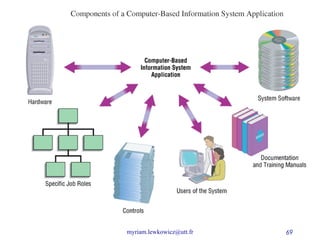
Systems Analysis and Design: Core Concepts System: Turns data into information and includes: Hardware and system software Documentation and training materials Job roles associated with the system Controls to prevent theft or fraud The people who use the software to perform their jobs
 
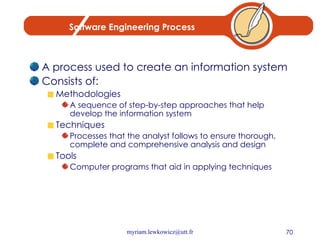
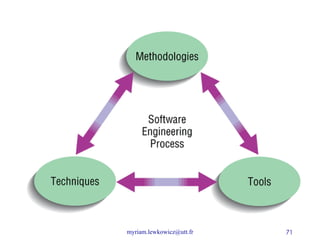
Software Engineering Process A process used to create an information system Consists of: Methodologies A sequence of step-by-step approaches that help develop the information system Techniques Processes that the analyst follows to ensure thorough, complete and comprehensive analysis and design Tools Computer programs that aid in applying techniques
 
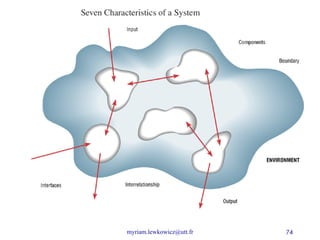
System A system is an interrelated set of business procedures used within one business unit working together for a purpose A system has nine characteristics A system exists within an environment A boundary separates a system from its environment
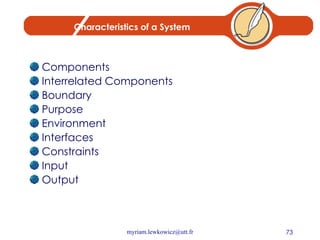
Characteristics of a System Components Interrelated Components Boundary Purpose Environment Interfaces Constraints Input Output
 
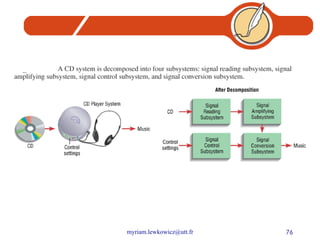
Important System Concepts Decomposition The process of breaking down a system into smaller components Allows the systems analyst to: Break a system into small, manageable subsystems Focus on one area at a time Concentrate on component pertinent to one group of users Build different components at independent times
 
Important System Concepts Modularity Process of dividing a system into modules of a relatively uniform size Modules simplify system design Coupling Subsystems that are dependent upon each other are coupled Cohesion Extent to which a subsystem performs a single function
A Modern Approach to Systems Analysis and Design Systems Integration Allows hardware and software from different vendors to work together Enables procedural language systems to work with visual programming systems Visual programming environment uses client/server model
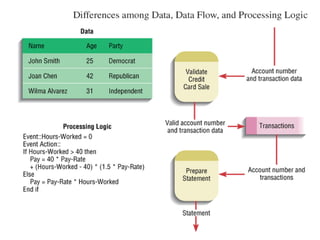
Data and Processes Three key components of an information system Data Data Flows Processing Logic Data vs. Information Data Raw facts Information Derived from data Organized in a manner that humans can understand
Data and Processes Data Understanding the source and use of data is key to good system design Various techniques are used to describe data and the relationship amongst data Data Flows Groups of data that move and flow through the system Include description of sources and destination for each data flow Processing Logic Describe steps that transform data and events that trigger the steps
 
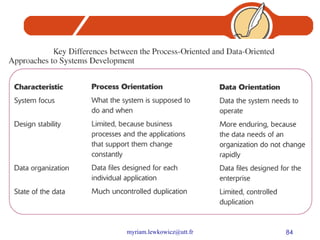
Approaches to Systems Development Process-Oriented Approach Focus is on flow, use and transformation of data in an information system Involves creating graphical representations such as data flow diagrams and charts Data are tracked from sources, through intermediate steps and to final destinations Natural structure of data is not specified Disadvantage: data files are tied to specific applications
Approaches to Systems Development (2) Data-Oriented Approach Depicts ideal organization of data, independent of where and how data are used Data model describes kinds of data and business relationships among the data Business rules depict how organization captures and processes the data
 
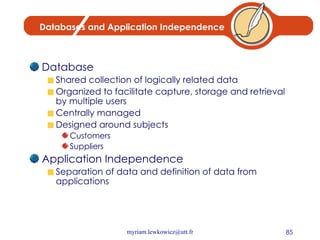
Databases and Application Independence Database Shared collection of logically related data Organized to facilitate capture, storage and retrieval by multiple users Centrally managed Designed around subjects Customers Suppliers Application Independence Separation of data and definition of data from applications
Role of the Systems Analyst Study problems and needs of an organization Determine best approach to improving organization through use of: People Methods Information technology Help system users and managers define their requirements for new or enhanced systems
Role of the Systems Analyst Assess options for system implementation In-house development Outsourced development Outsourced development and operation Commercial application For in-house projects, work on a team of analysts and developers
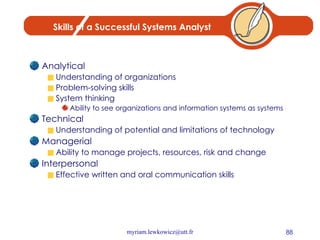
Skills of a Successful Systems Analyst Analytical Understanding of organizations Problem-solving skills System thinking Ability to see organizations and information systems as systems Technical Understanding of potential and limitations of technology Managerial Ability to manage projects, resources, risk and change Interpersonal Effective written and oral communication skills
Systems Development Life Cycle System Development Methodology Standard process followed in an organization Consists of: Analysis Design Implementation Maintenance
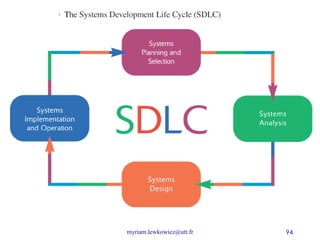
Systems Development Life Cycle Series of steps used to manage the phases of development for an information system Consists of four phases: Planning and Selection Analysis Design Implementation and Operation
Systems Development Life Cycle Phases are not necessarily sequential Each phase has a specific outcome and deliverable Individual companies use customized life cycle
Phases of the Systems Development Life Cycle Systems Planning and Selection Two Main Activities Identification of need Investigation and determination of scope Systems Analysis Study of current procedures and information systems Determine requirements Generate alternative designs Compare alternatives Recommend best alternative
Systems Development Life Cycle System Design Logical Design Concentrates on business aspects of the system Physical Design Technical specifications Implementation and Operation Implementation Hardware and software installation Programming User Training Documentation Operation System changed to reflect changing conditions System obsolescence
 
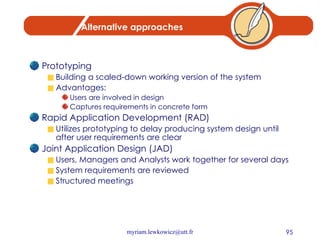
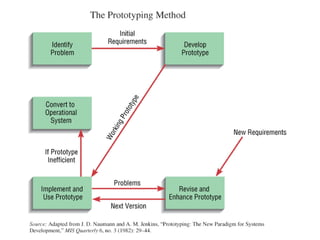
Alternative approaches Prototyping Building a scaled-down working version of the system Advantages: Users are involved in design Captures requirements in concrete form Rapid Application Development (RAD) Utilizes prototyping to delay producing system design until after user requirements are clear Joint Application Design (JAD) Users, Managers and Analysts work together for several days System requirements are reviewed Structured meetings
 
Summary Information systems analysis and design Process of developing and maintaining an information system Modern approach to systems analysis Process-Oriented Data-Oriented
Summary Systems Development Life Cycle (SDLC) Systems Planning and Selection Systems Analysis Systems Design Systems Implementation Alternatives to Systems Development Life Cycle Prototyping Rapid Application Development (RAD) Joint Application Design (JAD)
Questions In what way are organizations systems? List and explain the different phases in the systems development life cycle. Why is it important to use systems analysis and design methodologies when building a system?  Why not just build the system in whatever way seems to be “quick and easy”?  What value is provided by using an “engineering” approach?  Explain the traditional application-based approach to systems development.  How is this different from the data-based approach? What is prototyping? What is JAD?  What is Participatory Design?
Chapter 6  Managing the Information Systems Project
Learning Objectives Discuss skills required to be an effective project manager Describe skills and activities of a project manager during project initiation, planning, execution and closedown Explain Gantt Charts and Network Diagrams Review commercial project management software packages
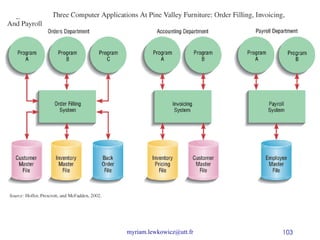
Case of Pine Valley Furniture Manufacturing Company Product: Wood Furniture Market: U.S. Organized into functional areas Manufacturing Sales Three independent computer systems were converted to a database in 1990s
 
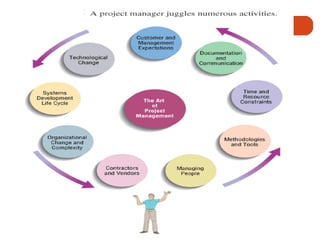
Managing the Information Systems Project Focus of project management To ensure that information system projects meet customer expectations Delivered in a timely manner Meet constraints and requirements
Project Manager Systems Analyst responsible for Project initiation Planning Execution Closing down Requires diverse set of skills Management Leadership Technical Conflict management Customer relations Managing the Information Systems Project
 
Project Management Process Project Planned undertaking of related activities to reach an objective that has a beginning and an end Four Phases Initiation Planning Execution Closing down
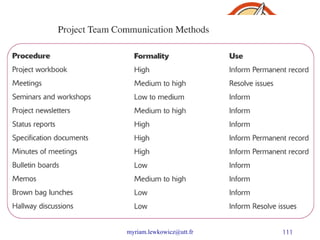
Initiating the Project Establish project initiation team Establish relationship with customer Establish project initiation plan Establish management procedures Establish project management environment and workbook
Planning the Project Describe project scope, alternatives and feasibility Scope and Feasibility Understand the project What problem is addressed What results are to be achieved Measures of success Completion criteria
Planning the Project Divide the project into manageable tasks Work breakdown structure Gantt chart Estimate resources and create a resource plan Develop a preliminary schedule Utilize Gantt Charts and Network Diagrams Develop a communication plan Outline communication processes among customers, team members and management Types of reports Frequency of reports
 
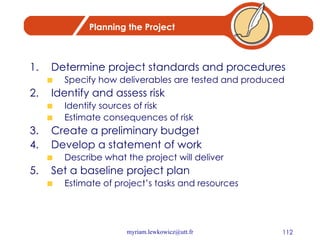
Planning the Project Determine project standards and procedures Specify how deliverables are tested and produced Identify and assess risk Identify sources of risk Estimate consequences of risk Create a preliminary budget Develop a statement of work Describe what the project will deliver Set a baseline project plan Estimate of project’s tasks and resources
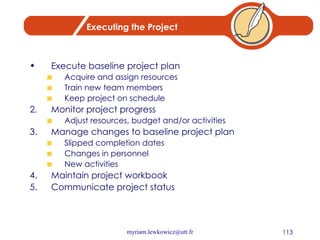
Executing the Project Execute baseline project plan Acquire and assign resources Train new team members Keep project on schedule Monitor project progress Adjust resources, budget and/or activities Manage changes to baseline project plan Slipped completion dates Changes in personnel New activities Maintain project workbook Communicate project status
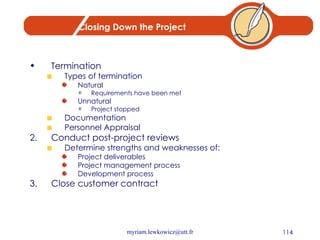
Closing Down the Project Termination Types of termination Natural Requirements have been met Unnatural Project stopped Documentation Personnel Appraisal Conduct post-project reviews Determine strengths and weaknesses of: Project deliverables Project management process Development process Close customer contract
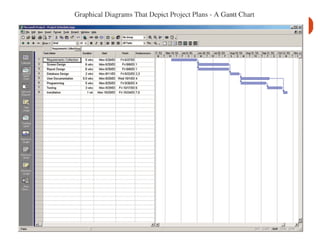
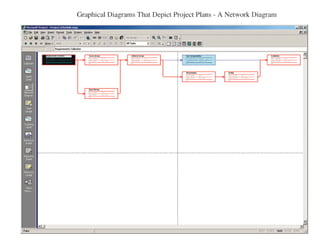
Representing and Scheduling Project Plans Gantt Charts Useful for depicting simple projects or parts of large projects Show start and completion dates for individual tasks Network Diagrams Show order of activities
 
 
Summary Skills of an effective project manager Activities of project manager Initiation Planning Execution Closedown Gantt Charts and Network Diagrams Commercial PM Software
Questions List and describe the common skills and activities of a project manager.  Which skill do you think is most important?  Why? Describe the activities performed by the project manager during project initiation. Describe the activities performed by the project manager during project planning. Describe the activities performed by the project manager during project execution.
Chapter 7  Systems Planning
Learning Objectives Discuss the content of and need for a Statement of Work and Baseline Project Plan Describe a structured walkthrough
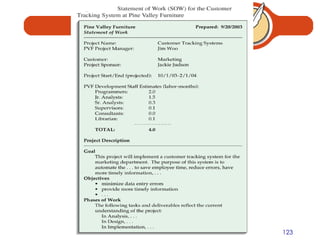
First documents Baseline Project Plan (BPP) : internal document Scope Benefits Costs Risks Resources Statement of Work (SOW) : Outlines objectives and constraints of the project to the customer Describes deliverables Outlines work needed to be performed
 
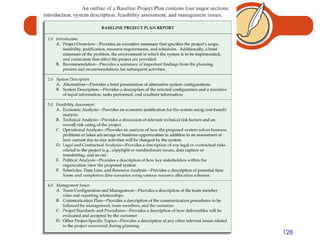
Building the Baseline Project Plan Objectives Assures that customer and development group have a complete understanding of the proposed system and requirements Provides sponsoring organization with a clear idea of scope, benefits and duration of project Four Sections Introduction System Description Feasibility Assessment Management Issues
Building the Baseline Project Plan Introduction Brief overview Recommended course of action Project scope defined Units affected Interaction with other systems Range of system capabilities
Building the Baseline Project Plan System Description Outline of possible alternative solutions Narrative format Feasibility Assessment Project costs and benefits Technical difficulties High-level project schedule
Building the Baseline Project Plan Management Issues Outlines concerns that management may have about the project Team composition Communication plan Project standards and procedures
 
Reviewing the Baseline Project Plan Objectives Assure conformity to organizational standards All parties agree to continue with project
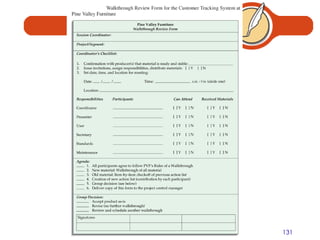
Reviewing the Baseline Project Plan Walkthrough Peer group review Participants Coordinator Presenter User Secretary Standards Bearer Maintenance Oracle Activities Walkthrough review form Individuals polled Walkthrough action list Advantages Assures that review occurs during project
 
 
Summary Baseline Project Plan (BPP) Created during project initiation and planning Contains: Introduction High-Level description of system Outline of feasibility Overview of Management Issues Statement of Work (SOW) Describes what project will deliver Lists all work to be performed
Questions What is contained in a Baseline Project Plan?  Are the content and format of all baseline plans the same?  Why or why not? Describe the structured walkthrough process.  What roles need to be performed during a walkthrough?
Chapter 8  Determining System Requirements
Learning Objectives Describe options for designing and conducting interviews Discuss planning an interview Discuss using questionnaires to determine system requirements Explain advantages and disadvantages of observing workers and analyzing business documents to determine requirements
Learning Objectives Learn about Joint Application Design (JAD) and Prototyping Discuss appropriate methods to elicit system requests Examine requirements determination for Internet applications
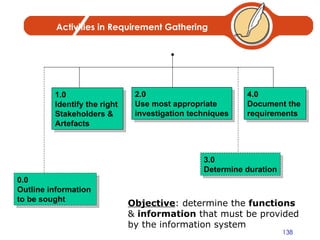
Activities in Requirement Gathering 1.0 Identify the right  Stakeholders & Artefacts 0.0 Outline information  to be sought 2.0 Use most appropriate  investigation techniques 4.0 Document the  requirements Objective : determine the  functions  &  information  that must be provided by the information system 3.0 Determine duration
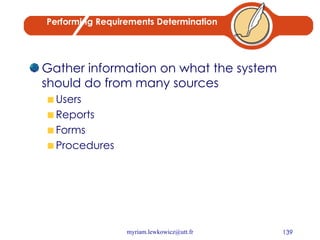
Performing Requirements Determination Gather information on what the system should do from many sources Users Reports Forms Procedures
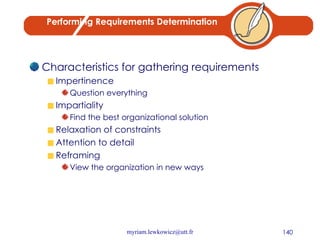
Performing Requirements Determination Characteristics for gathering requirements Impertinence Question everything Impartiality Find the best organizational solution Relaxation of constraints Attention to detail Reframing View the organization in new ways
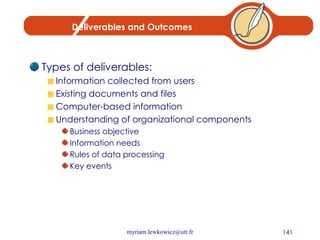
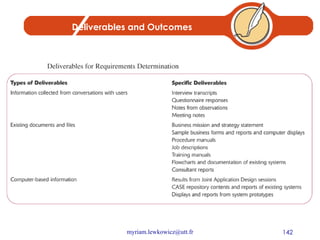
Deliverables and Outcomes Types of deliverables: Information collected from users Existing documents and files Computer-based information Understanding of organizational components Business objective Information needs Rules of data processing Key events
Deliverables and Outcomes
Traditional Methods for Determining Requirements
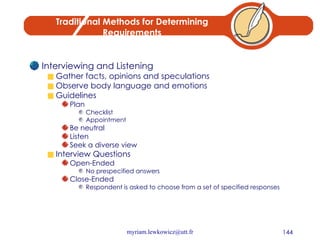
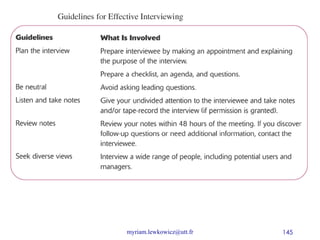
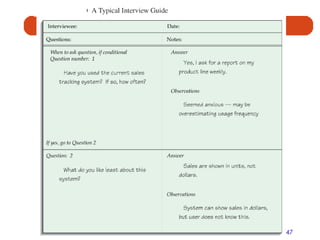
Traditional Methods for Determining Requirements Interviewing and Listening Gather facts, opinions and speculations Observe body language and emotions Guidelines Plan Checklist Appointment Be neutral Listen Seek a diverse view Interview Questions Open-Ended No prespecified answers Close-Ended Respondent is asked to choose from a set of specified responses


Traditional Methods for Determining Requirements Administering Questionnaires More cost-effective than interviews Choosing respondents Should be representative of all users Types of samples Convenient Random sample Purposeful sample Stratified sample Design Mostly closed-ended questions Can be administered over the phone, in person or over the Internet or company intranet
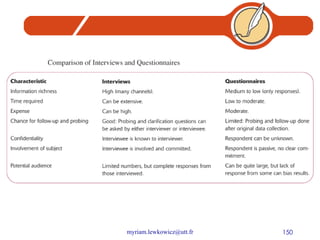
Traditional Methods for Determining Requirements Questionnaires Vs. Interviews Interviews cost more but yield more information Questionnaires are more cost-effective
 
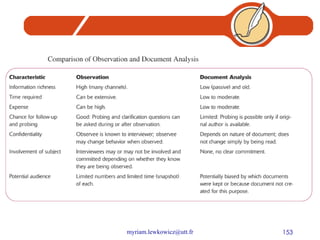
Traditional Methods for Determining Requirements Directly Observing Users Serves as a good method to supplement interviews Often difficult to obtain unbiased data People often work differently when being observed
Analyzing Procedures and Other Documents Types of information to be discovered: Problems with existing system Opportunity to meet new need Organizational direction Names of key individuals Values of organization Special information processing circumstances Rules for processing data
 
Modern Methods for Determining Requirements Joint Application Design (JAD) Brings together key users, managers and systems analysts Purpose: collect system requirements simultaneously from key people Conducted off-site Prototyping Repetitive process Rudimentary version of system is built Replaces or augments SDLC Goal: to develop concrete specifications for ultimate system
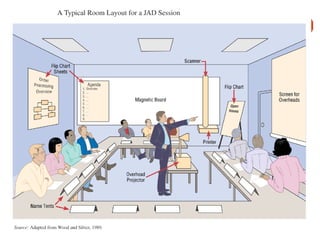
Joint Application Design (JAD) Participants Session Leader Users Managers Sponsor Systems Analysts Scribe IS Staff End Result Documentation detailing existing system Features of proposed system
 
Prototyping Quickly converts requirements to working version of system Once the user sees requirements converted to system, will ask for modifications or will generate additional requests Most useful when: User requests are not clear Few users are involved in the system Designs are complex and require concrete form History of communication problems between analysts and users Tools are readily available to build prototype
Prototyping Drawbacks Tendency to avoid formal documentation Difficult to adapt to more general user audience Sharing data with other systems is often not considered Systems Development Life Cycle (SDLC) checks are often bypassed
Summary Interviews Open-ended and close-ended questions Preparation is key Questionnaires Must be carefully designed Can contain close-ended as well as open-ended questions
Summary Other means of gathering requirements Observing workers Analyzing business documents Joint Application Design (JAD) Prototyping
Questions (1) Describe systems analysis and the major activities that occur during this phase of the systems development life cycle. What are some useful character traits for an analyst involved in requirements determination? Describe four traditional techniques for collecting information during analysis.  When might one be better than another? What are the general guidelines for conducting interviews? What are the general guidelines for designing questionnaires? Compare collecting information by interview and by questionnaire.  Describe a hypothetical situation in which each of these methods would be an effective way to collect information system requirements.
Questions (2) What are the general guidelines for collecting data through observing workers? What are the general guidelines for collecting data through analyzing documents? Describe how prototyping can be used during requirements determination.  How is it better or worse than traditional methods?
Chapter 9  Structuring System Requirements: Process Modeling
Learning Objectives Understand the logical modeling of processes through studying data flow diagrams How to draw data flow diagrams using rules and guidelines How to decompose data flow diagrams into lower-level diagrams Balancing of data flow diagrams
Learning Objectives Discuss the use of data flow diagrams as analysis tools  Discuss process modeling for Internet Applications
Process Modeling Graphically represent the processes that capture, manipulate, store and distribute data between a system and its environment and among system components Data flow diagrams (DFD) Graphically illustrate movement of data between external entities and the processes and data stores within a system
Process Modeling Modeling a system’s process Utilize information gathered during requirements determination Structure of the data is also modeled in addition to the processes Deliverables and Outcomes Set of coherent, interrelated data flow diagrams
Process Modeling Deliverables and outcomes (continued) Context data flow diagram (DFD) Scope of system DFDs of current system Enables analysts to understand current system DFDs of new logical system Technology independent Show data flows, structure and functional requirements of new system
 
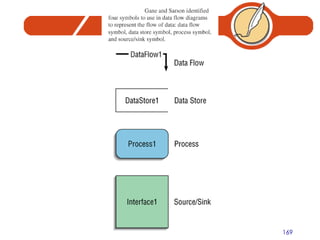
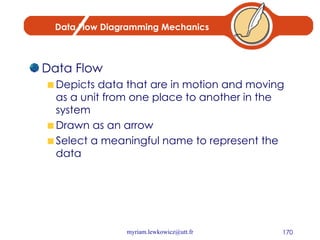
Data Flow Diagramming Mechanics Data Flow Depicts data that are in motion and moving as a unit from one place to another in the system Drawn as an arrow Select a meaningful name to represent the data
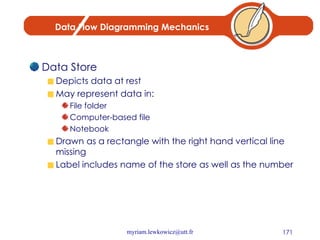
Data Flow Diagramming Mechanics Data Store Depicts data at rest May represent data in: File folder Computer-based file Notebook Drawn as a rectangle with the right hand vertical line missing Label includes name of the store as well as the number
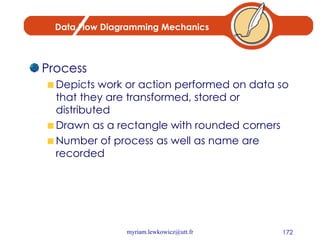
Data Flow Diagramming Mechanics Process Depicts work or action performed on data so that they are transformed, stored or distributed Drawn as a rectangle with rounded corners Number of process as well as name are recorded
Data Flow Diagramming Mechanics Source/Sink Depicts the origin and/or destination of the data Sometimes referred to as an external entity Drawn as a square symbol Name states what the external agent is Because they are external, many characteristics are not of interest to us
 
 
Data Flow Diagramming Definitions Context Diagram A data flow diagram (DFD) of the scope of an organizational system that shows the system boundaries, external entities that interact with the system and the major information flows between the entities and the system Level-O Diagram A data flow diagrams (DFD) that represents a system’s major processes, data flows and data stores at a higher level
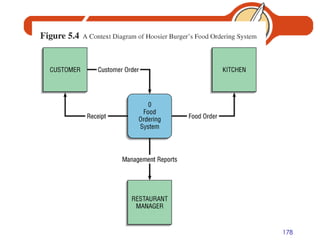
Developing DFDs: An Example Hoosier Burger’s automated food ordering system Context Diagram contains no data stores
 
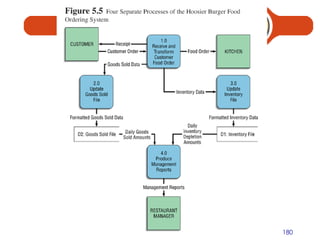
Developing DFDs: An Example Next step is to expand the context diagram to show the breakdown of processes
 
Data Flow Diagramming Rules Basic rules that apply to all DFDs Inputs to a process are always different than outputs Objects always have a unique name In order to keep the diagram uncluttered, you can repeat data stores and data flows on a diagram
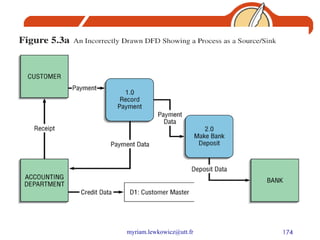
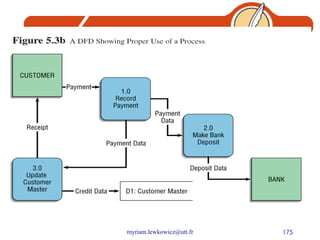
Data Flow Diagramming Rules Process No process can have only outputs (a miracle) No process can have only inputs (black hole) A process has a verb phrase label Data Store Data cannot be moved from one store to another Data cannot move from an outside source to a data store Data cannot move directly from a data store to a data sink Data store has a noun phrase label
Data Flow Diagramming Rules Source/Sink Data cannot move directly from a source to a sink A source/sink has a noun phrase label Data Flow A data flow has only one direction of flow between symbols A fork means that exactly the same data go from a common location to two or more processes, data stores or sources/sinks
Data Flow Diagramming Rules Data Flow (Continued) A join means that exactly the same data come from any two or more different processes, data stores or sources/sinks to a common location A data flow cannot go directly back to the same process it leaves A data flow to a data store means update A data flow from a data store means retrieve or use A data flow has a noun phrase label
Decomposition of DFDs Functional decomposition Act of going from one single system to many component processes Repetitive procedure Lowest level is called a primitive DFD Level-N Diagrams A DFD that is the result of  n  nested decompositions of a series of subprocesses from a process on a level-0 diagram
Balancing DFDs When decomposing a DFD, you must conserve inputs to and outputs from a process at the next level of decomposition This is called balancing Example: Hoosier Burgers In Figure 5-4, notice that there is one input to the system, the customer order Three outputs:  Customer receipt Food order Management reports
Balancing DFDs Example (Continued) Notice Figure 5-5.  We have the same inputs and outputs No new inputs or outputs have been introduced We can say that the context diagram and level-0 DFD are balanced
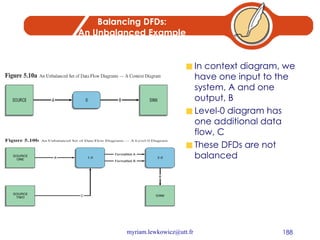
Balancing DFDs: An Unbalanced Example In context diagram, we have one input to the system, A and one output, B Level-0 diagram has one additional data flow, C These DFDs are not balanced
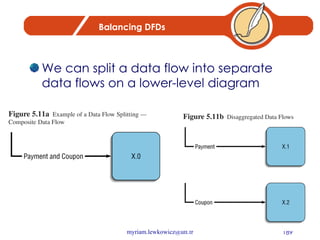
Balancing DFDs We can split a data flow into separate data flows on a lower-level diagram
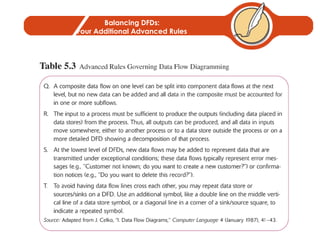
Balancing DFDs: Four Additional Advanced Rules
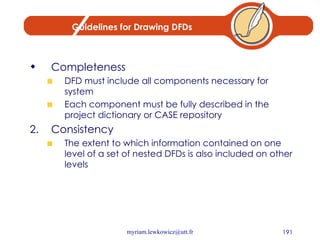
Guidelines for Drawing DFDs Completeness DFD must include all components necessary for system Each component must be fully described in the project dictionary or CASE repository Consistency The extent to which information contained on one level of a set of nested DFDs is also included on other levels
Guidelines for Drawing DFDs Timing Time is not represented well on DFDs Best to draw DFDs as if the system has never started and will never stop Iterative Development Analyst should expect to redraw diagram several times before reaching the closest approximation to the system being modeled Primitive DFDs Lowest logical level of decomposition Decision has to be made when to stop decomposition
Using DFDs as Analysis Tools Gap Analysis The process of discovering discrepancies between two or more sets of data flow diagrams or discrepancies within a single DFD Inefficiencies in a system can often be identified through DFDs
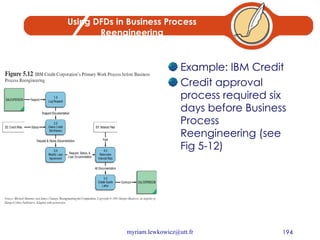
Using DFDs in Business Process Reengineering Example: IBM Credit Credit approval process required six days before Business Process Reengineering (see Fig 5-12)
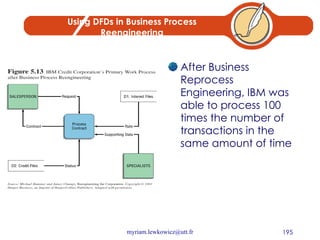
Using DFDs in Business Process Reengineering After Business Reprocess Engineering, IBM was able to process 100 times the number of transactions in the same amount of time
Summary Data flow diagrams (DFD) Symbols Rules for creating Decomposition Balancing DFDs for Analysis DFDs for Business Process Reengineering (BPR)
Questions What is a data flow diagram?  Why do systems analysts use data flow diagrams? What is decomposition?  What is balancing?  How can you determine if DFDs are not balanced? Explain the convention for naming different levels of data flow diagrams. How can data flow diagrams be used as analysis tools?
Chapter 10 Structuring System Requirements: Conceptual Data Modeling
Learning Objectives Define key data-modeling terms Conceptual data model Entity-Relationship (E-R) diagram  Entity type Entity instance Attribute Candidate key Multivalued attributes Relationship Degree Cardinality Associative entity
Learning Objectives Ask the right kinds of questions to determine data requirements for an IS Learn to draw entity-relationship diagrams (ERD) Review the role of conceptual data modeling in overall design and analysis of an information system Discuss relationships and associative entities Discuss relationship between data modeling and process modeling
Conceptual Data Modeling Representation of organizational data Purpose is to show rules about the meaning and interrelationships among data Entity-Relationship (E-R) diagrams are commonly used to show how data are organized Main goal of conceptual data modeling is to create accurate E-R diagrams Methods such as interviewing, questionnaires and JAD are used to collect information Consistency must be maintained between process flow, decision logic and data modeling descriptions
Process of Conceptual Data Modeling First step is to develop a data model for the system being replaced Next, a new conceptual data model is built that includes all the requirements of the new system In the design stage, the conceptual data model is translated into a physical design Project repository links all design and data modeling steps performed during SDLC
Deliverables and Outcomes Primary deliverable is the entity-relationship diagram There may be as many as 4 E-R diagrams produced and analyzed during conceptual data modeling Covers just data needed in the project’s application E-R diagram for system being replaced An E-R diagram for the whole database from which the new application’s data are extracted An E-R diagram for the whole database from which data for the application system being replaced are drawn
 
Deliverables and Outcomes Second deliverable is a set of entries about data objects to be stored in repository or project dictionary Repository links data, process and logic models of an information system Data elements that are included in the DFD must appear in the data model and conversely Each data store in a process model must relate to business objects represented in the data model
Gathering Information for Conceptual Data Modeling Two perspectives Top-down Data model is derived from an intimate understanding of the business Bottom-up Data model is derived by reviewing specifications and business documents
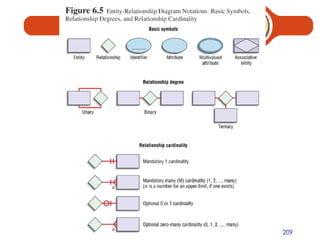
Introduction to Entity-Relationship (E-R) Modeling Notation uses three main constructs Data entities Relationships Attributes Entity-Relationship (E-R) Diagram A detailed, logical and graphical representation of the entities, associations and data elements for an organization or business
Entity-Relationship (E-R) Modeling Key Terms Entity A person, place, object, event or concept in the user environment about which the organization wishes to maintain data Represented by a rectangle in E-R diagrams Entity Type A collection of entities that share common properties or characteristics Attribute A named property or characteristic of an entity that is of interest to an organization
 
Entity-Relationship (E-R) Modeling Key Terms Candidate keys and identifiers Each entity type must have an attribute or set of attributes that distinguishes one instance from other instances of the same type Candidate key Attribute (or combination of attributes) that uniquely identifies each instance of an entity type
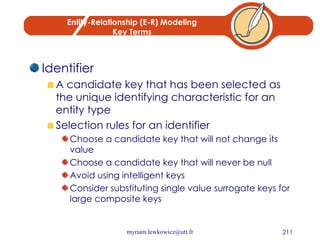
Entity-Relationship (E-R) Modeling Key Terms Identifier A candidate key that has been selected as the unique identifying characteristic for an entity type Selection rules for an identifier Choose a candidate key that will not change its value Choose a candidate key that will never be null Avoid using intelligent keys Consider substituting single value surrogate keys for large composite keys
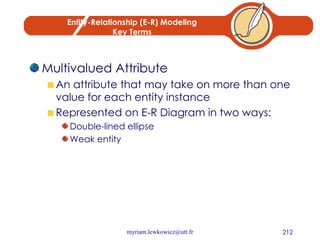
Entity-Relationship (E-R) Modeling Key Terms Multivalued Attribute An attribute that may take on more than one value for each entity instance Represented on E-R Diagram in two ways: Double-lined ellipse Weak entity
Entity-Relationship (E-R) Modeling Key Terms Relationship An association between the instances of one or more entity types that is of interest to the organization Association indicates that an event has occurred or that there is a natural link between entity types Relationships are always labeled with verb phrases
Conceptual Data Modeling and the E-R Diagram Goal Capture as much of the meaning of the data as possible Result A better design that is easier to maintain
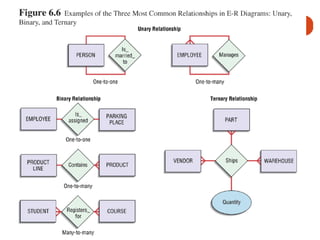
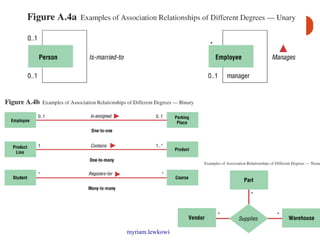
Degree of Relationship Degree Number of entity types that participate in a relationship Three cases Unary A relationship between the instances of one entity type Binary A relationship between the instances of two entity types Ternary A simultaneous relationship among the instances of three entity types Not the same as three binary relationships
 
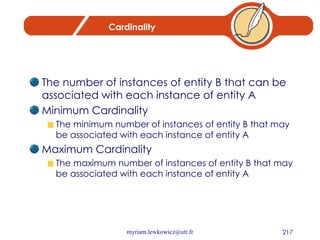
Cardinality The number of instances of entity B that can be associated with each instance of entity A Minimum Cardinality The minimum number of instances of entity B that may be associated with each instance of entity A Maximum Cardinality The maximum number of instances of entity B that may be associated with each instance of entity A
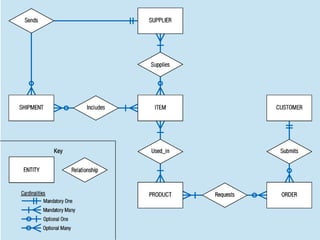
Electronic Commerce Development: Conceptual Data Model Conceptual data modeling for Internet applications is no different than the processed followed for other types of applications Pine Valley Furniture WebStore Four entity types defined Customer Inventory Order Shopping cart
 
 
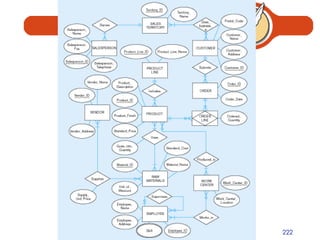
ER diagram for Pine Valley furniture
 
Summary Process of conceptual data modeling Deliverables Gathering information Entity-Relationship Modeling Entities Attributes Candidate keys and identifiers Multivalued attributes Degree of relationship
Summary Cardinality Associative entities Conceptual data modeling and Internet development
Questions List the four types of E-R diagrams produced and analyzed during conceptual data modeling. What elements of a data flow diagram should be analyzed as part of data modeling? What is the degree of a relationship?  Give an example of each of the relationship degrees illustrated in this chapter. Explain why a ternary relationship is not the same as three binary relationships. Which of the following types of relationships can have attributes associated with them:  one-to-one, one-to-many, many-to-many? Give an example of a ternary relationship (different from any example in this chapter.)
Chapter 11 Object-Oriented Analysis and Design
Learning Objectives Discuss the concepts and principles underlying the object-oriented approach Learn to develop requirements models using use-case diagrams Learn to develop requirements models using state and sequence diagrams Learn to use class diagrams to develop object models of the problem domain
The Object-Oriented Modeling Approach  Benefits The ability to tackle more challenging problem domains Improved communication among users, analysts, designers and programmers Reusability of analysis, design and programming results Increased consistency among the models developed during object-oriented analysis, design, and programming Explicit representation of commonality among system components
The Object-Oriented Modeling Approach Object-Oriented systems development life cycle: Process of progressively developing representation of a system component (or object) through the phases of analysis, design and implementation The model is abstract in the early stages As the model evolves, it becomes more and more detailed
The Object-Oriented Systems Development Life Cycle Analysis Phase Model of the real-world application is developed showing its important properties Model specifies the functional behavior of the system independent of implementation details Design Phase Analysis model is refined and adapted to the environment Implementation Phase Design is implemented using a programming language or database management system
The Object-Oriented Systems Development Life Cycle Unified Modeling Language (UML) A notation that allows the modeler to specify, visualize and construct the artifacts of software systems, as well as business models Techniques and notations Use cases Sequence diagrams  Activity diagrams Class diagrams State diagrams
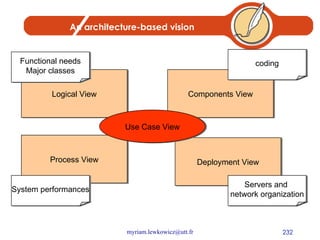
An architecture-based vision Components View Deployment View Process View Logical View Use Case View Functional needs Major classes coding System performances Servers and  network organization
Use Cases diagrams Functional modelling Sequence Diagrams  Dynamic modelling of scenarios Class Diagrams Static modelling System’s structure Collaboration diagram Dynamic modelling, focusing on spatial relationships between objects Statecharts Diagrams Dynamic modelling, focusing on an object. Activities done in each state correspond to operations Activity Diagrams Dynamic modelling, focusing on an activity Objects Diagrams Static modelling Context 1
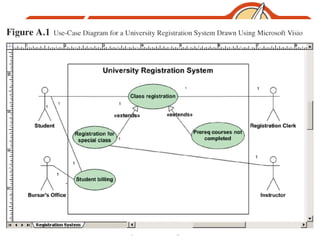
Use-Case Modeling Applied to analyze functional requirements of the system Performed during the analysis phase to help developers understand functional requirements of the system without regard for implementation details Use Case A complete sequence of related actions initiated by an actor Actor An external entity that interacts with the system
Use-Case Modeling Use cases are always initiated by an actor Use cases represent complete functionality of the system Use cases may participate in relationships with other use-cases Use cases may also use other use cases
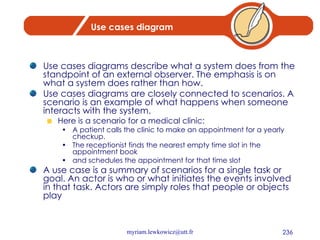
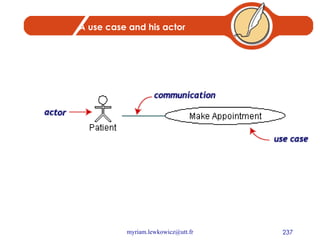
Use cases diagram Use cases diagrams describe what a system does from the standpoint of an external observer. The emphasis is on what a system does rather than how. Use cases diagrams are closely connected to scenarios. A scenario is an example of what happens when someone interacts with the system.  Here is a scenario for a medical clinic:  A patient calls the clinic to make an appointment for a yearly checkup.  The receptionist finds the nearest empty time slot in the appointment book  and schedules the appointment for that time slot A use case is a summary of scenarios for a single task or goal. An actor is who or what initiates the events involved in that task. Actors are simply roles that people or objects play
A use case and his actor
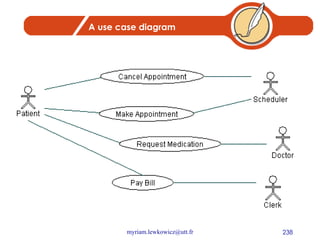
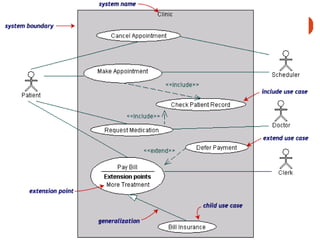
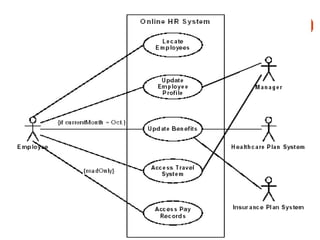
A use case diagram
 
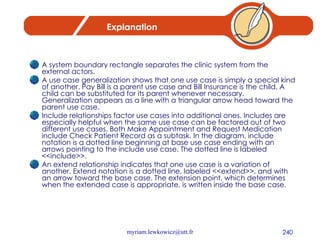
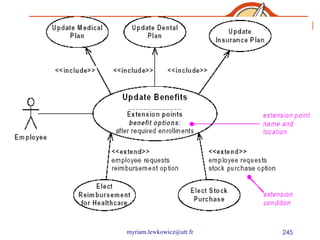
Explanation A system boundary rectangle separates the clinic system from the external actors. A use case generalization shows that one use case is simply a special kind of another. Pay Bill is a parent use case and Bill Insurance is the child. A child can be substituted for its parent whenever necessary. Generalization appears as a line with a triangular arrow head toward the parent use case. Include relationships factor use cases into additional ones. Includes are especially helpful when the same use case can be factored out of two different use cases. Both Make Appointment and Request Medication include Check Patient Record as a subtask. In the diagram, include notation is a dotted line beginning at base use case ending with an arrows pointing to the include use case. The dotted line is labeled <<include>>. An extend relationship indicates that one use case is a variation of another. Extend notation is a dotted line, labeled <<extend>>, and with an arrow toward the base case. The extension point, which determines when the extended case is appropriate, is written inside the base case.
 
Use case diagrams are helpful in three areas Determining features (requirements). New use cases often generate new requirements as the system is analyzed and the design takes shape.  Communicating with clients. Their notational simplicity makes use case diagrams a good way for developers to communicate with clients.  Generating test cases. The collection of scenarios for a use case may suggest a suite of test cases for those scenarios.
Use case example Online HR system
 
 
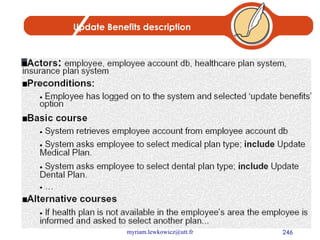
Update Benefits description
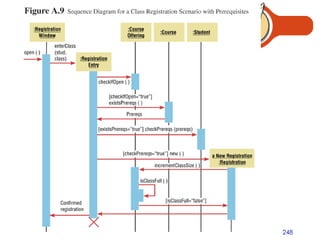
Dynamic Modeling: Sequence Diagrams Sequence Diagram A depiction of the interaction among objects during certain periods of time Activation The time period during which an object performs an operation Messages Means by which objects communicate with each other
 
 
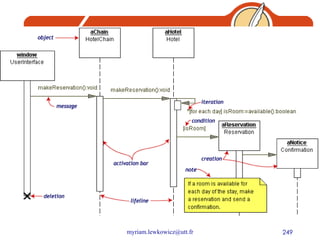
Explanation The  Reservation window  sends a makeReservation() message to a  HotelChain . The  HotelChain  then sends a makeReservation() message to a  Hotel . If the  Hotel  has available rooms, then it makes a  Reservation  and a  Confirmation . Each vertical dotted line is a  lifeline , representing the time that an object exists. Each arrow is a message call. An arrow goes from the sender to the top of the  activation bar  of the message on the receiver's lifeline. The activation bar represents the duration of execution of the message. In our diagram, the  Hotel  issues a  self call  to determine if a room is available. If so, then the  Hotel  creates a  Reservation  and a  Confirmation . The asterisk on the self call means  iteration  (to make sure there is available room for each day of the stay in the hotel). The expression in square brackets, [ ], is a  condition . The diagram has a clarifying  note , which is text inside a dog-eared rectangle. Notes can be put into any kind of UML diagram.
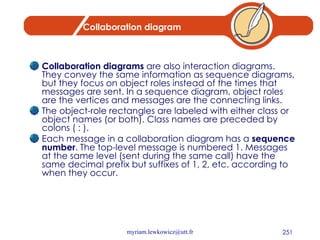
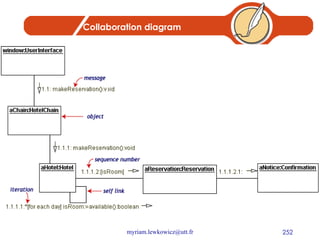
Collaboration diagram Collaboration diagrams  are also interaction diagrams. They convey the same information as sequence diagrams, but they focus on object roles instead of the times that messages are sent. In a sequence diagram, object roles are the vertices and messages are the connecting links. The object-role rectangles are labeled with either class or object names (or both). Class names are preceded by colons ( : ). Each message in a collaboration diagram has a  sequence number . The top-level message is numbered 1. Messages at the same level (sent during the same call) have the same decimal prefix but suffixes of 1, 2, etc. according to when they occur.
Collaboration diagram
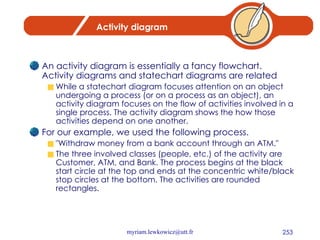
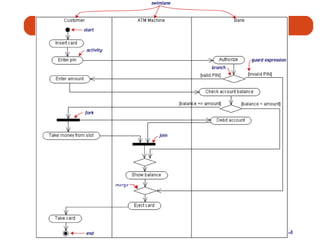
Activity diagram An activity diagram is essentially a fancy flowchart. Activity diagrams and statechart diagrams are related While a statechart diagram focuses attention on an object undergoing a process (or on a process as an object), an activity diagram focuses on the flow of activities involved in a single process. The activity diagram shows the how those activities depend on one another. For our example, we used the following process. &quot;Withdraw money from a bank account through an ATM.&quot; The three involved classes (people, etc.) of the activity are Customer, ATM, and Bank. The process begins at the black start circle at the top and ends at the concentric white/black stop circles at the bottom. The activities are rounded rectangles.
 
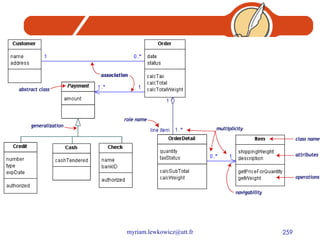
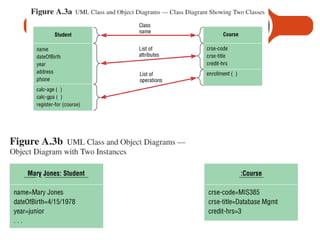
Class diagrams A Class diagram gives an overview of a system by showing its classes and the relationships among them.  Class diagrams are static: they display what interacts but not what happens when they do interact
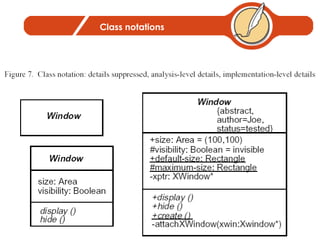
Class notations
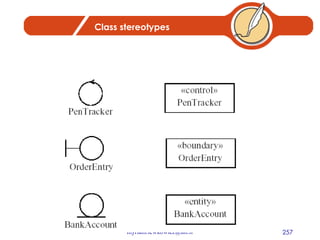
Class stereotypes
Example The following class diagram models a customer order from a retail catalog.  The central class is the Order.  Associated with it are the Customer making the purchase and the Payment.  A Payment is one of three kinds: Cash, Check, or Credit.  The order  contains  OrderDetails (line items), each with its associated Item.
 
Representing Associations Association A relationship between object classes Degree may be unary, binary, ternary or higher Depicted as a solid line between participating classes Association Role The end of an association where it connects to a class Each role has multiplicity, which indicates how many objects participate in a given association relationship
 
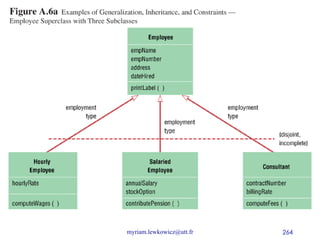
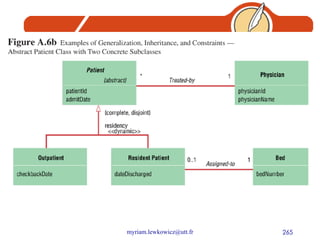
Representing Generalization Generalization Abstraction of common features among multiple classes, as well as their relationships, into a more general class Subclass A class that has been generalized Superclass A class that is composed of several generalized subclasses
Representing Generalization Discriminator Shows which property of an object class is being abstracted by a generalization relationship Inheritance A property that a subclass inherits the features from its superclass Abstract Class A class that has no direct instances, but whose descendents may have direct instances Concrete Class A class that can have direct instances
 
 
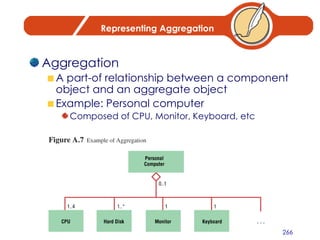
Representing Aggregation Aggregation A part-of relationship between a component object and an aggregate object Example: Personal computer Composed of CPU, Monitor, Keyboard, etc
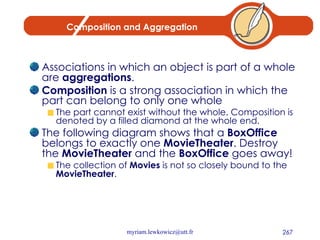
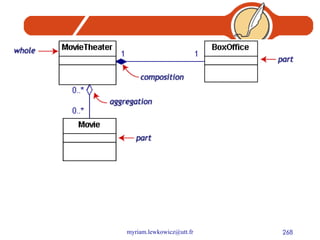
Composition and Aggregation Associations in which an object is part of a whole are  aggregations .  Composition  is a strong association in which the part can belong to only one whole  The part cannot exist without the whole. Composition is denoted by a filled diamond at the whole end. The following diagram shows that a  BoxOffice  belongs to exactly one  MovieTheater . Destroy the  MovieTheater  and the  BoxOffice  goes away!  The collection of  Movies  is not so closely bound to the  MovieTheater .
 
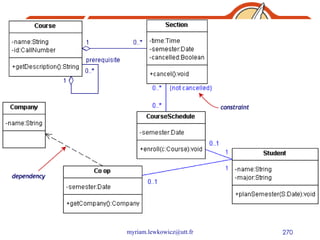
Dependencies and constraints A  dependency  is a relation between two classes in which a change in one may force changes in the other. Dependencies are drawn as dotted lines.  In the class diagram below,  Co_op  depends on  Company . If you decide to modify  Company , you may have to change  Co_op  too. A  constraint  is a condition that every implementation of the design must satisfy. Constraints are written in curly braces { }.  The constraint on our diagram indicates that a  Section  can be part of a  CourseSchedule  only if it is not canceled.
 
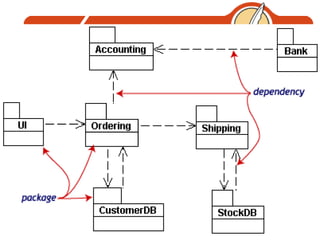
Packages To simplify complex class diagrams, you can group classes into packages.  A package is a collection of logically related UML elements.  Packages appear as rectangles with small tabs at the top.  The package name is on the tab or inside the rectangle.  The dotted arrows are dependencies: One package depends on another if changes in the other could possibly force changes in the first.
 
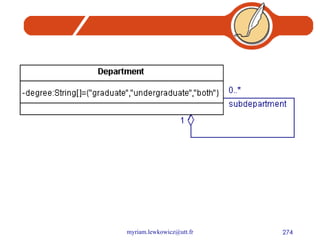
Object diagrams Object diagrams show instances instead of classes. They are useful for explaining small pieces with complicated relationships, especially recursive relationships. This small class diagram shows that a university Department can contain lots of other Departments.
 
Object Modeling Object Diagrams Object Diagram also called an instance diagram Object is represented as a rectangle with two compartments Operation A function or service that is provided by all the instances of a class Encapsulation The technique of hiding the internal implementation details of an object from its external view
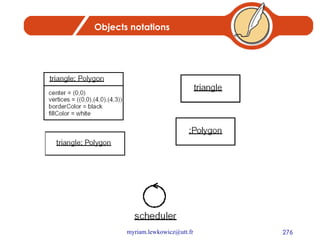
Objects notations
 
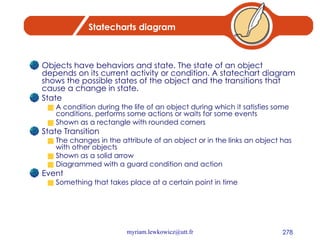
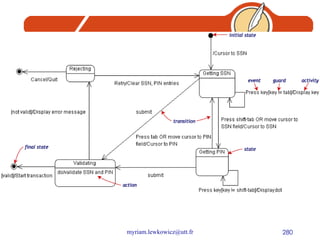
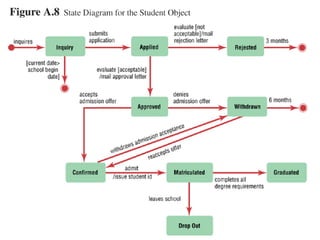
Statecharts diagram Objects have behaviors and state. The state of an object depends on its current activity or condition. A statechart diagram shows the possible states of the object and the transitions that cause a change in state. State A condition during the life of an object during which it satisfies some conditions, performs some actions or waits for some events Shown as a rectangle with rounded corners State Transition The changes in the attribute of an object or in the links an object has with other objects Shown as a solid arrow Diagrammed with a guard condition and action Event Something that takes place at a certain point in time
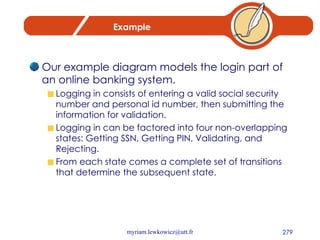
Example Our example diagram models the login part of an online banking system.  Logging in consists of entering a valid social security number and personal id number, then submitting the information for validation. Logging in can be factored into four non-overlapping states: Getting SSN, Getting PIN, Validating, and Rejecting.  From each state comes a complete set of transitions that determine the subsequent state.
 
Explanation Our diagram has two self-transition, one on  Getting SSN  and another on  Getting PIN . The initial state (black circle) is a dummy to start the action. Final states are also dummy states that terminate the action. The action that occurs as a result of an event or condition is expressed in the form /action.  While in its  Validating  state, the object does not wait for an outside event to trigger a transition. Instead, it performs an activity. The result of that activity determines its subsequent state.
 
Moving to Design Start with existing set of analysis model Progressively add technical details Design model must be more detailed than analysis model Component Diagram A diagram that shows the software components or modules and their dependencies Deployment Diagram A diagram that shows how the software components, process and objects are deployed into the physical architecture of the system
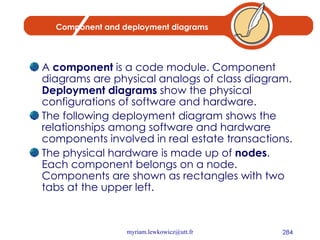
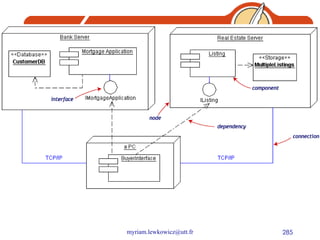
Component and deployment diagrams A  component  is a code module. Component diagrams are physical analogs of class diagram.  Deployment diagrams  show the physical configurations of software and hardware. The following deployment diagram shows the relationships among software and hardware components involved in real estate transactions. The physical hardware is made up of  nodes . Each component belongs on a node. Components are shown as rectangles with two tabs at the upper left.
 
Summary Object-Oriented modeling approach Benefits Unified Modeling Language Use cases Class diagrams State diagrams Sequence diagrams Use-case modeling
Summary Object Modeling: Class Diagrams Associations Generalizations Aggregation Dynamic Modeling: State Diagrams Dynamic Modeling: Sequence Diagrams Moving to Design
Chapter 12 Designing the Human Interface
Learning Objectives Explain the process of designing forms and reports and the deliverables for their creation Discuss general guidelines for formatting text, tables and lists Learn how to effectively format text, tables and lists Explain the process of designing interfaces and dialogues and the deliverables for their creation
Learning Objectives Discuss the general guidelines for interface design including: Layout and design Structuring data entry fields Providing feedback System help Discuss the design of human-computer dialogues and the use of dialogue diagramming Explain interface design guidelines unique to the design of Internet-based electronic commerce systems
Designing Forms and Reports  System inputs and outputs are produced at the end of the analysis phase Precise appearance was not defined during this phase Forms and reports are integrally related to DFD and E-R diagrams
Designing Forms and Reports: Key Concepts Form A business document that contains some predefined data and may include some areas where additional data are to be filled in An instance of a form is typically based on one database record Report A business document that contains only predefined data A passive document for reading or viewing data Typically contains data from many database records or transactions
The Process of Designing Forms and Reports User-focused activity Follows a prototyping approach Requirements determination Who will use the form or report? What is the purpose of the form or report? When is the report needed or used? Where does the form or report need to be delivered and used? How many people need to use or view the form or report?
The Process of Designing Forms and Reports Prototyping Initial prototype is designed from requirements Users review prototype design and either accept the design or request changes If changes are requested, the construction-evaluation-request cycle is repeated until the design is accepted
Deliverables and Outcomes Design specifications are major deliverable and contain three sections Narrative Screen Design Testing and usability assessment
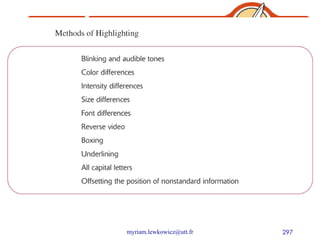
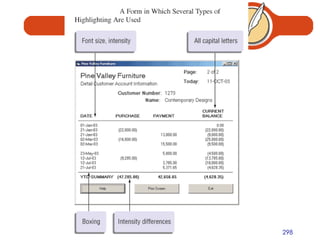
General Formatting Guidelines for Forms and Reports Highlighting Use sparingly to draw user to or away from certain information Blinking and audible tones should only be used to highlight critical information requiring user’s immediate attention Methods should be consistently selected and used based upon level of importance of emphasized information
 
 
General Formatting Guidelines for Forms and Reports Displaying Text Display text in mixed upper- and lowercase and use conventional punctuation Use double spacing if space permits.  If not, place a blank line between paragraphs Left-justify text and leave a ragged right margin Do not hyphenate words between lines Use abbreviations and acronyms only when they are widely understood by users and are significantly shorter than the full text
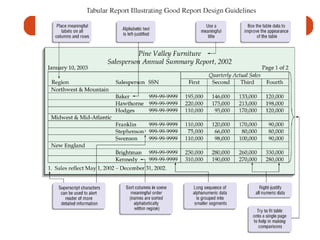
General Formatting Guidelines for Forms and Reports Displaying tables and lists Labels All columns and rows should have meaningful labels Labels should be separated from other information by using highlighting Redisplay labels when the data extend beyond a single screen or page
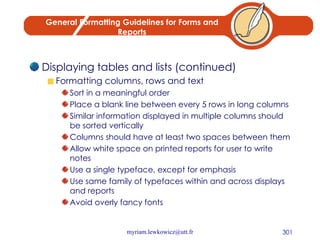
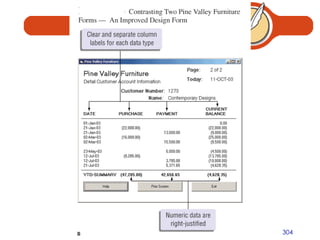
General Formatting Guidelines for Forms and Reports Displaying tables and lists (continued) Formatting columns, rows and text Sort in a meaningful order Place a blank line between every 5 rows in long columns Similar information displayed in multiple columns should be sorted vertically Columns should have at least two spaces between them Allow white space on printed reports for user to write notes Use a single typeface, except for emphasis Use same family of typefaces within and across displays and reports Avoid overly fancy fonts
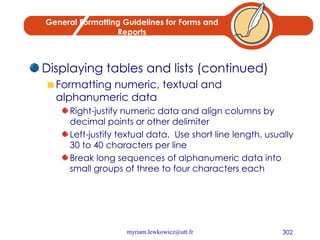
General Formatting Guidelines for Forms and Reports Displaying tables and lists (continued) Formatting numeric, textual and alphanumeric data Right-justify numeric data and align columns by decimal points or other delimiter Left-justify textual data.  Use short line length, usually 30 to 40 characters per line Break long sequences of alphanumeric data into small groups of three to four characters each


Designing Interfaces and Dialogues Focus on how information is provided to and captured from users Dialogues are analogous to a conversation between two people A good human-computer interface provides a unifying structure for finding, viewing and invoking the different components of a system
Designing Interfaces Designing Layouts Standard formats similar to paper-based forms and reports should be used Screen navigation on data entry screens should be left-to-right, top-to-bottom as on paper forms
Designing Layouts Flexibility and consistency are primary design goals Users should be able to move freely between fields Data should not be permanently saved until the user explicitly requests this Each key and command should be assigned to one function
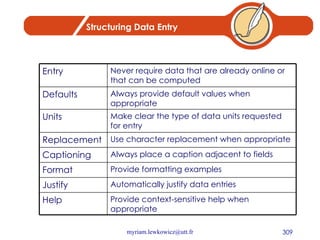
Structuring Data Entry Provide context-sensitive help when appropriate Help Automatically justify data entries Justify Provide formatting examples Format Always place a caption adjacent to fields Captioning Use character replacement when appropriate Replacement Make clear the type of data units requested for entry Units Always provide default values when appropriate Defaults Never require data that are already online or that can be computed Entry
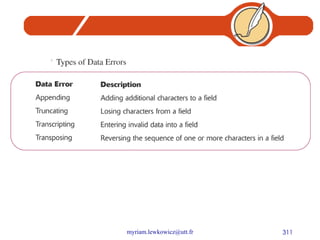
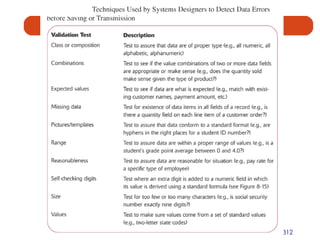
Controlling Data Input One objective of interface design is to reduce data entry errors Role of systems analyst is to anticipate user errors and design features into the system’s interfaces to avoid, detect, and correct data entry mistakes Table 8-9 describes types of data entry errors Table 8-10 lists techniques used by system designers to detect errors
 
 
Providing Feedback Status Information Keeps users informed of what is going on in system Displaying status information is especially important if the operation takes longer than a second or two Prompting Cues Best to keep as specific as possible Error and Warning Messages Messages should be specific and free of error codes and jargon User should be guided toward a result rather than scolded Use terms familiar to user Be consistent in format and placement of messages
Providing Help Place yourself in user’s place when designing help Guidelines Simplicity Help messages should be short and to the point Organization Information in help messages should be easily absorbed by users Demonstrate It is useful to explicitly show users how to perform an operation
Providing Help Context-Sensitive Help Enables user to get field-specific help Users should always be returned to where they were when requesting help
Designing Dialogues Dialogue Sequence in which information is displayed to and obtained from a user Primary design guideline is consistency in sequence of actions, keystrokes, and terminology Three-step process 1. Design dialogue sequence 2. Build a prototype 3. Assess usability
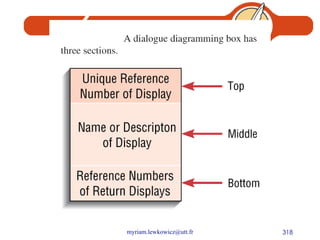
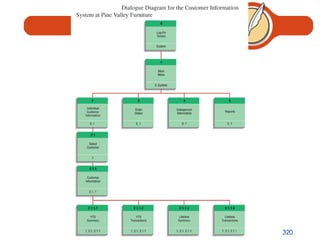
Designing the Dialogue Sequence Define the sequence Have a clear understanding of the user, task, technological and environmental characteristics Dialogue Diagram A formal method for designing and representing human-computer dialogues using box and line diagrams Consists of a box with three sections Top: Unique display reference number used by other displays for referencing dialogue Middle: Contains the name or description of the display Bottom: Contains display reference numbers that can be accessed from the current display
 
Designing Dialogues: Building Prototypes and Assessing Usability Often optional activities Task is simplified by using graphical design environment
 
Web-based Application: Designing Interfaces and Dialogues for Pine Valley Furniture’s Webstore General Guidelines Several factors have contributed to poor design of Web interfaces Web’s single “click-to-act” method of loading static hypertext documents Limited capabilities of most Web-browsers to support finely grained user interactivity Limited agreed-upon standards for encoding Web content and control mechanisms Lack of maturity in Web scripting and programming languages
Web-based Application: Designing the Human Interface at Pine Valley Furniture Design Guidelines Navigation via cookie crumbs A technique that uses a series of tabs on a Web page to show users where they are and where they have been in the site Tabs are hyperlinks to allow users to move backward easily within the site Two important purposes Allows users to navigate to a point previously visited Shows users where they have been and how far they have gone from point of entry into site
Web-based Application:  Design Guidelines Lightweight Graphics The use of small images to allow a Web page to be displayed more quickly Forms and Data Integrity All forms that record information should be clearly labeled and provide room for input Clear examples of input should be provided to reduce data errors Site must clearly designate which fields are required, which are optional and which have a range of values
Summary Designing Forms and Reports General guidelines for designing forms and reports Formatting text, tables and lists Design guidelines for interfaces Layout design Structuring data entry fields Providing feedback Designing help
Questions To which initial questions must the analyst gain answers in order to build an initial prototype of a system output? Describe the process of designing interfaces and dialogues.  What deliverables are produced from this process?  Are these deliverables the same for all types of system projects?  Why or why not?
Chapter 13 Systems Implementation and Operation
Learning Objectives Describe the process of coding, testing and converting an organizational information system Discuss four installation strategies Direct Parallel Single location Phased installation Describe the deliverables for documenting the system and for training and supporting the users Compare the many modes available for organizational system training, including self-training and electronic performance support systems
Learning Objectives Discuss the issues of providing support to end users Discuss system implementation failure Explain four types of maintenance Describe several factors that influence the cost of maintaining an information system
System Implementation and Maintenance  Seven major activities Coding Testing Installation Documentation Training Support Maintenance Purpose To convert final physical system specifications into working and reliable software To document work that has been done To provide help for current and future users
The Process of Coding, Testing and Installation Coding Physical design specifications are turned into working computer code Testing Tests are performed using various strategies Testing can be performed in parallel with coding Installation Process during which the current system is replaced by the new system
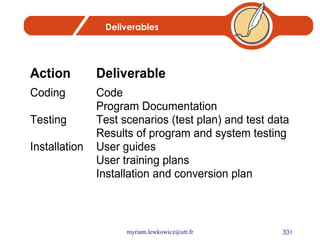
Deliverables
The Process of Documenting the System, Training Users and Supporting Users Two audiences for documentation The information systems personnel who will maintain the system throughout its productive life The people who will use the system as part of their daily lives
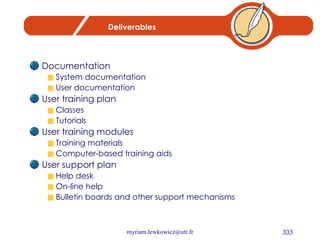
Deliverables Documentation System documentation User documentation User training plan Classes Tutorials User training modules Training materials Computer-based training aids User support plan Help desk On-line help Bulletin boards and other support mechanisms
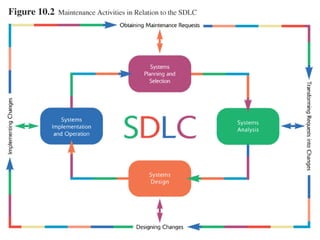
The Process of Maintaining Information Systems Process of returning to the beginning of the SDLC and repeating development steps focusing on system change until the change is implemented Four major activities 1. Obtaining maintenance requests 2. Transforming requests into changes 3. Designing changes 4. Implementing changes
 
Deliverables Development of a new version of the software, new versions of all design documents and training materials created or modified during the maintenance effort
Software Application Testing A test plan is developed during the analysis phase During the design phase, a unit test plan and a system test plan are developed The actual testing is done during implementation Test plans provide improved communication among all parties involved in testing Serve as checklists
Types of Testing Inspection A testing technique in which participants examine program code for predictable language-specific errors Walkthrough A peer group review of any product created during the systems development process;  also called a structured walkthrough Desk Checking A testing technique in which the program code is sequentially executed manually by the reviewer
Types of Testing Unit Testing Each module is tested alone in an attempt to discover any errors in its code, also called module testing Integration Testing The process of bringing together all of the modules that a program comprises for testing purposes.  Modules are typically integrated in a top-down, incremental fashion
Types of Testing System Testing The bringing together of all the programs that a system comprises for testing purposes.  Programs are typically integrated in a top-down, incremental fashion Stub Testing A technique used in testing, especially where modules are written and tested in a top-down fashion, where a few lines of code are used to substitute for subordinate modules
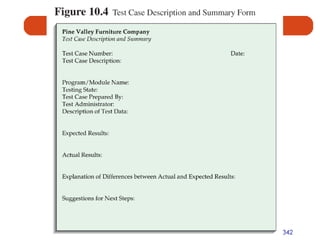
The Testing Process The purpose of the testing is confirming that the system satisfies requirements Testing must be planned Test Case A specific scenario of transactions, queries or navigation paths that represent a typical, critical or abnormal use of the system Test cases and results should be thoroughly documented so they can be repeated for each revision of an application
 
Acceptance Testing by Users The process whereby actual users test a completed information system, the end result of which is the users’ acceptance of it
Acceptance Testing by Users Alpha Testing User testing of a completed information system using simulated data Recovery testing Forces the software (or environment) to fail in order to verify that recovery is properly performed Security testing Verifies that protection mechanisms built into the system will protect it from improper penetration Stress testing Tries to break the system Performance testing Determines how the system performs on the range of possible environments in which it may be used
Acceptance Testing by Users Beta Testing User testing of a completed information system using real data in the real user environment
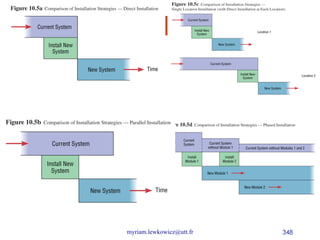
Installation The organizational process of changing over from the current information system to a new one Four approaches Direct Installation Changing over from the old information system to a new one by turning off the old system when the new one is turned on Parallel Installation Running the old information system and the new one at the same time until management decides the old system can be turned off
Installation Single location installation Trying out an information system at one site and using the experience to decide if and how the new system should be deployed throughout the organization Phased Installation Changing from the old information system to the new one incrementally, starting with one or a few functional components and then gradually extending the installation to cover the whole new system
 
Planning Installation Considerations Data conversion Error correction Loading from current system Planned system shutdown Business cycle of organization
Documenting the System System documentation Detailed information about a system’s design specifications, its internal workings and its functionality Internal documentation System documentation that is part of the program source code or is generated at compile time External documentation System documentation that includes the outcome of structured diagramming techniques such as data flow and entity relationship diagrams
Documenting the System User Documentation Written or other visual information about an application system, how it works, and how to use it Preparing user documentation Traditional source has been information systems department Application-oriented documentation is now often supplied by vendors and users themselves
Training Information System Users Potential training topics Use of the system General computer concepts Information system concepts Organizational concepts System management System installation
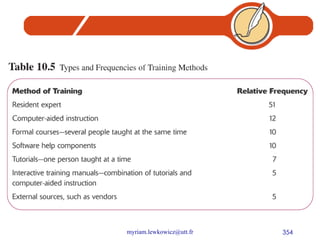
Training Information System Users Training methods Resident expert Computer-aided instruction Formal courses Software help components Tutorials Interactive training manuals External sources, such as vendors
 
Training Information System Users Electronic performance support system (EPSS) Component of a software package or application in which training and educational information is embedded
Supporting Information System Users Support is extremely important to users J.D. Power and Associates survey found user support to be number one criterion contributing to user satisfaction with personal computing Most organizations provide support by two means Information center Help desk
Supporting Information System Users: Information Center An organizational unit whose mission is to support users in exploiting information technology Staff might perform the following tasks Install new hardware or software and set up user accounts Consult with users writing programs in fourth-generation languages Extract data from organizational databases onto personal computers Answer basic on-demand questions Provide a demonstration site for viewing hardware and software Work with users to submit system change requests
Supporting Information System Users: Help Desk A single point of contact for all user inquiries and problems about a particular information system or for all users in a particular department
Why Implementation Sometimes Fails Two conditions necessary for a successful implementation Management support of the system under development Involvement of users in the development process
Why Implementation Sometimes Fails Insights about implementation process Risk Commitment to the project Commitment to change Extent of project definition and planning Realistic user expectations Implementation success factors Extent to which system is used User’s satisfaction with system
Project Close Down Evaluate team Reassign members to other projects Notify all affected parties that the development project is ending and that you are switching to operation and maintenance mode Conduct post-project reviews Close out customer contract Formal signoff
Conducting System Maintenance Corrective maintenance Changes made to a system to repair flaws in its design, coding, or implementation Adaptive maintenance Changes made to a system to evolve its functionality to changing business needs or technologies Perfective maintenance Changes made to a system to add new features or to improve performance Preventive maintenance Changes made to a system to avoid possible future problems
Conducting System Maintenance: The Cost of Maintenance Many organizations allocate eighty percent of information systems budget to maintenance Factors that influence system maintainability Latent defects Number of customers for a given system Quality of system documentation Maintenance personnel Tools Well-structured programs
Conducting System Maintenance: Measures of Effectiveness Number of failures Time between each failure Type of failure Mean time between failures (MTBF) A measurement of error occurrences that can be tracked over time to indicate the quality of a system
Controlling Maintenance Requests Determine type of request Error Adaptation Enhancement Figure 10-9 shows a flowchart for a request procedure
 
Configuration Management The process of assuring that only authorized changes are made to the system Baseline modules Software modules that have been tested, documented, and approved to be included in the most recently created version of a system System librarian A person responsible for controlling the checking out and checking in of baseline modules when a system is being developed or maintained Build routines Guidelines that list the instructions to construct an executable system from the baseline source code
Summary Process of coding, testing and converting an organizational information system Four installation strategies Direct Parallel Single location Phased installation
Summary Documentation System User User training Providing support for end users Systems implementation failures
Summary Maintenance Corrective Adaptive Perfective Preventive Cost of maintenance Measuring effectiveness of maintenance
Summary Controlling maintenance requests Configuration management Internet development

Information system

  • 1.
    Information Systems Analysisand Design Myriam Lewkowicz
  • 2.
    Outline Information Systems:the big picture Information Systems for competitive advantage Organizational Information Systems Entreprise -Wide Information Systems Information Systems Development & Acquisition Managing the Information Systems Project Systems Planning Determining System Requirements Structuring System Requirements: Process Modeling Structuring System Requirements: Conceptual Data Modeling Object Oriented Analysis and Design Designing the Human Interface Systems Implementation and Operation
  • 3.
    Chapter 1 InformationSystems: The Big Picture
  • 4.
    Chapter 1 ObjectivesUnderstand the term information systems (IS) Understand IS components: Technology, people, organizations Understand IS career opportunities Understand types of information systems Understand IS and organizational success or failure Understand the future of IS management
  • 5.
    Information Systems DefinedCombinations of hardware, software, and telecommunications networks that people build and use to collect, create, and distribute useful data in organizations
  • 6.
    Key Elements ofInformation Systems
  • 7.
    Data Data: rawmaterial, unformatted information Information: processed data (meaningful) Knowledge: understanding relationships between pieces of information Wisdom: knowledge accumulated and applied
  • 8.
    Knowledge as aBusiness Resource Knowledge Worker A well-educated professional who creates, modifies, or synthesizes knowledge in one’s profession Knowledge Society Also called digital society, new economy Working with brains instead of hands The importance of education Digital divide
  • 9.
    Technology and InformationSystems Computer-Based Information Systems One type of technology Technology – any mechanical and/or electrical means to supplement, extend, or replace human activity Information Technology (IT) – machine technology controlled by or using information The goal of IS is to provide useful data to users IS can be local or global, organizational or enterprise-wide
  • 10.
    IS Managerial PersonnelCIO IS director Account Executive Info Center Manager Development Manager Project Manager Maintenance Manager Systems Manager IS planning Manager Operations Manager Programming Manager Systems Programming Manager Manager of Emerging Technologies Telecommunications Manager Network Manager Database Administrator Auditing or Computer Security Manager Quality Assurance Manager Webmaster
  • 11.
    Integrating Skills andKnowledge Technology hardware, software, networking Business business, management, social, communications Systems Integration, development methods, critical thinking, problem solving
  • 12.
    Hot Skills inIS Workers Office / E-mail Languages Applications RDBS Administration Development Tools Internetworking Operating Systems LAN Administration Networking
  • 13.
    IS Within theFirm Traditionally a love/hate relationship “Techies” vs. mere “users” (us vs. them) Poor service, lousy attitudes Now: progress toward better customer service Better relationships within the company Cooperation, not rivalry
  • 14.
    The Spread ofTechnology in Organizations Technology infiltrates business units Dual role for IS workers: Work with IS technical group Work with business unit (marketing, finance, etc.)
  • 15.
    The Spread ofTechnology in Organizations Benefits of centralized IS function Coordinated planning Consistent management Systems compatibility and connectivity
  • 16.
    Questions Define andunderstand the term information systems (IS) Explain the technology, people, and organizational components of an information system.
  • 17.
    Chapter 2 InformationSystems for Competitive Advantage
  • 18.
    Chapter 2 ObjectivesUnderstand the IS in automation, organizational learning, and strategic support Understand IS for strategic organizational success Understand the need for making an IS business case Understand technological innovations to improve competitive advantage
  • 19.
    Why Use InformationSystems? Automating: doing things faster Organizational learning: doing things better Supporting Strategy: doing things smarter
  • 20.
    Automating: DoingThings Faster Technology is used to automate a manual process Doing things faster, better, cheaper Greater accuracy and consistency Loan application example Manual processing Technology-supported process Completely automated
  • 21.
    Organizational Learning: Doing Things Better Going beyond automation Involves learning to improve the day-to-day activities within the process Looking at patterns and trends Organizational Learning Using acquired knowledge and insights to improve organizational behavior Total Quality Management (TQM) Monitoring an organization to improve quality of operations, products, and services
  • 22.
    Supporting Strategy: Doing Things Smarter Strategic Planning Create a vision: setting the direction Create a standard: performance targets Create a strategy: reaching the goal
  • 23.
    Question Now, itshould be fairly obvious why an IS professional should be able to make a business case for a given system. Why, however, is it just as important for non-IS professionals? How are they involved in this process? What is their role in information systems planning?
  • 24.
    Chapter 3 OrganizationalInformation Systems
  • 25.
    Chapter Objectives Understandcharacteristics of operational, managerial, and executive information systems Understand characteristics of transaction processing systems, management information systems, and executive information systems Understand characteristics of information systems that span organizational boundaries
  • 26.
  • 27.
    Decision-Making Levels ofan Organization Executive level (top) Long-term decisions Unstructured decisions Managerial level (middle) Decisions covering weeks and months Semistructured decisions Operational level (bottom) Day-to-day decisions Structured decisions
  • 28.
    General Types ofInformation Systems Transaction Processing Systems (TPSs) Transactions Used at Operational level of the organization Goal: to automate repetitive information processing activities Increase speed Increase accuracy Greater efficiency
  • 29.
    General Types ofInformation Systems Data input Manual data entry Semiautomated data entry Fully automated data entry Examples: Payroll Sales and ordering Inventory Purchasing, receiving, shipping Accounts payable and receivable
  • 30.
    General Types ofInformation Systems Management Information Systems (MISs) Two Types: Management of IS in organizations Specific information systems for mid-level managers Used at managerial level of the organization
  • 31.
    General Types ofInformation Systems Management Information Systems Types of reports: Scheduled report Key-indicator report Exception report Drill-down report Ad hoc report
  • 32.
    General Types ofInformation Systems Management Information Systems (MISs) Examples: Sales forecasting Financial management and forecasting Manufacturing planning and scheduling Inventory management and planning Advertising and product pricing
  • 33.
    General Types ofInformation Systems Executive Information Systems (EISs) Used at executive level of the organization Highly aggregated form Data types Soft data – news and nonanalytical data Hard data – facts and numbers
  • 34.
    General Types ofInformation Systems Executive Information Systems (EISs) Examples: Executive-level decision making Long-range and strategic planning Monitoring internal and external events Crisis management Staffing and labor relations
  • 35.
  • 36.
    Information Systems thatSpan Organizational Boundaries
  • 37.
    Information Systems that Span Organizational Boundaries Decision Support Systems (DSSs) Designed to support organizational decision making “ What-if” analysis Example of a DSS tool: Microsoft Excel Text and graphs Models for each of the functional areas Accounting, finance, personnel, etc.
  • 38.
    Information Systems that Span Organizational Boundaries Expert Systems (ESs) Mimics human expertise by manipulating knowledge Rules (If-then) Inferencing
  • 39.
    Information Systems that Span Organizational Boundaries Office Automation Systems (OASs) Examples: Communicating and scheduling Document preparation Analyzing data Consolidating information
  • 40.
    Information Systems that Span Organizational Boundaries Collaboration Technologies Virtual teams Videoconferencing Groupware Electronic Meeting Systems (EMSs)
  • 41.
    Information Systems that Span Organizational Boundaries Functional Area Information Systems Geared toward specific areas in the company: Human Resources Benefits Marketing
  • 42.
  • 43.
    Information Systems that Span Organizational Boundaries Global Information Systems International IS Transnational IS Multinational IS Global IS
  • 44.
    Chapter 4 Enterprise-WideInformation Systems
  • 45.
    Chapter ObjectivesUnderstand how information technology supports business activities Understand enterprise systems and how they evolved Understand software applications that are internally or externally focused Understand how to implement enterprise systems
  • 46.
    Enterprise Systems Enterprisesystems Also known as enterprise-wide information systems Information systems that allow companies to integrate information across operations on a company-wide basis
  • 47.
  • 48.
  • 49.
    Types of EnterpriseSystems Packaged applications Custom applications Stand-alone applications
  • 50.
    Types of EnterpriseSystems Enterprise Resource Planning Integrated applications ERP systems Baan Oracle PeopleSoft SAP
  • 51.
    Types of EnterpriseSystems ERP Implementation Modules Customizations Best practices Business process reengineering (BPR)
  • 52.
    Types of EnterpriseSystems Customer Relationship Management (CRM) Sales Force Automation (SFA) New opportunities for competitive advantage Examples: MGM American Airlines Marriott International
  • 53.
  • 54.
    Types of EnterpriseSystems Supply Chain Management (SCM) Supply chain – the producers of supplies that a company uses Supply network What if supply chain does not collaborate? Two objectives of upstream information flow: Accelerate product development Reduce costs associated with suppliers
  • 55.
  • 56.
    The Formula forEnterprise System Success Secure executive sponsorship Get help from outside experts Thoroughly train users Take a multidisciplinary approach to implementation
  • 57.
    Questions List thedifferent classes of information systems described in this chapter. How do they differ from each other? Of the information systems listed in the chapter, how many do you have experience with? What systems would you like to work with? What types of systems do you encounter at the university you are attending? Consider an organization that you are familiar with, perhaps the one in which you work or one with which you have done business. Describe the type of information systems that organization uses and whether or not they are useful or up-to-date. List specific examples for updating or installing information systems that improve productivity or efficiency.
  • 58.
    Chapter 5 InformationSystems Development & Acquisition
  • 59.
    Chapter Objectives Understandthe process of IS management Understand the system development life cycle (SDLC) Understand alternative approaches to system development Understand in-house system development Understand external acquisition, outsourcing, and end-user development
  • 60.
    The Need forStructured Systems Development Systems analysis and design – the process of designing, building, and maintaining information systems Systems analyst Blending technical and managerial expertise
  • 61.
    The Need forStructured Systems Development Evolution of IS development From “art” to a “discipline” Standardized development methods Software engineering
  • 62.
    The Need forStructured Systems Development Options for Obtaining Information Systems Build your own Buy a prepackaged system Outsource development to a 3rd party End user development
  • 63.
    The Need forStructured Systems Development Information Systems Development in Action Breaking large complex problems into manageable pieces Decomposing large, complex problems
  • 64.
    The Need forStructured Systems Development System Construction Process Identify a large IT problem to solve Break the large problem into several smaller, more manageable pieces Translate each “piece” (small problem) into computer programs Piece together each program into an overall comprehensive IS that solves the problem
  • 65.
    The Need forStructured Systems Development The Role of Users in the Systems Development Process Knowledgeable of needs Effective partnership
  • 66.
    Information Systems Analysisand Design Systems Analyst performs analysis and design based upon: Understanding of organization’s objectives, structure and processes Knowledge of how to exploit information technology for advantage
  • 67.
    Systems Analysis andDesign: Core Concepts Major goal: to improve organizational systems by developing or acquiring software and training employees in its use Application software, or a system, supports organizational functions or processes
  • 68.
    Systems Analysis andDesign: Core Concepts System: Turns data into information and includes: Hardware and system software Documentation and training materials Job roles associated with the system Controls to prevent theft or fraud The people who use the software to perform their jobs
  • 69.
  • 70.
    Software Engineering ProcessA process used to create an information system Consists of: Methodologies A sequence of step-by-step approaches that help develop the information system Techniques Processes that the analyst follows to ensure thorough, complete and comprehensive analysis and design Tools Computer programs that aid in applying techniques
  • 71.
  • 72.
    System A systemis an interrelated set of business procedures used within one business unit working together for a purpose A system has nine characteristics A system exists within an environment A boundary separates a system from its environment
  • 73.
    Characteristics of aSystem Components Interrelated Components Boundary Purpose Environment Interfaces Constraints Input Output
  • 74.
  • 75.
    Important System ConceptsDecomposition The process of breaking down a system into smaller components Allows the systems analyst to: Break a system into small, manageable subsystems Focus on one area at a time Concentrate on component pertinent to one group of users Build different components at independent times
  • 76.
  • 77.
    Important System ConceptsModularity Process of dividing a system into modules of a relatively uniform size Modules simplify system design Coupling Subsystems that are dependent upon each other are coupled Cohesion Extent to which a subsystem performs a single function
  • 78.
    A Modern Approachto Systems Analysis and Design Systems Integration Allows hardware and software from different vendors to work together Enables procedural language systems to work with visual programming systems Visual programming environment uses client/server model
  • 79.
    Data and ProcessesThree key components of an information system Data Data Flows Processing Logic Data vs. Information Data Raw facts Information Derived from data Organized in a manner that humans can understand
  • 80.
    Data and ProcessesData Understanding the source and use of data is key to good system design Various techniques are used to describe data and the relationship amongst data Data Flows Groups of data that move and flow through the system Include description of sources and destination for each data flow Processing Logic Describe steps that transform data and events that trigger the steps
  • 81.
  • 82.
    Approaches to SystemsDevelopment Process-Oriented Approach Focus is on flow, use and transformation of data in an information system Involves creating graphical representations such as data flow diagrams and charts Data are tracked from sources, through intermediate steps and to final destinations Natural structure of data is not specified Disadvantage: data files are tied to specific applications
  • 83.
    Approaches to SystemsDevelopment (2) Data-Oriented Approach Depicts ideal organization of data, independent of where and how data are used Data model describes kinds of data and business relationships among the data Business rules depict how organization captures and processes the data
  • 84.
  • 85.
    Databases and ApplicationIndependence Database Shared collection of logically related data Organized to facilitate capture, storage and retrieval by multiple users Centrally managed Designed around subjects Customers Suppliers Application Independence Separation of data and definition of data from applications
  • 86.
    Role of theSystems Analyst Study problems and needs of an organization Determine best approach to improving organization through use of: People Methods Information technology Help system users and managers define their requirements for new or enhanced systems
  • 87.
    Role of theSystems Analyst Assess options for system implementation In-house development Outsourced development Outsourced development and operation Commercial application For in-house projects, work on a team of analysts and developers
  • 88.
    Skills of aSuccessful Systems Analyst Analytical Understanding of organizations Problem-solving skills System thinking Ability to see organizations and information systems as systems Technical Understanding of potential and limitations of technology Managerial Ability to manage projects, resources, risk and change Interpersonal Effective written and oral communication skills
  • 89.
    Systems Development LifeCycle System Development Methodology Standard process followed in an organization Consists of: Analysis Design Implementation Maintenance
  • 90.
    Systems Development LifeCycle Series of steps used to manage the phases of development for an information system Consists of four phases: Planning and Selection Analysis Design Implementation and Operation
  • 91.
    Systems Development LifeCycle Phases are not necessarily sequential Each phase has a specific outcome and deliverable Individual companies use customized life cycle
  • 92.
    Phases of theSystems Development Life Cycle Systems Planning and Selection Two Main Activities Identification of need Investigation and determination of scope Systems Analysis Study of current procedures and information systems Determine requirements Generate alternative designs Compare alternatives Recommend best alternative
  • 93.
    Systems Development LifeCycle System Design Logical Design Concentrates on business aspects of the system Physical Design Technical specifications Implementation and Operation Implementation Hardware and software installation Programming User Training Documentation Operation System changed to reflect changing conditions System obsolescence
  • 94.
  • 95.
    Alternative approaches PrototypingBuilding a scaled-down working version of the system Advantages: Users are involved in design Captures requirements in concrete form Rapid Application Development (RAD) Utilizes prototyping to delay producing system design until after user requirements are clear Joint Application Design (JAD) Users, Managers and Analysts work together for several days System requirements are reviewed Structured meetings
  • 96.
  • 97.
    Summary Information systemsanalysis and design Process of developing and maintaining an information system Modern approach to systems analysis Process-Oriented Data-Oriented
  • 98.
    Summary Systems DevelopmentLife Cycle (SDLC) Systems Planning and Selection Systems Analysis Systems Design Systems Implementation Alternatives to Systems Development Life Cycle Prototyping Rapid Application Development (RAD) Joint Application Design (JAD)
  • 99.
    Questions In whatway are organizations systems? List and explain the different phases in the systems development life cycle. Why is it important to use systems analysis and design methodologies when building a system? Why not just build the system in whatever way seems to be “quick and easy”? What value is provided by using an “engineering” approach? Explain the traditional application-based approach to systems development. How is this different from the data-based approach? What is prototyping? What is JAD? What is Participatory Design?
  • 100.
    Chapter 6 Managing the Information Systems Project
  • 101.
    Learning Objectives Discussskills required to be an effective project manager Describe skills and activities of a project manager during project initiation, planning, execution and closedown Explain Gantt Charts and Network Diagrams Review commercial project management software packages
  • 102.
    Case of PineValley Furniture Manufacturing Company Product: Wood Furniture Market: U.S. Organized into functional areas Manufacturing Sales Three independent computer systems were converted to a database in 1990s
  • 103.
  • 104.
    Managing the InformationSystems Project Focus of project management To ensure that information system projects meet customer expectations Delivered in a timely manner Meet constraints and requirements
  • 105.
    Project Manager SystemsAnalyst responsible for Project initiation Planning Execution Closing down Requires diverse set of skills Management Leadership Technical Conflict management Customer relations Managing the Information Systems Project
  • 106.
  • 107.
    Project Management ProcessProject Planned undertaking of related activities to reach an objective that has a beginning and an end Four Phases Initiation Planning Execution Closing down
  • 108.
    Initiating the ProjectEstablish project initiation team Establish relationship with customer Establish project initiation plan Establish management procedures Establish project management environment and workbook
  • 109.
    Planning the ProjectDescribe project scope, alternatives and feasibility Scope and Feasibility Understand the project What problem is addressed What results are to be achieved Measures of success Completion criteria
  • 110.
    Planning the ProjectDivide the project into manageable tasks Work breakdown structure Gantt chart Estimate resources and create a resource plan Develop a preliminary schedule Utilize Gantt Charts and Network Diagrams Develop a communication plan Outline communication processes among customers, team members and management Types of reports Frequency of reports
  • 111.
  • 112.
    Planning the ProjectDetermine project standards and procedures Specify how deliverables are tested and produced Identify and assess risk Identify sources of risk Estimate consequences of risk Create a preliminary budget Develop a statement of work Describe what the project will deliver Set a baseline project plan Estimate of project’s tasks and resources
  • 113.
    Executing the ProjectExecute baseline project plan Acquire and assign resources Train new team members Keep project on schedule Monitor project progress Adjust resources, budget and/or activities Manage changes to baseline project plan Slipped completion dates Changes in personnel New activities Maintain project workbook Communicate project status
  • 114.
    Closing Down theProject Termination Types of termination Natural Requirements have been met Unnatural Project stopped Documentation Personnel Appraisal Conduct post-project reviews Determine strengths and weaknesses of: Project deliverables Project management process Development process Close customer contract
  • 115.
    Representing and SchedulingProject Plans Gantt Charts Useful for depicting simple projects or parts of large projects Show start and completion dates for individual tasks Network Diagrams Show order of activities
  • 116.
  • 117.
  • 118.
    Summary Skills ofan effective project manager Activities of project manager Initiation Planning Execution Closedown Gantt Charts and Network Diagrams Commercial PM Software
  • 119.
    Questions List anddescribe the common skills and activities of a project manager. Which skill do you think is most important? Why? Describe the activities performed by the project manager during project initiation. Describe the activities performed by the project manager during project planning. Describe the activities performed by the project manager during project execution.
  • 120.
    Chapter 7 Systems Planning
  • 121.
    Learning Objectives Discussthe content of and need for a Statement of Work and Baseline Project Plan Describe a structured walkthrough
  • 122.
    First documents BaselineProject Plan (BPP) : internal document Scope Benefits Costs Risks Resources Statement of Work (SOW) : Outlines objectives and constraints of the project to the customer Describes deliverables Outlines work needed to be performed
  • 123.
  • 124.
    Building the BaselineProject Plan Objectives Assures that customer and development group have a complete understanding of the proposed system and requirements Provides sponsoring organization with a clear idea of scope, benefits and duration of project Four Sections Introduction System Description Feasibility Assessment Management Issues
  • 125.
    Building the BaselineProject Plan Introduction Brief overview Recommended course of action Project scope defined Units affected Interaction with other systems Range of system capabilities
  • 126.
    Building the BaselineProject Plan System Description Outline of possible alternative solutions Narrative format Feasibility Assessment Project costs and benefits Technical difficulties High-level project schedule
  • 127.
    Building the BaselineProject Plan Management Issues Outlines concerns that management may have about the project Team composition Communication plan Project standards and procedures
  • 128.
  • 129.
    Reviewing the BaselineProject Plan Objectives Assure conformity to organizational standards All parties agree to continue with project
  • 130.
    Reviewing the BaselineProject Plan Walkthrough Peer group review Participants Coordinator Presenter User Secretary Standards Bearer Maintenance Oracle Activities Walkthrough review form Individuals polled Walkthrough action list Advantages Assures that review occurs during project
  • 131.
  • 132.
  • 133.
    Summary Baseline ProjectPlan (BPP) Created during project initiation and planning Contains: Introduction High-Level description of system Outline of feasibility Overview of Management Issues Statement of Work (SOW) Describes what project will deliver Lists all work to be performed
  • 134.
    Questions What iscontained in a Baseline Project Plan? Are the content and format of all baseline plans the same? Why or why not? Describe the structured walkthrough process. What roles need to be performed during a walkthrough?
  • 135.
    Chapter 8 Determining System Requirements
  • 136.
    Learning Objectives Describeoptions for designing and conducting interviews Discuss planning an interview Discuss using questionnaires to determine system requirements Explain advantages and disadvantages of observing workers and analyzing business documents to determine requirements
  • 137.
    Learning Objectives Learnabout Joint Application Design (JAD) and Prototyping Discuss appropriate methods to elicit system requests Examine requirements determination for Internet applications
  • 138.
    Activities in RequirementGathering 1.0 Identify the right Stakeholders & Artefacts 0.0 Outline information to be sought 2.0 Use most appropriate investigation techniques 4.0 Document the requirements Objective : determine the functions & information that must be provided by the information system 3.0 Determine duration
  • 139.
    Performing Requirements DeterminationGather information on what the system should do from many sources Users Reports Forms Procedures
  • 140.
    Performing Requirements DeterminationCharacteristics for gathering requirements Impertinence Question everything Impartiality Find the best organizational solution Relaxation of constraints Attention to detail Reframing View the organization in new ways
  • 141.
    Deliverables and OutcomesTypes of deliverables: Information collected from users Existing documents and files Computer-based information Understanding of organizational components Business objective Information needs Rules of data processing Key events
  • 142.
  • 143.
    Traditional Methods forDetermining Requirements
  • 144.
    Traditional Methods forDetermining Requirements Interviewing and Listening Gather facts, opinions and speculations Observe body language and emotions Guidelines Plan Checklist Appointment Be neutral Listen Seek a diverse view Interview Questions Open-Ended No prespecified answers Close-Ended Respondent is asked to choose from a set of specified responses
  • 145.
  • 146.
  • 147.
  • 148.
    Traditional Methods forDetermining Requirements Administering Questionnaires More cost-effective than interviews Choosing respondents Should be representative of all users Types of samples Convenient Random sample Purposeful sample Stratified sample Design Mostly closed-ended questions Can be administered over the phone, in person or over the Internet or company intranet
  • 149.
    Traditional Methods forDetermining Requirements Questionnaires Vs. Interviews Interviews cost more but yield more information Questionnaires are more cost-effective
  • 150.
  • 151.
    Traditional Methods forDetermining Requirements Directly Observing Users Serves as a good method to supplement interviews Often difficult to obtain unbiased data People often work differently when being observed
  • 152.
    Analyzing Procedures andOther Documents Types of information to be discovered: Problems with existing system Opportunity to meet new need Organizational direction Names of key individuals Values of organization Special information processing circumstances Rules for processing data
  • 153.
  • 154.
    Modern Methods forDetermining Requirements Joint Application Design (JAD) Brings together key users, managers and systems analysts Purpose: collect system requirements simultaneously from key people Conducted off-site Prototyping Repetitive process Rudimentary version of system is built Replaces or augments SDLC Goal: to develop concrete specifications for ultimate system
  • 155.
    Joint Application Design(JAD) Participants Session Leader Users Managers Sponsor Systems Analysts Scribe IS Staff End Result Documentation detailing existing system Features of proposed system
  • 156.
  • 157.
    Prototyping Quickly convertsrequirements to working version of system Once the user sees requirements converted to system, will ask for modifications or will generate additional requests Most useful when: User requests are not clear Few users are involved in the system Designs are complex and require concrete form History of communication problems between analysts and users Tools are readily available to build prototype
  • 158.
    Prototyping Drawbacks Tendencyto avoid formal documentation Difficult to adapt to more general user audience Sharing data with other systems is often not considered Systems Development Life Cycle (SDLC) checks are often bypassed
  • 159.
    Summary Interviews Open-endedand close-ended questions Preparation is key Questionnaires Must be carefully designed Can contain close-ended as well as open-ended questions
  • 160.
    Summary Other meansof gathering requirements Observing workers Analyzing business documents Joint Application Design (JAD) Prototyping
  • 161.
    Questions (1) Describesystems analysis and the major activities that occur during this phase of the systems development life cycle. What are some useful character traits for an analyst involved in requirements determination? Describe four traditional techniques for collecting information during analysis. When might one be better than another? What are the general guidelines for conducting interviews? What are the general guidelines for designing questionnaires? Compare collecting information by interview and by questionnaire. Describe a hypothetical situation in which each of these methods would be an effective way to collect information system requirements.
  • 162.
    Questions (2) Whatare the general guidelines for collecting data through observing workers? What are the general guidelines for collecting data through analyzing documents? Describe how prototyping can be used during requirements determination. How is it better or worse than traditional methods?
  • 163.
    Chapter 9 Structuring System Requirements: Process Modeling
  • 164.
    Learning Objectives Understandthe logical modeling of processes through studying data flow diagrams How to draw data flow diagrams using rules and guidelines How to decompose data flow diagrams into lower-level diagrams Balancing of data flow diagrams
  • 165.
    Learning Objectives Discussthe use of data flow diagrams as analysis tools Discuss process modeling for Internet Applications
  • 166.
    Process Modeling Graphicallyrepresent the processes that capture, manipulate, store and distribute data between a system and its environment and among system components Data flow diagrams (DFD) Graphically illustrate movement of data between external entities and the processes and data stores within a system
  • 167.
    Process Modeling Modelinga system’s process Utilize information gathered during requirements determination Structure of the data is also modeled in addition to the processes Deliverables and Outcomes Set of coherent, interrelated data flow diagrams
  • 168.
    Process Modeling Deliverablesand outcomes (continued) Context data flow diagram (DFD) Scope of system DFDs of current system Enables analysts to understand current system DFDs of new logical system Technology independent Show data flows, structure and functional requirements of new system
  • 169.
  • 170.
    Data Flow DiagrammingMechanics Data Flow Depicts data that are in motion and moving as a unit from one place to another in the system Drawn as an arrow Select a meaningful name to represent the data
  • 171.
    Data Flow DiagrammingMechanics Data Store Depicts data at rest May represent data in: File folder Computer-based file Notebook Drawn as a rectangle with the right hand vertical line missing Label includes name of the store as well as the number
  • 172.
    Data Flow DiagrammingMechanics Process Depicts work or action performed on data so that they are transformed, stored or distributed Drawn as a rectangle with rounded corners Number of process as well as name are recorded
  • 173.
    Data Flow DiagrammingMechanics Source/Sink Depicts the origin and/or destination of the data Sometimes referred to as an external entity Drawn as a square symbol Name states what the external agent is Because they are external, many characteristics are not of interest to us
  • 174.
  • 175.
  • 176.
    Data Flow DiagrammingDefinitions Context Diagram A data flow diagram (DFD) of the scope of an organizational system that shows the system boundaries, external entities that interact with the system and the major information flows between the entities and the system Level-O Diagram A data flow diagrams (DFD) that represents a system’s major processes, data flows and data stores at a higher level
  • 177.
    Developing DFDs: AnExample Hoosier Burger’s automated food ordering system Context Diagram contains no data stores
  • 178.
  • 179.
    Developing DFDs: AnExample Next step is to expand the context diagram to show the breakdown of processes
  • 180.
  • 181.
    Data Flow DiagrammingRules Basic rules that apply to all DFDs Inputs to a process are always different than outputs Objects always have a unique name In order to keep the diagram uncluttered, you can repeat data stores and data flows on a diagram
  • 182.
    Data Flow DiagrammingRules Process No process can have only outputs (a miracle) No process can have only inputs (black hole) A process has a verb phrase label Data Store Data cannot be moved from one store to another Data cannot move from an outside source to a data store Data cannot move directly from a data store to a data sink Data store has a noun phrase label
  • 183.
    Data Flow DiagrammingRules Source/Sink Data cannot move directly from a source to a sink A source/sink has a noun phrase label Data Flow A data flow has only one direction of flow between symbols A fork means that exactly the same data go from a common location to two or more processes, data stores or sources/sinks
  • 184.
    Data Flow DiagrammingRules Data Flow (Continued) A join means that exactly the same data come from any two or more different processes, data stores or sources/sinks to a common location A data flow cannot go directly back to the same process it leaves A data flow to a data store means update A data flow from a data store means retrieve or use A data flow has a noun phrase label
  • 185.
    Decomposition of DFDsFunctional decomposition Act of going from one single system to many component processes Repetitive procedure Lowest level is called a primitive DFD Level-N Diagrams A DFD that is the result of n nested decompositions of a series of subprocesses from a process on a level-0 diagram
  • 186.
    Balancing DFDs Whendecomposing a DFD, you must conserve inputs to and outputs from a process at the next level of decomposition This is called balancing Example: Hoosier Burgers In Figure 5-4, notice that there is one input to the system, the customer order Three outputs: Customer receipt Food order Management reports
  • 187.
    Balancing DFDs Example(Continued) Notice Figure 5-5. We have the same inputs and outputs No new inputs or outputs have been introduced We can say that the context diagram and level-0 DFD are balanced
  • 188.
    Balancing DFDs: AnUnbalanced Example In context diagram, we have one input to the system, A and one output, B Level-0 diagram has one additional data flow, C These DFDs are not balanced
  • 189.
    Balancing DFDs Wecan split a data flow into separate data flows on a lower-level diagram
  • 190.
    Balancing DFDs: FourAdditional Advanced Rules
  • 191.
    Guidelines for DrawingDFDs Completeness DFD must include all components necessary for system Each component must be fully described in the project dictionary or CASE repository Consistency The extent to which information contained on one level of a set of nested DFDs is also included on other levels
  • 192.
    Guidelines for DrawingDFDs Timing Time is not represented well on DFDs Best to draw DFDs as if the system has never started and will never stop Iterative Development Analyst should expect to redraw diagram several times before reaching the closest approximation to the system being modeled Primitive DFDs Lowest logical level of decomposition Decision has to be made when to stop decomposition
  • 193.
    Using DFDs asAnalysis Tools Gap Analysis The process of discovering discrepancies between two or more sets of data flow diagrams or discrepancies within a single DFD Inefficiencies in a system can often be identified through DFDs
  • 194.
    Using DFDs inBusiness Process Reengineering Example: IBM Credit Credit approval process required six days before Business Process Reengineering (see Fig 5-12)
  • 195.
    Using DFDs inBusiness Process Reengineering After Business Reprocess Engineering, IBM was able to process 100 times the number of transactions in the same amount of time
  • 196.
    Summary Data flowdiagrams (DFD) Symbols Rules for creating Decomposition Balancing DFDs for Analysis DFDs for Business Process Reengineering (BPR)
  • 197.
    Questions What isa data flow diagram? Why do systems analysts use data flow diagrams? What is decomposition? What is balancing? How can you determine if DFDs are not balanced? Explain the convention for naming different levels of data flow diagrams. How can data flow diagrams be used as analysis tools?
  • 198.
    Chapter 10 StructuringSystem Requirements: Conceptual Data Modeling
  • 199.
    Learning Objectives Definekey data-modeling terms Conceptual data model Entity-Relationship (E-R) diagram Entity type Entity instance Attribute Candidate key Multivalued attributes Relationship Degree Cardinality Associative entity
  • 200.
    Learning Objectives Askthe right kinds of questions to determine data requirements for an IS Learn to draw entity-relationship diagrams (ERD) Review the role of conceptual data modeling in overall design and analysis of an information system Discuss relationships and associative entities Discuss relationship between data modeling and process modeling
  • 201.
    Conceptual Data ModelingRepresentation of organizational data Purpose is to show rules about the meaning and interrelationships among data Entity-Relationship (E-R) diagrams are commonly used to show how data are organized Main goal of conceptual data modeling is to create accurate E-R diagrams Methods such as interviewing, questionnaires and JAD are used to collect information Consistency must be maintained between process flow, decision logic and data modeling descriptions
  • 202.
    Process of ConceptualData Modeling First step is to develop a data model for the system being replaced Next, a new conceptual data model is built that includes all the requirements of the new system In the design stage, the conceptual data model is translated into a physical design Project repository links all design and data modeling steps performed during SDLC
  • 203.
    Deliverables and OutcomesPrimary deliverable is the entity-relationship diagram There may be as many as 4 E-R diagrams produced and analyzed during conceptual data modeling Covers just data needed in the project’s application E-R diagram for system being replaced An E-R diagram for the whole database from which the new application’s data are extracted An E-R diagram for the whole database from which data for the application system being replaced are drawn
  • 204.
  • 205.
    Deliverables and OutcomesSecond deliverable is a set of entries about data objects to be stored in repository or project dictionary Repository links data, process and logic models of an information system Data elements that are included in the DFD must appear in the data model and conversely Each data store in a process model must relate to business objects represented in the data model
  • 206.
    Gathering Information forConceptual Data Modeling Two perspectives Top-down Data model is derived from an intimate understanding of the business Bottom-up Data model is derived by reviewing specifications and business documents
  • 207.
    Introduction to Entity-Relationship(E-R) Modeling Notation uses three main constructs Data entities Relationships Attributes Entity-Relationship (E-R) Diagram A detailed, logical and graphical representation of the entities, associations and data elements for an organization or business
  • 208.
    Entity-Relationship (E-R) ModelingKey Terms Entity A person, place, object, event or concept in the user environment about which the organization wishes to maintain data Represented by a rectangle in E-R diagrams Entity Type A collection of entities that share common properties or characteristics Attribute A named property or characteristic of an entity that is of interest to an organization
  • 209.
  • 210.
    Entity-Relationship (E-R) ModelingKey Terms Candidate keys and identifiers Each entity type must have an attribute or set of attributes that distinguishes one instance from other instances of the same type Candidate key Attribute (or combination of attributes) that uniquely identifies each instance of an entity type
  • 211.
    Entity-Relationship (E-R) ModelingKey Terms Identifier A candidate key that has been selected as the unique identifying characteristic for an entity type Selection rules for an identifier Choose a candidate key that will not change its value Choose a candidate key that will never be null Avoid using intelligent keys Consider substituting single value surrogate keys for large composite keys
  • 212.
    Entity-Relationship (E-R) ModelingKey Terms Multivalued Attribute An attribute that may take on more than one value for each entity instance Represented on E-R Diagram in two ways: Double-lined ellipse Weak entity
  • 213.
    Entity-Relationship (E-R) ModelingKey Terms Relationship An association between the instances of one or more entity types that is of interest to the organization Association indicates that an event has occurred or that there is a natural link between entity types Relationships are always labeled with verb phrases
  • 214.
    Conceptual Data Modelingand the E-R Diagram Goal Capture as much of the meaning of the data as possible Result A better design that is easier to maintain
  • 215.
    Degree of RelationshipDegree Number of entity types that participate in a relationship Three cases Unary A relationship between the instances of one entity type Binary A relationship between the instances of two entity types Ternary A simultaneous relationship among the instances of three entity types Not the same as three binary relationships
  • 216.
  • 217.
    Cardinality The numberof instances of entity B that can be associated with each instance of entity A Minimum Cardinality The minimum number of instances of entity B that may be associated with each instance of entity A Maximum Cardinality The maximum number of instances of entity B that may be associated with each instance of entity A
  • 218.
    Electronic Commerce Development:Conceptual Data Model Conceptual data modeling for Internet applications is no different than the processed followed for other types of applications Pine Valley Furniture WebStore Four entity types defined Customer Inventory Order Shopping cart
  • 219.
  • 220.
  • 221.
    ER diagram forPine Valley furniture
  • 222.
  • 223.
    Summary Process ofconceptual data modeling Deliverables Gathering information Entity-Relationship Modeling Entities Attributes Candidate keys and identifiers Multivalued attributes Degree of relationship
  • 224.
    Summary Cardinality Associativeentities Conceptual data modeling and Internet development
  • 225.
    Questions List thefour types of E-R diagrams produced and analyzed during conceptual data modeling. What elements of a data flow diagram should be analyzed as part of data modeling? What is the degree of a relationship? Give an example of each of the relationship degrees illustrated in this chapter. Explain why a ternary relationship is not the same as three binary relationships. Which of the following types of relationships can have attributes associated with them: one-to-one, one-to-many, many-to-many? Give an example of a ternary relationship (different from any example in this chapter.)
  • 226.
    Chapter 11 Object-OrientedAnalysis and Design
  • 227.
    Learning Objectives Discussthe concepts and principles underlying the object-oriented approach Learn to develop requirements models using use-case diagrams Learn to develop requirements models using state and sequence diagrams Learn to use class diagrams to develop object models of the problem domain
  • 228.
    The Object-Oriented ModelingApproach Benefits The ability to tackle more challenging problem domains Improved communication among users, analysts, designers and programmers Reusability of analysis, design and programming results Increased consistency among the models developed during object-oriented analysis, design, and programming Explicit representation of commonality among system components
  • 229.
    The Object-Oriented ModelingApproach Object-Oriented systems development life cycle: Process of progressively developing representation of a system component (or object) through the phases of analysis, design and implementation The model is abstract in the early stages As the model evolves, it becomes more and more detailed
  • 230.
    The Object-Oriented SystemsDevelopment Life Cycle Analysis Phase Model of the real-world application is developed showing its important properties Model specifies the functional behavior of the system independent of implementation details Design Phase Analysis model is refined and adapted to the environment Implementation Phase Design is implemented using a programming language or database management system
  • 231.
    The Object-Oriented SystemsDevelopment Life Cycle Unified Modeling Language (UML) A notation that allows the modeler to specify, visualize and construct the artifacts of software systems, as well as business models Techniques and notations Use cases Sequence diagrams Activity diagrams Class diagrams State diagrams
  • 232.
    An architecture-based visionComponents View Deployment View Process View Logical View Use Case View Functional needs Major classes coding System performances Servers and network organization
  • 233.
    Use Cases diagramsFunctional modelling Sequence Diagrams Dynamic modelling of scenarios Class Diagrams Static modelling System’s structure Collaboration diagram Dynamic modelling, focusing on spatial relationships between objects Statecharts Diagrams Dynamic modelling, focusing on an object. Activities done in each state correspond to operations Activity Diagrams Dynamic modelling, focusing on an activity Objects Diagrams Static modelling Context 1
  • 234.
    Use-Case Modeling Appliedto analyze functional requirements of the system Performed during the analysis phase to help developers understand functional requirements of the system without regard for implementation details Use Case A complete sequence of related actions initiated by an actor Actor An external entity that interacts with the system
  • 235.
    Use-Case Modeling Usecases are always initiated by an actor Use cases represent complete functionality of the system Use cases may participate in relationships with other use-cases Use cases may also use other use cases
  • 236.
    Use cases diagramUse cases diagrams describe what a system does from the standpoint of an external observer. The emphasis is on what a system does rather than how. Use cases diagrams are closely connected to scenarios. A scenario is an example of what happens when someone interacts with the system. Here is a scenario for a medical clinic: A patient calls the clinic to make an appointment for a yearly checkup. The receptionist finds the nearest empty time slot in the appointment book and schedules the appointment for that time slot A use case is a summary of scenarios for a single task or goal. An actor is who or what initiates the events involved in that task. Actors are simply roles that people or objects play
  • 237.
    A use caseand his actor
  • 238.
    A use casediagram
  • 239.
  • 240.
    Explanation A systemboundary rectangle separates the clinic system from the external actors. A use case generalization shows that one use case is simply a special kind of another. Pay Bill is a parent use case and Bill Insurance is the child. A child can be substituted for its parent whenever necessary. Generalization appears as a line with a triangular arrow head toward the parent use case. Include relationships factor use cases into additional ones. Includes are especially helpful when the same use case can be factored out of two different use cases. Both Make Appointment and Request Medication include Check Patient Record as a subtask. In the diagram, include notation is a dotted line beginning at base use case ending with an arrows pointing to the include use case. The dotted line is labeled <<include>>. An extend relationship indicates that one use case is a variation of another. Extend notation is a dotted line, labeled <<extend>>, and with an arrow toward the base case. The extension point, which determines when the extended case is appropriate, is written inside the base case.
  • 241.
  • 242.
    Use case diagramsare helpful in three areas Determining features (requirements). New use cases often generate new requirements as the system is analyzed and the design takes shape. Communicating with clients. Their notational simplicity makes use case diagrams a good way for developers to communicate with clients. Generating test cases. The collection of scenarios for a use case may suggest a suite of test cases for those scenarios.
  • 243.
    Use case exampleOnline HR system
  • 244.
  • 245.
  • 246.
  • 247.
    Dynamic Modeling: SequenceDiagrams Sequence Diagram A depiction of the interaction among objects during certain periods of time Activation The time period during which an object performs an operation Messages Means by which objects communicate with each other
  • 248.
  • 249.
  • 250.
    Explanation The Reservation window sends a makeReservation() message to a HotelChain . The HotelChain then sends a makeReservation() message to a Hotel . If the Hotel has available rooms, then it makes a Reservation and a Confirmation . Each vertical dotted line is a lifeline , representing the time that an object exists. Each arrow is a message call. An arrow goes from the sender to the top of the activation bar of the message on the receiver's lifeline. The activation bar represents the duration of execution of the message. In our diagram, the Hotel issues a self call to determine if a room is available. If so, then the Hotel creates a Reservation and a Confirmation . The asterisk on the self call means iteration (to make sure there is available room for each day of the stay in the hotel). The expression in square brackets, [ ], is a condition . The diagram has a clarifying note , which is text inside a dog-eared rectangle. Notes can be put into any kind of UML diagram.
  • 251.
    Collaboration diagram Collaborationdiagrams are also interaction diagrams. They convey the same information as sequence diagrams, but they focus on object roles instead of the times that messages are sent. In a sequence diagram, object roles are the vertices and messages are the connecting links. The object-role rectangles are labeled with either class or object names (or both). Class names are preceded by colons ( : ). Each message in a collaboration diagram has a sequence number . The top-level message is numbered 1. Messages at the same level (sent during the same call) have the same decimal prefix but suffixes of 1, 2, etc. according to when they occur.
  • 252.
  • 253.
    Activity diagram Anactivity diagram is essentially a fancy flowchart. Activity diagrams and statechart diagrams are related While a statechart diagram focuses attention on an object undergoing a process (or on a process as an object), an activity diagram focuses on the flow of activities involved in a single process. The activity diagram shows the how those activities depend on one another. For our example, we used the following process. &quot;Withdraw money from a bank account through an ATM.&quot; The three involved classes (people, etc.) of the activity are Customer, ATM, and Bank. The process begins at the black start circle at the top and ends at the concentric white/black stop circles at the bottom. The activities are rounded rectangles.
  • 254.
  • 255.
    Class diagrams AClass diagram gives an overview of a system by showing its classes and the relationships among them. Class diagrams are static: they display what interacts but not what happens when they do interact
  • 256.
  • 257.
  • 258.
    Example The followingclass diagram models a customer order from a retail catalog. The central class is the Order. Associated with it are the Customer making the purchase and the Payment. A Payment is one of three kinds: Cash, Check, or Credit. The order contains OrderDetails (line items), each with its associated Item.
  • 259.
  • 260.
    Representing Associations AssociationA relationship between object classes Degree may be unary, binary, ternary or higher Depicted as a solid line between participating classes Association Role The end of an association where it connects to a class Each role has multiplicity, which indicates how many objects participate in a given association relationship
  • 261.
  • 262.
    Representing Generalization GeneralizationAbstraction of common features among multiple classes, as well as their relationships, into a more general class Subclass A class that has been generalized Superclass A class that is composed of several generalized subclasses
  • 263.
    Representing Generalization DiscriminatorShows which property of an object class is being abstracted by a generalization relationship Inheritance A property that a subclass inherits the features from its superclass Abstract Class A class that has no direct instances, but whose descendents may have direct instances Concrete Class A class that can have direct instances
  • 264.
  • 265.
  • 266.
    Representing Aggregation AggregationA part-of relationship between a component object and an aggregate object Example: Personal computer Composed of CPU, Monitor, Keyboard, etc
  • 267.
    Composition and AggregationAssociations in which an object is part of a whole are aggregations . Composition is a strong association in which the part can belong to only one whole The part cannot exist without the whole. Composition is denoted by a filled diamond at the whole end. The following diagram shows that a BoxOffice belongs to exactly one MovieTheater . Destroy the MovieTheater and the BoxOffice goes away! The collection of Movies is not so closely bound to the MovieTheater .
  • 268.
  • 269.
    Dependencies and constraintsA dependency is a relation between two classes in which a change in one may force changes in the other. Dependencies are drawn as dotted lines. In the class diagram below, Co_op depends on Company . If you decide to modify Company , you may have to change Co_op too. A constraint is a condition that every implementation of the design must satisfy. Constraints are written in curly braces { }. The constraint on our diagram indicates that a Section can be part of a CourseSchedule only if it is not canceled.
  • 270.
  • 271.
    Packages To simplifycomplex class diagrams, you can group classes into packages. A package is a collection of logically related UML elements. Packages appear as rectangles with small tabs at the top. The package name is on the tab or inside the rectangle. The dotted arrows are dependencies: One package depends on another if changes in the other could possibly force changes in the first.
  • 272.
  • 273.
    Object diagrams Objectdiagrams show instances instead of classes. They are useful for explaining small pieces with complicated relationships, especially recursive relationships. This small class diagram shows that a university Department can contain lots of other Departments.
  • 274.
  • 275.
    Object Modeling ObjectDiagrams Object Diagram also called an instance diagram Object is represented as a rectangle with two compartments Operation A function or service that is provided by all the instances of a class Encapsulation The technique of hiding the internal implementation details of an object from its external view
  • 276.
  • 277.
  • 278.
    Statecharts diagram Objectshave behaviors and state. The state of an object depends on its current activity or condition. A statechart diagram shows the possible states of the object and the transitions that cause a change in state. State A condition during the life of an object during which it satisfies some conditions, performs some actions or waits for some events Shown as a rectangle with rounded corners State Transition The changes in the attribute of an object or in the links an object has with other objects Shown as a solid arrow Diagrammed with a guard condition and action Event Something that takes place at a certain point in time
  • 279.
    Example Our examplediagram models the login part of an online banking system. Logging in consists of entering a valid social security number and personal id number, then submitting the information for validation. Logging in can be factored into four non-overlapping states: Getting SSN, Getting PIN, Validating, and Rejecting. From each state comes a complete set of transitions that determine the subsequent state.
  • 280.
  • 281.
    Explanation Our diagramhas two self-transition, one on Getting SSN and another on Getting PIN . The initial state (black circle) is a dummy to start the action. Final states are also dummy states that terminate the action. The action that occurs as a result of an event or condition is expressed in the form /action. While in its Validating state, the object does not wait for an outside event to trigger a transition. Instead, it performs an activity. The result of that activity determines its subsequent state.
  • 282.
  • 283.
    Moving to DesignStart with existing set of analysis model Progressively add technical details Design model must be more detailed than analysis model Component Diagram A diagram that shows the software components or modules and their dependencies Deployment Diagram A diagram that shows how the software components, process and objects are deployed into the physical architecture of the system
  • 284.
    Component and deploymentdiagrams A component is a code module. Component diagrams are physical analogs of class diagram. Deployment diagrams show the physical configurations of software and hardware. The following deployment diagram shows the relationships among software and hardware components involved in real estate transactions. The physical hardware is made up of nodes . Each component belongs on a node. Components are shown as rectangles with two tabs at the upper left.
  • 285.
  • 286.
    Summary Object-Oriented modelingapproach Benefits Unified Modeling Language Use cases Class diagrams State diagrams Sequence diagrams Use-case modeling
  • 287.
    Summary Object Modeling:Class Diagrams Associations Generalizations Aggregation Dynamic Modeling: State Diagrams Dynamic Modeling: Sequence Diagrams Moving to Design
  • 288.
    Chapter 12 Designingthe Human Interface
  • 289.
    Learning Objectives Explainthe process of designing forms and reports and the deliverables for their creation Discuss general guidelines for formatting text, tables and lists Learn how to effectively format text, tables and lists Explain the process of designing interfaces and dialogues and the deliverables for their creation
  • 290.
    Learning Objectives Discussthe general guidelines for interface design including: Layout and design Structuring data entry fields Providing feedback System help Discuss the design of human-computer dialogues and the use of dialogue diagramming Explain interface design guidelines unique to the design of Internet-based electronic commerce systems
  • 291.
    Designing Forms andReports System inputs and outputs are produced at the end of the analysis phase Precise appearance was not defined during this phase Forms and reports are integrally related to DFD and E-R diagrams
  • 292.
    Designing Forms andReports: Key Concepts Form A business document that contains some predefined data and may include some areas where additional data are to be filled in An instance of a form is typically based on one database record Report A business document that contains only predefined data A passive document for reading or viewing data Typically contains data from many database records or transactions
  • 293.
    The Process ofDesigning Forms and Reports User-focused activity Follows a prototyping approach Requirements determination Who will use the form or report? What is the purpose of the form or report? When is the report needed or used? Where does the form or report need to be delivered and used? How many people need to use or view the form or report?
  • 294.
    The Process ofDesigning Forms and Reports Prototyping Initial prototype is designed from requirements Users review prototype design and either accept the design or request changes If changes are requested, the construction-evaluation-request cycle is repeated until the design is accepted
  • 295.
    Deliverables and OutcomesDesign specifications are major deliverable and contain three sections Narrative Screen Design Testing and usability assessment
  • 296.
    General Formatting Guidelinesfor Forms and Reports Highlighting Use sparingly to draw user to or away from certain information Blinking and audible tones should only be used to highlight critical information requiring user’s immediate attention Methods should be consistently selected and used based upon level of importance of emphasized information
  • 297.
  • 298.
  • 299.
    General Formatting Guidelinesfor Forms and Reports Displaying Text Display text in mixed upper- and lowercase and use conventional punctuation Use double spacing if space permits. If not, place a blank line between paragraphs Left-justify text and leave a ragged right margin Do not hyphenate words between lines Use abbreviations and acronyms only when they are widely understood by users and are significantly shorter than the full text
  • 300.
    General Formatting Guidelinesfor Forms and Reports Displaying tables and lists Labels All columns and rows should have meaningful labels Labels should be separated from other information by using highlighting Redisplay labels when the data extend beyond a single screen or page
  • 301.
    General Formatting Guidelinesfor Forms and Reports Displaying tables and lists (continued) Formatting columns, rows and text Sort in a meaningful order Place a blank line between every 5 rows in long columns Similar information displayed in multiple columns should be sorted vertically Columns should have at least two spaces between them Allow white space on printed reports for user to write notes Use a single typeface, except for emphasis Use same family of typefaces within and across displays and reports Avoid overly fancy fonts
  • 302.
    General Formatting Guidelinesfor Forms and Reports Displaying tables and lists (continued) Formatting numeric, textual and alphanumeric data Right-justify numeric data and align columns by decimal points or other delimiter Left-justify textual data. Use short line length, usually 30 to 40 characters per line Break long sequences of alphanumeric data into small groups of three to four characters each
  • 303.
  • 304.
  • 305.
  • 306.
    Designing Interfaces andDialogues Focus on how information is provided to and captured from users Dialogues are analogous to a conversation between two people A good human-computer interface provides a unifying structure for finding, viewing and invoking the different components of a system
  • 307.
    Designing Interfaces DesigningLayouts Standard formats similar to paper-based forms and reports should be used Screen navigation on data entry screens should be left-to-right, top-to-bottom as on paper forms
  • 308.
    Designing Layouts Flexibilityand consistency are primary design goals Users should be able to move freely between fields Data should not be permanently saved until the user explicitly requests this Each key and command should be assigned to one function
  • 309.
    Structuring Data EntryProvide context-sensitive help when appropriate Help Automatically justify data entries Justify Provide formatting examples Format Always place a caption adjacent to fields Captioning Use character replacement when appropriate Replacement Make clear the type of data units requested for entry Units Always provide default values when appropriate Defaults Never require data that are already online or that can be computed Entry
  • 310.
    Controlling Data InputOne objective of interface design is to reduce data entry errors Role of systems analyst is to anticipate user errors and design features into the system’s interfaces to avoid, detect, and correct data entry mistakes Table 8-9 describes types of data entry errors Table 8-10 lists techniques used by system designers to detect errors
  • 311.
  • 312.
  • 313.
    Providing Feedback StatusInformation Keeps users informed of what is going on in system Displaying status information is especially important if the operation takes longer than a second or two Prompting Cues Best to keep as specific as possible Error and Warning Messages Messages should be specific and free of error codes and jargon User should be guided toward a result rather than scolded Use terms familiar to user Be consistent in format and placement of messages
  • 314.
    Providing Help Placeyourself in user’s place when designing help Guidelines Simplicity Help messages should be short and to the point Organization Information in help messages should be easily absorbed by users Demonstrate It is useful to explicitly show users how to perform an operation
  • 315.
    Providing Help Context-SensitiveHelp Enables user to get field-specific help Users should always be returned to where they were when requesting help
  • 316.
    Designing Dialogues DialogueSequence in which information is displayed to and obtained from a user Primary design guideline is consistency in sequence of actions, keystrokes, and terminology Three-step process 1. Design dialogue sequence 2. Build a prototype 3. Assess usability
  • 317.
    Designing the DialogueSequence Define the sequence Have a clear understanding of the user, task, technological and environmental characteristics Dialogue Diagram A formal method for designing and representing human-computer dialogues using box and line diagrams Consists of a box with three sections Top: Unique display reference number used by other displays for referencing dialogue Middle: Contains the name or description of the display Bottom: Contains display reference numbers that can be accessed from the current display
  • 318.
  • 319.
    Designing Dialogues: BuildingPrototypes and Assessing Usability Often optional activities Task is simplified by using graphical design environment
  • 320.
  • 321.
    Web-based Application: DesigningInterfaces and Dialogues for Pine Valley Furniture’s Webstore General Guidelines Several factors have contributed to poor design of Web interfaces Web’s single “click-to-act” method of loading static hypertext documents Limited capabilities of most Web-browsers to support finely grained user interactivity Limited agreed-upon standards for encoding Web content and control mechanisms Lack of maturity in Web scripting and programming languages
  • 322.
    Web-based Application: Designingthe Human Interface at Pine Valley Furniture Design Guidelines Navigation via cookie crumbs A technique that uses a series of tabs on a Web page to show users where they are and where they have been in the site Tabs are hyperlinks to allow users to move backward easily within the site Two important purposes Allows users to navigate to a point previously visited Shows users where they have been and how far they have gone from point of entry into site
  • 323.
    Web-based Application: Design Guidelines Lightweight Graphics The use of small images to allow a Web page to be displayed more quickly Forms and Data Integrity All forms that record information should be clearly labeled and provide room for input Clear examples of input should be provided to reduce data errors Site must clearly designate which fields are required, which are optional and which have a range of values
  • 324.
    Summary Designing Formsand Reports General guidelines for designing forms and reports Formatting text, tables and lists Design guidelines for interfaces Layout design Structuring data entry fields Providing feedback Designing help
  • 325.
    Questions To whichinitial questions must the analyst gain answers in order to build an initial prototype of a system output? Describe the process of designing interfaces and dialogues. What deliverables are produced from this process? Are these deliverables the same for all types of system projects? Why or why not?
  • 326.
    Chapter 13 SystemsImplementation and Operation
  • 327.
    Learning Objectives Describethe process of coding, testing and converting an organizational information system Discuss four installation strategies Direct Parallel Single location Phased installation Describe the deliverables for documenting the system and for training and supporting the users Compare the many modes available for organizational system training, including self-training and electronic performance support systems
  • 328.
    Learning Objectives Discussthe issues of providing support to end users Discuss system implementation failure Explain four types of maintenance Describe several factors that influence the cost of maintaining an information system
  • 329.
    System Implementation andMaintenance Seven major activities Coding Testing Installation Documentation Training Support Maintenance Purpose To convert final physical system specifications into working and reliable software To document work that has been done To provide help for current and future users
  • 330.
    The Process ofCoding, Testing and Installation Coding Physical design specifications are turned into working computer code Testing Tests are performed using various strategies Testing can be performed in parallel with coding Installation Process during which the current system is replaced by the new system
  • 331.
  • 332.
    The Process ofDocumenting the System, Training Users and Supporting Users Two audiences for documentation The information systems personnel who will maintain the system throughout its productive life The people who will use the system as part of their daily lives
  • 333.
    Deliverables Documentation Systemdocumentation User documentation User training plan Classes Tutorials User training modules Training materials Computer-based training aids User support plan Help desk On-line help Bulletin boards and other support mechanisms
  • 334.
    The Process ofMaintaining Information Systems Process of returning to the beginning of the SDLC and repeating development steps focusing on system change until the change is implemented Four major activities 1. Obtaining maintenance requests 2. Transforming requests into changes 3. Designing changes 4. Implementing changes
  • 335.
  • 336.
    Deliverables Development ofa new version of the software, new versions of all design documents and training materials created or modified during the maintenance effort
  • 337.
    Software Application TestingA test plan is developed during the analysis phase During the design phase, a unit test plan and a system test plan are developed The actual testing is done during implementation Test plans provide improved communication among all parties involved in testing Serve as checklists
  • 338.
    Types of TestingInspection A testing technique in which participants examine program code for predictable language-specific errors Walkthrough A peer group review of any product created during the systems development process; also called a structured walkthrough Desk Checking A testing technique in which the program code is sequentially executed manually by the reviewer
  • 339.
    Types of TestingUnit Testing Each module is tested alone in an attempt to discover any errors in its code, also called module testing Integration Testing The process of bringing together all of the modules that a program comprises for testing purposes. Modules are typically integrated in a top-down, incremental fashion
  • 340.
    Types of TestingSystem Testing The bringing together of all the programs that a system comprises for testing purposes. Programs are typically integrated in a top-down, incremental fashion Stub Testing A technique used in testing, especially where modules are written and tested in a top-down fashion, where a few lines of code are used to substitute for subordinate modules
  • 341.
    The Testing ProcessThe purpose of the testing is confirming that the system satisfies requirements Testing must be planned Test Case A specific scenario of transactions, queries or navigation paths that represent a typical, critical or abnormal use of the system Test cases and results should be thoroughly documented so they can be repeated for each revision of an application
  • 342.
  • 343.
    Acceptance Testing byUsers The process whereby actual users test a completed information system, the end result of which is the users’ acceptance of it
  • 344.
    Acceptance Testing byUsers Alpha Testing User testing of a completed information system using simulated data Recovery testing Forces the software (or environment) to fail in order to verify that recovery is properly performed Security testing Verifies that protection mechanisms built into the system will protect it from improper penetration Stress testing Tries to break the system Performance testing Determines how the system performs on the range of possible environments in which it may be used
  • 345.
    Acceptance Testing byUsers Beta Testing User testing of a completed information system using real data in the real user environment
  • 346.
    Installation The organizationalprocess of changing over from the current information system to a new one Four approaches Direct Installation Changing over from the old information system to a new one by turning off the old system when the new one is turned on Parallel Installation Running the old information system and the new one at the same time until management decides the old system can be turned off
  • 347.
    Installation Single locationinstallation Trying out an information system at one site and using the experience to decide if and how the new system should be deployed throughout the organization Phased Installation Changing from the old information system to the new one incrementally, starting with one or a few functional components and then gradually extending the installation to cover the whole new system
  • 348.
  • 349.
    Planning Installation ConsiderationsData conversion Error correction Loading from current system Planned system shutdown Business cycle of organization
  • 350.
    Documenting the SystemSystem documentation Detailed information about a system’s design specifications, its internal workings and its functionality Internal documentation System documentation that is part of the program source code or is generated at compile time External documentation System documentation that includes the outcome of structured diagramming techniques such as data flow and entity relationship diagrams
  • 351.
    Documenting the SystemUser Documentation Written or other visual information about an application system, how it works, and how to use it Preparing user documentation Traditional source has been information systems department Application-oriented documentation is now often supplied by vendors and users themselves
  • 352.
    Training Information SystemUsers Potential training topics Use of the system General computer concepts Information system concepts Organizational concepts System management System installation
  • 353.
    Training Information SystemUsers Training methods Resident expert Computer-aided instruction Formal courses Software help components Tutorials Interactive training manuals External sources, such as vendors
  • 354.
  • 355.
    Training Information SystemUsers Electronic performance support system (EPSS) Component of a software package or application in which training and educational information is embedded
  • 356.
    Supporting Information SystemUsers Support is extremely important to users J.D. Power and Associates survey found user support to be number one criterion contributing to user satisfaction with personal computing Most organizations provide support by two means Information center Help desk
  • 357.
    Supporting Information SystemUsers: Information Center An organizational unit whose mission is to support users in exploiting information technology Staff might perform the following tasks Install new hardware or software and set up user accounts Consult with users writing programs in fourth-generation languages Extract data from organizational databases onto personal computers Answer basic on-demand questions Provide a demonstration site for viewing hardware and software Work with users to submit system change requests
  • 358.
    Supporting Information SystemUsers: Help Desk A single point of contact for all user inquiries and problems about a particular information system or for all users in a particular department
  • 359.
    Why Implementation SometimesFails Two conditions necessary for a successful implementation Management support of the system under development Involvement of users in the development process
  • 360.
    Why Implementation SometimesFails Insights about implementation process Risk Commitment to the project Commitment to change Extent of project definition and planning Realistic user expectations Implementation success factors Extent to which system is used User’s satisfaction with system
  • 361.
    Project Close DownEvaluate team Reassign members to other projects Notify all affected parties that the development project is ending and that you are switching to operation and maintenance mode Conduct post-project reviews Close out customer contract Formal signoff
  • 362.
    Conducting System MaintenanceCorrective maintenance Changes made to a system to repair flaws in its design, coding, or implementation Adaptive maintenance Changes made to a system to evolve its functionality to changing business needs or technologies Perfective maintenance Changes made to a system to add new features or to improve performance Preventive maintenance Changes made to a system to avoid possible future problems
  • 363.
    Conducting System Maintenance:The Cost of Maintenance Many organizations allocate eighty percent of information systems budget to maintenance Factors that influence system maintainability Latent defects Number of customers for a given system Quality of system documentation Maintenance personnel Tools Well-structured programs
  • 364.
    Conducting System Maintenance:Measures of Effectiveness Number of failures Time between each failure Type of failure Mean time between failures (MTBF) A measurement of error occurrences that can be tracked over time to indicate the quality of a system
  • 365.
    Controlling Maintenance RequestsDetermine type of request Error Adaptation Enhancement Figure 10-9 shows a flowchart for a request procedure
  • 366.
  • 367.
    Configuration Management Theprocess of assuring that only authorized changes are made to the system Baseline modules Software modules that have been tested, documented, and approved to be included in the most recently created version of a system System librarian A person responsible for controlling the checking out and checking in of baseline modules when a system is being developed or maintained Build routines Guidelines that list the instructions to construct an executable system from the baseline source code
  • 368.
    Summary Process ofcoding, testing and converting an organizational information system Four installation strategies Direct Parallel Single location Phased installation
  • 369.
    Summary Documentation SystemUser User training Providing support for end users Systems implementation failures
  • 370.
    Summary Maintenance CorrectiveAdaptive Perfective Preventive Cost of maintenance Measuring effectiveness of maintenance
  • 371.
    Summary Controlling maintenancerequests Configuration management Internet development

Editor's Notes

  • #143 CASE tools are software tools that provide automated support for some portion of the systems development process. CASE automates or supports SDLC activities, provides an engineering-type discipline to software development and to the automation of the entire software life cycle process, assists systems builders in managing the complexities of information system projects, and helps assure that high-quality systems are constructed on time and within budget. Types of CASE tools include diagramming tools, computer display and report generators, analysis tools, a central repository, documentation generators, and code generators . Visual Basic by Microsoft, PowerBuilder by Sybase, ColdFusion by Allaire Corporation, and Delphi by Borland International are types of visual development tools.