Multimedia Systems
Computer Systems
Multimedia Systems
Multimedia Contents Development
 Components of Multimedia
 Types of Multimedia Applications
 Project Team Roles
 Summary of the Design Steps
Components of Multimedia:
1. Audio
2. Animation
3. Video
4. Static Pictures
5. Text
Audio
A signal, electrical representation of sound.
Animation
Is the process of making the illusion of motion and change by means of the rapid
display of a sequence of static images that minimally differ from each other.
Video
Is an electronic medium for the recording, copying, playback, broadcasting, and
display of moving visual media.
Static Pictures
Is an artifact that depicts visual perception.
Text
It’s literally theory of any object that can be read.
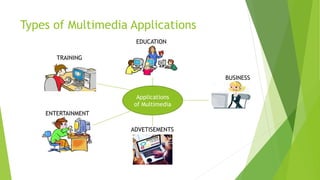
Types of Multimedia Applications
Applications
of Multimedia
ENTERTAINMENT
ADVETISEMENTS
TRAINING
EDUCATION
BUSINESS
Types of Multimedia Applications
1. Education – the user allows to learn at their own pace.
2. Training – the learner allows to enhance their learning experience.
3. Entertainment – it includes movies, net gaming and concerts.
4. Advertisements – computer characters replaced the real world character in
the advertisement.
5. Business – it allows the users to manipulate the products.
Project Team Roles
1. Project Manager – responsible of the projects timeline and resources.
2. Graphic Designer – responsible for the look and feel of the project.
3. Programmer – responsible for the mechanics of the project.
4. Script Writer – responsible for the development of the characters and stories.
5. Second Designer – responsible of the original compositions, sound effects and
designs for the environment.
6. 3D/ 2D Animator – is responsible of developing and making animations.
7. Videographer – is responsible of editing and creating video output.
Brainstorming and Storyboarding
Flowchart and Paper Design
Prototype and User Testing
Media Production
Summary of the Design Steps
1. Brainstorming and Storyboarding – determine who the target audience is.
a. Define Contents – clarification with the user to the objectives and the
knowledge requirement to achieve the objectives are essential to allow the
creation of the right content.
The following are defined when creating contents
o Objectives
o Use the medium that best conveys the information
o Use the multimedia as a supportive and not just for decoration
o Synchronize the multimedia with the text or picture
o Make the interface interactive
Summary of the Design Steps
b. Storyboard – simple serve the purpose of roughly illustrating a concept.
2. Flowchart and Paper Design – the concept of series and scenes.
a. Creating the flowchart
- to develop a hierarchy of information.
3. Prototype and User Testing
a. Video authoring
b. Multimedia authoring
c. Landscape generators
d. Character modelling
e. Audio editing
Summary of the Design Steps
4. Media Production
a. Building Blocks – defined as a series of related actions, happening one
after another.
b. Presenting Activity – most basic activity to display a single, non interactive
block of text, image or video sequence.
c. Controlling Activity – most basic variation of a one after the other
approach is the use of a selection structure based on menus.
d. Linear Presentations – allows the presentation to be synchronized.
e. Data- driven engine – interprets instructions from a file that defines what
is to occur at each stage of the presentation.
Summary of the Design Steps
f. Hierarchical menus – simplifies the menu structure down to two engine
programs presentation and menu.
g. Delivery of contents – actual production and the delivery of the media.
-------End-------
Thank you…..

Multimedia Systems

  • 1.
  • 2.
    Multimedia Systems Multimedia ContentsDevelopment  Components of Multimedia  Types of Multimedia Applications  Project Team Roles  Summary of the Design Steps
  • 3.
    Components of Multimedia: 1.Audio 2. Animation 3. Video 4. Static Pictures 5. Text
  • 4.
    Audio A signal, electricalrepresentation of sound.
  • 5.
    Animation Is the processof making the illusion of motion and change by means of the rapid display of a sequence of static images that minimally differ from each other.
  • 6.
    Video Is an electronicmedium for the recording, copying, playback, broadcasting, and display of moving visual media.
  • 7.
    Static Pictures Is anartifact that depicts visual perception.
  • 8.
    Text It’s literally theoryof any object that can be read.
  • 9.
    Types of MultimediaApplications Applications of Multimedia ENTERTAINMENT ADVETISEMENTS TRAINING EDUCATION BUSINESS
  • 10.
    Types of MultimediaApplications 1. Education – the user allows to learn at their own pace. 2. Training – the learner allows to enhance their learning experience. 3. Entertainment – it includes movies, net gaming and concerts. 4. Advertisements – computer characters replaced the real world character in the advertisement. 5. Business – it allows the users to manipulate the products.
  • 11.
    Project Team Roles 1.Project Manager – responsible of the projects timeline and resources. 2. Graphic Designer – responsible for the look and feel of the project. 3. Programmer – responsible for the mechanics of the project. 4. Script Writer – responsible for the development of the characters and stories. 5. Second Designer – responsible of the original compositions, sound effects and designs for the environment. 6. 3D/ 2D Animator – is responsible of developing and making animations. 7. Videographer – is responsible of editing and creating video output.
  • 12.
    Brainstorming and Storyboarding Flowchartand Paper Design Prototype and User Testing Media Production Summary of the Design Steps
  • 13.
    Summary of theDesign Steps 1. Brainstorming and Storyboarding – determine who the target audience is. a. Define Contents – clarification with the user to the objectives and the knowledge requirement to achieve the objectives are essential to allow the creation of the right content. The following are defined when creating contents o Objectives o Use the medium that best conveys the information o Use the multimedia as a supportive and not just for decoration o Synchronize the multimedia with the text or picture o Make the interface interactive
  • 14.
    Summary of theDesign Steps b. Storyboard – simple serve the purpose of roughly illustrating a concept. 2. Flowchart and Paper Design – the concept of series and scenes. a. Creating the flowchart - to develop a hierarchy of information. 3. Prototype and User Testing a. Video authoring b. Multimedia authoring c. Landscape generators d. Character modelling e. Audio editing
  • 15.
    Summary of theDesign Steps 4. Media Production a. Building Blocks – defined as a series of related actions, happening one after another. b. Presenting Activity – most basic activity to display a single, non interactive block of text, image or video sequence. c. Controlling Activity – most basic variation of a one after the other approach is the use of a selection structure based on menus. d. Linear Presentations – allows the presentation to be synchronized. e. Data- driven engine – interprets instructions from a file that defines what is to occur at each stage of the presentation.
  • 16.
    Summary of theDesign Steps f. Hierarchical menus – simplifies the menu structure down to two engine programs presentation and menu. g. Delivery of contents – actual production and the delivery of the media.
  • 17.