11. Multimedia Development
CHAPTER
CHAPTER HIGHLIGHTS
• Multimedia development requires a team and a
development plan.
• Team members provide specialized knowledge of media
creation.
• Plan defines the set of tasks and procedures needed for
successful project development.
2
DEVELOPMENT TEAM
• Team of experts is important for project.
– They produce high quality media.
– They contribute to the development of ideas in the project cycle.
• Development is both:
– Interactive—team members share expertise and ideas during
the development cycle.
– Iterative—revisions result from development feedback.
3
TEAM MEMBERS
• Project manager
– Responsible for delivering the product with promised features,
on time, and on budget.
– Oversees the business aspects of the development process.
– Must be organized, focused, and task oriented.
• Project designer
– Responsible for overall structure of content, the look, feel, and
functionality of user interface.
4
TEAM MEMBERS
• Content expert
– Has detailed understanding of the topic.
– Some projects may rely on the client to provide content for
project.
• Writers
– Create original text for the project.
– Provide written requirements of the project such as
documentation, contracts, help screens.
– Technical writing skills are useful.
5
MEDIA SPECIALISTS
• Responsible for preparation of individual elements in a
multimedia application.
– Graphics specialist
• Artists skilled in design principles and most current digital
technology.
– Sound specialist
• Trained in traditional sound production and has a working
knowledge of a sound studio.
• Familiar with digital tools for creating and editing sounds.
6
MEDIA SPECIALISTS
– Animation artist
• Understands the principles of composition and color and can
produce drawings.
• Understands the elements of motion and can envision action
sequences.
• Knows computer animation programs and techniques.
– Video specialist
• Videographers who have knowledge of film techniques, writing,
sound, and digital video production and editing.
7
MEDIA SPECIALISTS
– Programmer
• Responsible for computer code that unites the media elements and
provides the product's functionality.
– Acquisitions Specialist
• Knowledgeable about sources for copyright-protected content and
process of securing permissions.
• Establishes agreements to protect the creative work of the project
developers.
8
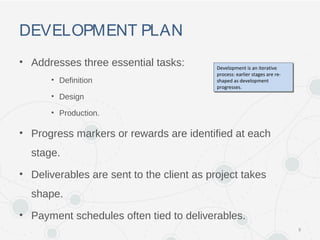
DEVELOPMENT PLAN
• Addresses three essential tasks:
• Definition
• Design
• Production.
• Progress markers or rewards are identified at each
stage.
• Deliverables are sent to the client as project takes
shape.
• Payment schedules often tied to deliverables.
9
Development is an iterative
process: earlier stages are re-
shaped as development
progresses.
Development is an iterative
process: earlier stages are re-
shaped as development
progresses.
STAGE 1: DEFINITION
• Identify project goal or purpose.
• Identify the audience.
• Identify role of multimedia in this project.
• Advantages of multimedia to accomplish goal.
• Media elements it requires.
• Forms of interactivity to provide.
• Delivery method and cost estimate.
• There are 3 Key documents in Stage 1
10
KEY DOCUMENTSIN STAGE 1
• Preliminary Proposal
– Short description of the proposed application.
• Includes project goal, audience, outcomes, description of media,
types and uses of interactivity, preliminary cost estimate.
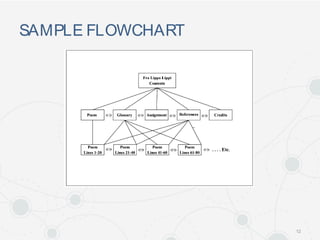
– Often includes a flowchart.
• A simple box diagram with brief descriptions of product contents.
11
SAMPLE FLOWCHART
12
KEY DOCUMENTSIN STAGE 1
• Storyboard (Mockups)
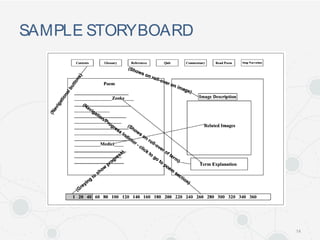
– Series of sketches of major screens.
– Rough drawings of media elements such as photos, animations,
or videos are sketched in.
– Navigational aides are identified.
– Used to:
• Communicate with the client during the definition stage
• Communicate project goals and requirements to the development
team.
13
SAMPLE STORYBOARD
14
KEY DOCUMENTSIN STAGE 1
• Functional specification
– Detailed description of the elements and performance of
multimedia project.
– Basis of a detailed business contract.
• Developer and client understanding of what has been promised and
the procedures to follow if changes are made in specifications.
15
STAGE 2: DESIGN
• Purpose is to create an incomplete working model of the
project—prototype.
– First media elements are created.
– Interface is designed.
– Elements are combined to create the prototype.
• Media Creation
– Required media identified in a content inventory list.
– Media preproduction, production, postproduction are carried out.
16
INTERFACE DESIGN
• User interface defines how user experiences the content
on the screen.
• Goal of interface design is to engage the user.
– Must support the project goals, match the expectations and
abilities of audience.
– Should establish appropriate tone determined by style of media
elements and controls.
17
INTERFACE DESIGN
• Features of user interface
– Intuitive.
• Immediately understood by the user.
• Common strategy is to use a metaphor.
– Consistent.
• Common backgrounds and consistent location of user controls.
– Predictable and reliable.
• Similar actions should produce similar results.
• Identical actions produce identical results.
18
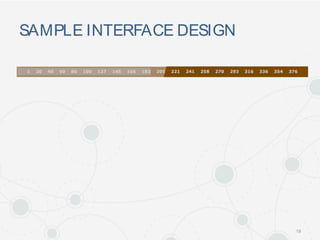
SAMPLE INTERFACE DESIGN
19
PROTOTYPE
• A Prototype is an incomplete working model of the final
product.
• Functions of a prototype:
– Refine the definition of the product
– Test proposed features
– Guide further work of team members.
• Generally built in the authoring application that will
produce final project.
20
PROTOTYPE (cont.)
• Used to test the product itself.
– Test proposals.
– Test assumptions of definition and design stage.
– Test product to see if it performs as anticipated.
– Test navigation of product.
– Obtain internal and external product review.
• Guides subsequent work to complete the project.
21
SAMPLE PROTOTYPE
22
STAGE 3: PRODUCTION
• Remaining elements of product are created and
integrated into the application.
• Includes quality assurance testing with bug reports and
corrective measures.
– Alpha version: includes most media elements but also many
"bugs."
– Beta version: includes all media but still has a few bugs.
– Gold master: complete, bug-free application.
23
STAGE 3: PRODUCTION (cont.)
• Completion of release notes, manuals, and packaging.
• Project materials are systematically archived.
– Archived files may resolve disputes between client and
developers.
– Project may need revisions that use archived files.
– Copyrighted materials may be used in future projects.
24
WRAPUP
• Multimedia development is a team effort.
– Team members provide expertise in the varied disciplines
needed to complete the project.
– Process is interactive and iterative.
• Development plan guides the process to keep production
on task and on time.
– Follows three major stages: Definition, Design, Production
25

Chapter 11 Multimedia Development

  • 1.
  • 2.
    CHAPTER HIGHLIGHTS • Multimediadevelopment requires a team and a development plan. • Team members provide specialized knowledge of media creation. • Plan defines the set of tasks and procedures needed for successful project development. 2
  • 3.
    DEVELOPMENT TEAM • Teamof experts is important for project. – They produce high quality media. – They contribute to the development of ideas in the project cycle. • Development is both: – Interactive—team members share expertise and ideas during the development cycle. – Iterative—revisions result from development feedback. 3
  • 4.
    TEAM MEMBERS • Projectmanager – Responsible for delivering the product with promised features, on time, and on budget. – Oversees the business aspects of the development process. – Must be organized, focused, and task oriented. • Project designer – Responsible for overall structure of content, the look, feel, and functionality of user interface. 4
  • 5.
    TEAM MEMBERS • Contentexpert – Has detailed understanding of the topic. – Some projects may rely on the client to provide content for project. • Writers – Create original text for the project. – Provide written requirements of the project such as documentation, contracts, help screens. – Technical writing skills are useful. 5
  • 6.
    MEDIA SPECIALISTS • Responsiblefor preparation of individual elements in a multimedia application. – Graphics specialist • Artists skilled in design principles and most current digital technology. – Sound specialist • Trained in traditional sound production and has a working knowledge of a sound studio. • Familiar with digital tools for creating and editing sounds. 6
  • 7.
    MEDIA SPECIALISTS – Animationartist • Understands the principles of composition and color and can produce drawings. • Understands the elements of motion and can envision action sequences. • Knows computer animation programs and techniques. – Video specialist • Videographers who have knowledge of film techniques, writing, sound, and digital video production and editing. 7
  • 8.
    MEDIA SPECIALISTS – Programmer •Responsible for computer code that unites the media elements and provides the product's functionality. – Acquisitions Specialist • Knowledgeable about sources for copyright-protected content and process of securing permissions. • Establishes agreements to protect the creative work of the project developers. 8
  • 9.
    DEVELOPMENT PLAN • Addressesthree essential tasks: • Definition • Design • Production. • Progress markers or rewards are identified at each stage. • Deliverables are sent to the client as project takes shape. • Payment schedules often tied to deliverables. 9 Development is an iterative process: earlier stages are re- shaped as development progresses. Development is an iterative process: earlier stages are re- shaped as development progresses.
  • 10.
    STAGE 1: DEFINITION •Identify project goal or purpose. • Identify the audience. • Identify role of multimedia in this project. • Advantages of multimedia to accomplish goal. • Media elements it requires. • Forms of interactivity to provide. • Delivery method and cost estimate. • There are 3 Key documents in Stage 1 10
  • 11.
    KEY DOCUMENTSIN STAGE1 • Preliminary Proposal – Short description of the proposed application. • Includes project goal, audience, outcomes, description of media, types and uses of interactivity, preliminary cost estimate. – Often includes a flowchart. • A simple box diagram with brief descriptions of product contents. 11
  • 12.
  • 13.
    KEY DOCUMENTSIN STAGE1 • Storyboard (Mockups) – Series of sketches of major screens. – Rough drawings of media elements such as photos, animations, or videos are sketched in. – Navigational aides are identified. – Used to: • Communicate with the client during the definition stage • Communicate project goals and requirements to the development team. 13
  • 14.
  • 15.
    KEY DOCUMENTSIN STAGE1 • Functional specification – Detailed description of the elements and performance of multimedia project. – Basis of a detailed business contract. • Developer and client understanding of what has been promised and the procedures to follow if changes are made in specifications. 15
  • 16.
    STAGE 2: DESIGN •Purpose is to create an incomplete working model of the project—prototype. – First media elements are created. – Interface is designed. – Elements are combined to create the prototype. • Media Creation – Required media identified in a content inventory list. – Media preproduction, production, postproduction are carried out. 16
  • 17.
    INTERFACE DESIGN • Userinterface defines how user experiences the content on the screen. • Goal of interface design is to engage the user. – Must support the project goals, match the expectations and abilities of audience. – Should establish appropriate tone determined by style of media elements and controls. 17
  • 18.
    INTERFACE DESIGN • Featuresof user interface – Intuitive. • Immediately understood by the user. • Common strategy is to use a metaphor. – Consistent. • Common backgrounds and consistent location of user controls. – Predictable and reliable. • Similar actions should produce similar results. • Identical actions produce identical results. 18
  • 19.
  • 20.
    PROTOTYPE • A Prototypeis an incomplete working model of the final product. • Functions of a prototype: – Refine the definition of the product – Test proposed features – Guide further work of team members. • Generally built in the authoring application that will produce final project. 20
  • 21.
    PROTOTYPE (cont.) • Usedto test the product itself. – Test proposals. – Test assumptions of definition and design stage. – Test product to see if it performs as anticipated. – Test navigation of product. – Obtain internal and external product review. • Guides subsequent work to complete the project. 21
  • 22.
  • 23.
    STAGE 3: PRODUCTION •Remaining elements of product are created and integrated into the application. • Includes quality assurance testing with bug reports and corrective measures. – Alpha version: includes most media elements but also many "bugs." – Beta version: includes all media but still has a few bugs. – Gold master: complete, bug-free application. 23
  • 24.
    STAGE 3: PRODUCTION(cont.) • Completion of release notes, manuals, and packaging. • Project materials are systematically archived. – Archived files may resolve disputes between client and developers. – Project may need revisions that use archived files. – Copyrighted materials may be used in future projects. 24
  • 25.
    WRAPUP • Multimedia developmentis a team effort. – Team members provide expertise in the varied disciplines needed to complete the project. – Process is interactive and iterative. • Development plan guides the process to keep production on task and on time. – Follows three major stages: Definition, Design, Production 25

Editor's Notes

  • #4 Not all development will have the array of team members we identify here. In some cases one person may do all the development, but in many cases a variety of expertise is part of a production staff. Rather than consider the individual persons on a team, it may be more realistic to consider the required skill sets that are part of the process. Some staff members may handle multiple roles because they have a wide range of skill sets.
  • #5 Not all development will have the array of team members we identify here. In some cases one person may do all the development, but in many cases a variety of expertise is part of a production staff. Rather than consider the individual persons on a team, it may be more realistic to consider the required skill sets that are part of the process. Some staff members may handle multiple roles because they have a wide range of skill sets.
  • #14 Sometimes referred to as mockups, comprehensive mockups, comps… etc..
  • #17 Students should identify the uses for a content inventory list. Identify the tasks done in each stage of media creation.
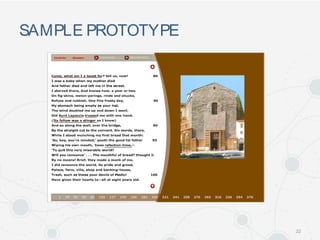
  • #20 One navigation interface for the multimedia application, Exploring Fra Lippo Lippi. User can randomly access segments of the poem by clicking on a line number. Gray bar provides visual feedback on their progress through the poem. Other means of navigating the poem are presented in the overall design.
  • #23 Prototype created in Flash MX, includes media, design, user interface and provides an incomplete working model to test the product's functionality.