Chapter 3
Multimedia System Design
-PRATIK MAN SINGH PRADHAN (WWW.PMSPRATIK.COM.NP)-
MMS2401 – MULTIMEDIA SYSTEMS & COMMUNICATIONS (3 CREDITS)
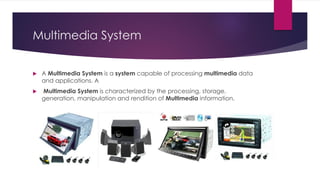
Multimedia System
 A Multimedia System is a system capable of processing multimedia data
and applications. A
 Multimedia System is characterized by the processing, storage,
generation, manipulation and rendition of Multimedia information.
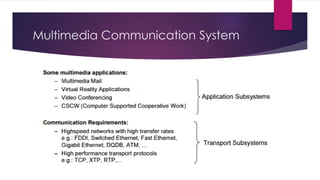
Multimedia Communication System
Multimedia System Application Areas
- World Wide Web
- Multimedia Authoring (Adobe/Autodesk based applications)
- Hypermedia courseware
- Video-on-demand
- Interactive TV
- Computer Games
- Virtual Reality
- Digital Video Editing and Production Systems
- Multimedia Database Systems
Multimedia Document
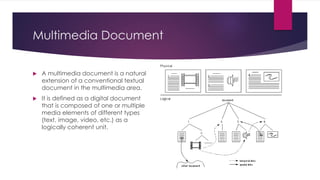
 A multimedia document is a natural
extension of a conventional textual
document in the multimedia area.
 It is defined as a digital document
that is composed of one or multiple
media elements of different types
(text, image, video, etc.) as a
logically coherent unit.
Multimedia Document Architecture
and Structure
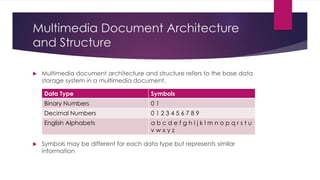
 Multimedia document architecture and structure refers to the base data
storage system in a multimedia document.
 Symbols may be different for each data type but represents similar
information
Data Type Symbols
Binary Numbers 0 1
Decimal Numbers 0 1 2 3 4 5 6 7 8 9
English Alphabets a b c d e f g h I j k l m n o p q r s t u
v w x y z
Multimedia Document Imaging
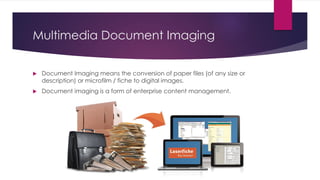
 Document Imaging means the conversion of paper files (of any size or
description) or microfilm / fiche to digital images.
 Document imaging is a form of enterprise content management.
Properties of
Multimedia
System
 Independency
 Integrated
 Computerized
 High Data Throughput
 Real Time Synchronization
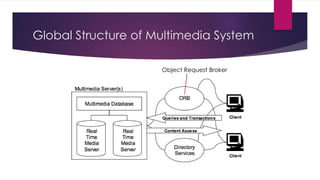
Global Structure of Multimedia System
Object Request Broker
Challenges of Multimedia System
Design
 Host computing power requirement
 Data storage and management requirements
 Human Interface usability requirements
 Network latency and throughput requirements
Issues of Multimedia System Design
 Bandwidth - capacity of the transfer mechanism between source and
destination.
 Delay - the time a multimedia unit spends in transmission from source to
destination.
 Delay Jitter - Variation in delay delivery of data
 Loss Probability - the ratio of units of information that an application can
afford to lose.
Digital Representation
 Digital representation of multimedia means the digital representation of
the multimedia elements.
 Digital Audio is played back through audio player, speaker, audio card
and MP3 Player.
 Digital Images are displayed in computer monitors and printed form
printers.
 Digital Videos are played back from Computer Video Players, Portable
DVD/Blu-Ray Players in Computer Monitors or TV Screens
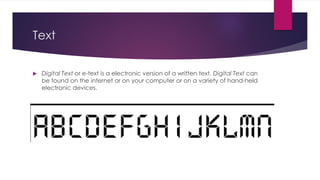
Text
 Digital Text or e-text is a electronic version of a written text. Digital Text can
be found on the internet or on your computer or on a variety of hand-held
electronic devices.
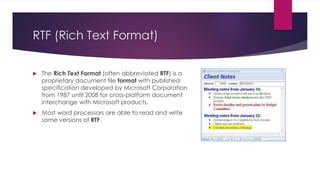
RTF (Rich Text Format)
 The Rich Text Format (often abbreviated RTF) is a
proprietary document file format with published
specification developed by Microsoft Corporation
from 1987 until 2008 for cross-platform document
interchange with Microsoft products.
 Most word processors are able to read and write
some versions of RTF.
Key Information in RTF (Rich Text
Format)
 Object
 Picture
 Font
 Annotations (Comments)
 Drawn Objects (Computer Generated Graphics)
 Security Information (Password/Encryption)
Text Representation
 ANSI - American National Standards Institute
 Unicode – Universal Code
 UTF-8 - Unicode Transformation Format - 8 Unicode Characters
 ASCII – American Standard Code for Information Interchange
 RTF – Rich Text Format
Text Representation Hardware and
Software
 Computer Processor
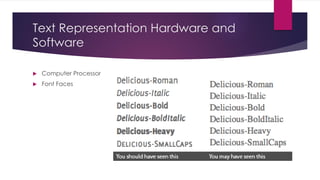
 Font Faces
Image
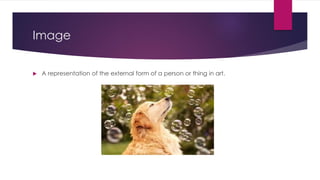
 A representation of the external form of a person or thing in art.
Digital Image
 A digital image is a numeric representation (normally binary) of a two-
dimensional image.
 Depending on whether the image resolution is fixed, it may be of vector or
raster type.
 By itself, the term "digital image" usually refers to raster images or
bitmapped images.
Pixel Bit Depth – 2/4/8/16/32 Bits
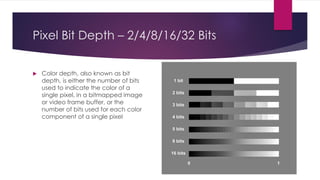
 Color depth, also known as bit
depth, is either the number of bits
used to indicate the color of a
single pixel, in a bitmapped image
or video frame buffer, or the
number of bits used for each color
component of a single pixel
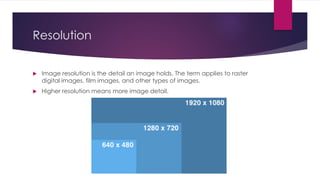
Resolution
 Image resolution is the detail an image holds. The term applies to raster
digital images, film images, and other types of images.
 Higher resolution means more image detail.
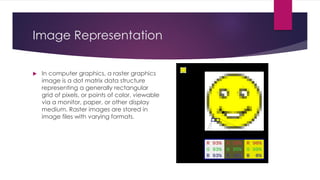
Image Representation
 In computer graphics, a raster graphics
image is a dot matrix data structure
representing a generally rectangular
grid of pixels, or points of color, viewable
via a monitor, paper, or other display
medium. Raster images are stored in
image files with varying formats.
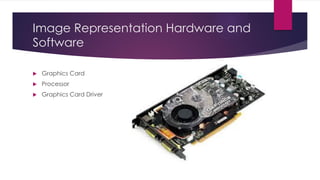
Image Representation Hardware and
Software
 Graphics Card
 Processor
 Graphics Card Driver
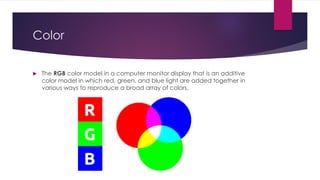
Color
 The RGB color model in a computer monitor display that is an additive
color model in which red, green, and blue light are added together in
various ways to reproduce a broad array of colors.
Luminance and Chrominance
Components
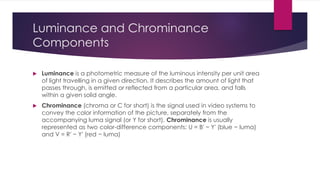
 Luminance is a photometric measure of the luminous intensity per unit area
of light travelling in a given direction. It describes the amount of light that
passes through, is emitted or reflected from a particular area, and falls
within a given solid angle.
 Chrominance (chroma or C for short) is the signal used in video systems to
convey the color information of the picture, separately from the
accompanying luma signal (or Y for short). Chrominance is usually
represented as two color-difference components: U = B′ − Y′ (blue − luma)
and V = R′ − Y′ (red − luma)
Colour Representation
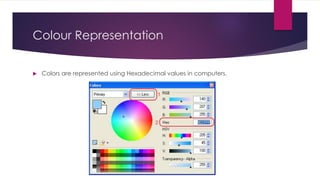
 Colors are represented using Hexadecimal values in computers.
Color Representation Hardware and
Software
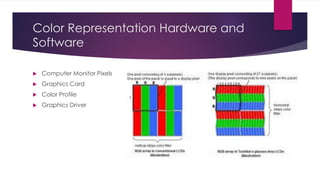
 Computer Monitor Pixels
 Graphics Card
 Color Profile
 Graphics Driver
Graphics
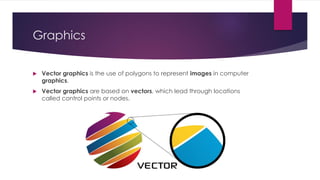
 Vector graphics is the use of polygons to represent images in computer
graphics.
 Vector graphics are based on vectors, which lead through locations
called control points or nodes.
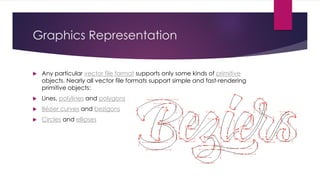
Graphics Representation
 Any particular vector file format supports only some kinds of primitive
objects. Nearly all vector file formats support simple and fast-rendering
primitive objects:
 Lines, polylines and polygons
 Bézier curves and bezigons
 Circles and ellipses
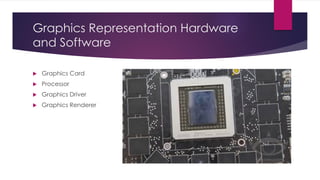
Graphics Representation Hardware
and Software
 Graphics Card
 Processor
 Graphics Driver
 Graphics Renderer
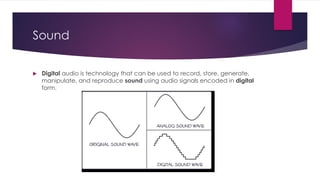
Sound
 Digital audio is technology that can be used to record, store, generate,
manipulate, and reproduce sound using audio signals encoded in digital
form.
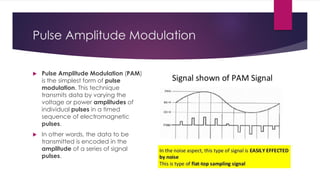
Pulse Amplitude Modulation
 Pulse Amplitude Modulation (PAM)
is the simplest form of pulse
modulation. This technique
transmits data by varying the
voltage or power amplitudes of
individual pulses in a timed
sequence of electromagnetic
pulses.
 In other words, the data to be
transmitted is encoded in the
amplitude of a series of signal
pulses.
Audio Sampling Process
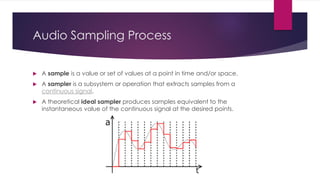
 A sample is a value or set of values at a point in time and/or space.
 A sampler is a subsystem or operation that extracts samples from a
continuous signal.
 A theoretical ideal sampler produces samples equivalent to the
instantaneous value of the continuous signal at the desired points.
Audio Sampling Rate
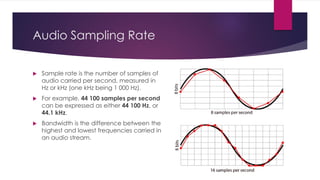
 Sample rate is the number of samples of
audio carried per second, measured in
Hz or kHz (one kHz being 1 000 Hz).
 For example, 44 100 samples per second
can be expressed as either 44 100 Hz, or
44.1 kHz.
 Bandwidth is the difference between the
highest and lowest frequencies carried in
an audio stream.
Audio Quantization
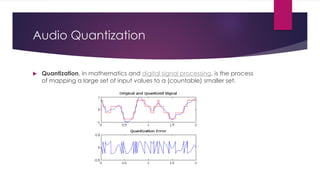
 Quantization, in mathematics and digital signal processing, is the process
of mapping a large set of input values to a (countable) smaller set.
Sound Representation
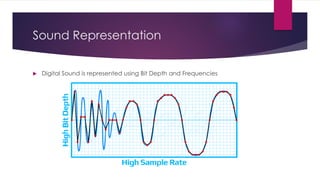
 Digital Sound is represented using Bit Depth and Frequencies
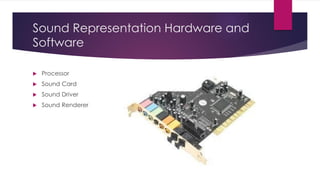
Sound Representation Hardware and
Software
 Processor
 Sound Card
 Sound Driver
 Sound Renderer
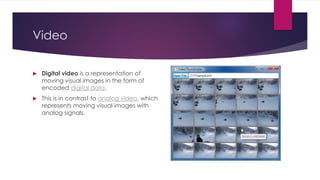
Video
 Digital video is a representation of
moving visual images in the form of
encoded digital data.
 This is in contrast to analog video, which
represents moving visual images with
analog signals.
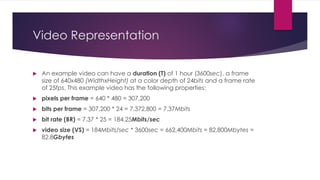
Video Representation
 An example video can have a duration (T) of 1 hour (3600sec), a frame
size of 640x480 (WidthxHeight) at a color depth of 24bits and a frame rate
of 25fps. This example video has the following properties:
 pixels per frame = 640 * 480 = 307,200
 bits per frame = 307,200 * 24 = 7,372,800 = 7.37Mbits
 bit rate (BR) = 7.37 * 25 = 184.25Mbits/sec
 video size (VS) = 184Mbits/sec * 3600sec = 662,400Mbits = 82,800Mbytes =
82.8Gbytes
Video Representation Hardware and
Software
 Processor
 Sound Card
 Graphics Card
 Graphics Driver
 Sound Driver
 Video Player
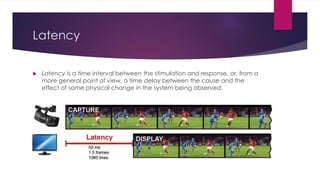
Latency
 Latency is a time interval between the stimulation and response, or, from a
more general point of view, a time delay between the cause and the
effect of some physical change in the system being observed.
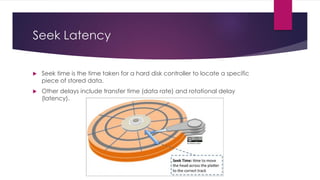
Seek Latency
 Seek time is the time taken for a hard disk controller to locate a specific
piece of stored data.
 Other delays include transfer time (data rate) and rotational delay
(latency).

Chapter 3 - Multimedia System Design

  • 1.
    Chapter 3 Multimedia SystemDesign -PRATIK MAN SINGH PRADHAN (WWW.PMSPRATIK.COM.NP)- MMS2401 – MULTIMEDIA SYSTEMS & COMMUNICATIONS (3 CREDITS)
  • 2.
    Multimedia System  AMultimedia System is a system capable of processing multimedia data and applications. A  Multimedia System is characterized by the processing, storage, generation, manipulation and rendition of Multimedia information.
  • 3.
  • 4.
    Multimedia System ApplicationAreas - World Wide Web - Multimedia Authoring (Adobe/Autodesk based applications) - Hypermedia courseware - Video-on-demand - Interactive TV - Computer Games - Virtual Reality - Digital Video Editing and Production Systems - Multimedia Database Systems
  • 5.
    Multimedia Document  Amultimedia document is a natural extension of a conventional textual document in the multimedia area.  It is defined as a digital document that is composed of one or multiple media elements of different types (text, image, video, etc.) as a logically coherent unit.
  • 6.
    Multimedia Document Architecture andStructure  Multimedia document architecture and structure refers to the base data storage system in a multimedia document.  Symbols may be different for each data type but represents similar information Data Type Symbols Binary Numbers 0 1 Decimal Numbers 0 1 2 3 4 5 6 7 8 9 English Alphabets a b c d e f g h I j k l m n o p q r s t u v w x y z
  • 7.
    Multimedia Document Imaging Document Imaging means the conversion of paper files (of any size or description) or microfilm / fiche to digital images.  Document imaging is a form of enterprise content management.
  • 8.
    Properties of Multimedia System  Independency Integrated  Computerized  High Data Throughput  Real Time Synchronization
  • 9.
    Global Structure ofMultimedia System Object Request Broker
  • 10.
    Challenges of MultimediaSystem Design  Host computing power requirement  Data storage and management requirements  Human Interface usability requirements  Network latency and throughput requirements
  • 11.
    Issues of MultimediaSystem Design  Bandwidth - capacity of the transfer mechanism between source and destination.  Delay - the time a multimedia unit spends in transmission from source to destination.  Delay Jitter - Variation in delay delivery of data  Loss Probability - the ratio of units of information that an application can afford to lose.
  • 12.
    Digital Representation  Digitalrepresentation of multimedia means the digital representation of the multimedia elements.  Digital Audio is played back through audio player, speaker, audio card and MP3 Player.  Digital Images are displayed in computer monitors and printed form printers.  Digital Videos are played back from Computer Video Players, Portable DVD/Blu-Ray Players in Computer Monitors or TV Screens
  • 13.
    Text  Digital Textor e-text is a electronic version of a written text. Digital Text can be found on the internet or on your computer or on a variety of hand-held electronic devices.
  • 14.
    RTF (Rich TextFormat)  The Rich Text Format (often abbreviated RTF) is a proprietary document file format with published specification developed by Microsoft Corporation from 1987 until 2008 for cross-platform document interchange with Microsoft products.  Most word processors are able to read and write some versions of RTF.
  • 15.
    Key Information inRTF (Rich Text Format)  Object  Picture  Font  Annotations (Comments)  Drawn Objects (Computer Generated Graphics)  Security Information (Password/Encryption)
  • 16.
    Text Representation  ANSI- American National Standards Institute  Unicode – Universal Code  UTF-8 - Unicode Transformation Format - 8 Unicode Characters  ASCII – American Standard Code for Information Interchange  RTF – Rich Text Format
  • 17.
    Text Representation Hardwareand Software  Computer Processor  Font Faces
  • 18.
    Image  A representationof the external form of a person or thing in art.
  • 19.
    Digital Image  Adigital image is a numeric representation (normally binary) of a two- dimensional image.  Depending on whether the image resolution is fixed, it may be of vector or raster type.  By itself, the term "digital image" usually refers to raster images or bitmapped images.
  • 20.
    Pixel Bit Depth– 2/4/8/16/32 Bits  Color depth, also known as bit depth, is either the number of bits used to indicate the color of a single pixel, in a bitmapped image or video frame buffer, or the number of bits used for each color component of a single pixel
  • 21.
    Resolution  Image resolutionis the detail an image holds. The term applies to raster digital images, film images, and other types of images.  Higher resolution means more image detail.
  • 22.
    Image Representation  Incomputer graphics, a raster graphics image is a dot matrix data structure representing a generally rectangular grid of pixels, or points of color, viewable via a monitor, paper, or other display medium. Raster images are stored in image files with varying formats.
  • 23.
    Image Representation Hardwareand Software  Graphics Card  Processor  Graphics Card Driver
  • 24.
    Color  The RGBcolor model in a computer monitor display that is an additive color model in which red, green, and blue light are added together in various ways to reproduce a broad array of colors.
  • 25.
    Luminance and Chrominance Components Luminance is a photometric measure of the luminous intensity per unit area of light travelling in a given direction. It describes the amount of light that passes through, is emitted or reflected from a particular area, and falls within a given solid angle.  Chrominance (chroma or C for short) is the signal used in video systems to convey the color information of the picture, separately from the accompanying luma signal (or Y for short). Chrominance is usually represented as two color-difference components: U = B′ − Y′ (blue − luma) and V = R′ − Y′ (red − luma)
  • 26.
    Colour Representation  Colorsare represented using Hexadecimal values in computers.
  • 27.
    Color Representation Hardwareand Software  Computer Monitor Pixels  Graphics Card  Color Profile  Graphics Driver
  • 28.
    Graphics  Vector graphicsis the use of polygons to represent images in computer graphics.  Vector graphics are based on vectors, which lead through locations called control points or nodes.
  • 29.
    Graphics Representation  Anyparticular vector file format supports only some kinds of primitive objects. Nearly all vector file formats support simple and fast-rendering primitive objects:  Lines, polylines and polygons  Bézier curves and bezigons  Circles and ellipses
  • 30.
    Graphics Representation Hardware andSoftware  Graphics Card  Processor  Graphics Driver  Graphics Renderer
  • 31.
    Sound  Digital audiois technology that can be used to record, store, generate, manipulate, and reproduce sound using audio signals encoded in digital form.
  • 32.
    Pulse Amplitude Modulation Pulse Amplitude Modulation (PAM) is the simplest form of pulse modulation. This technique transmits data by varying the voltage or power amplitudes of individual pulses in a timed sequence of electromagnetic pulses.  In other words, the data to be transmitted is encoded in the amplitude of a series of signal pulses.
  • 33.
    Audio Sampling Process A sample is a value or set of values at a point in time and/or space.  A sampler is a subsystem or operation that extracts samples from a continuous signal.  A theoretical ideal sampler produces samples equivalent to the instantaneous value of the continuous signal at the desired points.
  • 34.
    Audio Sampling Rate Sample rate is the number of samples of audio carried per second, measured in Hz or kHz (one kHz being 1 000 Hz).  For example, 44 100 samples per second can be expressed as either 44 100 Hz, or 44.1 kHz.  Bandwidth is the difference between the highest and lowest frequencies carried in an audio stream.
  • 35.
    Audio Quantization  Quantization,in mathematics and digital signal processing, is the process of mapping a large set of input values to a (countable) smaller set.
  • 36.
    Sound Representation  DigitalSound is represented using Bit Depth and Frequencies
  • 37.
    Sound Representation Hardwareand Software  Processor  Sound Card  Sound Driver  Sound Renderer
  • 38.
    Video  Digital videois a representation of moving visual images in the form of encoded digital data.  This is in contrast to analog video, which represents moving visual images with analog signals.
  • 39.
    Video Representation  Anexample video can have a duration (T) of 1 hour (3600sec), a frame size of 640x480 (WidthxHeight) at a color depth of 24bits and a frame rate of 25fps. This example video has the following properties:  pixels per frame = 640 * 480 = 307,200  bits per frame = 307,200 * 24 = 7,372,800 = 7.37Mbits  bit rate (BR) = 7.37 * 25 = 184.25Mbits/sec  video size (VS) = 184Mbits/sec * 3600sec = 662,400Mbits = 82,800Mbytes = 82.8Gbytes
  • 40.
    Video Representation Hardwareand Software  Processor  Sound Card  Graphics Card  Graphics Driver  Sound Driver  Video Player
  • 41.
    Latency  Latency isa time interval between the stimulation and response, or, from a more general point of view, a time delay between the cause and the effect of some physical change in the system being observed.
  • 42.
    Seek Latency  Seektime is the time taken for a hard disk controller to locate a specific piece of stored data.  Other delays include transfer time (data rate) and rotational delay (latency).