MULTIMEDIA
COMPONENTS
Chapter 12, White Space Is Not Your Enemy
DEFINITION
Multimedia may combine type, image, audio, video, infographics, and
interactivity
MULTIMEDIA IN SILENT
FILMS
 Interspersed type frames to deliver dialogue and establish context
 Theatre organists provided musical accompaniments
THUMBNAILS,
STORYBOARDS, SITEMAPS
 Sketch thumbnail layouts
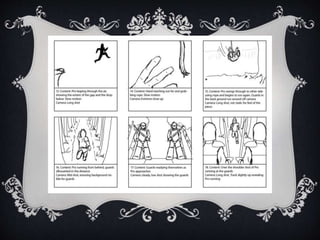
 Storyboard slideshows, animations, videos
 Site map content relationships along with user flow
STORYBOARDS
SLIDESHOWS AND IMAGES
 Don’t let transitions outshine your actual slides. Pick just one.
 Sort, crop, and edit photos before assembling a slideshow
 Consider image content, theme (colour and subject), orientation
 Focus on narrative continuity more than technical superiority
 Storyboarding can help if the slideshow has a narrative
SLIDESHOWS
 PACING.
 “KEN BURNS’ EFFECT.
 CAPTIONS/CUTLINES.
 LOOPING.
 INTERACTIVE IMAGE GALLERIES.
INTERACTIVE IMAGE
GALLERIES
 Generate more viewing traffic than automated slideshows
 Commonly offer an automated slideshow option
WORKING WITH AUDIO
 Use ambient audio sparingly
 Give the user control
 For narration, use the best microphone possible
 …Digital stock sites offer free music
VIDEO – SHOOTING TIPS
• Steady your camera
• Bright even lighting
• Shoot more than you think you need
• Capture a variety of angles (close-up, medium, full, wide, long)
• Zooming and Panning
• Composition (rule of thirds)
• Don’t talk while shooting
RULE OF THIRDS
VIDEO CONT’D
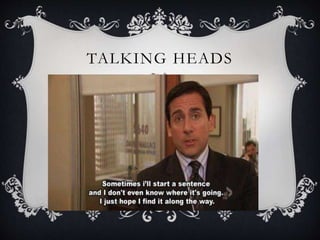
 Interviews, monologues (talking heads)
• Shoot in a quiet location
• Select talking head subject wisely
• Test footage
 Editing
• Best quality video possible (uncompressed, raw)
• Best quality audio
• Transitions
 … Stock video
TALKING HEADS
VIDEO ENCODING
 MPEG4 (MP4) is the most popular file format
 Aspect ratio
 Video-sharing sites (YouTube) offer embedding codes
ANIMATION
 Motion tweens.
 Pacing frames.
 Duration.
 File formats.
 Use restraint, don’t clutter.
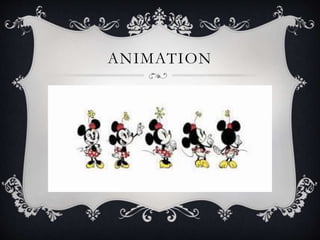
ANIMATION
APPS, PLUG-INS, WIDGETS
 Apps are programs designed to run on computers, tablets,
smartphones, websites, or social media sites
 Plug-ins are code that give browsers or websites additional
functionality
 Widgets are the visible expression of a plug-in.
MULTIMEDIA
STORYTELLING
 Not every story or subject lends itself to multimedia treatment
 Choose the best multimedia elements for your content
 Select a primary medium and let other media play a supporting
role
 Make the interface intuitive
 Don’t let technology get in the way of the information
INTERACTIVE
COMPONENTS…
 Interactive music videos
 Augmented reality
 Comment boxes
 Interactive image galleries
TWEET #1
Name 1 multimedia component used on Montrealites or EatingCrow
E.g. Twitter Widget - EatingCrow Homepage #eatingcrows
MULTIMEDIA TOOLBOX
 Text (headlines, summaries, captions, external links, blogs)
 Data (statistics, spreadsheets, numbers, archives, lottery results)
 Images (still photos, illustrations, info-graphics, slideshows, galleries)
 Video (recorded clips, live feeds, historical footage, animation, tutorials)
 Audio (narration, music, sound effects, ambient sound,)
 User-Contributed Content (anecdotes, comments, photos, social networks)
 Mobile Content (RSS feeds, social networks, GPS applications)
 Site exposure (content and media sharing sites for video, photo, news, info)
TWEET #2
Give an example of something that uses multimedia, and list its
components
e.g. Silent film: video, text, music #eatingcrows
TWEET #3
Give an example of Interactive Media
E.g. The Wilderness Downtown-Arcade Fire, Interactive video
#eatingcrows

Multimedia Components

  • 1.
  • 2.
    DEFINITION Multimedia may combinetype, image, audio, video, infographics, and interactivity
  • 3.
    MULTIMEDIA IN SILENT FILMS Interspersed type frames to deliver dialogue and establish context  Theatre organists provided musical accompaniments
  • 4.
    THUMBNAILS, STORYBOARDS, SITEMAPS  Sketchthumbnail layouts  Storyboard slideshows, animations, videos  Site map content relationships along with user flow
  • 5.
  • 6.
    SLIDESHOWS AND IMAGES Don’t let transitions outshine your actual slides. Pick just one.  Sort, crop, and edit photos before assembling a slideshow  Consider image content, theme (colour and subject), orientation  Focus on narrative continuity more than technical superiority  Storyboarding can help if the slideshow has a narrative
  • 7.
    SLIDESHOWS  PACING.  “KENBURNS’ EFFECT.  CAPTIONS/CUTLINES.  LOOPING.  INTERACTIVE IMAGE GALLERIES.
  • 8.
    INTERACTIVE IMAGE GALLERIES  Generatemore viewing traffic than automated slideshows  Commonly offer an automated slideshow option
  • 9.
    WORKING WITH AUDIO Use ambient audio sparingly  Give the user control  For narration, use the best microphone possible  …Digital stock sites offer free music
  • 10.
    VIDEO – SHOOTINGTIPS • Steady your camera • Bright even lighting • Shoot more than you think you need • Capture a variety of angles (close-up, medium, full, wide, long) • Zooming and Panning • Composition (rule of thirds) • Don’t talk while shooting
  • 11.
  • 12.
    VIDEO CONT’D  Interviews,monologues (talking heads) • Shoot in a quiet location • Select talking head subject wisely • Test footage  Editing • Best quality video possible (uncompressed, raw) • Best quality audio • Transitions  … Stock video
  • 13.
  • 14.
    VIDEO ENCODING  MPEG4(MP4) is the most popular file format  Aspect ratio  Video-sharing sites (YouTube) offer embedding codes
  • 15.
    ANIMATION  Motion tweens. Pacing frames.  Duration.  File formats.  Use restraint, don’t clutter.
  • 16.
  • 17.
    APPS, PLUG-INS, WIDGETS Apps are programs designed to run on computers, tablets, smartphones, websites, or social media sites  Plug-ins are code that give browsers or websites additional functionality  Widgets are the visible expression of a plug-in.
  • 18.
    MULTIMEDIA STORYTELLING  Not everystory or subject lends itself to multimedia treatment  Choose the best multimedia elements for your content  Select a primary medium and let other media play a supporting role  Make the interface intuitive  Don’t let technology get in the way of the information
  • 19.
    INTERACTIVE COMPONENTS…  Interactive musicvideos  Augmented reality  Comment boxes  Interactive image galleries
  • 20.
    TWEET #1 Name 1multimedia component used on Montrealites or EatingCrow E.g. Twitter Widget - EatingCrow Homepage #eatingcrows
  • 21.
    MULTIMEDIA TOOLBOX  Text(headlines, summaries, captions, external links, blogs)  Data (statistics, spreadsheets, numbers, archives, lottery results)  Images (still photos, illustrations, info-graphics, slideshows, galleries)  Video (recorded clips, live feeds, historical footage, animation, tutorials)  Audio (narration, music, sound effects, ambient sound,)  User-Contributed Content (anecdotes, comments, photos, social networks)  Mobile Content (RSS feeds, social networks, GPS applications)  Site exposure (content and media sharing sites for video, photo, news, info)
  • 22.
    TWEET #2 Give anexample of something that uses multimedia, and list its components e.g. Silent film: video, text, music #eatingcrows
  • 23.
    TWEET #3 Give anexample of Interactive Media E.g. The Wilderness Downtown-Arcade Fire, Interactive video #eatingcrows