1
About Multimedia
Introduction to Multimedia
What does multimedia mean to you?
Multimedia is any presentation that combines
several media such as text, animation,
graphics, sound, video and streaming
content.
Multimedia is the convergence of digital
media. This means media producers must
learn how to use multimedia to create content
for TV, radio, video, and the Web.
2
Types of Multimedia
Introduction to Multimedia
Still Media
Any media or image that can be viewed
within one single frame or a single
image that does not change.
Examples: Photos or graphic
images, logos, etc.
3
Types of Multimedia
Introduction to Multimedia
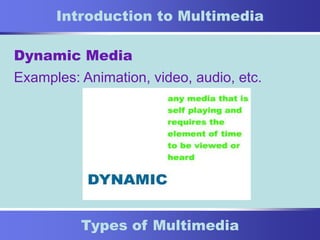
Dynamic Media
Examples: Animation, video, audio, etc.
4
Types of Multimedia
Introduction to Multimedia
Interactive Media
Examples: Animation, Web sites, CD/DVD
authoring, software programming, etc.
5
Types of Multimedia
Introduction to Multimedia
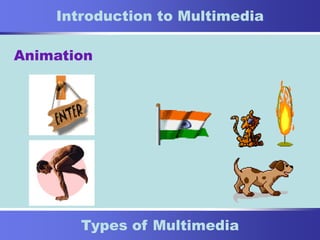
Animation
6
Types of Multimedia
Introduction to Multimedia
Digital Video
7
Types of Multimedia
Introduction to Multimedia
Digital Audio
8
Types of Multimedia
Introduction to Multimedia
Streaming Media
So what is streaming anyway?
Streaming software like RealServer or QuickTime
takes your video/audio file, segments it, and
sends the pieces to a buffer on your hard drive.
Then, the buffer renders the packets together to
play like a continuous file, resulting in a smooth,
high-quality track with a painless download time.
9
Types of Software
Introduction to Multimedia
Software
Text and Graphics: MS Word, Macromedia
Freehand, Adobe Illustrator, Adobe
Photoshop (bitmap), Macromedia Flash
(vector-based)
Animation: Macromedia Flash and Director
Digital Video: iMovie2, Adobe Premiere,
Final Cut Pro
10
Types of Software
Introduction to Multimedia
Software
Digital Audio: Pro Tools, Sound Forge,
iTunes
Streaming: QuickTime, RealServer
Third-Party and Others: Adobe AfterEffects
(add filters & effects to video), Cleaner 5
(encoding/compressing video, audio, etc.),
Real Media, Sorenson Pro
11
QuickTime
Introduction to Multimedia
What is QuickTime?
It’s a file that tells the computer what kind of
media to present and when to present it.
The software is a gateway for distributing
media including images, music, MP3 and
more.
QuickTime lets you experience more than
200 kinds of digital media with a Mac or PC.
12
Hardware and Equipment
Introduction to Multimedia
Hardware and Equipment
• Windows PC/Mac G4
• 300-512 Mb RAM
• 30-40 GB Hard Drive
• CD ROM, DVD RAM (CD-R, DVD-R)
• Two 17” Monitors
• FireWire or ATA Drives (30+ GB)
• Removable Media
13
Hardware and Equipment
Introduction to Multimedia
Hardware and Equipment
• 3CCD Digital Video Camcorder (Sony, Canon)
• Digital Still Camera - 3-5 mega pixels* (Nikon, Sony)
• Converter or Deck (from DV to SVHS)
• Scanner (Hewlett Packard, Epson)
• Printer (optional)
* high-end
14
End of Presentation
Introduction to Multimedia
More Information
• For software, visit www.macromedia.com (free 30-
day trials of Flash, Dreamweaver and more!)
Other Links:
• www.cnet.com (latest prices, tutorials, and more)
• www.techsoup.org (CompuMentor’s site)
• Presentation by: Nettrice R. Gaskins, current Director of the BNN
Multimedia Center & President of DigitalArt Communities, Inc.
Email: nettrice@onebox.com
15
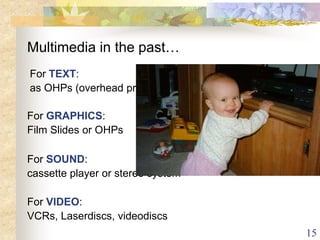
Multimedia in the past…
For VIDEO:
VCRs, Laserdiscs, videodiscs
For SOUND:
cassette player or stereo system
For GRAPHICS:
Film Slides or OHPs
For TEXT:
as OHPs (overhead projectors)
16
Definition of Multimedia
Interactive multimedia
means that all of
these elements are put
together is such a way
that the user can control
all or some aspects of
your software.
Multimedia is a collection of various elements
called media that when combined form a single unit.
These media elements include
video, sound, graphics, animation, and text.
The multimedia
designer’s job is to
put together a
product that is both
easy to use and
interesting.
17
Convergence of industries & technologies
 Multimedia is the convergence of different
technologies. Technologies of sound, video,
graphic design, publishing and animation
combine in an interactive way in:
 Web applications (publishing, streaming
audio, hypertext, graphic design)
 Movies (digital video, animation)
 CD ROM development (audio, PC, DVD)
18
Applications of Multimedia
 Games Industry - PC, Video console, etc.
 Entertainment – Television, movies
 Education – Educational software, interactive
programs
 Training and Development
19
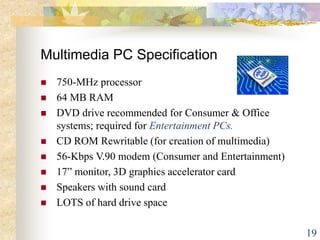
Multimedia PC Specification
 750-MHz processor
 64 MB RAM
 DVD drive recommended for Consumer & Office
systems; required for Entertainment PCs.
 CD ROM Rewritable (for creation of multimedia)
 56-Kbps V.90 modem (Consumer and Entertainment)
 17” monitor, 3D graphics accelerator card
 Speakers with sound card
 LOTS of hard drive space
20
Creating Multimedia - Hardware
In order to create a multimedia application, you will access to:
 Microphone and speakers
 Scanner (capture images)
 video capture card (capture video)
 VCR (play video to be captured)
 Digital camera / still camera (capture images)
 Connection to the internet (capture images/text,
research)
21
Creating Multimedia - Software
In order to create multimedia application, you
will need:
 Macromedia Director
 Image editing software – Fireworks,
Photoshop, Paint Shop Pro, etc.
 Sound editing software – Cooledit, etc.
 Video editing software – Adobe Premier,
Videowave, etc.
Try www.download.com for trialware or
shareware of sound, image or video
editing software.
22
Creating Multimedia - Skills
In order to create multimedia application, be:
Organised. Creating a multimedia project
is time-consuming. You must be
organised and set time-goals for
yourself.
Creative. Spend time analysing other
software and websites. Search for
graphic design techniques, etc.
23
Standards
There are no standard multimedia
platforms, however there are multimedia
standards on individual platforms.
Examples include QuickTime (originally
Apple), AVI, MP3, MPEG, JPG, GIF, PAL,
NTSC, etc.
25
What is multimedia?
 A computer-based interactive
communications process that
incorporates:
– text,
– graphics,
– sound,
– animation, and
– video.
26
Why Multimedia?
 User control
 Individualization
 Interactivity
27
Interactivity: the Key
Component
 Learner Control: The user determines
what content is delivered, when it is
delivered, & how it is delivered.
 Nonlinear:
 Linear:
28
Categories of Multimedia
Titles
 Entertainment
 Education: A.D.A.M.
 Corporate Communications
– Marketing & training
– Presentations & training
 Reference
29
Categories of Multimedia
Titles (Continue)
 Edutainment
 Training
 Recreation
30
Delivering Multimedia
 Compact Disc (CD)
 Digital Video (Versatile) Disc (DVD)
 Kiosk
 Online (Internet & Intranet)
31
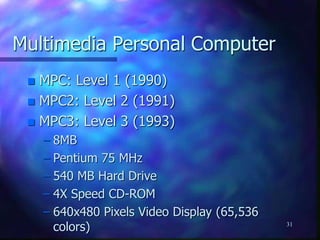
Multimedia Personal Computer
 MPC: Level 1 (1990)
 MPC2: Level 2 (1991)
 MPC3: Level 3 (1993)
– 8MB
– Pentium 75 MHz
– 540 MB Hard Drive
– 4X Speed CD-ROM
– 640x480 Pixels Video Display (65,536
colors)
32
Playback System
 Processor
 Memory
 Monitor & Video Card
 Audio Card
 CD-ROM Drive & DVD-ROM Drive
33
Development System
 Processor
 Memory
 Video capture card
 Monitor
34
Development System (Continue)
 Peripherals
– Scanner
– External storage
 Zip drive (100 MB)
 Jazz drive (1 GB)
– CD, DVD recorder
– Digital camera, Digital Video Camera
– Microphone
– other
35
What is Multimedia?
• Human behavior – sensory, memory,
reactionary
• Five senses – sound, touch, sight, taste,
smell
• A combination of these provides a rich
learning environment
• Only sound and sight can be captured in
computer systems (why?)
36
What is Multimedia?
• Sight and sound are captured in a
computer system as video, audio,
and data
• A medium refers to any one of data
such as text, digitized voice, digitized
video, still digitized images, and
graphics.
37
What is Multimedia?
Multimedia
- is the combination of two or
more media.
38
User perspective
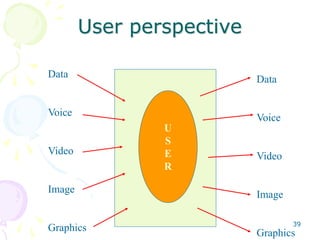
• The user gets input in the form of
data, voice, video, image, graphics,
or a combination of these
• The user generates information in
one or more of these media
39
User perspective
U
S
E
R
Data
Voice
Video
Image
Graphics
Data
Voice
Video
Image
Graphics
40
What is a Multimedia
System?
• A multimedia system is characterized by
the creation, processing, storage,
manipulation, rendition and distribution of
multimedia information
• Temporal relationship (time) between
media makes multimedia different from
normal data
– synchronization
41
Multimedia System
Requirements
• Very high processing power -
processing and movement of large
amounts of data in real-time
• File system capable of handling
multimedia information
• File formats that exploit the inherent
properties of the multimedia
information
42
Multimedia System
Requirements
• Efficient and high I/O rate
• Multimedia operating system
• Storage and memory
• Network support
• Software tools and applications
43
Analog vs Digital Signals
• Voice, music – analog signal –
continuous
• They must be digitized for computer
manipulation
• Conversion is carried out by signal
encoder
• Signal decoder
44
Sampling
• E.g. voice can be sampled at 11 KHz,
22KHz, 44KHz
• Music has a higher range.
• Human hearing 20-20,000 Hz
• CD quality sound is 44KHz
45
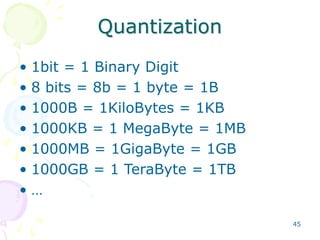
Quantization
• 1bit = 1 Binary Digit
• 8 bits = 8b = 1 byte = 1B
• 1000B = 1KiloBytes = 1KB
• 1000KB = 1 MegaByte = 1MB
• 1000MB = 1GigaByte = 1GB
• 1000GB = 1 TeraByte = 1TB
• …
46
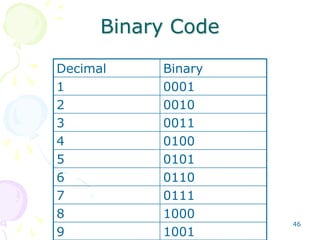
Binary Code
Decimal Binary
1 0001
2 0010
3 0011
4 0100
5 0101
6 0110
7 0111
8 1000
9 1001
47
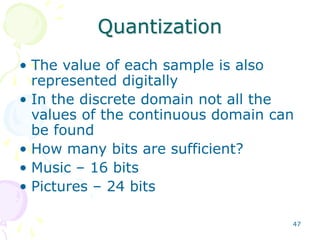
Quantization
• The value of each sample is also
represented digitally
• In the discrete domain not all the
values of the continuous domain can
be found
• How many bits are sufficient?
• Music – 16 bits
• Pictures – 24 bits
48
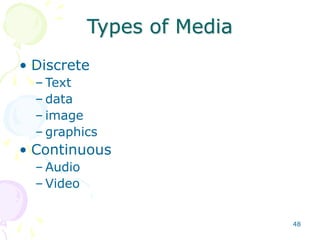
Types of Media
• Discrete
– Text
– data
– image
– graphics
• Continuous
– Audio
– Video
49
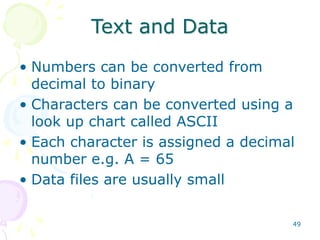
Text and Data
• Numbers can be converted from
decimal to binary
• Characters can be converted using a
look up chart called ASCII
• Each character is assigned a decimal
number e.g. A = 65
• Data files are usually small
50
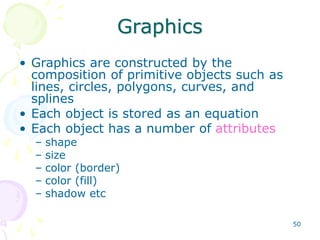
Graphics
• Graphics are constructed by the
composition of primitive objects such as
lines, circles, polygons, curves, and
splines
• Each object is stored as an equation
• Each object has a number of attributes
– shape
– size
– color (border)
– color (fill)
– shadow etc
51
Graphics
• Takes less space than bitmaps for
uncomplicated pictures
• Not suitable for photographs with a
lot of shades etc.
52
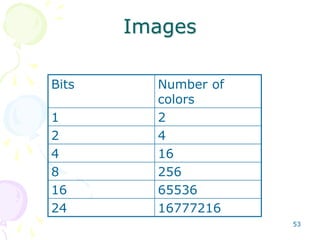
Images
• Continuous-tone pictures are
digitized
• Images are bitmaps
• Divide the picture into pixels –
picture cells
• E.g. 100 x 100
• Each pixel has a n bit quantization
• N = 1, 2, 4, 8, 16, 24
53
Images
Bits Number of
colors
1 2
2 4
4 16
8 256
16 65536
24 16777216
54
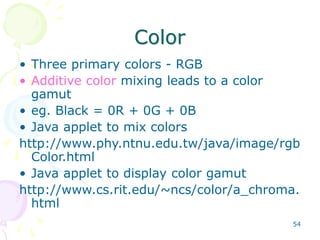
Color
• Three primary colors - RGB
• Additive color mixing leads to a color
gamut
• eg. Black = 0R + 0G + 0B
• Java applet to mix colors
http://www.phy.ntnu.edu.tw/java/image/rgb
Color.html
• Java applet to display color gamut
http://www.cs.rit.edu/~ncs/color/a_chroma.
html
55
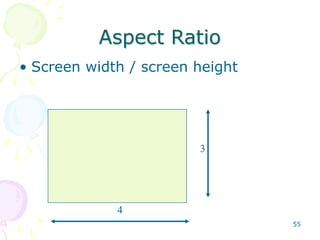
Aspect Ratio
• Screen width / screen height
4
3
4/3 = 1.33
56
Audio
• Sampling rate and quantization
• Mono, stereo or surround (number of
channels)
• CD specification
• DVD specification
57
CD-DA
• CD - Digital Audio
• Stereo, 44KHz Sampling, 16 bit
quantization
• 73 minutes of music on CD
58
Surround Sound• Mono - one channel
• Stereo - Two channels
• Five channel - Left , center,
right, left surround, right
surround
59
Video
• Most colors of the visible spectrum
can be constructed from three
primary colors
• Red, Green, Blue RGB
• Each uses an 8 bit representation
• 256 levels of each color
• Total 24 bit = 16 million colors
60
Video
• Frame rate – 12, 15, 25, 30
frames/sec
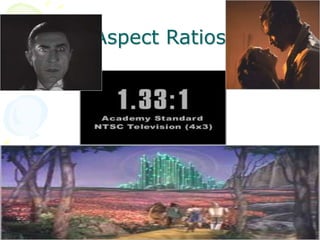
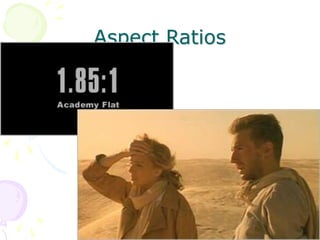
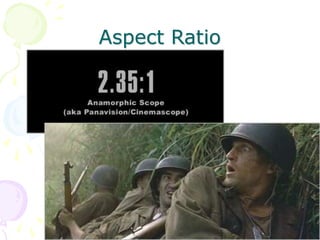
• NTSC video uses 30 frames / sec
• NTSC has 4:3 aspect ratio
– Length/height = AR
– 1, 1.33, 1.66, 1.85, 2, 2.5 etc.
61
Aspect Ratios
62
Aspect Ratios
63
Aspect Ratio
64
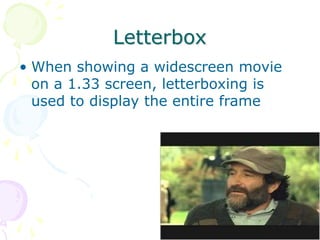
Letterbox
• When showing a widescreen movie
on a 1.33 screen, letterboxing is
used to display the entire frame
65
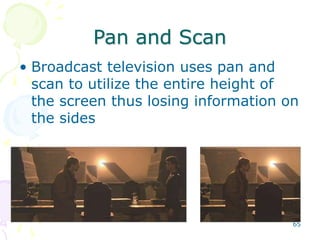
Pan and Scan
• Broadcast television uses pan and
scan to utilize the entire height of
the screen thus losing information on
the sides
Definition of Multimedia
Multi (Latin multus - numerous)
Media, medium (Latin medius, medium: middle, center,
intermediary; Latin mediat: intermediary, means)
Multiple types of information captured, stored,
manipulated, transmitted, and presented.
Specifically: Images, Video, Audio (+Speech) and Text
Related terms: hypermedia, hypertext
Problem: “hypertext”, “hypermedia”, “multimedia” so
overused/generalized they now convey little meaning
Top Ten Misconceptions about
Multimedia Computing
Ramesh Jain, founding chairman of Virage and CTO of
Praja, www.praja.com, presented the following “top ten”
MISCONCEPTIONS list as part of his keynote speech at
the ACM Multimedia Conference, Ottawa, Canada,
October 2, 2001:
10. Video = Multimedia.
9. Multimedia = multi X separate medium.
8. All information is ONLY in the images or video.
7. Editing of media is almost always off-line.
6. Query by example is best access method.
Top Ten Misconceptions about
Multimedia Computing, Continued
5. All users have PhDs in multimedia computing.
4. Users have no memory or context.
3. Computers are for computing.
2. Medium is the message.
1. We work for computers.
Ramesh Jain concluded his keynote talk with the
observation:
Information Builds Experience, Experience is Life.
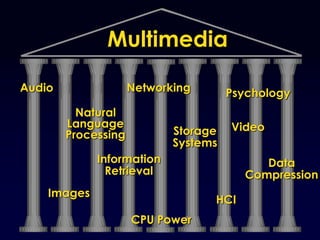
Audio
Images
Information
Retrieval
Storage
Systems
Networking Psychology
HCI
Data
Compression
Natural
Language
Processing
Multimedia
CPU Power
Video
Multimedia Physics
• Sound is a waveform
• Imagery is a waveform
• light is electromagnetic radiation with different intensity in
spatial coordinates
• color corresponds to wavelength (red is the longest
wavelength visible by people)
• Introductory treatment of “light behaves as both particle
and wave” at http://www.howstuffworks.com/light1.htm
• “Distributed Multimedia” by Palmer Agnew and Anne
Kellerman, published by Atomic Dog Publishing,
http://www.atomicdogpublishing.com
A Quick Introduction to Light Waves
• Derived from:
http://www.pbs.org/deepspace/classroom/activity2.html
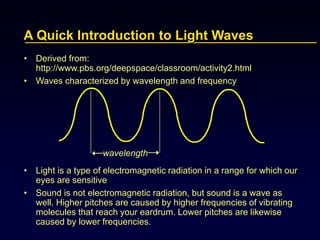
• Waves characterized by wavelength and frequency
• Light is a type of electromagnetic radiation in a range for which our
eyes are sensitive
• Sound is not electromagnetic radiation, but sound is a wave as
well. Higher pitches are caused by higher frequencies of vibrating
molecules that reach your eardrum. Lower pitches are likewise
caused by lower frequencies.
wavelength
Wavelength/ Frequency Spectrum
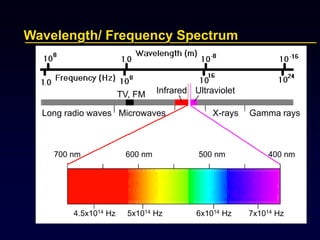
Long radio waves Microwaves X-rays Gamma rays
TV, FM Infrared Ultraviolet
700 nm 600 nm 500 nm 400 nm
4.5x10¹⁴ Hz 5x10¹⁴ Hz 6x10¹⁴ Hz 7x10¹⁴ Hz
Migration from Analog to Digital Representation
• Analog signals to sensors
• E.g. vinyl records
• Fidelity is faithfulness to the original
• Digital representation (1960s)
• Sampling
• Quantizing
• Coding
• Limiting factors in move to digital:
• Storage limits
• CPU speeds
• I/O speeds
• Network bandwidth
Why Digital?
• Universal storage, transmission format
• CD, Internet
• Precision (range of values, number of bits, floating
point)
• Lossless transmission/storage
BUT:
• Sampling rate distorts information
• Size requirements may be huge compared to analog,
e.g., 4.2 million pixels for single 35 mm photograph!
 results in lots of work on perception-based lossy digital
compression strategies
Why Perception Matters
http://www.libertarian.on.ca/images/Florida%20Recount.jpg
Audio
• Sounds
• Hear 15 Hz to 20 kHz
• Speech is 50 Hz to 10 kHz
• Speech Recognition
• It is hard to wreck a nice beach / It is hard to recognize
speech
• Ice cream / I scream
• Synthesis
• Speech
• Music
• MIDI for 127 instruments, 47 percussion sounds
• Notes, timing
Speech Recognition Issues
• Continuous vs. discrete
• Vocabulary size
• Channel (microphone)
• Environment (location of microphone and speaker)
• Speaker dependent/speaker independent
• Context (language model)
• Interactivity (dialog model)
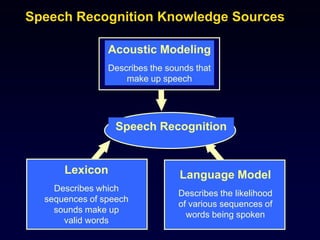
Acoustic Modeling
Describes the sounds that
make up speech
Lexicon
Describes which
sequences of speech
sounds make up
valid words
Language Model
Describes the likelihood
of various sequences of
words being spoken
Speech Recognition
Speech Recognition Knowledge Sources
Speech Variations
Style Variations
careful, clear, articulated, formal, casual
spontaneous, normal, read,
dictated, intimateVoice Quality
breathy, creaky,
whispery, tense,
lax, modal
Context
sport, professional,
interview,
free conversation,
man-machine dialogue
Speaking Rate
normal, slow, fast,
very fast
Stress
in noise, with increased vocal
effort (Lombard reflex),
emotional factors (e.g. angry),
under cognitive load
Video
• Video is made up of frames
• Frame rate = delay between successive frames
• Minimal change between frames
• Sequencing creates the illusion of movement
• 16 frames per second (fps) is “smooth”
• Standards: NTSC 29.97 fps, PAL fps, HDTV 60 fps
• Interlacing
• Display scan rate is different
• Monitor refresh rate, e.g., 60-70 Hz = ~1/second
Captured vs. Synthetic
• Animation vs. Video
• Vector Graphics vs. Bitmap/Raster Pictures
• Synthesizer vs. Recording
• Storage? Manipulation? Processor Requirements?
• Fidelity to real world
• Hybrids are possible
Why is Multimedia Important?
• Our society -
• captures its experience,
• records its accomplishments,
• portrays its past
• informs its masses
……in pictures, audio and video
• For many, CNN has become the “publication of record”
• Multimedia learning leverages “multiple intelligences”
• Multimedia Digital Libraries are an essential component
of
• formal, informal, and professional learning
• distance education, telemedicine
Technology Push vs. Market Pull
• Home Entertainment
• Catalog Ordering
• Multimedia Training, Education
• Videoconferencing
• Professional Video Services
• Videomail
• Speech Recognition
Hype vs. Reality
What is feasible, under what circumstances?
What is possible?
What is impossible?
What is unlikely?

4 multimedia basics

  • 1.
    1 About Multimedia Introduction toMultimedia What does multimedia mean to you? Multimedia is any presentation that combines several media such as text, animation, graphics, sound, video and streaming content. Multimedia is the convergence of digital media. This means media producers must learn how to use multimedia to create content for TV, radio, video, and the Web.
  • 2.
    2 Types of Multimedia Introductionto Multimedia Still Media Any media or image that can be viewed within one single frame or a single image that does not change. Examples: Photos or graphic images, logos, etc.
  • 3.
    3 Types of Multimedia Introductionto Multimedia Dynamic Media Examples: Animation, video, audio, etc.
  • 4.
    4 Types of Multimedia Introductionto Multimedia Interactive Media Examples: Animation, Web sites, CD/DVD authoring, software programming, etc.
  • 5.
    5 Types of Multimedia Introductionto Multimedia Animation
  • 6.
    6 Types of Multimedia Introductionto Multimedia Digital Video
  • 7.
    7 Types of Multimedia Introductionto Multimedia Digital Audio
  • 8.
    8 Types of Multimedia Introductionto Multimedia Streaming Media So what is streaming anyway? Streaming software like RealServer or QuickTime takes your video/audio file, segments it, and sends the pieces to a buffer on your hard drive. Then, the buffer renders the packets together to play like a continuous file, resulting in a smooth, high-quality track with a painless download time.
  • 9.
    9 Types of Software Introductionto Multimedia Software Text and Graphics: MS Word, Macromedia Freehand, Adobe Illustrator, Adobe Photoshop (bitmap), Macromedia Flash (vector-based) Animation: Macromedia Flash and Director Digital Video: iMovie2, Adobe Premiere, Final Cut Pro
  • 10.
    10 Types of Software Introductionto Multimedia Software Digital Audio: Pro Tools, Sound Forge, iTunes Streaming: QuickTime, RealServer Third-Party and Others: Adobe AfterEffects (add filters & effects to video), Cleaner 5 (encoding/compressing video, audio, etc.), Real Media, Sorenson Pro
  • 11.
    11 QuickTime Introduction to Multimedia Whatis QuickTime? It’s a file that tells the computer what kind of media to present and when to present it. The software is a gateway for distributing media including images, music, MP3 and more. QuickTime lets you experience more than 200 kinds of digital media with a Mac or PC.
  • 12.
    12 Hardware and Equipment Introductionto Multimedia Hardware and Equipment • Windows PC/Mac G4 • 300-512 Mb RAM • 30-40 GB Hard Drive • CD ROM, DVD RAM (CD-R, DVD-R) • Two 17” Monitors • FireWire or ATA Drives (30+ GB) • Removable Media
  • 13.
    13 Hardware and Equipment Introductionto Multimedia Hardware and Equipment • 3CCD Digital Video Camcorder (Sony, Canon) • Digital Still Camera - 3-5 mega pixels* (Nikon, Sony) • Converter or Deck (from DV to SVHS) • Scanner (Hewlett Packard, Epson) • Printer (optional) * high-end
  • 14.
    14 End of Presentation Introductionto Multimedia More Information • For software, visit www.macromedia.com (free 30- day trials of Flash, Dreamweaver and more!) Other Links: • www.cnet.com (latest prices, tutorials, and more) • www.techsoup.org (CompuMentor’s site) • Presentation by: Nettrice R. Gaskins, current Director of the BNN Multimedia Center & President of DigitalArt Communities, Inc. Email: nettrice@onebox.com
  • 15.
    15 Multimedia in thepast… For VIDEO: VCRs, Laserdiscs, videodiscs For SOUND: cassette player or stereo system For GRAPHICS: Film Slides or OHPs For TEXT: as OHPs (overhead projectors)
  • 16.
    16 Definition of Multimedia Interactivemultimedia means that all of these elements are put together is such a way that the user can control all or some aspects of your software. Multimedia is a collection of various elements called media that when combined form a single unit. These media elements include video, sound, graphics, animation, and text. The multimedia designer’s job is to put together a product that is both easy to use and interesting.
  • 17.
    17 Convergence of industries& technologies  Multimedia is the convergence of different technologies. Technologies of sound, video, graphic design, publishing and animation combine in an interactive way in:  Web applications (publishing, streaming audio, hypertext, graphic design)  Movies (digital video, animation)  CD ROM development (audio, PC, DVD)
  • 18.
    18 Applications of Multimedia Games Industry - PC, Video console, etc.  Entertainment – Television, movies  Education – Educational software, interactive programs  Training and Development
  • 19.
    19 Multimedia PC Specification 750-MHz processor  64 MB RAM  DVD drive recommended for Consumer & Office systems; required for Entertainment PCs.  CD ROM Rewritable (for creation of multimedia)  56-Kbps V.90 modem (Consumer and Entertainment)  17” monitor, 3D graphics accelerator card  Speakers with sound card  LOTS of hard drive space
  • 20.
    20 Creating Multimedia -Hardware In order to create a multimedia application, you will access to:  Microphone and speakers  Scanner (capture images)  video capture card (capture video)  VCR (play video to be captured)  Digital camera / still camera (capture images)  Connection to the internet (capture images/text, research)
  • 21.
    21 Creating Multimedia -Software In order to create multimedia application, you will need:  Macromedia Director  Image editing software – Fireworks, Photoshop, Paint Shop Pro, etc.  Sound editing software – Cooledit, etc.  Video editing software – Adobe Premier, Videowave, etc. Try www.download.com for trialware or shareware of sound, image or video editing software.
  • 22.
    22 Creating Multimedia -Skills In order to create multimedia application, be: Organised. Creating a multimedia project is time-consuming. You must be organised and set time-goals for yourself. Creative. Spend time analysing other software and websites. Search for graphic design techniques, etc.
  • 23.
    23 Standards There are nostandard multimedia platforms, however there are multimedia standards on individual platforms. Examples include QuickTime (originally Apple), AVI, MP3, MPEG, JPG, GIF, PAL, NTSC, etc.
  • 24.
    25 What is multimedia? A computer-based interactive communications process that incorporates: – text, – graphics, – sound, – animation, and – video.
  • 25.
    26 Why Multimedia?  Usercontrol  Individualization  Interactivity
  • 26.
    27 Interactivity: the Key Component Learner Control: The user determines what content is delivered, when it is delivered, & how it is delivered.  Nonlinear:  Linear:
  • 27.
    28 Categories of Multimedia Titles Entertainment  Education: A.D.A.M.  Corporate Communications – Marketing & training – Presentations & training  Reference
  • 28.
    29 Categories of Multimedia Titles(Continue)  Edutainment  Training  Recreation
  • 29.
    30 Delivering Multimedia  CompactDisc (CD)  Digital Video (Versatile) Disc (DVD)  Kiosk  Online (Internet & Intranet)
  • 30.
    31 Multimedia Personal Computer MPC: Level 1 (1990)  MPC2: Level 2 (1991)  MPC3: Level 3 (1993) – 8MB – Pentium 75 MHz – 540 MB Hard Drive – 4X Speed CD-ROM – 640x480 Pixels Video Display (65,536 colors)
  • 31.
    32 Playback System  Processor Memory  Monitor & Video Card  Audio Card  CD-ROM Drive & DVD-ROM Drive
  • 32.
    33 Development System  Processor Memory  Video capture card  Monitor
  • 33.
    34 Development System (Continue) Peripherals – Scanner – External storage  Zip drive (100 MB)  Jazz drive (1 GB) – CD, DVD recorder – Digital camera, Digital Video Camera – Microphone – other
  • 34.
    35 What is Multimedia? •Human behavior – sensory, memory, reactionary • Five senses – sound, touch, sight, taste, smell • A combination of these provides a rich learning environment • Only sound and sight can be captured in computer systems (why?)
  • 35.
    36 What is Multimedia? •Sight and sound are captured in a computer system as video, audio, and data • A medium refers to any one of data such as text, digitized voice, digitized video, still digitized images, and graphics.
  • 36.
    37 What is Multimedia? Multimedia -is the combination of two or more media.
  • 37.
    38 User perspective • Theuser gets input in the form of data, voice, video, image, graphics, or a combination of these • The user generates information in one or more of these media
  • 38.
  • 39.
    40 What is aMultimedia System? • A multimedia system is characterized by the creation, processing, storage, manipulation, rendition and distribution of multimedia information • Temporal relationship (time) between media makes multimedia different from normal data – synchronization
  • 40.
    41 Multimedia System Requirements • Veryhigh processing power - processing and movement of large amounts of data in real-time • File system capable of handling multimedia information • File formats that exploit the inherent properties of the multimedia information
  • 41.
    42 Multimedia System Requirements • Efficientand high I/O rate • Multimedia operating system • Storage and memory • Network support • Software tools and applications
  • 42.
    43 Analog vs DigitalSignals • Voice, music – analog signal – continuous • They must be digitized for computer manipulation • Conversion is carried out by signal encoder • Signal decoder
  • 43.
    44 Sampling • E.g. voicecan be sampled at 11 KHz, 22KHz, 44KHz • Music has a higher range. • Human hearing 20-20,000 Hz • CD quality sound is 44KHz
  • 44.
    45 Quantization • 1bit =1 Binary Digit • 8 bits = 8b = 1 byte = 1B • 1000B = 1KiloBytes = 1KB • 1000KB = 1 MegaByte = 1MB • 1000MB = 1GigaByte = 1GB • 1000GB = 1 TeraByte = 1TB • …
  • 45.
    46 Binary Code Decimal Binary 10001 2 0010 3 0011 4 0100 5 0101 6 0110 7 0111 8 1000 9 1001
  • 46.
    47 Quantization • The valueof each sample is also represented digitally • In the discrete domain not all the values of the continuous domain can be found • How many bits are sufficient? • Music – 16 bits • Pictures – 24 bits
  • 47.
    48 Types of Media •Discrete – Text – data – image – graphics • Continuous – Audio – Video
  • 48.
    49 Text and Data •Numbers can be converted from decimal to binary • Characters can be converted using a look up chart called ASCII • Each character is assigned a decimal number e.g. A = 65 • Data files are usually small
  • 49.
    50 Graphics • Graphics areconstructed by the composition of primitive objects such as lines, circles, polygons, curves, and splines • Each object is stored as an equation • Each object has a number of attributes – shape – size – color (border) – color (fill) – shadow etc
  • 50.
    51 Graphics • Takes lessspace than bitmaps for uncomplicated pictures • Not suitable for photographs with a lot of shades etc.
  • 51.
    52 Images • Continuous-tone picturesare digitized • Images are bitmaps • Divide the picture into pixels – picture cells • E.g. 100 x 100 • Each pixel has a n bit quantization • N = 1, 2, 4, 8, 16, 24
  • 52.
    53 Images Bits Number of colors 12 2 4 4 16 8 256 16 65536 24 16777216
  • 53.
    54 Color • Three primarycolors - RGB • Additive color mixing leads to a color gamut • eg. Black = 0R + 0G + 0B • Java applet to mix colors http://www.phy.ntnu.edu.tw/java/image/rgb Color.html • Java applet to display color gamut http://www.cs.rit.edu/~ncs/color/a_chroma. html
  • 54.
    55 Aspect Ratio • Screenwidth / screen height 4 3 4/3 = 1.33
  • 55.
    56 Audio • Sampling rateand quantization • Mono, stereo or surround (number of channels) • CD specification • DVD specification
  • 56.
    57 CD-DA • CD -Digital Audio • Stereo, 44KHz Sampling, 16 bit quantization • 73 minutes of music on CD
  • 57.
    58 Surround Sound• Mono- one channel • Stereo - Two channels • Five channel - Left , center, right, left surround, right surround
  • 58.
    59 Video • Most colorsof the visible spectrum can be constructed from three primary colors • Red, Green, Blue RGB • Each uses an 8 bit representation • 256 levels of each color • Total 24 bit = 16 million colors
  • 59.
    60 Video • Frame rate– 12, 15, 25, 30 frames/sec • NTSC video uses 30 frames / sec • NTSC has 4:3 aspect ratio – Length/height = AR – 1, 1.33, 1.66, 1.85, 2, 2.5 etc.
  • 60.
  • 61.
  • 62.
  • 63.
    64 Letterbox • When showinga widescreen movie on a 1.33 screen, letterboxing is used to display the entire frame
  • 64.
    65 Pan and Scan •Broadcast television uses pan and scan to utilize the entire height of the screen thus losing information on the sides
  • 65.
    Definition of Multimedia Multi(Latin multus - numerous) Media, medium (Latin medius, medium: middle, center, intermediary; Latin mediat: intermediary, means) Multiple types of information captured, stored, manipulated, transmitted, and presented. Specifically: Images, Video, Audio (+Speech) and Text Related terms: hypermedia, hypertext Problem: “hypertext”, “hypermedia”, “multimedia” so overused/generalized they now convey little meaning
  • 66.
    Top Ten Misconceptionsabout Multimedia Computing Ramesh Jain, founding chairman of Virage and CTO of Praja, www.praja.com, presented the following “top ten” MISCONCEPTIONS list as part of his keynote speech at the ACM Multimedia Conference, Ottawa, Canada, October 2, 2001: 10. Video = Multimedia. 9. Multimedia = multi X separate medium. 8. All information is ONLY in the images or video. 7. Editing of media is almost always off-line. 6. Query by example is best access method.
  • 67.
    Top Ten Misconceptionsabout Multimedia Computing, Continued 5. All users have PhDs in multimedia computing. 4. Users have no memory or context. 3. Computers are for computing. 2. Medium is the message. 1. We work for computers. Ramesh Jain concluded his keynote talk with the observation: Information Builds Experience, Experience is Life.
  • 68.
  • 69.
    Multimedia Physics • Soundis a waveform • Imagery is a waveform • light is electromagnetic radiation with different intensity in spatial coordinates • color corresponds to wavelength (red is the longest wavelength visible by people) • Introductory treatment of “light behaves as both particle and wave” at http://www.howstuffworks.com/light1.htm • “Distributed Multimedia” by Palmer Agnew and Anne Kellerman, published by Atomic Dog Publishing, http://www.atomicdogpublishing.com
  • 70.
    A Quick Introductionto Light Waves • Derived from: http://www.pbs.org/deepspace/classroom/activity2.html • Waves characterized by wavelength and frequency • Light is a type of electromagnetic radiation in a range for which our eyes are sensitive • Sound is not electromagnetic radiation, but sound is a wave as well. Higher pitches are caused by higher frequencies of vibrating molecules that reach your eardrum. Lower pitches are likewise caused by lower frequencies. wavelength
  • 71.
    Wavelength/ Frequency Spectrum Longradio waves Microwaves X-rays Gamma rays TV, FM Infrared Ultraviolet 700 nm 600 nm 500 nm 400 nm 4.5x10¹⁴ Hz 5x10¹⁴ Hz 6x10¹⁴ Hz 7x10¹⁴ Hz
  • 72.
    Migration from Analogto Digital Representation • Analog signals to sensors • E.g. vinyl records • Fidelity is faithfulness to the original • Digital representation (1960s) • Sampling • Quantizing • Coding • Limiting factors in move to digital: • Storage limits • CPU speeds • I/O speeds • Network bandwidth
  • 73.
    Why Digital? • Universalstorage, transmission format • CD, Internet • Precision (range of values, number of bits, floating point) • Lossless transmission/storage BUT: • Sampling rate distorts information • Size requirements may be huge compared to analog, e.g., 4.2 million pixels for single 35 mm photograph!  results in lots of work on perception-based lossy digital compression strategies
  • 74.
  • 75.
    Audio • Sounds • Hear15 Hz to 20 kHz • Speech is 50 Hz to 10 kHz • Speech Recognition • It is hard to wreck a nice beach / It is hard to recognize speech • Ice cream / I scream • Synthesis • Speech • Music • MIDI for 127 instruments, 47 percussion sounds • Notes, timing
  • 76.
    Speech Recognition Issues •Continuous vs. discrete • Vocabulary size • Channel (microphone) • Environment (location of microphone and speaker) • Speaker dependent/speaker independent • Context (language model) • Interactivity (dialog model)
  • 77.
    Acoustic Modeling Describes thesounds that make up speech Lexicon Describes which sequences of speech sounds make up valid words Language Model Describes the likelihood of various sequences of words being spoken Speech Recognition Speech Recognition Knowledge Sources
  • 78.
    Speech Variations Style Variations careful,clear, articulated, formal, casual spontaneous, normal, read, dictated, intimateVoice Quality breathy, creaky, whispery, tense, lax, modal Context sport, professional, interview, free conversation, man-machine dialogue Speaking Rate normal, slow, fast, very fast Stress in noise, with increased vocal effort (Lombard reflex), emotional factors (e.g. angry), under cognitive load
  • 79.
    Video • Video ismade up of frames • Frame rate = delay between successive frames • Minimal change between frames • Sequencing creates the illusion of movement • 16 frames per second (fps) is “smooth” • Standards: NTSC 29.97 fps, PAL fps, HDTV 60 fps • Interlacing • Display scan rate is different • Monitor refresh rate, e.g., 60-70 Hz = ~1/second
  • 80.
    Captured vs. Synthetic •Animation vs. Video • Vector Graphics vs. Bitmap/Raster Pictures • Synthesizer vs. Recording • Storage? Manipulation? Processor Requirements? • Fidelity to real world • Hybrids are possible
  • 81.
    Why is MultimediaImportant? • Our society - • captures its experience, • records its accomplishments, • portrays its past • informs its masses ……in pictures, audio and video • For many, CNN has become the “publication of record” • Multimedia learning leverages “multiple intelligences” • Multimedia Digital Libraries are an essential component of • formal, informal, and professional learning • distance education, telemedicine
  • 82.
    Technology Push vs.Market Pull • Home Entertainment • Catalog Ordering • Multimedia Training, Education • Videoconferencing • Professional Video Services • Videomail • Speech Recognition
  • 83.
    Hype vs. Reality Whatis feasible, under what circumstances? What is possible? What is impossible? What is unlikely?