


Part 3
• Project where users are given navigational control and
variety of media
• Navigation Control:
• At times the user may want to skip a portion of the
presentation or want to again go through the same
portion.
• The user is given buttons or hyperlinks for navigation.
When these interactive objects are clicked, the flow of
the presentation changes as per the user’s choice.
• Variety of Media
• Earlier the internet browser supported only one media
element: Text. Text was also limited to single font and
color.
• Now a day latest internet browser support all the
media elements.
• Some media elements can be handled inline and some
require plug-in
• Inline media objects are specified inside the
program using a specific <inlinemediaobject> tag.
• Plugin are extra helper programs that can be
easily installed and used as a part of the web
browser.
Generally multimedia is classified into two namely:
Interactive and non-interactive multimedia.
The sequence and timing of media elements can be
controlled by the user.
For example: a multimedia CD-ROM titles and games-
The user can control the media elements and use the
multimedia according to his/her needs and preference.
,
 The user simply watches the media as it plays from
beginning to the end. He/she has no control over the
flow.
For example: a corporate presentation or a
multimedia.
All types of games, movies are examples
of entertainment multimedia wherein the
purpose is to entertain the user
The multimedia titles that educate the
user are classified under edutainment
multimedia. Example: All types of
educational CD’s
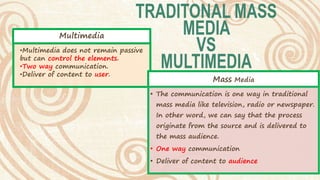
Mass Media
• The communication is one way in traditional
mass media like television, radio or newspaper.
In other word, we can say that the process
originate from the source and is delivered to
the mass audience.
• One way communication
• Deliver of content to audience
•Multimedia does not remain passive
but can control the elements.
•Two way communication.
•Deliver of content to user.
Multimedia
Multimedia has become
integral part of our life.
Multimedia find its
application in various areas.
Some of the usage of
multimedia in various fields:
Usage of
Multimedia
Education &
Training
Advertisement
Journalism
Entertainment
We have been using presentations consist of charts, tables and other
objects to impart knowledge since a long time.
Multimedia is used to produce computer based training courses
commonly known as CBT.
CBT lets the user go through a series of presentations, animations, text
about a particular topic along with the examples.
Edutainment is an informal term used to describe combining education
with entertainment, especially multimedia entertainment.
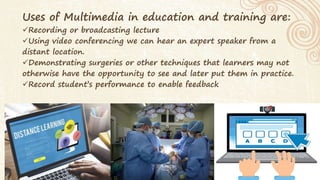
Uses of Multimedia in education and training are:
Recording or broadcasting lecture
Using video conferencing we can hear an expert speaker from a
distant location.
Demonstrating surgeries or other techniques that learners may not
otherwise have the opportunity to see and later put them in practice.
Record student’s performance to enable feedback
It is the major source of launching and promoting a product by the
manufacturing companies in the market.
Excited animation, effects and slogan can make an advertisement
popular.
For Example, Jujus and pug dog in Vodafone Advertisement.
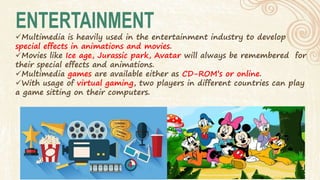
Multimedia is heavily used in the entertainment industry to develop
special effects in animations and movies.
Movies like Ice age, Jurassic park, Avatar will always be remembered for
their special effects and animations.
Multimedia games are available either as CD-ROM’s or online.
With usage of virtual gaming, two players in different countries can play
a game sitting on their computers.
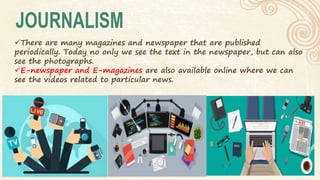
There are many magazines and newspaper that are published
periodically. Today no only we see the text in the newspaper, but can also
see the photographs.
E-newspaper and E-magazines are also available online where we can
see the videos related to particular news.
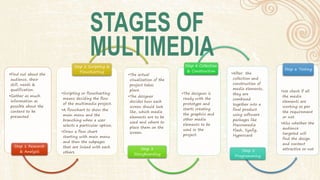
•Find out about the
audience, their
skill, needs &
qualification.
•Gather as much
information as
possible about the
content to be
presented
Step 1 Research
& Analysis
•Scripting or flowcharting
means deciding the flow
of the multimedia project.
•A flowchart to show the
main menu and the
branching when a user
selects a particular option.
•Draw a flow chart
starting with main menu
and then the subpages
that are linked with each
others
Step 2 Scripting &
Flowcharting
•The actual
visualization of the
project takes
place.
•The designer
decides how each
screen should look
like, which media
elements are to be
used and where to
place them on the
screen.
Step 3
Storyboarding
•The designer is
ready with the
prototype and
starts creating
the graphics and
other media
elements to be
used in the
project.
Step 4 Collection
& Construction
•After the
collection and
construction of
media elements,
they are
combined
together into a
final product
using software
packages like
Macromedia
Flash, Synfig,
Hypercard
Step 5
Programming
•We check if all
the media
elements are
working as per
the requirement
or not.
•Also whether the
audience
targeted will
find the design
and content
attractive or not
Step 6 Testing
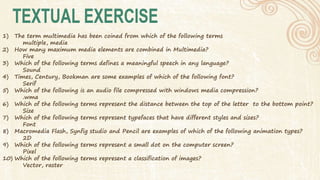
1) The term multimedia has been coined from which of the following terms
multiple, media
2) How many maximum media elements are combined in Multimedia?
Five
3) Which of the following terms defines a meaningful speech in any language?
Sound
4) Times, Century, Bookman are some examples of which of the following font?
Serif
5) Which of the following is an audio file compressed with windows media compression?
.wma
6) Which of the following terms represent the distance between the top of the letter to the bottom point?
Size
7) Which of the following terms represent typefaces that have different styles and sizes?
Font
8) Macromedia Flash, Synfig studio and Pencil are examples of which of the following animation types?
2D
9) Which of the following terms represent a small dot on the computer screen?
Pixel
10) Which of the following terms represent a classification of images?
Vector, raster
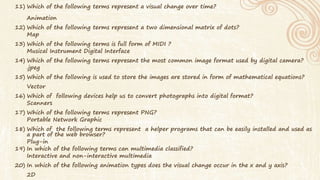
11) Which of the following terms represent a visual change over time?
Animation
12) Which of the following terms represent a two dimensional matrix of dots?
Map
13) Which of the following terms is full form of MIDI ?
Musical Instrument Digital Interface
14) Which of the following terms represent the most common image format used by digital camera?
.jpeg
15) Which of the following is used to store the images are stored in form of mathematical equations?
Vector
16) Which of following devices help us to convert photographs into digital format?
Scanners
17) Which of the following terms represent PNG?
Portable Network Graphic
18) Which of the following terms represent a helper programs that can be easily installed and used as
a part of the web browser?
Plug-in
19) In which of the following terms can multimedia classified?
Interactive and non-interactive multimedia
20) In which of the following animation types does the visual change occur in the x and y axis?
2D
Std 11 Computer Chapter 1 Introduction to Multimedia (Part3)

Std 11 Computer Chapter 1 Introduction to Multimedia (Part3)

  • 1.
  • 2.
    • Project whereusers are given navigational control and variety of media • Navigation Control: • At times the user may want to skip a portion of the presentation or want to again go through the same portion. • The user is given buttons or hyperlinks for navigation. When these interactive objects are clicked, the flow of the presentation changes as per the user’s choice. • Variety of Media • Earlier the internet browser supported only one media element: Text. Text was also limited to single font and color. • Now a day latest internet browser support all the media elements. • Some media elements can be handled inline and some require plug-in • Inline media objects are specified inside the program using a specific <inlinemediaobject> tag. • Plugin are extra helper programs that can be easily installed and used as a part of the web browser.
  • 3.
    Generally multimedia isclassified into two namely: Interactive and non-interactive multimedia. The sequence and timing of media elements can be controlled by the user. For example: a multimedia CD-ROM titles and games- The user can control the media elements and use the multimedia according to his/her needs and preference. ,  The user simply watches the media as it plays from beginning to the end. He/she has no control over the flow. For example: a corporate presentation or a multimedia.
  • 4.
    All types ofgames, movies are examples of entertainment multimedia wherein the purpose is to entertain the user The multimedia titles that educate the user are classified under edutainment multimedia. Example: All types of educational CD’s
  • 5.
    Mass Media • Thecommunication is one way in traditional mass media like television, radio or newspaper. In other word, we can say that the process originate from the source and is delivered to the mass audience. • One way communication • Deliver of content to audience •Multimedia does not remain passive but can control the elements. •Two way communication. •Deliver of content to user. Multimedia
  • 6.
    Multimedia has become integralpart of our life. Multimedia find its application in various areas. Some of the usage of multimedia in various fields: Usage of Multimedia Education & Training Advertisement Journalism Entertainment
  • 7.
    We have beenusing presentations consist of charts, tables and other objects to impart knowledge since a long time. Multimedia is used to produce computer based training courses commonly known as CBT. CBT lets the user go through a series of presentations, animations, text about a particular topic along with the examples. Edutainment is an informal term used to describe combining education with entertainment, especially multimedia entertainment.
  • 8.
    Uses of Multimediain education and training are: Recording or broadcasting lecture Using video conferencing we can hear an expert speaker from a distant location. Demonstrating surgeries or other techniques that learners may not otherwise have the opportunity to see and later put them in practice. Record student’s performance to enable feedback
  • 9.
    It is themajor source of launching and promoting a product by the manufacturing companies in the market. Excited animation, effects and slogan can make an advertisement popular. For Example, Jujus and pug dog in Vodafone Advertisement.
  • 10.
    Multimedia is heavilyused in the entertainment industry to develop special effects in animations and movies. Movies like Ice age, Jurassic park, Avatar will always be remembered for their special effects and animations. Multimedia games are available either as CD-ROM’s or online. With usage of virtual gaming, two players in different countries can play a game sitting on their computers.
  • 11.
    There are manymagazines and newspaper that are published periodically. Today no only we see the text in the newspaper, but can also see the photographs. E-newspaper and E-magazines are also available online where we can see the videos related to particular news.
  • 12.
    •Find out aboutthe audience, their skill, needs & qualification. •Gather as much information as possible about the content to be presented Step 1 Research & Analysis •Scripting or flowcharting means deciding the flow of the multimedia project. •A flowchart to show the main menu and the branching when a user selects a particular option. •Draw a flow chart starting with main menu and then the subpages that are linked with each others Step 2 Scripting & Flowcharting •The actual visualization of the project takes place. •The designer decides how each screen should look like, which media elements are to be used and where to place them on the screen. Step 3 Storyboarding •The designer is ready with the prototype and starts creating the graphics and other media elements to be used in the project. Step 4 Collection & Construction •After the collection and construction of media elements, they are combined together into a final product using software packages like Macromedia Flash, Synfig, Hypercard Step 5 Programming •We check if all the media elements are working as per the requirement or not. •Also whether the audience targeted will find the design and content attractive or not Step 6 Testing
  • 13.
    1) The termmultimedia has been coined from which of the following terms multiple, media 2) How many maximum media elements are combined in Multimedia? Five 3) Which of the following terms defines a meaningful speech in any language? Sound 4) Times, Century, Bookman are some examples of which of the following font? Serif 5) Which of the following is an audio file compressed with windows media compression? .wma 6) Which of the following terms represent the distance between the top of the letter to the bottom point? Size 7) Which of the following terms represent typefaces that have different styles and sizes? Font 8) Macromedia Flash, Synfig studio and Pencil are examples of which of the following animation types? 2D 9) Which of the following terms represent a small dot on the computer screen? Pixel 10) Which of the following terms represent a classification of images? Vector, raster
  • 14.
    11) Which ofthe following terms represent a visual change over time? Animation 12) Which of the following terms represent a two dimensional matrix of dots? Map 13) Which of the following terms is full form of MIDI ? Musical Instrument Digital Interface 14) Which of the following terms represent the most common image format used by digital camera? .jpeg 15) Which of the following is used to store the images are stored in form of mathematical equations? Vector 16) Which of following devices help us to convert photographs into digital format? Scanners 17) Which of the following terms represent PNG? Portable Network Graphic 18) Which of the following terms represent a helper programs that can be easily installed and used as a part of the web browser? Plug-in 19) In which of the following terms can multimedia classified? Interactive and non-interactive multimedia 20) In which of the following animation types does the visual change occur in the x and y axis? 2D