Command to configure Mikrotik
1. Setup router
//to create a name for network card
admin@mikrotik>int
admin@mikrotik int>eth
admin@mikrotik int eth>print
admin@mikrotik int eth>set 0 name=LAN
admin@mikrotik int eth>set 1 name=WAN
admin@mikrotik int eth>print
//to assign ip address to network card
admin@mikrotik ip address>add address=x.x.x.x netmask=x.x.x.x interface=LAN
admin@mikrotik ip address>add address=x.x.x.x netmask=x.x.x.x interface=WAN
admin@mikrotik ip address>print
//to create NAT rule
admin@mikrotik ip firewall nat>add chain=srcnat action=masquerade out-interface=WAN
admin@mikrotik ip firewall nat>print
//to assign gateway
admin@mikrotik ip route>add gateway=x.x.x.x
admin@mikrotik ip route>print
//to assign dns
admin@mikrotik ip dns>set primary-dns=x.x.x.x
admin@mikrotik ip dns>set secondary-dns=x.x.x.x
admin@mikrotik ip dns>set allow-remote-requests=yes
//to create dhcp
admin@mikrotik>setup
select s =config dhcp server
dhcp server interface=LAN
dhcp space=x.x.x.0/24
dhcp pool=x.x.x.x-x.x.x.x
select x to exit.
2.Create login page(Hotspot)
admin@mikrotik ip hotspot>setup
interface=LAN
local address=x.x.x.x/24
masquerade=yes
address pool=x.x.x.x-x.x.x.x
select certificate=none
ip address of smtp server=0.0.0.0
dns="press enter"
dns name="put it blank"
name of local hotspot=admin
password=23804151
Mikrotik Server with Hotspot Done
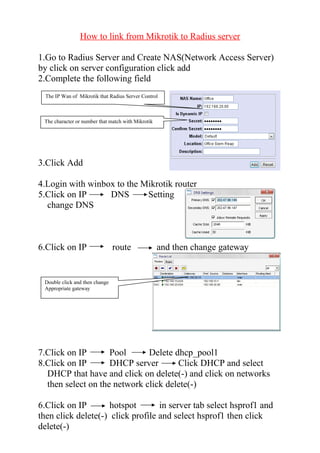
How to link from Mikrotik to Radius server
1.Go to Radius Server and Create NAS(Network Access Server)
by click on server configuration click add
2.Complete the following field
3.Click Add
4.Login with winbox to the Mikrotik router
5.Click on IP DNS Setting
change DNS
6.Click on IP route and then change gateway
7.Click on IP Pool Delete dhcp_pool1
8.Click on IP DHCP server Click DHCP and select
DHCP that have and click on delete(-) and click on networks
then select on the network click delete(-)
6.Click on IP hotspot in server tab select hsprof1 and
then click delete(-) click profile and select hsprof1 then click
delete(-)
The IP Wan of Mikrotik that Radius Server Control
The character or number that match with Mikrotik
Double click and then change
Appropriate gateway
7. Go to DHCP server in DHCP tab click setup next
until finish so it created the IP pool and network automatically
8. Go to hotspot again in server tab click setup and then
click Next until finish
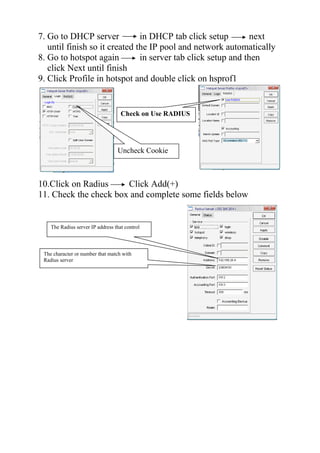
9. Click Profile in hotspot and double click on hsprof1
10.Click on Radius Click Add(+)
11. Check the check box and complete some fields below
Uncheck Cookie
Check on Use RADIUS
The Radius server IP address that control
The character or number that match with
Radius server
How to change from one ISP to other ISP
1.Login with winbox to the Mikrotik router
2.Click on IP DNS Setting
change DNS
3.Click on IP route and then change gateway
4.Click on IP Pool Delete dhcp_pool1
5.Click on IP DHCP server Click DHCP and select
DHCP that have and click on delete(-) and click on networks
then select on the network click delete(-)
6.Click on IP hotspot in server tab select hsprof1 and
then click delete(-) click profile and select hsprof1 then click
delete(-)
7. Go to DHCP server in DHCP tab click setup next
until finish so it created the IP pool and network automatically
8. Go to hotspot again in server tab click setup and then
click Next until finish
9. Click Profile in hotspot and double click on hsprof1
Double click and then change
Appropriate gateway
Uncheck Cookie
Check on Use RADIUS
[admin@Mikrotik]> interface wireless set wlan1 ssid="My HotSpot"
band=2.4ghz-b mode=ap-bridges in
admin@MikroTik] > ip hotspot setup
hotspot interface: wlan1
local address of network: 192.168.30.1/24
masquerade network: yes
address pool of network: 192.168.30.2-192.168.30.99
select certificate: none
ip address of smtp server: 0.0.0.0
dns servers: 192.168.24.2
dns name: hotspot.mydomain.net (or leave this blank)
name of local hotspot user: user
password for the user: password
[admin@MikroTik] > ip hotspot user print
Flags: X - disabled, D - dynamic
# SERVER NAME ADDRESS PROFILE UPTIME
0 fred default 0s
[admin@MikroTik] > ip hotspot user remove 0
[admin@Mikrotik]> interface wireless set wlan1 ssid="My HotSpot"
band=2.4ghz-b mode=ap-bridges in
admin@MikroTik] > ip hotspot setup
hotspot interface: wlan1
local address of network: 192.168.30.1/24
masquerade network: yes
address pool of network: 192.168.30.2-192.168.30.99
select certificate: none
ip address of smtp server: 0.0.0.0
dns servers: 192.168.24.2
dns name: hotspot.mydomain.net (or leave this blank)
name of local hotspot user: user
password for the user: password
[admin@MikroTik] > ip hotspot user print
Flags: X - disabled, D - dynamic
# SERVER NAME ADDRESS PROFILE UPTIME
0 fred default 0s
[admin@MikroTik] > ip hotspot user remove 0

Basic command to configure mikrotik

  • 1.
    Command to configureMikrotik 1. Setup router //to create a name for network card admin@mikrotik>int admin@mikrotik int>eth admin@mikrotik int eth>print admin@mikrotik int eth>set 0 name=LAN admin@mikrotik int eth>set 1 name=WAN admin@mikrotik int eth>print //to assign ip address to network card admin@mikrotik ip address>add address=x.x.x.x netmask=x.x.x.x interface=LAN admin@mikrotik ip address>add address=x.x.x.x netmask=x.x.x.x interface=WAN admin@mikrotik ip address>print //to create NAT rule admin@mikrotik ip firewall nat>add chain=srcnat action=masquerade out-interface=WAN admin@mikrotik ip firewall nat>print //to assign gateway admin@mikrotik ip route>add gateway=x.x.x.x admin@mikrotik ip route>print //to assign dns admin@mikrotik ip dns>set primary-dns=x.x.x.x admin@mikrotik ip dns>set secondary-dns=x.x.x.x admin@mikrotik ip dns>set allow-remote-requests=yes //to create dhcp admin@mikrotik>setup select s =config dhcp server dhcp server interface=LAN dhcp space=x.x.x.0/24 dhcp pool=x.x.x.x-x.x.x.x select x to exit. 2.Create login page(Hotspot) admin@mikrotik ip hotspot>setup interface=LAN local address=x.x.x.x/24 masquerade=yes address pool=x.x.x.x-x.x.x.x select certificate=none ip address of smtp server=0.0.0.0 dns="press enter" dns name="put it blank" name of local hotspot=admin password=23804151 Mikrotik Server with Hotspot Done
  • 2.
    How to linkfrom Mikrotik to Radius server 1.Go to Radius Server and Create NAS(Network Access Server) by click on server configuration click add 2.Complete the following field 3.Click Add 4.Login with winbox to the Mikrotik router 5.Click on IP DNS Setting change DNS 6.Click on IP route and then change gateway 7.Click on IP Pool Delete dhcp_pool1 8.Click on IP DHCP server Click DHCP and select DHCP that have and click on delete(-) and click on networks then select on the network click delete(-) 6.Click on IP hotspot in server tab select hsprof1 and then click delete(-) click profile and select hsprof1 then click delete(-) The IP Wan of Mikrotik that Radius Server Control The character or number that match with Mikrotik Double click and then change Appropriate gateway
  • 3.
    7. Go toDHCP server in DHCP tab click setup next until finish so it created the IP pool and network automatically 8. Go to hotspot again in server tab click setup and then click Next until finish 9. Click Profile in hotspot and double click on hsprof1 10.Click on Radius Click Add(+) 11. Check the check box and complete some fields below Uncheck Cookie Check on Use RADIUS The Radius server IP address that control The character or number that match with Radius server
  • 4.
    How to changefrom one ISP to other ISP 1.Login with winbox to the Mikrotik router 2.Click on IP DNS Setting change DNS 3.Click on IP route and then change gateway 4.Click on IP Pool Delete dhcp_pool1 5.Click on IP DHCP server Click DHCP and select DHCP that have and click on delete(-) and click on networks then select on the network click delete(-) 6.Click on IP hotspot in server tab select hsprof1 and then click delete(-) click profile and select hsprof1 then click delete(-) 7. Go to DHCP server in DHCP tab click setup next until finish so it created the IP pool and network automatically 8. Go to hotspot again in server tab click setup and then click Next until finish 9. Click Profile in hotspot and double click on hsprof1 Double click and then change Appropriate gateway Uncheck Cookie Check on Use RADIUS
  • 5.
    [admin@Mikrotik]> interface wirelessset wlan1 ssid="My HotSpot" band=2.4ghz-b mode=ap-bridges in admin@MikroTik] > ip hotspot setup hotspot interface: wlan1 local address of network: 192.168.30.1/24 masquerade network: yes address pool of network: 192.168.30.2-192.168.30.99 select certificate: none ip address of smtp server: 0.0.0.0 dns servers: 192.168.24.2 dns name: hotspot.mydomain.net (or leave this blank) name of local hotspot user: user password for the user: password [admin@MikroTik] > ip hotspot user print Flags: X - disabled, D - dynamic # SERVER NAME ADDRESS PROFILE UPTIME 0 fred default 0s [admin@MikroTik] > ip hotspot user remove 0
  • 6.
    [admin@Mikrotik]> interface wirelessset wlan1 ssid="My HotSpot" band=2.4ghz-b mode=ap-bridges in admin@MikroTik] > ip hotspot setup hotspot interface: wlan1 local address of network: 192.168.30.1/24 masquerade network: yes address pool of network: 192.168.30.2-192.168.30.99 select certificate: none ip address of smtp server: 0.0.0.0 dns servers: 192.168.24.2 dns name: hotspot.mydomain.net (or leave this blank) name of local hotspot user: user password for the user: password [admin@MikroTik] > ip hotspot user print Flags: X - disabled, D - dynamic # SERVER NAME ADDRESS PROFILE UPTIME 0 fred default 0s [admin@MikroTik] > ip hotspot user remove 0