D.H.C.P
Dynamic Host Configuration
Protocol
DHCP Packets
 1. DHCPDISCOVER
 2. DHCPOFFER
 3. DHCPREQUEST
 4. DHCPACK
 5. DHCPNAK
 6. DHCPDECLINE
 7. DHCPINFORM
 8. DHCPRELEASE
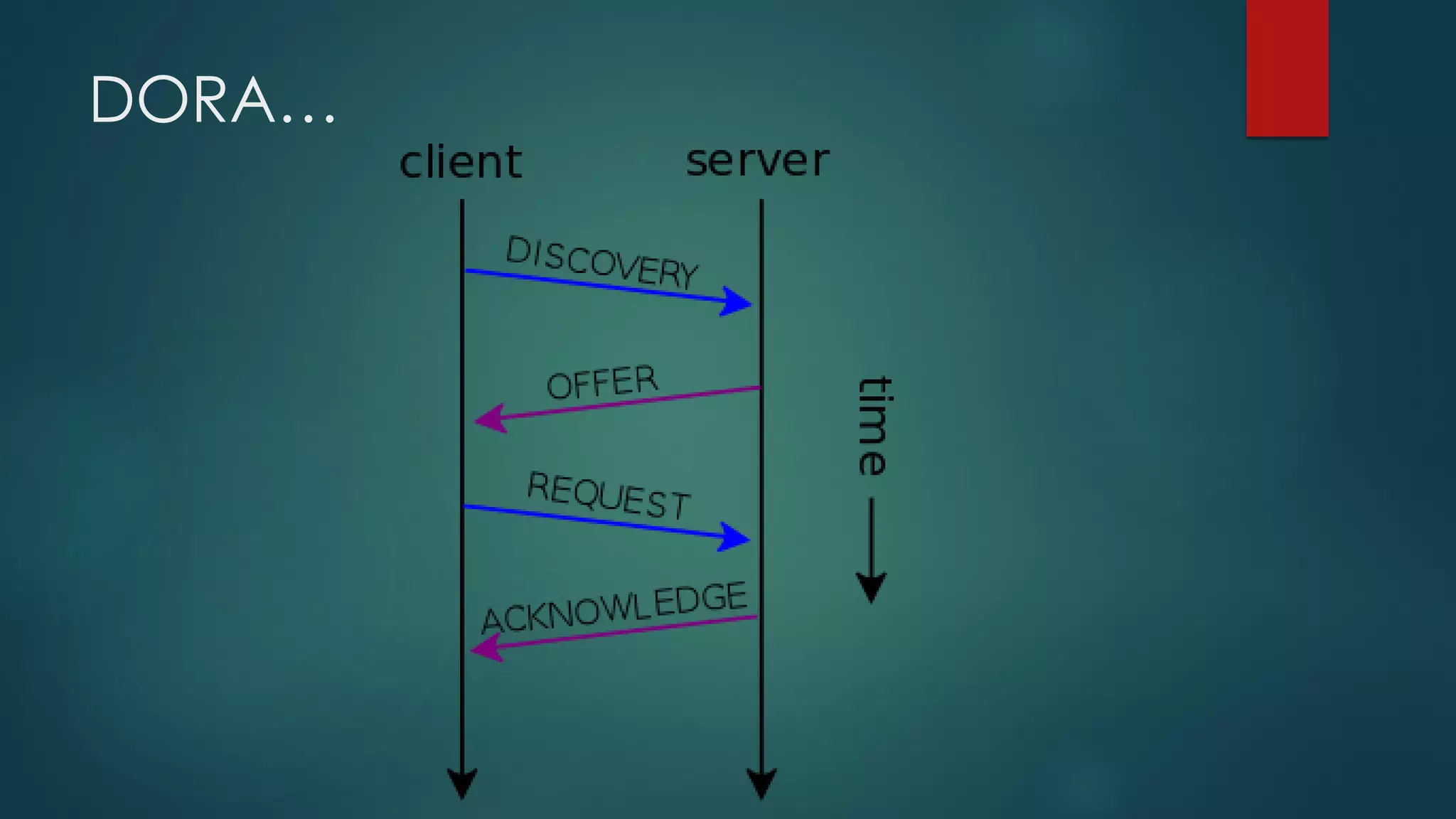
DORA…
Few more points
 The DHCP client tries to renew the lease after half of the lease time
has expired. This is done by the exchange of DHCPREQUEST and
DHCPACK messages. While doing all this, the client enters the
renewing stage.
 Boot Protocol (DHCP/BootP) client and server datagrams (ports 67
and 68)
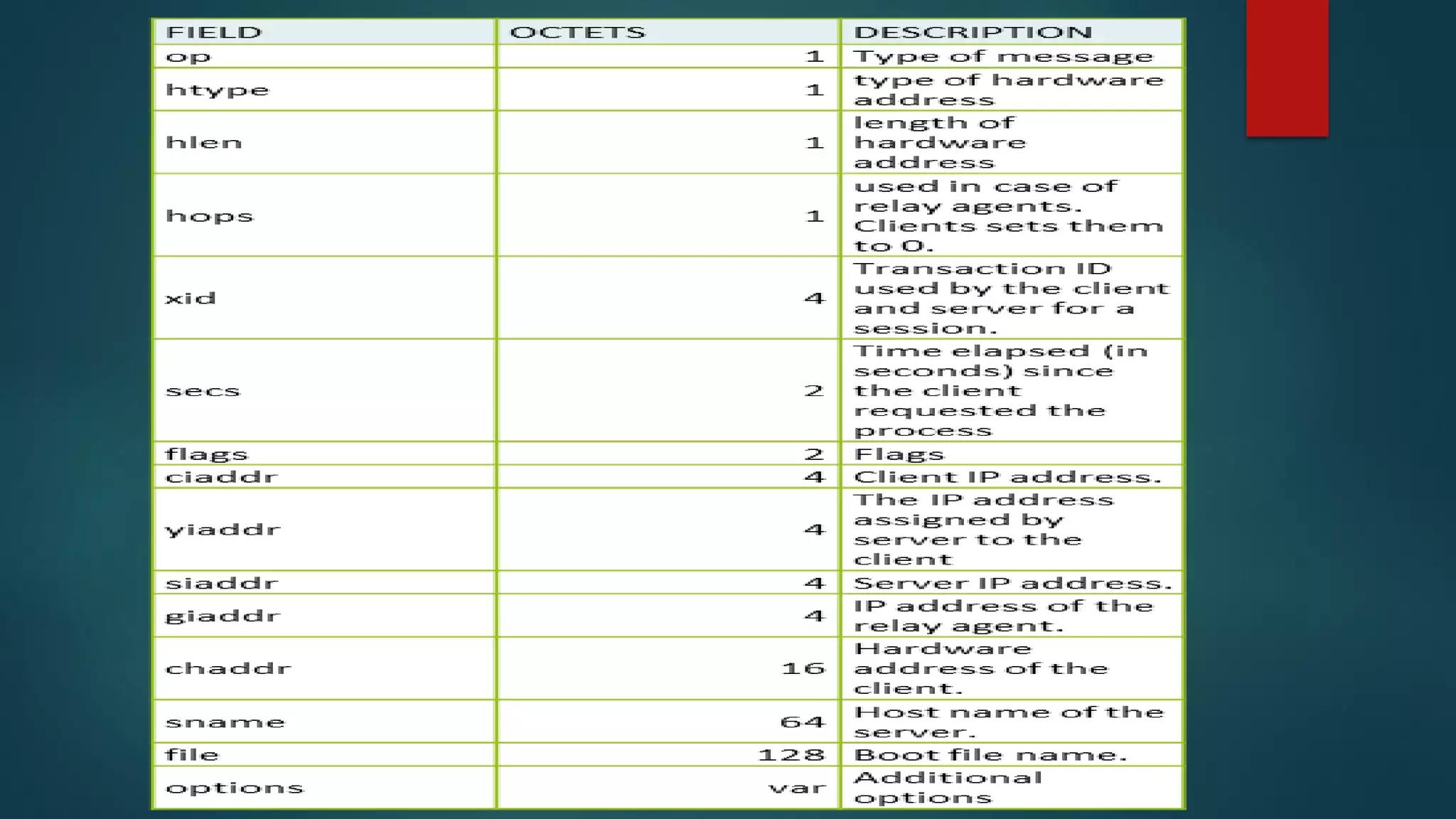
DHCP Packet Header
 http://www.cisco.com/c/en/us/support/docs/ip/dynamic-address-
allocation-resolution/27470-100.html
 DHCP Client-Server Conversation with DHCP Relay Function
 Packet Header detail
 https://www.cloudshark.org/captures/0009d5398f37
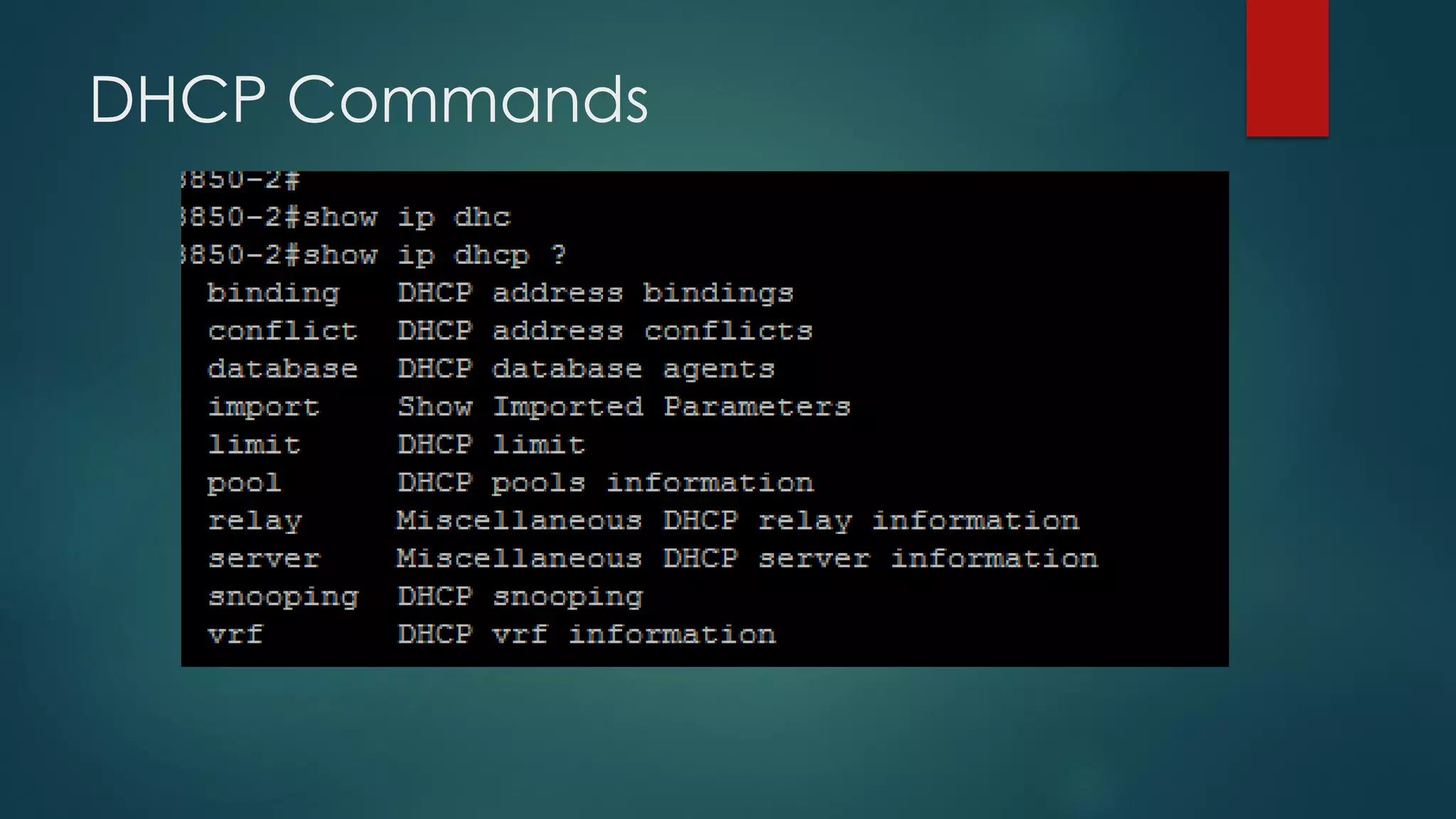
DHCP Commands
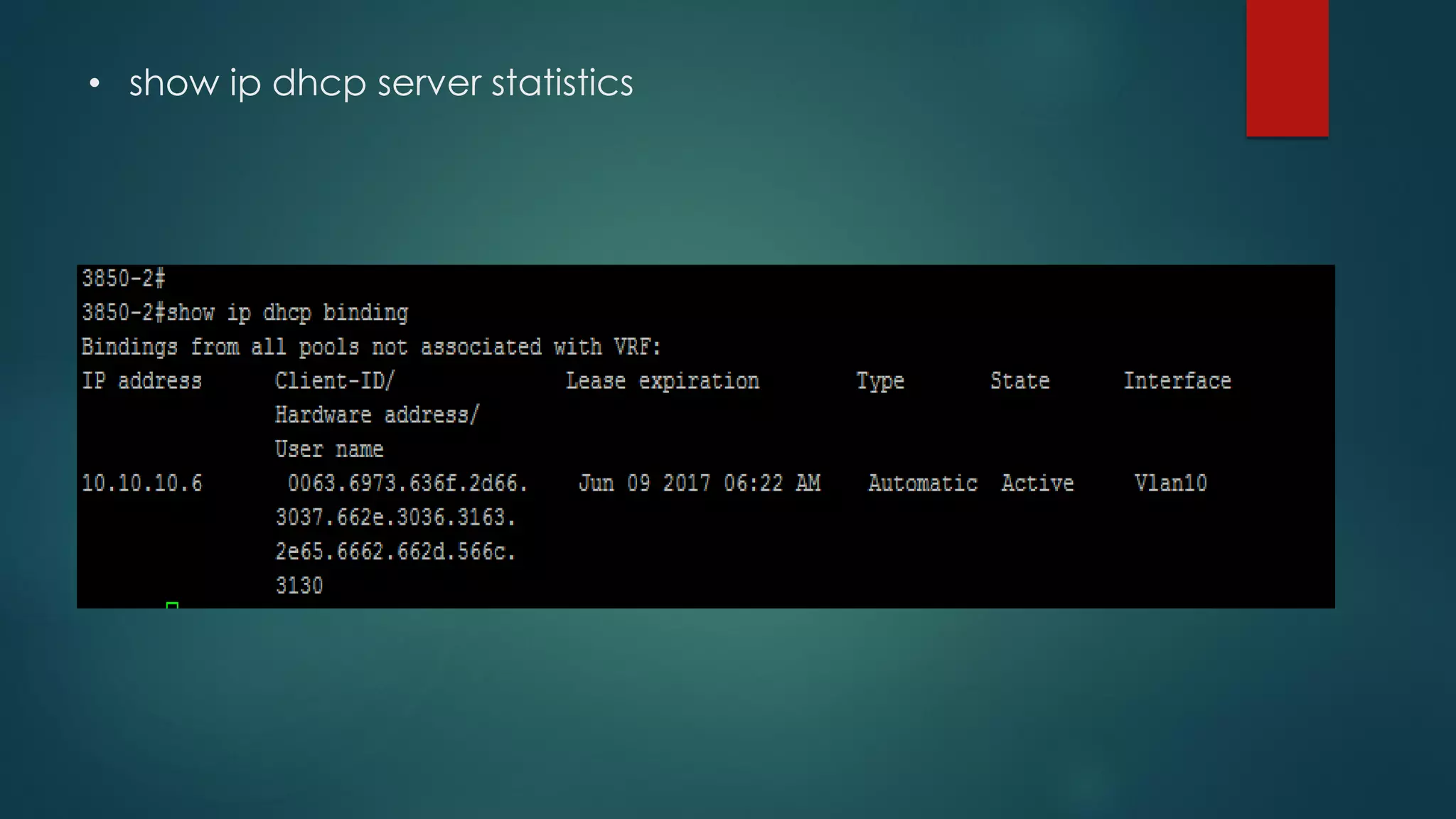
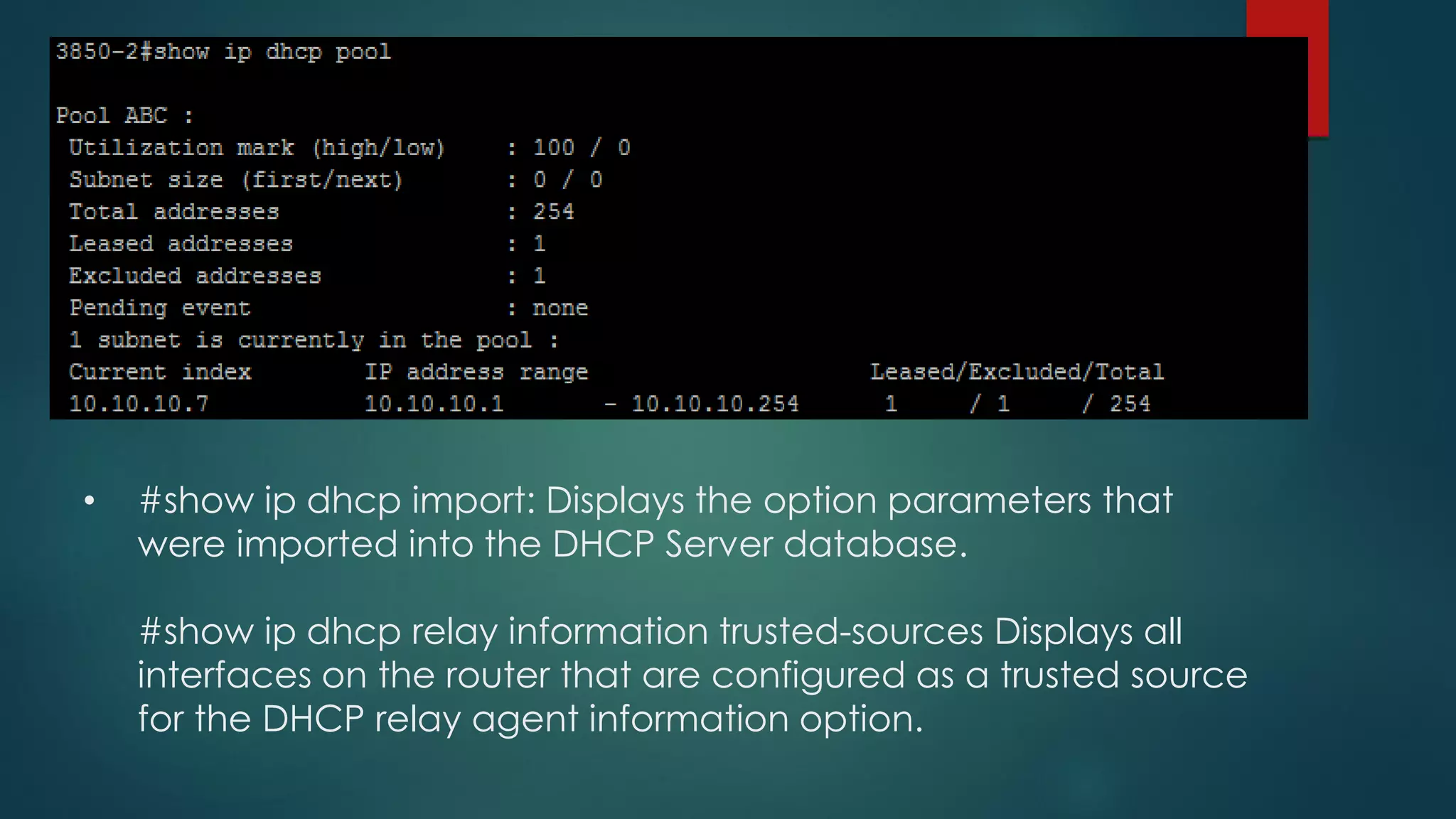
• show ip dhcp server statistics
• #show ip dhcp import: Displays the option parameters that
were imported into the DHCP Server database.
#show ip dhcp relay information trusted-sources Displays all
interfaces on the router that are configured as a trusted source
for the DHCP relay agent information option.
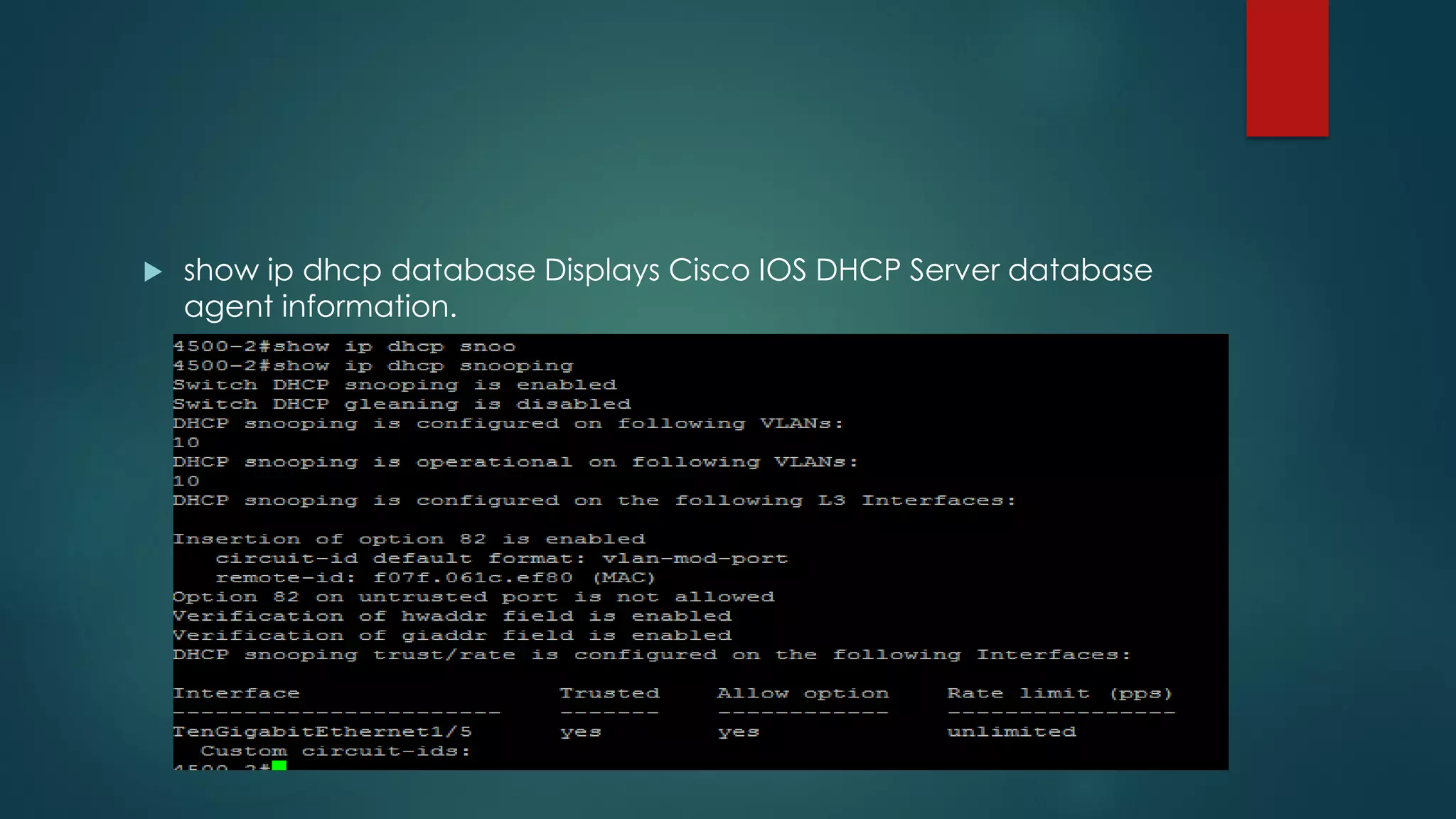
 show ip dhcp database Displays Cisco IOS DHCP Server database
agent information.
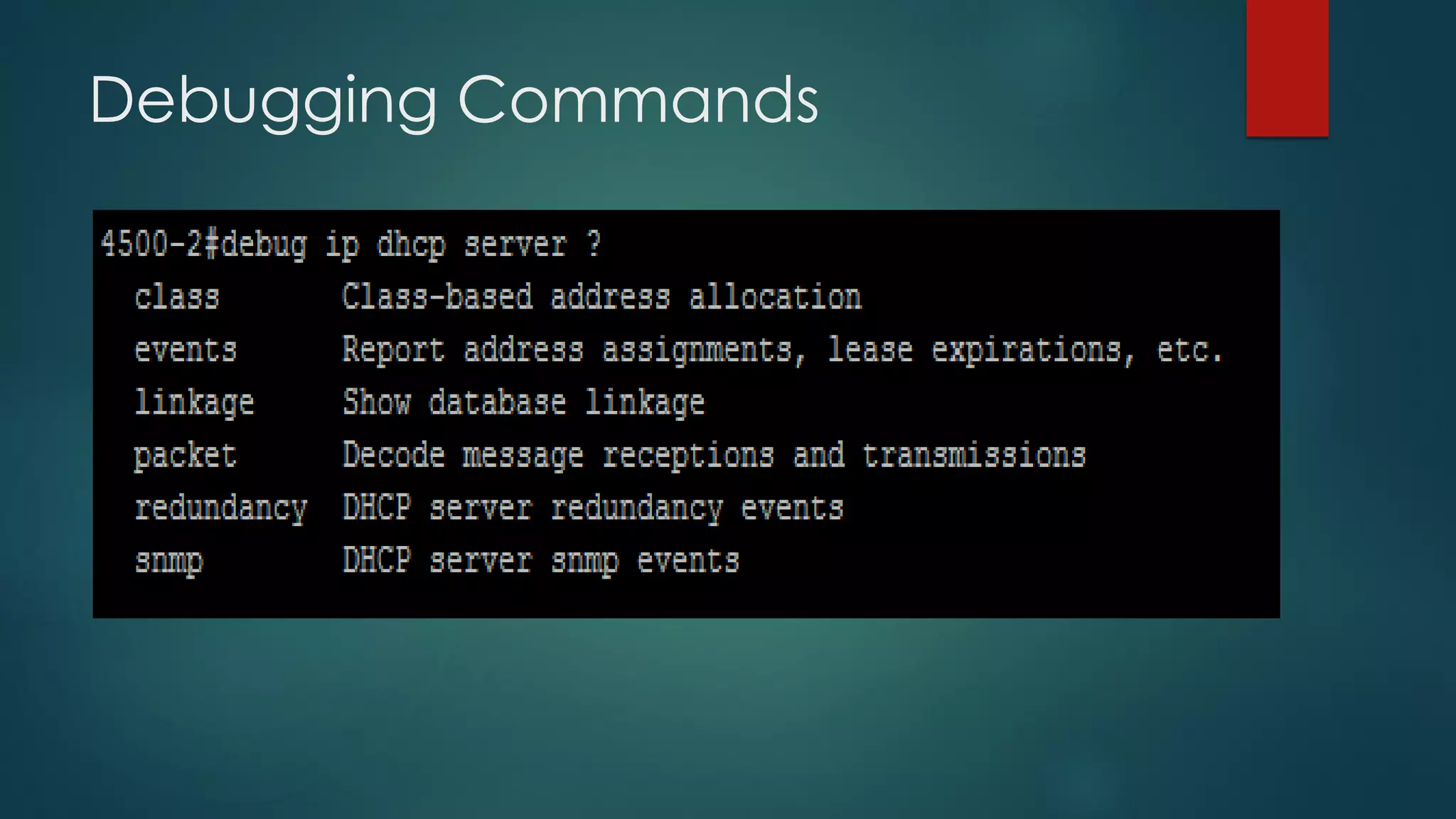
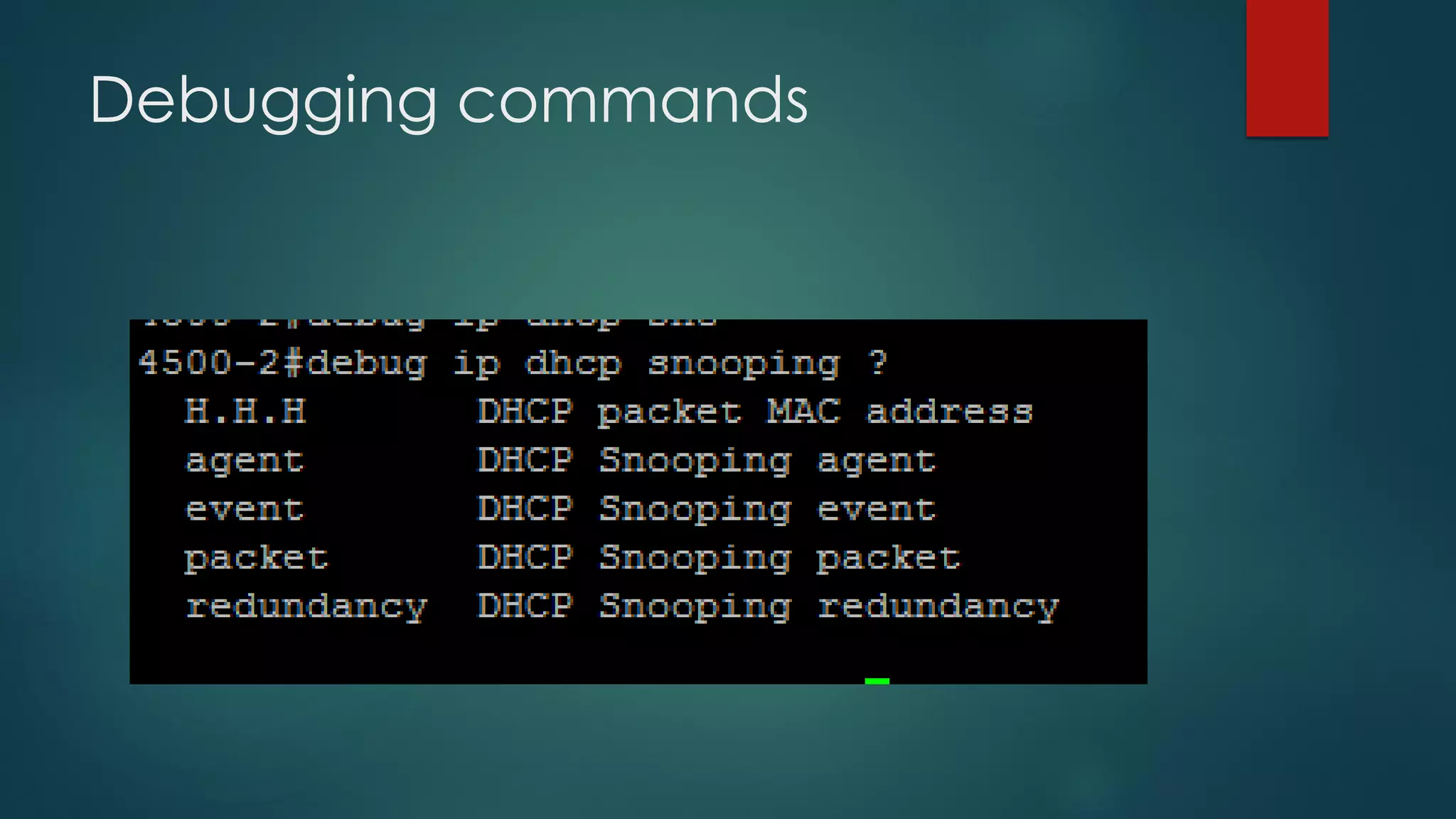
Debugging Commands
DHCP Command Reference:
 http://www.cisco.com/c/en/us/td/docs/ios/12_2/ipaddr/command
/reference/fipras_r/1rfdhcp.pdf
DHCP SNOOPING
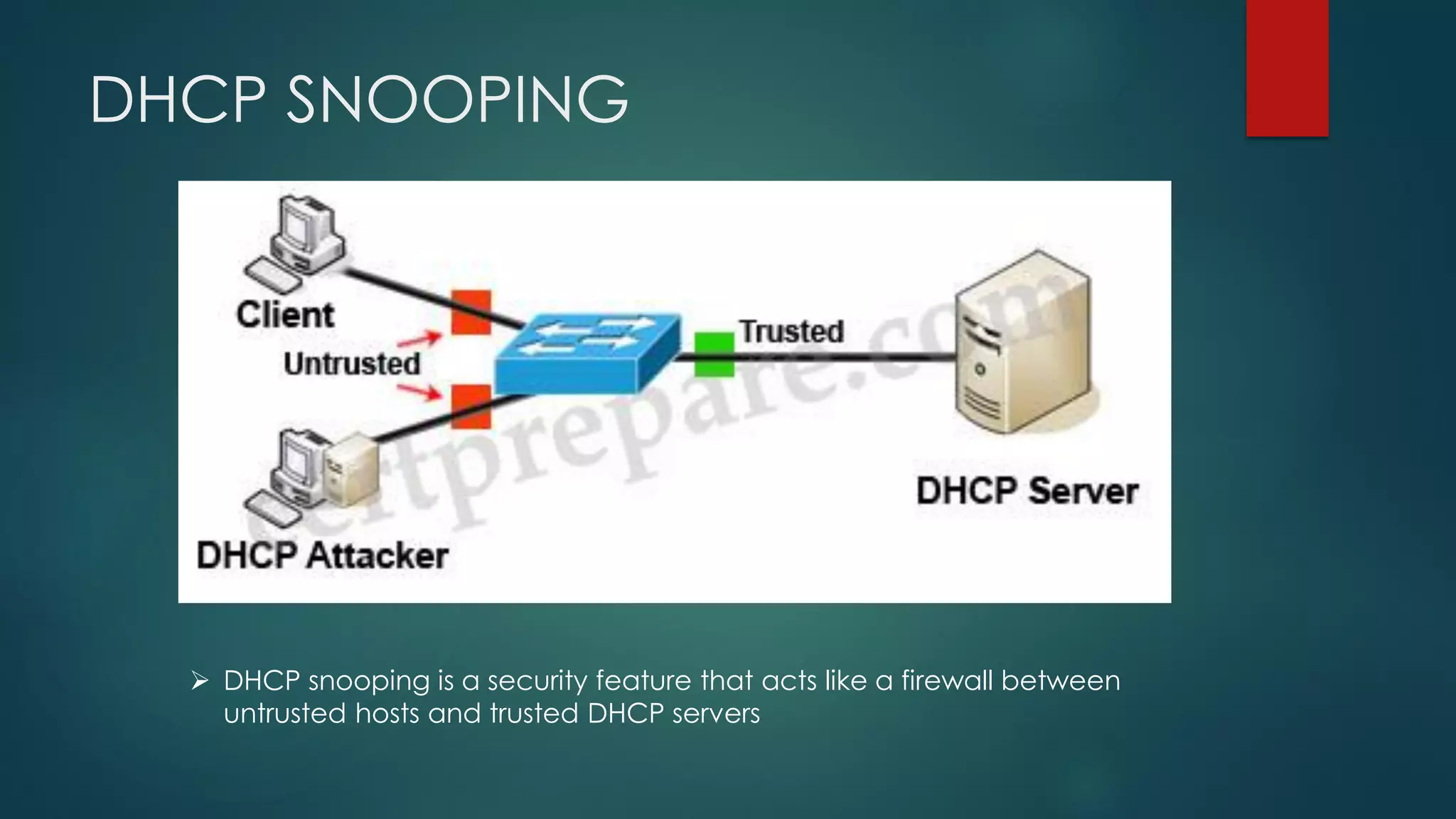
➢ DHCP snooping is a security feature that acts like a firewall between
untrusted hosts and trusted DHCP servers
The DHCP snooping feature
performs the following activities:
 • Validates DHCP messages received from untrusted sources and
filters out invalid messages.
 • Rate-limits DHCP traffic from trusted and untrusted sources.
 • Builds and maintains the DHCP snooping binding database, which
contains information about untrusted hosts with leased IP addresses.
 • Utilizes the DHCP snooping binding database to validate
subsequent requests from untrusted hosts.
 DAI
 The DHCP snooping feature determines whether traffic sources are
trusted or untrusted. An untrusted source may initiate traffic attacks
or other hostile actions. To prevent such attacks, the DHCP snooping
feature filters messages and rate-limits traffic from untrusted sources
 DHCP snooping is enabled on a per-VLAN basis. By default, the
feature is inactive on all VLANs. You can enable the feature on a
single VLAN or a range of VLANs
 The DHCP snooping feature is implemented in software on the route
processor (RP). Therefore, all DHCP messages for enabled VLANs are
intercepted in the PFC and directed to the RP for processing.
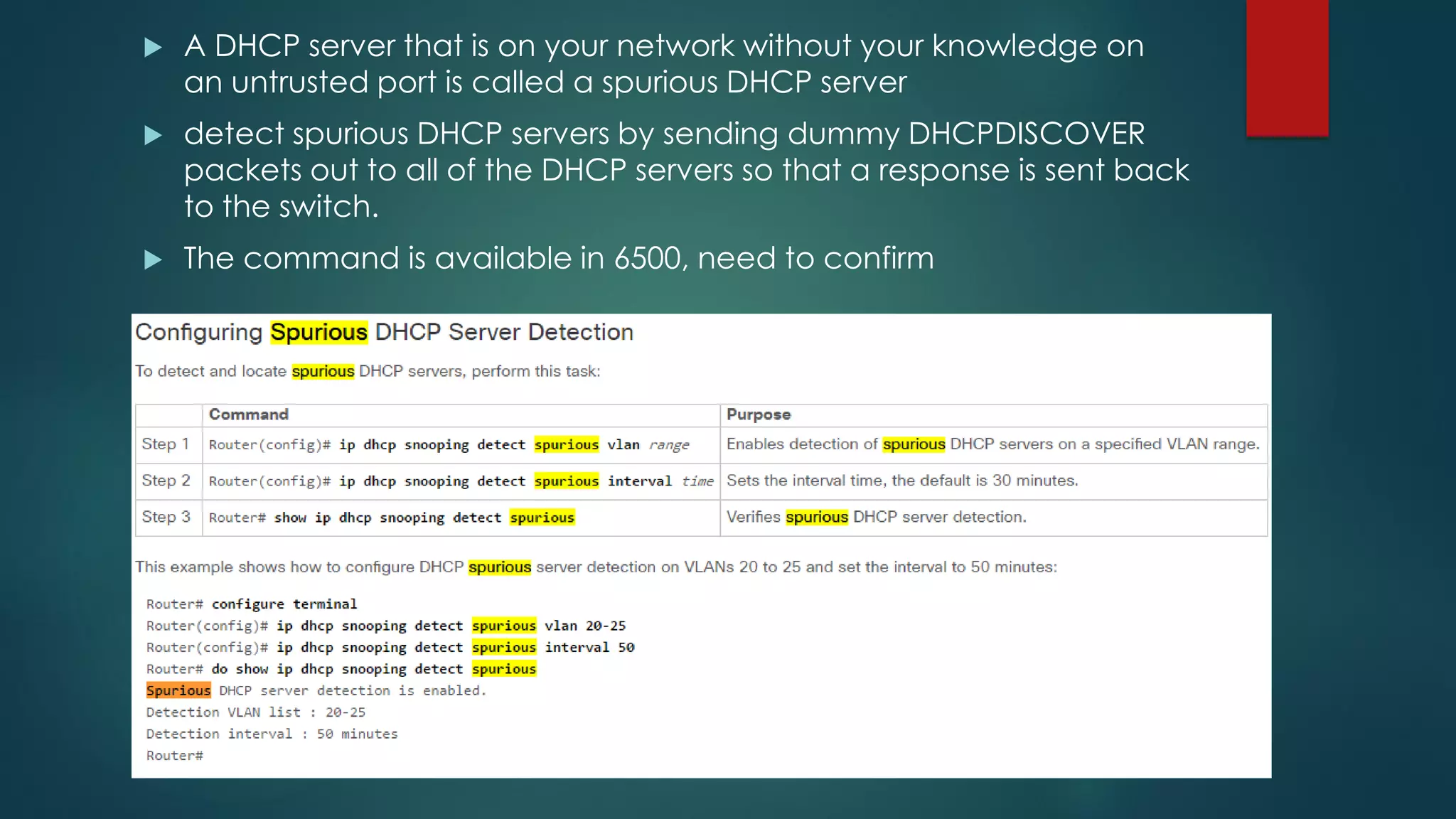
 A DHCP server that is on your network without your knowledge on
an untrusted port is called a spurious DHCP server
 detect spurious DHCP servers by sending dummy DHCPDISCOVER
packets out to all of the DHCP servers so that a response is sent back
to the switch.
 The command is available in 6500, need to confirm
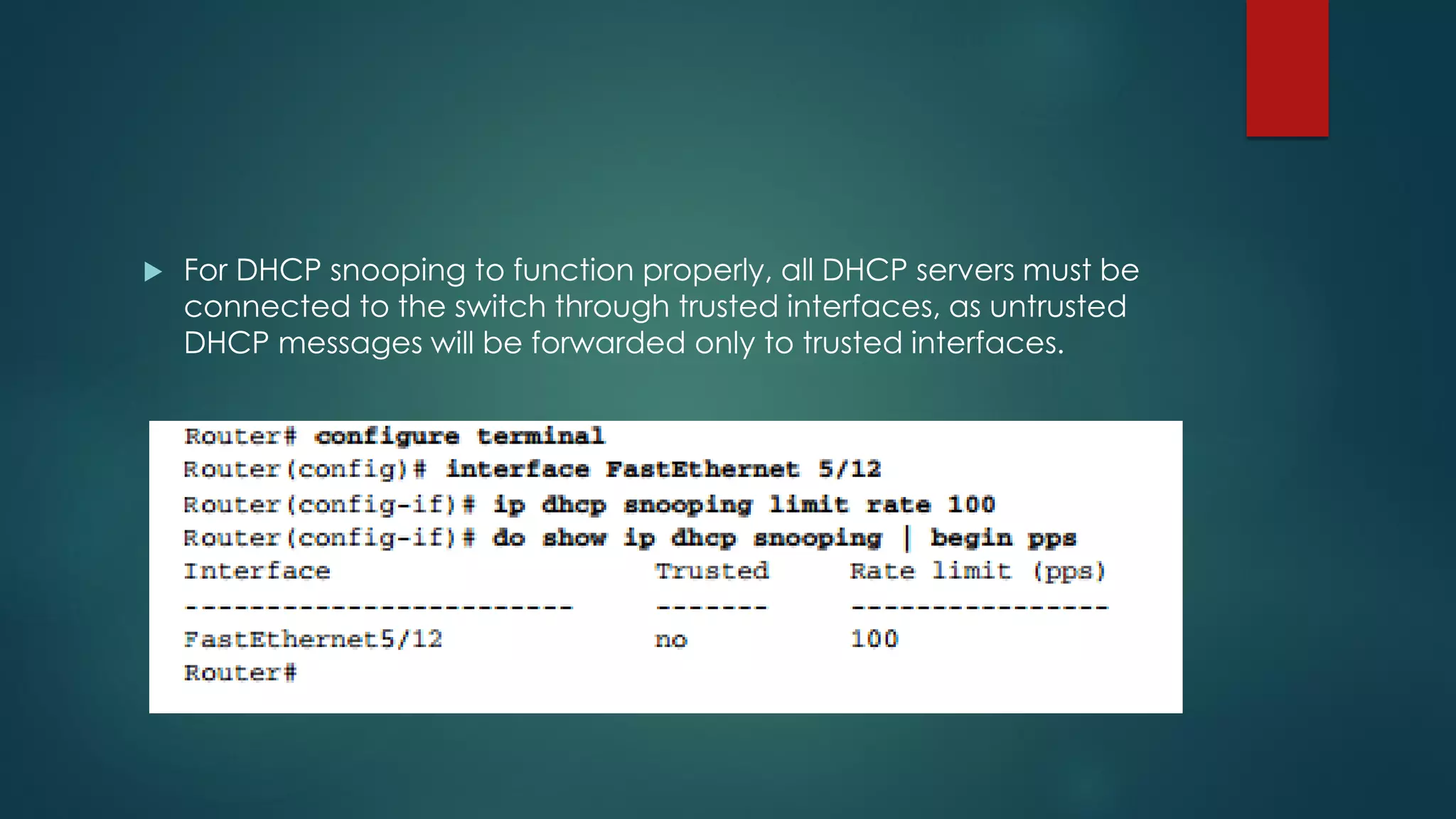
 For DHCP snooping to function properly, all DHCP servers must be
connected to the switch through trusted interfaces, as untrusted
DHCP messages will be forwarded only to trusted interfaces.
DHCP Snooping Binding Table
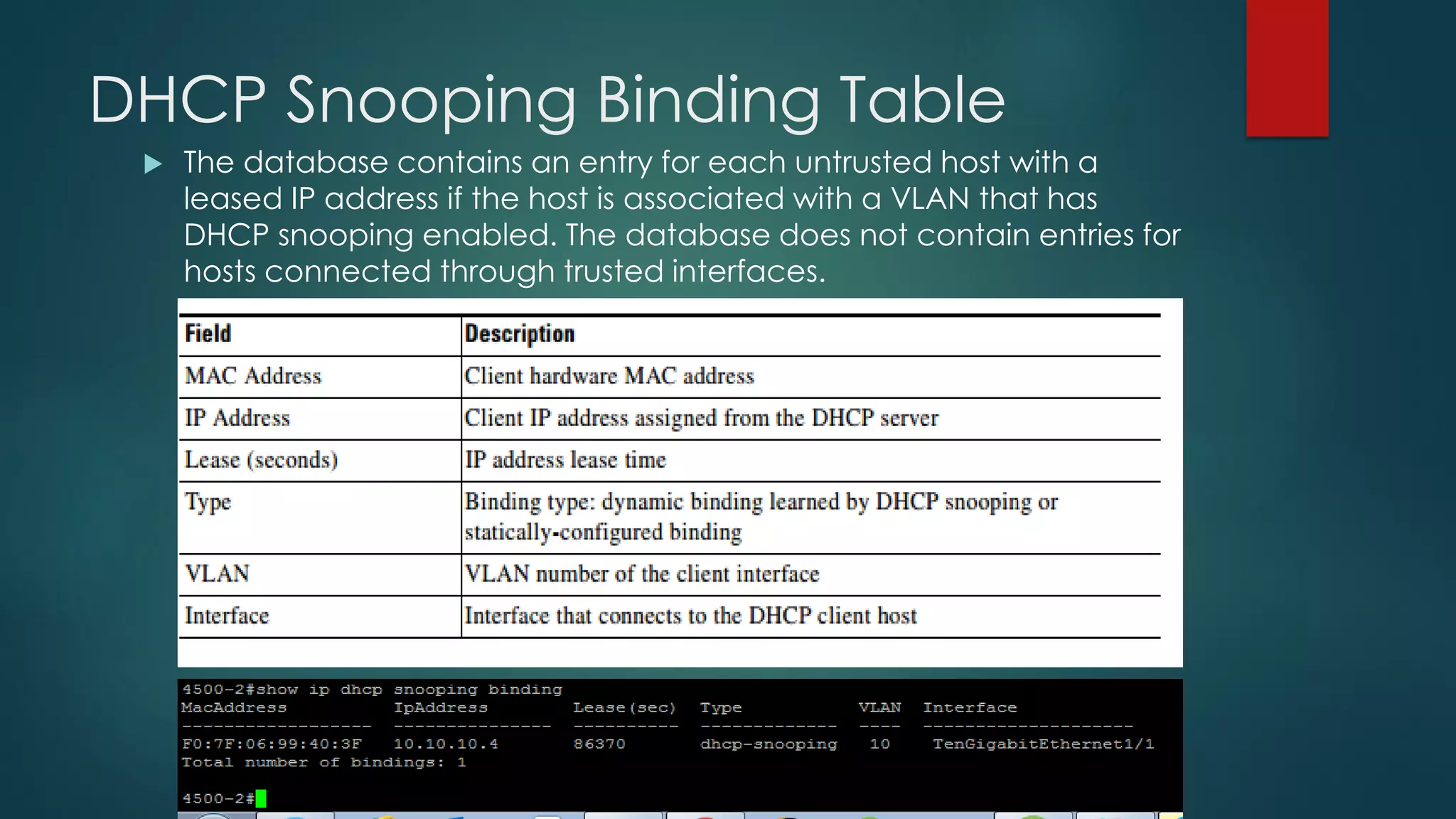
 The database contains an entry for each untrusted host with a
leased IP address if the host is associated with a VLAN that has
DHCP snooping enabled. The database does not contain entries for
hosts connected through trusted interfaces.
 The DHCP snooping feature updates the database when the switch
receives specific DHCP messages. For example, the feature adds an
entry to the database when the switch receives a DHCPACK
message from the server.
 The feature removes the entry in the database when the IP address
lease expires or the switch receives a DHCPRELEASE message from
the host. Each entry in the DHCP snooping binding database
includes the MAC address of the host, the leased IP address, the
lease time, the binding type, and the VLAN number and interface
information associated with the host.
 The switch validates DHCP packets received on the untrusted
interfaces of VLANs with DHCP snooping enabled
Packet Validation
The switch forwards the DHCP packet unless any of the following
conditions occur (in which case the packet is dropped):
 • The switch receives a packet (such as a DHCPOFFER, DHCPACK,
DHCPNAK, or DHCPLEASEQUERY packet) from a DHCP server outside
the network or firewall.
 • The switch receives a packet on an untrusted interface, and the
source MAC address and the DHCP client hardware address do not
match. This check is performed only if the DHCP snooping MAC address
verification option is turned on.
 Router(config)# ip dhcp snooping verify mac-address ➔ Enables DHCP
snooping MAC address verification.
 • The switch receives a DHCPRELEASE or DHCPDECLINE message from
an untrusted host with an entry in the DHCP snooping binding table,
and the interface information in the binding table does not match the
interface on which the message was received.
 • The switch receives a DHCP packet that includes a relay agent IP
address that is not 0.0.0.0.
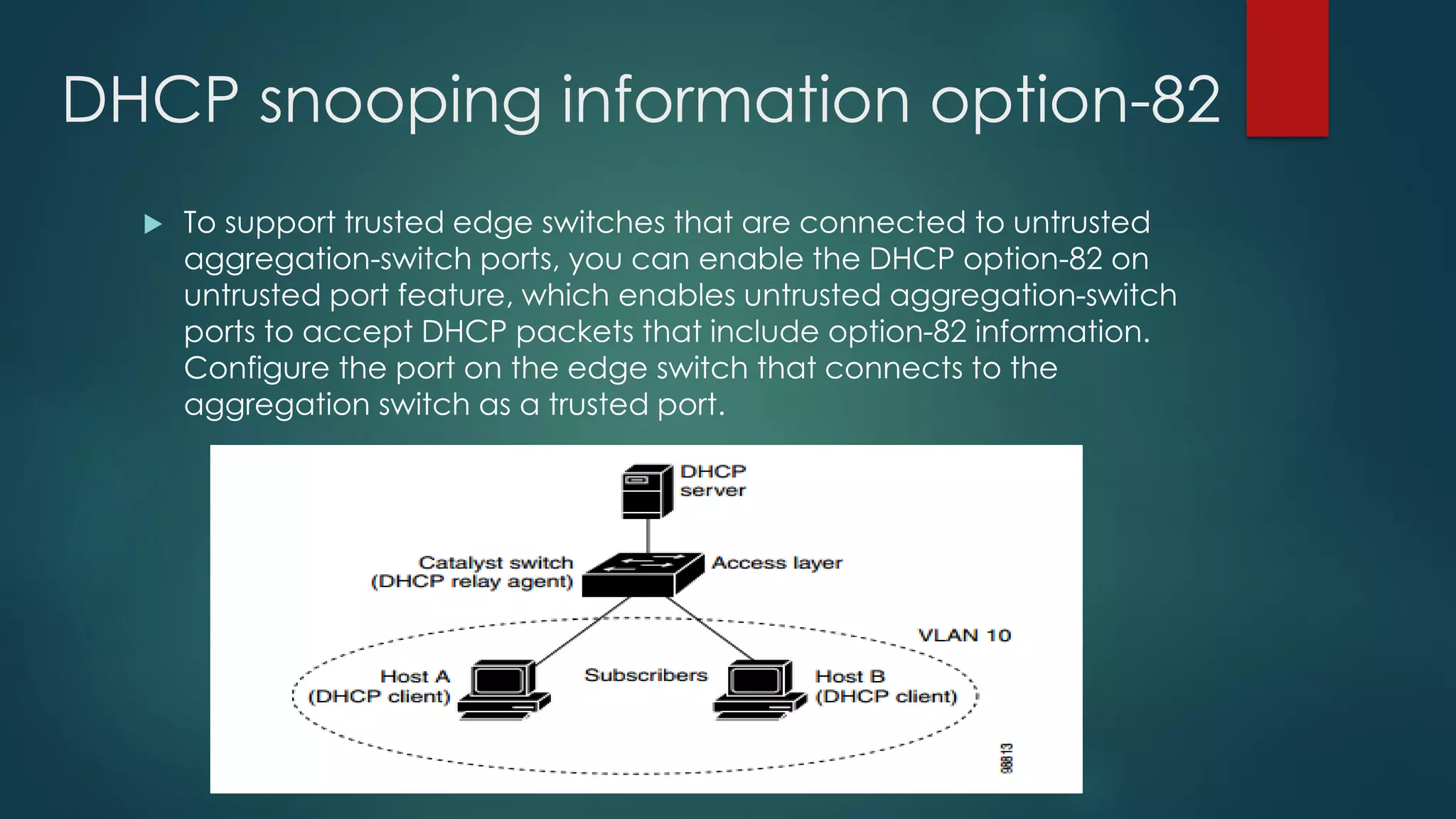
DHCP snooping information option-82
 To support trusted edge switches that are connected to untrusted
aggregation-switch ports, you can enable the DHCP option-82 on
untrusted port feature, which enables untrusted aggregation-switch
ports to accept DHCP packets that include option-82 information.
Configure the port on the edge switch that connects to the
aggregation switch as a trusted port.
When you enable the DHCP snooping information option-82 on the
switch, this sequence of events occurs:
 • The host (DHCP client) generates a DHCP request and broadcasts
it on the network.
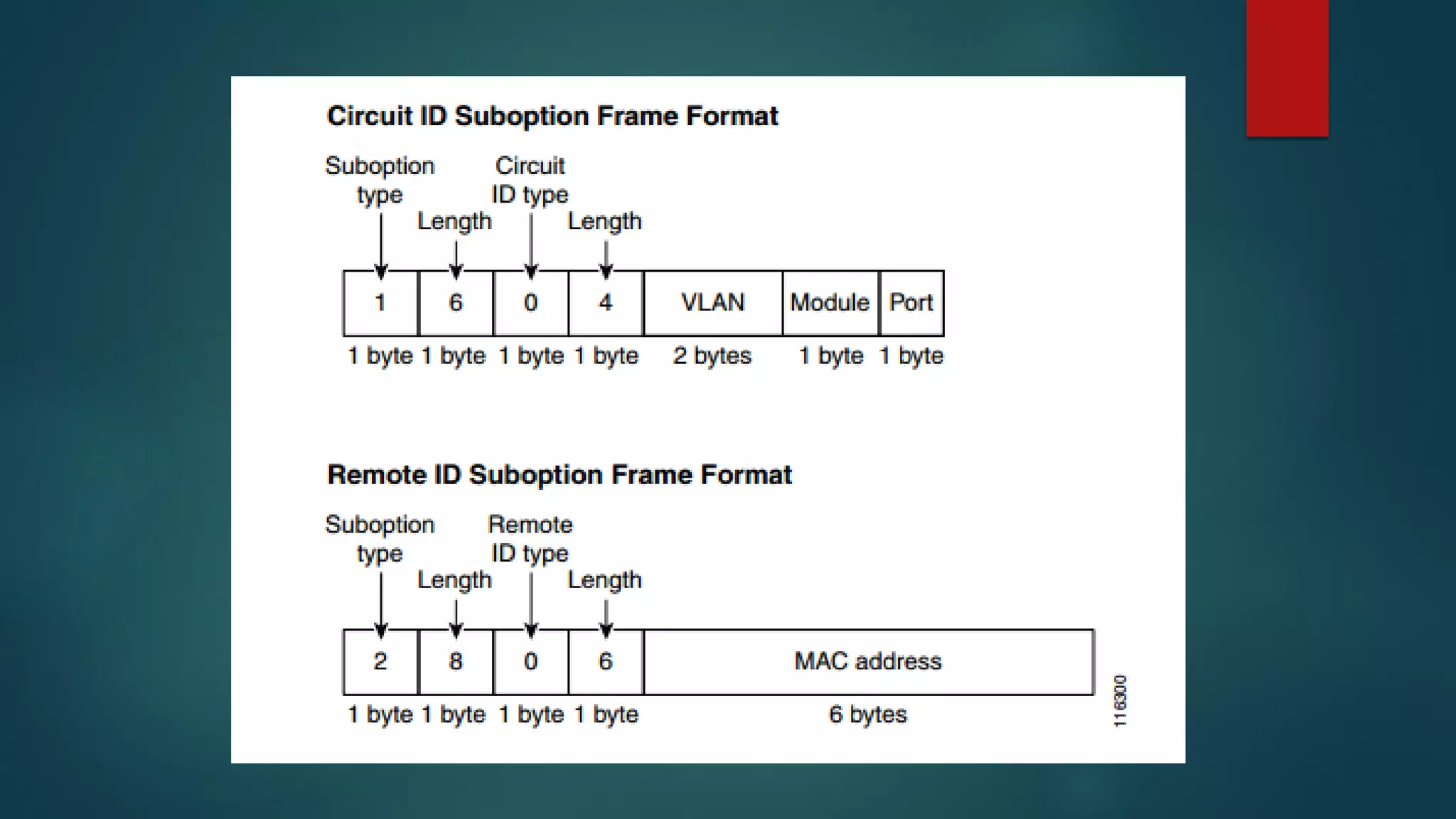
 • When the switch receives the DHCP request, it adds the option-82
information in the packet. Theoption-82 information contains the
switch MAC address (the remote ID suboption) and the port
identifier, vlan-mod-port, from which the packet is received (the
circuit ID suboption).
 • If IEEE 802.1X port-based authentication is enabled, the switch will
also add the host’s 802.1X authenticated user identity information
(the RADIUS attributes suboption) to the packet.
 • If the IP address of the relay agent is configured, the switch adds the IP address in the DHCP
packet.
 • The switch forwards the DHCP request that includes the option-82 field to the DHCP server.
 • The DHCP server receives the packet. If the server is option-82 capable, it can use the remote
ID, or the circuit ID, or both to assign IP addresses and implement policies, such as restricting the
number of IP addresses that can be assigned to a single remote ID or circuit ID. The DHCP server
then echoes the option-82 field in the DHCP reply.
 • The DHCP server unicasts the reply to the switch if the request was relayed to the server by the
switch. When the client and server are on the same subnet, the server broadcasts the reply. The
switch verifies that it originally inserted the option-82 data by inspecting the remote ID and
possibly
the circuit ID fields. The switch removes the option-82 field and forwards the packet to the switch
port that connects to the DHCP client that sent the DHCP request.
 With the DHCP option-82 on untrusted port feature enabled, the
switch does not drop DHCP packets that include option-82
information that are received on untrusted ports. Do not enter the ip
dhcp snooping information option allowed-untrusted command on
an aggregation switch to which any untrusted devices are
connected.
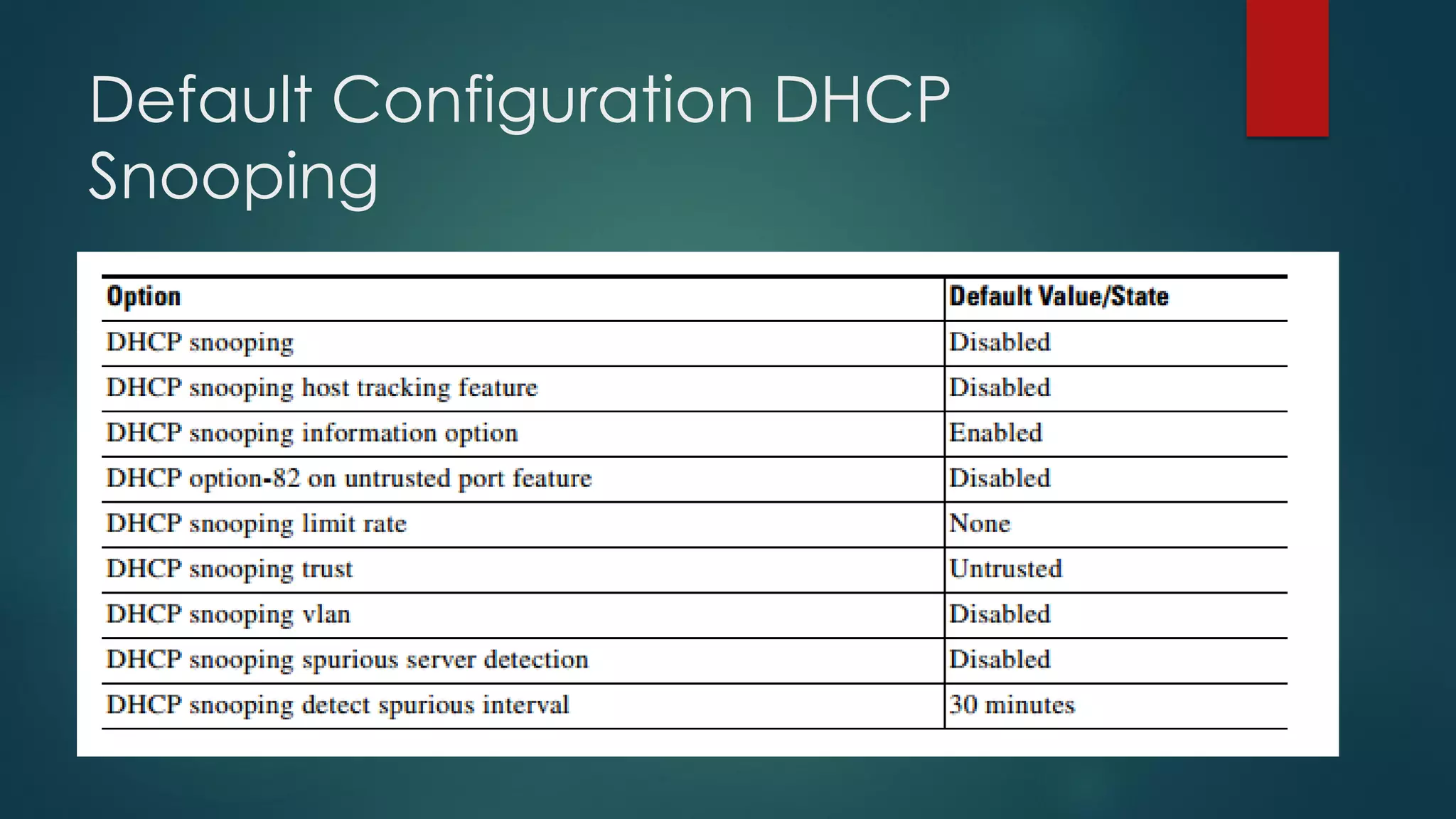
Default Configuration DHCP
Snooping
Debugging commands
DAI
 http://www.cisco.com/c/en/us/td/docs/switches/lan/catalyst4500/
12-2/25ew/configuration/guide/conf/dynarp.html#wp1039201
IP Source Guard
 IP Source Guard provides source IP address filtering on a Layer 2 port to
prevent a malicious host from impersonating a legitimate host by
assuming the legitimate host's IP address. The feature uses dynamic
DHCP snooping and static IP source binding to match IP addresses to
hosts on untrusted Layer 2 access ports.
 Initially, all IP traffic on the protected port is blocked except for DHCP
packets. After a client receives an IP address from the DHCP server, or
after static IP source binding is configured by the administrator, all
traffic with that IP source address is permitted from that client. Traffic
from other hosts is denied. This filtering limits a host's ability to attack the
network by claiming a neighbor host's IP address. IP Source Guard is a
port-based feature that automatically creates an implicit port access
control list (PACL).
 http://www.cisco.com/c/en/us/td/docs/switches/lan/catalyst6500/ios/
12-2SX/configuration/guide/book/ipsrcgrd.html

Dhcp Snooping

  • 1.
  • 2.
    DHCP Packets  1.DHCPDISCOVER  2. DHCPOFFER  3. DHCPREQUEST  4. DHCPACK  5. DHCPNAK  6. DHCPDECLINE  7. DHCPINFORM  8. DHCPRELEASE
  • 3.
  • 4.
    Few more points The DHCP client tries to renew the lease after half of the lease time has expired. This is done by the exchange of DHCPREQUEST and DHCPACK messages. While doing all this, the client enters the renewing stage.  Boot Protocol (DHCP/BootP) client and server datagrams (ports 67 and 68)
  • 6.
    DHCP Packet Header http://www.cisco.com/c/en/us/support/docs/ip/dynamic-address- allocation-resolution/27470-100.html  DHCP Client-Server Conversation with DHCP Relay Function  Packet Header detail  https://www.cloudshark.org/captures/0009d5398f37
  • 7.
  • 8.
    • show ipdhcp server statistics
  • 10.
    • #show ipdhcp import: Displays the option parameters that were imported into the DHCP Server database. #show ip dhcp relay information trusted-sources Displays all interfaces on the router that are configured as a trusted source for the DHCP relay agent information option.
  • 11.
     show ipdhcp database Displays Cisco IOS DHCP Server database agent information.
  • 12.
  • 13.
    DHCP Command Reference: http://www.cisco.com/c/en/us/td/docs/ios/12_2/ipaddr/command /reference/fipras_r/1rfdhcp.pdf
  • 14.
    DHCP SNOOPING ➢ DHCPsnooping is a security feature that acts like a firewall between untrusted hosts and trusted DHCP servers
  • 15.
    The DHCP snoopingfeature performs the following activities:  • Validates DHCP messages received from untrusted sources and filters out invalid messages.  • Rate-limits DHCP traffic from trusted and untrusted sources.  • Builds and maintains the DHCP snooping binding database, which contains information about untrusted hosts with leased IP addresses.  • Utilizes the DHCP snooping binding database to validate subsequent requests from untrusted hosts.  DAI
  • 16.
     The DHCPsnooping feature determines whether traffic sources are trusted or untrusted. An untrusted source may initiate traffic attacks or other hostile actions. To prevent such attacks, the DHCP snooping feature filters messages and rate-limits traffic from untrusted sources  DHCP snooping is enabled on a per-VLAN basis. By default, the feature is inactive on all VLANs. You can enable the feature on a single VLAN or a range of VLANs  The DHCP snooping feature is implemented in software on the route processor (RP). Therefore, all DHCP messages for enabled VLANs are intercepted in the PFC and directed to the RP for processing.
  • 17.
     A DHCPserver that is on your network without your knowledge on an untrusted port is called a spurious DHCP server  detect spurious DHCP servers by sending dummy DHCPDISCOVER packets out to all of the DHCP servers so that a response is sent back to the switch.  The command is available in 6500, need to confirm
  • 18.
     For DHCPsnooping to function properly, all DHCP servers must be connected to the switch through trusted interfaces, as untrusted DHCP messages will be forwarded only to trusted interfaces.
  • 19.
    DHCP Snooping BindingTable  The database contains an entry for each untrusted host with a leased IP address if the host is associated with a VLAN that has DHCP snooping enabled. The database does not contain entries for hosts connected through trusted interfaces.
  • 20.
     The DHCPsnooping feature updates the database when the switch receives specific DHCP messages. For example, the feature adds an entry to the database when the switch receives a DHCPACK message from the server.  The feature removes the entry in the database when the IP address lease expires or the switch receives a DHCPRELEASE message from the host. Each entry in the DHCP snooping binding database includes the MAC address of the host, the leased IP address, the lease time, the binding type, and the VLAN number and interface information associated with the host.  The switch validates DHCP packets received on the untrusted interfaces of VLANs with DHCP snooping enabled
  • 21.
    Packet Validation The switchforwards the DHCP packet unless any of the following conditions occur (in which case the packet is dropped):  • The switch receives a packet (such as a DHCPOFFER, DHCPACK, DHCPNAK, or DHCPLEASEQUERY packet) from a DHCP server outside the network or firewall.  • The switch receives a packet on an untrusted interface, and the source MAC address and the DHCP client hardware address do not match. This check is performed only if the DHCP snooping MAC address verification option is turned on.  Router(config)# ip dhcp snooping verify mac-address ➔ Enables DHCP snooping MAC address verification.  • The switch receives a DHCPRELEASE or DHCPDECLINE message from an untrusted host with an entry in the DHCP snooping binding table, and the interface information in the binding table does not match the interface on which the message was received.  • The switch receives a DHCP packet that includes a relay agent IP address that is not 0.0.0.0.
  • 22.
    DHCP snooping informationoption-82  To support trusted edge switches that are connected to untrusted aggregation-switch ports, you can enable the DHCP option-82 on untrusted port feature, which enables untrusted aggregation-switch ports to accept DHCP packets that include option-82 information. Configure the port on the edge switch that connects to the aggregation switch as a trusted port.
  • 23.
    When you enablethe DHCP snooping information option-82 on the switch, this sequence of events occurs:  • The host (DHCP client) generates a DHCP request and broadcasts it on the network.  • When the switch receives the DHCP request, it adds the option-82 information in the packet. Theoption-82 information contains the switch MAC address (the remote ID suboption) and the port identifier, vlan-mod-port, from which the packet is received (the circuit ID suboption).  • If IEEE 802.1X port-based authentication is enabled, the switch will also add the host’s 802.1X authenticated user identity information (the RADIUS attributes suboption) to the packet.
  • 24.
     • Ifthe IP address of the relay agent is configured, the switch adds the IP address in the DHCP packet.  • The switch forwards the DHCP request that includes the option-82 field to the DHCP server.  • The DHCP server receives the packet. If the server is option-82 capable, it can use the remote ID, or the circuit ID, or both to assign IP addresses and implement policies, such as restricting the number of IP addresses that can be assigned to a single remote ID or circuit ID. The DHCP server then echoes the option-82 field in the DHCP reply.  • The DHCP server unicasts the reply to the switch if the request was relayed to the server by the switch. When the client and server are on the same subnet, the server broadcasts the reply. The switch verifies that it originally inserted the option-82 data by inspecting the remote ID and possibly the circuit ID fields. The switch removes the option-82 field and forwards the packet to the switch port that connects to the DHCP client that sent the DHCP request.
  • 25.
     With theDHCP option-82 on untrusted port feature enabled, the switch does not drop DHCP packets that include option-82 information that are received on untrusted ports. Do not enter the ip dhcp snooping information option allowed-untrusted command on an aggregation switch to which any untrusted devices are connected.
  • 27.
  • 28.
  • 29.
  • 30.
    IP Source Guard IP Source Guard provides source IP address filtering on a Layer 2 port to prevent a malicious host from impersonating a legitimate host by assuming the legitimate host's IP address. The feature uses dynamic DHCP snooping and static IP source binding to match IP addresses to hosts on untrusted Layer 2 access ports.  Initially, all IP traffic on the protected port is blocked except for DHCP packets. After a client receives an IP address from the DHCP server, or after static IP source binding is configured by the administrator, all traffic with that IP source address is permitted from that client. Traffic from other hosts is denied. This filtering limits a host's ability to attack the network by claiming a neighbor host's IP address. IP Source Guard is a port-based feature that automatically creates an implicit port access control list (PACL).  http://www.cisco.com/c/en/us/td/docs/switches/lan/catalyst6500/ios/ 12-2SX/configuration/guide/book/ipsrcgrd.html