OSPF external route
summarization
www.netprotocolxpert.in
• External routes in OSPF are carried by type 5 LSA (external LSAs).
Type 5 LSAs are generated by ASBR (Autonomous System Boundary
Router), that’s why external route summarization must be configured
on ASBR. Stub area do not allow ASBR because they don’t allow type
5 LSAs.
• Instead, if your ASBR is in a NSSA Area (Not so stubby area), you can
transport external routes and do summarization. In this case NSSA
ASBR create type 7 LSAs, transport them through NSSA area, and at
the exit from the area, NSSA ABR translates them into type 5 LSAs.
• To configure OSPF external route summarization access ASBR and
under OSPF configuration mode type following command:
– summary-address ip-address mask [not-advertise] [tag tag]
• where not-advertise is optional and means that range matched will not
be advertised, tag value is used to control redistribution and can be
used further by a route map.
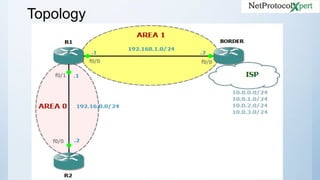
Topology
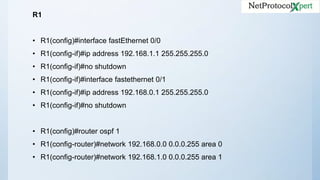
R1
• R1(config)#interface fastEthernet 0/0
• R1(config-if)#ip address 192.168.1.1 255.255.255.0
• R1(config-if)#no shutdown
• R1(config-if)#interface fastethernet 0/1
• R1(config-if)#ip address 192.168.0.1 255.255.255.0
• R1(config-if)#no shutdown
• R1(config)#router ospf 1
• R1(config-router)#network 192.168.0.0 0.0.0.255 area 0
• R1(config-router)#network 192.168.1.0 0.0.0.255 area 1
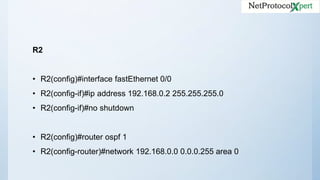
R2
• R2(config)#interface fastEthernet 0/0
• R2(config-if)#ip address 192.168.0.2 255.255.255.0
• R2(config-if)#no shutdown
• R2(config)#router ospf 1
• R2(config-router)#network 192.168.0.0 0.0.0.255 area 0
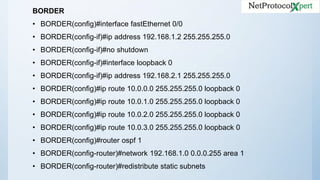
BORDER
• BORDER(config)#interface fastEthernet 0/0
• BORDER(config-if)#ip address 192.168.1.2 255.255.255.0
• BORDER(config-if)#no shutdown
• BORDER(config-if)#interface loopback 0
• BORDER(config-if)#ip address 192.168.2.1 255.255.255.0
• BORDER(config)#ip route 10.0.0.0 255.255.255.0 loopback 0
• BORDER(config)#ip route 10.0.1.0 255.255.255.0 loopback 0
• BORDER(config)#ip route 10.0.2.0 255.255.255.0 loopback 0
• BORDER(config)#ip route 10.0.3.0 255.255.255.0 loopback 0
• BORDER(config)#router ospf 1
• BORDER(config-router)#network 192.168.1.0 0.0.0.255 area 1
• BORDER(config-router)#redistribute static subnets
• In this scenario BORDER router will be ASBR, we simulated external
interface by Loopback0 and few static routes which were redistributed
in OSPF on BORDER.
Let’s see if external routes (redistirbuted routes) arrive to R2
• R2#show ip route
• ... output ommited ...
• Gateway of last resort is not set
• 10.0.0.0/24 is subnetted, 4 subnets
• O E2 10.0.2.0 [110/20] via 192.168.0.1, 00:00:16, FastEthernet0/0
• O E2 10.0.3.0 [110/20] via 192.168.0.1, 00:00:16, FastEthernet0/0
• O E2 10.0.0.0 [110/20] via 192.168.0.1, 00:00:11, FastEthernet0/0
• O E2 10.0.1.0 [110/20] via 192.168.0.1, 00:00:16, FastEthernet0/0
• C 192.168.0.0/24 is directly connected, FastEthernet0/0
• O IA 192.168.1.0/24 [110/20] via 192.168.0.1, 00:18:35, FastEthernet0/0
• R2#
• As we can see, all external routes are present on R2.
• It’s time to summarize external routes, this is done on BORDER router
with the command discussed earlier:
• BORDER(config-router)#summary-address 10.0.0.0 255.255.252.0
• Now we’ll check again routing table on R2:
• R2#show ip route
• ... output ommited ...
• Gateway of last resort is not set
• 10.0.0.0/22 is subnetted, 1 subnets
• O E2 10.0.0.0 [110/20] via 192.168.0.1, 00:01:04, FastEthernet0/0
• C 192.168.0.0/24 is directly connected, FastEthernet0/0
• O IA 192.168.1.0/24 [110/20] via 192.168.0.1, 00:18:35, FastEthernet0/0
• R2#
• You can see that all external routes are replaced by only one external route.
• In ASBR’s routing table is generated a summary route pointing to Null0, that’s
used to drop the packets in case that there’s not a more specific route in
ASBR routing table, thus avoiding routing loops.
Follow us
@https://www.facebook
.com/NetProtocolXpe
rt/
https://www.linkedin.c
om/company/netprot
ocol-xpert
https://plus.google.co
m/u/0/+NetProtocolX
pert_NPX/posts
https://www.instagra
m.com/netprotocol_
xpert/
https://twitter.com/
NPX_cisco
https://branded.m
e/netprotocolxper
t

OSPF External Route Summarization

  • 1.
  • 2.
    • External routesin OSPF are carried by type 5 LSA (external LSAs). Type 5 LSAs are generated by ASBR (Autonomous System Boundary Router), that’s why external route summarization must be configured on ASBR. Stub area do not allow ASBR because they don’t allow type 5 LSAs. • Instead, if your ASBR is in a NSSA Area (Not so stubby area), you can transport external routes and do summarization. In this case NSSA ASBR create type 7 LSAs, transport them through NSSA area, and at the exit from the area, NSSA ABR translates them into type 5 LSAs.
  • 3.
    • To configureOSPF external route summarization access ASBR and under OSPF configuration mode type following command: – summary-address ip-address mask [not-advertise] [tag tag] • where not-advertise is optional and means that range matched will not be advertised, tag value is used to control redistribution and can be used further by a route map.
  • 4.
  • 5.
    R1 • R1(config)#interface fastEthernet0/0 • R1(config-if)#ip address 192.168.1.1 255.255.255.0 • R1(config-if)#no shutdown • R1(config-if)#interface fastethernet 0/1 • R1(config-if)#ip address 192.168.0.1 255.255.255.0 • R1(config-if)#no shutdown • R1(config)#router ospf 1 • R1(config-router)#network 192.168.0.0 0.0.0.255 area 0 • R1(config-router)#network 192.168.1.0 0.0.0.255 area 1
  • 6.
    R2 • R2(config)#interface fastEthernet0/0 • R2(config-if)#ip address 192.168.0.2 255.255.255.0 • R2(config-if)#no shutdown • R2(config)#router ospf 1 • R2(config-router)#network 192.168.0.0 0.0.0.255 area 0
  • 7.
    BORDER • BORDER(config)#interface fastEthernet0/0 • BORDER(config-if)#ip address 192.168.1.2 255.255.255.0 • BORDER(config-if)#no shutdown • BORDER(config-if)#interface loopback 0 • BORDER(config-if)#ip address 192.168.2.1 255.255.255.0 • BORDER(config)#ip route 10.0.0.0 255.255.255.0 loopback 0 • BORDER(config)#ip route 10.0.1.0 255.255.255.0 loopback 0 • BORDER(config)#ip route 10.0.2.0 255.255.255.0 loopback 0 • BORDER(config)#ip route 10.0.3.0 255.255.255.0 loopback 0 • BORDER(config)#router ospf 1 • BORDER(config-router)#network 192.168.1.0 0.0.0.255 area 1 • BORDER(config-router)#redistribute static subnets
  • 8.
    • In thisscenario BORDER router will be ASBR, we simulated external interface by Loopback0 and few static routes which were redistributed in OSPF on BORDER.
  • 9.
    Let’s see ifexternal routes (redistirbuted routes) arrive to R2 • R2#show ip route • ... output ommited ... • Gateway of last resort is not set • 10.0.0.0/24 is subnetted, 4 subnets • O E2 10.0.2.0 [110/20] via 192.168.0.1, 00:00:16, FastEthernet0/0 • O E2 10.0.3.0 [110/20] via 192.168.0.1, 00:00:16, FastEthernet0/0 • O E2 10.0.0.0 [110/20] via 192.168.0.1, 00:00:11, FastEthernet0/0 • O E2 10.0.1.0 [110/20] via 192.168.0.1, 00:00:16, FastEthernet0/0 • C 192.168.0.0/24 is directly connected, FastEthernet0/0 • O IA 192.168.1.0/24 [110/20] via 192.168.0.1, 00:18:35, FastEthernet0/0 • R2# • As we can see, all external routes are present on R2.
  • 10.
    • It’s timeto summarize external routes, this is done on BORDER router with the command discussed earlier: • BORDER(config-router)#summary-address 10.0.0.0 255.255.252.0
  • 11.
    • Now we’llcheck again routing table on R2: • R2#show ip route • ... output ommited ... • Gateway of last resort is not set • 10.0.0.0/22 is subnetted, 1 subnets • O E2 10.0.0.0 [110/20] via 192.168.0.1, 00:01:04, FastEthernet0/0 • C 192.168.0.0/24 is directly connected, FastEthernet0/0 • O IA 192.168.1.0/24 [110/20] via 192.168.0.1, 00:18:35, FastEthernet0/0 • R2# • You can see that all external routes are replaced by only one external route. • In ASBR’s routing table is generated a summary route pointing to Null0, that’s used to drop the packets in case that there’s not a more specific route in ASBR routing table, thus avoiding routing loops.
  • 12.