
![BASICS
Have you had difficulty getting the hang of
using Regular Expression in Cisco world.
The examples here are mostly used with BGP,
but can be used elsewhere.
| VERTICAL BAR
Represents ‘OR’ Statements
[ ] SQUARE BRACKET
Represents a range of characters
. DOT
Matches any single character
^ CAROT
Matches Beginning of string
$ DOLLAR
Matches End of string
_ UNDERSCORE
Matches any Delimiter (beginning, end, space, tab, comma)
( ) PARENTHESIS
are used for “and” operations. To Group thing together
BACKSLASH
Removes the special meaning of one of the above characters (a Atom
is a single preceding character or preceding group)
(The special characters *,?,+ all apply repetition to what immediately
precedes them)
* ASTERISK
Matches ZERO or MORE Atoms(single or group of characters)
? QUESTION MARK
Matches ZERO or ONE Atoms
+ PLUS
Matches ONE or more Atoms](https://image.slidesharecdn.com/regularexpressionexamples-170102130028/85/Regular-expression-examples-2-320.jpg)
![SIMPLE EXAMPLES
21|31
>> will match either 21 or 31 in a line.
[1-4]
>> will match any in the range 1 to 4
[67]
>> will match either 6 or 7
[1-4].[67]
>> match 1/2/3/4 and 6/7, thus 16 or 37
From the String :’213 317 31 218 731′ the following:
^21
>> will only match the first 21
$31
>> will only match the 31 at the end
_31_
>> will only match the 31 in the middle
(213|218)_31
>> matches 213 or 218 followed by 31, ie ‘213 317’ or ‘218 31’
_23(_78)*_45_
>> will match “23 45” or “23 78 45” OR “23 78 78 78 78 45”
_23(_78)?_45_
>> will match “23 45” OR “23 78 45”
_23(_78)+_45_
>> will match “23 78 45” OR “23 78 78 78 78 78 78 45”
^(213_
>> will match (213 at the beginning of string](https://image.slidesharecdn.com/regularexpressionexamples-170102130028/85/Regular-expression-examples-3-320.jpg)
![SAMPLE BGP EXPRESSIONS IN AS-PATH LISTS
^[0-9]+$
>> AS Paths that is one AS long
^([0-9]+)(_1)*$
>> Networks originating in Neighboring AS, with
possible Prependings
^$
>> Networks originating in LOCAL AS
.*
>> Matches Everything
_100_
>> going through AS 100
^100$
>> Directly connected to AS 100
(begins and ends in AS 100)
_100&
>> Originated in AS 100
^100_
>> Networks behind AS 100](https://image.slidesharecdn.com/regularexpressionexamples-170102130028/85/Regular-expression-examples-4-320.jpg)
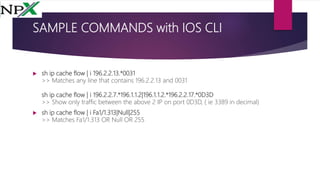

This document provides examples and explanations of regular expressions. It covers basic regex syntax like | (or), [] (character sets), . (wildcards), ^/$ (start/end anchors), and *+? (quantifiers). Simple examples demonstrate matching numbers, ranges, and strings. More complex examples show grouping, repetition, and matching BGP autonomous system paths. The document concludes with examples of using regex to filter Cisco IOS show command output.


