OSPF INTERNAL ROUTE
SUMMARIZATION
www.netprotocolxpert.in
 OSPF does not support auto summarization, only manual. OSPF route
summarization can be of two types:
 Internal route summarization;
 External route summarization.
 OSPF internal route summarization on Cisco routers. Unlike EIGRP where is
possible to summarize wherever, in OSPF you can do internal route
summarization only on ABR (between areas). The reason for this is that Link
State Database for all routers in a area must be the same for that area.
 Using OSPF summarization give us significant advantages like:
 Smaller routing tables;
 Less LSA flooding throughout the network;
 Less bandwidth, memory and CPU resources utilization on network links
and devices.
 Summary routes are carried by type 3 LSA (called summary LSA). Normally
type 3 LSA (which runs between areas) is translated from type 1 LSA and
type 2 LSA (which run within area). When summarization is used type 3 LSA
joins multiple routes into fewer. So, instead of flooding all type 1 and 2 LSAs
(translated into type 3 LSA) between areas, only one or several summary
prefixes will be sent between areas carried in type 3 LSA.
 By default summary LSA (type 3 LSA), which runs between areas, does not
contain summary routes, it contains information from type 1 LSA (Router
LSA) and type 2 LSA (Network LSA). So, they carry summarization
information after you configure summarization.
To configure OSPF summarization go to ABR under OSPF configuration mode
and use this command:
area area-id range address mask [advertise | not-advertise][cost cost]
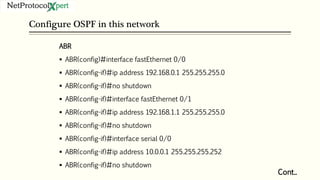
Configure OSPF in this network
Cont..
ABR
 ABR(config)#interface fastEthernet 0/0
 ABR(config-if)#ip address 192.168.0.1 255.255.255.0
 ABR(config-if)#no shutdown
 ABR(config-if)#interface fastEthernet 0/1
 ABR(config-if)#ip address 192.168.1.1 255.255.255.0
 ABR(config-if)#no shutdown
 ABR(config-if)#interface serial 0/0
 ABR(config-if)#ip address 10.0.0.1 255.255.255.252
 ABR(config-if)#no shutdown
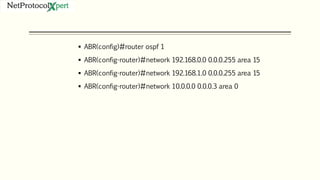
 ABR(config)#router ospf 1
 ABR(config-router)#network 192.168.0.0 0.0.0.255 area 15
 ABR(config-router)#network 192.168.1.0 0.0.0.255 area 15
 ABR(config-router)#network 10.0.0.0 0.0.0.3 area 0
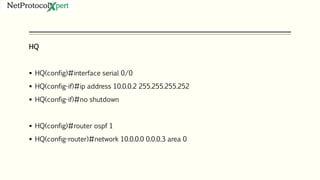
HQ
 HQ(config)#interface serial 0/0
 HQ(config-if)#ip address 10.0.0.2 255.255.255.252
 HQ(config-if)#no shutdown
 HQ(config)#router ospf 1
 HQ(config-router)#network 10.0.0.0 0.0.0.3 area 0
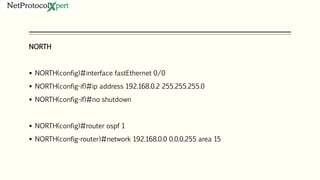
NORTH
 NORTH(config)#interface fastEthernet 0/0
 NORTH(config-if)#ip address 192.168.0.2 255.255.255.0
 NORTH(config-if)#no shutdown
 NORTH(config)#router ospf 1
 NORTH(config-router)#network 192.168.0.0 0.0.0.255 area 15
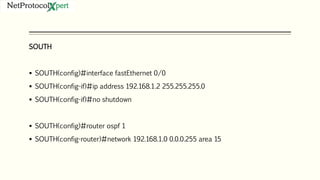
SOUTH
 SOUTH(config)#interface fastEthernet 0/0
 SOUTH(config-if)#ip address 192.168.1.2 255.255.255.0
 SOUTH(config-if)#no shutdown
 SOUTH(config)#router ospf 1
 SOUTH(config-router)#network 192.168.1.0 0.0.0.255 area 15
 We will configure ABR to summarize routes learned in Area 15, thus, a summary route will be sent
in Area 0 to HQ. In next output we can see routing table and summary LSAs in link state database
on HQ router before we configure summarization.
HQ#show ip route
 ... output ommited ...
 Gateway of last resort is not set
 10.0.0.0/30 is subnetted, 1 subnets
 C 10.0.0.0 is directly connected, Serial0/0
 O IA 192.168.0.0/24 [110/74] via 10.0.0.1, 00:14:17, Serial0/0
 O IA 192.168.1.0/24 [110/74] via 10.0.0.1, 00:14:17, Serial0/0
 HQ#
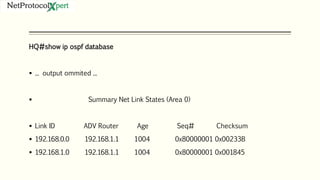
HQ#show ip ospf database
 ... output ommited ...
 Summary Net Link States (Area 0)
 Link ID ADV Router Age Seq# Checksum
 192.168.0.0 192.168.1.1 1004 0x80000001 0x00233B
 192.168.1.0 192.168.1.1 1004 0x80000001 0x001845
 It’s time to configure summarization. Go to ABR under OSPF configuration and type:
ABR(config-router)#area 15 range 192.168.0.0 255.255.254.0
 Range 192.168.0.0/23 contains both networks in Area 15. Let’s verify again routing
table and LSDB on HQ to see the results.
HQ#show ip route
 ... output ommited ...
 Gateway of last resort is not set
 10.0.0.0/30 is subnetted, 1 subnets
 C 10.0.0.0 is directly connected, Serial0/0
 O IA 192.168.0.0/23 [110/74] via 10.0.0.1, 00:04:32, Serial0/0
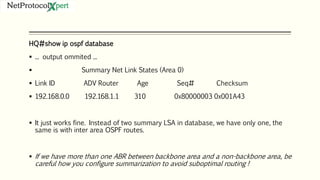
HQ#show ip ospf database
 ... output ommited ...
 Summary Net Link States (Area 0)
 Link ID ADV Router Age Seq# Checksum
 192.168.0.0 192.168.1.1 310 0x80000003 0x001A43
 It just works fine. Instead of two summary LSA in database, we have only one, the
same is with inter area OSPF routes.
 If we have more than one ABR between backbone area and a non-backbone area, be
careful how you configure summarization to avoid suboptimal routing !
Follow us
@
https://www.facebook.com
/NetProtocolXpert/
https://www.linkedin.com/c
ompany/netprotocol-xpert
https://plus.google.com/u
/0/+NetProtocolXpert_NPX
/posts
https://www.instagram.co
m/netprotocol_xpert/
https://twitter.com/NP
X_cisco
https://branded.me/n
etprotocolxpert

OSPF Internal Route Summarization

  • 1.
  • 2.
     OSPF doesnot support auto summarization, only manual. OSPF route summarization can be of two types:  Internal route summarization;  External route summarization.  OSPF internal route summarization on Cisco routers. Unlike EIGRP where is possible to summarize wherever, in OSPF you can do internal route summarization only on ABR (between areas). The reason for this is that Link State Database for all routers in a area must be the same for that area.
  • 3.
     Using OSPFsummarization give us significant advantages like:  Smaller routing tables;  Less LSA flooding throughout the network;  Less bandwidth, memory and CPU resources utilization on network links and devices.  Summary routes are carried by type 3 LSA (called summary LSA). Normally type 3 LSA (which runs between areas) is translated from type 1 LSA and type 2 LSA (which run within area). When summarization is used type 3 LSA joins multiple routes into fewer. So, instead of flooding all type 1 and 2 LSAs (translated into type 3 LSA) between areas, only one or several summary prefixes will be sent between areas carried in type 3 LSA.  By default summary LSA (type 3 LSA), which runs between areas, does not contain summary routes, it contains information from type 1 LSA (Router LSA) and type 2 LSA (Network LSA). So, they carry summarization information after you configure summarization.
  • 4.
    To configure OSPFsummarization go to ABR under OSPF configuration mode and use this command: area area-id range address mask [advertise | not-advertise][cost cost]
  • 5.
    Configure OSPF inthis network Cont.. ABR  ABR(config)#interface fastEthernet 0/0  ABR(config-if)#ip address 192.168.0.1 255.255.255.0  ABR(config-if)#no shutdown  ABR(config-if)#interface fastEthernet 0/1  ABR(config-if)#ip address 192.168.1.1 255.255.255.0  ABR(config-if)#no shutdown  ABR(config-if)#interface serial 0/0  ABR(config-if)#ip address 10.0.0.1 255.255.255.252  ABR(config-if)#no shutdown
  • 6.
     ABR(config)#router ospf1  ABR(config-router)#network 192.168.0.0 0.0.0.255 area 15  ABR(config-router)#network 192.168.1.0 0.0.0.255 area 15  ABR(config-router)#network 10.0.0.0 0.0.0.3 area 0
  • 7.
    HQ  HQ(config)#interface serial0/0  HQ(config-if)#ip address 10.0.0.2 255.255.255.252  HQ(config-if)#no shutdown  HQ(config)#router ospf 1  HQ(config-router)#network 10.0.0.0 0.0.0.3 area 0
  • 8.
    NORTH  NORTH(config)#interface fastEthernet0/0  NORTH(config-if)#ip address 192.168.0.2 255.255.255.0  NORTH(config-if)#no shutdown  NORTH(config)#router ospf 1  NORTH(config-router)#network 192.168.0.0 0.0.0.255 area 15
  • 9.
    SOUTH  SOUTH(config)#interface fastEthernet0/0  SOUTH(config-if)#ip address 192.168.1.2 255.255.255.0  SOUTH(config-if)#no shutdown  SOUTH(config)#router ospf 1  SOUTH(config-router)#network 192.168.1.0 0.0.0.255 area 15
  • 10.
     We willconfigure ABR to summarize routes learned in Area 15, thus, a summary route will be sent in Area 0 to HQ. In next output we can see routing table and summary LSAs in link state database on HQ router before we configure summarization. HQ#show ip route  ... output ommited ...  Gateway of last resort is not set  10.0.0.0/30 is subnetted, 1 subnets  C 10.0.0.0 is directly connected, Serial0/0  O IA 192.168.0.0/24 [110/74] via 10.0.0.1, 00:14:17, Serial0/0  O IA 192.168.1.0/24 [110/74] via 10.0.0.1, 00:14:17, Serial0/0  HQ#
  • 11.
    HQ#show ip ospfdatabase  ... output ommited ...  Summary Net Link States (Area 0)  Link ID ADV Router Age Seq# Checksum  192.168.0.0 192.168.1.1 1004 0x80000001 0x00233B  192.168.1.0 192.168.1.1 1004 0x80000001 0x001845
  • 12.
     It’s timeto configure summarization. Go to ABR under OSPF configuration and type: ABR(config-router)#area 15 range 192.168.0.0 255.255.254.0  Range 192.168.0.0/23 contains both networks in Area 15. Let’s verify again routing table and LSDB on HQ to see the results. HQ#show ip route  ... output ommited ...  Gateway of last resort is not set  10.0.0.0/30 is subnetted, 1 subnets  C 10.0.0.0 is directly connected, Serial0/0  O IA 192.168.0.0/23 [110/74] via 10.0.0.1, 00:04:32, Serial0/0
  • 13.
    HQ#show ip ospfdatabase  ... output ommited ...  Summary Net Link States (Area 0)  Link ID ADV Router Age Seq# Checksum  192.168.0.0 192.168.1.1 310 0x80000003 0x001A43  It just works fine. Instead of two summary LSA in database, we have only one, the same is with inter area OSPF routes.  If we have more than one ABR between backbone area and a non-backbone area, be careful how you configure summarization to avoid suboptimal routing !
  • 14.

Editor's Notes

  • #2 NOTE: To change the image on this slide, select the picture and delete it. Then click the Pictures icon in the placeholder to insert your own image.