IP Addressing
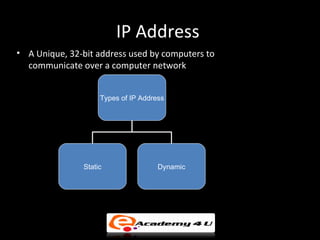
IP Address
• A Unique, 32-bit address used by computers to
  communicate over a computer network


                    Types of IP Address


               Static                Dynamic
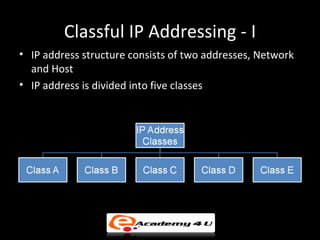
Classful IP Addressing - I
• IP address structure consists of two addresses, Network
  and Host
• IP address is divided into five classes
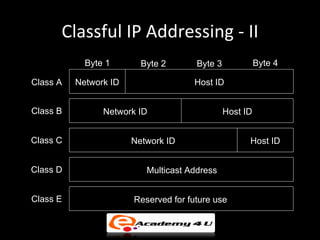
Classful IP Addressing - II
            Byte 1       Byte 2       Byte 3             Byte 4

Class A   Network ID                 Host ID


Class B         Network ID                     Host ID


Class C                Network ID                    Host ID


Class D                   Multicast Address


Class E                Reserved for future use
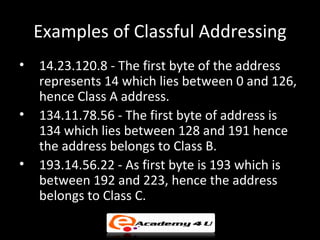
Examples of Classful Addressing
•   14.23.120.8 - The first byte of the address
    represents 14 which lies between 0 and 126,
    hence Class A address.
•   134.11.78.56 - The first byte of address is
    134 which lies between 128 and 191 hence
    the address belongs to Class B.
•   193.14.56.22 - As first byte is 193 which is
    between 192 and 223, hence the address
    belongs to Class C.
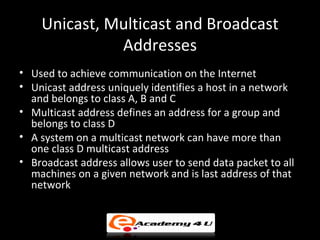
Unicast, Multicast and Broadcast
              Addresses
• Used to achieve communication on the Internet
• Unicast address uniquely identifies a host in a network
  and belongs to class A, B and C
• Multicast address defines an address for a group and
  belongs to class D
• A system on a multicast network can have more than
  one class D multicast address
• Broadcast address allows user to send data packet to all
  machines on a given network and is last address of that
  network
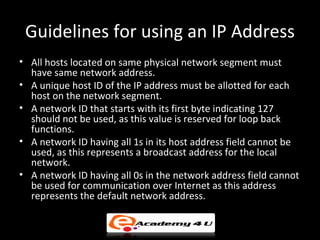
Guidelines for using an IP Address
• All hosts located on same physical network segment must
  have same network address.
• A unique host ID of the IP address must be allotted for each
  host on the network segment.
• A network ID that starts with its first byte indicating 127
  should not be used, as this value is reserved for loop back
  functions.
• A network ID having all 1s in its host address field cannot be
  used, as this represents a broadcast address for the local
  network.
• A network ID having all 0s in the network address field cannot
  be used for communication over Internet as this address
  represents the default network address.
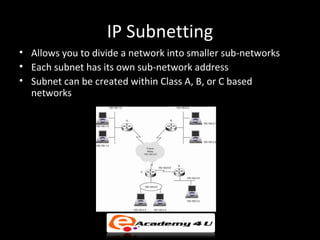
IP Subnetting
• Allows you to divide a network into smaller sub-networks
• Each subnet has its own sub-network address
• Subnet can be created within Class A, B, or C based
  networks
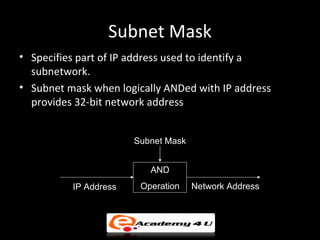
Subnet Mask
• Specifies part of IP address used to identify a
  subnetwork.
• Subnet mask when logically ANDed with IP address
  provides 32-bit network address


                       Subnet Mask


                          AND
          IP Address    Operation    Network Address
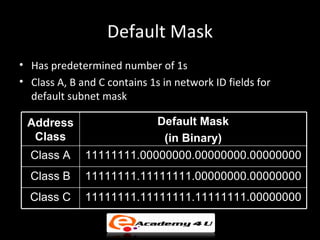
Default Mask
• Has predetermined number of 1s
• Class A, B and C contains 1s in network ID fields for
  default subnet mask

 Address                  Default Mask
  Class                    (in Binary)
  Class A     11111111.00000000.00000000.00000000
  Class B     11111111.11111111.00000000.00000000
  Class C     11111111.11111111.11111111.00000000
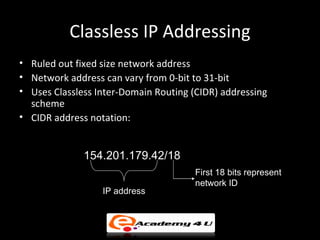
Classless IP Addressing
• Ruled out fixed size network address
• Network address can vary from 0-bit to 31-bit
• Uses Classless Inter-Domain Routing (CIDR) addressing
  scheme
• CIDR address notation:


              154.201.179.42/18
                                       First 18 bits represent
                                       network ID
                  IP address
Variable Length Subnet Mask (VLSM)
• Used by CIDR to allocate IP addresses to subnets
  depending up on the requirement
• Allows network administrator to create variable size
  subnets within a network
• Employs two different subnet masks at router which are
  ANDed one after another to the address
Example of VLSM - I
• For example, if an organization is given a Class C
  address and the organization needs to have five
  subnets VLSM employs two subnet masks.
• If the IP address is 201.70.64.0, consider the first
  subnet mask with 26 1s that is 255.255.255.192 or in
  binary format
  1111111.11111111.11111111.11000000
  which provides four subnets having 64 addresses in
  each subnet.
Example of VLSM - II
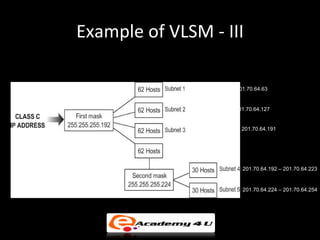
• Further, one of the subnet having 64 host addresses
  is divided in two subnet having 32 hosts addresses by
  applying a mask of 27 1s that is 255.255.255.224 or
  11111111.11111111.11111111.11100000
  to one of the subnet from the four subnets. Refer to
  the figure in next slide.
Example of VLSM - III

               201.70.64.0 – 201.70.64.63


               201.70.64.64– 201.70.64.127


               201.70.64.128 – 201.70.64.191


                               201.70.64.192 – 201.70.64.223


                               201.70.64.224 – 201.70.64.254
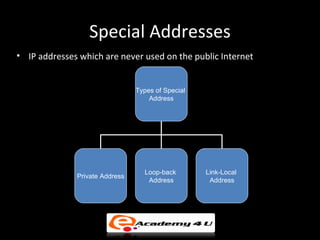
Special Addresses
• IP addresses which are never used on the public Internet


                                Types of Special
                                    Address


                                  Loop-back        Link-Local
              Private Address
                                   Address          Address
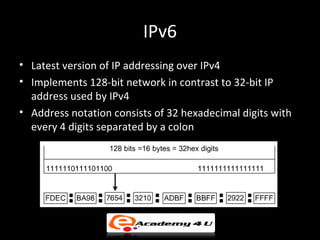
IPv6
• Latest version of IP addressing over IPv4
• Implements 128-bit network in contrast to 32-bit IP
  address used by IPv4
• Address notation consists of 32 hexadecimal digits with
  every 4 digits separated by a colon
Ping, Tracert and Path Ping
• Utility tools used for keeping track about hosts on the
  network and network structure
• Ping (Packet Internet Groper) – Used by computer
  network to test whether intended host is reachable
  across IP network
• Tracert – Used by Windows operating system to increase
  time-to-live (TTL) value of data packets sent
• Pathping – Provides useful information about network
  errors, network latency and network loss at hops
  between source and destination address
Host Addressing In Mobile IP - I
• Host cannot carry IP address from one network to
  another
• IP address is valid only when the host is connected to a
  particular network
• When a host moves from one network to another it
  requires IP addressing structure to be modified
• To maintain network connectivity of host within new
  network:
   – Change IP address from one network to another
   – Use two IP addresses
Host Addressing In Mobile IP - II
• To maintain network connectivity of host within new
  network:
   – Change IP address from one network to another - Provides
     network connectivity for mobile host when it travels from
     one network to another by changing IP address of mobile
     host
   – Use two IP addresses - Host uses home address when it is
     in permanent home network and uses care-of-address
     when it moves to foreign network
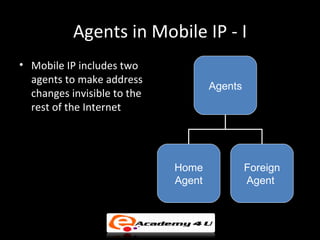
Agents in Mobile IP - I
• Mobile IP includes two
  agents to make address
                                     Agents
  changes invisible to the
  rest of the Internet


                             Home             Foreign
                             Agent            Agent
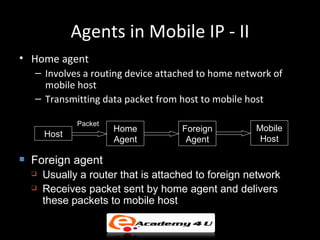
Agents in Mobile IP - II
• Home agent
    – Involves a routing device attached to home network of
      mobile host
    – Transmitting data packet from host to mobile host

               Packet
                        Home          Foreign         Mobile
        Host
                        Agent          Agent           Host

   Foreign agent
       Usually a router that is attached to foreign network
       Receives packet sent by home agent and delivers
        these packets to mobile host
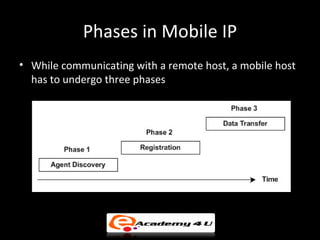
Phases in Mobile IP
• While communicating with a remote host, a mobile host
  has to undergo three phases
Inefficiency in Mobile IP
• Mobile IP sometime may provide with inefficient
  communication which can be either severe or
  moderate.
• Inefficiency may be caused due to:
   – Double Crossing
   – Triangle Routing

Ip addressing

  • 1.
  • 2.
    IP Address • AUnique, 32-bit address used by computers to communicate over a computer network Types of IP Address Static Dynamic
  • 3.
    Classful IP Addressing- I • IP address structure consists of two addresses, Network and Host • IP address is divided into five classes
  • 4.
    Classful IP Addressing- II Byte 1 Byte 2 Byte 3 Byte 4 Class A Network ID Host ID Class B Network ID Host ID Class C Network ID Host ID Class D Multicast Address Class E Reserved for future use
  • 5.
    Examples of ClassfulAddressing • 14.23.120.8 - The first byte of the address represents 14 which lies between 0 and 126, hence Class A address. • 134.11.78.56 - The first byte of address is 134 which lies between 128 and 191 hence the address belongs to Class B. • 193.14.56.22 - As first byte is 193 which is between 192 and 223, hence the address belongs to Class C.
  • 6.
    Unicast, Multicast andBroadcast Addresses • Used to achieve communication on the Internet • Unicast address uniquely identifies a host in a network and belongs to class A, B and C • Multicast address defines an address for a group and belongs to class D • A system on a multicast network can have more than one class D multicast address • Broadcast address allows user to send data packet to all machines on a given network and is last address of that network
  • 7.
    Guidelines for usingan IP Address • All hosts located on same physical network segment must have same network address. • A unique host ID of the IP address must be allotted for each host on the network segment. • A network ID that starts with its first byte indicating 127 should not be used, as this value is reserved for loop back functions. • A network ID having all 1s in its host address field cannot be used, as this represents a broadcast address for the local network. • A network ID having all 0s in the network address field cannot be used for communication over Internet as this address represents the default network address.
  • 8.
    IP Subnetting • Allowsyou to divide a network into smaller sub-networks • Each subnet has its own sub-network address • Subnet can be created within Class A, B, or C based networks
  • 9.
    Subnet Mask • Specifiespart of IP address used to identify a subnetwork. • Subnet mask when logically ANDed with IP address provides 32-bit network address Subnet Mask AND IP Address Operation Network Address
  • 10.
    Default Mask • Haspredetermined number of 1s • Class A, B and C contains 1s in network ID fields for default subnet mask Address Default Mask Class (in Binary) Class A 11111111.00000000.00000000.00000000 Class B 11111111.11111111.00000000.00000000 Class C 11111111.11111111.11111111.00000000
  • 11.
    Classless IP Addressing •Ruled out fixed size network address • Network address can vary from 0-bit to 31-bit • Uses Classless Inter-Domain Routing (CIDR) addressing scheme • CIDR address notation: 154.201.179.42/18 First 18 bits represent network ID IP address
  • 12.
    Variable Length SubnetMask (VLSM) • Used by CIDR to allocate IP addresses to subnets depending up on the requirement • Allows network administrator to create variable size subnets within a network • Employs two different subnet masks at router which are ANDed one after another to the address
  • 13.
    Example of VLSM- I • For example, if an organization is given a Class C address and the organization needs to have five subnets VLSM employs two subnet masks. • If the IP address is 201.70.64.0, consider the first subnet mask with 26 1s that is 255.255.255.192 or in binary format 1111111.11111111.11111111.11000000 which provides four subnets having 64 addresses in each subnet.
  • 14.
    Example of VLSM- II • Further, one of the subnet having 64 host addresses is divided in two subnet having 32 hosts addresses by applying a mask of 27 1s that is 255.255.255.224 or 11111111.11111111.11111111.11100000 to one of the subnet from the four subnets. Refer to the figure in next slide.
  • 15.
    Example of VLSM- III 201.70.64.0 – 201.70.64.63 201.70.64.64– 201.70.64.127 201.70.64.128 – 201.70.64.191 201.70.64.192 – 201.70.64.223 201.70.64.224 – 201.70.64.254
  • 16.
    Special Addresses • IPaddresses which are never used on the public Internet Types of Special Address Loop-back Link-Local Private Address Address Address
  • 17.
    IPv6 • Latest versionof IP addressing over IPv4 • Implements 128-bit network in contrast to 32-bit IP address used by IPv4 • Address notation consists of 32 hexadecimal digits with every 4 digits separated by a colon
  • 18.
    Ping, Tracert andPath Ping • Utility tools used for keeping track about hosts on the network and network structure • Ping (Packet Internet Groper) – Used by computer network to test whether intended host is reachable across IP network • Tracert – Used by Windows operating system to increase time-to-live (TTL) value of data packets sent • Pathping – Provides useful information about network errors, network latency and network loss at hops between source and destination address
  • 19.
    Host Addressing InMobile IP - I • Host cannot carry IP address from one network to another • IP address is valid only when the host is connected to a particular network • When a host moves from one network to another it requires IP addressing structure to be modified • To maintain network connectivity of host within new network: – Change IP address from one network to another – Use two IP addresses
  • 20.
    Host Addressing InMobile IP - II • To maintain network connectivity of host within new network: – Change IP address from one network to another - Provides network connectivity for mobile host when it travels from one network to another by changing IP address of mobile host – Use two IP addresses - Host uses home address when it is in permanent home network and uses care-of-address when it moves to foreign network
  • 21.
    Agents in MobileIP - I • Mobile IP includes two agents to make address Agents changes invisible to the rest of the Internet Home Foreign Agent Agent
  • 22.
    Agents in MobileIP - II • Home agent – Involves a routing device attached to home network of mobile host – Transmitting data packet from host to mobile host Packet Home Foreign Mobile Host Agent Agent Host  Foreign agent  Usually a router that is attached to foreign network  Receives packet sent by home agent and delivers these packets to mobile host
  • 23.
    Phases in MobileIP • While communicating with a remote host, a mobile host has to undergo three phases
  • 24.
    Inefficiency in MobileIP • Mobile IP sometime may provide with inefficient communication which can be either severe or moderate. • Inefficiency may be caused due to: – Double Crossing – Triangle Routing

Editor's Notes