presentation 
on 
IP-Addressing 
Created By:> Er. Bhagat Singh Sharma 
kuldeepjmn@gmail.com 
+91-8432216444 
1
CONTENTS 
2 
Introduction 
Working with IP Addressing 
IP Address classes 
Subnet Mask 
Subnetting , Subnet and Subnet Mask
Introduction 
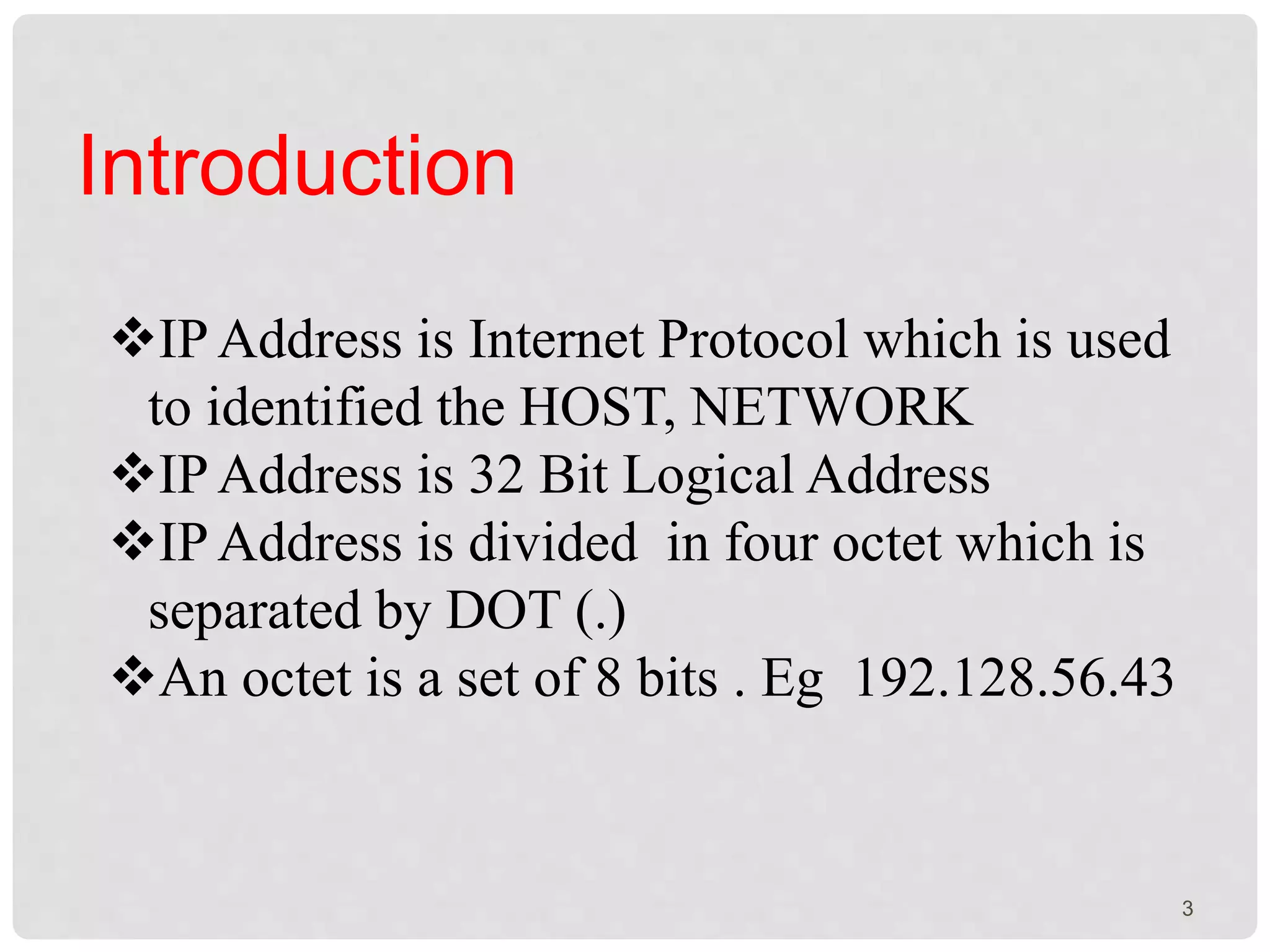
IP Address is Internet Protocol which is used 
to identified the HOST, NETWORK 
IP Address is 32 Bit Logical Address 
IP Address is divided in four octet which is 
separated by DOT (.) 
An octet is a set of 8 bits . Eg 192.128.56.43 
3
Working with IP Addressing 
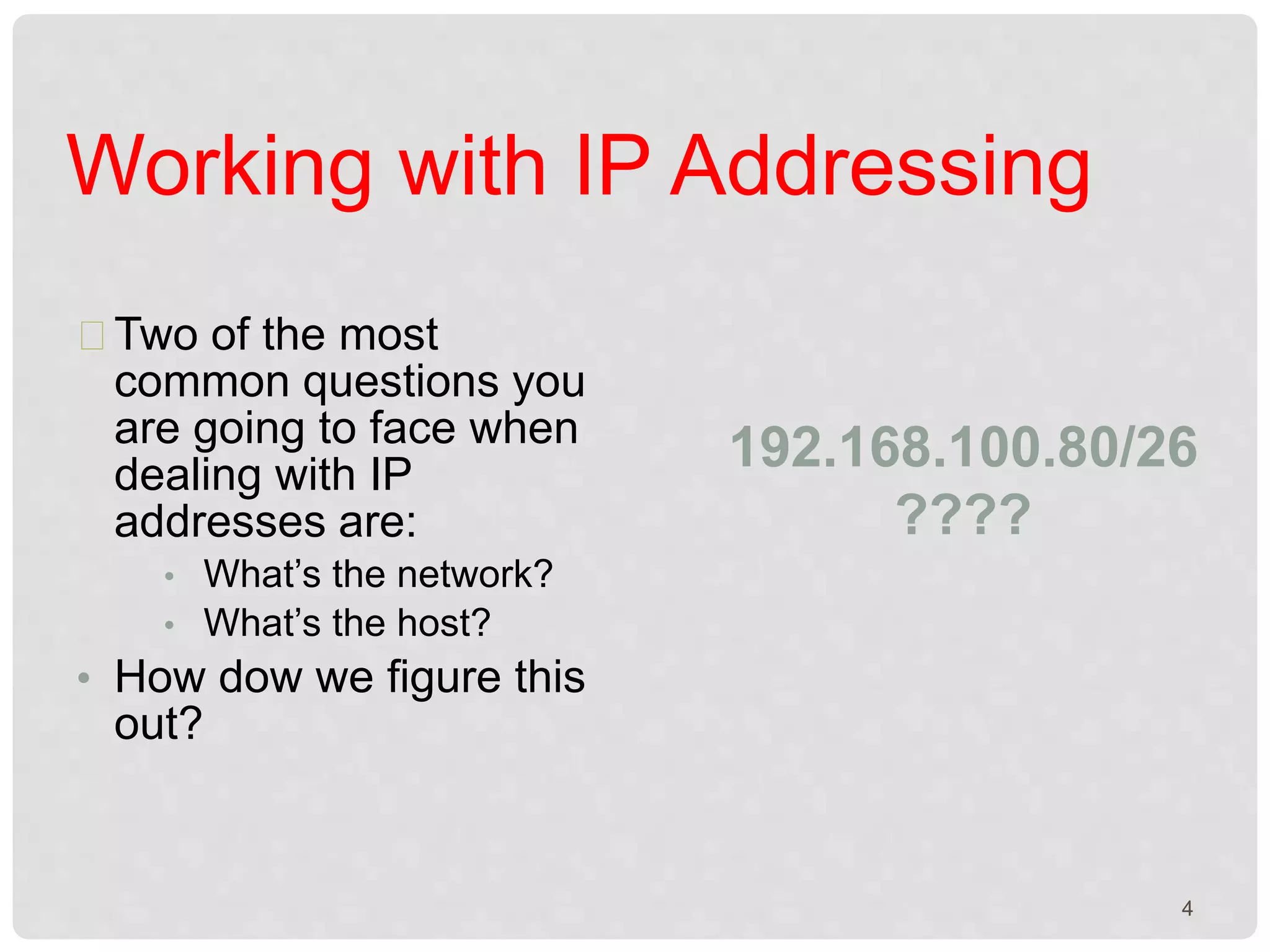
Two of the most 
common questions you 
are going to face when 
dealing with IP 
addresses are: 
• What’s the network? 
• What’s the host? 
• How dow we figure this 
out? 
192.168.100.80/26 
???? 
4
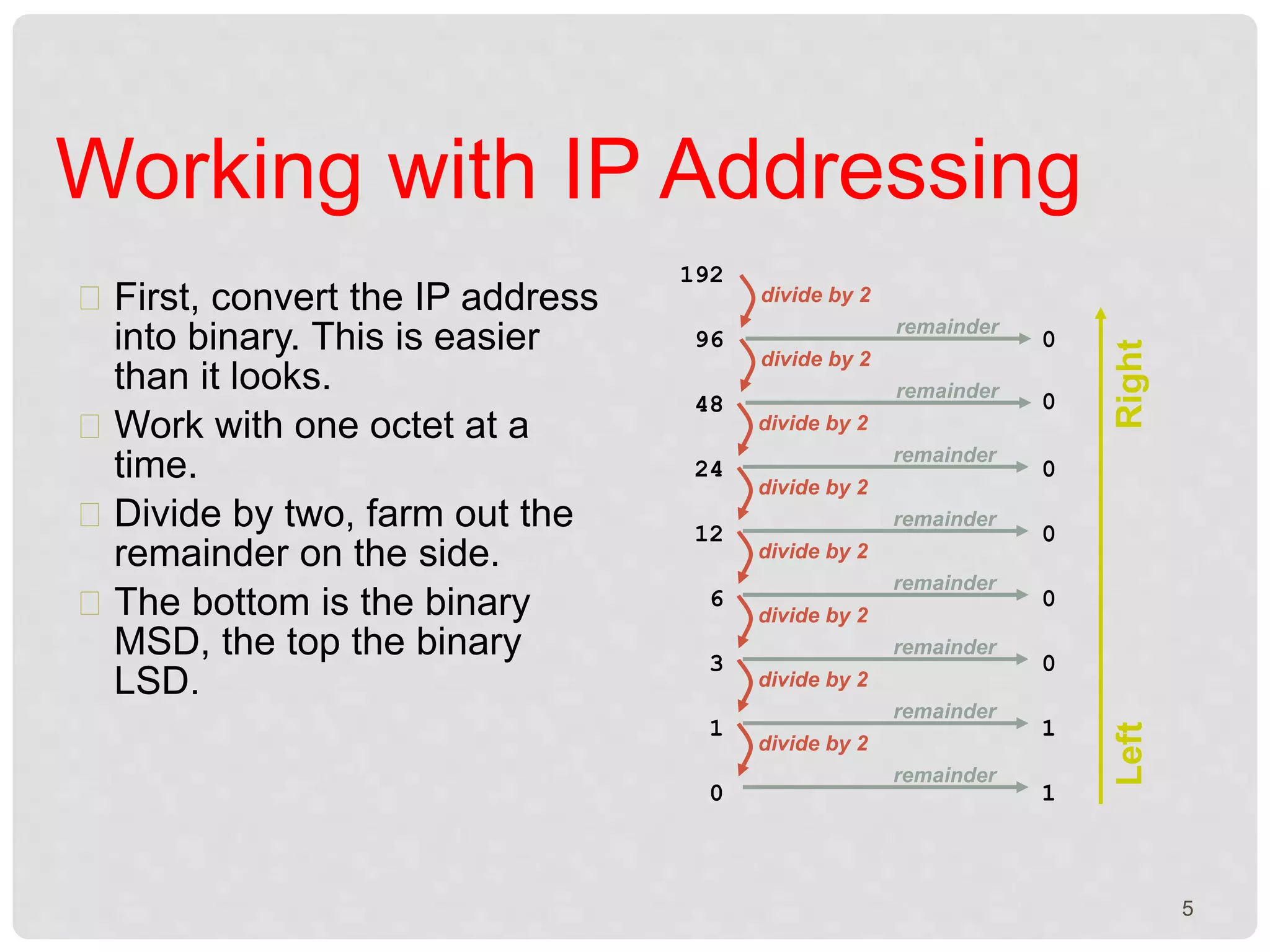
First, convert the IP address 
into binary. This is easier 
than it looks. 
Work with one octet at a 
time. 
Divide by two, farm out the 
remainder on the side. 
The bottom is the binary 
MSD, the top the binary 
LSD. 
192 
divide by 2 
remainder 
96 0 
divide by 2 
remainder 
48 0 
divide by 2 
remainder 
24 0 
divide by 2 
remainder 
12 0 
divide by 2 
remainder 
6 0 
divide by 2 
remainder 
3 0 
divide by 2 
remainder 
1 1 
divide by 2 
remainder 
0 1 
Left Right 
Working with IP Addressing 
5
Working with IP Addressing 
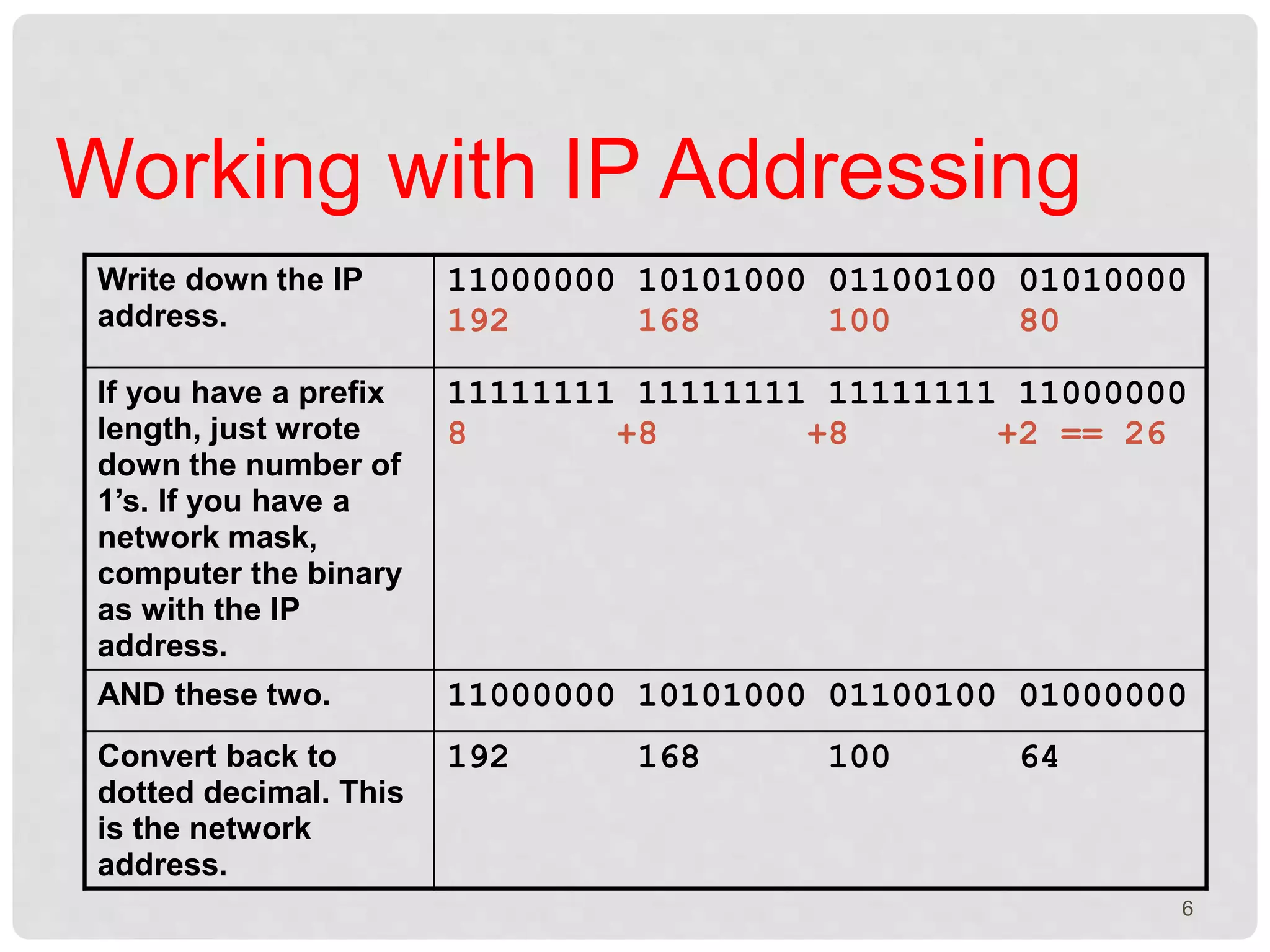
Write down the IP 
address. 
11000000 10101000 01100100 01010000 
192 168 100 80 
If you have a prefix 
length, just wrote 
down the number of 
1’s. If you have a 
network mask, 
computer the binary 
as with the IP 
address. 
11111111 11111111 11111111 11000000 
8 +8 +8 +2 == 26 
AND these two. 11000000 10101000 01100100 01000000 
Convert back to 
dotted decimal. This 
is the network 
address. 
192 168 100 64 
6
Working with IP Addressing 
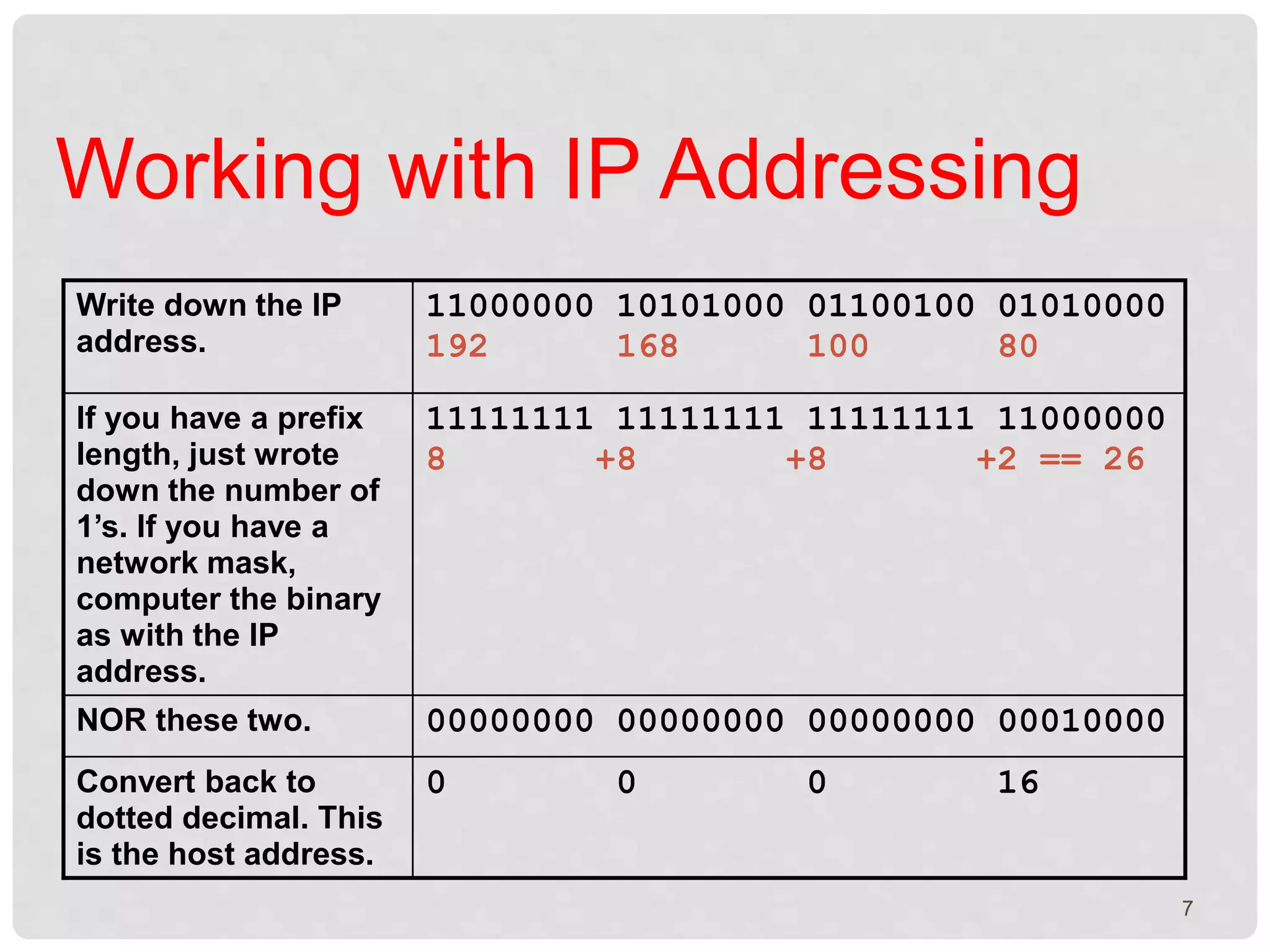
Write down the IP 
address. 
11000000 10101000 01100100 01010000 
192 168 100 80 
If you have a prefix 
length, just wrote 
down the number of 
1’s. If you have a 
network mask, 
computer the binary 
as with the IP 
address. 
11111111 11111111 11111111 11000000 
8 +8 +8 +2 == 26 
NOR these two. 00000000 00000000 00000000 00010000 
Convert back to 
dotted decimal. This 
is the host address. 
0 0 0 16 
7
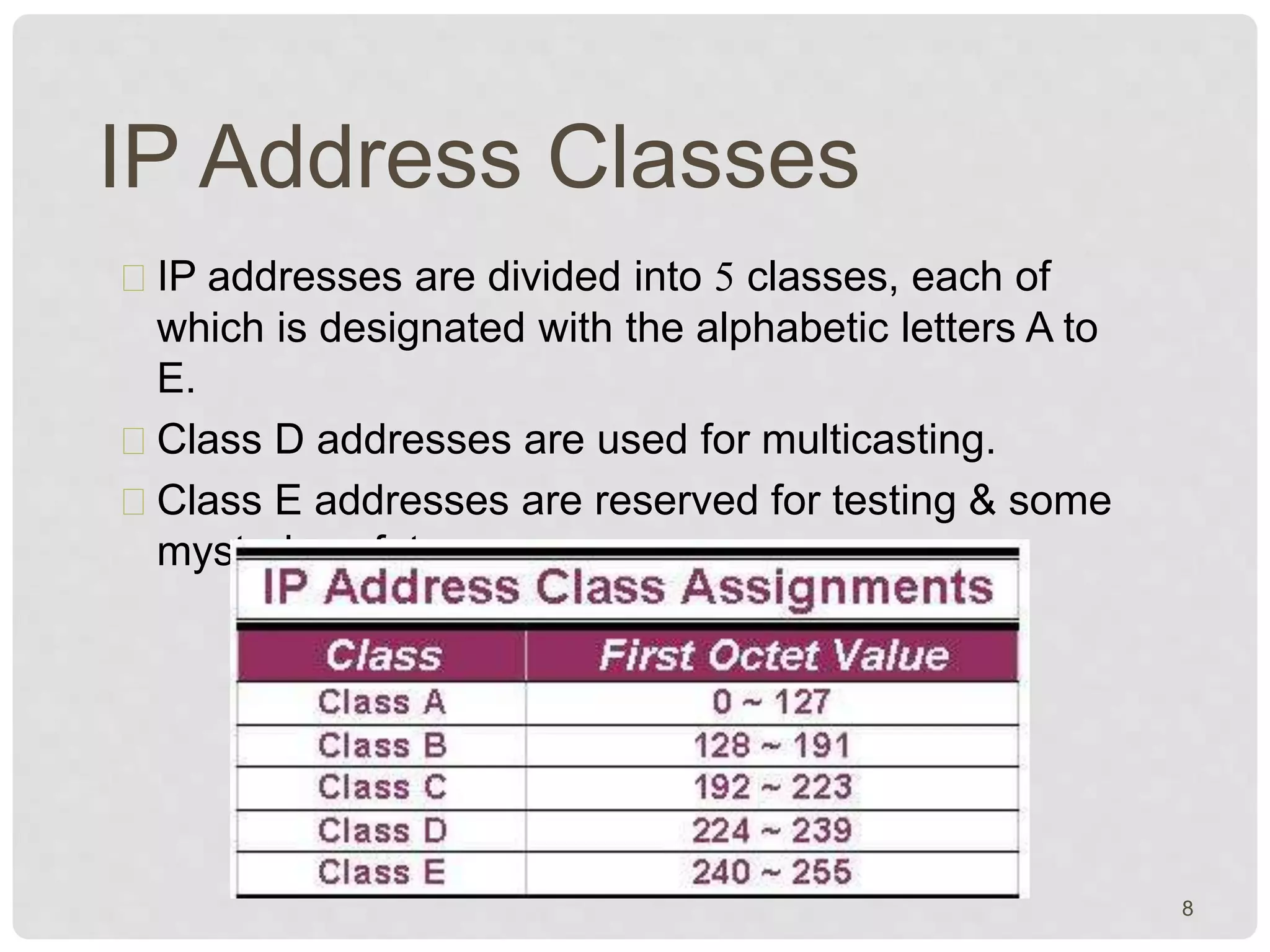
IP Address Classes 
IP addresses are divided into 5 classes, each of 
which is designated with the alphabetic letters A to 
E. 
Class D addresses are used for multicasting. 
Class E addresses are reserved for testing & some 
mysterious future use. 
8
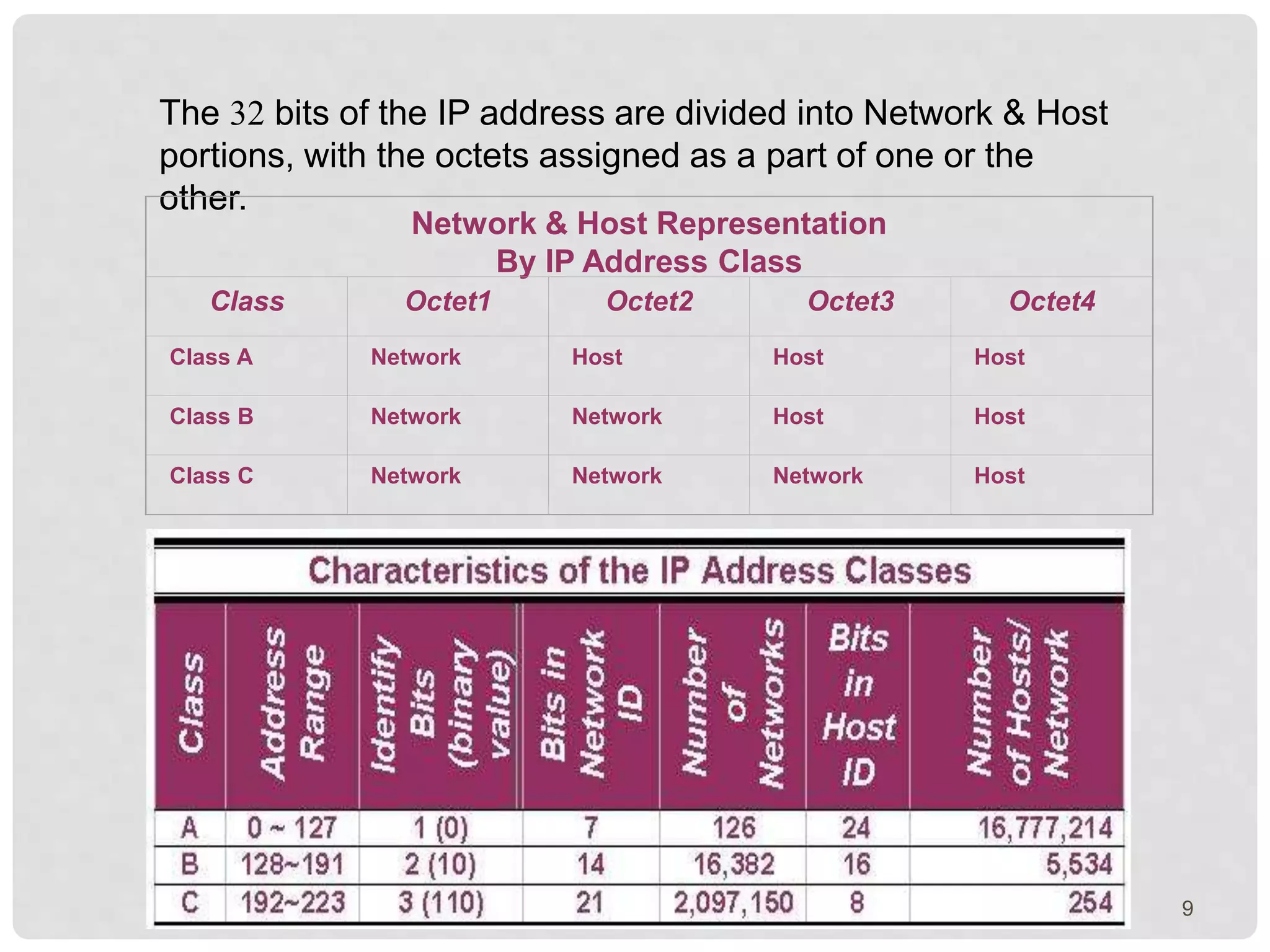
The 32 bits of the IP address are divided into Network & Host 
portions, with the octets assigned as a part of one or the 
other. 
Network & Host Representation 
By IP Address Class 
Class Octet1 Octet2 Octet3 Octet4 
Class A Network Host Host Host 
Class B Network Network Host Host 
Class C Network Network Network Host 
9
Subnet Mask 
With the rapid growth of the internet & the ever-increasing 
demand for new addresses, the 
standard address class structure has been 
expanded by borrowing bits from the Host 
portion to allow for more Networks. 
Under this addressing scheme, called 
Subnetting, separating the Network & Host 
requires a special process called Subnet 
TMhaes skuinbgn.et masking process was developed to 
identify & extract the Network part of the 
address. 
A subnet mask, which contains a binary bit 
pattern of ones & zeros, is applied to an address 
to determine whether the address is on the local 
Network. 
10
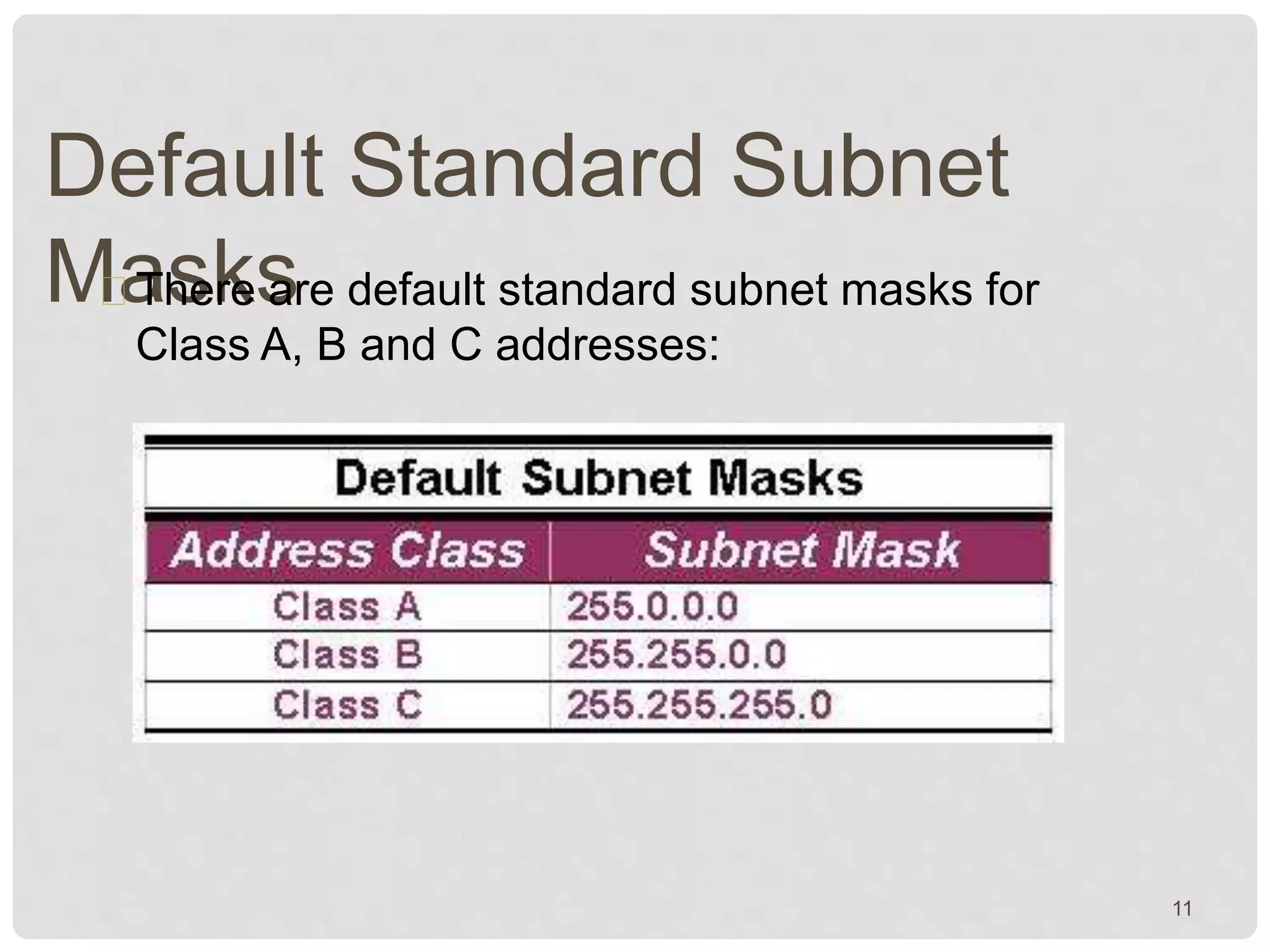
Default Standard Subnet 
MaThsekres are default standard subnet masks for 
Class A, B and C addresses: 
11
Subnetting, Subnet & Subnet 
MasSukbnetting, a subnet & a subnet mask are all 
different. 
Subnetting is the process of dividing a network 
& its IP addresses into segments, each of 
which is called a subnetwork or subnet. 
The subnet mask is the 32-bit number that 
the router uses to cover up the network 
address to show which bits are being used to 
identify the subnet. 
12
THANKING YOU !!! 
13

iP Address ,

  • 1.
    presentation on IP-Addressing Created By:> Er. Bhagat Singh Sharma kuldeepjmn@gmail.com +91-8432216444 1
  • 2.
    CONTENTS 2 Introduction Working with IP Addressing IP Address classes Subnet Mask Subnetting , Subnet and Subnet Mask
  • 3.
    Introduction IP Addressis Internet Protocol which is used to identified the HOST, NETWORK IP Address is 32 Bit Logical Address IP Address is divided in four octet which is separated by DOT (.) An octet is a set of 8 bits . Eg 192.128.56.43 3
  • 4.
    Working with IPAddressing Two of the most common questions you are going to face when dealing with IP addresses are: • What’s the network? • What’s the host? • How dow we figure this out? 192.168.100.80/26 ???? 4
  • 5.
    First, convert theIP address into binary. This is easier than it looks. Work with one octet at a time. Divide by two, farm out the remainder on the side. The bottom is the binary MSD, the top the binary LSD. 192 divide by 2 remainder 96 0 divide by 2 remainder 48 0 divide by 2 remainder 24 0 divide by 2 remainder 12 0 divide by 2 remainder 6 0 divide by 2 remainder 3 0 divide by 2 remainder 1 1 divide by 2 remainder 0 1 Left Right Working with IP Addressing 5
  • 6.
    Working with IPAddressing Write down the IP address. 11000000 10101000 01100100 01010000 192 168 100 80 If you have a prefix length, just wrote down the number of 1’s. If you have a network mask, computer the binary as with the IP address. 11111111 11111111 11111111 11000000 8 +8 +8 +2 == 26 AND these two. 11000000 10101000 01100100 01000000 Convert back to dotted decimal. This is the network address. 192 168 100 64 6
  • 7.
    Working with IPAddressing Write down the IP address. 11000000 10101000 01100100 01010000 192 168 100 80 If you have a prefix length, just wrote down the number of 1’s. If you have a network mask, computer the binary as with the IP address. 11111111 11111111 11111111 11000000 8 +8 +8 +2 == 26 NOR these two. 00000000 00000000 00000000 00010000 Convert back to dotted decimal. This is the host address. 0 0 0 16 7
  • 8.
    IP Address Classes IP addresses are divided into 5 classes, each of which is designated with the alphabetic letters A to E. Class D addresses are used for multicasting. Class E addresses are reserved for testing & some mysterious future use. 8
  • 9.
    The 32 bitsof the IP address are divided into Network & Host portions, with the octets assigned as a part of one or the other. Network & Host Representation By IP Address Class Class Octet1 Octet2 Octet3 Octet4 Class A Network Host Host Host Class B Network Network Host Host Class C Network Network Network Host 9
  • 10.
    Subnet Mask Withthe rapid growth of the internet & the ever-increasing demand for new addresses, the standard address class structure has been expanded by borrowing bits from the Host portion to allow for more Networks. Under this addressing scheme, called Subnetting, separating the Network & Host requires a special process called Subnet TMhaes skuinbgn.et masking process was developed to identify & extract the Network part of the address. A subnet mask, which contains a binary bit pattern of ones & zeros, is applied to an address to determine whether the address is on the local Network. 10
  • 11.
    Default Standard Subnet MaThsekres are default standard subnet masks for Class A, B and C addresses: 11
  • 12.
    Subnetting, Subnet &Subnet MasSukbnetting, a subnet & a subnet mask are all different. Subnetting is the process of dividing a network & its IP addresses into segments, each of which is called a subnetwork or subnet. The subnet mask is the 32-bit number that the router uses to cover up the network address to show which bits are being used to identify the subnet. 12
  • 13.