Mahmmoud Mahdi
 Understanding TCP/IP Addressing
 The Domain Name System (DNS)
 The Dynamic Host Configuration Protocol
  (DHCP)
 The Routing & Remote Access (RRAS)
  service
 The Network Access Protection (NAP)
  service
 Provide the logical "language" for
  communication
 Two computers must be configured
  with the same network protocols in
  order to communicate and transfer
  information.
 The most common networking
  protocol
 Consists of a suite of different
  protocols that work in concert to allow
  computers to communicate on a
  TCP/IP network.
 By subdividing TCP/IP networks into
  smaller groupings called subnets.
 In order for any computer or host, a computer,
  printer, or other device configured with a
  network interface, to communicate on a
  TCP/IP network, it must be configured with a
  valid IP address.
 IP address:
   Is a software address, not a hardware address
   Used for finding hosts on a local network.
   Allow hosts on one network to communicate with a
   host on a different network.
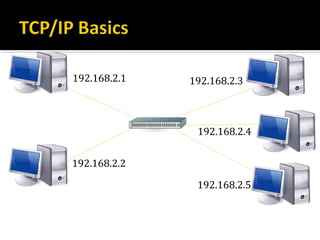
192.168.2.1   192.168.2.3


               192.168.2.4

192.168.2.2

               192.168.2.5
 Each IP address consists of two components:
   Network Address:
    ▪ This portion of the IP address is shared by all TCP/IP hosts
      on a particular network or subnet.
   Host Address:
    ▪ This comprises the portion of me IP address that is unique
      to a particular computer or host.
 IP address = the network address + the host
 address
   must be unique across an entire TCP/IP network.
 In addition to the IP address, each TCP/IP
 host must be configured with the following:
  Subnet Mask
   ▪ Used to identify which network the TCP/IP host
     resides on by defining where the network address
     stops and the host address begins.
  Default Gateway
   ▪ Allows a host to communicate with devices that reside
     on a remote network or location.
 The first implementation of the Internet
  Protocol (IP)
 It uses 32 bits (4 bytes, or octets) for
  addressing.
   providing a limit of 232 possible addresses
 Represented using dotted-decimal notation
   the decimal value of each byte is shown using
    periods to separate the bytes
 for example:
   192.1.120.84 or 192.5.18.102
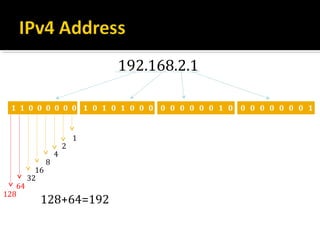
192.168.2.1

 1 1 0 0 0 0 0 0 1 0 1 0 1 0 0 0 0 0 0 0 0 0 1 0 0 0 0 0 0 0 0 1


                           1
                       2
                   4
               8
          16
        32
   64
128
           128+64=192
 Network address:
  Uniquely identifies each network.
  Every host on the same network share that
   network address as a part of its IP address
  Used in routing to send packets to a remote
   network
   ▪ Ex: 10.0.0.0, 172.16.0.0, 192.168.10.0
 Host address:
  Uniquely identifies each host on a network
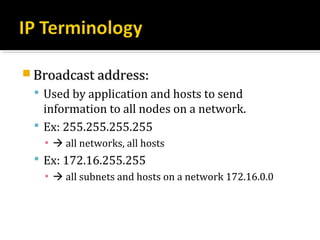
 Broadcast address:
  Used by application and hosts to send
   information to all nodes on a network.
  Ex: 255.255.255.255
   ▪  all networks, all hosts
  Ex: 172.16.255.255
   ▪  all subnets and hosts on a network 172.16.0.0
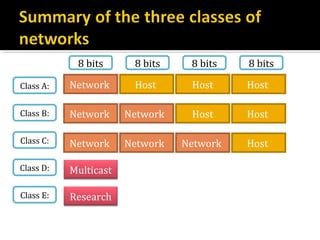
 Classful Addressing
  The field for the network number was a
   different length for different classes of network,
   and the remaining bits were used for the host
   number.
8 bits      8 bits    8 bits   8 bits

Class A:   Network      Host      Host     Host

Class B:   Network     Network    Host     Host

Class C:   Network     Network   Network   Host

Class D:   Multicast

Class E:   Research
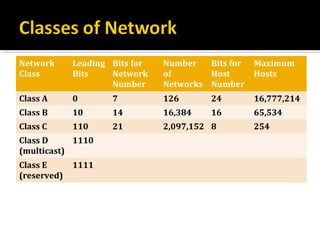
Network      Leading Bits for   Number   Bits for   Maximum
Class        Bits    Network    of       Host       Hosts
                     Number     Networks Number
Class A      0       7          126       24        16,777,214
Class B      10      14         16,384    16        65,534
Class C      110     21         2,097,152 8         254
Class D     1110
(multicast)
Class E      1111
(reserved)
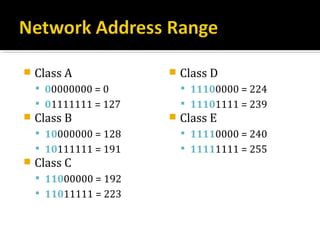
   Class A               Class D
     00000000 = 0          11100000 = 224
     01111111 = 127        11101111 = 239
   Class B               Class E
     10000000 = 128        11110000 = 240
     10111111 = 191        11111111 = 255
   Class C
     11000000 = 192
     11011111 = 223
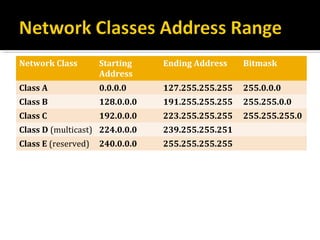
Network Class        Starting    Ending Address    Bitmask
                     Address
Class A              0.0.0.0     127.255.255.255   255.0.0.0
Class B              128.0.0.0   191.255.255.255   255.255.0.0
Class C              192.0.0.0   223.255.255.255   255.255.255.0
Class D (multicast) 224.0.0.0    239.255.255.251
Class E (reserved)   240.0.0.0   255.255.255.255
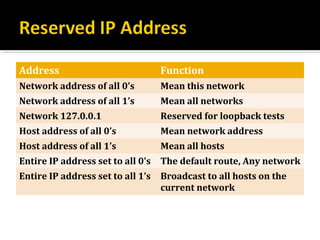
Address                            Function
Network address of all 0’s         Mean this network
Network address of all 1’s         Mean all networks
Network 127.0.0.1                  Reserved for loopback tests
Host address of all 0’s            Mean network address
Host address of all 1’s            Mean all hosts
Entire IP address set to all 0’s   The default route, Any network
Entire IP address set to all 1’s   Broadcast to all hosts on the
                                   current network
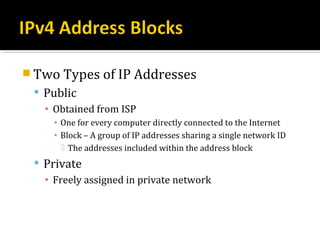
 Two Types of IP Addresses
  Public
   ▪ Obtained from ISP
     ▪ One for every computer directly connected to the Internet
     ▪ Block – A group of IP addresses sharing a single network ID
        The addresses included within the address block
  Private
   ▪ Freely assigned in private network
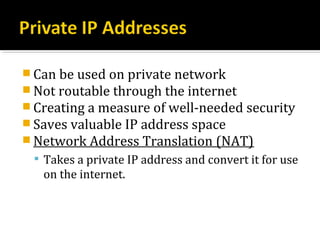
 Can be used on private network
 Not routable through the internet
 Creating a measure of well-needed security
 Saves valuable IP address space
 Network Address Translation (NAT)
  Takes a private IP address and convert it for use
   on the internet.
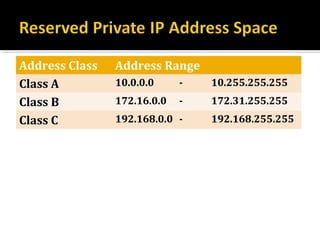
Address Class   Address Range
Class A         10.0.0.0     -   10.255.255.255
Class B         172.16.0.0   -   172.31.255.255
Class C         192.168.0.0 -    192.168.255.255
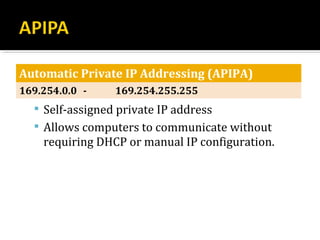
Automatic Private IP Addressing (APIPA)
169.254.0.0 -    169.254.255.255
   Self-assigned private IP address
   Allows computers to communicate without
    requiring DHCP or manual IP configuration.
Contact Me: qursaan@yahoo.com

Lesson1: Introduction To Networking Concepts

  • 1.
  • 2.
     Understanding TCP/IPAddressing  The Domain Name System (DNS)  The Dynamic Host Configuration Protocol (DHCP)  The Routing & Remote Access (RRAS) service  The Network Access Protection (NAP) service
  • 4.
     Provide thelogical "language" for communication  Two computers must be configured with the same network protocols in order to communicate and transfer information.
  • 5.
     The mostcommon networking protocol  Consists of a suite of different protocols that work in concert to allow computers to communicate on a TCP/IP network.  By subdividing TCP/IP networks into smaller groupings called subnets.
  • 6.
     In orderfor any computer or host, a computer, printer, or other device configured with a network interface, to communicate on a TCP/IP network, it must be configured with a valid IP address.  IP address:  Is a software address, not a hardware address  Used for finding hosts on a local network.  Allow hosts on one network to communicate with a host on a different network.
  • 7.
    192.168.2.1 192.168.2.3 192.168.2.4 192.168.2.2 192.168.2.5
  • 8.
     Each IPaddress consists of two components:  Network Address: ▪ This portion of the IP address is shared by all TCP/IP hosts on a particular network or subnet.  Host Address: ▪ This comprises the portion of me IP address that is unique to a particular computer or host.  IP address = the network address + the host address  must be unique across an entire TCP/IP network.
  • 9.
     In additionto the IP address, each TCP/IP host must be configured with the following:  Subnet Mask ▪ Used to identify which network the TCP/IP host resides on by defining where the network address stops and the host address begins.  Default Gateway ▪ Allows a host to communicate with devices that reside on a remote network or location.
  • 10.
     The firstimplementation of the Internet Protocol (IP)  It uses 32 bits (4 bytes, or octets) for addressing.  providing a limit of 232 possible addresses  Represented using dotted-decimal notation  the decimal value of each byte is shown using periods to separate the bytes  for example:  192.1.120.84 or 192.5.18.102
  • 11.
    192.168.2.1 1 10 0 0 0 0 0 1 0 1 0 1 0 0 0 0 0 0 0 0 0 1 0 0 0 0 0 0 0 0 1 1 2 4 8 16 32 64 128 128+64=192
  • 12.
     Network address:  Uniquely identifies each network.  Every host on the same network share that network address as a part of its IP address  Used in routing to send packets to a remote network ▪ Ex: 10.0.0.0, 172.16.0.0, 192.168.10.0  Host address:  Uniquely identifies each host on a network
  • 13.
     Broadcast address:  Used by application and hosts to send information to all nodes on a network.  Ex: 255.255.255.255 ▪  all networks, all hosts  Ex: 172.16.255.255 ▪  all subnets and hosts on a network 172.16.0.0
  • 14.
     Classful Addressing  The field for the network number was a different length for different classes of network, and the remaining bits were used for the host number.
  • 15.
    8 bits 8 bits 8 bits 8 bits Class A: Network Host Host Host Class B: Network Network Host Host Class C: Network Network Network Host Class D: Multicast Class E: Research
  • 16.
    Network Leading Bits for Number Bits for Maximum Class Bits Network of Host Hosts Number Networks Number Class A 0 7 126 24 16,777,214 Class B 10 14 16,384 16 65,534 Class C 110 21 2,097,152 8 254 Class D 1110 (multicast) Class E 1111 (reserved)
  • 17.
    Class A  Class D  00000000 = 0  11100000 = 224  01111111 = 127  11101111 = 239  Class B  Class E  10000000 = 128  11110000 = 240  10111111 = 191  11111111 = 255  Class C  11000000 = 192  11011111 = 223
  • 18.
    Network Class Starting Ending Address Bitmask Address Class A 0.0.0.0 127.255.255.255 255.0.0.0 Class B 128.0.0.0 191.255.255.255 255.255.0.0 Class C 192.0.0.0 223.255.255.255 255.255.255.0 Class D (multicast) 224.0.0.0 239.255.255.251 Class E (reserved) 240.0.0.0 255.255.255.255
  • 19.
    Address Function Network address of all 0’s Mean this network Network address of all 1’s Mean all networks Network 127.0.0.1 Reserved for loopback tests Host address of all 0’s Mean network address Host address of all 1’s Mean all hosts Entire IP address set to all 0’s The default route, Any network Entire IP address set to all 1’s Broadcast to all hosts on the current network
  • 20.
     Two Typesof IP Addresses  Public ▪ Obtained from ISP ▪ One for every computer directly connected to the Internet ▪ Block – A group of IP addresses sharing a single network ID  The addresses included within the address block  Private ▪ Freely assigned in private network
  • 21.
     Can beused on private network  Not routable through the internet  Creating a measure of well-needed security  Saves valuable IP address space  Network Address Translation (NAT)  Takes a private IP address and convert it for use on the internet.
  • 22.
    Address Class Address Range Class A 10.0.0.0 - 10.255.255.255 Class B 172.16.0.0 - 172.31.255.255 Class C 192.168.0.0 - 192.168.255.255
  • 23.
    Automatic Private IPAddressing (APIPA) 169.254.0.0 - 169.254.255.255  Self-assigned private IP address  Allows computers to communicate without requiring DHCP or manual IP configuration.
  • 24.