



Internet protocol (IP)
N.JUNNUBABU ASST.PROF
WHAT IS IP ADDRESS:
IP (Internet Protocol) Address is an address of your network hardware. It helps
in connecting your computer to other devices on your network and all over
the world. An IP Address is made up of numbers or characters.
An example of an IP address would be like this: 192.157.1.250
THERE ARE TWO IP VERSIONS:
 IPv4(internet protocol version4 ).
 IPv6(internet protocol version4 ).
IPv4 is the older version which has an space of over 4 billion IP addresses.
IPv6 is the new version can provide up to trillions of IP addresses to fulfil the
need of all internet users and devices.
Types of IP Address:-
1.Private IP Address.
2. Public IP Address.
3. Static IP Address.
4. Dynamic IP Address.
Private IP Addresses:
A private IP address is a unique IP number assigned to every
that connects to your home internet network, which includes
devices like computers, tablets, smartphones, which is used in your
household.
It also likely includes all types of Bluetooth devices you use, like
printers or printers, smart devices like TV, etc. With a rising industry
of internet of things (IoT) products, the number of private IP
addresses you are likely to have in your own home is growing.
Public IP Addresses:-
A public IP address is an address where one primary address is
associated with your whole network. In this type of IP address, each
of the connected devices has the same IP address.
Dynamic IP address:-
Dynamic IP addresses always keep changing. It is temporary and
allocated to a device every time it connects to the web. Dynamic
can trace their origin to a collection of IP addresses that are shared
across many computers.
Dynamic IP addresses are another important type of internet
protocol addresses. It is active for a specific amount of time; after
that, it will expire.
Static IP Addresses
A static IP address is an IP address that cannot be changed. In
contrast, a dynamic IP address will be assigned by a Dynamic Host
Configuration Protocol (DHCP) server, which is subject to change.
Static IP address never changes, but it can be altered as part of
routine network administration.
Static IP addresses are consistent, which is assigned once, that
the same over the years. This type of IP also helps you procure a
of information about a device.
Types of Website IP Addresses
Two types of website IP Addresses are
1) Share IP Address
2) Dedicated IP Address
Shared IP Addresses:-
Shared IP address is used by small business websites that do not
get many visitors or have many files or pages on their site. The IP
address is not unique and it is shared with other websites.
Dedicated IP Addresses:-
Dedicated IP address is assigned uniquely to each website.
Dedicated IP addresses helps you avoid any potential backlists
because of bad behaviour from others on your server. The
IP address also gives you the option of pulling up your website
using the IP address alone, instead of your domain name. It also
helps you to access your website when you are waiting on a
transfer.
IP Address Classification Based on Operational Characteristics
1)Unicast addressing
2)Broadcast addressing
3)Multicast IP addresses
4)Anycast addressing
Unicast addressing:
Unicast addressing is the most common concept of an IP address
the Unicast addressing method. It is available in both IPv4 and
This IP address method refers to a single sender/receiver.
It can be used for both sending and receiving the data.
In most cases, a Unicast address is associated with a single device
host, but a device or host that may have more than one unicast
address.
Broadcast addressing:
Broadcasting addressing is another addressing method available in
IPv4. It allows you to manage data to all destinations on a network
with a single transmission operation.
The IP address 255.255.255.255 is mostly used for network
broadcast. Moreover, limited directed-broadcast uses the all-ones
host address with the network prefix.
IPv6 does not provide any implementation and any broadcast
addressing. It replaces it with multicast to the specially defined all-
nodes of the multicast address.
Multicast IP addresses
Multicast IP addresses are used mainly for one-to-many
communication. Multicast messages are mostly sent to the IP
multicast group address.
In this, routers forward copies of the packet out to every interface
with hosts subscribed to that specific group address. Only the
that require receiving the message will process the packets. All
hosts on that LAN will discard them.
Anycast addressing:
In anycast addressing the data, the stream is not transmitted to all
receivers. However, just the one that the router decides is closest
the network.
This IP addressing comes as a built-in feature of IPv6. In IPv4, it is
implemented by using the Border Gateway Protocol by using the
shortest-path metric. This method is widely used for global load
balancing and is also used in distributed DNS systems.
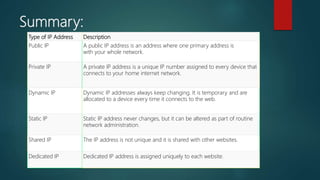
Summary:
Type of IP Address Description
Public IP A public IP address is an address where one primary address is
with your whole network.
Private IP A private IP address is a unique IP number assigned to every device that
connects to your home internet network.
Dynamic IP Dynamic IP addresses always keep changing. It is temporary and are
allocated to a device every time it connects to the web.
Static IP Static IP address never changes, but it can be altered as part of routine
network administration.
Shared IP The IP address is not unique and it is shared with other websites.
Dedicated IP Dedicated IP address is assigned uniquely to each website.
IP address classes:
The 32 bit IP address is divided into five sub-classes.
These are:
Class A.
Class B.
Class C.
Class D.
Class E.
Each of these classes has a valid range of IP addresses.
Classes D and E are reserved for multicast and experimental purposes
The order of bits in the first octet determine the classes of IP address.
IPv4 address is divided into two parts:
Network ID
Host ID
The class of IP address is used to determine the bits used for network ID and
ID and the number of total networks and hosts possible in that particular class.
Each ISP or network administrator assigns IP address to each device that is
connected to its network.
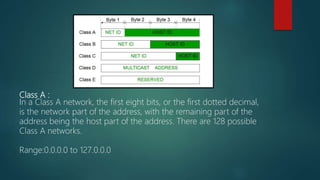
Class A :
In a Class A network, the first eight bits, or the first dotted decimal,
is the network part of the address, with the remaining part of the
address being the host part of the address. There are 128 possible
Class A networks.
Range:0.0.0.0 to 127.0.0.0
Class B:-
In a Class B network, the first 16 bits are the network part of the
address. All Class B networks have their first bit set to 1 and the
second bit set to 0. In dotted decimal notation, that makes
to 191.255.255.255 as Class B networks. There are 16,384 possible
Class B networks.
Class C:-
In a Class C network, the first two bits are set to 1, and the third bit
is set to 0. That makes the first 24 bits of the address the network
address and the remainder as the host address. Class C network
addresses range from 192.0.0.0 to 223.255.255.255. There are over
million possible Class C networks.
Class D:-
Class D addresses are used for multicasting applications. Unlike the
previous classes, the Class D is not used for "normal" networking
operations. Class D addresses have their first three bits set to “1”
and their fourth bit set to “0”.
Class D addresses are 32-bit network addresses, meaning that all
values within the range of 224.0.0.0 – 239.255.255.255 are used to
uniquely identify multicast groups.
There are no host addresses within the Class D address space,
all the hosts within a group share the group’s IP address for
purposes.
Class E:-
Class E networks are defined by having the first four network
address bits as 1. That encompasses addresses from 240.0.0.0 to
255.255.255.255.
While this class is reserved, its usage was never defined. As a result,
most network implementations discard these addresses as illegal or
undefined.
The exception is 255.255.255.255, which is used as a broadcast
address.
Rules for assigning Host ID:
Host ID’s are used to identify a host within a network. The host ID
are assigned based on the following rules:
Within any network, the host ID must be unique to that network.
Host ID in which all bits are set to 0 cannot be assigned because
host ID is used to represent the network ID of the IP address.
Host ID in which all bits are set to 1 cannot be assigned because
host ID is reserved as a broadcast address to send packets to all
hosts present on that particular network.
Rules for assigning Network ID:
Hosts that are located on the same physical network are identified
by the network ID, as all host on the same physical network is
assigned the same network ID. The network ID is assigned based
the following rules:
The network ID cannot start with 127 because 127 belongs to class
A address and is reserved for internal loop-back functions.
All bits of network ID set to 1 are reserved for use as an IP
address and therefore, cannot be used.
All bits of network ID set to 0 are used to denote a specific host on
the local network and are not routed and therefore, aren’t used.
Over view of class:-

Internet protocol (ip)

  • 1.
  • 2.
    WHAT IS IPADDRESS: IP (Internet Protocol) Address is an address of your network hardware. It helps in connecting your computer to other devices on your network and all over the world. An IP Address is made up of numbers or characters. An example of an IP address would be like this: 192.157.1.250 THERE ARE TWO IP VERSIONS:  IPv4(internet protocol version4 ).  IPv6(internet protocol version4 ). IPv4 is the older version which has an space of over 4 billion IP addresses. IPv6 is the new version can provide up to trillions of IP addresses to fulfil the need of all internet users and devices.
  • 3.
    Types of IPAddress:- 1.Private IP Address. 2. Public IP Address. 3. Static IP Address. 4. Dynamic IP Address. Private IP Addresses: A private IP address is a unique IP number assigned to every that connects to your home internet network, which includes devices like computers, tablets, smartphones, which is used in your household. It also likely includes all types of Bluetooth devices you use, like printers or printers, smart devices like TV, etc. With a rising industry of internet of things (IoT) products, the number of private IP addresses you are likely to have in your own home is growing.
  • 4.
    Public IP Addresses:- Apublic IP address is an address where one primary address is associated with your whole network. In this type of IP address, each of the connected devices has the same IP address. Dynamic IP address:- Dynamic IP addresses always keep changing. It is temporary and allocated to a device every time it connects to the web. Dynamic can trace their origin to a collection of IP addresses that are shared across many computers. Dynamic IP addresses are another important type of internet protocol addresses. It is active for a specific amount of time; after that, it will expire.
  • 5.
    Static IP Addresses Astatic IP address is an IP address that cannot be changed. In contrast, a dynamic IP address will be assigned by a Dynamic Host Configuration Protocol (DHCP) server, which is subject to change. Static IP address never changes, but it can be altered as part of routine network administration. Static IP addresses are consistent, which is assigned once, that the same over the years. This type of IP also helps you procure a of information about a device. Types of Website IP Addresses Two types of website IP Addresses are 1) Share IP Address 2) Dedicated IP Address
  • 6.
    Shared IP Addresses:- SharedIP address is used by small business websites that do not get many visitors or have many files or pages on their site. The IP address is not unique and it is shared with other websites. Dedicated IP Addresses:- Dedicated IP address is assigned uniquely to each website. Dedicated IP addresses helps you avoid any potential backlists because of bad behaviour from others on your server. The IP address also gives you the option of pulling up your website using the IP address alone, instead of your domain name. It also helps you to access your website when you are waiting on a transfer.
  • 7.
    IP Address ClassificationBased on Operational Characteristics 1)Unicast addressing 2)Broadcast addressing 3)Multicast IP addresses 4)Anycast addressing Unicast addressing: Unicast addressing is the most common concept of an IP address the Unicast addressing method. It is available in both IPv4 and This IP address method refers to a single sender/receiver. It can be used for both sending and receiving the data. In most cases, a Unicast address is associated with a single device host, but a device or host that may have more than one unicast address.
  • 8.
    Broadcast addressing: Broadcasting addressingis another addressing method available in IPv4. It allows you to manage data to all destinations on a network with a single transmission operation. The IP address 255.255.255.255 is mostly used for network broadcast. Moreover, limited directed-broadcast uses the all-ones host address with the network prefix. IPv6 does not provide any implementation and any broadcast addressing. It replaces it with multicast to the specially defined all- nodes of the multicast address.
  • 9.
    Multicast IP addresses MulticastIP addresses are used mainly for one-to-many communication. Multicast messages are mostly sent to the IP multicast group address. In this, routers forward copies of the packet out to every interface with hosts subscribed to that specific group address. Only the that require receiving the message will process the packets. All hosts on that LAN will discard them.
  • 10.
    Anycast addressing: In anycastaddressing the data, the stream is not transmitted to all receivers. However, just the one that the router decides is closest the network. This IP addressing comes as a built-in feature of IPv6. In IPv4, it is implemented by using the Border Gateway Protocol by using the shortest-path metric. This method is widely used for global load balancing and is also used in distributed DNS systems.
  • 11.
    Summary: Type of IPAddress Description Public IP A public IP address is an address where one primary address is with your whole network. Private IP A private IP address is a unique IP number assigned to every device that connects to your home internet network. Dynamic IP Dynamic IP addresses always keep changing. It is temporary and are allocated to a device every time it connects to the web. Static IP Static IP address never changes, but it can be altered as part of routine network administration. Shared IP The IP address is not unique and it is shared with other websites. Dedicated IP Dedicated IP address is assigned uniquely to each website.
  • 12.
    IP address classes: The32 bit IP address is divided into five sub-classes. These are: Class A. Class B. Class C. Class D. Class E. Each of these classes has a valid range of IP addresses. Classes D and E are reserved for multicast and experimental purposes The order of bits in the first octet determine the classes of IP address. IPv4 address is divided into two parts: Network ID Host ID The class of IP address is used to determine the bits used for network ID and ID and the number of total networks and hosts possible in that particular class. Each ISP or network administrator assigns IP address to each device that is connected to its network.
  • 13.
    Class A : Ina Class A network, the first eight bits, or the first dotted decimal, is the network part of the address, with the remaining part of the address being the host part of the address. There are 128 possible Class A networks. Range:0.0.0.0 to 127.0.0.0
  • 14.
    Class B:- In aClass B network, the first 16 bits are the network part of the address. All Class B networks have their first bit set to 1 and the second bit set to 0. In dotted decimal notation, that makes to 191.255.255.255 as Class B networks. There are 16,384 possible Class B networks. Class C:- In a Class C network, the first two bits are set to 1, and the third bit is set to 0. That makes the first 24 bits of the address the network address and the remainder as the host address. Class C network addresses range from 192.0.0.0 to 223.255.255.255. There are over million possible Class C networks.
  • 15.
    Class D:- Class Daddresses are used for multicasting applications. Unlike the previous classes, the Class D is not used for "normal" networking operations. Class D addresses have their first three bits set to “1” and their fourth bit set to “0”. Class D addresses are 32-bit network addresses, meaning that all values within the range of 224.0.0.0 – 239.255.255.255 are used to uniquely identify multicast groups. There are no host addresses within the Class D address space, all the hosts within a group share the group’s IP address for purposes.
  • 16.
    Class E:- Class Enetworks are defined by having the first four network address bits as 1. That encompasses addresses from 240.0.0.0 to 255.255.255.255. While this class is reserved, its usage was never defined. As a result, most network implementations discard these addresses as illegal or undefined. The exception is 255.255.255.255, which is used as a broadcast address.
  • 17.
    Rules for assigningHost ID: Host ID’s are used to identify a host within a network. The host ID are assigned based on the following rules: Within any network, the host ID must be unique to that network. Host ID in which all bits are set to 0 cannot be assigned because host ID is used to represent the network ID of the IP address. Host ID in which all bits are set to 1 cannot be assigned because host ID is reserved as a broadcast address to send packets to all hosts present on that particular network.
  • 18.
    Rules for assigningNetwork ID: Hosts that are located on the same physical network are identified by the network ID, as all host on the same physical network is assigned the same network ID. The network ID is assigned based the following rules: The network ID cannot start with 127 because 127 belongs to class A address and is reserved for internal loop-back functions. All bits of network ID set to 1 are reserved for use as an IP address and therefore, cannot be used. All bits of network ID set to 0 are used to denote a specific host on the local network and are not routed and therefore, aren’t used.
  • 19.
    Over view ofclass:-