BY :
SYED FAWAD UL HASSAN GILLANI
IP-TABLES
Outline
 Firewall
 What is the iptables
 Why need the iptables
 What you can do with iptables
 Basic Structure of iptable
 Graphical View of iptables, Chains and Rules
 Types of iptables use in Filtering
 Rules in Chains
 Targets
 Few Examples
 Implementation
Firewall
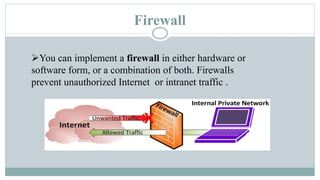
You can implement a firewall in either hardware or
software form, or a combination of both. Firewalls
prevent unauthorized Internet or intranet traffic .
What is the iptables
 The basic firewall software used in Linux is called iptables.
 iptables is a user-space utility program that allows a system
administrator to configure the tables provided by the Linux
kernel firewall (implemented as different Netfilter modules) and
the chains and rules it stores.
The Linux kernel’s network packet processing subsystem is
called Netfilter
Why need the iptables
With the help iptables secure the system (PC) from
unauthorized access.
The Linux kernel firewall has the built-in ability to filter
packets and allow outgoing and incoming network traffic into
system (PC).
Power full software firewall.
What you can do with IP-tables
Control network traffic with iptables.
You can use iptables to block all traffic and only allow traffic from
certain IP addresses.
iptables is an application that allows users to configure specific
rules. It acts as a packet filter that examines and directs traffic
based on port, protocol and other criteria.
Basic Structure of iptable
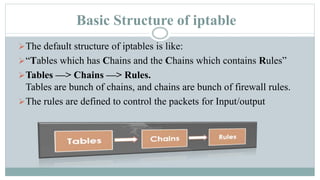
The default structure of iptables is like:
“Tables which has Chains and the Chains which contains Rules”
Tables —> Chains —> Rules.
Tables are bunch of chains, and chains are bunch of firewall rules.
The rules are defined to control the packets for Input/output
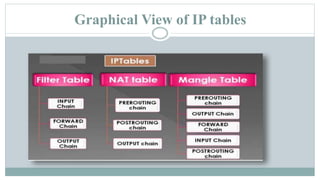
Graphical View of IP tables
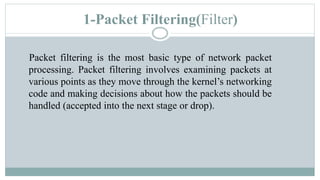
1-Packet Filtering(Filter)
Packet filtering is the most basic type of network packet
processing. Packet filtering involves examining packets at
various points as they move through the kernel’s networking
code and making decisions about how the packets should be
handled (accepted into the next stage or drop).
2-Network address translation (NAT)
NAT is a type of packet mangling that involves overwriting the source
and/or destination addresses and/or port numbers. Connection tracking
information is used to mangle related packets in specific ways.
3-Packet mangling(Mangle)
Packet mangling involves making changes to packet header fields
(such as network addresses and port numbers) or payloads.
Rules in Chains
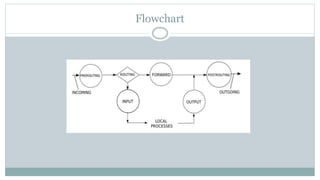
 There are five types of rules implemented in all types of
iptable chains:
1. Input: The input chain is used for any packet coming into
the system. Used by mangle and filter tables.
2. Output: The output chain is for any packet leaving the
system. Used by Mangle, NAT
and Filter tables.
Rules in Chains
3. Forward: The forward chain is for packets that are
forwarded (routed) through the system. Used by
Mangle and Filter tables.
4. Prerouting: Prerouting allows altering of packets
before they reach the input chain.Used by Mangle
and NAT tables.
5. Postrouting: Postrouting allows altering packets
after they exit the output chain. Used
by Mangle and NAT tables.
Targets
Every iptables rules have some "target" which is executed. If
a packet matches the rule, the target specifies what should be
done with it. For example, a packet can be accepted, dropped,
logged, or sent to another chain to be compared against more
rules.
ACCEPT: Packet is accepted and goes to the application for
processing.
Targets
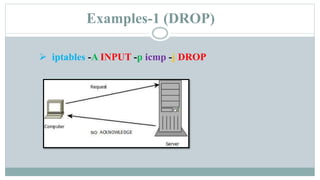
DROP: Packet is dropped. No information regarding
the drop is sent to the sender.
REJECT: Packet is dropped and information (error)
message is sent to the sender.
LOG: Packet details are sent to for logging.
DNAT: Rewrites the destination IP of the packet
SNAT: Rewrites the source IP of the packet
Examples-1 (DROP)
 iptables -A INPUT -p icmp -j DROP
Examples-1 (DROP)
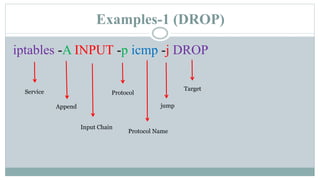
iptables -A INPUT -p icmp -j DROP
Service
Append
Input Chain
Protocol
Protocol Name
jump
Target
Examples-2 (ACCEPT)
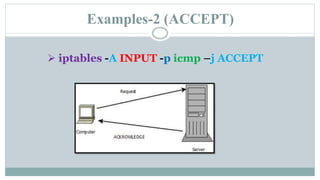
 iptables -A INPUT -p icmp –j ACCEPT
Examples-2 (ACCEPT)
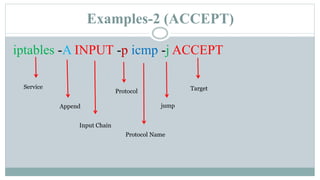
iptables -A INPUT -p icmp -j ACCEPT
Service
Append
Input Chain
Protocol
Protocol Name
jump
Target
Flowchart
THANK YOU

Iptables the Linux Firewall

  • 1.
    BY : SYED FAWADUL HASSAN GILLANI IP-TABLES
  • 2.
    Outline  Firewall  Whatis the iptables  Why need the iptables  What you can do with iptables  Basic Structure of iptable  Graphical View of iptables, Chains and Rules  Types of iptables use in Filtering  Rules in Chains  Targets  Few Examples  Implementation
  • 3.
    Firewall You can implementa firewall in either hardware or software form, or a combination of both. Firewalls prevent unauthorized Internet or intranet traffic .
  • 4.
    What is theiptables  The basic firewall software used in Linux is called iptables.  iptables is a user-space utility program that allows a system administrator to configure the tables provided by the Linux kernel firewall (implemented as different Netfilter modules) and the chains and rules it stores. The Linux kernel’s network packet processing subsystem is called Netfilter
  • 5.
    Why need theiptables With the help iptables secure the system (PC) from unauthorized access. The Linux kernel firewall has the built-in ability to filter packets and allow outgoing and incoming network traffic into system (PC). Power full software firewall.
  • 6.
    What you cando with IP-tables Control network traffic with iptables. You can use iptables to block all traffic and only allow traffic from certain IP addresses. iptables is an application that allows users to configure specific rules. It acts as a packet filter that examines and directs traffic based on port, protocol and other criteria.
  • 7.
    Basic Structure ofiptable The default structure of iptables is like: “Tables which has Chains and the Chains which contains Rules” Tables —> Chains —> Rules. Tables are bunch of chains, and chains are bunch of firewall rules. The rules are defined to control the packets for Input/output
  • 8.
  • 9.
    1-Packet Filtering(Filter) Packet filteringis the most basic type of network packet processing. Packet filtering involves examining packets at various points as they move through the kernel’s networking code and making decisions about how the packets should be handled (accepted into the next stage or drop).
  • 10.
    2-Network address translation(NAT) NAT is a type of packet mangling that involves overwriting the source and/or destination addresses and/or port numbers. Connection tracking information is used to mangle related packets in specific ways.
  • 11.
    3-Packet mangling(Mangle) Packet manglinginvolves making changes to packet header fields (such as network addresses and port numbers) or payloads.
  • 12.
    Rules in Chains There are five types of rules implemented in all types of iptable chains: 1. Input: The input chain is used for any packet coming into the system. Used by mangle and filter tables. 2. Output: The output chain is for any packet leaving the system. Used by Mangle, NAT and Filter tables.
  • 13.
    Rules in Chains 3.Forward: The forward chain is for packets that are forwarded (routed) through the system. Used by Mangle and Filter tables. 4. Prerouting: Prerouting allows altering of packets before they reach the input chain.Used by Mangle and NAT tables. 5. Postrouting: Postrouting allows altering packets after they exit the output chain. Used by Mangle and NAT tables.
  • 14.
    Targets Every iptables ruleshave some "target" which is executed. If a packet matches the rule, the target specifies what should be done with it. For example, a packet can be accepted, dropped, logged, or sent to another chain to be compared against more rules. ACCEPT: Packet is accepted and goes to the application for processing.
  • 15.
    Targets DROP: Packet isdropped. No information regarding the drop is sent to the sender. REJECT: Packet is dropped and information (error) message is sent to the sender. LOG: Packet details are sent to for logging. DNAT: Rewrites the destination IP of the packet SNAT: Rewrites the source IP of the packet
  • 16.
    Examples-1 (DROP)  iptables-A INPUT -p icmp -j DROP
  • 17.
    Examples-1 (DROP) iptables -AINPUT -p icmp -j DROP Service Append Input Chain Protocol Protocol Name jump Target
  • 18.
    Examples-2 (ACCEPT)  iptables-A INPUT -p icmp –j ACCEPT
  • 19.
    Examples-2 (ACCEPT) iptables -AINPUT -p icmp -j ACCEPT Service Append Input Chain Protocol Protocol Name jump Target
  • 20.
  • 21.