CISCO CCNA
DHCP SERVER
To watch our Cisco CCNA Video Trainings Please Check out the link below:
www.asmed.com/c1
ASM Educational Center Inc. (ASM)
Where Training, Technology & Service Converge
Phone: (301) 984-7400
Cisco CCNA-DHCP Server
 In this lab we are trying to make our Cisco Router Act as a DHCP server, that is R1 will
give IP address 10.10.10.0/24 to left side Pc and it will give the IP address
20.20.20.0/24 to right side of PC. The Goal is Prepare you for your Cisco CCNA
Certification Exam.
Cisco CCNA-DHCP Server
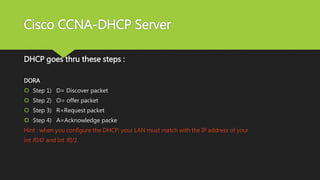
DHCP goes thru these steps :
DORA
 Step 1) D= Discover packet
 Step 2) O= offer packet
 Step 3) R=Request packet
 Step 4) A=Acknowledge packe
Hint : when you configure the DHCP; your LAN must match with the IP address of your
int f0/0 and Int f0/1.
Cisco CCNA-DHCP Server
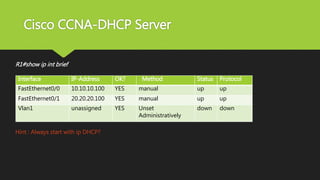
R1#show ip int brief
Hint : Always start with ip DHCP?
Interface IP-Address OK? Method Status Protocol
FastEthernet0/0 10.10.10.100 YES manual up up
FastEthernet0/1 20.20.20.100 YES manual up up
Vlan1 unassigned YES Unset
Administratively
down down
Cisco CCNA-DHCP Server
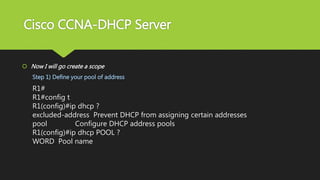
 Now I will go create a scope
Step 1) Define your pool of address
R1#
R1#config t
R1(config)#ip dhcp ?
excluded-address Prevent DHCP from assigning certain addresses
pool Configure DHCP address pools
R1(config)#ip dhcp POOL ?
WORD Pool name
Cisco CCNA-DHCP Server
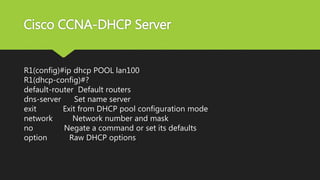
R1(config)#ip dhcp POOL lan100
R1(dhcp-config)#?
default-router Default routers
dns-server Set name server
exit Exit from DHCP pool configuration mode
network Network number and mask
no Negate a command or set its defaults
option Raw DHCP options
Cisco CCNA-DHCP Server
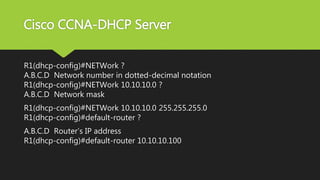
R1(dhcp-config)#NETWork ?
A.B.C.D Network number in dotted-decimal notation
R1(dhcp-config)#NETWork 10.10.10.0 ?
A.B.C.D Network mask
R1(dhcp-config)#NETWork 10.10.10.0 255.255.255.0
R1(dhcp-config)#default-router ?
A.B.C.D Router’s IP address
R1(dhcp-config)#default-router 10.10.10.100
Cisco CCNA-DHCP Server
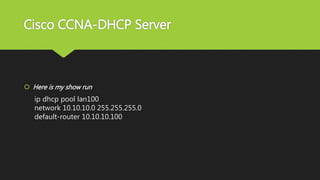
 Here is my show run
ip dhcp pool lan100
network 10.10.10.0 255.255.255.0
default-router 10.10.10.100
Cisco CCNA-DHCP Server
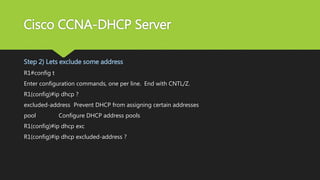
Step 2) Lets exclude some address
R1#config t
Enter configuration commands, one per line. End with CNTL/Z.
R1(config)#ip dhcp ?
excluded-address Prevent DHCP from assigning certain addresses
pool Configure DHCP address pools
R1(config)#ip dhcp exc
R1(config)#ip dhcp excluded-address ?
Cisco CCNA-DHCP Server
A.B.C.D Low IP address
R1(config)#ip dhcp excluded-address 10.10.10.1 ?
A.B.C.D High IP address
<cr>
R1(config)#ip dhcp excluded-address 10.10.10.1 10.10.10.20 ?
<cr>
R1(config)#ip dhcp excluded-address 10.10.10.1 10.10.10.20
Cisco CCNA-DHCP Server
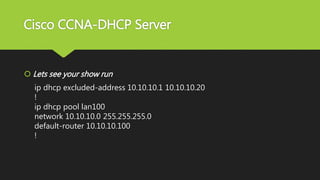
 Lets see your show run
ip dhcp excluded-address 10.10.10.1 10.10.10.20
!
ip dhcp pool lan100
network 10.10.10.0 255.255.255.0
default-router 10.10.10.100
!
Cisco CCNA-DHCP Server
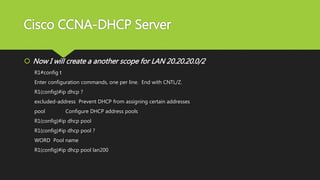
 Now I will create a another scope for LAN 20.20.20.0/2
R1#config t
Enter configuration commands, one per line. End with CNTL/Z.
R1(config)#ip dhcp ?
excluded-address Prevent DHCP from assigning certain addresses
pool Configure DHCP address pools
R1(config)#ip dhcp pool
R1(config)#ip dhcp pool ?
WORD Pool name
R1(config)#ip dhcp pool lan200
Cisco CCNA-DHCP Server
R1(dhcp-config)#?
default-router Default routers
dns-server Set name server
exit Exit from DHCP pool configuration mode
network Network number and mask
no Negate a command or set its defaults
option Raw DHCP options
Cisco CCNA-DHCP Server
R1(dhcp-config)#netw
R1(dhcp-config)#network 20.20.20.0 ?
A.B.C.D Network mask
R1(dhcp-config)#network 20.20.20.0 255.255.255.0
R1(dhcp-config)#de
R1(dhcp-config)#default-router 20.20.20.100
R1(dhcp-config)#
Cisco CCNA-DHCP Server
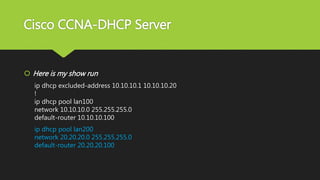
 Here is my show run
ip dhcp excluded-address 10.10.10.1 10.10.10.20
!
ip dhcp pool lan100
network 10.10.10.0 255.255.255.0
default-router 10.10.10.100
ip dhcp pool lan200
network 20.20.20.0 255.255.255.0
default-router 20.20.20.100
Cisco CCNA-DHCP Server
 Now I will give out 2nd exclusion
R1#config t
Enter configuration commands, one per line. End with CNTL/Z.
R1(config)#ip dhcp ?
excluded-address Prevent DHCP from assigning certain addresses
pool Configure DHCP address pools
Cisco CCNA-DHCP Server
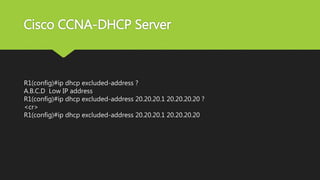
R1(config)#ip dhcp excluded-address ?
A.B.C.D Low IP address
R1(config)#ip dhcp excluded-address 20.20.20.1 20.20.20.20 ?
<cr>
R1(config)#ip dhcp excluded-address 20.20.20.1 20.20.20.20
Cisco CCNA-DHCP Server
 Here is my show run
ip dhcp excluded-address 10.10.10.1 10.10.10.20
ip dhcp excluded-address 20.20.20.1 20.20.20.20
!
ip dhcp pool lan100
network 10.10.10.0 255.255.255.0
default-router 10.10.10.100
Cisco CCNA-DHCP Server
ip dhcp pool lan200
network 20.20.20.0 255.255.255.0
default-router 20.20.20.100
!
interface FastEthernet0/0
ip address 10.10.10.100 255.255.255.0
duplex auto
speed auto
!
Cisco CCNA-DHCP Server
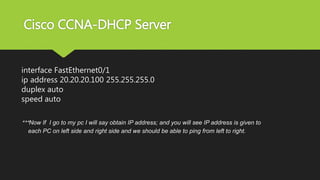
interface FastEthernet0/1
ip address 20.20.20.100 255.255.255.0
duplex auto
speed auto
***Now If I go to my pc I will say obtain IP address; and you will see IP address is given to
each PC on left side and right side and we should be able to ping from left to right.
ASM Educational Center Inc. (ASM)
Where Training, Technology & Service Converge
To watch our Cisco CCNA Video Trainings Please Check out the link below:
www.asmed.com/c1
Phone: (301) 984-7400

Cisco CCNA- DHCP Server

  • 1.
    CISCO CCNA DHCP SERVER Towatch our Cisco CCNA Video Trainings Please Check out the link below: www.asmed.com/c1 ASM Educational Center Inc. (ASM) Where Training, Technology & Service Converge Phone: (301) 984-7400
  • 2.
    Cisco CCNA-DHCP Server In this lab we are trying to make our Cisco Router Act as a DHCP server, that is R1 will give IP address 10.10.10.0/24 to left side Pc and it will give the IP address 20.20.20.0/24 to right side of PC. The Goal is Prepare you for your Cisco CCNA Certification Exam.
  • 3.
    Cisco CCNA-DHCP Server DHCPgoes thru these steps : DORA  Step 1) D= Discover packet  Step 2) O= offer packet  Step 3) R=Request packet  Step 4) A=Acknowledge packe Hint : when you configure the DHCP; your LAN must match with the IP address of your int f0/0 and Int f0/1.
  • 4.
    Cisco CCNA-DHCP Server R1#showip int brief Hint : Always start with ip DHCP? Interface IP-Address OK? Method Status Protocol FastEthernet0/0 10.10.10.100 YES manual up up FastEthernet0/1 20.20.20.100 YES manual up up Vlan1 unassigned YES Unset Administratively down down
  • 5.
    Cisco CCNA-DHCP Server Now I will go create a scope Step 1) Define your pool of address R1# R1#config t R1(config)#ip dhcp ? excluded-address Prevent DHCP from assigning certain addresses pool Configure DHCP address pools R1(config)#ip dhcp POOL ? WORD Pool name
  • 6.
    Cisco CCNA-DHCP Server R1(config)#ipdhcp POOL lan100 R1(dhcp-config)#? default-router Default routers dns-server Set name server exit Exit from DHCP pool configuration mode network Network number and mask no Negate a command or set its defaults option Raw DHCP options
  • 7.
    Cisco CCNA-DHCP Server R1(dhcp-config)#NETWork? A.B.C.D Network number in dotted-decimal notation R1(dhcp-config)#NETWork 10.10.10.0 ? A.B.C.D Network mask R1(dhcp-config)#NETWork 10.10.10.0 255.255.255.0 R1(dhcp-config)#default-router ? A.B.C.D Router’s IP address R1(dhcp-config)#default-router 10.10.10.100
  • 8.
    Cisco CCNA-DHCP Server Here is my show run ip dhcp pool lan100 network 10.10.10.0 255.255.255.0 default-router 10.10.10.100
  • 9.
    Cisco CCNA-DHCP Server Step2) Lets exclude some address R1#config t Enter configuration commands, one per line. End with CNTL/Z. R1(config)#ip dhcp ? excluded-address Prevent DHCP from assigning certain addresses pool Configure DHCP address pools R1(config)#ip dhcp exc R1(config)#ip dhcp excluded-address ?
  • 10.
    Cisco CCNA-DHCP Server A.B.C.DLow IP address R1(config)#ip dhcp excluded-address 10.10.10.1 ? A.B.C.D High IP address <cr> R1(config)#ip dhcp excluded-address 10.10.10.1 10.10.10.20 ? <cr> R1(config)#ip dhcp excluded-address 10.10.10.1 10.10.10.20
  • 11.
    Cisco CCNA-DHCP Server Lets see your show run ip dhcp excluded-address 10.10.10.1 10.10.10.20 ! ip dhcp pool lan100 network 10.10.10.0 255.255.255.0 default-router 10.10.10.100 !
  • 12.
    Cisco CCNA-DHCP Server Now I will create a another scope for LAN 20.20.20.0/2 R1#config t Enter configuration commands, one per line. End with CNTL/Z. R1(config)#ip dhcp ? excluded-address Prevent DHCP from assigning certain addresses pool Configure DHCP address pools R1(config)#ip dhcp pool R1(config)#ip dhcp pool ? WORD Pool name R1(config)#ip dhcp pool lan200
  • 13.
    Cisco CCNA-DHCP Server R1(dhcp-config)#? default-routerDefault routers dns-server Set name server exit Exit from DHCP pool configuration mode network Network number and mask no Negate a command or set its defaults option Raw DHCP options
  • 14.
    Cisco CCNA-DHCP Server R1(dhcp-config)#netw R1(dhcp-config)#network20.20.20.0 ? A.B.C.D Network mask R1(dhcp-config)#network 20.20.20.0 255.255.255.0 R1(dhcp-config)#de R1(dhcp-config)#default-router 20.20.20.100 R1(dhcp-config)#
  • 15.
    Cisco CCNA-DHCP Server Here is my show run ip dhcp excluded-address 10.10.10.1 10.10.10.20 ! ip dhcp pool lan100 network 10.10.10.0 255.255.255.0 default-router 10.10.10.100 ip dhcp pool lan200 network 20.20.20.0 255.255.255.0 default-router 20.20.20.100
  • 16.
    Cisco CCNA-DHCP Server Now I will give out 2nd exclusion R1#config t Enter configuration commands, one per line. End with CNTL/Z. R1(config)#ip dhcp ? excluded-address Prevent DHCP from assigning certain addresses pool Configure DHCP address pools
  • 17.
    Cisco CCNA-DHCP Server R1(config)#ipdhcp excluded-address ? A.B.C.D Low IP address R1(config)#ip dhcp excluded-address 20.20.20.1 20.20.20.20 ? <cr> R1(config)#ip dhcp excluded-address 20.20.20.1 20.20.20.20
  • 18.
    Cisco CCNA-DHCP Server Here is my show run ip dhcp excluded-address 10.10.10.1 10.10.10.20 ip dhcp excluded-address 20.20.20.1 20.20.20.20 ! ip dhcp pool lan100 network 10.10.10.0 255.255.255.0 default-router 10.10.10.100
  • 19.
    Cisco CCNA-DHCP Server ipdhcp pool lan200 network 20.20.20.0 255.255.255.0 default-router 20.20.20.100 ! interface FastEthernet0/0 ip address 10.10.10.100 255.255.255.0 duplex auto speed auto !
  • 20.
    Cisco CCNA-DHCP Server interfaceFastEthernet0/1 ip address 20.20.20.100 255.255.255.0 duplex auto speed auto ***Now If I go to my pc I will say obtain IP address; and you will see IP address is given to each PC on left side and right side and we should be able to ping from left to right.
  • 21.
    ASM Educational CenterInc. (ASM) Where Training, Technology & Service Converge To watch our Cisco CCNA Video Trainings Please Check out the link below: www.asmed.com/c1 Phone: (301) 984-7400