DHCP( Dynamic Host Configuration
Protocol )
By
Trupti Rajesh Kini
History & Evolution
1. RARP
The primary motivation for
replacing RARP with BOOTP
was that RARP was a data link
layer protocol. This made
implementation difficult on
many server platforms, and
required that a server be
present on each individual IP
subnet.
2.BOOTP
In computer networking, the
Bootstrap Protocol, or BOOTP,
is a network protocol used by a
network client to obtain an IP
address from a configuration
server.
3. DHCP
The Dynamic Host Configuration Protocol (DHCP) is a more
advanced protocol for the same purpose and has superseded
the use of BOOTP.
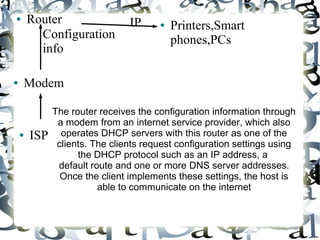
● Router
The router receives the configuration information through
a modem from an internet service provider, which also
operates DHCP servers with this router as one of the
clients. The clients request configuration settings using
the DHCP protocol such as an IP address, a
default route and one or more DNS server addresses.
Once the client implements these settings, the host is
able to communicate on the internet
● Printers,Smart
phones,PCs
● Modem
● ISP
Configuration
info
IP
● The DHCP server maintains a database of available IP
addresses and configuration information. When the server
receives a request from a client, the DHCP server
determines the network to which the DHCP client is
connected, and then allocates an IP address or prefix that is
appropriate for the client, and sends configuration
information appropriate for that client
● The query is typically initiated immediately after booting, and
must complete before the client can initiate IP-based
communication with other hosts. Upon disconnecting, the IP
address is returned to the pool for use by another computer.
This way, many other computers can use the same IP
address within minutes of each other.
● For example, the DHCP Message type option for an Offer
would appear as 0x35,0x01,0x02, where 0x35 is code 53 for
"DHCP Message Type", 0x01 means one octet follows and
0x02 is the value of "Offer".
Three methods of allocating IP-addresses
●
AAutomatic allocation: The DHCP server permanently assigns
a free IP address to a requesting client from the range
defined by the administrator. This is like dynamic allocation,
but the DHCP server keeps a table of past IP address
assignments, so that it can preferentially assign to a client
the same IP address that the client previously had.
●
SStatic allocation: The DHCP server allocates an IP address
based on a table with MAC address/IP address pairs, which
are manually filled in (perhaps by a network administrator).
Only clients with a MAC address listed in this table will be
allocated an IP address.
●
DDynamic allocation: A network administrator assigns a range
of IP addresses to DHCP, and each client computer on the
LAN is configured to request an IP address from the DHCP
server during network initialization. The request-and-grant
process uses a lease concept.
Disadvantage
● Because the DHCP server has no secure mechanism for
authenticating the client, clients can gain unauthorized
access to IP addresses by presenting credentials, such as
client identifiers, that belong to other DHCP clients
Important Commands
● less /var/lib/dhcp/dhclient.leases
● grep dhcp-server-identifier
/var/lib/dhcp/dhclient.leases
● man dhcp-options
● netstat -au | grep bootp
Change Ubuntu Server from DHCP
to a Static IP Address
● sudo vi /etc/network/interfaces
● For the primary interface, which is usually eth0,
you will see these lines:
auto eth0
iface eth0 inet dhcp
● Instead type the below lines:
auto lo
iface lo inet loopback
auto eth0
iface eth0 inet static
address 192.168.1.10
netmask 255.255.255.0
gateway 192.168.1.1
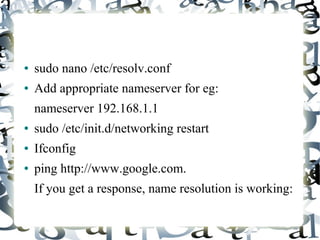
● sudo nano /etc/resolv.conf
● Add appropriate nameserver for eg:
nameserver 192.168.1.1
● sudo /etc/init.d/networking restart
● Ifconfig
● ping http://www.google.com.
If you get a response, name resolution is working:
References
● http://en.wikipedia.org/wiki/DHCP_server
● http://en.wikipedia.org/wiki/Bootstrap_Protocol
● http://www.cyberciti.biz/faq/linux-find-out-dhcp-server-ip-address/
● http://www.techsutram.com/2009/03/differences-ipv4-vs-ipv6.html
● http://helpdesk.rpi.edu/update.do?artcenterkey=65
● http://rbgeek.wordpress.com/2012/09/13/how-to-add-static-dns-in-ubuntu-1
● http://cyphrus.in/resolvconf-on-ubuntu
● http://rbgeek.wordpress.com/2012/04/03/change-ubuntu-server-from-dhcp-
● www.howtogeek.com/howto/ubuntu/change-ubuntu-server-from-dhcp-to-a-
● https://duckduckgo.com/
● http://www.linuxhomenetworking.com/wiki/index.php/Quick_HOWT
O_:_Ch08_:_Configuring_the_DHCP_Server#.Uad_8NfS9xG

Dhcp presentation

  • 1.
    DHCP( Dynamic HostConfiguration Protocol ) By Trupti Rajesh Kini
  • 2.
    History & Evolution 1.RARP The primary motivation for replacing RARP with BOOTP was that RARP was a data link layer protocol. This made implementation difficult on many server platforms, and required that a server be present on each individual IP subnet. 2.BOOTP In computer networking, the Bootstrap Protocol, or BOOTP, is a network protocol used by a network client to obtain an IP address from a configuration server. 3. DHCP The Dynamic Host Configuration Protocol (DHCP) is a more advanced protocol for the same purpose and has superseded the use of BOOTP.
  • 3.
    ● Router The routerreceives the configuration information through a modem from an internet service provider, which also operates DHCP servers with this router as one of the clients. The clients request configuration settings using the DHCP protocol such as an IP address, a default route and one or more DNS server addresses. Once the client implements these settings, the host is able to communicate on the internet ● Printers,Smart phones,PCs ● Modem ● ISP Configuration info IP
  • 4.
    ● The DHCPserver maintains a database of available IP addresses and configuration information. When the server receives a request from a client, the DHCP server determines the network to which the DHCP client is connected, and then allocates an IP address or prefix that is appropriate for the client, and sends configuration information appropriate for that client ● The query is typically initiated immediately after booting, and must complete before the client can initiate IP-based communication with other hosts. Upon disconnecting, the IP address is returned to the pool for use by another computer. This way, many other computers can use the same IP address within minutes of each other. ● For example, the DHCP Message type option for an Offer would appear as 0x35,0x01,0x02, where 0x35 is code 53 for "DHCP Message Type", 0x01 means one octet follows and 0x02 is the value of "Offer".
  • 5.
    Three methods ofallocating IP-addresses ● AAutomatic allocation: The DHCP server permanently assigns a free IP address to a requesting client from the range defined by the administrator. This is like dynamic allocation, but the DHCP server keeps a table of past IP address assignments, so that it can preferentially assign to a client the same IP address that the client previously had. ● SStatic allocation: The DHCP server allocates an IP address based on a table with MAC address/IP address pairs, which are manually filled in (perhaps by a network administrator). Only clients with a MAC address listed in this table will be allocated an IP address. ● DDynamic allocation: A network administrator assigns a range of IP addresses to DHCP, and each client computer on the LAN is configured to request an IP address from the DHCP server during network initialization. The request-and-grant process uses a lease concept.
  • 6.
    Disadvantage ● Because theDHCP server has no secure mechanism for authenticating the client, clients can gain unauthorized access to IP addresses by presenting credentials, such as client identifiers, that belong to other DHCP clients
  • 7.
    Important Commands ● less/var/lib/dhcp/dhclient.leases ● grep dhcp-server-identifier /var/lib/dhcp/dhclient.leases ● man dhcp-options ● netstat -au | grep bootp
  • 8.
    Change Ubuntu Serverfrom DHCP to a Static IP Address ● sudo vi /etc/network/interfaces ● For the primary interface, which is usually eth0, you will see these lines: auto eth0 iface eth0 inet dhcp
  • 9.
    ● Instead typethe below lines: auto lo iface lo inet loopback auto eth0 iface eth0 inet static address 192.168.1.10 netmask 255.255.255.0 gateway 192.168.1.1
  • 10.
    ● sudo nano/etc/resolv.conf ● Add appropriate nameserver for eg: nameserver 192.168.1.1 ● sudo /etc/init.d/networking restart ● Ifconfig ● ping http://www.google.com. If you get a response, name resolution is working:
  • 11.
    References ● http://en.wikipedia.org/wiki/DHCP_server ● http://en.wikipedia.org/wiki/Bootstrap_Protocol ●http://www.cyberciti.biz/faq/linux-find-out-dhcp-server-ip-address/ ● http://www.techsutram.com/2009/03/differences-ipv4-vs-ipv6.html ● http://helpdesk.rpi.edu/update.do?artcenterkey=65 ● http://rbgeek.wordpress.com/2012/09/13/how-to-add-static-dns-in-ubuntu-1 ● http://cyphrus.in/resolvconf-on-ubuntu ● http://rbgeek.wordpress.com/2012/04/03/change-ubuntu-server-from-dhcp- ● www.howtogeek.com/howto/ubuntu/change-ubuntu-server-from-dhcp-to-a- ● https://duckduckgo.com/ ● http://www.linuxhomenetworking.com/wiki/index.php/Quick_HOWT O_:_Ch08_:_Configuring_the_DHCP_Server#.Uad_8NfS9xG