CREATING A FEATURE CLASS
MASHHOOD ARIF
About Feature Classes
You can perform geoprocessing tasks on the feature classes contained within a
geodatabase feature dataset
Geodatabase feature classes store geographic features represented as points,
lines, polygons, annotation, dimensions, and multipatches and their attributes
They store simple features, so they can be organized inside or outside a feature
dataset, but always inside a geodatabase, personal or ArcSDE. Simple feature
classes that are outside a feature dataset are called standalone feature classes
Feature classes that store topological features must be contained within a
feature dataset to ensure a common coordinate system
Types of Feature Classes
Generally, feature classes are thematic collections of points, lines, or polygons, but there are
seven feature class types:
Points—Features that are too small to represent as lines or polygons as well as point locations
(such as a GPS observations).
Lines—Represent the shape and location of geographic objects, such as street centerlines and
streams, too narrow to depict as areas. Lines are also used to represent features that have
length but no area such as contour lines and boundaries.
Polygons—A set of many-sided area features that represent the shape and location of
homogeneous feature types such as states, counties, parcels, soil types, and land-use zones.
Annotation—Map text including properties for how the text is rendered. For example, in
addition to the text string of each annotation, other properties are included such as the shape
points for placing the text, its font and point size, and other display properties. Annotation can
also be feature-linked and can contain subclasses.
Types of Feature Classes (Contd..)
Dimensions—A special kind of annotation that shows specific lengths or distances, for example,
to indicate the length of a side of a building, a land parcel, or the distance between two features.
Dimensions are heavily used in design, engineering, and facilities applications for GIS.
Multipoints—Features that are composed of more than one point. Multipoints are often used to
manage arrays of very large point collections such as lidar point clusters, which can contain
literally billions of points. Using a single row for such point geometry is not feasible. Clustering
these into multipoint rows enables the geodatabase to handle massive point sets.
Multipatches—A 3D geometry used to represent the outer surface, or shell, of features that
occupy a discrete area or volume in three-dimensional space. Multipatches comprise planar 3D
rings and triangles that are used in combination to model a three-dimensional shell.
Multipatches can be used to represent anything from simple objects, such as spheres and cubes,
to complex objects such as iso-surfaces and buildings.
Creating a Feature Class
Right click on the
Geodatabase (or
Feature Dataset) in
which you want to
create the new
Feature Class
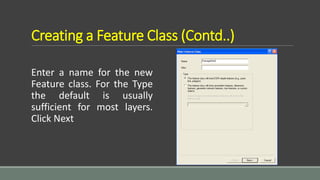
Creating a Feature Class (Contd..)
Enter a name for the new
Feature class. For the Type
the default is usually
sufficient for most layers.
Click Next
Creating a Feature Class (Contd..)
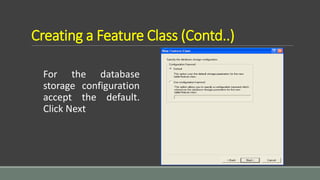
For the database
storage configuration
accept the default.
Click Next
Creating a Feature Class (Contd..)
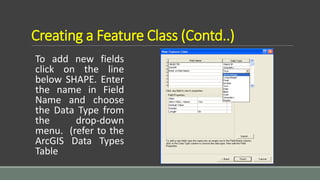
To add new fields
click on the line
below SHAPE. Enter
the name in Field
Name and choose
the Data Type from
the drop-down
menu. (refer to the
ArcGIS Data Types
Table
ArcGIS Data Types Table
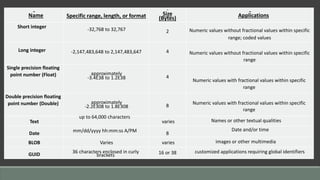
 The ArcGIS Data Types Table shows each data type, the specific
range, and the length or format. The table gives specifics on byte
size and the application for each data type
 For numeric fields you need to specify the precision (the number of
digits that can be stored in a field) and scale (the number of decimal
places for float or double-type). Refer to the Field Properties section
on the following page
 When you have completed the options click Finish
Name Specific range, length, or format Size
(Bytes) Applications
Short integer -32,768 to 32,767 2 Numeric values without fractional values within specific
range; coded values
Long integer -2,147,483,648 to 2,147,483,647 4 Numeric values without fractional values within specific
range
Single precision floating
point number (Float) approximately
-3.4E38 to 1.2E38 4
Numeric values with fractional values within specific
range
Double precision floating
point number (Double) approximately
-2.2E308 to 1.8E308 8 Numeric values with fractional values within specific
range
Text
up to 64,000 characters
varies Names or other textual qualities
Date mm/dd/yyyy hh:mm:ss A/PM 8
Date and/or time
BLOB Varies varies images or other multimedia
GUID 36 characters enclosed in curly
brackets 16 or 38 customized applications requiring global identifiers
Field Properties
When you use ArcCatalog to create a new table or feature class, you can specify any number of
fields to be included. You can also specify settings for fields such as the field type and the
maximum size of the data that can be stored in the field
Default Field Properties
 Each field type has special properties. All fields have properties default value, domain, alias,
and allow nulls. You can set the allow nulls property to "no" if you do not want the field to store
null values. If you set the allow nulls property to "yes", then the field will allow null values
 Use the default value property if you want the field to be automatically populated with a
default value when a new feature or object is created with the ArcMap editing tools. You can
set a domain, which is a valid set or range of values that can be stored in the field by using the
domain property. Default values and domains are discussed in detail in Subtypes and attribute
domains
Default Field Properties (Contd..)
The exceptions are fields of type ObjectID, binary large object (BLOB), and
Geometry. ObjectID, BLOB, and Geometry type fields do not have a default
value and domain property. Alias is the only property of an ObjectID field you
can modify, while BLOB and Geometry fields have special properties you can
modify
The properties of the geometry field describe the kind of features that can be
stored in a feature class, the size of the spatial index, and the spatial reference
for the features
Field Precision and Scale
 The precision and scale of a field describe the maximum size and precision of
data that can be stored in the field
 The precision describes the number of digits that can be stored in the field,
while the scale describes the number of decimal places for float and double
fields
 When creating a new field in a geodatabase feature class or table, you can
specify the field's type, precision, and scale
 When the field is actually created in the database, the field type may be
changed based on the precision and scale values you specify
Guidelines for Choosing Appropriate Field
Use the following guidelines for choosing the correct field type for a given precision and scale:
 When you create a float, double, or integer field and specify 0 for precision and scale, the
geodatabase will attempt to create a binary type field if the underlying database supports it.
Personal geodatabases support only binary type fields, and precision and scale are ignored
 When you create float and double fields and specify a precision and scale, if your precision is
greater than 6, use a double; otherwise use a float. If you create a double field and specify a
precision of 6 or less, a float field is created in the database. If you create a float field and
specify a precision greater than 6, a double field is created
 If you specify a scale of 0 and a precision of 10 or less, you should be creating integer fields.
When creating integer fields, your precision should be 10 or less or your field may be created as
double
Conclusion
Feature classes are homogeneous collections of common features,
each having the same spatial representation, such as points, lines, or
polygons, and a common set of attribute columns, for example, a
line feature class for representing road centerlines. The four most
commonly used feature classes in the geodatabase are points, lines,
polygons, and annotation (the geodatabase name for map text).

Creating a feature class

  • 1.
    CREATING A FEATURECLASS MASHHOOD ARIF
  • 2.
    About Feature Classes Youcan perform geoprocessing tasks on the feature classes contained within a geodatabase feature dataset Geodatabase feature classes store geographic features represented as points, lines, polygons, annotation, dimensions, and multipatches and their attributes They store simple features, so they can be organized inside or outside a feature dataset, but always inside a geodatabase, personal or ArcSDE. Simple feature classes that are outside a feature dataset are called standalone feature classes Feature classes that store topological features must be contained within a feature dataset to ensure a common coordinate system
  • 3.
    Types of FeatureClasses Generally, feature classes are thematic collections of points, lines, or polygons, but there are seven feature class types: Points—Features that are too small to represent as lines or polygons as well as point locations (such as a GPS observations). Lines—Represent the shape and location of geographic objects, such as street centerlines and streams, too narrow to depict as areas. Lines are also used to represent features that have length but no area such as contour lines and boundaries. Polygons—A set of many-sided area features that represent the shape and location of homogeneous feature types such as states, counties, parcels, soil types, and land-use zones. Annotation—Map text including properties for how the text is rendered. For example, in addition to the text string of each annotation, other properties are included such as the shape points for placing the text, its font and point size, and other display properties. Annotation can also be feature-linked and can contain subclasses.
  • 4.
    Types of FeatureClasses (Contd..) Dimensions—A special kind of annotation that shows specific lengths or distances, for example, to indicate the length of a side of a building, a land parcel, or the distance between two features. Dimensions are heavily used in design, engineering, and facilities applications for GIS. Multipoints—Features that are composed of more than one point. Multipoints are often used to manage arrays of very large point collections such as lidar point clusters, which can contain literally billions of points. Using a single row for such point geometry is not feasible. Clustering these into multipoint rows enables the geodatabase to handle massive point sets. Multipatches—A 3D geometry used to represent the outer surface, or shell, of features that occupy a discrete area or volume in three-dimensional space. Multipatches comprise planar 3D rings and triangles that are used in combination to model a three-dimensional shell. Multipatches can be used to represent anything from simple objects, such as spheres and cubes, to complex objects such as iso-surfaces and buildings.
  • 5.
    Creating a FeatureClass Right click on the Geodatabase (or Feature Dataset) in which you want to create the new Feature Class
  • 6.
    Creating a FeatureClass (Contd..) Enter a name for the new Feature class. For the Type the default is usually sufficient for most layers. Click Next
  • 7.
    Creating a FeatureClass (Contd..) For the database storage configuration accept the default. Click Next
  • 8.
    Creating a FeatureClass (Contd..) To add new fields click on the line below SHAPE. Enter the name in Field Name and choose the Data Type from the drop-down menu. (refer to the ArcGIS Data Types Table
  • 9.
    ArcGIS Data TypesTable  The ArcGIS Data Types Table shows each data type, the specific range, and the length or format. The table gives specifics on byte size and the application for each data type  For numeric fields you need to specify the precision (the number of digits that can be stored in a field) and scale (the number of decimal places for float or double-type). Refer to the Field Properties section on the following page  When you have completed the options click Finish
  • 10.
    Name Specific range,length, or format Size (Bytes) Applications Short integer -32,768 to 32,767 2 Numeric values without fractional values within specific range; coded values Long integer -2,147,483,648 to 2,147,483,647 4 Numeric values without fractional values within specific range Single precision floating point number (Float) approximately -3.4E38 to 1.2E38 4 Numeric values with fractional values within specific range Double precision floating point number (Double) approximately -2.2E308 to 1.8E308 8 Numeric values with fractional values within specific range Text up to 64,000 characters varies Names or other textual qualities Date mm/dd/yyyy hh:mm:ss A/PM 8 Date and/or time BLOB Varies varies images or other multimedia GUID 36 characters enclosed in curly brackets 16 or 38 customized applications requiring global identifiers
  • 11.
    Field Properties When youuse ArcCatalog to create a new table or feature class, you can specify any number of fields to be included. You can also specify settings for fields such as the field type and the maximum size of the data that can be stored in the field Default Field Properties  Each field type has special properties. All fields have properties default value, domain, alias, and allow nulls. You can set the allow nulls property to "no" if you do not want the field to store null values. If you set the allow nulls property to "yes", then the field will allow null values  Use the default value property if you want the field to be automatically populated with a default value when a new feature or object is created with the ArcMap editing tools. You can set a domain, which is a valid set or range of values that can be stored in the field by using the domain property. Default values and domains are discussed in detail in Subtypes and attribute domains
  • 12.
    Default Field Properties(Contd..) The exceptions are fields of type ObjectID, binary large object (BLOB), and Geometry. ObjectID, BLOB, and Geometry type fields do not have a default value and domain property. Alias is the only property of an ObjectID field you can modify, while BLOB and Geometry fields have special properties you can modify The properties of the geometry field describe the kind of features that can be stored in a feature class, the size of the spatial index, and the spatial reference for the features
  • 13.
    Field Precision andScale  The precision and scale of a field describe the maximum size and precision of data that can be stored in the field  The precision describes the number of digits that can be stored in the field, while the scale describes the number of decimal places for float and double fields  When creating a new field in a geodatabase feature class or table, you can specify the field's type, precision, and scale  When the field is actually created in the database, the field type may be changed based on the precision and scale values you specify
  • 14.
    Guidelines for ChoosingAppropriate Field Use the following guidelines for choosing the correct field type for a given precision and scale:  When you create a float, double, or integer field and specify 0 for precision and scale, the geodatabase will attempt to create a binary type field if the underlying database supports it. Personal geodatabases support only binary type fields, and precision and scale are ignored  When you create float and double fields and specify a precision and scale, if your precision is greater than 6, use a double; otherwise use a float. If you create a double field and specify a precision of 6 or less, a float field is created in the database. If you create a float field and specify a precision greater than 6, a double field is created  If you specify a scale of 0 and a precision of 10 or less, you should be creating integer fields. When creating integer fields, your precision should be 10 or less or your field may be created as double
  • 15.
    Conclusion Feature classes arehomogeneous collections of common features, each having the same spatial representation, such as points, lines, or polygons, and a common set of attribute columns, for example, a line feature class for representing road centerlines. The four most commonly used feature classes in the geodatabase are points, lines, polygons, and annotation (the geodatabase name for map text).